

 100% Security Verified | No Subscription Required | No Malware


 ChatGPT
 Perplexity
 Gemini
 Claude
 Grok
Grok
This collection of soft pink tone cinematic filters is designed for content creators who want a gentle, romantic aesthetic without complicated color grading.
Use these Filmora-ready looks to add subtle blush highlights, pastel shadows, and a calm cinematic mood that flatters skin tones and elevates your storytelling.
In this article
Golden Hour Romance Scenes
Blush Dusk Glow
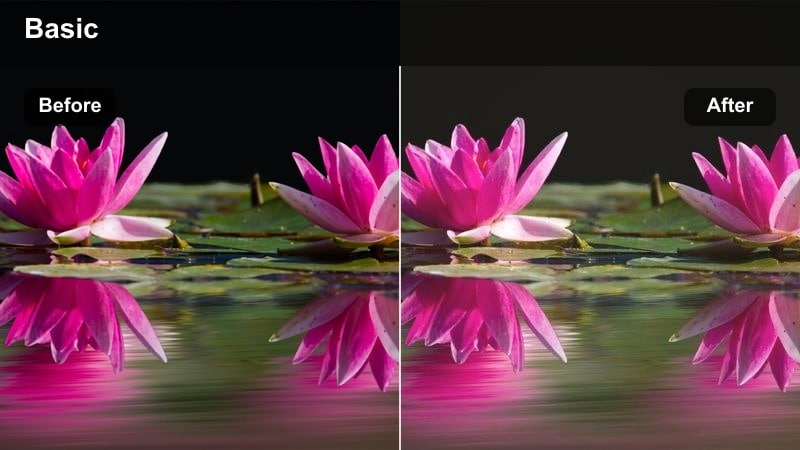
- Effect look: Soft pastel pink highlights with slightly warmed midtones and a gentle cinematic fade.
- Best for: Golden hour vlogs, engagement reels, and soft backlit couple shots outdoors.
- Editing tip: Lower contrast slightly and add a subtle vignette to keep attention on faces in backlit scenes.
Blush Dusk Glow wraps your sunset footage in a warm blush, ideal for creators who want to turn simple golden hour walks into dreamy storytelling sequences. In Filmora, this filter gently warms midtones while lifting pink in the highlights, so skin looks sun-kissed and flattering without harsh color shifts.
Use it on backlit clips where the sun sits behind your subject and let Filmora handle the soft fade for a more cinematic frame. If skin drifts too orange, nudge the temperature down slightly while keeping the pink tint, and add a touch of clarity so hair and clothing details remain defined against the glowing sky.
Match Soft Pink Tones Instantly with AI Color Tools
Filmora s AI-powered color tools can automatically match your soft pink grade from one clip to another, saving you from manually tweaking every shot. Once you like how Blush Dusk Glow looks on a hero clip, use AI color matching to push the same romantic palette across the rest of your timeline.
This keeps golden hour, blue hour, and indoor scenes visually consistent, so your audience experiences one cohesive soft pink story from start to finish.
 secure download

Preview Soft Pink Filters in Real Time
In Filmora, you can drop any soft pink filter onto a clip and instantly preview how it changes the mood as you play back. This makes it easy to compare Blush Dusk Glow against other romantic looks while adjusting exposure, contrast, and saturation in real time.
Toggle the filter on and off as you scrub your timeline to find the exact intensity that feels cinematic but still true to your original scene.
secure downloadCombine Filters with LUTs for Custom Looks
Filmora lets you stack soft pink filters with 3D LUTs so you can craft a signature cinematic grade that matches your channel branding. Use a cinematic LUT to establish contrast and overall color balance, then layer a pink-toned filter on top for a romantic finishing touch.
Adjust opacity and blending until the LUT provides structure and the soft pink wash adds just enough emotion without overpowering the frame.
secure downloadPastel Sun Haze
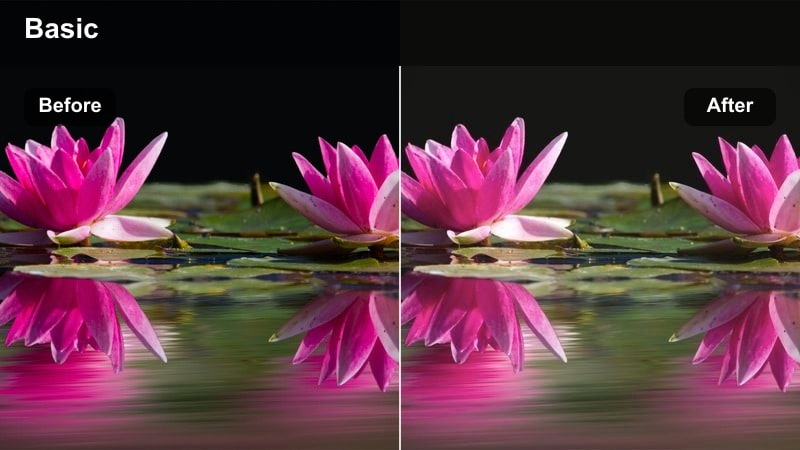
- Effect look: Hazy pastel pink wash with softened highlights and lowered saturation for a calm mood.
- Best for: Slow-motion B-roll, dreamy walking shots, and cinematic lifestyle montages.
- Editing tip: Use a slightly slower shutter footage and add gentle motion blur to enhance the hazy pastel mood.
Pastel Sun Haze gives your footage a soft veil of pink, muting strong colors while keeping silhouettes and outlines readable. In Filmora, it works especially well on B-roll and slow-motion clips where you want the viewer to feel like they are in a daydream rather than a high-contrast reality.
Before applying this look, pull back overall saturation and reduce highlights so skies retain enough texture for the haze to tint. Then, raise shadows a touch to prevent foreground objects from disappearing, and add subtle motion blur in Filmora to reinforce the floating, romantic atmosphere.
Rose Gold Evening
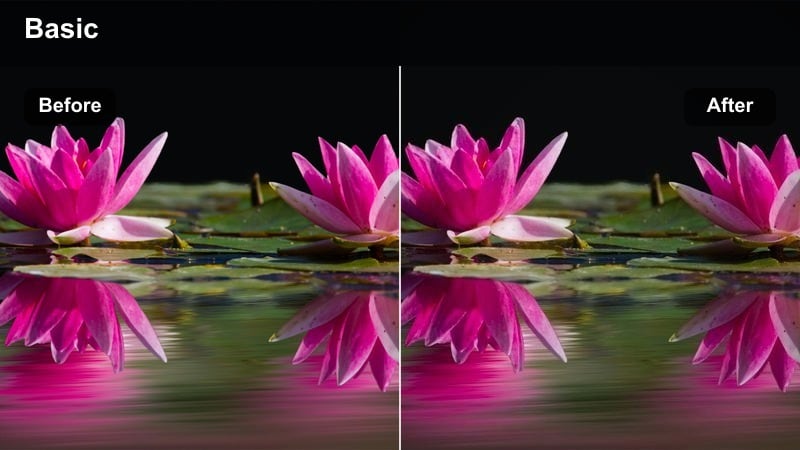
- Effect look: Rose gold warmth in the highlights with gentle pink shadows and a cinematic softness.
- Best for: Evening city walks, rooftop scenes, and cozy date-night storytelling.
- Editing tip: Push saturation in yellows and reds just a bit to make city lights blend beautifully with the rose tone.
Rose Gold Evening infuses your frames with a polished, high-end city glow by shifting highlights toward rose gold while keeping shadows gently pink and soft. It is ideal in Filmora for blue hour rooftops, skyline shots, and any scene where warm city lights mix with fading daylight.
Apply this filter to unify mixed lighting from windows, street lamps, and signs, then increase yellows and reds slightly so bokeh and distant buildings harmonize with the rose tone. If neon becomes too intense, simply lower filter intensity or selectively reduce saturation in those specific hues to maintain a soft cinematic finish.
Cozy Indoor Lifestyle Vibes
Soft Room Glow
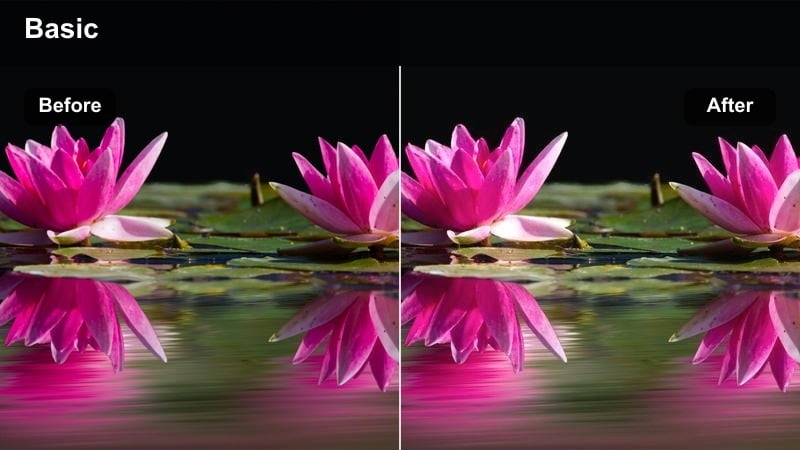
- Effect look: Gentle pink lift in mids with slightly muted contrast for a cozy, filmic interior look.
- Best for: Desk setups, room tours, and casual sit-down talking head content.
- Editing tip: Lower sharpness a touch and keep exposure slightly under to avoid a washed-out look in bright rooms.
Soft Room Glow is built to flatter everyday interiors by lifting midtones with a pink touch while reducing harsh contrast. In Filmora, it helps you turn simple desk setups, gaming corners, or living room scenes into inviting, filmic environments that feel gentle on the eyes.
Before applying, balance your white point so mixed bulbs do not clash, then let the filter add its soft rosy character. Slightly reducing sharpness and adding light film grain in Filmora will keep the room from looking overly digital while preserving a cozy, cinematic ambiance.
Blush Morning Routine
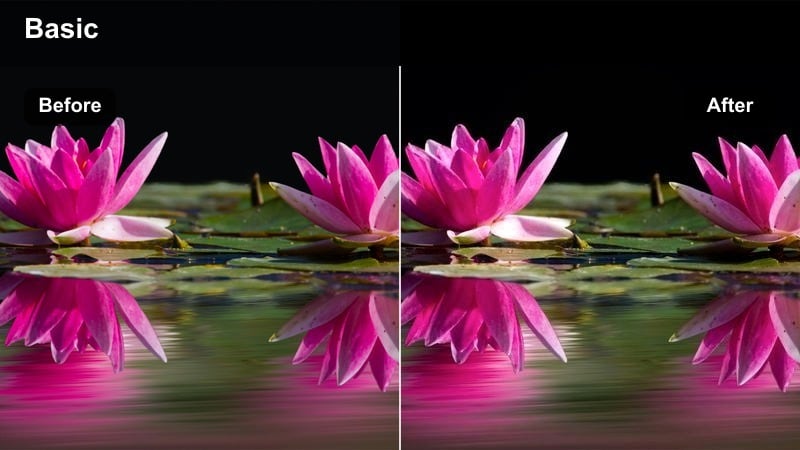
- Effect look: Light, airy blush tones with slightly raised exposure and creamy highlights.
- Best for: Morning routines, self-care montages, and lifestyle shorts filmed near windows.
- Editing tip: Shoot against a bright window and reduce shadows in post so the blush tone wraps softly around the subject.
Blush Morning Routine brightens indoor scenes with soft, airy pinks that feel perfect for self-care vlogs and aesthetic morning rituals. In Filmora, it gently raises exposure and smooths highlights so light from a window wraps around your subject in a flattering, creamy way.
Use it on clips filmed close to natural light, then protect white objects by dialing back pink tint in the highlights if they turn too rosy. A subtle boost in blue saturation can keep visible sky looking fresh, ensuring your morning scenes feel clean, calm, and cinematic rather than overly stylized.
Cafe Rose Soft
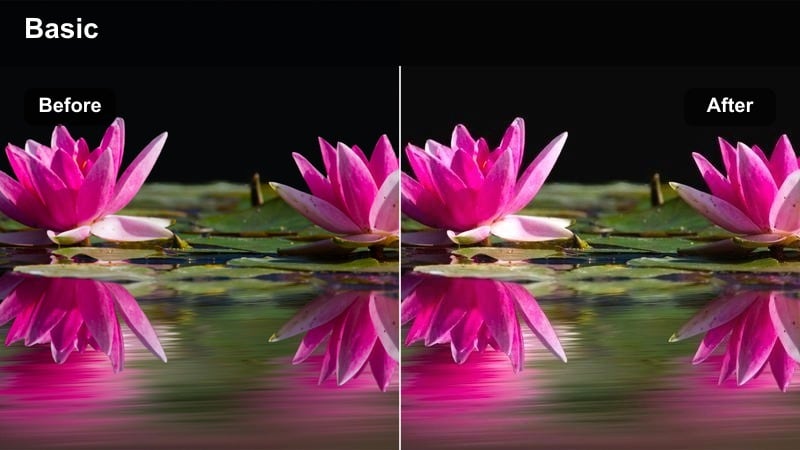
- Effect look: Muted contrast with a gentle rose cast and softened shadows for cozy cafe atmospheres.
- Best for: Coffee shop b-roll, laptop work sessions, and intimate conversation scenes.
- Editing tip: Add a subtle vignette and lift blacks slightly to keep the mood soft without losing depth.
Cafe Rose Soft leans into the warmth of coffee shop interiors by softening contrast and bathing the frame in delicate rose tones. In Filmora, this filter makes laptop sessions, latte pours, and casual conversations feel instantly more intimate and story-driven.
Apply it to footage with hanging lights, wooden tables, or warm decor, then lift blacks a bit so shadows remain gentle but still defined. If the background feels busy, slightly desaturate those areas and combine with shallow depth-of-field shots to keep your subject naturally separated from the cozy rose-tinted surroundings.
Street Portraits and Cinematic B-Roll
Urban Blush Frame
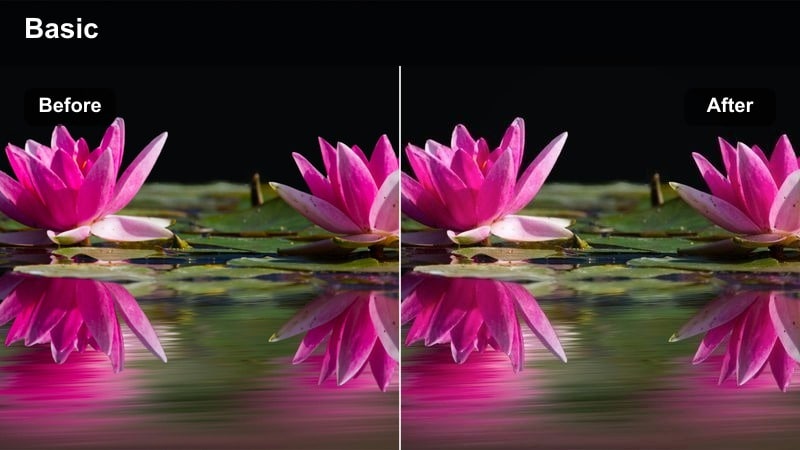
- Effect look: Soft pink midtones with cool-balanced shadows for polished urban portrait frames.
- Best for: Street portraits, fashion reels, and handheld walking shots through the city.
- Editing tip: Stabilize handheld clips and add gentle slow motion to let the blush tones and city textures stand out.
Urban Blush Frame balances warm pink midtones with cooler shadows, making it ideal for fashion content and city portraits where you want skin to glow while buildings stay crisp. In Filmora, it adds a subtle cinematic polish without flattening your urban environment.
Stabilize handheld footage to avoid distraction, then slow clips slightly so viewers can appreciate the interplay between soft skin tones and sharp architectural lines. If billboards or signs pull too much focus, selectively reduce their saturation so the blush grading on your subject remains the star.
City Rose Trails
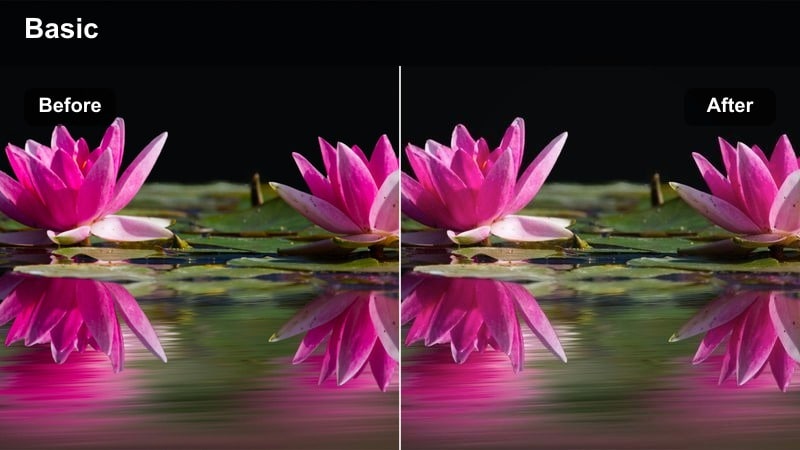
- Effect look: Soft pink cast over highlights with gently deepened shadows for moody city motion.
- Best for: Time-lapses, car light trails, and dynamic b-roll of busy streets.
- Editing tip: Increase contrast a bit on low-light footage so the pink highlights in light trails read clearly.
City Rose Trails is tuned for movement, especially car lights and busy intersections shot at night. In Filmora, it gives highlight areas a soft pink glow while deepening shadows just enough to keep the city mood rich and cinematic.
Use it on time-lapses, hyperlapses, or traffic shots to introduce a romantic twist to urban energy. Slightly boosting contrast and adding a touch of glow to highlight areas after applying the filter will make light trails pop while still feeling dreamy and cohesive.
Pastel Sidewalk Cinema
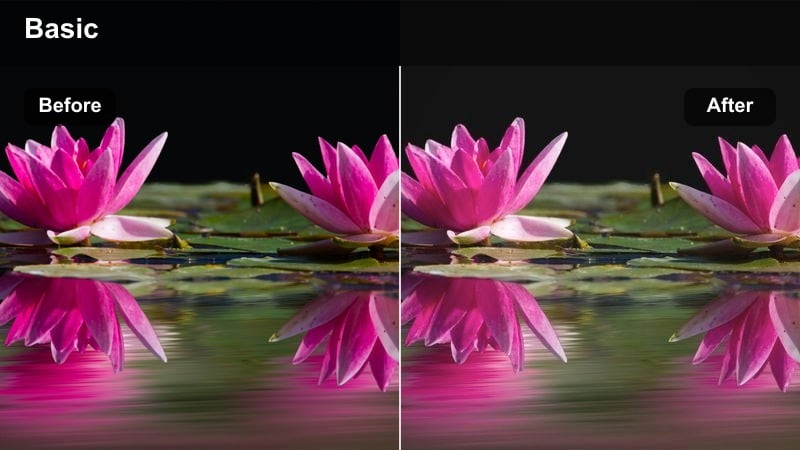
- Effect look: Matte pastel finish with pinkish highlights and gently lifted blacks for soft street visuals.
- Best for: Sidewalk walks, storefront details, and handheld documentary-style footage.
- Editing tip: Reduce in-camera sharpening and add a small film grain layer to keep the matte pastel style cohesive.
Pastel Sidewalk Cinema turns ordinary city walks into soft, pastel-toned vignettes with a matte, almost film-like finish. In Filmora, it lifts blacks slightly and nudges highlights toward pink, taking the harsh edge off concrete, glass, and signage.
Apply it to handheld documentary clips or storefront details, then add light film grain and a bit of local contrast to keep textures visible. If the matte effect feels too flat, carefully increase clarity on key subjects like railings, signs, or your main character to guide the viewer through the frame.
City Night Lights and Intimate Moments
Neon Blush Nights
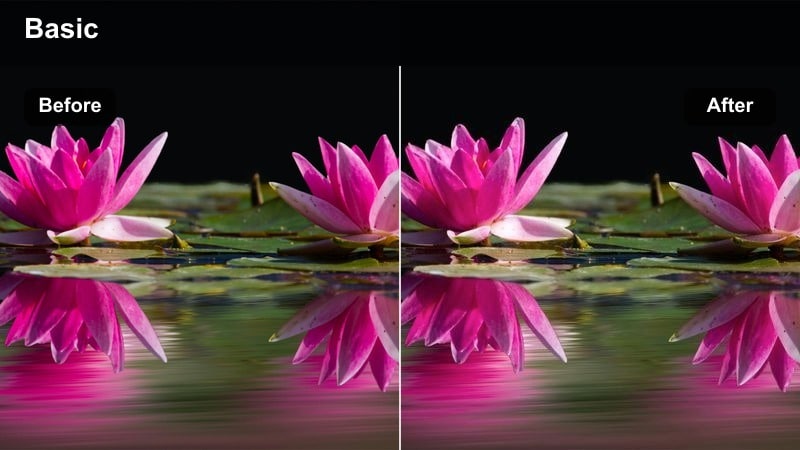
- Effect look: Soft pink shift in neon highlights with preserved contrast and crisp blacks.
- Best for: Night street walks, neon signs, and moody nightlife storytelling.
- Editing tip:Expose for highlights so neon signs are not blown out, then apply the filter for rich pink reflections.
Neon Blush Nights is made for illuminated streets, billboards, and signs, pushing neon highlights toward a romantic pink while keeping blacks deep and clean. In Filmora, it helps you capture nightlife energy without letting colors become chaotic or oversaturated.
Expose for the brightest signs in-camera, then add the filter so details in the lights and reflections remain visible. If faces shift too magenta, selectively lower magenta saturation in midtones, and apply light noise reduction before grading so low-light noise is not exaggerated by the added color.
Whisper Soft Dialogue
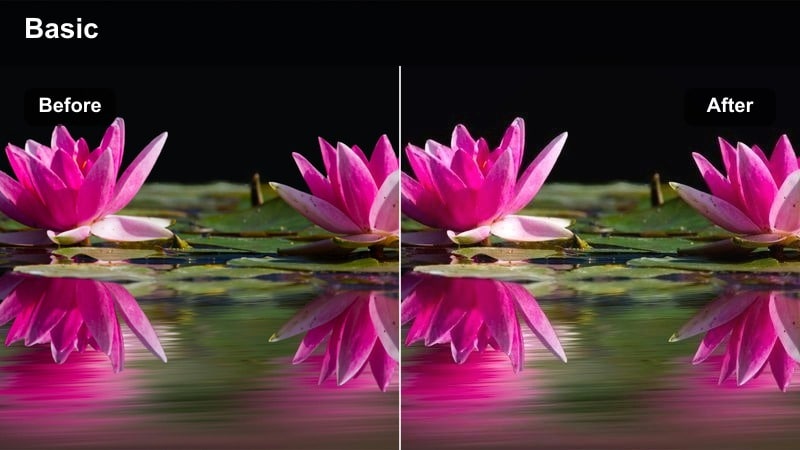
- Effect look: Subtle pink warmth with gently rolled-off highlights for intimate low-light conversations.
- Best for: Short film dialogue, confessional vlogs, and quiet emotional moments indoors at night.
- Editing tip: Reduce background brightness slightly so faces become the natural focal point within the soft tones.
Whisper Soft Dialogue is tuned for close-ups and emotional exchanges, adding just enough pink warmth to soften skin and highlights without distracting from performance. In Filmora, it slightly rolls off bright areas so practical lamps and windows do not compete with your subject s expression.
Dim background exposure using simple adjustments or masks so faces remain the brightest elements in the frame. Then, adjust filter intensity depending on the emotion of the scene lighter for tension, stronger for tenderness and pair with restrained sound design to create a cohesive, intimate mood.
Moody Rose Reflections
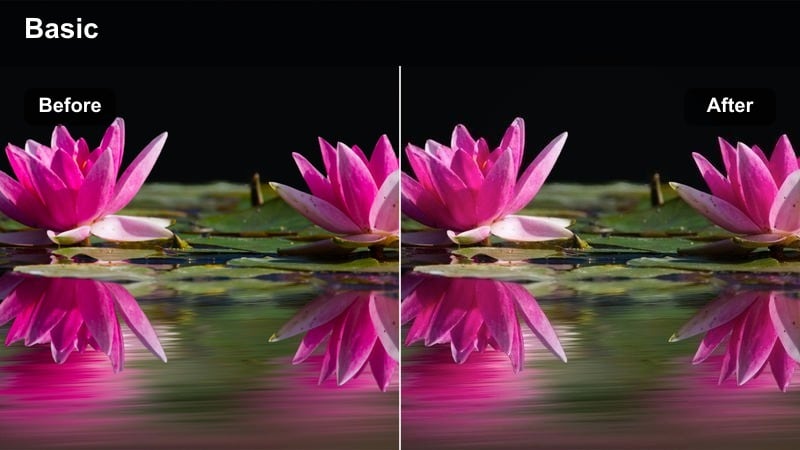
- Effect look: Deep shadows with pink reflections in highlights for dramatic, reflective scenes.
- Best for: Window reflections, rainy nights, and introspective character moments in the city.
- Editing tip: Crush blacks slightly and add a subtle highlight bloom to make reflections feel dreamy but grounded.
Moody Rose Reflections is designed for introspective, cinematic visuals where glass, water, or polished surfaces play a storytelling role. In Filmora, it deepens shadows while injecting pink into reflections, giving city lights and window overlays a poetic, emotional twist.
Use it on shots where your subject is framed with reflections or rain-streaked glass, then crush blacks a little to intensify the mood. Add a small bloom or glow to highlight areas so the pink reflections feel dreamy, and keep camera moves slow so viewers can absorb the layered composition.
Tips for Using Soft Pink Tone Cinematic Lut Filters in Filmora
- Keep exposure slightly under when shooting so the soft pink filters have room to lift highlights without clipping.
- Dial back saturation in primary reds if skin starts to look too flushed under the pink tone.
- Use selective vignettes to keep attention on faces while the soft pink wash fills the background.
- Export a short test clip with different filter intensities to choose the most cinematic setting for your series.
- Combine gentle camera movement with slower cuts so the dreamy pink atmosphere has time to register on screen.
- Balance warm and cool shots with Filmora s color tools so the soft pink palette stays consistent across locations.
- Stack pink filters with LUTs at lower opacity to refine contrast while preserving your preferred pastel mood.
Soft pink tone cinematic filters are an easy way to turn everyday footage into romantic, story-driven visuals that feel polished and intentional.
Save your favorite combinations as presets in Filmora so you can apply the same soft pink aesthetic across vlogs, short films, and social content with one click.
secure download