

 100% Security Verified | No Subscription Required | No Malware


 ChatGPT
 Perplexity
 Gemini
 Claude
 Grok
Grok
Urban street creators on TikTok need filters that keep city textures raw while still looking cinematic. With the right presets, every corner, crosswalk, and neon sign can turn into a scroll-stopping short.
Below are curated Filmora-style street filters and tones designed for TikTok street clips and urban culture shorts, so your content stays on trend without losing the authentic city feel.
In this article
High-Contrast Grit for Concrete Streets
Steel Frame Grit
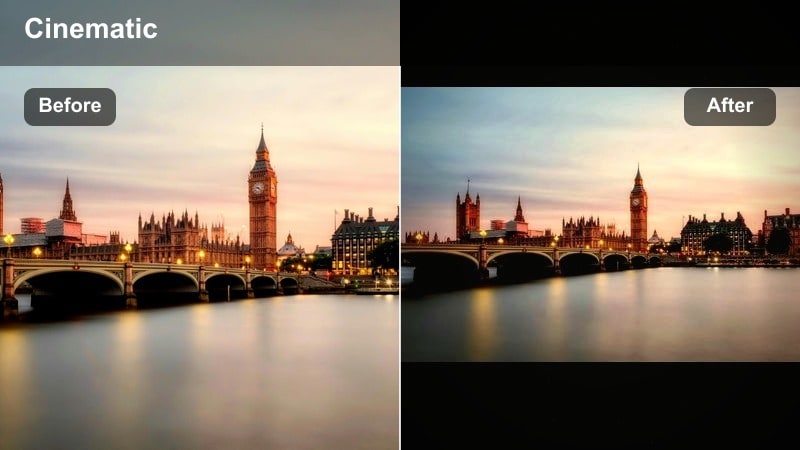
- Effect look: Hard contrast with cool steel blues, deeper shadows, and sharpened fine details on asphalt and buildings.
- Best for: Street skating clips, bike POV rides, and fast-paced alley runs filmed in bright daytime.
- Editing tip: Slightly lower exposure and add a touch of film grain to keep highlights controlled and textures raw.
Steel Frame Grit is built for creators who want their TikTok urban filter to make concrete, rails, and city lines look razor sharp. The cool steel blues give your clips a cinematic, industrial mood while the boosted contrast carves out every crack in the asphalt and metal edge in the frame.
Inside Filmora, drop this look onto your brightest daytime clips, then nudge exposure down so skies and reflective windows do not blow out. Add Filmora grain and a bit of sharpening to emphasize wheels, shoes, and board textures, and keyframe intensity if you want the effect to ramp up during tricks or high-speed pushes.
Match Urban Street Filters to Your TikTok Aesthetic
Use Filmora s AI-assisted color tools to quickly match Steel Frame Grit and similar street tones to your existing TikTok aesthetic. You can let AI analyze a favorite clip or thumbnail and build a color palette that keeps your grid unified even as lighting and locations change.
Once you dial in a steel-blue, gritty palette you love, save it as a preset in Filmora so you can one-click match new skate sessions, bike POVs, and alley runs to the same signature look.
 secure download

Preview Street Filters on Real TikTok Clips
To see how gritty tones behave in motion, drop a quick sidewalk or skate test clip into Filmora and cycle through your favorite urban street TikTok filter options. Watch how Steel Frame Grit treats highlights on concrete and chrome, and compare it with softer or more colorful presets.
Previewing filters on the same 10 to 15 second reference walk makes it easy to judge which look keeps skin natural while still pushing city contrast and detail for street content.
secure download1000+ Video Filters and 3D LUTs for Street TikToks
Filmora comes with a large library of filters and 3D LUTs you can stack with Steel Frame Grit to design your own city street short color recipes. Mix subtle film LUTs with high-contrast filters or neon looks to create unique TikTok urban filter combinations that match different blocks, times of day, or outfits.
Save each combo as a custom preset so you can jump between your go-to daytime grit, golden hour warmth, and after-dark neon vibes without rebuilding looks from scratch.
secure downloadCrosswalk Crunch
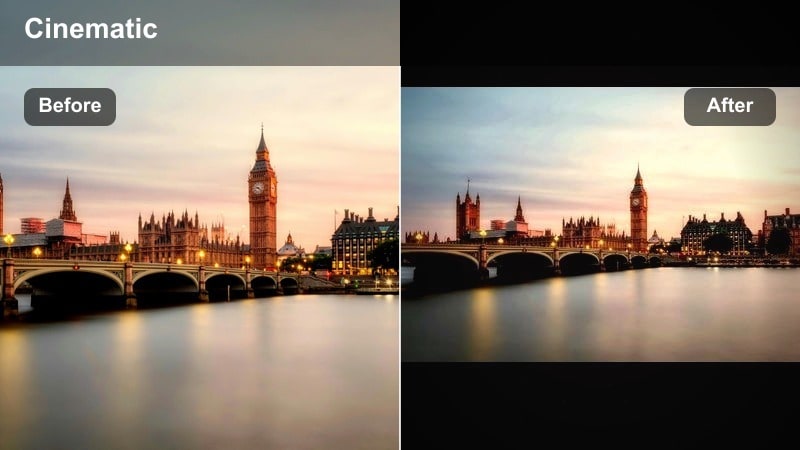
- Effect look: Crisp whites, inky blacks, and boosted local contrast to emphasize crosswalk lines and shadows.
- Best for: Urban fashion walks, city fit checks, and walking transitions across crosswalks.
- Editing tip: Use slower cuts and match your step beats to music so the sharp lines sync with transitions.
Crosswalk Crunch is a tiktok urban filter that makes zebra crossings, sidewalk edges, and architecture lines visually snap. The whites go bright and clean, while blacks drop deep, which is perfect for confident catwalk-style walks and fit checks that rely on bold shapes.
In Filmora, align your cuts with steps or beat drops so each stride lands on a transition, emphasizing the strong contrast. If your shoes or street markings start clipping, trim highlights and whites in the Color panel while leaving overall contrast high to keep that graphic, editorial feeling.
Subway Shadow Pop
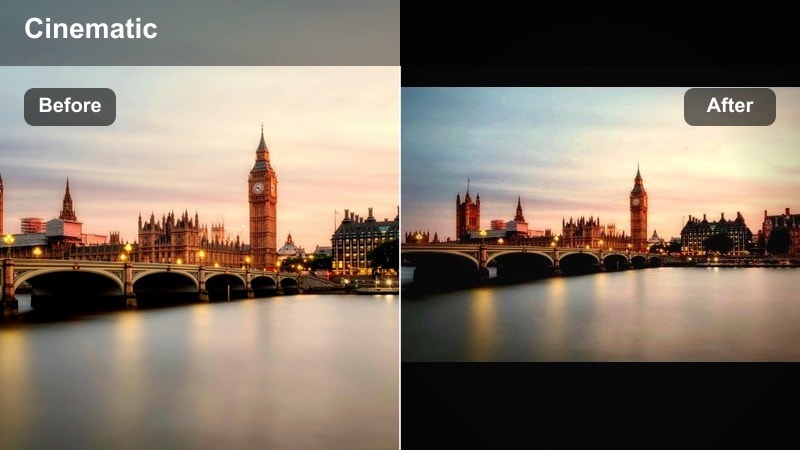
- Effect look: Deepened shadows with lifted midtones and slight teal push to tunnels and platforms.
- Best for: Subway ride vlogs, escalator shots, and moody corridor transitions.
- Editing tip: Turn up saturation on warm tones like skin and signage so faces stand out from dark surroundings.
Subway Shadow Pop leans into the dark, repeating lines of tunnels and escalators while keeping midtones bright enough that faces do not disappear. The touch of teal in shadows gives underground spaces a modern, cinematic twist that pairs well with lo-fi beats or storytime voiceovers.
Inside Filmora, push saturation slightly on oranges and reds so skin, warning signs, and station ads separate from the deepened shadows. If footage feels too moody, lift only the shadow slider instead of overall exposure so you preserve the underground atmosphere while regaining just enough detail for TikTok viewers on small screens.
Neon Nights and City Glow
Neon Drift
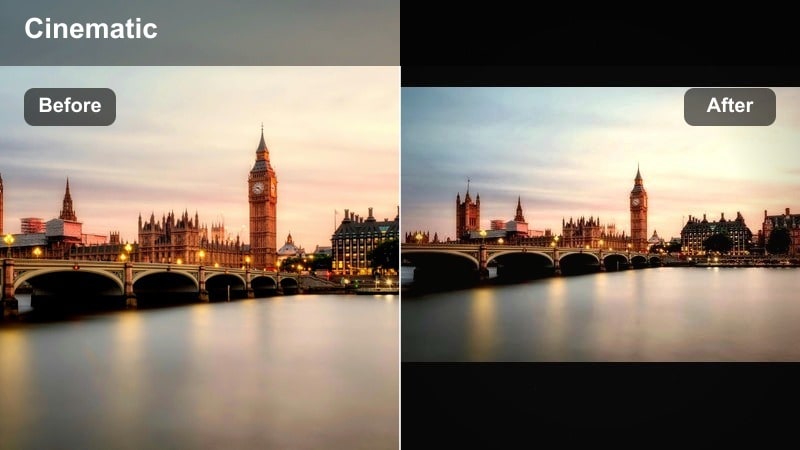
- Effect look: Soft glow on neon signs, lifted blacks, and subtle magenta and cyan highlights.
- Best for: Night street hangs, b-roll of signs, and slow-motion walking shots under colorful lights.
- Editing tip: Add a slight blur or glow effect on brightest areas to make neon feel dreamy instead of harsh.
Neon Drift is made for late-night TikToks where signage, store windows, and LED strips carry the scene. By lifting blacks, it keeps shadows soft and inviting, while magenta and cyan highlights turn regular storefronts into stylized backdrops that look great in vertical format.
In Filmora, expose for the signs first, keeping the brightest tubes under control, then add glow or a light blur to highlights so the neon blooms gently. If your skin starts leaning too magenta, warm up white balance slightly and pull back magenta saturation while preserving the punch in the neon elements.
City Noir Night
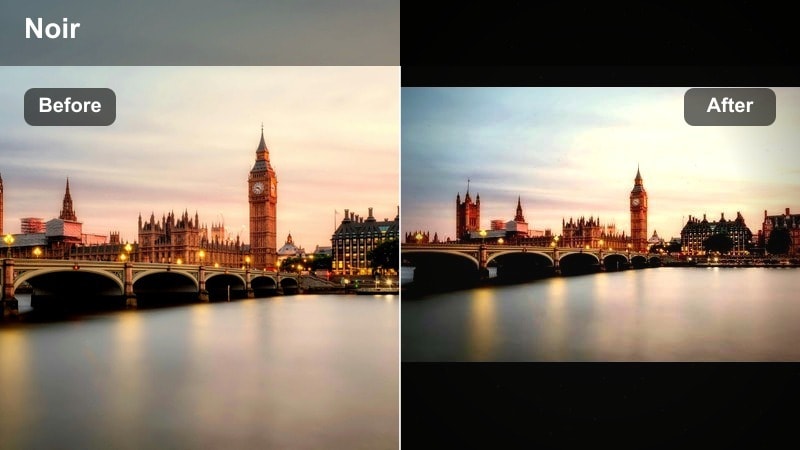
- Effect look: Desaturated backgrounds with protected warm skin tones and strong, cinematic contrast.
- Best for: Dialogue-style street monologues, storytelling shorts, and close-up city character shots.
- Editing tip: Use tighter framing and slower movements so the noir contrast focuses attention on your face.
City Noir Night strips color from the chaos of city streets while keeping faces warm and expressive, making it ideal for storytelling and POV confessionals. The strong contrast sculpts features and gives any night corner a movie still vibe without needing heavy lighting gear.
When editing in Filmora, frame tighter around your subject and avoid fast camera swings so the contrast does not smear details. If signs or cars in the background feel distracting, lower global saturation a bit more or use Filmora masking to subtly dim or blur those areas while keeping skin tones fully present.
Alley Light Glow
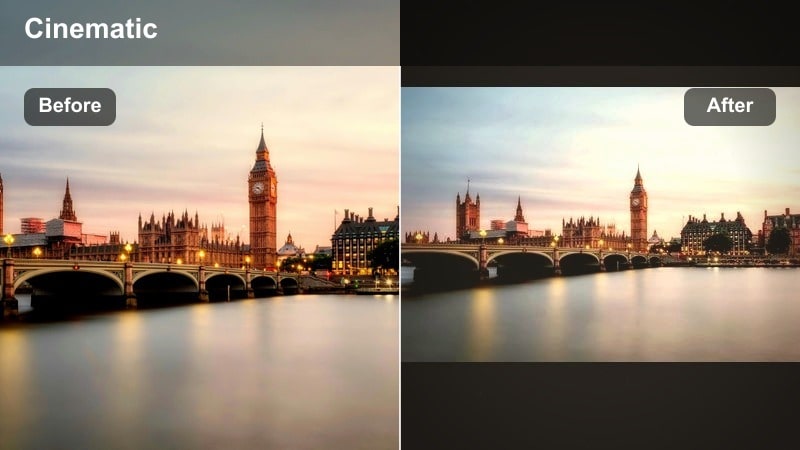
- Effect look: Warm streetlamp highlights, softened edges, and gentle fade in the blacks for a hazy alley look.
- Best for: Dance loops, choreography under streetlights, and slow spins in narrow alleys.
- Editing tip: Add a tiny vignette and keep camera low for more dramatic vertical lines and glowing streetlamps.
Alley Light Glow turns simple backstreets into performance stages, emphasizing warmth from streetlamps and creating a mild haze that flatters movement. Faded blacks avoid harsh shadows, so dancers and creators stay visible even when they step slightly out of the brightest pool of light.
In Filmora, place a subtle vignette around the frame and angle the camera upward from a low position to stretch alley walls vertically in your TikTok frame. If highlights get too yellow, cool them slightly with color wheels while keeping midtones warm so skin stays rich and inviting against the softened background.
Daytime Street Stories and Lifestyle Clips
Corner Cafe Soft
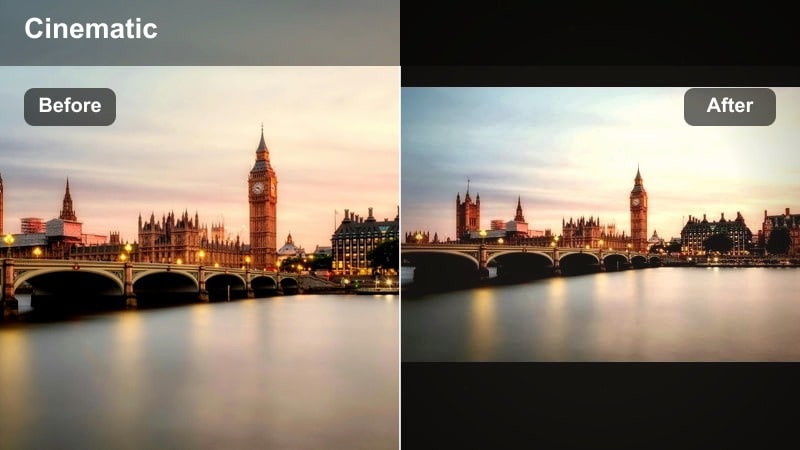
- Effect look: Gentle contrast, soft highlights, and pastel leaning city colors for relaxed daytime scenes.
- Best for: Cafe check-ins, soft-grunge outfits, and subtle lifestyle storytelling in open streets.
- Editing tip: Lower sharpness and keep camera moves slow to stay aligned with the soft, airy vibe.
Corner Cafe Soft mutes the hard edges of the city and leans into an airy, pastel vibe that is perfect for lifestyle and aesthetic TikToks. It tames harsh midday light, smoothing skin and reflections so your viewers focus on mood, outfits, and small details like coffee cups or notebooks.
Use Filmora to ease off sharpness and micro-contrast, then add slow push-ins or pans that match the calm look. If skies start to blow out, lower highlights and introduce a bit of blue saturation so the sky stays pastel rather than pure white, keeping the overall frame cohesive.
Block Party Color
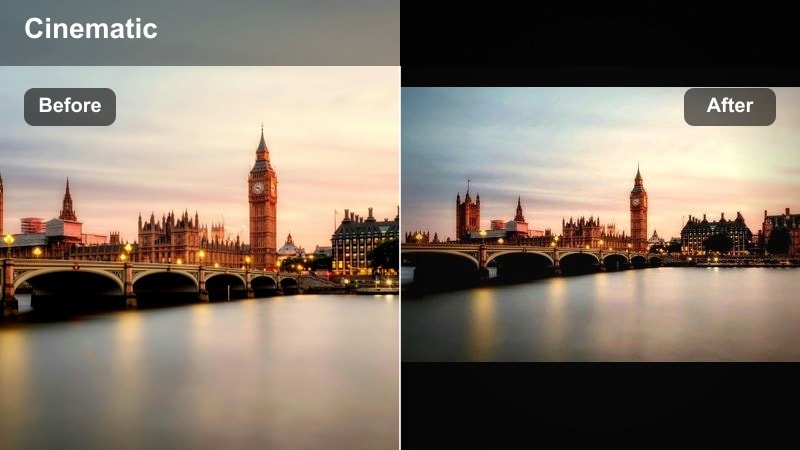
- Effect look: Vibrant city colors, boosted saturation on murals and outfits, with clean modern contrast.
- Best for: Street festivals, block parties, and quick crowd shots showing urban culture energy.
- Editing tip: Cut to the beat and use short clips so the strong colors feel energetic, not overwhelming.
Block Party Color is designed to make murals, street art, and bold fits jump off the screen. Saturation is pushed where it matters, while contrast stays clean and modern, giving event recaps and culture shorts the punch they need to stand out in the TikTok feed.
In Filmora, plan snappy edits that cut on the beat and avoid holding on one frame too long so the color intensity feels like a burst of energy instead of visual noise. If the frame gets too busy, selectively lower greens and yellows in the HSL controls while keeping reds and blues strong to guide the viewer s eye.
City Fade Journal
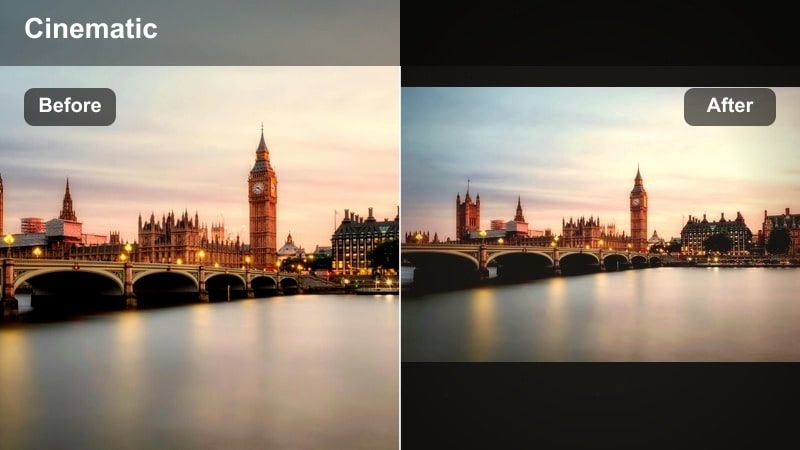
- Effect look: Soft faded blacks, slightly muted colors, and a subtle warm tint for diary-style clips.
- Best for: POV city walks, day-in-the-life vlogs, and quiet storytelling over music.
- Editing tip: Combine with on-screen text captions and slower cuts to match the nostalgic city journal mood.
City Fade Journal brings a nostalgic, diary-like character to daytime city walks and calm vlogs. Faded blacks and muted colors evoke photo prints or old journals, making it ideal for POV shots set to music or gentle narration about your day.
In Filmora, keep cuts longer and add on-screen captions or handwriting-style titles to reinforce the journal feel. If the image looks too washed, boost midtone contrast a touch without deepening blacks, maintaining the soft fade while restoring just enough structure to buildings and faces.
Grunge LUT-Style Looks and City Street Short Color
Asphalt Grain LUT
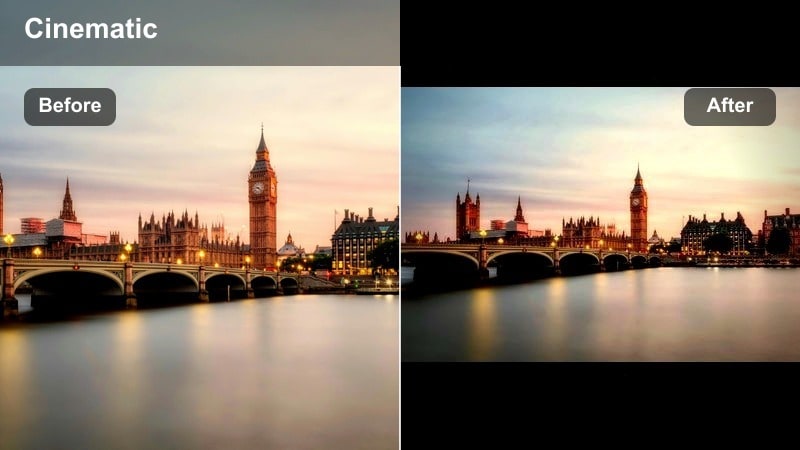
- Effect look: Filmic contrast curve, subtle grain, and cool shadows for a street TikTok LUT style.
- Best for: Gritty skate edits, parkour runs, and B-roll of traffic and street details.
- Editing tip: Apply the look first, then adjust exposure and white balance so grain and contrast sit naturally.
Asphalt Grain LUT gives your TikTok a film-inspired street finish, bringing in a cinematic curve and subtle grain that flatters movement. Cool shadows keep asphalt, railings, and metal fixtures feeling tough and urban while still letting skin tones sit naturally in the midtones.
In Filmora, apply this LUT-style look before making major exposure or temperature tweaks so you are grading on top of the intended contrast. For best results, shoot slightly flatter in-camera, then fine-tune white balance so grain remains organic and shadows stay cool without turning skin tones blue.
Urban Fade Short Color
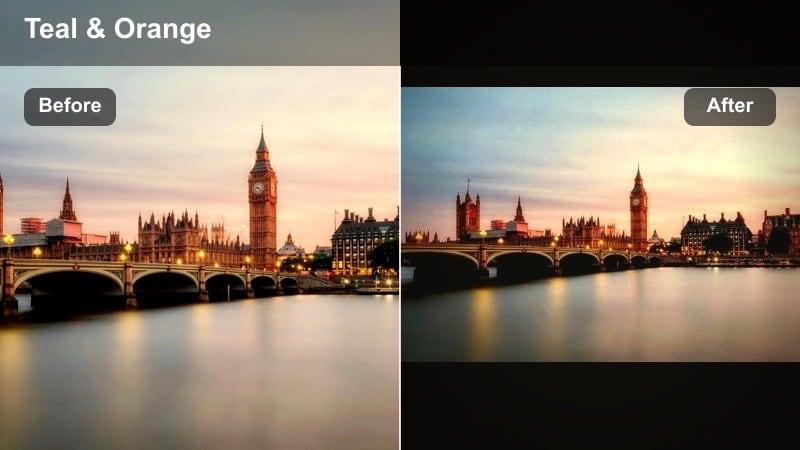
- Effect look: Balanced city street short color with lowered saturation, lifted shadows, and subtle teal-orange mood.
- Best for: Fast vertical shorts, B-roll transitions between locations, and quick urban aesthetic loops.
- Editing tip: Use speed ramps and whip pans so the toned-down color feels intentional and modern.
Urban Fade Short Color provides a muted teal-orange palette that instantly ties together a sequence of city clips. Reduced saturation and lifted shadows make it a great base for fast edits, transitions, and loops where the focus is on motion and structure rather than bold color.
In Filmora, pair this look with speed ramps, whip pans, and quick match cuts to build dynamic TikTok shorts that still feel clean and cohesive. Keep clips from similar lighting conditions grouped on the timeline and apply the filter to each group for consistent tones across your entire street sequence.
Brickwall Urban Filter
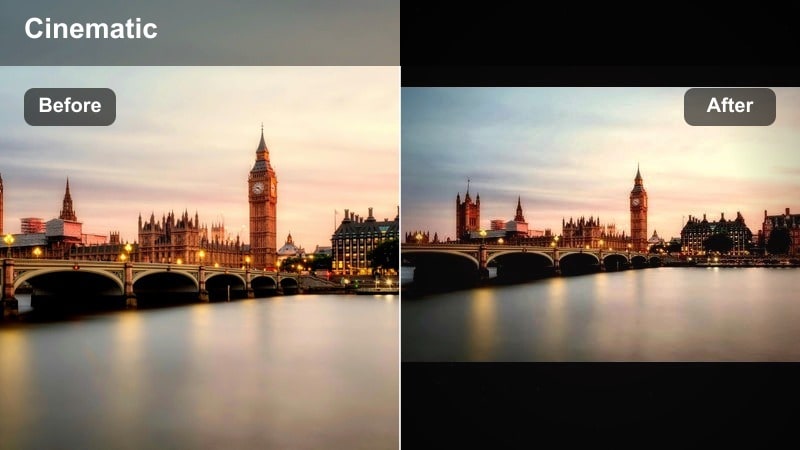
- Effect look: Rich reds, detail in brick textures, and slightly darkened edges that frame the subject.
- Best for: Outfit of the day clips against brick walls, portrait-style lip-syncs, and static performance shots.
- Editing tip: Lock focus on the subject and dial down background sharpness so the textured wall does not steal the show.
Brickwall Urban Filter is tailored for static or semi-static shots where a textured wall becomes your backdrop. It enriches reds and fine details in the bricks while darkening edges slightly, creating a natural frame that keeps attention centered on your outfit, lip-sync, or choreography.
In Filmora, use shallow depth-of-field footage when possible and consider lowering overall background sharpness with blur or selective masking. If reds dominate the shot, ease red saturation down a bit and add a slight contrast boost to maintain depth while preventing the wall from overpowering your subject.
Tips for Using Urban Street Tiktok Filter Filters in Filmora
- Shoot a short reference clip on each street location and test multiple urban street filters before committing to a full batch edit.
- Lock white balance in-camera so your city street short color stays consistent when you switch between different TikTok urban filters.
- Keep your subject separated from the background with depth, framing, or contrast so heavy street textures do not distract from the story.
- Use Filmora keyframes to gradually fade filters in or out when transitioning from subway tunnels to bright streets or from day to night.
- Save filter presets with clear names like Day_Grit, Cafe_Soft, or Neon_Soft so you can instantly match tones across new TikTok shoots.
- Group clips by lighting conditions on your Filmora timeline and apply urban street tiktok filter looks per group for smoother visual continuity.
- Combine Filmora LUTs with softer filters at low intensity to create layered urban styles without overprocessing your footage.
- Always preview your edits on a phone-sized screen to be sure shadows, details, and skin tones read well in the TikTok feed.
Urban street filters for TikTok work best when they match both your city environment and your personal creator style, from gritty daytime runs to neon-lit nights.
Test, tweak, and save a core set of presets in Filmora so every new TikTok street clip or urban culture short drops into a ready-made, on-brand look in seconds.
secure downloadNext: Best Urban Street Filters for Instagram Reels and Stories
