



 100% Security Verified | No Subscription Required | No Malware


 ChatGPT
 Perplexity
 Gemini
 Claude
 Grok
Grok
An image prompt generator converts visuals into text prompts that can be used for AI image or video creation. Many users rely on these tools because writing accurate prompts is difficult, especially when trying to recreate a specific style or visual from an existing image.
Part 1: Quick Solution: How People Generate Prompts from Images

There are several ways to generate prompts from images today, including:
- Online AI tools
- Browser-based extensions
- Built-in software solutions
Some tools focus only on prompt generation, while others combine prompt creation with actual content production. Platforms like Filmora offer an all-in-one workflow where users can generate prompts and immediately apply them to image or video creation.
Part 2: Best Image Prompt Generator Tools
1. CLIP Interrogator
Overview:
A favored AI-powered tool that examines images and formulates a prompt as a guide. This tool is especially designed for Stable Diffusion workflows.
- Key Features: Deeper image analysis; descriptive prompt generation; supports multiple styles and tags.
- Pros: Highly accurate; suitable for advanced users; free to use.
- Cons: Technical interface; may be difficult for beginners.
- Best For: Advanced AI art and Stable Diffusion users.
2. Hugging Face Image Captioning Tools

Overview:
Hugging Face tools streamline the process of turning images into captions and prompts directly through the browser.
- Key Features: Open-source AI models; browser-based; multiple model options.
- Pros: Free and flexible; no installation needed.
- Cons: Output quality varies; requires experimentation.
- Best For: Developers and users exploring AI capabilities.
3. PromptHero
Overview:
A platform designed to explore and generate prompts based on existing AI-generated images.
- Key Features: Large prompt database; reverse search; community-driven.
- Pros: Easy to use; great for inspiration.
- Cons: Not an actual AI generator; limited automation.
- Best For: Inspiration and prompt discovery.
4. Img2Prompt
Overview:
A lightweight tool that extracts prompts quickly using AI captioning.
- Key Features: Fast processing; minimalistic design.
- Pros: Very fast; simple to use.
- Cons: Less detailed output; limited customization.
- Best For: Beginners and quick results.
5. Phraser AI
Overview:
A creative AI platform focused on structured prompt generation.
- Key Features: Creative workflows; style-based prompts.
- Pros: Beginner-friendly; clean interface.
- Cons: Requires login; limited free features.
- Best For: Users who want guided prompt creation.
Disadvantages of Image Prompt Generator Tools
- Most tools only generate prompts and do not support content creation.
- Results may be inconsistent depending on the image.
- Users often need to switch between multiple platforms.
- Limited support for video workflows.
Part 3: Filmora as a Recommended Solution
3.1 Image to Prompt Feature in Filmora
Filmora allows users to create prompts directly from images within the app, eliminating the need to switch tools.
3.2 Why It’s Different
- Generate prompts from images
- Create images or videos from prompts
- Edit and export content in one platform
This integrated workflow improves efficiency, especially for beginners.
3.3 Additional Capabilities
- AI image generation
- AI video generation
- Built-in editing tools
How to Use Image to Prompt and Image to Video in Filmora
Filmora combines Image to Prompt and Image to Video features to help creators turn a single reference image into a fully generated AI video. This workflow allows you to extract visual styles from an image and instantly apply them to video generation without switching tools.
1. Generate a Prompt from an Image (Image to Prompt)
Step 1: Import Your Reference Image
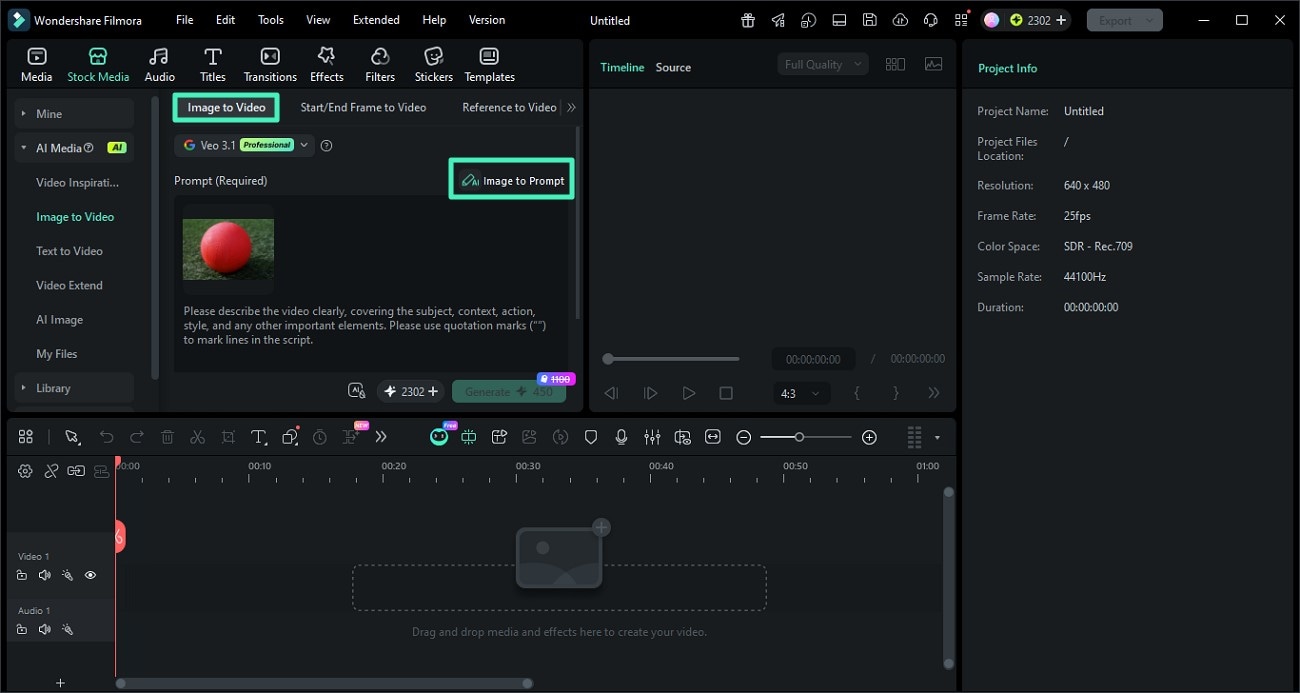
Open Filmora and go to the AI Image to Video feature. Upload the image you want to use as a reference for style, composition, or lighting.
Step 2: Click Image to Prompt
Select the image and click the Image to Prompt option. Filmora will analyze the visual elements such as objects, colors, and style to generate a descriptive prompt.
You can review and edit the generated prompt to better match your desired creative direction.
Step 3: Confirm and Apply the Prompt
Once satisfied, apply the generated prompt. This prompt will now serve as the base for creating AI-generated content with a consistent style.
2. Turn the Prompt into a Video (Image to Video)
Step 1: Adjust Video Settings
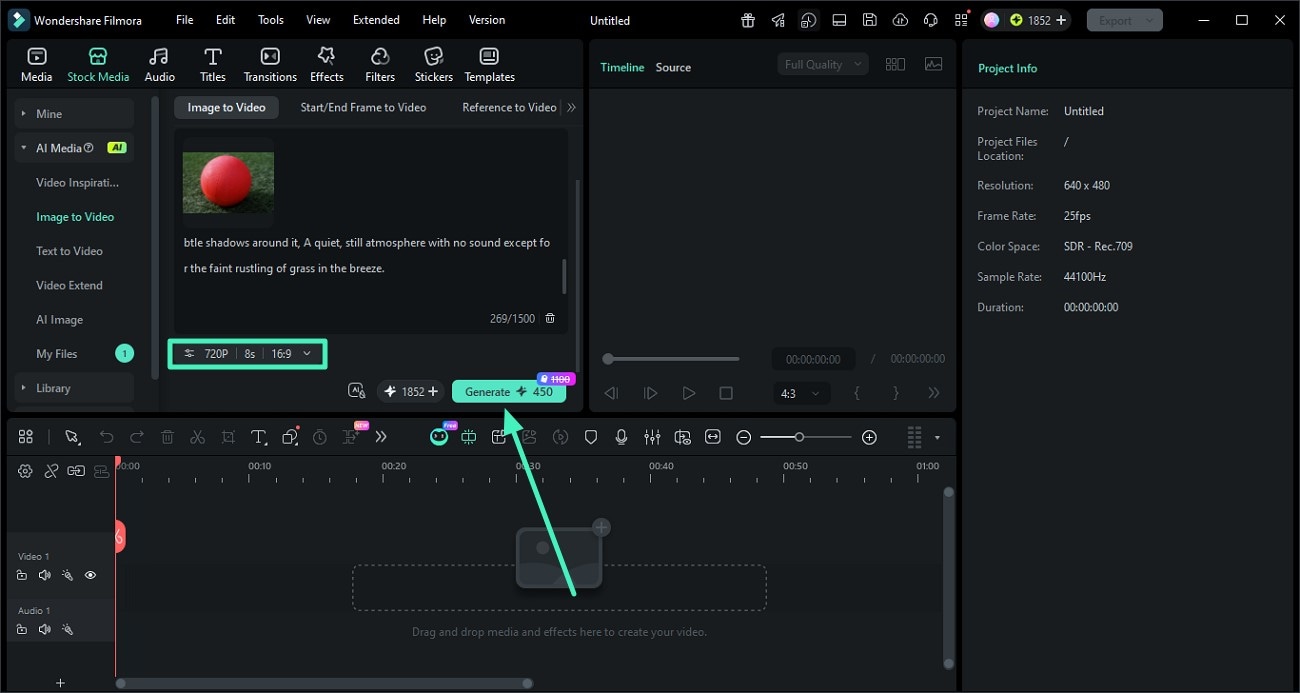
After applying the prompt, configure your video settings such as resolution, aspect ratio, and duration. This ensures your final output matches your target platform like TikTok, YouTube, or Instagram.
Step 2: Generate the AI Video
Click Generate to let Filmora create a video based on your prompt and image reference. The AI will maintain visual consistency in style, lighting, and composition.
Step 3: Preview and Export
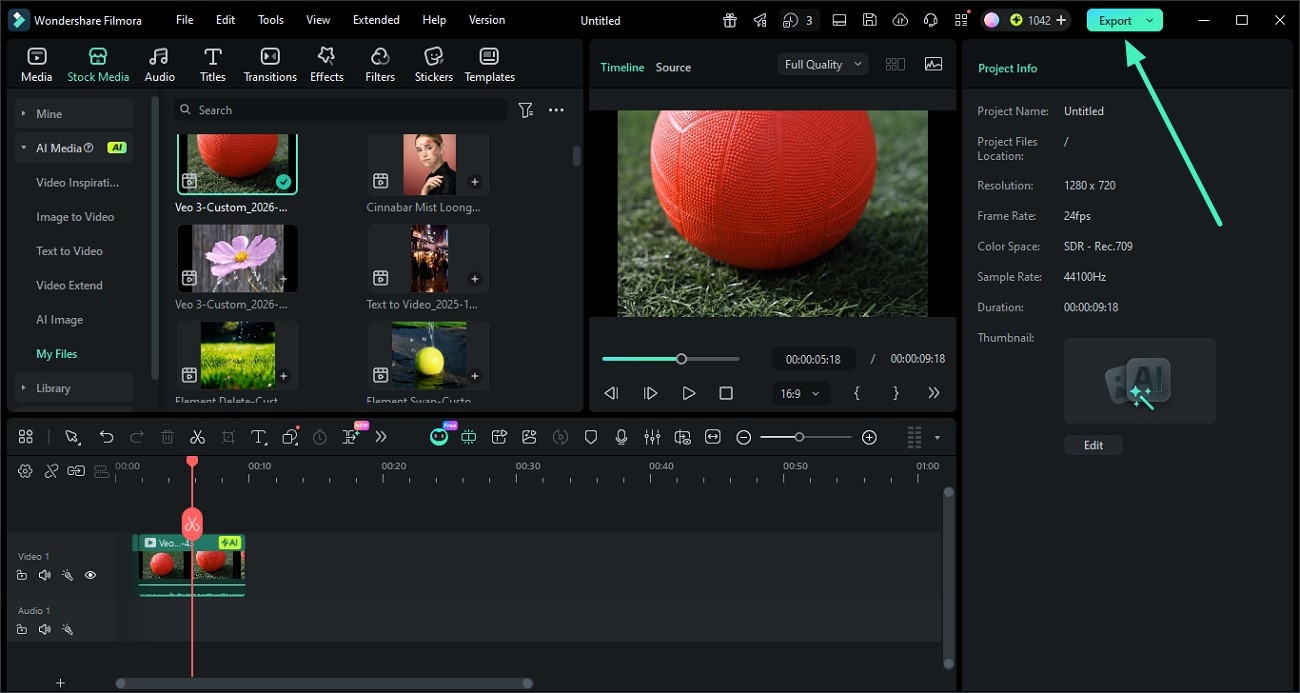
Once the video is ready, preview the result. If everything looks good, click Export to save the video or share it directly to your desired platform.
Conclusion
Image prompt generator tools simplify turning visuals into prompts, but most are limited to a single function. Switching between tools can slow down workflows.
An all-in-one solution like Filmora allows users to generate prompts and create content within the same platform, making the process faster and more efficient.
FAQs
Q1: What is an image-to-prompt tool?
An image-to-prompt tool converts images into text prompts for AI-generated content.
Q2: What is the best tool?
The best tool depends on your needs—accuracy, ease of use, or workflow integration.
Q3: Can I use prompts for video?
Yes, prompts can be used to create videos, animations, and other visual content.
