
New Year Countdown Clock / Midnight Photo Prompt:
Copy, Paste & Share the Moment
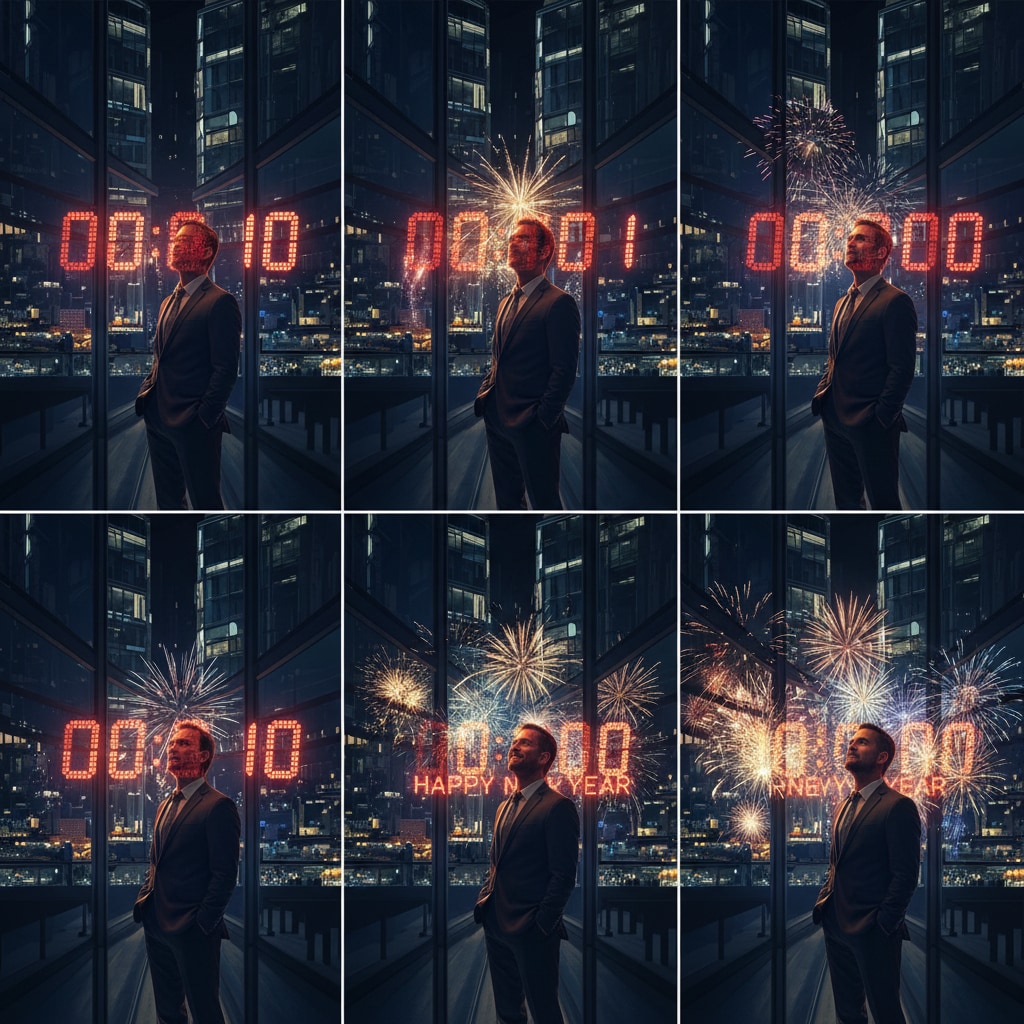
Want to post the viral New Year Countdown Clock / Midnight Photo Prompt? Tap into this top effect for 2026: add a countdown clock to your photos, snap your “Happy New Year!” at midnight, and share instantly. Scroll, tap, and copy — these templates let you join the countdown trend fast. Perfect for TikTok, Insta, Snapchat, or group chats where everyone’s watching the clock!
Loading more templates...
 Category:
 Duration:
 Aspect Ratio:
Popular New Year Countdown Clock / Midnight Photo Prompt Effect
Searching for a viral New Year Countdown Clock / Midnight Photo Prompt? Quickly add an animated countdown timer and capture the perfect midnight moment for Instagram, TikTok, YouTube Shorts, or Snapchat. Filmora’s advanced AI image generator, powered by Google's Nano Banana model, lets you create a real-time countdown and midnight photo prompt to celebrate the New Year and go viral across every social platform.
Stand out with trending countdown overlays, midnight prompts, and creative social media-ready layouts. Get crisp, customizable countdown graphics and instantly share the moment your followers are waiting for—New Year’s Eve midnight!
Create a New Year Countdown Clock for Your Photos & Videos
Create a New Year Countdown Clock for Your Photos & Videos
Choose your countdown style: vertical, horizontal, digital flip clock, or fireworks overlay. Just type “New Year Countdown Clock / Midnight Photo Prompt” in your request, upload your photo or video, and Filmora’s AI instantly adds a festive timer. Customize the hours, minutes, seconds, and even schedule a midnight prompt—perfect for last-second group shots or midnight confetti pop! Share your countdown results on TikTok, Instagram, Shorts, or Stories to join trending New Year’s Eve content.
- Copy-Paste Countdown Prompts - Use 10+ fast countdown clock & midnight photo prompt templates.
- Multiple Timer Styles - Classic countdown, fireworks, digital flip, neon, gold shimmer, photo overlay.
- Import Your Image - Add the countdown overlay to any selfie, group photo, or video for major impact.
How New Year Countdown Clock / Midnight Photo Prompt Works
How New Year Countdown Clock / Midnight Photo Prompt Works
The Filmora mobile app makes it easy: Select your photo or video, pick a trending New Year Countdown Clock or set a midnight photo prompt, then generate content in one tap. No editing skills needed—just upload, set your clock style, and share your moment when the countdown hits zero!
- Quick-Start Templates - Choose from 2026 New Year countdowns, confetti blowouts, or “0:00” midnight flash prompts.
- No Prompt Writing Needed - Add effect → Choose midnight photo prompt → Generate & share to TikTok or Instagram.
- Custom Prompts Available - Make your own personalized countdown or group midnight photo reminders.
- From Photo to Viral Video - Instantly turn static New Year photos into animated countdown reels.
- Built-In Music & SFX - Countdown beeps, celebration sounds, and fireworks audio included.
Instantly Add Text & Stickers to Your Midnight Photo Prompt
Instantly Add Text & Stickers to Your Midnight Photo Prompt
Customize your New Year Countdown Clock / Midnight Photo Prompt with festive stickers, captions, and countdown titles. Filmora gives you easy-to-use tools to place custom “Happy New Year” text, time to midnight, or trending hashtags—plus eye-catching animated effects for every celebration.
- 🕛 Countdown Text Styles – Digital, neon, confetti, and sparkling overlays for midnight.
- 🎆 Festive Stickers – Fireworks, champagne, party hats, and 2026 labels for New Year posts.
- 🖊️ Full Typography Controls – Curved text, clock outlines, gold/silver foil, and color pops.
FAQs for New Year Countdown Clock / Midnight Photo Prompt
- Open your favorite camera or photo editing app that supports trending New Year Countdown Clock / Midnight Photo Prompt overlays.
- Choose a countdown clock template or add the Midnight Photo Prompt effect.
- Set the timer for 11:59 PM or sync it up to local midnight.
- Snap your photo or record a video as the countdown hits zero for the perfect New Year's moment.
- Post instantly to TikTok, Instagram, or Snapchat and join the trend!
How to Use a New Year Countdown Clock / Midnight Photo Prompt Effect in Your App?
Want to create midnight countdown photos or viral videos for the New Year in seconds? This guide shows how to use the New Year Countdown Clock / Midnight Photo Prompt feature—even if you're brand new to viral effects. Add a countdown overlay, sync to midnight, and share instantly—all in under a minute.
Step 1 Open Your Photo/Video App and Find the Countdown Effect

Step 2 Add the New Year Countdown Clock / Midnight Photo Prompt Overlay

Step 3 Capture, Download, and Share Your Countdown Photo or Video

-
1:Open Your Photo/Video App and Find the Countdown Effect
Start your camera or editing app, open a new project, and locate the "Countdown Clock" or "Midnight Prompt" feature in the overlays or effects tab. -
2:Add the New Year Countdown Clock / Midnight Photo Prompt Overlay
Select your preferred style and set the timer or prompt for midnight. Choose the look trending on TikTok or customize it for your New Year vibe. -
3:Capture, Download, and Share Your Countdown Photo or Video
Take your photo or record as midnight hits, then download and post it to social media—ready for likes, views, and shares!
More Than Just a Countdown Clock Effect
Besides the popular New Year Countdown Clock / Midnight Photo Prompt, you can also add other trending overlays, use AI video tools for special effects, and edit your New Year content with pro tools—all in one place for standout social posts.







