

 100% Security Verified | No Subscription Required | No Malware


 ChatGPT
 Perplexity
 Gemini
 Claude
 Grok
Grok
If you want your lifestyle videos to feel dreamy, soft, and on-brand across your Instagram grid, choosing the right filters is just as important as your camera and location. With the right aesthetic lifestyle video filters, everyday clips instantly turn into cohesive, scroll-stopping stories.
Below you will find a curated set of Filmora-friendly filters designed for aesthetic vlogs, lifestyle content, and brand storytelling. Each look includes what it does, where it works best, and one quick editing tip so you can lock in your signature style fast.
In this article
Soft Dreamy Glow Aesthetic Filters
Cotton Morning Glow
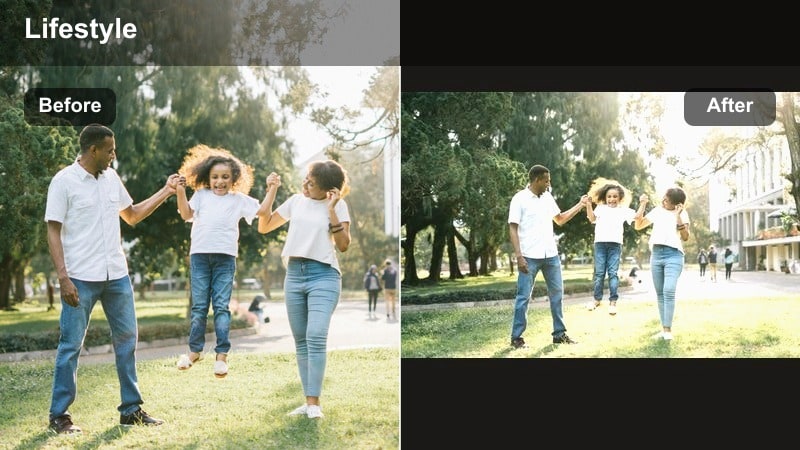
- Effect look: Soft bright haze with gentle highlights and a subtle warm tint that makes mornings feel airy and calm.
- Best for: Slow morning routines, coffee shots by the window, minimal desk setups, and calm aesthetic vlogs.
- Editing tip: Slightly lower contrast and lift shadows to keep the look feather-light; avoid over-saturating warm colors so whites stay clean.
Cotton Morning Glow wraps your lifestyle clips in a soft, airy haze that feels like sunlight through sheer curtains. Whites stay bright and clean while highlights pick up a gentle warmth, ideal for capturing calm rituals like coffee, stretching, or journaling in bed.
In Filmora, start by increasing exposure to get a bright base, then apply your filter or preset and fine-tune contrast and shadows. Use the color tools to keep yellows and oranges in check so skin tones remain natural and your minimal interiors keep that fresh, cotton-light aesthetic.
Build a Consistent Aesthetic With Filmora’s AI Color Tools
Once you choose your favorite aesthetic lifestyle video filters, Filmora’s AI color tools help you keep that look consistent across all your vlogs and brand content. You can quickly balance exposure, fix white balance, and then let your chosen filter do the final styling.
Use AI-driven color matching to copy the vibe of one clip you love onto an entire sequence. This is especially powerful for Instagram creators and lifestyle influencers who batch-film content in different locations but still want a unified, dreamy soft-tone aesthetic.
 secure download

Preview Aesthetic Lifestyle Filters on Your Own Clips
Before you commit to a new aesthetic, drop your raw footage into Filmora and try several of these soft-toned lifestyle filters on the same scene. Seeing them side by side makes it easier to choose which look supports your storytelling and your brand colors.
Start by testing a bright dreamy filter, a neutral soft-tone option, and a moody look on the same clip from an aesthetic vlog. Compare how each version feels with your music and captions, then choose the vibe that best reflects your personality and ideal audience.
secure download1000+ Video Filters and 3D LUTs in Filmora
Filmora includes a large library of built-in video filters and 3D LUT-style looks that you can stack and customize for your lifestyle aesthetic. Combine soft dreamy filters with subtle grain, light leaks, or vignette effects to create a signature style that feels premium on Instagram.
Once you find a combination you love, save it as a preset so you can apply that same look to every vlog, Reel, or brand story without rebuilding your edit from scratch.
secure downloadPearl Soft Focus
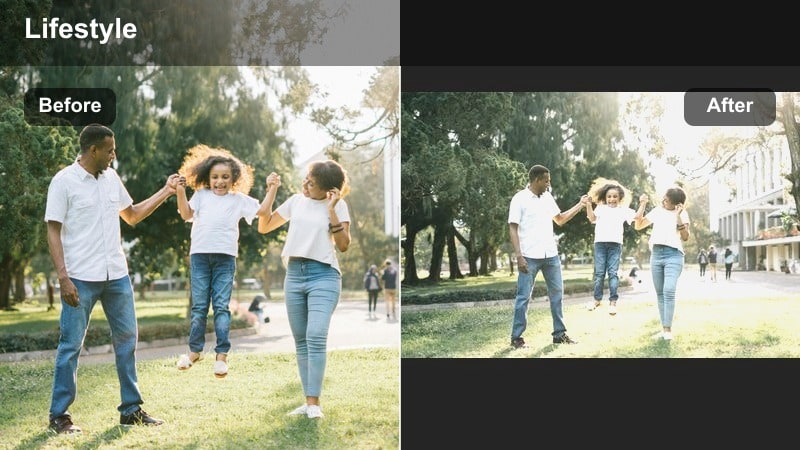
- Effect look: Low-contrast, slightly desaturated glow with creamy highlights and softened skin texture.
- Best for: Self-care routines, skincare close-ups, bedroom montages, and aesthetic reels focused on calm moods.
- Editing tip: Add a touch of Filmora blur or vignette around the edges to push attention to the subject while keeping the overall frame light.
Pearl Soft Focus smooths harsh lines and wraps your subject in a creamy glow that flatters skin and fabrics. Colors are dialed back just enough to feel calm and intimate, making it ideal for skincare, makeup, and self-care content.
Inside Filmora, pair this filter with a subtle edge blur or vignette to guide the viewer’s eye toward faces and hands. Keep local sharpening on eyes and lashes using masks so the subject feels alive and crisp while the rest of the frame stays soft and dreamy.
Linen Daylight Soft
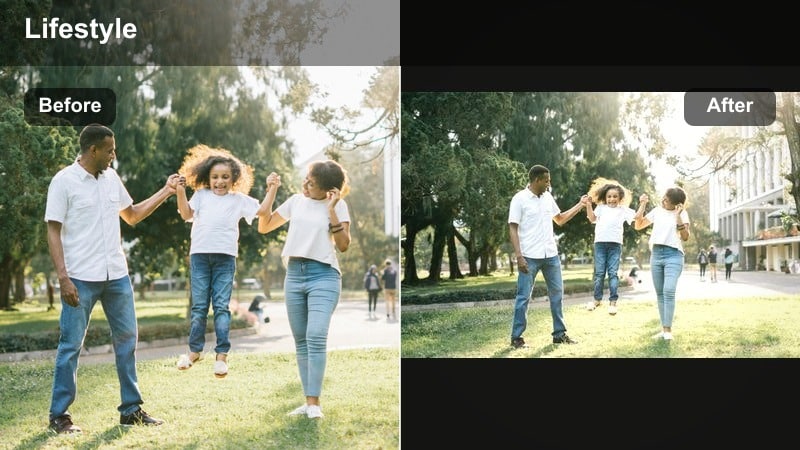
- Effect look: Neutral, low-saturation daylight look with soft contrast and a subtle beige tint that mimics linen textures.
- Best for: Apartment tours, wardrobe try-ons, and simple lifestyle B-roll with lots of neutrals and whites.
- Editing tip: Pull down saturation in strong primary colors and boost clarity just a bit to keep fabrics and interior details crisp.
Linen Daylight Soft is built for neutral interiors and capsule wardrobe content, adding a beige-inspired tint that feels like linen and cotton. It keeps whites calm and clean while slightly muting bold colors, so your space looks curated rather than cluttered.
In Filmora, correct your white balance first, then apply the filter and gently adjust saturation on strong reds and blues. A small clarity boost will help furniture textures, knitwear, and decor details stay sharp without breaking the soft, daylight mood.
Dreamy Pastel Lifestyle Filters
Pastel Cloud Aesthetic
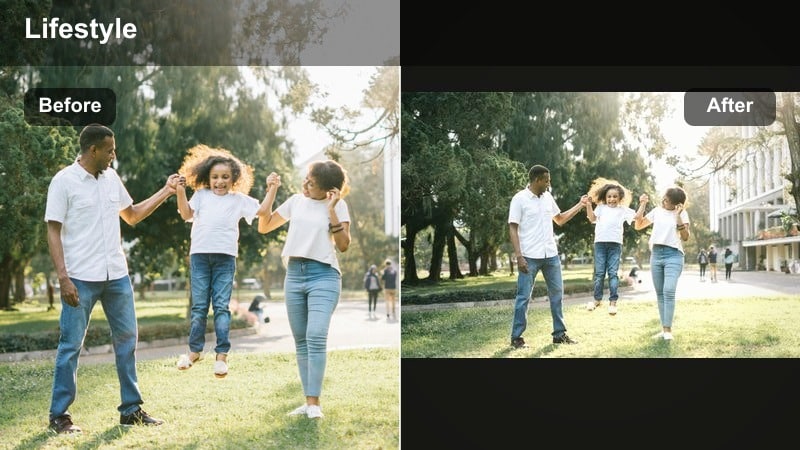
- Effect look: Soft pastel wash over the frame with gently boosted pinks and blues and muted shadows for a cloud-like feel.
- Best for: Aesthetic vlogs with city walks, flower markets, sky shots, and dreamy day-in-the-life reels.
- Editing tip: Use Filmora’s color curves to slightly lift the blue and red channels in the highlights for extra cotton-candy skies.
Pastel Cloud Aesthetic turns everyday environments into soft, whimsical scenes where skies and florals take center stage. Pinks and blues are subtly boosted to create a cotton-candy vibe, while shadows are softened so nothing feels too harsh.
Apply this look in Filmora to clips with visible skies, reflective windows, or colorful details, then fine-tune highlight curves on the red and blue channels. Pair it with gentle slow motion or speed ramps to emphasize dreamy transitions and match pastel tones with light, floaty music.
Macaron Lifestyle Wash
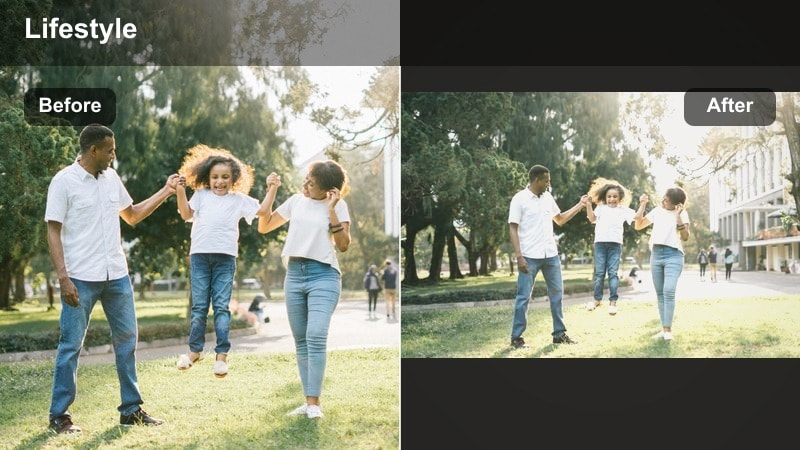
- Effect look: Bright, playful tones with pastel greens and pinks, soft contrast, and a subtle matte finish on the blacks.
- Best for: Cafe trips, dessert B-roll, stationery hauls, and colorful lifestyle content aimed at a playful brand vibe.
- Editing tip: Reduce saturation in reds a bit so skin tones stay natural while backgrounds and props carry the color story.
Macaron Lifestyle Wash is a playful filter that brings out pastel greens, pinks, and creamy whites for cafe and desk aesthetics. Blacks become slightly matte, which gives your footage a soft editorial feel without losing clarity.
When editing in Filmora, lean on props like notebooks, desserts, and mugs to carry the pastel palette while you keep skin tones balanced with targeted HSL adjustments. Slightly lowering red saturation and luminance will help faces look natural while the rest of the frame stays fun and candy-bright.
Cotton Candy Street
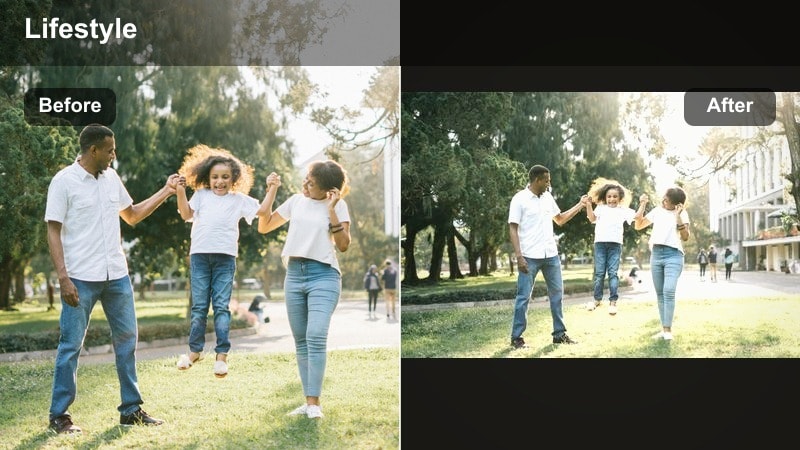
- Effect look: Warm pastel highlights with boosted magentas and teals, slightly lowered clarity for a dreamy street-film vibe.
- Best for: Evening walks, city b-roll, lifestyle montages with neon signs or colorful storefronts.
- Editing tip: Lower sharpness just a touch and add Filmora grain to avoid a plastic digital feel while keeping the pastel glow.
Cotton Candy Street is perfect for city lifestyle creators who love neon signage, reflections, and twilight walks. Magentas and teals are gently emphasized, wrapping your streetscapes in a pastel glow that feels cinematic rather than overly saturated.
In Filmora, apply this filter to clips that feature lights, shop windows, or street art, and slightly underexpose before grading to preserve highlight detail. Reduce sharpness a bit and add subtle film grain so the pastel tones feel organic, helping your Reels stand out from standard phone footage.
Neutral Soft-Toned Branding Filters
Brand Linen Neutral
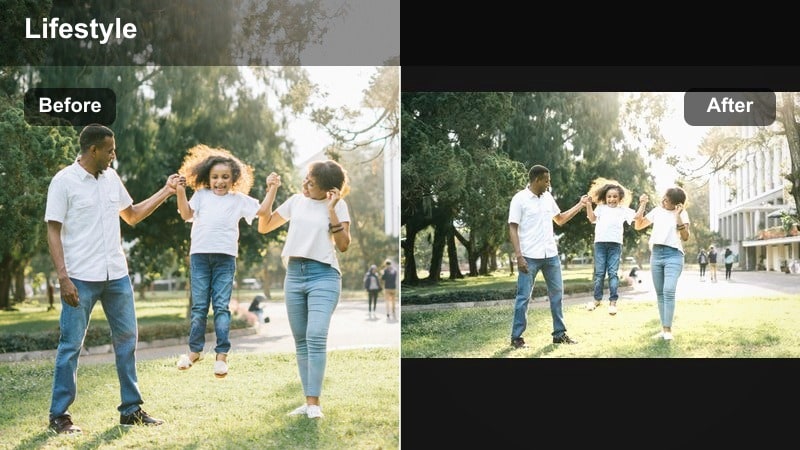
- Effect look: Soft, neutral filter with beige and taupe emphasis, low contrast, and gentle highlight roll-off for a polished brand look.
- Best for: Brand storytelling, product showcases, workspace tours, and minimalist lifestyle content.
- Editing tip: Dial back saturation on brand packaging if it is very bright so the overall palette stays cohesive and elevated.
Brand Linen Neutral is designed for creators and small businesses who want a clean, elevated aesthetic across all their content. Beige and taupe tones are highlighted, while contrast stays gentle to avoid harsh shadows on faces, products, or packaging.
Use this look in Filmora for talking-heads, product demos, and workspace tours, then selectively desaturate loud colors that clash with your brand palette. Saving this setup as a custom preset lets you quickly apply the same soft-neutral look to new campaigns and Reels covers.
Oatmilk Lifestyle Soft
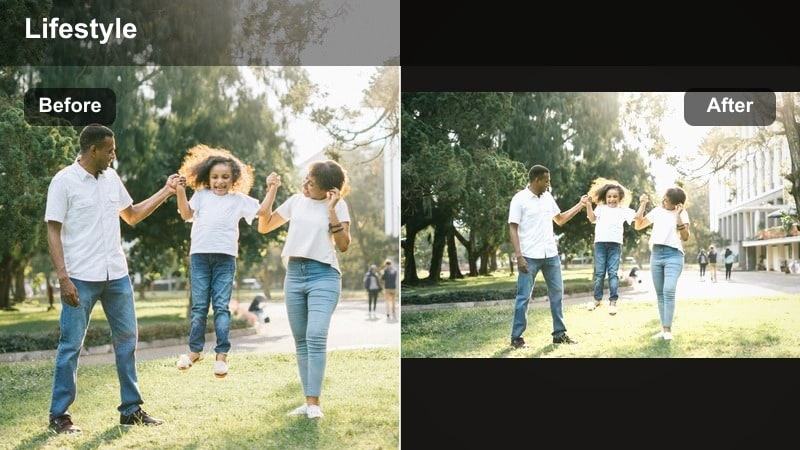
- Effect look: Warm neutral tones with creamy whites, slightly lifted blacks, and softened edge contrast for a cozy oatmilk vibe.
- Best for: Kitchen vlogs, cooking content, cozy evenings at home, and neutral outfit reels.
- Editing tip: Use Filmora’s HSL to gently desaturate yellows and oranges so the warm look feels modern instead of overly vintage.
Oatmilk Lifestyle Soft is made for cozy kitchens, coffee rituals, and warm home scenes. It lifts blacks slightly and warms up neutrals so your footage feels inviting and creamy, while whites remain soft instead of stark.
Within Filmora, apply this filter to clips that feature wood, linen, and warm lamps, then refine yellow and orange channels so the grade stays modern. If you have mixed lighting, cool down overly orange areas first with white balance tools, then let the filter create a smooth, oatmilk-inspired mood.
Soft Studio Brand
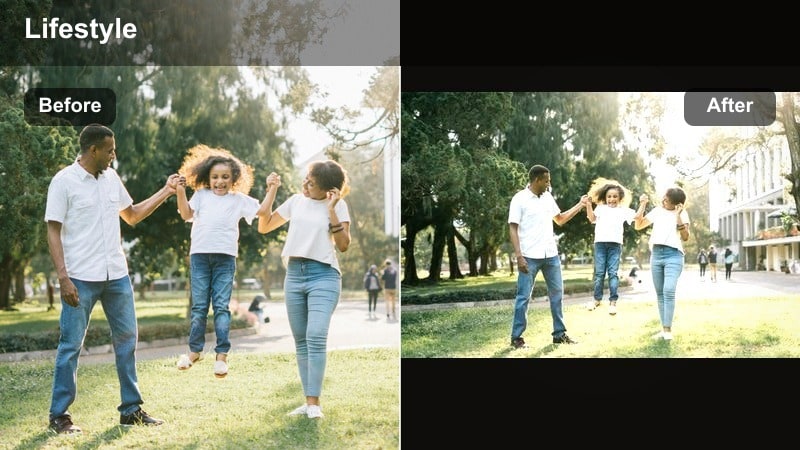
- Effect look: Clean, studio-ready look with soft contrast, accurate skin tones, and a hint of warmth for polished lifestyle branding.
- Best for: Talking-to-camera content, brand introductions, product education, and Instagram Reels covers.
- Editing tip: Use Filmora’s face refinement or skin smoothing very lightly to pair with this filter and keep the result natural on 4K screens.
Soft Studio Brand gives your talking-head and educational content a polished, professional presence while keeping skin tones realistic. Contrast is eased just enough to be flattering, and a subtle warmth adds approachability for brand and personal introductions.
In Filmora, apply this look as your default for seated videos, then lightly use skin smoothing and face refinement to even out texture without blurring details. Match exposure and white balance across all talking clips so the filter behaves consistently, helping your channel and grid feel cohesive.
Soft Moody Lifestyle Filters
Dusky Journal Mood
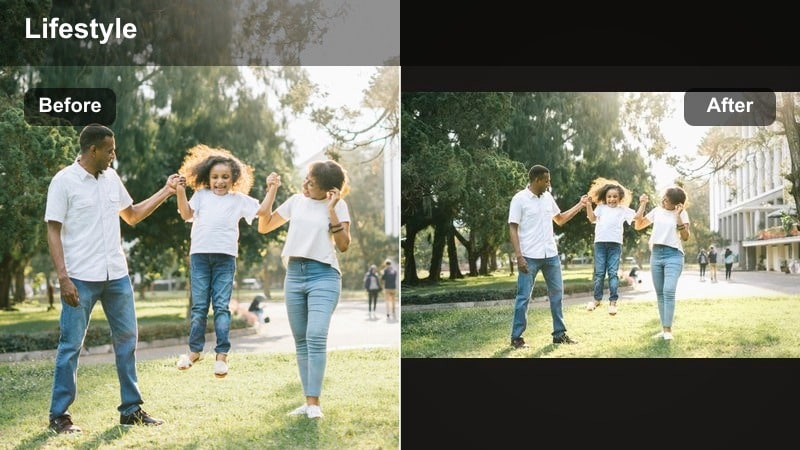
- Effect look: Muted colors with slightly cool shadows, warm highlights, and a subtle matte finish for moody but soft journaling vibes.
- Best for: Night routines, journaling sessions, candle-lit scenes, and reflective lifestyle storytelling.
- Editing tip: Lower global saturation and selectively lift oranges to keep skin warm while backgrounds stay moody and muted.
Dusky Journal Mood creates a quiet, reflective atmosphere by cooling shadows and gently warming highlights from candles or lamps. Colors are softened so attention goes to hands, notebooks, and little rituals instead of bright distractions.
Use this filter in Filmora on clips shot in low light and let some areas fall naturally into shadow. Lower overall saturation, then selectively boost orange tones for skin and candlelight, balancing moody depth with a soft, intimate feel that suits voiceovers and slower edits.
Soft Evening Amber
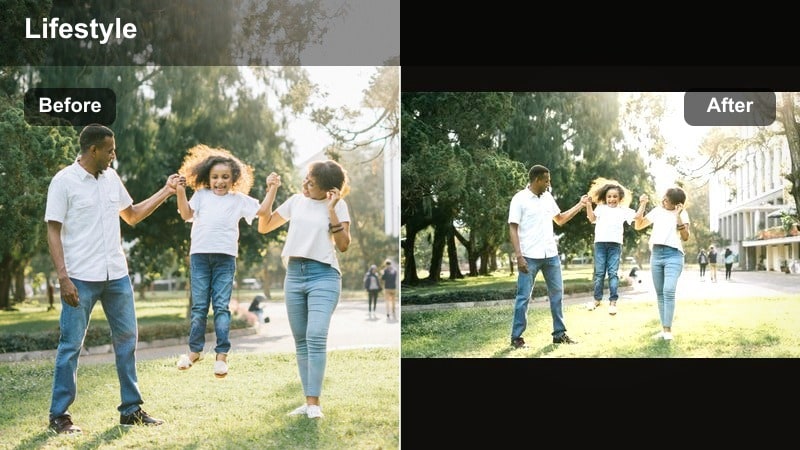
- Effect look: Golden amber cast with soft contrast and slightly lifted blacks, ideal for cozy evenings and warm lamps.
- Best for: Golden hour walks, living-room movie nights, evening routines, and warm brand storytelling.
- Editing tip: Reduce the intensity of the filter on skin tones if they turn too orange by selectively cooling midtones in Filmora.
Soft Evening Amber bathes your footage in a golden cast that feels like late-day sun or lamp light, perfect for winding-down routines and cozy vlogs. Contrast remains soft and blacks are slightly lifted, which keeps shadows from feeling heavy or harsh.
In Filmora, apply this filter to clips with lamps, string lights, or sunsets in frame, then use color tools to tame overly orange skin. Adjust midtone temperature or individual HSL channels so faces stay natural while the environment glows with rich amber warmth.
Foggy Window Lifestyle
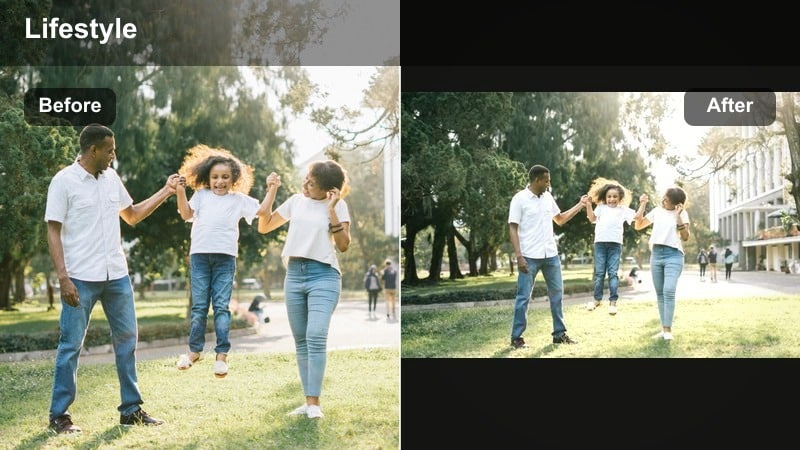
- Effect look: Cool, misty tones with reduced saturation and a gentle bloom on highlights for rainy-day softness.
- Best for: Rainy day vlogs, introspective walks, workspace days, and calm moody lifestyle edits.
- Editing tip: Slightly raise exposure and add a hint of Filmora vignette to pull focus toward the center of the frame.
Foggy Window Lifestyle cools down your footage and adds a light bloom to highlights, creating a soft rainy-day mood. Colors become more muted and reflective, making it a great choice for desk scenes, window shots, and quiet walks.
In Filmora, apply this filter to clips with water, glass, or soft textiles, then gently lift exposure so details do not disappear into gray. A slight vignette helps center focus on your subject, while avoiding heavy sharpening keeps the misty, introspective tone intact.
Tips for Using Lifestyle Video Aesthetic Filters in Filmora
- Shoot with consistent light and white balance so your aesthetic lifestyle video filters look clean and intentional instead of over-edited.
- Decide on one or two core filters for your main series, such as vlogs or brand storytelling, and use others only for special moments.
- Keep saturation and skin tones in check; your filter should support flattering, natural skin even when the rest of the frame is stylized.
- Match your music and pacing to the filter mood so dreamy soft tones pair with slower cuts, and brighter looks pair with more movement.
- Use Filmora masks to apply heavier filter intensity to backgrounds while keeping faces and products a bit more natural.
- Batch-edit several Reels or TikToks in one session with the same filter to maintain a cohesive aesthetic across your weekly posts.
With the right aesthetic lifestyle video filters, your everyday routines, brand stories, and cozy vlogs can feel instantly cinematic while still staying authentic to how you live.
Experiment with a few of these dreamy soft-toned looks in Filmora, then lock in your favorites as presets so every new lifestyle video feels on-brand, cohesive, and camera-ready for Instagram.
secure download