

 100% Security Verified | No Subscription Required | No Malware


 ChatGPT
 Perplexity
 Gemini
 Claude
 Grok
Grok
Cinematic Copper sits between warm orange and earthy brown, carrying the feel of glowing film lights, aged metal, and late-afternoon sun. It instantly suggests warmth, nostalgia, and craftsmanship, which is why it is popular in cinematic thumbnails, YouTube intros, and title cards. Used well, it can make even simple footage look premium and story-driven.
Below are 15 Cinematic Copper color palettes with HEX codes you can plug straight into your thumbnails, lower thirds, channel branding, and cinematic color grading. Whether you are editing in Filmora or planning a new aesthetic for your vlog, these ready-made Cinematic Copper color combinations will help you keep a consistent, polished look across all your creative projects.
In this article
Warm Cinematic Cinematic Copper Color Palettes
Sunset Studio Copper

- HEX Codes: #a6471c, #f29f6b, #ffd3a3, #402218, #130f0d
- Mood: Warm, cinematic, and nostalgic with a soft studio glow.
- Use for: Use for travel vlogs, cinematic b-roll sequences, and emotional storytelling intros.
This palette blends deep copper (#a6471c) with peach highlights (#f29f6b) and creamy light (#ffd3a3), anchored by dark browns (#402218, #130f0d). It feels like golden hour slipping through studio blinds, wrapping your scene in a soft, nostalgic warmth.
Use it for cinematic vlogs, storytelling intros, and YouTube thumbnails where you want emotion and intimacy. Copper tones can drive your primary elements (titles, key frames), while the darker browns are perfect for text outlines, overlays, and subtle gradients in Filmora to keep everything legible and cinematic.
Pro Tip: Enhance Your Cinematic Copper Visuals With Filmora
To keep a consistent Sunset Studio Copper look across your whole edit, build a simple style guide inside Filmora. Use the copper tone for titles and lower thirds, the peach highlight for accent shapes or callouts, and the darkest brown as your background and shadow color. Save these as custom presets so every intro, b-roll sequence, and thumbnail aligns with the same warm visual identity.
When you color grade, gently push midtones toward copper and keep shadows rich and deep instead of pure black. This preserves the cinematic depth of the palette while avoiding crushed details, especially in moody indoor shots or backlit golden hour footage.
AI Color Palette
You can turn this Cinematic Copper palette into a full video look using Filmora's AI Color Palette feature. Grab a reference image that already has these warm copper and peach hues (for example, your favorite frame or the palette card) and let the AI analyze and match that mood to your entire timeline.
Filmora's AI Color Palette feature helps you apply the same copper glow to intros, A-roll, B-roll, and thumbnails, so everything feels like it belongs to one cinematic world. You can still fine-tune the intensity per clip to keep skin tones natural and avoid oversaturation.
 secure download

HSL, Color Wheels & Curves
To refine a Sunset Studio Copper grade, use Filmora's HSL controls to subtly boost saturation in oranges and reduce yellows so copper feels rich, not neon. Then, in the color wheels, warm up midtones while keeping highlights slightly creamy and shadows leaning toward Moody Frame Black for a cinematic falloff.
Gentle S-shaped curves will deepen contrast without losing detail in hair, clothing, or backgrounds. If you want more guidance on shaping cinematic tones, you can follow along with Filmora's color correction and grading tutorial and adapt the steps to your copper palette.
secure download1000+ Video Filters & 3D LUTs
If you want to get to a polished Cinematic Copper look fast, start with Filmora's filters and LUTs, then tweak. Many of the filmic, warm, or retro presets already push footage toward golden and copper tones, giving you a strong base that you can nudge to match your exact HEX codes.
Filmora's video filters and 3D LUTs make it easy to apply a consistent treatment across all clips, then fine-tune exposure, contrast, and saturation so your copper remains rich but not overpowering. This is especially helpful for creators who want the same cinematic signature on YouTube, shorts, and social promos.
secure downloadCinematic Ember Frames

- HEX Codes: #b14e28, #ff8b55, #ffb88a, #5a3422, #1c120f
- Mood: Intense, fiery, and dramatic with ember-like highlights.
- Use for: Use for movie trailers, dramatic channel openers, and performance highlight reels.
Cinematic Ember Frames strikes a balance between searing ember oranges (#b14e28, #ff8b55) and softened highlights (#ffb88a), anchored by deep chocolate browns (#5a3422, #1c120f). It feels like glowing coals in a dark theater, full of tension and energy.
This palette is ideal for high-impact trailers, punchy intros, or performance highlight reels where you want strong contrast. Use bright ember tones for titles, kinetic typography, and call-to-action buttons, while the dark browns form backgrounds, letterbox bars, and overlays in Filmora to keep everything readable and dramatic.
Golden Reels Copper Glow

- HEX Codes: #c2662f, #ffb46a, #ffe2b3, #6a3a1d, #22120c
- Mood: Luxurious, warm, and inviting like vintage film reels.
- Use for: Use for film review channels, documentary titles, and premium tutorial content.
Golden Reels Copper Glow mixes rich copper (#c2662f) with golden highlights (#ffb46a) and soft cream (#ffe2b3), then grounds it with deep mahogany tones (#6a3a1d, #22120c). The result is a luxurious, film-stock-inspired palette that feels premium and timeless.
It is a strong choice for film review branding, masterclass-style tutorials, and documentary titles. Use the lightest colors as background panels behind text, reserve the deeper browns for borders, frames, and shadows, and let the core copper hue drive your logo, subscribe buttons, and thumbnails for a cohesive brand feel.
Festival Lantern Copper

- HEX Codes: #b85a2e, #ff9f4a, #ffd58c, #76402a, #241614
- Mood: Festive, energetic, and story-driven with night-market warmth.
- Use for: Use for event recaps, festival vlogs, and energetic social edits.
Festival Lantern Copper combines bright lantern oranges (#b85a2e, #ff9f4a) and soft yellows (#ffd58c) with grounded browns (#76402a, #241614). It feels like string lights over a street market, with pockets of warmth floating above deep shadows.
Use this palette for event recaps, travel vlogs, or festival reels. Warm oranges can highlight titles, emojis, and stickers, while the darkest brown becomes a perfect overlay for text and transitions in Filmora. It keeps the energy high but still cinematic, rather than overly saturated.
Copper Screen Glow

- HEX Codes: #a74a24, #f28c5b, #ffc49b, #4a2a1b, #171010
- Mood: Cozy, intimate, and screen-lit with warm glow.
- Use for: Use for reaction videos, commentary channels, and indoor lifestyle vlogs.
Copper Screen Glow pairs warm copper and apricot (#a74a24, #f28c5b) with soft peach highlights (#ffc49b), resting on dark, almost-black browns (#4a2a1b, #171010). It captures the feeling of a single screen glowing in a dim room.
This palette works well for commentary channels, reaction videos, and late-night desk vlogs. Use the lighter tones for text and UI frames around your webcam, and the deeper browns for backgrounds and letterboxing in Filmora. It keeps the focus on faces and expressions while maintaining a cozy cinematic vibe.
Modern Minimal Cinematic Copper Color Palettes
Urban Loft Copper

- HEX Codes: #aa5730, #f2b999, #f7ede6, #2f3639, #15191b
- Mood: Modern, sleek, and urban with industrial warmth.
- Use for: Use for design breakdowns, architecture tours, and tech lifestyle branding.
Urban Loft Copper mixes a refined copper accent (#aa5730) with soft neutrals (#f2b999, #f7ede6) and industrial charcoals (#2f3639, #15191b). It feels like a modern apartment with concrete, glass, and warm metal details.
Use this for architecture tours, design explainers, or tech lifestyle content. Keep backgrounds clean and light, rely on charcoal for text, and let the copper accent guide key elements like logo marks, timeline highlights, and calls to action in your Filmora layouts.
Copper Interface Clean

- HEX Codes: #b15c34, #f0c0a0, #f8f3f0, #40464f, #161921
- Mood: Clean, product-focused, and professional with a subtle warmth.
- Use for: Use for app promos, UI design showcases, and motion graphics explainers.
Copper Interface Clean uses a tasteful copper accent (#b15c34), warm neutrals (#f0c0a0, #f8f3f0), and cool charcoals (#40464f, #161921). It looks like a polished interface with just enough warmth to feel human.
This palette is great for UI showcases, SaaS promos, or explainer videos. Use the near-white shade as your canvas, charcoals for text and strokes, and copper for buttons, hover states, and animated pointers within Filmora. It keeps visuals professional, clean, and on-brand.
Studio Desk Copper

- HEX Codes: #9f4e2c, #d98a63, #f2dfcf, #3a3f45, #111417
- Mood: Focused, creative, and understated like a curated workspace.
- Use for: Use for productivity content, editing tutorials, and brand intros for creators.
Studio Desk Copper pairs muted coppers (#9f4e2c, #d98a63) with beige lights (#f2dfcf) and neutral grays (#3a3f45, #111417). It feels like a carefully arranged desk setup: cozy, efficient, and distraction-free.
It works well for productivity videos, editing tutorials, and creator brand kits. Use the light beige for background cards, mid-gray for captions and timelines, and copper for icons, badges, and lower-third accents in Filmora. The result is a calm, focused aesthetic that still feels visually rich.
Minimal Frame Copper
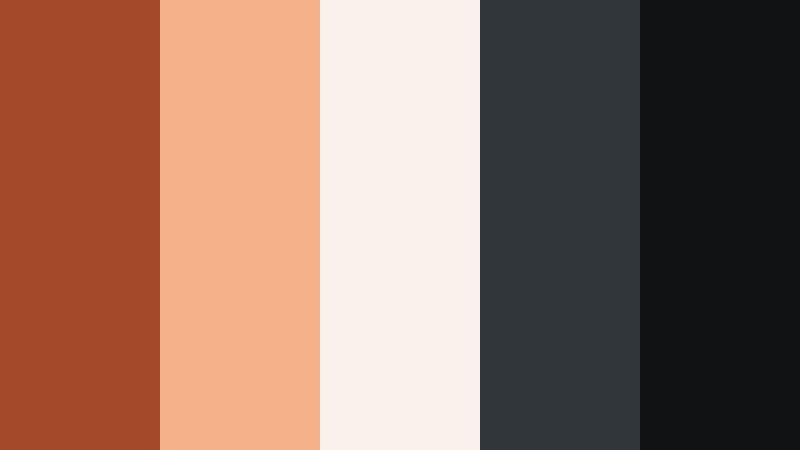
- HEX Codes: #a44a28, #f5b18a, #faf1ea, #31363a, #101214
- Mood: Airy, minimal, and editorial with a warm frame accent.
- Use for: Use for lookbooks, portfolio reels, and minimalist social promos.
Minimal Frame Copper brings together a warm accent (#a44a28), soft peach (#f5b18a), and airy off-white (#faf1ea), balanced with cool grays (#31363a, #101214). It feels like a minimal magazine layout edged with copper.
Use the off-white and gray mix as your base, then frame footage or stills with thin copper borders and subtle shapes. In Filmora, this palette is especially strong for lookbooks, portfolio reels, and elegant story covers, where typography and negative space do most of the talking.
Romantic Vintage Cinematic Copper Color Palettes
Vintage Copper Postcard

- HEX Codes: #a45c33, #ddb28a, #f6e3cf, #6b4b37, #231712
- Mood: Nostalgic, romantic, and softly faded like an old postcard.
- Use for: Use for travel diaries, memory montages, and analog-style edits.
Vintage Copper Postcard mixes a classic copper brown (#a45c33) with warm tans and creams (#ddb28a, #f6e3cf), plus gentle darks (#6b4b37, #231712). It feels like aged paper, sun-faded ink, and soft memories.
This palette is perfect for travel diaries, memory montages, and analog-inspired edits. Use the lighter tones as overlays with reduced opacity, apply copper and mid-browns for titles and stamps, and lean on the darkest shade for subtle vignettes and film borders in Filmora.
Sepia Copper Story

- HEX Codes: #8f4a2a, #c5895e, #e5c7a3, #754b33, #291914
- Mood: Softly dramatic, story-rich, and sepia-tinted.
- Use for: Use for narrative shorts, wedding highlights, and emotional doc segments.
Sepia Copper Story blends classic sepia browns (#8f4a2a, #754b33) with creamy highlights (#c5895e, #e5c7a3) and a deep shadow tone (#291914). It feels like an old photograph that still carries strong emotion.
Use it for romantic weddings, narrative shorts, or emotional documentary moments. In Filmora, gently desaturate other colors while lifting these browns and creams, then use the darkest shade for text and lower thirds to keep everything readable and cinematic.
Copper Lace Evening

- HEX Codes: #9d4e30, #d29b7b, #f4e2d8, #5e3b32, #201314
- Mood: Romantic, elegant, and evening-lit with soft contrast.
- Use for: Use for engagement videos, fashion lookbooks, and beauty content.
Copper Lace Evening pairs refined copper (#9d4e30) and blush beige (#d29b7b, #f4e2d8) with evening browns (#5e3b32, #201314). It evokes candlelight, lace, and soft-focus lenses.
This palette suits engagement films, fashion lookbooks, and beauty content. Use the softest tones for skin-friendly overlays and backgrounds, copper for logo and headings, and the dark brown to shape gentle vignettes and title cards in Filmora without overwhelming delicate details.
Old Cinema Copper Seats

- HEX Codes: #a54d2a, #c87442, #e9c39a, #5c3727, #160f0d
- Mood: Retro, cozy, and surrounded by theater charm.
- Use for: Use for film commentary, retro reviews, and movie night vlogs.
Old Cinema Copper Seats uses upholstery-style coppers (#a54d2a, #c87442), warm neutrals (#e9c39a), and deep theater browns (#5c3727, #160f0d). It feels like sinking into a worn cinema seat before the lights go down.
It is an excellent palette for film commentary channels, retro reviews, and movie-night vlogs. Use the coppers for title bars and frames, the cream for text panels, and the darkest brown for borders, intros, and outros in Filmora to give everything a cozy theater atmosphere.
Bold Contrast Cinematic Copper Color Palettes
Copper And Teal Horizon

- HEX Codes: #b35830, #ffb07a, #1e5b66, #0c2f38, #0a1416
- Mood: Bold, cinematic, and high-contrast with a teal horizon pop.
- Use for: Use for travel intros, drone shots, and action-packed sequences.
Copper And Teal Horizon throws hot copper lights (#b35830, #ffb07a) against deep teal shadows (#1e5b66, #0c2f38, #0a1416). It channels the classic blockbuster copper-and-teal grade with instant visual punch.
Use it for travel intros, drone montages, and action sequences. Let copper dominate highlights, skin, and titles, while teal defines skies, oceans, and shadows in Filmora. This palette is also strong for thumbnails because the complementary clash of warm and cool stops the scroll immediately.
Neon Alley Copper

- HEX Codes: #a94f30, #ff8a5c, #14b3c7, #123b47, #07090c
- Mood: Edgy, urban, and energetic with neon pops against copper.
- Use for: Use for night city b-roll, music videos, and street-style edits.
Neon Alley Copper pushes warm oranges (#a94f30, #ff8a5c) alongside electric cyan and teal (#14b3c7, #123b47) over a nearly black base (#07090c). It feels like a wet city alley lit by neon signs and street lamps.
This palette fits music videos, nightlife b-roll, and street-style edits. Use teal or cyan for glowing lines, outlines, and HUD elements, while copper tones highlight faces and clothing. In Filmora, deepen blacks and selectively boost these accent hues for a stylized, edgy mood.
Copper Noir Title Card

- HEX Codes: #b35c32, #e79d72, #343843, #151821, #050608
- Mood: Moody, refined, and title-ready with noir depth.
- Use for: Use for opening credits, crime or mystery content, and sophisticated channel branding.
Copper Noir Title Card sets refined coppers (#b35c32, #e79d72) against inky blues and blacks (#343843, #151821, #050608). It captures the restraint and intrigue of noir films with a modern copper twist.
Use this palette for opening credits, mystery content, or high-end channel branding. In Filmora, build dark, minimalist backgrounds with subtle blue hues, then let copper carry your typography, logo, and line details. The result is sophisticated, legible, and instantly cinematic.
Tips for Creating Cinematic Copper Color Palettes
When you create your own Cinematic Copper color palette for video and design, combine warm metals with balanced neutrals and carefully chosen contrast colors to keep shots cinematic, readable, and on-brand.
- Limit yourself to 2 or 3 main copper tones and 2 or 3 supporting neutrals so your palette stays focused and easy to reuse across intros, overlays, and thumbnails.
- Always include a true dark shade (near black or deep brown) for backgrounds, letterboxing, and text shadows to preserve readability on mobile screens.
- Use one highlight color (cream, peach, or soft gold) for text boxes and UI elements to prevent copper-on-copper from blending together.
- For bold looks, pair Cinematic Copper with a cool contrast color like teal, cyan, or slate blue, but keep that cool tone for accents only so copper remains dominant.
- Check your thumbnails and title cards in grayscale to ensure contrast holds up; adjust lightness of your copper and background tones if text becomes hard to read.
- Match your grade to your brand: push oranges and midtones warmer for emotional or romantic content, and keep them more neutral for tech or education channels.
- In Filmora, save custom color presets for titles, lower thirds, and backgrounds so your Cinematic Copper identity stays consistent from video to video.
- Test your palette on a short sequence first (intro + one thumbnail) before rolling it out to full playlists or channel-wide rebrands.
Cinematic Copper color palettes bring warmth, depth, and a premium film-inspired feel to any project. Used with care, they can shape how your audience feels about your stories, from nostalgic travel diaries to high-energy trailers and polished tutorials.
With the HEX codes above and Filmora's editing tools, you can turn any of these palettes into a repeatable visual identity for your channel. Apply them to titles, overlays, and color grading so your viewers recognize your style the moment a new video appears in their feed.
Experiment with different combinations, save your favorite looks as presets, and keep refining until your Cinematic Copper aesthetic feels like a natural extension of your brand.
secure download