

 100% Security Verified | No Subscription Required | No Malware


 ChatGPT
 Perplexity
 Gemini
 Claude
 Grok
Grok
The City Sidewalk Daily Vlog Filter collection is built for creators who film everyday life between crosswalks, cafes, subway entrances, and crowded intersections. These Filmora-ready looks help you clean up harsh city lighting, add personality to concrete backdrops, and keep skin tones natural while you move through busy streets.
Below you will find 12 scene-based filters designed around real city vlog situations, from bright morning commutes to blue hour skyline walks. Each style includes best-use guidance and a quick editing tip so you can match the perfect look to your sidewalk storytelling in seconds.
In this article
Bright Morning Commute Sidewalks
Soft Urban Morning Glow
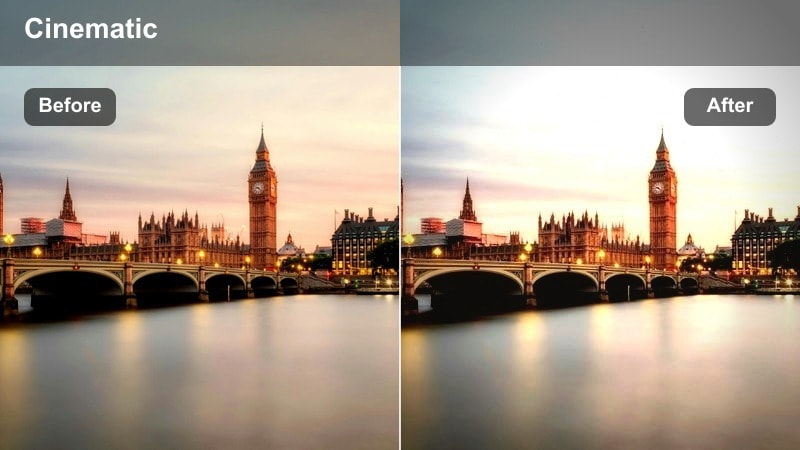
- Effect look: Soft contrast with lifted shadows and a gentle warm tint that flatters early daylight on concrete and glass.
- Best for: Talking-to-camera walks on wide sidewalks, coffee runs, and gentle sunrise B-roll in residential city streets.
- Editing tip: Slightly reduce the highlight intensity if your sky is overexposed and add a touch of vignette to keep attention on your face.
Soft Urban Morning Glow is ideal when your vlog opens with that first walk out the door, giving overcast or hazy sunshine a clean, flattering warmth. In Filmora, this filter subtly lifts the shadows around buildings and trees so background details are visible without crushing the blacks, while a mild golden tint keeps the scene feeling fresh instead of overly stylized.
Use this look whenever you are filming handheld walking shots and want your skin tone to stay natural even as light shifts between open sidewalk and building shade. Combine it with Filmora stabilization, a small vignette, and gentle motion graphics for time or location to turn a simple coffee run into a polished, repeatable intro sequence for your channel.
Use AI Tools to Match Your Sidewalk Vibe
Filmora s AI-powered color tools help you adapt Soft Urban Morning Glow and other sidewalk filters to whatever city you are filming in. Instead of manually tuning every clip, you can let AI analyze exposure, contrast, and skin tones, then fine-tune the preset so it feels tailored to your footage.
Apply your chosen filter first, then run Filmora s AI color optimization to balance highlights and shadows across clips from the same walk. This keeps your morning vlog consistent even if clouds move or you change streets mid-shot.
 secure download

Preview Sidewalk Filters on Real City Footage
Before you commit a full vlog to one look, you can test different city sidewalk daily vlog filters on a short sequence inside Filmora. Drop in a mix of walking shots, crosswalks, and storefront clips, then toggle filters to see which one best supports the story you want to tell that day.
Scrub slowly through your timeline and switch filters on key clips like your intro, B-roll, and closing walk home. This makes it easy to build a visual rhythm where brighter looks carry daytime errands and more cinematic palettes mark transitions and reflections.
secure download1000+ Video Filters and 3D LUTs
Beyond these sidewalk presets, Filmora includes a large library of filters and 3D LUTs you can stack for more cinematic skyline shots or dramatic night walks. Start with a subtle city vlog filter as your base, then add a matching LUT to create a signature grade that repeats across your channel.
Use LUTs on hero shots like drone skyline views, bridge walk timelapses, or slow pans across intersections, while keeping your main talking segments on cleaner filters. This contrast makes daily vlogs feel more like crafted mini films without losing their authentic, in-the-moment vibe.
secure downloadCrisp Sidewalk Streetlife
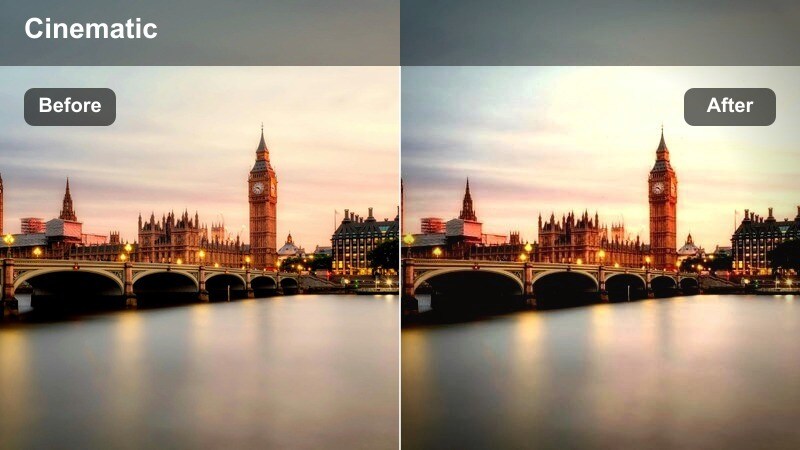
- Effect look: Clean, bright, and slightly desaturated look that sharpens edges on buildings, signs, and pavement details.
- Best for: Fast-paced morning sidewalk B-roll, bustling crosswalks, and establishing shots of urban neighborhoods.
- Editing tip: Use a touch of sharpening but avoid going too far; combine with subtle motion blur transitions to keep clips feeling energetic instead of harsh.
Crisp Sidewalk Streetlife is built for energy: it brightens your frame, pulls detail out of bricks and signage, and reduces overall saturation so the scene feels modern and punchy. In Filmora, this helps you cut together quick montages of commuters, bikes, and traffic without colors clashing or looking too intense on-screen.
Use this filter for B-roll chapter breaks or fast reveals of new locations. Pair it with speed ramps, whip-pan transitions, and subtle motion blur in Filmora to convey rapid movement between blocks or subway exits while keeping the visuals sharp and easy to follow.
Latte Walk Side Streets
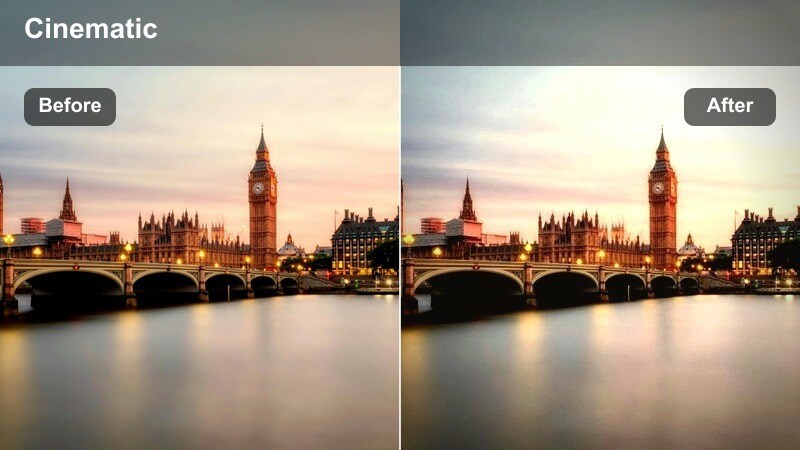
- Effect look: Warm beige and soft brown emphasis that adds cozy tones to sidewalks, brick walls, and cafe exteriors.
- Best for: Casual morning coffee vlogs, side street strolls, and storytelling intros near local cafes or bakeries.
- Editing tip: Keep saturation moderate and slightly lift blacks to avoid heavy contrast that can fight the relaxed, cozy vibe.
Latte Walk Side Streets leans into warm neutrals, softening gray concrete into pleasing beige and bringing subtle richness to brick, wood, and cafe signage. In Filmora, this filter helps you create a consistent cozy palette across multiple shots, even if you move from shade to sun along quieter side streets.
Apply this look to your slower story segments, like talking about plans for the day, sharing personal updates, or chatting with friends over coffee. Combine with gentle background music, minimal text overlays, and slower crossfade transitions to keep the mood relaxed and inviting for viewers.
High Noon City Errands and Chores
Harsh Sun Tamer
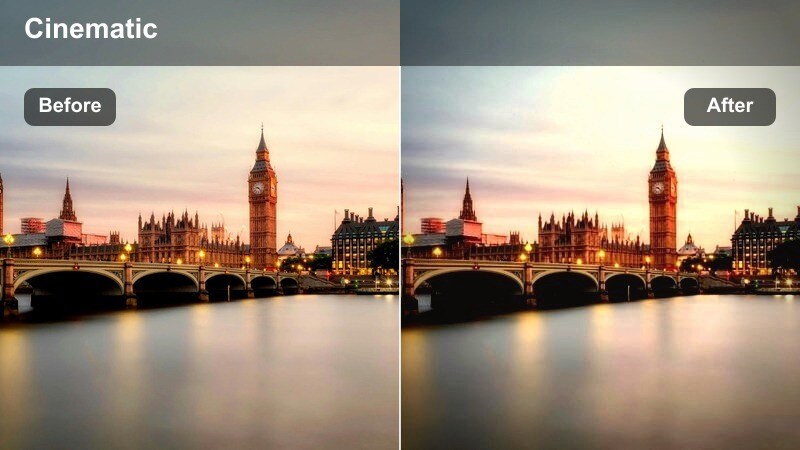
- Effect look: Lowered highlights and softened contrast to control midday glare on sidewalks, cars, and glass windows.
- Best for: Midday errand vlogs, outdoor shopping segments, and quick check-ins filmed under strong direct sunlight.
- Editing tip: Combine this filter with a slight clarity decrease and subtle film grain to hide blown-out areas and make footage feel more polished.
Harsh Sun Tamer is designed to rescue those necessary but unflattering midday clips when you have no choice but to film under hard sun. In Filmora, it pulls down clipped highlights on pavement and cars, softens contrast on your face, and gently compresses dynamic range so viewers are not distracted by glare.
Use this filter whenever you are running errands, crossing wide streets, or filming near glass storefronts at noon. Add a touch of film grain and reduce clarity as suggested, then stabilize your walking shots in Filmora to turn difficult lighting into clean, usable footage for your daily vlog timeline.
Clean Concrete Neutral
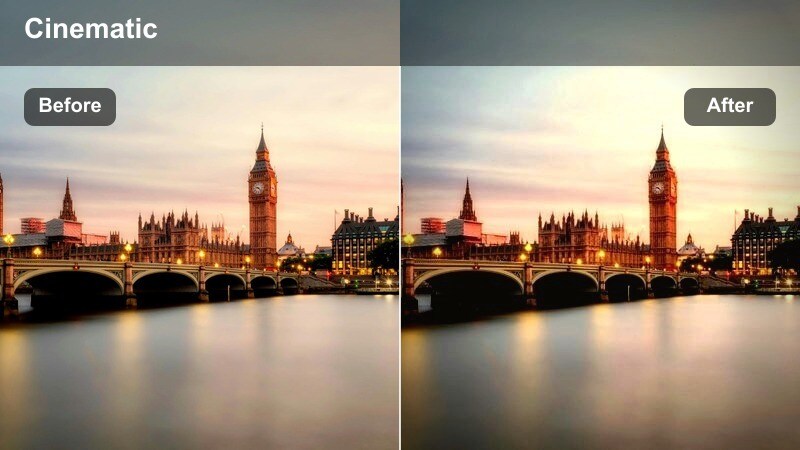
- Effect look: Balanced, true-to-life colors with neutral grays that keep concrete, street signs, and storefronts looking realistic.
- Best for: Daily errand vlogs, outfit-of-the-day sidewalk shots, and honest documentary-style city walks.
- Editing tip: Use this filter as your baseline and only adjust white balance for each clip so your entire vlog keeps one consistent neutral look.
Clean Concrete Neutral keeps color grading simple and accurate, ideal when your priority is authenticity and clarity over stylization. In Filmora, this preset levels out color differences between clips so your sidewalks, storefronts, and outfits maintain a consistent, lifelike appearance across the whole vlog.
Use it as your default everyday look, especially for talk-driven content like updates, productivity vlogs, or behind-the-scenes days. Adjust only white balance per clip in the color panel, then save the tweaked filter as a custom preset so future city walks match your established channel style.
Urban Pop Color Boost
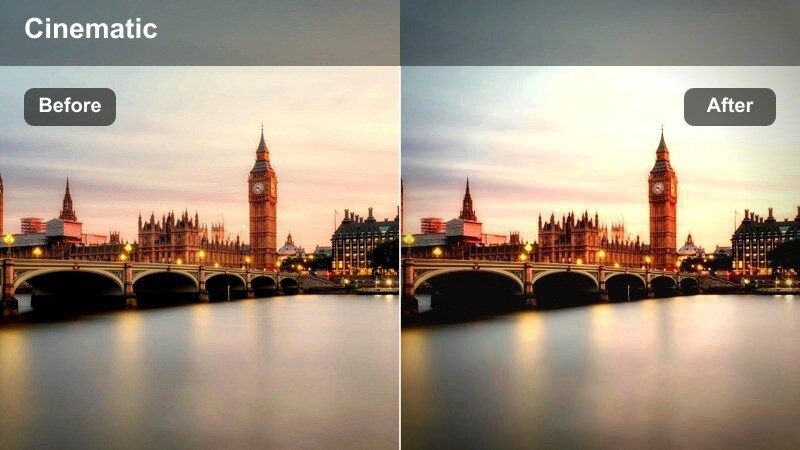
- Effect look: Punchy saturation on key city colors like traffic lights, crosswalk stripes, and street art while preserving skin tones.
- Best for: Shopping trips, street art walks, and any daily vlog that leans on bold urban visuals and signage.
- Editing tip: Keep your clips short and dynamic, and consider selectively lowering blues in the shadows to stop the image from looking cartoonish.
Urban Pop Color Boost emphasizes the strongest colors in your frame, making murals, shop signs, and traffic signals jump out without breaking skin tones. In Filmora, this filter is perfect for B-roll-heavy segments that rely on eye-catching visuals rather than long monologues.
Apply it to quick cut sequences of storefronts, markets, and graffiti walls, then mix in close-ups of products, food, or outfits to build a vivid urban collage. Use keyframed zooms, dynamic text, and rhythmic music edits in Filmora to match the saturated, high-energy style this filter delivers.
Golden Hour Sidewalk Walks
Golden Pavement Glow
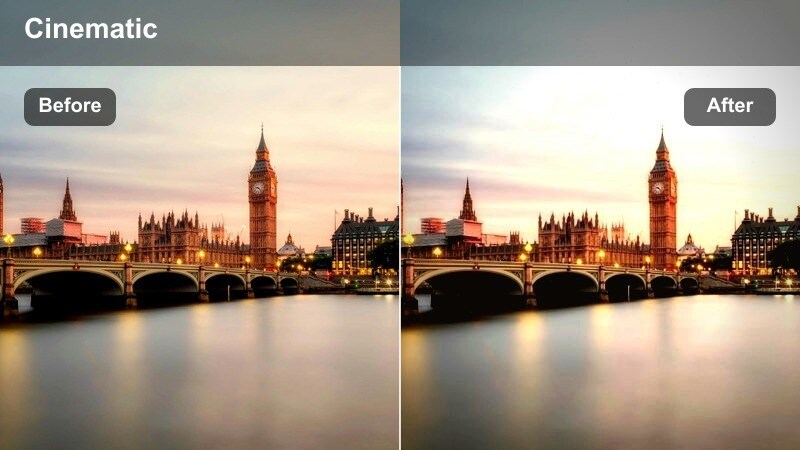
- Effect look: Rich golden highlights and gentle contrast that make late-afternoon light shimmer on sidewalks and building edges.
- Best for: Reflective end-of-day vlogs, relationship walk-and-talks, and slow B-roll of long city streets at sunset.
- Editing tip: Underexpose your original footage slightly, then let the filter raise warmth and highlights for a more cinematic sunset look.
Golden Pavement Glow is your go-to when the sun is low and casting long shadows across crosswalks and facades. In Filmora, it turns that natural warmth into a cinematic grade by enriching golden highlights and adding gentle contrast, while still preserving detail in your subject and surroundings.
Use this filter for end-of-day reflections, debriefs after work or class, or romantic walks that you want to feel nostalgic. Combine with slower cuts, a softer soundtrack, and minimal on-screen text so the light and movement along the sidewalk become the primary storytelling elements.
Soft Backlit City Portrait
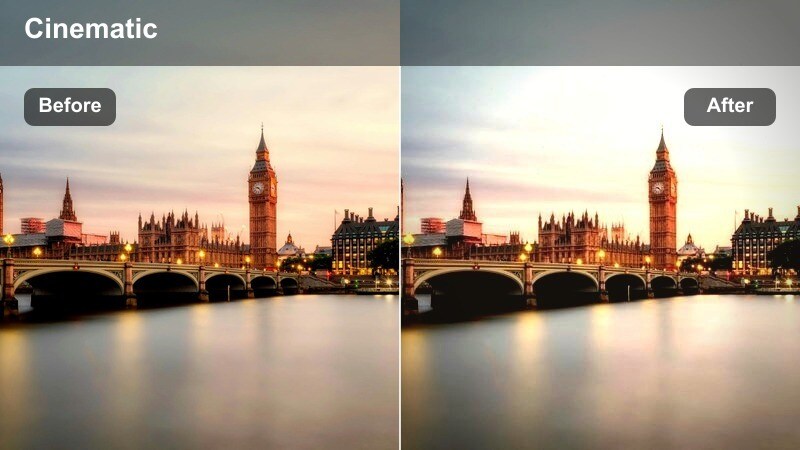
- Effect look: Softened highlights and gentle skin smoothing that make backlit sunset shots flattering and dreamy.
- Best for: Backlit talking-head intros, romantic or introspective walks, and portrait-style shots with strong sunset flare.
- Editing tip: Use lens flares and shallow depth-of-field footage, then apply this filter to keep details from disappearing into haze.
Soft Backlit City Portrait is tuned for shooting toward the sun, where flare and haze can quickly wash out your features. In Filmora, this preset manages those bright edges by softening highlights, smoothing skin, and adding a gentle glow that makes your silhouette stand out against dreamy backgrounds.
Apply this look to close-up sidewalk shots where the sun or streetlights sit just outside the frame, framing your face with a halo effect. Combine with Filmora s portrait tools, subtle slow motion, and minimalist titles to craft cinematic intros or emotional check-ins filmed on your usual walking route.
Sidewalk Sunset Story
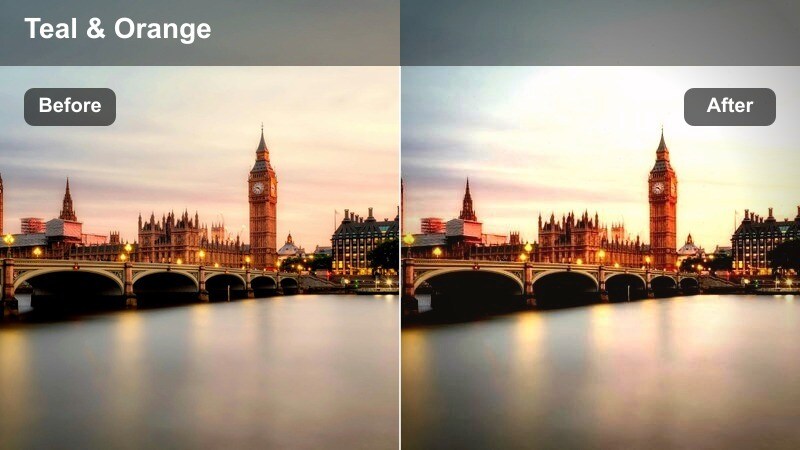
- Effect look: Warm, storytelling-driven grade with rich oranges and soft teal shadows for a cinematic golden hour city feel.
- Best for: End-of-day reflections, life updates while walking home, and cinematic B-roll of intersections at sunset.
- Editing tip: Record clean ambient sound of traffic and footsteps, then use slower cuts and this filter for a mini cinematic sequence inside your vlog.
Sidewalk Sunset Story gives your golden hour clips a filmic orange-teal balance that feels instantly cinematic without looking over-edited. In Filmora, it is perfect for turning a normal route home into a mini short film, with warm sidewalks and cooler shadows creating depth around your subject.
Use it for structured sequences: start with a wide of the intersection, move into medium walking shots, then cut to detail close-ups. Layer in field-recorded ambience and gentle camera moves like slow zooms or pans, and let this filter tie the sequence together as a visual chapter in your vlog.
Night Walks and City Lights on the Sidewalk
Neon Sidewalk Nights
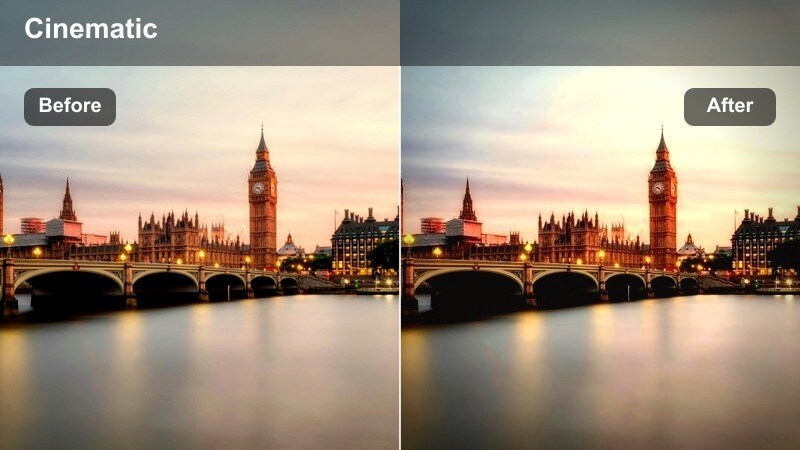
- Effect look: Deep contrast with boosted neon signs and storefront lights, adding a cyber-urban feel to night streets.
- Best for: Night walks in entertainment districts, street food lines, and evening hangouts near bright billboards.
- Editing tip: Stabilize your handheld shots and slightly lift shadows so your face stays visible against the intense neon background.
Neon Sidewalk Nights amplifies saturated signboards and window lights while keeping the rest of the frame moody and dark. In Filmora, this filter brings out vibrant pinks, blues, and greens in nightlife districts, giving your evening vlogs a stylized, cyber-urban atmosphere.
Apply it to handheld walking shots and crowd scenes, then use stabilization and noise reduction to clean up low-light noise. Mix in reflection shots on wet pavement or glass, and sync your cuts to the beat of your chosen track to create dynamic night sequences that still keep your face clearly readable.
Calm Late-Night Stroll
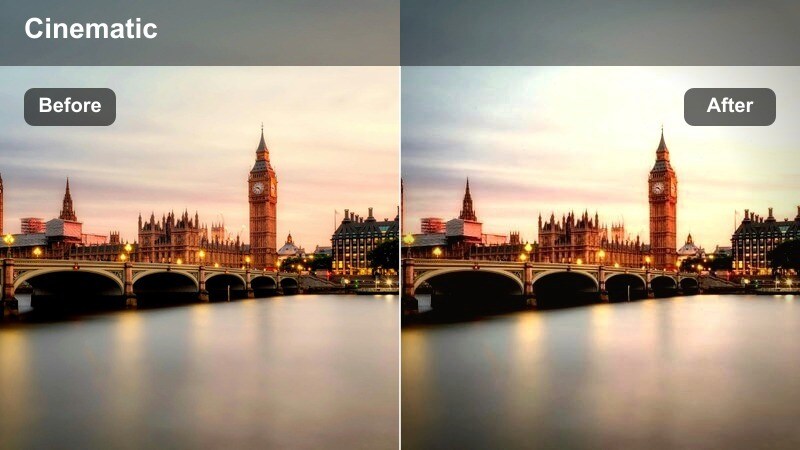
- Effect look: Softened contrast with gentle noise reduction and cool-warm balance that keeps night sidewalks calm and clear.
- Best for: Quiet late-night reflections, post-event walk home recaps, and slow-paced storytelling on less crowded streets.
- Editing tip: Lower saturation slightly and add subtle background music, letting your voice and the soft city lights carry the mood.
Calm Late-Night Stroll is tuned for quieter streets and softer streetlights, reducing harsh contrast and smoothing noise so the scene feels peaceful. In Filmora, this filter balances cooler shadows with warm lamp tones, preserving a relaxed nighttime vibe that is easy on the eyes.
Use it for reflective monologues after events, concerts, or long days when you want the edit to feel intimate and personal. Leave some pauses in your speech and hold shots a little longer in your timeline, letting the filter, ambient audio, and simple music work together to create a late-night mood.
City Skyline Night Walk
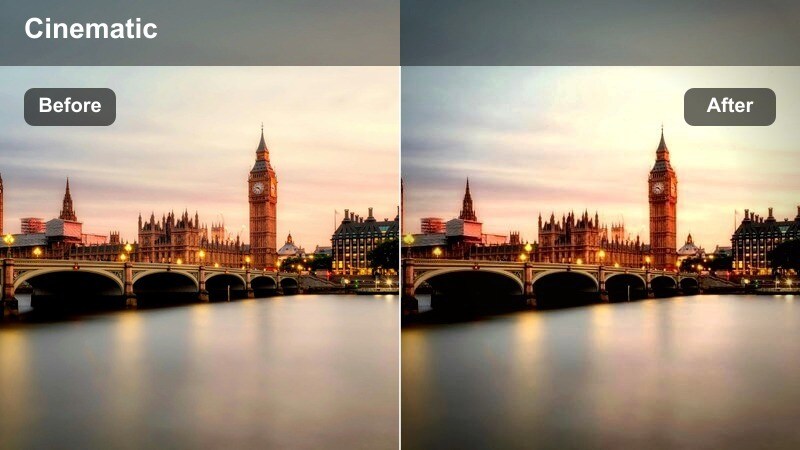
- Effect look: Cool-toned shadows with clean highlights that make skyscraper lights and distant skyline details stand out.
- Best for: Night walks along riverside paths, elevated sidewalks, or bridges where the city skyline appears behind you.
- Editing tip: Expose for the buildings in the distance and let this filter gently lift your face; avoid over-brightening the skyline.
City Skyline Night Walk focuses on making distant buildings and light patterns crisp while keeping the surrounding sidewalks naturally dark. In Filmora, this filter cools the shadows and cleans up highlights so skyline details stay sharp, even when your subject is closer to the camera.
Use it on bridges, waterfront paths, or elevated walkways where the city fills the background. Frame both talking segments and silent cutaways from the same spot, then apply this filter consistently to turn that viewpoint into a recognizable visual motif for your channel.
Tips for Using City Sidewalk Daily Vlog Filter Filters in Filmora
- Shoot a 5 to 10 second test clip on the sidewalk before each outing, then pick the filter that handles that specific light best.
- Keep one neutral filter as your default look and reserve the more stylized options for openings, chapter breaks, and skyline B-roll.
- Use consistent framing and camera height when walking so your filters and transitions feel seamless across different days.
- Record extra B-roll of crosswalks, shoes on pavement, and building reflections so you always have filler shots that match your sidewalk theme.
- Save custom versions of these filters with your tweaks inside Filmora so your city sidewalk daily vlog look becomes a recognizable brand.
With the right city sidewalk daily vlog filter, everyday walks between errands, classes, or work can look like intentional, cinematic pieces of your story instead of random clips.
Experiment with a few presets in Filmora, save the ones that match your city and routine, and pair them with skyline-focused LUTs to build a consistent urban style your audience instantly recognizes.
secure download