

 100% Security Verified | No Subscription Required | No Malware


 ChatGPT
 Perplexity
 Gemini
 Claude
 Grok
Grok
Cool lifestyle video filters are the fastest way to lock in a clean, modern aesthetic for your fashion content and urban vlogs. With the right mix of blue and silver tones, you can instantly turn everyday city shots into sleek, cinematic visuals.
This guide walks you through a curated set of Filmora filters designed for cool lifestyle looks, from soft blue washes to crisp, silver-toned contrast. Use them on urban lifestyle shots and clean aesthetic videos to keep your feed consistent, polished, and on-brand.
In this article
Subtle Cool Tone Lifestyle Filters
Soft Blue City Wash
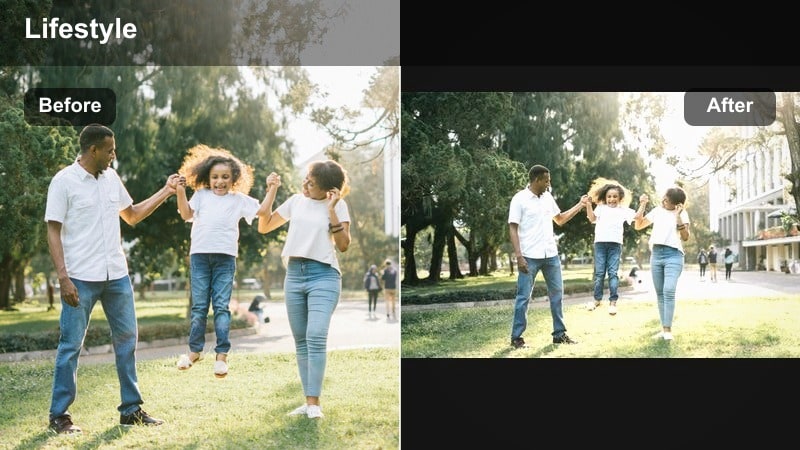
- Effect look: Light blue wash with soft contrast and gentle desaturation for a smooth, airy vibe.
- Best for: Daytime urban lifestyle shots, street fashion lookbooks, and soft minimal vlogs.
- Editing tip: Lower saturation on warm colors slightly and add a tiny bit of film grain to avoid a flat, digital look.
Soft Blue City Wash adds a gentle blue overlay that cools down your footage while keeping skin tones natural and flattering. In Filmora, this works especially well on clips shot in bright city streets or clean indoor spaces, where you want a modern, minimal color cast without turning everything icy.
Apply the filter, then use Filmoras saturation and grain controls to fine-tune the softness of the look. Slightly pull down oranges and yellows so signage and brickwork do not overpower the frame, and add a subtle film grain layer to keep your cool lifestyle aesthetic feeling organic instead of overly digital.
Lock in a Consistent Cool Palette with Filmora’s AI Tools
Filmora’s AI-driven color tools help you quickly match blue and silver tones across different cameras, locations, and shooting days. Instead of manually tweaking every clip, you can let AI analyze your footage and guide your cool grading choices.
Use AI color matching to copy your favorite cool lifestyle look from one reference clip to the rest of your timeline. Then fine-tune with basic controls like temperature, tint, and saturation so your blue and silver aesthetic feels unified but still uniquely yours.
 secure download

Preview Cool Lifestyle Filters in Real Time
Filmora lets you hover and preview filter presets directly on your clip so you can see each cool lifestyle look before you commit. This makes it easy to compare subtle silver tones versus stronger blue treatments on the same shot.
Stack filters with Filmora’s adjustment sliders to create variations of your favorite looks, then save them as custom presets. Over time, you will build a small library of blue and silver styles tailored to your personal brand and filming environments.
secure downloadCombine Filters and LUTs for Cinematic Lifestyle Videos
For a truly cinematic lifestyle look, blend Filmora’s cool filters with blue lifestyle LUTs and gentle silver grading. LUTs can give you an instant film-inspired base, while filters help refine the final mood and polish.
Start with a LUT that protects skin tones, then layer a subtle cool filter on top to nudge the image toward your signature blue or silver style. Adjust opacity on both layers so your footage stays clean and modern, never over-processed.
secure downloadMinimal Silver Glow
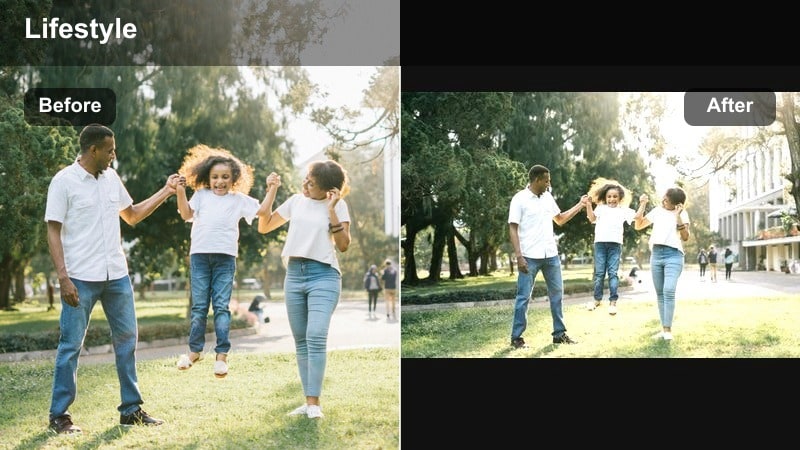
- Effect look: Soft silver highlight lift with clean shadows that adds a polished, editorial sheen.
- Best for: Lookbook-style fashion videos, product close-ups, and lifestyle desk setups.
- Editing tip: Raise highlights slightly and reduce clarity just a touch to keep the glow dreamy without losing detail.
Minimal Silver Glow is a muted silver-toned filter that smooths highlights and gives footage a refined, magazine-style shine. It is ideal when you are filming accessories, flatlays, and minimal desk scenes that need to look elevated and product-focused.
In Filmora, combine this filter with gentle highlight adjustments and a small clarity reduction to maintain a soft, flattering glow. Apply it to B-roll sequences while keeping your main talking shots more natural, so your video flows between everyday realism and polished editorial moments.
Cool Clean Aesthetic
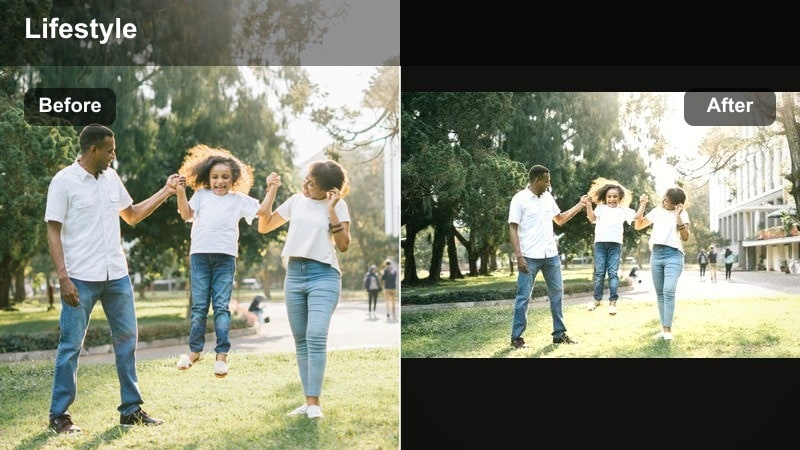
- Effect look: Neutral cool tone with slightly lifted blacks and gentle contrast for a clean, minimal lifestyle vibe.
- Best for: Clean aesthetic videos, home decor vlogs, and studio fashion hauls.
- Editing tip: Set blacks a bit higher to avoid harsh shadows and add a light vignette to guide attention to the center of the frame.
Cool Clean Aesthetic is a versatile cool filter that keeps your frame bright and tidy without strong color shifts. It is perfect for white interiors, wardrobe hauls, and decor content where you want everything to feel fresh and understated.
After applying it in Filmora, gently lift the blacks to avoid heavy shadows and add a subtle vignette so viewers focus on your subject or outfit. Pair the look with simple compositions and smooth camera moves to create a calm, curated lifestyle mood that fits modern feeds.
Bold Blue Lifestyle Filters
Deep Urban Blue
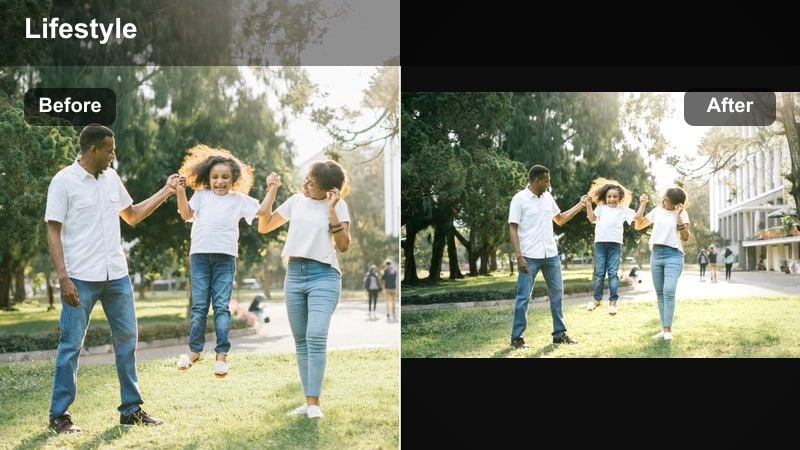
- Effect look: Rich blue shadows and cool midtones with punchy contrast for dramatic city visuals.
- Best for: Night city walks, rooftop shots, neon signs, and edgy street style outfits.
- Editing tip: Push contrast but keep exposure in check so blue shadows stay rich instead of crushing into pure black.
Deep Urban Blue delivers a strong blue treatment that makes city frames look cinematic and moody without losing clarity. It deepens shadows and midtones to turn ordinary streets, rooftops, and skyline shots into bold nighttime sequences.
In Filmora, add this filter to clips with neon signs, traffic, or metallic textures, then carefully adjust contrast and exposure so your blues remain rich and detailed. For extra drama, try combining it with a slight fade in the blacks or motion blur for streaky light trails in your night vlogs.
Blue Lifestyle LUT Lite
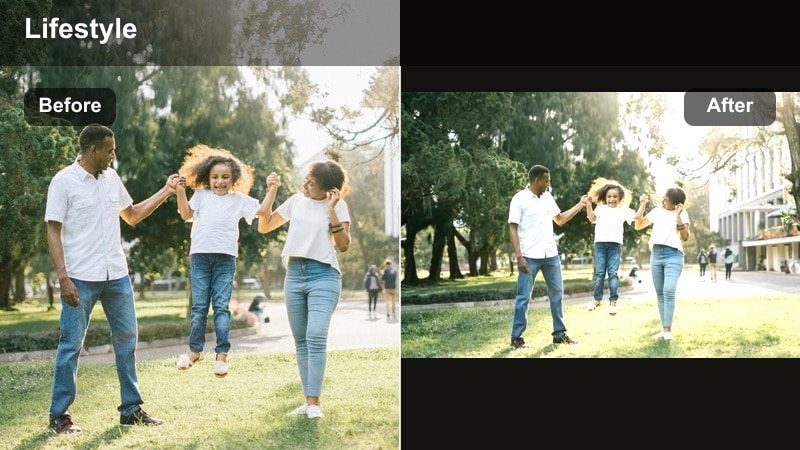
- Effect look: Soft LUT-style blue tint over neutrals with preserved skin tones and gentle contrast.
- Best for: Talking-head fashion vlogs, outfit-of-the-day segments, and casual coffee shop shots.
- Editing tip: Dial opacity to around 60-80 percent so the LUT adds style without overpowering natural colors.
Blue Lifestyle LUT Lite gives you a LUT-inspired blue lifestyle look while keeping faces natural and engaging. It is subtle enough for talking-head segments but still adds a clear, cohesive cool tone across your vlog.
Apply it in Filmora as a base look for both A-roll and B-roll, then lower the filter intensity per clip so skin tones stay flattering. Save your favorite variation as a custom preset to quickly match future videos and maintain a consistent cool lifestyle brand.
Icy Street Style
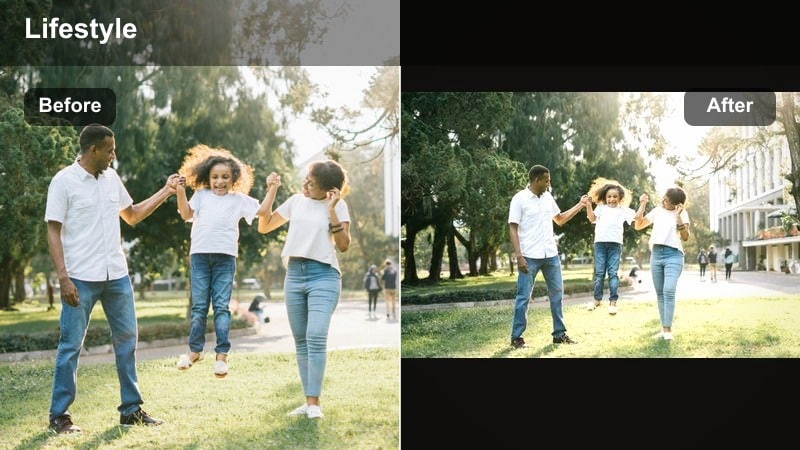
- Effect look: High-clarity cool tint with crisp edges, boosted blues, and slightly desaturated warm tones.
- Best for: Streetwear fits, sneaker close-ups, and gritty alleyway locations.
- Editing tip: Increase sharpness just a little and add a subtle film grain layer to keep the image edgy but not overly digital.
Icy Street Style creates an icy, high-definition look that makes fabrics, textures, and edges stand out. Blues are boosted while warm tones are slightly pulled back, which fits perfectly with concrete backdrops, graffiti, and streetwear outfits.
Inside Filmora, pair this filter with modest sharpness and a touch of grain to enhance detail without making the footage feel too harsh. Avoid heavy skin-smoothing to keep a natural, raw feel that matches sneakers, denim, and layered street fits.
Silver-Toned Lifestyle Filters
Silver City Matte
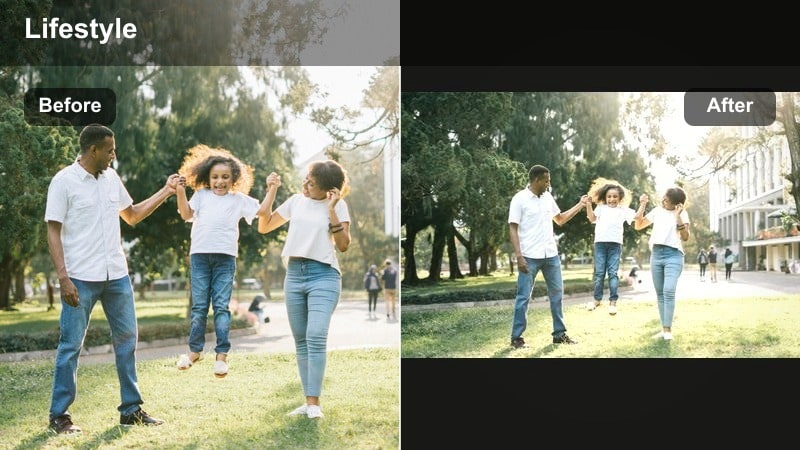
- Effect look: Cool silver tones with a soft matte curve that slightly lifts blacks and lowers saturation.
- Best for: Architectural b-roll, bridge shots, and moody overcast cityscapes.
- Editing tip: Add a bit of fade in the shadows and keep midtones neutral so buildings look sleek but not washed out.
Silver City Matte is a silver-toned filter that makes metal, glass, and concrete feel cinematic and stylish. It softens blacks and trims saturation, which is ideal for overcast skyline shots, industrial scenes, and modern architecture.
Use it in Filmora on your establishing shots of buildings, bridges, and streets, then gently adjust the fade and midtones so details remain visible. This filter works especially well when paired with cloudy or soft natural light, giving your urban B-roll a cohesive, film-like base for your lifestyle edits.
Silver Toned Editorial
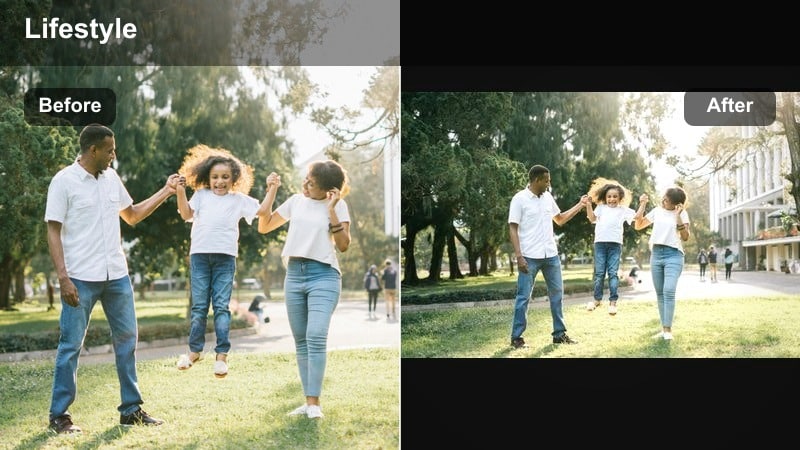
- Effect look: High-contrast silver look with cool highlights and neutral shadows for an editorial finish.
- Best for: Studio fashion shoots, runway-style walk segments, and high-end product shots.
- Editing tip: Protect skin tones by slightly warming the midtones while keeping highlights cool and punchy.
Silver Toned Editorial adds a strong, high-contrast silver finish that resembles printed fashion campaigns. Highlights go cool and punchy while shadows stay controlled, giving your studio content a sharp, professional feel.
In Filmora, combine this filter with careful midtone adjustments so skin stays flattering even as highlights go cooler. Use it on well-lit studio clips, runway walks, and hero product shots where you want a bold, fashion-forward silver aesthetic.
Silver Soft Lifestyle
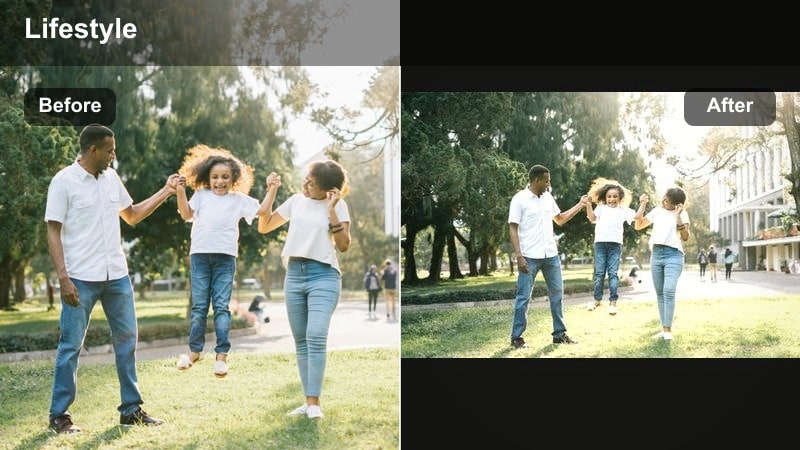
- Effect look: Gentle silver highlights with reduced saturation and soft contrast for a dreamy, quiet mood.
- Best for: Morning routines, self-care vlogs, and cozy home lifestyle shots.
- Editing tip: Lower contrast and add a slight blur to the background using Filmora effects for an extra dreamy touch.
Silver Soft Lifestyle brings delicate silver highlights and soft contrast to everyday moments, perfect for calm, cozy sequences. Colors are gently muted, which turns simple actions like making coffee or journaling into cinematic lifestyle visuals.
Apply it in Filmora to your morning or evening routine clips, then slightly lower contrast and add background blur for extra softness. Keep the same grade across the full sequence so viewers stay immersed in the relaxed, reflective atmosphere.
Cool Tone Lifestyle Mixing Filters
Cool Tone Lifestyle Filter
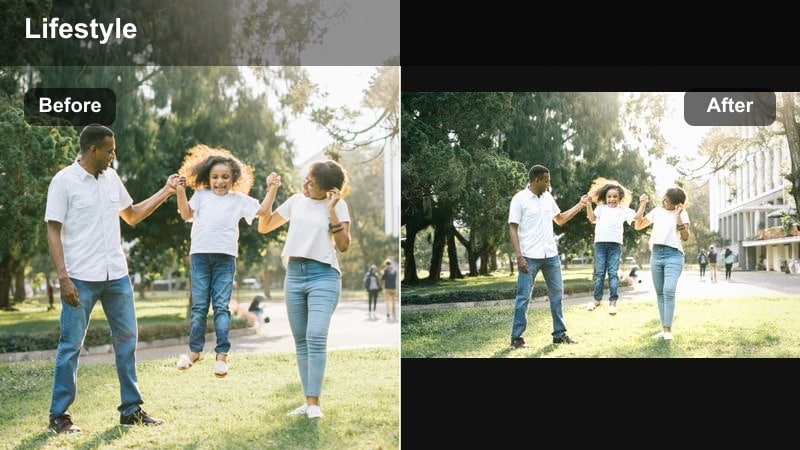
- Effect look: Balanced cool tint across shadows and midtones with soft contrast for a versatile lifestyle look.
- Best for: Day-in-the-life vlogs, mall trips, and everyday outfit montages.
- Editing tip: Keep white balance slightly warm before applying so the final image feels cool but not lifeless.
Cool Tone Lifestyle Filter is a flexible, all-purpose cool effect that makes entire vlogs feel cohesive without over-styling each shot. It gently cools shadows and midtones while maintaining soft contrast so your footage still feels approachable and real.
In Filmora, start with a slightly warm white balance, then apply this filter as your base look across multiple clips using adjustment layers. Save a few intensity variations so you can quickly adapt the same signature tone for indoor, outdoor, and evening scenes.
Blue Silver Hybrid
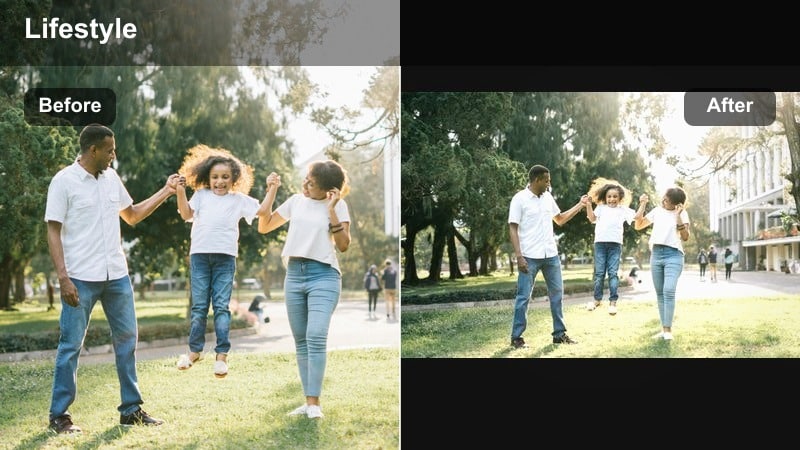
- Effect look: Combination of soft blue shadows and silver highlights with medium contrast and low saturation.
- Best for: Transition shots between scenes, establishing shots, and B-roll overlays.
- Editing tip: Use this filter mainly on non-speaking clips and keep intensity high to clearly separate them from A-roll.
Blue Silver Hybrid mixes soft blue shadows with bright silver highlights, making it ideal for establishing shots and transitions. The reduced saturation and medium contrast help bridge different lighting conditions while keeping your overall aesthetic aligned.
Apply it in Filmora to non-speaking clips like city bridges, wide streets, or scene openers, and keep the intensity higher than your A-roll. This creates clear visual chapters in your vlog and makes each new location or segment feel styled and intentional.
Cool Lifestyle Highlight Pop
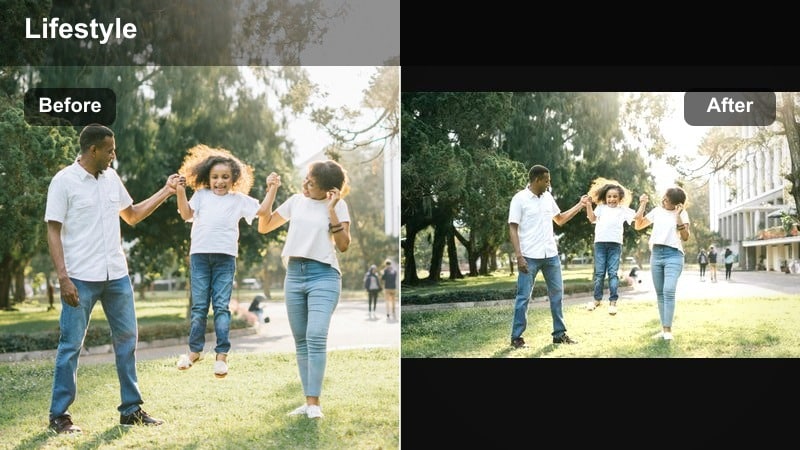
- Effect look: Cool highlight boost with slightly softened shadows to keep details visible and bright.
- Best for: Hero shots of outfits, reveal moments, and thumbnail frames.
- Editing tip: Use on selected hero clips only so the pop stands out and does not make the entire edit feel overly bright.
Cool Lifestyle Highlight Pop is a punchy cool filter that makes key lifestyle moments feel bright, crisp, and eye-catching. Highlights are cooled and lifted while shadows stay soft enough to preserve detail in clothing and hair.
Use it selectively in Filmora on outfit reveals, hero poses, and any frame you might export as a thumbnail. Keep backgrounds simple and apply the filter only to a few standout clips so those moments visually pop in the timeline and on your channel page.
Tips for Using Lifestyle Video Cool Filters in Filmora
- Shoot with neutral or slightly warm white balance so your cool filters have room to work without making skin look gray.
- Plan outfits and props in neutral, black, or white tones so blue and silver filters enhance the frame instead of clashing.
- Create a separate timeline just for testing filters on a few key clips, then apply your chosen look to the full project.
- Use adjustment layers in Filmora to apply cool lifestyle filters across multiple clips and keep the grade easy to tweak.
- Reduce saturation of strong reds and oranges when using deep blue filters so the overall palette stays cohesive.
- Save different intensity versions of the same cool filter to quickly adapt from indoor to outdoor scenes.
- Pair cool filters with smooth transitions and slower cuts for a polished, cinematic lifestyle feel.
- Export a short 10-20 second test clip with your chosen look and review it on social platforms before finalizing a full video.
Cool lifestyle video filters built around blue and silver tones can instantly upgrade your fashion content and urban vlogs, making everyday scenes feel intentional, cinematic, and on-brand.
Experiment with subtle and bold versions of these looks in Filmora, save your favorites as presets, and keep refining until your cool lifestyle aesthetic feels like a recognizable signature across every upload.
secure download