

 100% Security Verified | No Subscription Required | No Malware


 ChatGPT
 Perplexity
 Gemini
 Claude
 Grok
Grok
Galaxy-inspired color palettes instantly suggest mystery, depth, and a sense of wonder. Deep blues and violets feel cinematic and introspective, while touches of neon pink, cyan, or soft pastel glow add magic and energy. That mix makes Galaxy colors perfect for storytelling, sci fi, lofi, and dreamy lifestyle content where you want viewers to feel like they are drifting through space.
For video creators, YouTubers, and designers, Galaxy tones work beautifully in thumbnails, intros, overlays, lower thirds, and brand kits. Below you will find ready-made Galaxy color palettes with HEX codes you can plug directly into Filmora, your thumbnail editor, or any design app. Use them to keep a consistent Galaxy look across your edits, whether you are grading vlogs, designing motion graphics, or building a full channel aesthetic.
In this article
Dreamy Galaxy Aesthetic Palettes
Nebula Nightfall Glow

- HEX Codes: #050816, #151c3b, #413d8d, #d36ad6, #f5e9ff
- Mood: Ethereal, dreamy, and quietly cinematic.
- Use for: Ideal for slow, atmospheric vlog sequences, title cards, and dreamy travel montages.
Deep indigo and violet give Nebula Nightfall Glow a rich, night-sky base, while the soft lavender and pale highlight feel like stardust drifting across the frame. It is moody without being heavy, so your visuals stay magical and inviting rather than gloomy.
Use this palette to grade night cityscapes, add a Galaxy aura to talking-head shots, or design channel intros that feel cinematic but gentle. The darker tones (#050816, #151c3b) are great for backgrounds and overlays, while the brighter accents (#d36ad6, #f5e9ff) work perfectly for text, icons, subtitles, and thumbnail highlights.
Pro Tip: Build a Dreamy Galaxy Look in Filmora
To keep this Nebula Nightfall Glow palette consistent, set your darkest blue or purple as the base for your Filmora backgrounds, lower thirds, and title cards. Then reuse the lavender and soft white as your default text and accent colors across intros, chapter cards, and end screens.
Save your styled titles and overlays as custom presets in Filmora, so every new vlog, travel montage, or shorts edit can instantly match the same dreamy Galaxy mood without rebuilding graphics from scratch.
AI Color Palette
If you already have a screenshot, poster, or thumbnail mockup that nails this Nebula Nightfall Glow look, you can use Filmora's AI Color Palette feature to copy that style across your entire video. The AI analyzes the reference frame and automatically applies similar tones to the rest of your clips.
This is especially useful when you shoot on different cameras or in mixed lighting but want all your footage to share the same Galaxy color story. Choose your favorite frame, run AI Color Palette, and let Filmora harmonize the blues, violets, and highlights for you.
 secure download

HSL, Color Wheels & Curves
Once the base Galaxy look is matched, refine it using Filmora's HSL sliders, color wheels, and curves. You can deepen the indigo shadows, push violets slightly warmer for a romantic feel, or cool the highlights for a more sci fi tone. For more control, check out this guide to advanced color grading in Filmora and apply the same principles to your Galaxy footage.
Use curves to lift shadows just enough so details are visible in dark scenes, and nudge midtones toward purple to unify skin tones with your nebula-inspired environment. The result is a cohesive, cinematic Galaxy grade that still looks natural on faces and landscapes.
secure download1000+ Video Filters & 3D LUTs
If you want to stylize this Galaxy palette even faster, combine it with Filmora's filters and LUTs. You can layer a subtle soft-focus filter to make the nebula glow feel hazier, or apply a sci fi LUT to push blues and purples into a more graphic, stylized space look.
Filmora's video filters and 3D LUTs make it easy to experiment until you land on a signature Galaxy style that is repeatable for every upload, from long-form videos to shorts and Reels.
secure downloadStarlit Aurora Drift
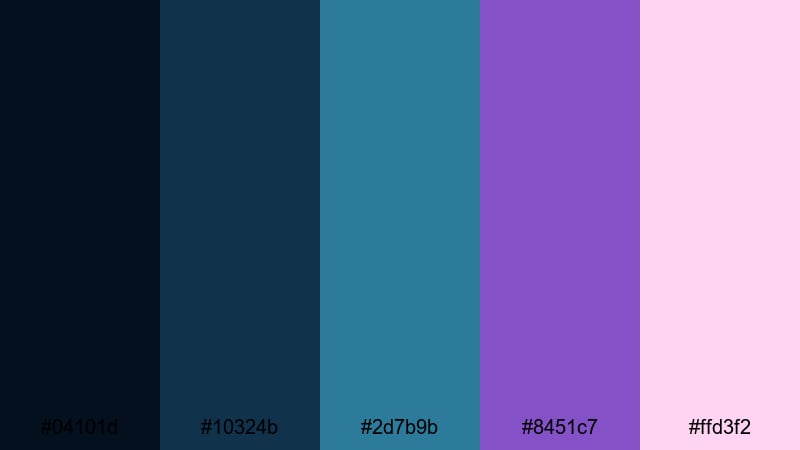
- HEX Codes: #04101d, #10324b, #2d7b9b, #8451c7, #ffd3f2
- Mood: Calm, wistful, and softly futuristic.
- Use for: Perfect for cinematic b roll, aerial night shots, and ambient lofi music visuals.
Starlit Aurora Drift feels like a slow-moving curtain of light across a midnight sky. The cool blues and teals make your footage feel clean and modern, while the violet and blush tones soften everything into a more emotional, nostalgic space.
Use the deep blue shades for backgrounds, overlays, and gradient wipes, then reserve the teal and pink for call-to-action buttons, waveform visuals, or titles on lofi and ambient music videos. It works especially well in intros for tech channels that still want a calm, dreamy Galaxy vibe.
Celestial Cottagecore Sky
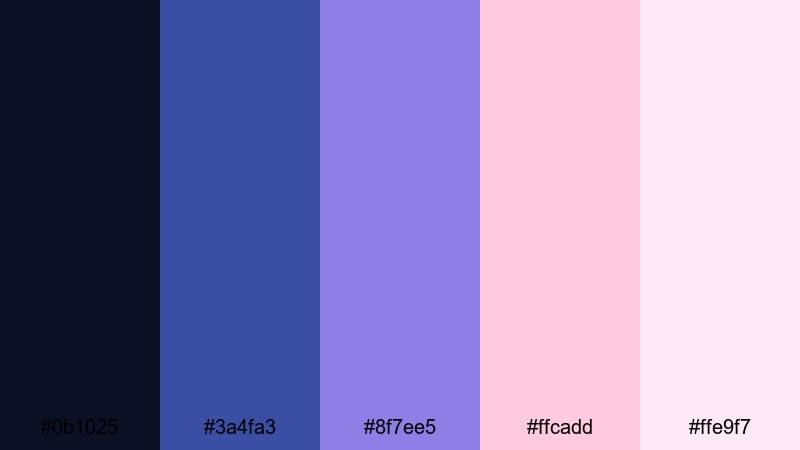
- HEX Codes: #0b1025, #3a4fa3, #8f7ee5, #ffcadd, #ffe9f7
- Mood: Whimsical, cozy, and slightly nostalgic.
- Use for: Great for aesthetic lifestyle vlogs, study videos, and dreamy storytelling edits.
Celestial Cottagecore Sky blends night-sky blues with gentle violets and rosy highlights to create a soft, comforting Galaxy vibe. It feels like stargazing from a quiet countryside porch, mixing cosmic drama with warm, homey charm.
Apply the darker blue as your footage base, then use the lilac and pink for handwritten-style titles, annotations, and stickers. This palette is perfect for journaling vlogs, cozy study-with-me edits, and aesthetic shorts where you want the Galaxy look without harsh contrast or neon intensity.
Milky Way Dreamscape
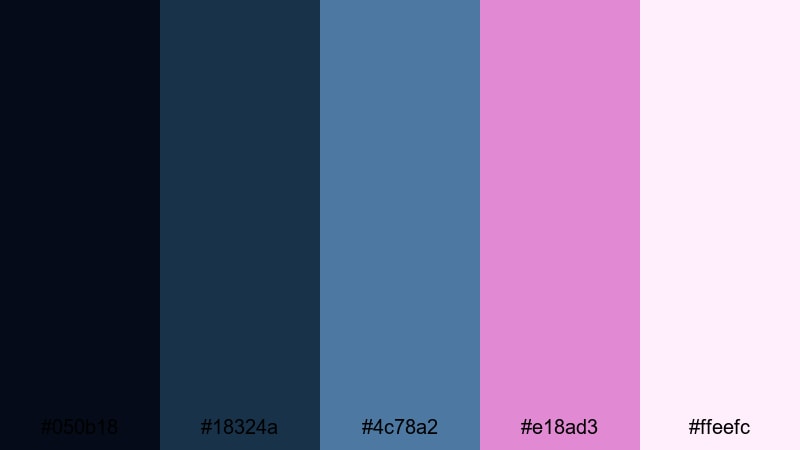
- HEX Codes: #050b18, #18324a, #4c78a2, #e18ad3, #ffeefc
- Mood: Hopeful, serene, and softly cinematic.
- Use for: Use for inspirational quotes, end screens, and reflective travel or diary style edits.
Milky Way Dreamscape has a peaceful, uplifting tone thanks to its smooth gradient from dusk blues into a soft magenta and pale rose. It feels like the sky just after sunset, when stars are starting to appear and everything looks slightly surreal.
Use the midtone blue and magenta in your titles and transitions to create a gentle Galaxy flare, while the pale highlight is excellent for legible text, buttons, and logo lockups. It is a strong choice for motivational edits, cinematic B-roll reels, and heartfelt storytime videos.
Bold & Vibrant Galaxy Palettes
Cosmic Neon Cascade

- HEX Codes: #050816, #122563, #4f3fdc, #ff3fb4, #00f0ff
- Mood: Energetic, futuristic, and high impact.
- Use for: Perfect for gaming intros, tech promos, and fast paced TikTok or Reels edits.
Cosmic Neon Cascade explodes with electric violet, hot pink, and cyan against a dark Galaxy core. The contrast is intentionally extreme, which makes this palette ideal when you want your visuals to leap off the screen and grab attention in a crowded feed.
Use the deepest blue as your primary background and let the neon shades drive action elements: glitch titles, subscriber buttons, animated HUDs, and swipe transitions. It is perfect for gaming overlays, tech channels, or any energetic short-form content where you want a bold, cyber-Galaxy look.
Supernova Pop Splash

- HEX Codes: #050306, #2a133e, #ff2e63, #ffa41b, #10f0c2
- Mood: Explosive, playful, and upbeat.
- Use for: Great for challenge videos, product reveals, and bold kinetic typography sequences.
Supernova Pop Splash feels like a cosmic firework. The neon pink, orange, and aqua tones burst out of a nearly black purple base, giving your frames a bright, pop-art Galaxy style that still feels cohesive.
Use this palette to build playful YouTube thumbnails, high-energy transitions, and bold product highlight cards. It suits creators who want space vibes that are more fun and colorful than moody or serious.
Starburst & Stardust Pop

- HEX Codes: #070818, #2334a3, #5b2dab, #ff5ed1, #fff176
- Mood: Playful, punchy, and visually loud.
- Use for: Ideal for pop edits, music videos, and attention grabbing YouTube thumbnails.
Starburst & Stardust Pop combines saturated violets and pinks with a bright, almost cartoonish starlight yellow. This is a palette that wants to be noticed, perfect when your content is upbeat, fun, and a bit over the top.
Use the deep navy and blue for base graphics, then let the pink and yellow do the heavy lifting on titles, emojis, and animated stickers. It is a strong fit for dance edits, energetic music videos, and bold channel rebrands.
Hyperdrive Galaxy Arcade

- HEX Codes: #020412, #14214b, #30358f, #f21bb2, #39ffba
- Mood: Retro futuristic, intense, and fast paced.
- Use for: Best for retro game edits, sci fi trailers, and motion graphics with glitch or HUD elements.
Hyperdrive Galaxy Arcade feels like an 80s neon arcade lost in space. The deep navy and royal blue provide a strong foundation, while the neon magenta and mint green deliver that classic retro-futuristic punch.
Use the dark shades for character frames, borders, and UI panels, and reserve the neons for score counters, glitch text, and HUD highlights. It works brilliantly with VHS and glitch effects in Filmora when you want a nostalgic but futuristic Galaxy look.
Moody Deep Space Galaxy Palettes
Event Horizon Echoes
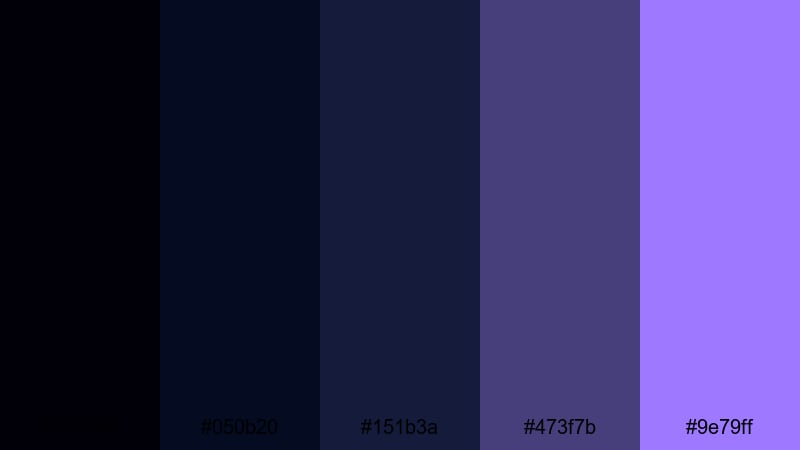
- HEX Codes: #010008, #050b20, #151b3a, #473f7b, #9e79ff
- Mood: Mysterious, introspective, and cinematic.
- Use for: Great for narrative shorts, sci fi concepts, and dramatic slow motion sequences.
Event Horizon Echoes leans into ultra-deep blues and muted purples, with just a hint of lilac to catch the light. It feels like standing at the edge of a black hole, quiet and tense but strangely beautiful.
Use this palette for dramatic stories, concept trailers, and serious tech content where you want a premium, film-like Galaxy grade. Keep titles in the lilac shade for readability, and let the almost-black blues dominate your backgrounds, shadows, and letterbox bars.
Black Hole Halo
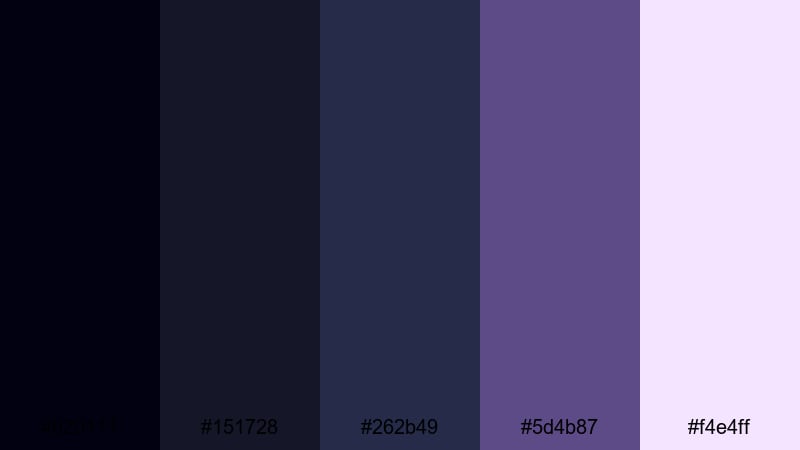
- HEX Codes: #020111, #151728, #262b49, #5d4b87, #f4e4ff
- Mood: Dark, contemplative, and quietly powerful.
- Use for: Perfect for tech explainers, cinematic title sequences, and minimalist brand intros.
Black Hole Halo is all about restraint. Cool graphite blues and muted violets give your footage a grounded, minimal aesthetic, while a soft pale highlight keeps text and UI elements clean and readable.
Use it when you want your brand to feel serious, modern, and slightly mysterious. It suits high-end product demos, UX motion graphics, and sleek channel intros where subtlety matters more than neon flair.
Quantum Starfield Noir
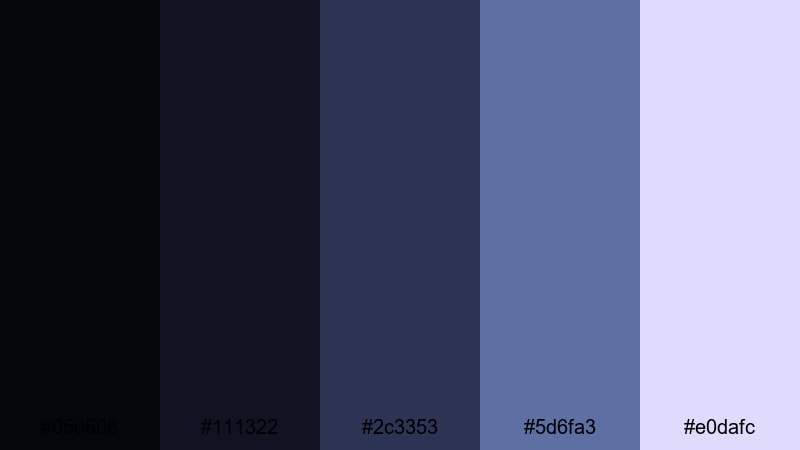
- HEX Codes: #050608, #111322, #2c3353, #5d6fa3, #e0dafc
- Mood: Elegant, restrained, and cerebral.
- Use for: Use for science content, thoughtful documentaries, and premium feeling brand videos.
Quantum Starfield Noir marries charcoal blacks with ink blues and muted periwinkle, creating an intelligent, understated Galaxy mood. The icy lavender highlight gently lifts titles and infographics without ruining the noir feel.
This palette is ideal for documentaries, explainer videos, and premium brand content where you want space inspiration but with a cool, rational tone. It pairs well with clean typography and minimalist motion design in Filmora.
Midnight Galaxy Observatory
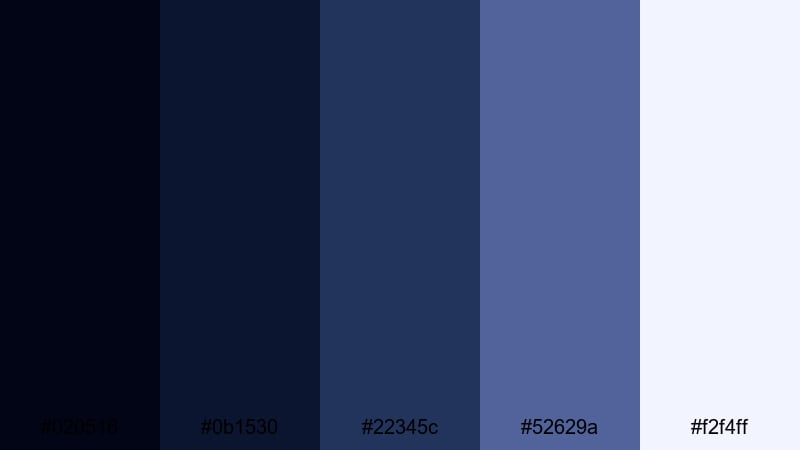
- HEX Codes: #020516, #0b1530, #22345c, #52629a, #f2f4ff
- Mood: Scholarly, calm, and cinematic.
- Use for: Ideal for educational videos, time lapse sky captures, and subtle lower third graphics.
Midnight Galaxy Observatory captures the feeling of watching the stars from a quiet mountain lab. The blues range from deep midnight to soft cornflower, with a gentle starlight white to keep diagrams, charts, and titles legible.
Use it for tutorials, astronomy explainers, and time-lapse sequences. The softer blues are perfect for info panels and lower thirds, while the darker shades make strong backgrounds for overlays and end-screen layouts.
Soft Pastel Galaxy Palettes
Pastel Cosmic Cotton
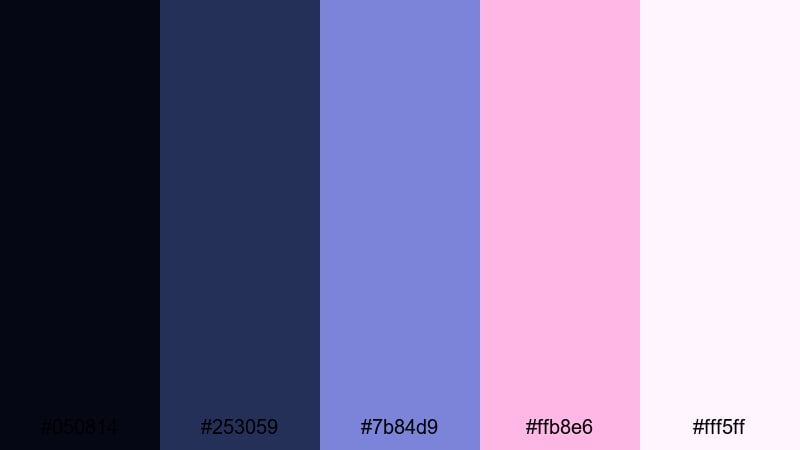
- HEX Codes: #050814, #253059, #7b84d9, #ffb8e6, #fff5ff
- Mood: Soft, romantic, and dreamlike.
- Use for: Great for aesthetic vlogs, K beauty content, and gentle product promos or lookbooks.
Pastel Cosmic Cotton takes a deep navy base and layers it with powdery lavender and cotton candy pink. The result is a Galaxy palette that feels airy and romantic instead of harsh or high-contrast.
Use the navy and slate blues for subtle backgrounds and borders, and let the pastel shades define product frames, transition cards, and typography. It is especially suited for beauty, fashion, and lifestyle channels that want a soft Galaxy twist without heavy neon.
Stellar Candy Cloud
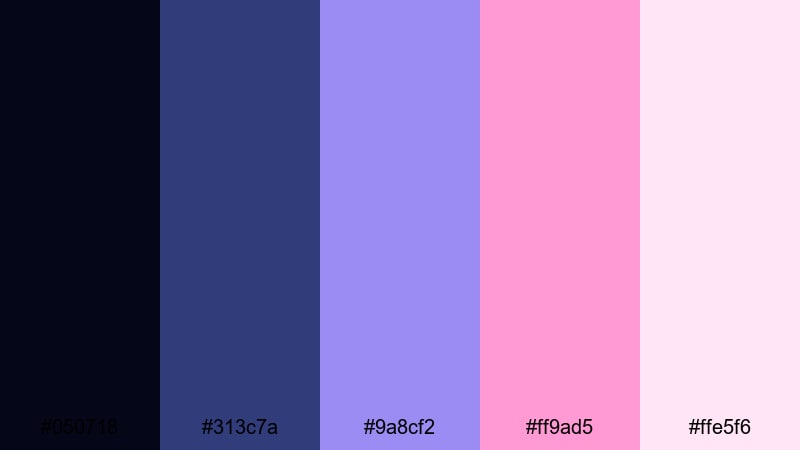
- HEX Codes: #050718, #313c7a, #9a8cf2, #ff9ad5, #ffe5f6
- Mood: Sweet, whimsical, and uplifting.
- Use for: Perfect for lifestyle channels, unboxings, and upbeat creator intros.
Stellar Candy Cloud looks like sugary clouds drifting through a twilight sky. Cool indigo keeps things grounded, while soft lilac and rosy pink add a cheerful, kawaii-inspired Galaxy mood.
Use this palette to design fun unboxing frames, intro cards, and sticker-style overlays. The lighter tones are perfect for on-screen text and price tags, and the indigo makes an excellent base for thumbnails and banners that still feel approachable.
Lunar Sorbet Galaxy
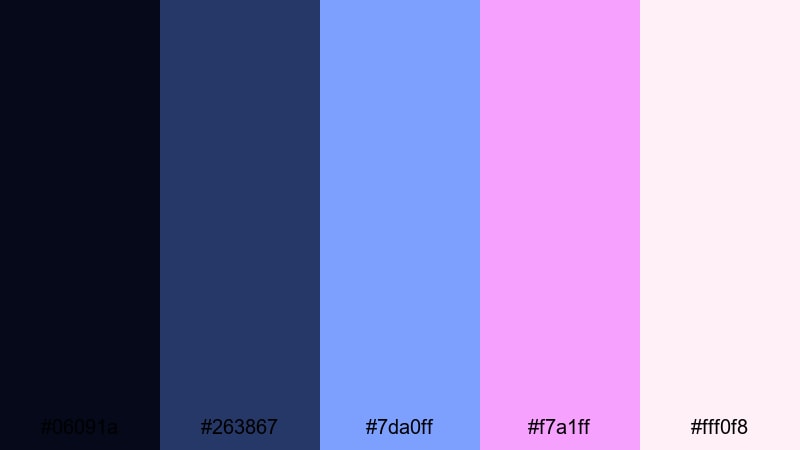
- HEX Codes: #06091a, #263867, #7da0ff, #f7a1ff, #fff0f8
- Mood: Airy, optimistic, and gently magical.
- Use for: Use for morning routine vlogs, travel diaries, and lighthearted montage edits.
Lunar Sorbet Galaxy feels fresh and optimistic, like pastel ice cream under moonlight. Navy and denim tones anchor the frame, while bright sorbet blues and pinks keep everything light and easy on the eyes.
Use it for morning routines, travel B-roll, and day-in-the-life edits. The pastel accents are great for timestamps, chapter markers, and subtle motion graphics, while the deeper tones help your footage feel cohesive and softly cinematic.
Tips for Creating Galaxy Color Palettes
Galaxy color palettes combine deep cosmic bases with glowing highlights, so balancing contrast, readability, and mood is key. Use these tips to adapt or build your own Galaxy schemes for video, thumbnails, and branding in Filmora and beyond.
- Pick a dark base first: choose 1 or 2 deep blues, purples, or near-blacks to anchor your backgrounds and shadows.
- Limit bright accents: use 1 or 2 neon or pastel highlight colors for text, icons, and buttons so the frame does not feel chaotic.
- Check text readability: test white, light lavender, or bright cyan on your darkest shade to make sure titles are readable on both desktop and mobile.
- Match your footage: lightly grade your clips toward your chosen palette (more blue, more magenta, etc.) so overlays and footage feel like they belong together.
- Stay on-brand: pick Galaxy hues that fit your niche, such as soft pastels for lifestyle, neon for gaming, or muted blues for education and tech.
- Use gradients wisely: blend two adjacent palette colors in backgrounds or transitions to create a smooth, atmospheric Galaxy feel.
- Test in thumbnails: export a frame with text and view it small to confirm that colors still pop and details are not lost.
- Save presets: in Filmora, save your favorite color corrections, titles, and overlays as presets so every new project can reuse the same Galaxy aesthetic.
Galaxy color palettes are powerful tools for shaping how viewers feel about your content and brand. From deep, moody blues to playful pastel nebulae, the right combination can make your channel look more cinematic, consistent, and memorable.
Use the HEX codes above as plug-and-play recipes in your editing and design tools, then refine them inside Filmora with AI Color Palette, HSL, and LUTs until they perfectly match your story. Whether you create vlogs, gaming videos, explainers, or aesthetic edits, a focused Galaxy palette will help every frame feel intentional.
Experiment with a few palettes, save your favorites as presets, and build a recognizable Galaxy identity that follows your audience from thumbnails to end screens.
secure downloadNext: Dark Color Palette
