

 100% Security Verified | No Subscription Required | No Malware


 ChatGPT
 Perplexity
 Gemini
 Claude
 Grok
Grok
Golden Honey sits between sunflower yellow and soft amber, giving it a warm, welcoming glow that feels optimistic without being loud. Psychologically, it suggests coziness, generosity, and a touch of everyday luxury, which is why it works so well for lifestyle content, food videos, and brands that want to feel friendly but still polished.
On screen, Golden Honey is a powerful storytelling tool. It can warm up flat footage, make skin tones look healthier, and guide the viewer’s eye in thumbnails, lower thirds, intros, and end screens. Below, you will find 15 ready-to-use Golden Honey color palettes with HEX codes, designed for creators and Filmora users who want consistent, cinematic color across videos, thumbnails, and branding.
In this article
Warm & Cozy Golden Honey Color Palettes
Afternoon Honey Drizzle
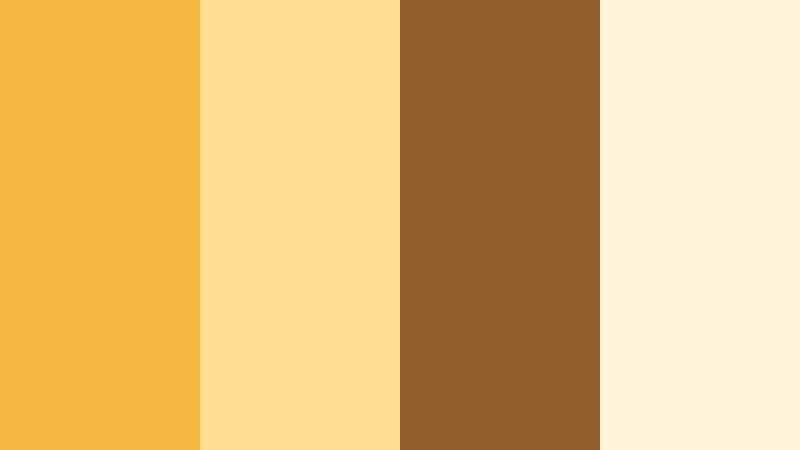
- HEX Codes: #f6b940, #ffdf92, #8f5c2a, #fff4da
- Mood: Comforting, homely, and softly radiant.
- Use for: Use for lifestyle vlogs, cozy recipe videos, and warm, inviting channel branding.
Afternoon Honey Drizzle wraps your visuals in a buttery Golden Honey glow, supported by soft cream and caramel browns. It feels like late sunlight sliding across a kitchen table, perfect for content that needs to feel personal, close, and comforting.
Use this palette to color your thumbnails, lower thirds, and intro cards for food videos, home diaries, and slow-living reels. In Filmora, you can carry these tones into overlays, background shapes, and text highlights so your entire channel identity feels consistently warm and delicious.
Pro Tip: Enhance Your Golden Honey Visuals With Filmora
When you lean into a palette like Afternoon Honey Drizzle, consistency across every clip matters more than any single shot. In Filmora, you can build a Golden Honey look once, then apply it to intros, b-roll, talking-head segments, and social cuts so everything feels like part of the same warm story.
Combine soft vignette effects with gentle brightness and contrast tweaks to keep the honey tones glowing without blowing out your highlights. Save your favorite adjustments as custom presets in Filmora so every new video drops right into the same cozy visual world.
AI Color Palette
If you have a reference image that nails this Golden Honey mood, you can turn it into a full video grade in a few clicks. Filmora's AI Color Palette feature analyzes your reference frame or color card, then transfers its tones to any clip you choose.
This is ideal when your cooking vlog, b-roll of steam, and thumbnail stills all come from different cameras or lighting setups. Use AI Color Palette to harmonize everything so Golden Honey remains the star, instead of spending hours matching shots by hand.
 secure download

HSL, Color Wheels & Curves
To really fine tune Golden Honey, use Filmora's HSL controls to target yellows and oranges and shift them slightly warmer or cooler depending on your scene. Color wheels let you push mids toward honey while keeping shadows richer and more neutral, so your footage stays cinematic instead of looking flat.
You can also use curves for subtle S-shaped contrast, protecting highlights in bright honey areas while adding just enough depth in the browns. For a deeper walkthrough of grading, check out Filmora's tools for advanced color correction and grading and adapt those techniques to your Golden Honey projects.
secure download1000+ Video Filters & 3D LUTs
If you want a Golden Honey atmosphere without manual grading every time, lean on ready-made looks. Filmora’s video filters and 3D LUTs make it easy to test different warm, vintage, or cinematic styles on top of your honey palette.
Stack soft warm filters with subtle vignette and grain to turn simple kitchen or desk footage into a polished, brand-ready aesthetic. Once you find a combination that fits your channel, save it as a custom preset and reuse it for intros, outros, and shorts for instant cohesion.
secure downloadGolden Hearth Glow
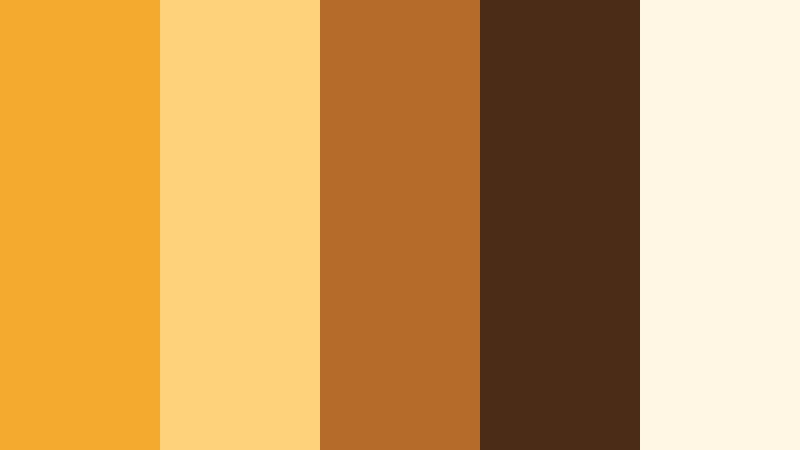
- HEX Codes: #f3aa2f, #fdd27a, #b56b2a, #4b2c16, #fff7e3
- Mood: Nostalgic, fireside warmth with rustic charm.
- Use for: Ideal for storytelling videos, family montages, and nostalgic cinematic looks.
Golden Hearth Glow deepens the Golden Honey base with ember browns and soft cream, echoing the light from a fireplace or candlelit evening. It brings a sense of memory and tradition to your frames.
Apply this palette to family montage videos, nostalgic storytelling edits, or tribute films. Use the lighter honey and cream for titles and frames, while the darker browns support backgrounds, lower thirds, and thumbnail shadows to keep text readable and cinematic.
Honeyed Breakfast Table
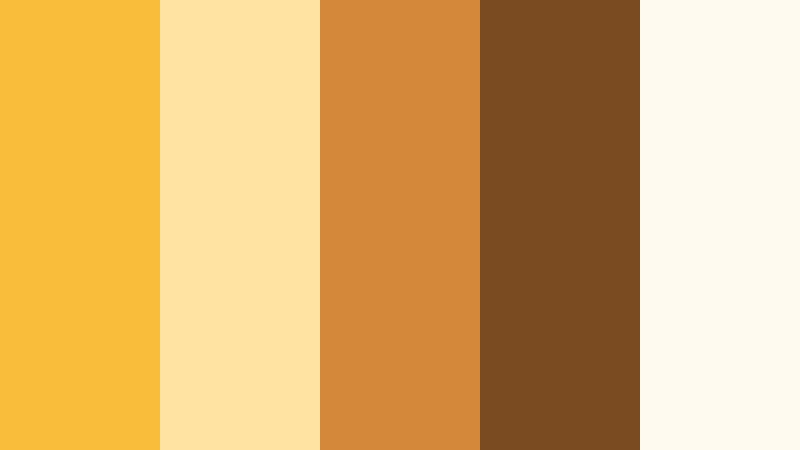
- HEX Codes: #f9bd3b, #ffe3a2, #d4893a, #7a4a21, #fffaf0
- Mood: Bright, friendly, and appetizing.
- Use for: Great for brunch and cafe vlogs, recipe shorts, and thumbnail accents around food.
Honeyed Breakfast Table feels like a sun-filled cafe morning, with Golden Honey highlights, toasty browns, and milky whites. It is appetizing and cheerful without becoming overly saturated.
Use the lighter tones (#ffe3a2, #fffaf0) as backdrop colors for text or recipe steps in Filmora, and let the richer browns frame plates, mugs, and close-ups in your thumbnails. This palette is especially effective for recipe shorts, brunch vlogs, and channel banners that center around food and hospitality.
Sunlit Woven Basket
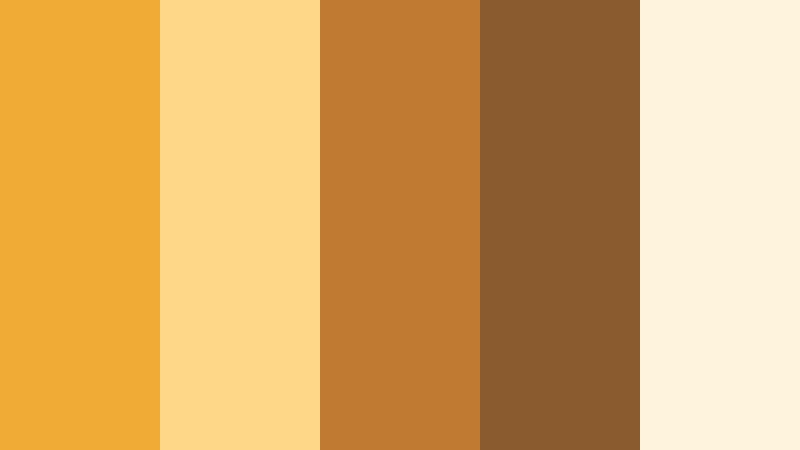
- HEX Codes: #f0ab36, #ffd789, #c07a32, #8a5b2e, #fef3dd
- Mood: Earthy, natural, and grounded yet bright.
- Use for: Use in DIY, crafts, and slow-living content where you want an organic, handmade feel.
Sunlit Woven Basket pairs Golden Honey with wicker browns and soft cream, evoking handwoven textures, straw baskets, and slow weekends. It keeps your visuals warm but adds a grounded, organic feel.
For DIY and craft videos, use the light cream as a neutral canvas for text, then drop accents of honey and brown into icons, borders, and chapter markers in Filmora. This palette also works well in thumbnails where you want a subtle rustic tone around your subject without distracting from the main image.
Caramel Honey Latte
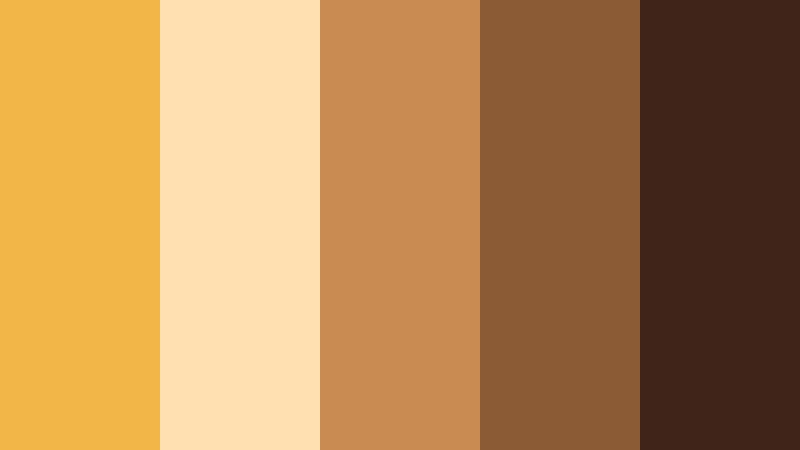
- HEX Codes: #f2b548, #ffe0b0, #c98b52, #8b5b35, #40241a
- Mood: Indulgent, intimate, and cafe-chic.
- Use for: Perfect for coffee shop b-roll, study-with-me videos, and aesthetic productivity channels.
Caramel Honey Latte channels the mood of a favorite corner cafe, with creamy Golden Honey, caramel mids, and espresso-dark accents. It feels intimate and slightly luxurious, great for aesthetic productivity content.
Use the deeper browns (#8b5b35, #40241a) as background colors for timeline titles or chapter cards in Filmora, then highlight key text and icons in honey and cream. On thumbnails, place your subject against the lighter tones and use the darkest shade for drop shadows and borders to make everything pop on crowded feeds.
Elegant & Modern Golden Honey Color Palettes
Urban Honey Luxe

- HEX Codes: #f5b63a, #111111, #3f3f3f, #ffffff, #d6a251
- Mood: Sleek, high-contrast, and contemporary.
- Use for: Use for premium intros, tech reviews, and minimalist channel branding that still feels warm.
Urban Honey Luxe throws Golden Honey against deep charcoal, pure black, and crisp white for a high-contrast, premium feel. It softens the coldness of typical tech palettes with a warm golden accent.
Use honey for logo marks, progress bars, and subscribe buttons, while #111111 and #3f3f3f handle backgrounds and frames. In Filmora, build minimalist openers with strong black or white fields and let Golden Honey be the signature accent color that viewers recognize as your brand.
Gallery Honey Spotlight

- HEX Codes: #f3b23c, #f7f3ec, #c1a98a, #5b4b39, #15100d
- Mood: Artful, refined, and quietly dramatic.
- Use for: Ideal for portfolio reels, fashion lookbooks, and cinematic B-roll sequences.
Gallery Honey Spotlight treats Golden Honey like a pool of gallery light in a room of taupes and deep browns. It feels editorial and refined, perfect for visuals that highlight craft, fashion, or art.
Use the off-white and beige tones as matte-style backgrounds for typography and credits in Filmora, then reserve honey for highlights on product shots or model frames. The darker shades (#5b4b39, #15100d) work well in gradient overlays that subtly vignette your footage and draw the eye to the brightest honey area.
Minimal Honey Grid

- HEX Codes: #f5b948, #fef7ea, #d9c29b, #777777, #1f1f1f
- Mood: Clean, structured, and design-forward.
- Use for: Great for channel layouts, lower-third graphics, and minimalist social posts.
Minimal Honey Grid mixes a soft Golden Honey accent with ivory, beige, and cool grays to create a neat, structured visual system. It is modern and design-driven, great for educators, designers, and productivity creators.
In Filmora, use #fef7ea for background panels and #d9c29b or #777777 for body text to keep things calm and legible. Golden Honey (#f5b948) should be reserved for headings, key numbers, and important CTAs in your thumbnails and end screens so viewers instantly spot what matters.
Honey Noir Premiere
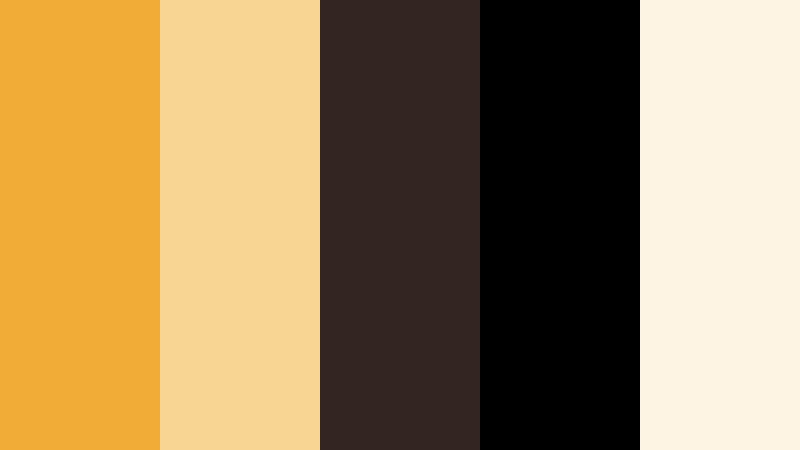
- HEX Codes: #f0ac36, #f6d692, #332521, #000000, #fdf4e4
- Mood: Cinematic, mysterious, and premium.
- Use for: Perfect for film-style trailers, title cards, and dramatic short films on YouTube.
Honey Noir Premiere contrasts a spotlight of Golden Honey and cream against almost-black browns and pure black, echoing movie posters and cinema marquees. It gives your content a premium, mysterious edge.
Use this palette for trailers, story-driven intros, and dramatic shorts. In Filmora, let #000000 and #332521 dominate the background, then drop in honey highlights for titles, logo stings, and light leaks. The pale cream (#f6d692, #fdf4e4) can be used for subtle light gradients across text to add depth without losing the dark, cinematic mood.
Sunset & Outdoor Golden Honey Color Palettes
Savanna Honey Dusk

- HEX Codes: #f5b740, #fce29a, #e88c4a, #a54b31, #28313a
- Mood: Adventurous, cinematic, and travel-ready.
- Use for: Use for travel vlogs, safari-style footage, and golden hour B-roll.
Savanna Honey Dusk blends Golden Honey with terracotta oranges and a deep twilight blue-gray, conjuring big skies and open landscapes at sunset. It feels adventurous and cinematic, ideal for travel storytelling.
Use honey and light sand (#fce29a) in your title cards and maps, then let the oranges and deep blue-gray shape your lower thirds and transitions in Filmora. This palette shines in golden hour drone shots, road trips, and destination reels where you want to underline the drama of the landscape.
Rooftop Honey Sunset
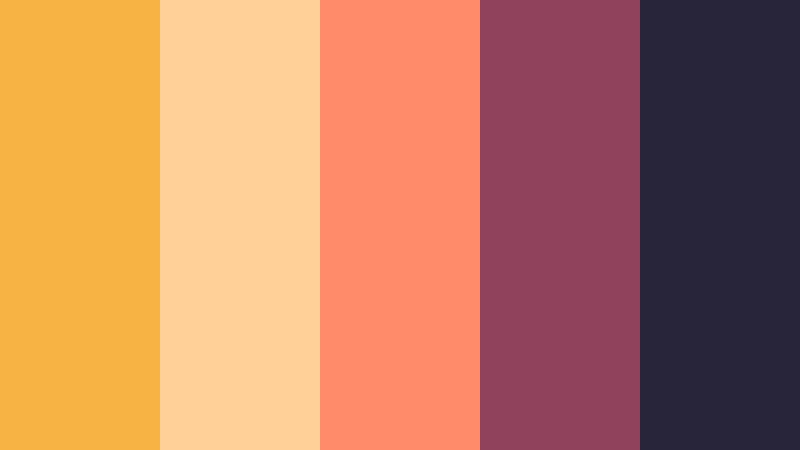
- HEX Codes: #f7b442, #ffd199, #ff8b6b, #90415b, #28253b
- Mood: Youthful, nostalgic, and city-romantic.
- Use for: Great for urban vlogs, rooftop hangout scenes, and music video color grades.
Rooftop Honey Sunset merges Golden Honey with coral, mauve, and indigo shadows. It captures the hazy magic of rooftop sunsets and late summer evenings in the city.
Use the warm tones on skin and highlights, and bring the deeper mauve and indigo into your shadows using Filmora's color tools. For thumbnails and titles, combine honey and coral (#ff8b6b) for punchy accent text, while #28253b anchors backgrounds so the warm colors glow without overwhelming.
Harvest Field Glow
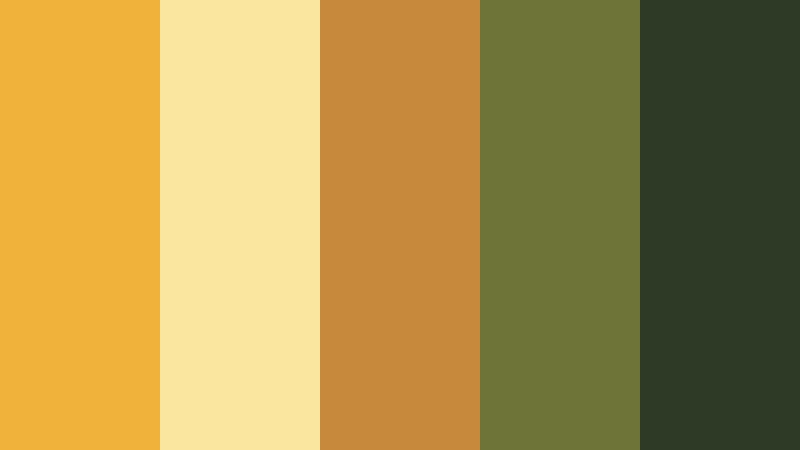
- HEX Codes: #f0b23a, #fbe6a0, #c78a3c, #6e7438, #2d3a26
- Mood: Organic, rustic, and nature-focused.
- Use for: Ideal for farm tours, nature walks, and seasonal content like autumn lookbooks.
Harvest Field Glow situates Golden Honey among wheat, olive, and deep moss greens. It feels seasonal and organic, perfectly suited to autumn, harvest, and countryside visuals.
Use the greens (#6e7438, #2d3a26) as grounding tones in overlays, maps, and title cards in Filmora, while honey and wheat shades highlight text and important frames. This palette works beautifully for nature walks, farm tours, gardening content, and any campaign that leans into earth and seasonality.
Fresh & Playful Golden Honey Color Palettes
Citrus Honey Splash

- HEX Codes: #f7b93e, #ffe788, #ffb84d, #ff6b6b, #3f8f7c
- Mood: Energetic, playful, and zesty.
- Use for: Use for upbeat intros, product promos, and fun shorts or Reels.
Citrus Honey Splash turns Golden Honey into a vibrant hero, boosted by grapefruit red and refreshing teal. It feels juicy and energetic, perfect for fast-paced edits and upbeat messaging.
In Filmora, use honey and lemon tones (#f7b93e, #ffe788, #ffb84d) as your primary brand colors, with #ff6b6b and #3f8f7c as accent pops in animated shapes, callouts, and subscribe buttons. This palette is ideal for product launches, fun shorts, and content that needs instant, scroll-stopping brightness.
Honey Lemon Studio

- HEX Codes: #f4b73f, #fff39c, #d1f0b0, #7bc5c9, #ffffff
- Mood: Bright, clean, and feel-good optimistic.
- Use for: Great for tutorials, wellness content, and creative studio branding.
Honey Lemon Studio keeps things airy and optimistic, balancing Golden Honey with lemon, mint, aqua, and crisp white. It feels studio-lit and clean, ideal for tutorials and wellness channels.
Use white and pale lemon as your primary background colors for text and diagrams in Filmora, while honey and aqua highlight key steps or sections. In thumbnails, this palette reads fresh and organized, making it perfect for how-to videos, planning content, and any brand that wants to feel clear and uplifting.
Honey Bee Pop Art

- HEX Codes: #f2b53a, #ffe26c, #232323, #ff4f7b, #3b7cff
- Mood: Bold, graphic, and pop-culture inspired.
- Use for: Ideal for commentary channels, memes, and eye-catching thumbnails.
Honey Bee Pop Art slams Golden Honey against deep black, punchy pink, and electric blue for a comic-book, meme-ready look. It is bold, graphic, and built to grab attention fast.
In Filmora, combine #232323 backgrounds with bright honey panels and drop in animated shapes in #ff4f7b and #3b7cff to emphasize jokes, reactions, or commentary points. For thumbnails, use thick outlines and big type with this palette to create a recognizable, high-impact brand style for reaction videos, commentary channels, and meme edits.
Tips for Creating Golden Honey Color Palettes
Golden Honey is versatile, but the way you combine it with supporting colors will decide whether your visuals feel cozy, premium, or playful. These tips will help you design palettes and apply them consistently in Filmora for video and design work.
- Pair Golden Honey with a deep anchor color (charcoal, espresso brown, or deep green) so text and UI elements have strong contrast and stay readable.
- Use one light neutral (cream, ivory, or soft beige) as your main background color, and reserve Golden Honey for accents like titles, buttons, and key graphics.
- For cinematic looks, shift supporting colors toward muted browns, olives, and dark blues; for playful content, bring in teals, corals, and brighter pinks.
- Keep your on-screen text mostly in white, black, or dark gray, and use honey only for short emphasis words or numbers so the palette does not feel noisy.
- Match your footage to your palette by gently warming highlights and midtones in Filmora, then cooling shadows if you need more depth and contrast.
- Create a small brand kit with your main Golden Honey HEX code plus 2 to 3 supporting colors, and reuse them in intros, lower thirds, and end cards for recognition.
- Test thumbnails at small sizes to ensure Golden Honey accents still stand out against your chosen backgrounds on mobile and crowded feeds.
- Save color presets and favorite filters in Filmora so every new video, short, or Reel seamlessly inherits the same Golden Honey vibe.
Golden Honey color palettes can transform your channel into a recognizable visual experience, whether you aim for cozy lifestyle, premium editorial, or bold pop-art energy. By pairing Golden Honey with the right supporting tones, you can shape how viewers feel about your brand in just a few frames.
Use the HEX codes above as starting points, then refine them in Filmora until they match your story, audience, and content style. With tools like AI Color Palette, HSL and curves, and ready-made filters and LUTs, it is easy to turn a favorite Golden Honey palette into a full, consistent look across every edit.
Experiment with these palettes on your next intro, thumbnail set, or full video project in Filmora, and keep iterating until your Golden Honey signature feels both cinematic and uniquely yours.
secure download