

 100% Security Verified | No Subscription Required | No Malware


 ChatGPT
 Perplexity
 Gemini
 Claude
 Grok
Grok
Soft Bronze is a warm neutral that sits between gold and brown, with a gentle metallic depth that feels both cozy and refined. It suggests warmth, nostalgia, and quiet luxury, which makes it perfect for human-centered content and brands that want to appear approachable yet premium. On screen, Soft Bronze echoes candlelight, golden hour, or a favorite vintage lens, without the harshness of pure orange or yellow.
In video editing and design, Soft Bronze works beautifully for cinematic grading, elegant YouTube thumbnails, polished intros, logo reveals, and social media covers. Below you will find Soft Bronze color palettes with HEX codes tailored for creators and Filmora users, so you can match your grading, graphics, and branding across vlogs, promos, and storytelling edits.
In this article
Soft & Romantic Soft Bronze Color Palettes
Rose Dawn Bronze
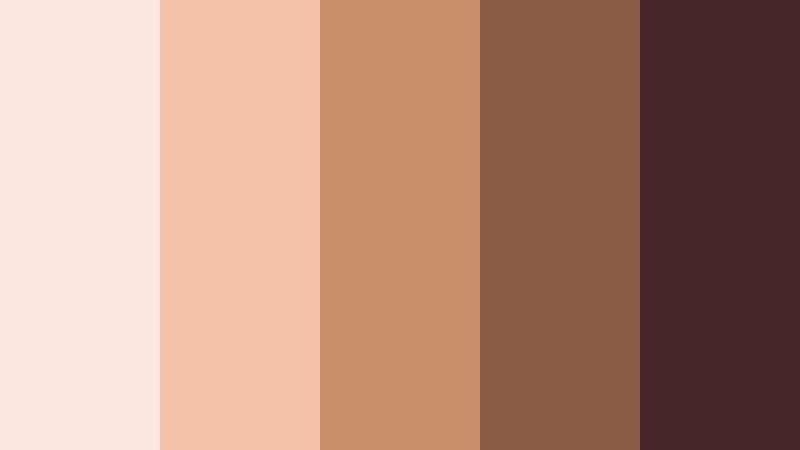
- HEX Codes: #fbe7e0, #f4c1a9, #c98f6b, #8b5c45, #462628
- Mood: Gentle, romantic, and nostalgic with a warm sunrise glow.
- Use for: Perfect for wedding highlight reels, engagement announcements, and soft lifestyle vlogs that need a dreamy touch.
Rose Dawn Bronze combines blush pinks, sunlit peach, and Soft Bronze shadows for a palette that feels like early-morning light on skin. The darker reddish bronze anchors the softer tones, giving your visuals depth without losing that dreamy, airy vibe.
Use this palette for save the date cards, lower thirds in wedding films, and YouTube thumbnails for romantic vlogs. In Filmora, you can color pick these HEX codes for titles, overlays, and frame accents so your B-roll, text, and transitions all share the same tender, nostalgic Soft Bronze atmosphere.
Pro Tip: Build a Cinematic Soft Bronze Look in Filmora
To keep a Rose Dawn Bronze look consistent, think in layers. Use the lighter tones for backgrounds and highlight areas, then bring in the richer bronzes for text, logo marks, and subtle vignettes. In Filmora, you can design your intro, lower thirds, and end screen with the same HEX values so every part of your video belongs to one cohesive Soft Bronze world.
Once you find a Soft Bronze setup you like, save it as a custom preset in Filmora. Apply that preset across your engagement reels, wedding films, and short-form clips so viewers instantly recognize your warm, romantic style, no matter which platform they are watching on.
AI Color Palette
If you have a still frame, brand card, or Pinterest reference that already nails this Rose Dawn Bronze mood, you can turn it into your grading base. Filmora's AI Color Palette feature analyzes the colors in your reference image and applies a similar palette across your clips, keeping skin, highlights, and bronzy shadows aligned.
Import a key shot from your wedding or lifestyle session, run AI Color Palette on your timeline, and let Filmora push your footage toward that Soft Bronze target. This saves time on manual grading and helps every cut in your sequence feel like it was shot in the same gentle sunrise.
 secure download

HSL, Color Wheels & Curves
To really fine tune Soft Bronze, use Filmora's HSL, color wheels, and curves tools. Nudge oranges and reds slightly toward pink for softer skin, lift the midtones for that hazy glow, and keep shadows on the warm side of neutral so your bronzy tones never look muddy. With the color wheels, gently warm the midtones while cooling highlights just a touch for a cinematic balance.
You can follow along with Filmora's color grading tutorials on YouTube to see how HSL and curves interact in a real timeline. Subtle S-shaped curves add contrast to this Soft Bronze palette without crushing detail, giving your wedding and lifestyle edits a polished, professional finish that still feels romantic and soft.
secure download1000+ Video Filters & 3D LUTs
If you want to move fast, Filmora's video filters and 3D LUTs make it easy to lock in a Soft Bronze aesthetic without grading from scratch. Layer a warm filter over your footage, then dial back the intensity and tweak with HSL until your highlights match the lighter HEX tones and your shadows sit in the deeper bronze range.
You can save combinations of filters and LUTs as presets, so every new wedding highlight, lookbook, or romantic vlog can instantly inherit your signature Soft Bronze style. This keeps your channel or brand feed consistent, whether you are editing long-form videos or quick vertical reels.
secure downloadBlush Bronze Whisper
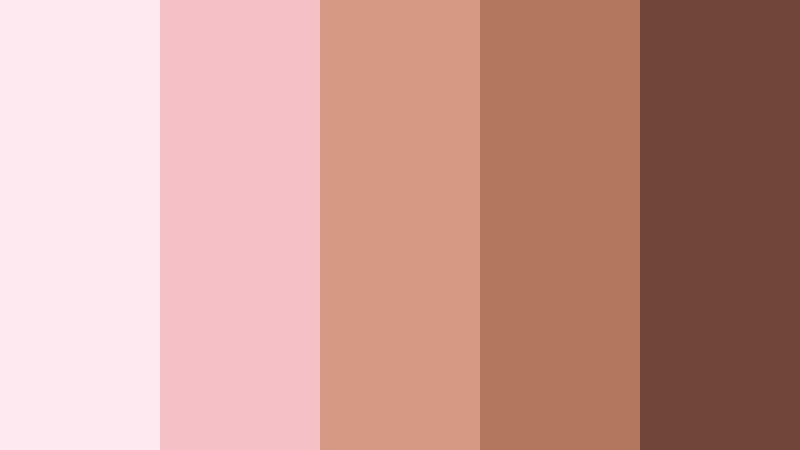
- HEX Codes: #fde9ef, #f6c0c7, #d59a83, #b3775d, #70463b
- Mood: Delicate, feminine, and softly glamorous.
- Use for: Ideal for beauty tutorials, skincare shorts, and pastel brand intros with a subtle luxury feel.
Blush Bronze Whisper mixes powdery pinks with gentle Soft Bronze tones to create a palette that feels light, airbrushed, and flattering. The deeper bronze shades prevent it from becoming too sugary, adding a polished, editorial touch.
Use the paler pinks as background blocks or lower third panels in your beauty videos, then bring in the darker bronze for typography, icons, and call to action buttons on thumbnails. In Filmora you can color match your text, overlays, and graphics to these HEX codes so your channel art, intros, and tutorial layouts all whisper the same soft glamour.
Caramel Latte Glow
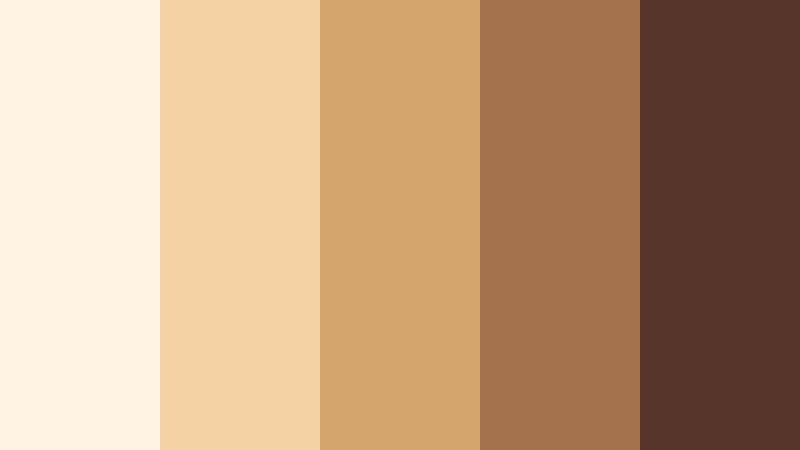
- HEX Codes: #fff3e4, #f4d2a4, #d4a56c, #a4734d, #57352b
- Mood: Cozy, comforting, and inviting like your favorite cafe corner.
- Use for: Use in coffee shop b-roll, cozy study vlogs, and podcast cover art with a warm lifestyle vibe.
Caramel Latte Glow layers cream, caramel, and Soft Bronze browns for that perfect cafe aesthetic. It feels like late afternoon light streaming through a window onto notebooks, laptops, and steaming mugs.
This palette works well for productivity and lifestyle content where you want viewers to feel relaxed and focused. In thumbnails and title cards, use the light cream as a base, with caramel and bronze for typography and borders. In Filmora, you can tint your footage slightly toward the mid-tone caramel shade to unify different locations into one inviting, latte-warm story.
Sunlit Terracotta Haze
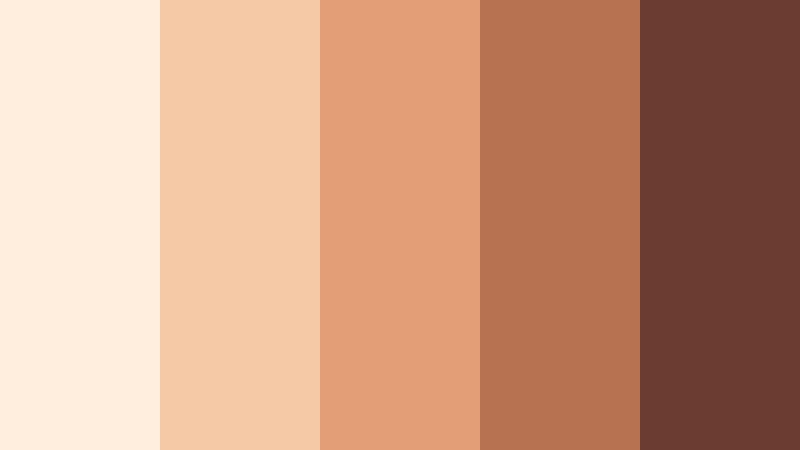
- HEX Codes: #ffeedd, #f5c9a6, #e49e75, #b67251, #6a3d30
- Mood: Sun-kissed, nostalgic, and softly earthy.
- Use for: Great for travel vlogs, outdoor picnics, and lifestyle reels that capture golden hour warmth.
Sunlit Terracotta Haze pairs peachy light with terracotta and Soft Bronze to mimic golden hour on brick walls and sun-warmed skin. It is earthy yet soft, making outdoor scenes feel cozy and cinematic.
Use the brighter tones as gradients behind your text and the deeper terracotta for headlines, icons, and subtle frames around your clips. When grading in Filmora, warm up oranges and reds to echo the mid-tone HEX values while keeping highlights creamy, so your travel b-roll and picnic shots radiate that hazy, sun-kissed bronze glow.
Champagne Bronze Bouquet
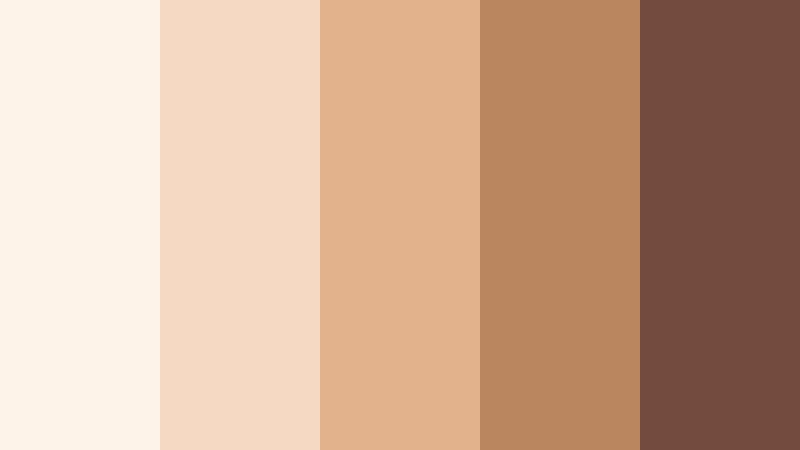
- HEX Codes: #fdf3e8, #f5d9c3, #e2b28c, #b98660, #744c3d
- Mood: Romantic, celebratory, and softly luxurious.
- Use for: Perfect for event highlight videos, bridal content, and brand promos with a refined party mood.
Champagne Bronze Bouquet combines creamy champagnes with Soft Bronze and warm brown for a palette that feels like clinking glasses, candlelight, and fresh florals. It is luxurious without being too bold, ideal for upscale yet approachable branding.
Use the paler tones for motion backgrounds and lower thirds in your event recaps, while the deeper bronze and brown make elegant type colors. In Filmora, match your overlay graphics, logo stings, and transition cards to these HEX codes for a cohesive, champagne-soft identity across teasers, reels, and full event films.
Elegant & Modern Soft Bronze Color Palettes
Minimal Loft Bronze
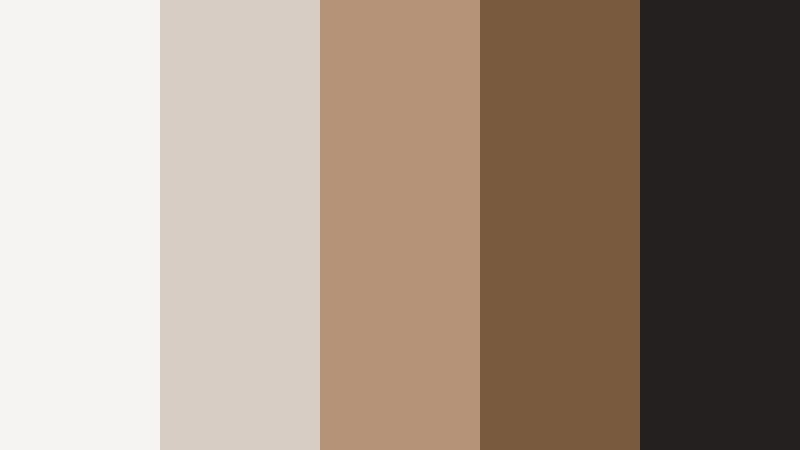
- HEX Codes: #f6f4f2, #d8cdc5, #b49378, #7a5a3f, #23201f
- Mood: Calm, refined, and contemporary with a design studio feel.
- Use for: Ideal for UX mockups, SaaS explainer videos, and minimalist channel branding.
Minimal Loft Bronze merges soft greige tones with structured Soft Bronze and a dark charcoal accent. It looks like a stylish studio or modern co-working space, perfect for tech and creative brands that want warmth without clutter.
Use the light neutrals for clean backgrounds in explainer scenes, and reserve the bronzes for accent elements such as titles, buttons, and icon outlines. The deepest shade works beautifully for main text on thumbnails and UI callouts. In Filmora, build your lower thirds and title presets with this palette to give your tutorials and product walk-throughs a calm, premium look.
Cinematic Bronze Noir
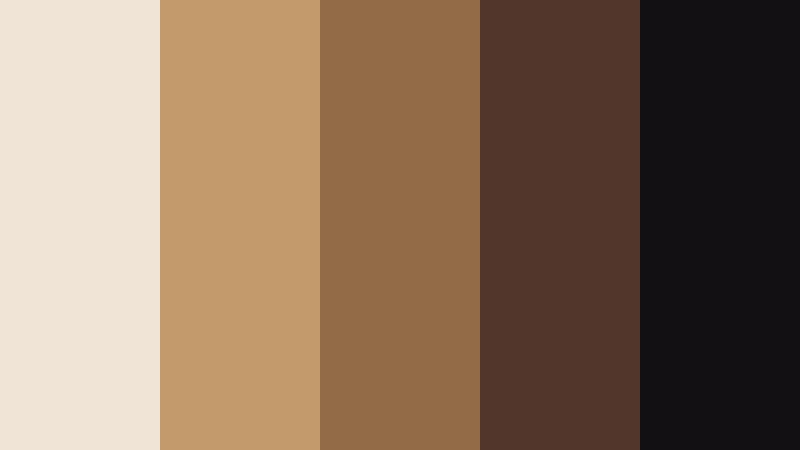
- HEX Codes: #f0e4d7, #c29a6b, #936b46, #52362b, #121012
- Mood: Moody, cinematic, and sophisticated with strong contrast.
- Use for: Use for film trailers, gaming intros, and dramatic title cards that need punch without loud colors.
Cinematic Bronze Noir balances creamy highlights and rich Soft Bronze mid-tones against inky blacks. The result is a high-contrast, dramatic look that still feels warm and refined rather than harsh.
Apply the lighter beige as a subtle wash behind your titles, with the mid bronzes for typography and UI elements, and the darkest tone for deep shadows or borders. In Filmora, combine this palette with strong contrast curves and vignette effects to give your trailers, story-driven edits, and game intros a big-screen Soft Bronze noir atmosphere.
Urban Bronze Concrete
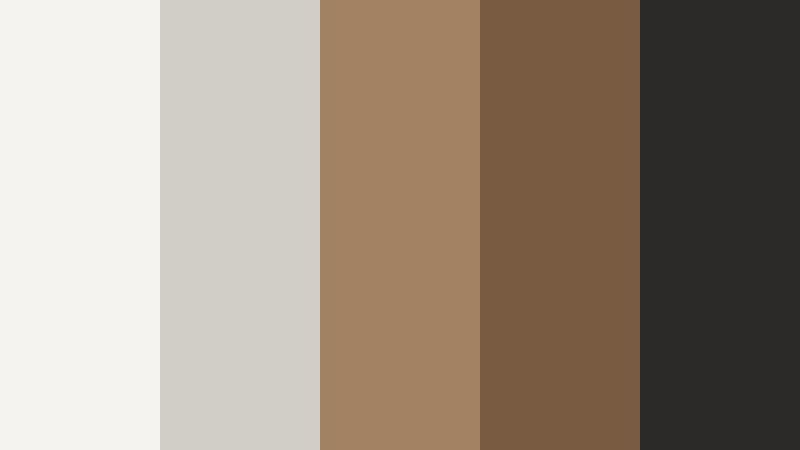
- HEX Codes: #f5f3f0, #d1cec8, #a38264, #795b42, #2c2a29
- Mood: Sleek, urban, and understated with a creative-agency polish.
- Use for: Great for portfolio reels, studio bumpers, and typography-led motion graphics.
Urban Bronze Concrete pairs cool concrete neutrals with warm Soft Bronze accents and dark charcoal. It feels like a city studio with polished floors and bronze fixtures, perfect for agencies, designers, and production houses.
Use the concrete tones as your base for slides, transitions, and frames, then let the bronze shades highlight key phrases, stats, or CTAs. In Filmora, apply this palette to kinetic typography templates and logo animations to give your reel or case study a stylish, agency-level identity.
Digital Bronze Interface
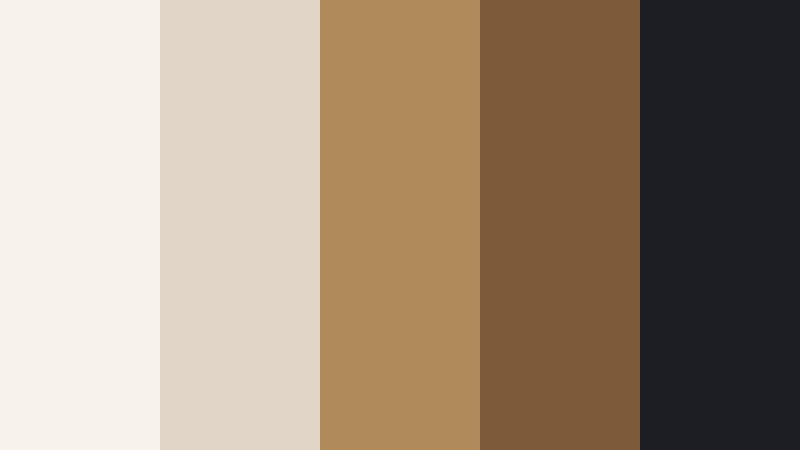
- HEX Codes: #f7f2ec, #e0d5c7, #b08a5b, #7c5a3a, #1c1e23
- Mood: Tech-forward, polished, and trustworthy.
- Use for: Perfect for app demos, dashboard UI previews, and product explainers that need warm neutrality.
Digital Bronze Interface mixes clean off-whites and beiges with Soft Bronze and a deep slate accent. It keeps your visuals techy and clear, but with enough warmth to feel human and approachable.
Use the light shades as background panels for screen recordings and mockups, with bronze tones highlighting key metrics, tooltips, or feature callouts. The darkest color is ideal for nav bars, captions, and code snippets in your explainers. In Filmora, build on-screen UI overlays with this palette so your product demos and onboarding series feel cohesive and brand aligned.
Editorial Bronze Monochrome
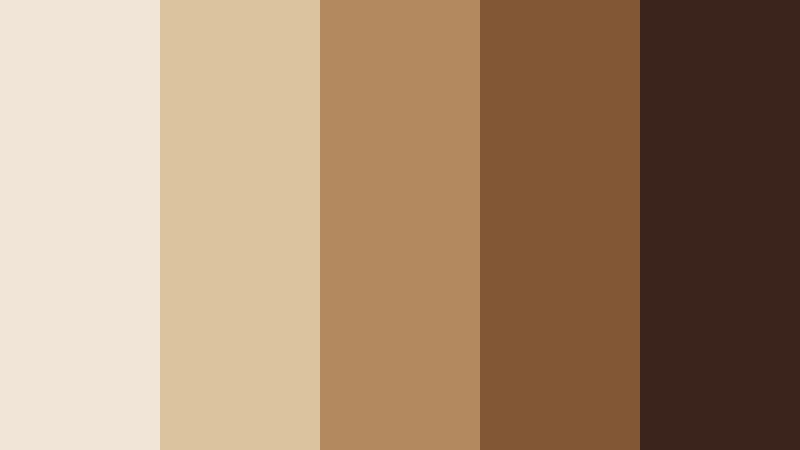
- HEX Codes: #f1e5d7, #dcc3a0, #b38a60, #815735, #3a241c
- Mood: Editorial, classy, and cohesive with a monochrome focus.
- Use for: Use in lookbooks, fashion reels, and stylized brand guides where consistency matters.
Editorial Bronze Monochrome sticks tightly to a family of Soft Bronze tones, from light tan to deep brown. This narrow range creates a very cohesive, magazine-like mood, especially effective for fashion and lifestyle brands.
Let the lightest tones fill your backgrounds and negative space, while the mid bronzes define shapes and the darkest color handles headlines and logo marks. Because every hue is a cousin of the others, your Filmora edits will feel instantly unified, whether you are cutting runway clips, styling reels, or behind the scenes looks.
Earthy & Organic Soft Bronze Color Palettes
Autumn Market Bronze
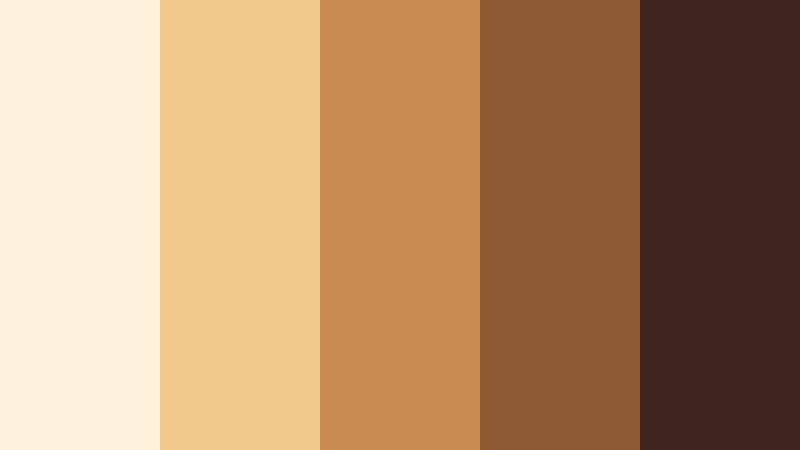
- HEX Codes: #fff2dd, #f0c88a, #c98b52, #8d5a33, #40251f
- Mood: Seasonal, grounded, and inviting with harvest warmth.
- Use for: Ideal for food vlogs, farmers market b-roll, and cozy seasonal promos.
Autumn Market Bronze blends creamy vanilla, pumpkin spice, and deep Soft Bronze browns to capture the feeling of crisp mornings at a market. It is warm and appetizing, perfect for food and seasonal content.
Use the lighter tones behind recipe steps and ingredient lists, with the mid bronzes for accent graphics like badges and arrows. The darkest shade works well for legible text over warm-toned footage. In Filmora, color grade your clips slightly toward the mid-orange bronze to make produce, baked goods, and fall outfits look rich and inviting.
Olive Grove Bronze
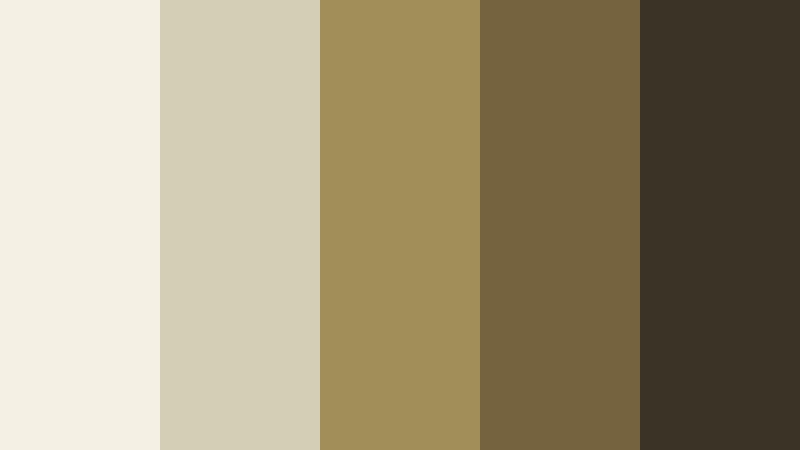
- HEX Codes: #f4f0e3, #d4cfb4, #a18f5a, #75633f, #3b3325
- Mood: Natural, serene, and artisanal with a slow-living feel.
- Use for: Great for sustainable brands, craft tutorials, and nature-inspired vlogs.
Olive Grove Bronze unites soft creams, muted olives, and earthy Soft Bronze accents. It evokes linen, handmade ceramics, and sunlight filtering through trees, ideal for slow-living and eco-conscious storytelling.
Let the light neutrals dominate backgrounds and whitespace, and use the olive and bronze tones for section headers, icons, and subtle borders. In Filmora, you can warm the greens toward these HEX values and slightly lift shadows to maintain that soft, organic feel in your outdoor and studio shots.
Desert Dune Bronze
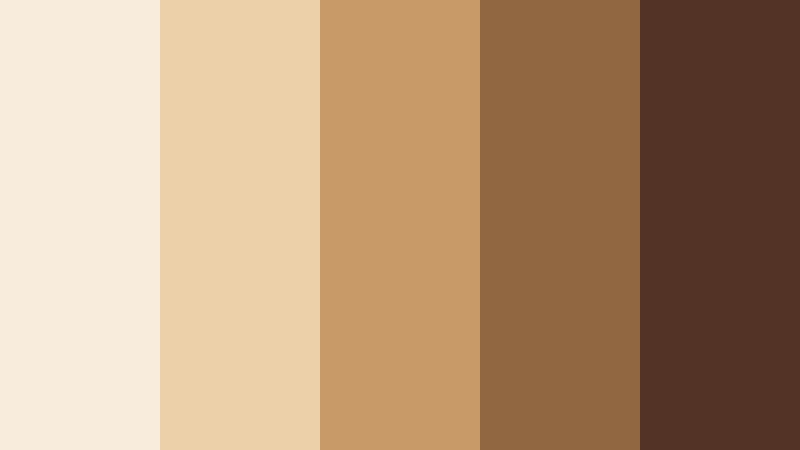
- HEX Codes: #f8eddd, #ebd0aa, #c79a68, #916741, #533326
- Mood: Expansive, calm, and sun-baked like a quiet desert landscape.
- Use for: Perfect for travel edits, drone footage, and cinematic B-roll in arid or sandy locations.
Desert Dune Bronze mirrors sun-bleached sand, carved dunes, and rocky bronze outcrops. It is calm and wide, ideal for drone shots and landscape-heavy travel edits.
Use the lighter tones for text blocks and overlays that sit on top of wide shots, with mid bronzes highlighting map pins, titles, and transitions. In Filmora, grade your footage with a gentle warm tint and slightly desaturated look so your scenes flow together like one continuous, sun-baked bronze horizon.
Forest Trail Bronze
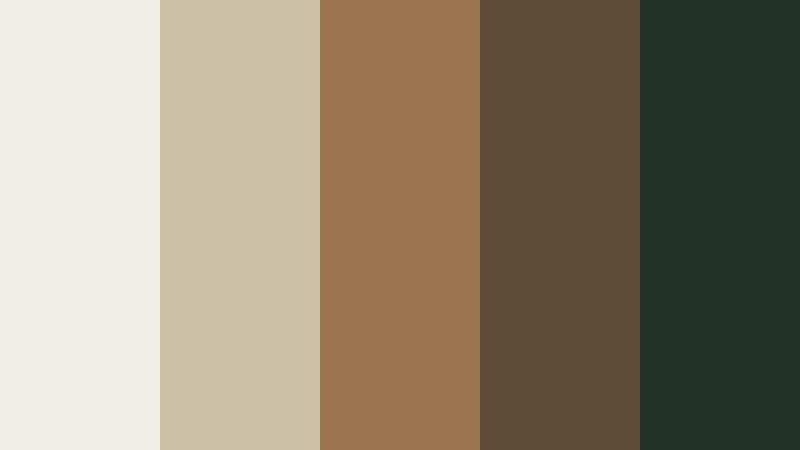
- HEX Codes: #f0eee7, #cbbfa6, #9a754d, #5e4b36, #233226
- Mood: Grounded, calm, and slightly rugged with woodland depth.
- Use for: Use for hiking vlogs, camping content, and outdoor brand visuals needing earthy warmth.
Forest Trail Bronze combines soft off-whites and tans with trail browns and deep forest green. The Soft Bronze mid-tone acts as a bridge between earth and foliage, giving your footage warmth and depth.
Use the lighter shades to keep your text readable over busy forest footage, while browns and greens define headings, badges, and map graphics. In Filmora, gently warm midtones and protect greens from turning neon so your hiking, camping, and outdoor gear content feels rugged, cinematic, and grounded.
Clay Studio Bronze
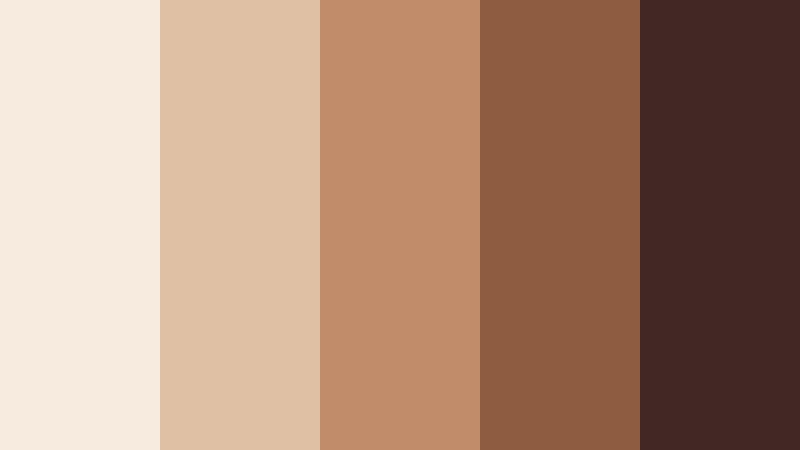
- HEX Codes: #f7ebe0, #e0c0a4, #c18c6a, #8e5c3f, #432724
- Mood: Artisanal, tactile, and creative with a hand-crafted touch.
- Use for: Ideal for pottery reels, maker studio tours, and DIY tutorials focused on materials and texture.
Clay Studio Bronze mixes soft creams with clay-inspired oranges and rich Soft Bronze browns. It feels tactile and handmade, echoing ceramics, wood, and raw materials.
Use the paler hues as neutral stages for your tutorials, with the warmer bronzes framing close-ups of tools and hands at work. In Filmora, lean into the mid-tone bronze for overlays, subtitles, and chapter markers so your whole maker series feels like it lives in the same warm, clay-colored studio.
Tips for Creating Soft Bronze Color Palettes
When you build your own Soft Bronze color palette for video and design, focus on balance: mix warm neutrals, one or two accent depths, and enough contrast for clear text and strong visual hierarchy.
- Pair Soft Bronze with light creams or off-whites for clean backgrounds that keep your footage readable and uncluttered.
- Add one dark anchor shade (charcoal, deep brown, or near black) so titles and key information are easy to read on thumbnails and overlays.
- Limit saturated accent colors; Soft Bronze works best with muted peaches, olives, or terracottas rather than loud primaries.
- Check skin tone against your palette: make sure your grading does not push faces too orange or muddy when you warm highlights and midtones.
- Use consistent HEX codes across your logo, lower thirds, end screens, and channel art to build recognizable Soft Bronze branding.
- Test your palette on both light and dark backgrounds to confirm that text, icons, and buttons remain legible at mobile sizes.
- In Filmora, save your favorite Soft Bronze grading and graphic styles as presets so you can apply them instantly to new edits.
- Export a few test frames and check them on different devices (phone, laptop, TV) to ensure your Soft Bronze tones stay warm and elegant everywhere.
Soft Bronze color palettes give you a way to express warmth, intimacy, and understated luxury across everything you create. Whether you lean into romantic blush-bronze, modern studio neutrals, or earthy, handcrafted tones, these combinations can define the mood of your videos and the personality of your brand.
Experiment with the HEX codes above in Filmora to build intros, titles, overlays, and color grades that all speak the same Soft Bronze language. Once you find a look you love, lock it in with presets and use it across thumbnails, shorts, and long-form edits so your audience recognizes your style at a glance.
The more consistently you apply your Soft Bronze palette, the more cinematic and professional your channel or client work will feel. Filmora gives you the tools to keep that look polished, repeatable, and easy to use on any project.
secure downloadNext: Dusty Sand Color Palette
