

 100% Security Verified | No Subscription Required | No Malware


 ChatGPT
 Perplexity
 Gemini
 Claude
 Grok
Grok
These Filmora filters are crafted to mimic popular Instagram reels urban city LUTs, giving your street footage a polished, cinematic aesthetic in a few clicks.
Whether you film neon nights, morning commutes, rooftop views, or moody alleys, these filters help content creators keep a consistent urban look across all their Instagram Reels.
In this article
Golden Hour Streets and Evening Commutes
Amber Commute Glow
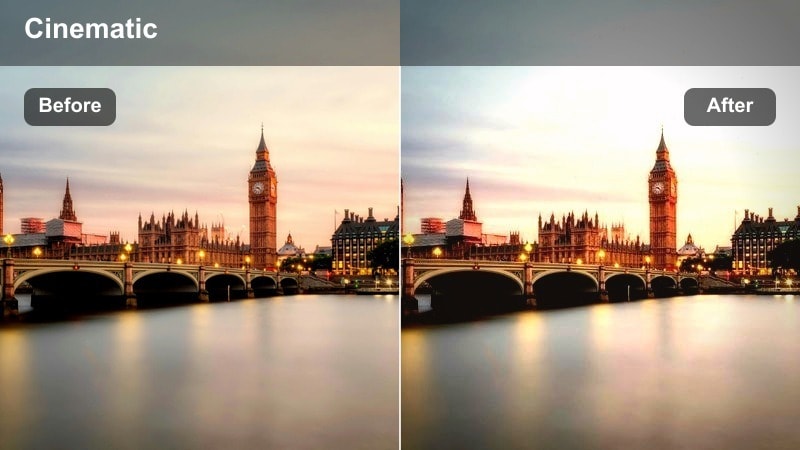
- Effect look: Soft amber highlights with gentle contrast for warm, nostalgic city commutes.
- Best for: Rush-hour street walks, tram rides, and bike lanes during sunset in the city.
- Editing tip: Lower saturation slightly and add a subtle vignette to keep focus on your subject's silhouette against the skyline.
Amber Commute Glow wraps your city footage in a warm amber cast, lifting highlights while keeping contrast soft enough to feel cinematic rather than harsh. Streetlights, windows, and sky picks up a nostalgic glow that mimics popular Instagram reels urban city LUTs, perfect for end-of-day commute reels that need a cohesive, cozy tone.
In Filmora, apply this filter to your sunset B-roll, then fine-tune exposure so faces and skylines stay clear on mobile screens. Use the vignette controls to darken edges slightly and guide attention to your subject moving through the frame, whether they are walking through crosswalks or riding a bike along the lane.
Instant Urban Color Matching with AI
Use Filmora's AI-powered color tools to quickly match different clips to the same urban city aesthetic, so your Instagram Reels feel cohesive from scene to scene. This is ideal when you mix golden hour commutes with night shots and indoor metro scenes but still want a consistent brand look.
Analyze one hero shot with your favorite filter applied and then let AI push similar contrast, saturation, and tones across the rest of your timeline. This saves time and keeps your city LUT style tight, even if you filmed on different days or devices.
 secure download

Preview Filters on Real Street Footage
Load your own city B-roll into Filmora and quickly preview different filters to see how each responds to changing light and motion. Cycling through options like Amber Commute Glow, Neon Rain Pulse, or Concrete Minimal Mist on the same clip helps you lock in the right look for your Instagram reels urban city LUTs concept.
With real-time preview, you can compare how each filter handles highlights, shadows, and skin tones in vertical 9:16 format before you commit. This makes it easier to build a filter toolkit for commutes, rooftops, metros, and gritty alley B-roll.
secure download1000+ Video Filters and 3D LUTs
Beyond these city-focused looks, Filmora includes a large library of video filters and 3D LUTs you can stack for even more stylized results. You can start with a base filter that nails your exposure and contrast, then layer 3D LUTs or extra color effects to refine your unique street style.
Once you dial in a combo you love, save it as a custom preset so every future city Reel can match your established aesthetic in a single click. This is especially useful when you publish recurring commute diaries, night walks, or architecture series on Instagram.
secure downloadHazy Sunlit Blocks
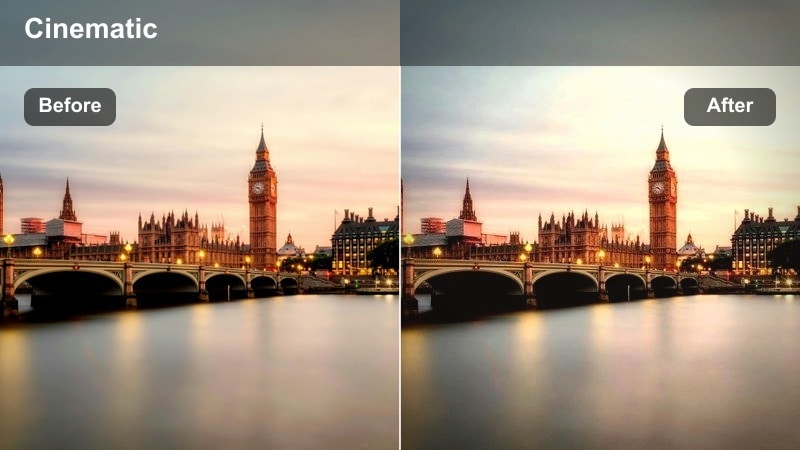
- Effect look: Low-contrast, hazy highlights that give overexposed city blocks a dreamy, cinematic softness.
- Best for: Handheld walking shots on bright streets, storefront b-roll, and reflective glass facades.
- Editing tip: Bring down highlights and lift shadows to enhance the hazy look without losing detail in building textures.
Hazy Sunlit Blocks turns harsh midday light into something soft and cinematic, ideal for bright streets and glassy storefronts that usually look blown out. The filter reduces contrast and blooms highlights slightly, creating a dreamy halo around buildings and moving pedestrians.
In Filmora, combine this filter with gentle highlight reduction and raised shadows so clouds, windows, and façade details stay present in your Instagram Reels. Pair it with slow-motion walking shots and subtle camera movement to lean into that floaty, daydream-in-the-city vibe.
Sunset Subway Exit
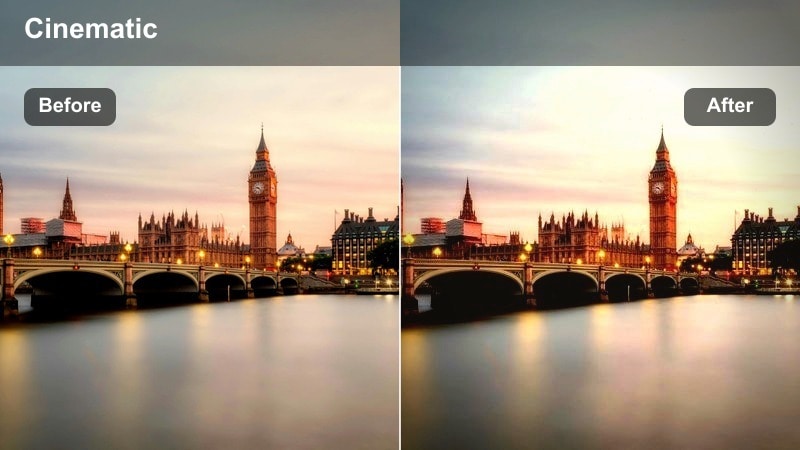
- Effect look: Warm highlights with slightly cool shadows that add a dramatic transition from underground to street level.
- Best for: Escalator rides, staircase reveals, and POV shots coming out of subway stations at dusk.
- Editing tip: Add a slight tilt to your frame and stabilize in post to create dynamic upward movement that matches the dramatic color shift.
Sunset Subway Exit is designed for those reveal moments when you leave the metro and step into glowing city streets. By keeping shadows slightly cool while highlights lean warm, the filter exaggerates the feeling of emerging from a dim underground space into golden dusk light.
Use this look in Filmora on staircase and escalator footage, then add a stabilized, upward-tilted frame to enhance the sense of motion. Cut right as your subject hits the street and consider a speed ramp to match music drops, making the color shift feel like a built-in transition for your Reel.
Neon Nights and High-Contrast Street Scenes
Neon Rain Pulse
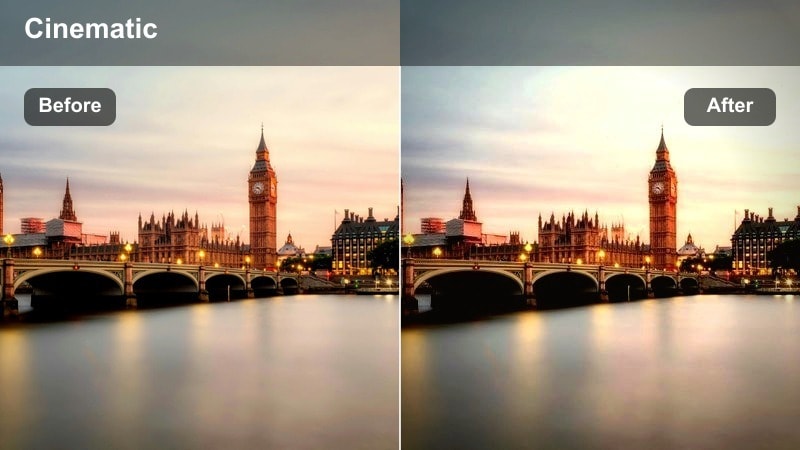
- Effect look: High-contrast blues and magentas that make neon signs and wet streets glow with cyberpunk intensity.
- Best for: Nighttime street reels, taxi drives, and rainy sidewalks filled with reflections.
- Editing tip: Crank up clarity and slightly deepen blacks to make neon reflections pop on pavement and car windows.
Neon Rain Pulse pushes blues and magentas so neon signage, LED billboards, and traffic lights explode with color against moody, dark backgrounds. The high contrast is especially effective on wet streets, where reflections create a layered, cyberpunk look beloved in Instagram reels urban city LUTs.
In Filmora, apply this filter to low-angle night shots and then increase clarity and black levels just enough to add punch without crushing detail. Focus on puddles, car surfaces, and glass to catch as many reflections as possible, and build fast cuts or match cuts between similar colors to keep your Reel visually electric.
Alley Noir Crush
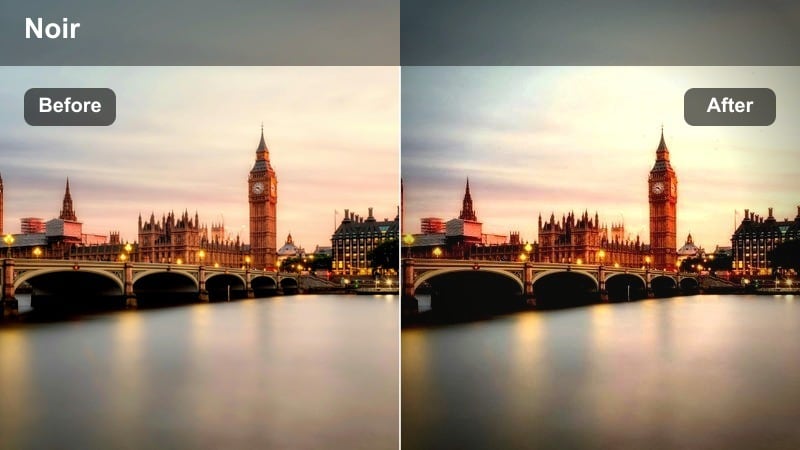
- Effect look: Moody, crushed blacks with cool midtones that create a cinematic film-noir alley aesthetic.
- Best for: Dark alleys, fire escapes, and streetwear portraits shot under a single streetlamp.
- Editing tip: Lower exposure slightly and add grain after the filter to enhance the gritty, noir-inspired vibe.
Alley Noir Crush emulates classic film-noir with deep, crushed blacks and cool midtones that highlight pools of light in an otherwise shadowy scene. It turns simple alleys, stairwells, and fire escapes into dramatic backdrops for portraits and storytelling shots.
Inside Filmora, use this filter on selectively lit frames and then dial exposure down a touch to intensify the mood. Add a layer of film grain and slow, creeping zooms to heighten tension, perfect for fashion, streetwear, or narrative Reels set in the city after dark.
Metro Neon Fade
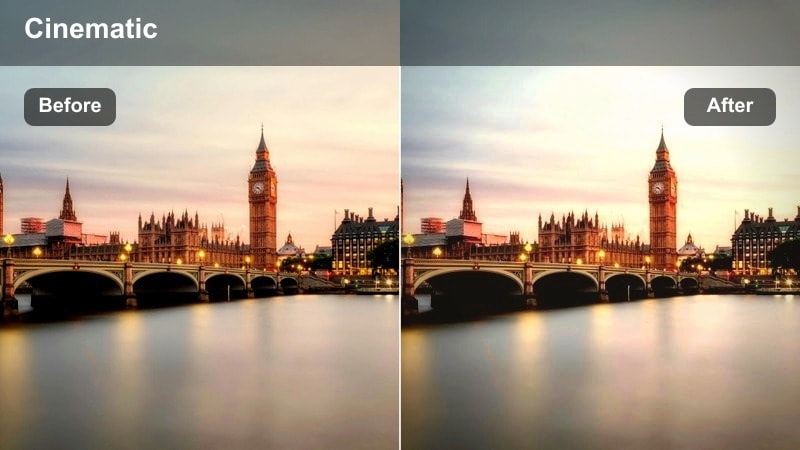
- Effect look: Soft neon accents with slightly faded shadows for a trendy, stylized night city aesthetic.
- Best for: Subway platforms, metro cars, and escalator shots with fluorescent or LED lighting.
- Editing tip: Lift shadows lightly and reduce saturation in greens to keep skin tones clean under harsh metro lights.
Metro Neon Fade gives fluorescent and LED-heavy scenes a softer, more fashionable edge by fading shadows while preserving neon accents. The result is a trendy night city look that works well for metro platforms, escalators, and in-train lifestyle shots.
In Filmora, apply this filter and then tweak HSL to tame greenish tints and protect skin tones from harsh overhead lighting. Lift shadows just enough to see detail in walls and passengers, and use motion tracking on your main subject so they stay gently highlighted while trains and lights streak around them.
Clean Daylight and Minimal Urban Aesthetic
Concrete Minimal Mist
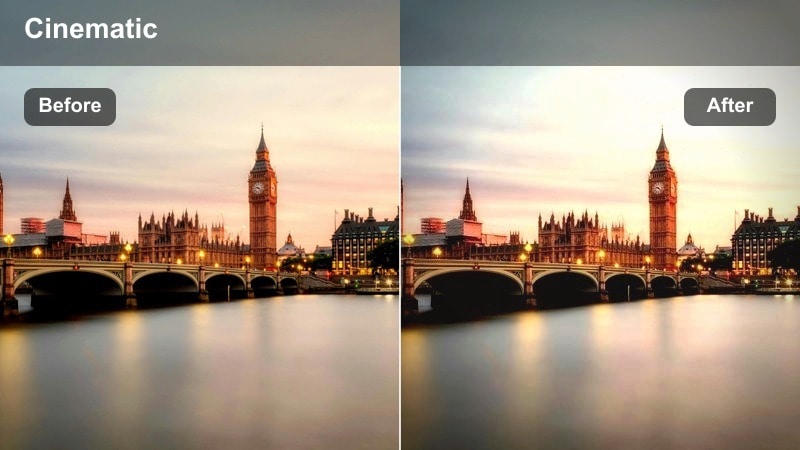
- Effect look: Desaturated neutrals with soft contrast that make concrete, glass, and steel feel airy and minimal.
- Best for: Architecture reels, empty plazas, staircases, and lifestyle shots in modern business districts.
- Editing tip: Straighten vertical lines and crop wide for a clean, gallery-like composition that suits minimalist feeds.
Concrete Minimal Mist strips heavy color out of your city footage, leaving soft neutrals that highlight shapes, lines, and negative space. It is perfect for modern architecture, empty plazas, and lifestyle content where you want an understated, editorial feel.
Within Filmora, apply this filter and then correct vertical lines using transform tools so buildings look precise and intentional. Crop a bit wider than usual and avoid bright wardrobe colors so the minimal palette stays intact, making your Reels blend seamlessly into a clean, modern grid.
Skyline Soft Matte
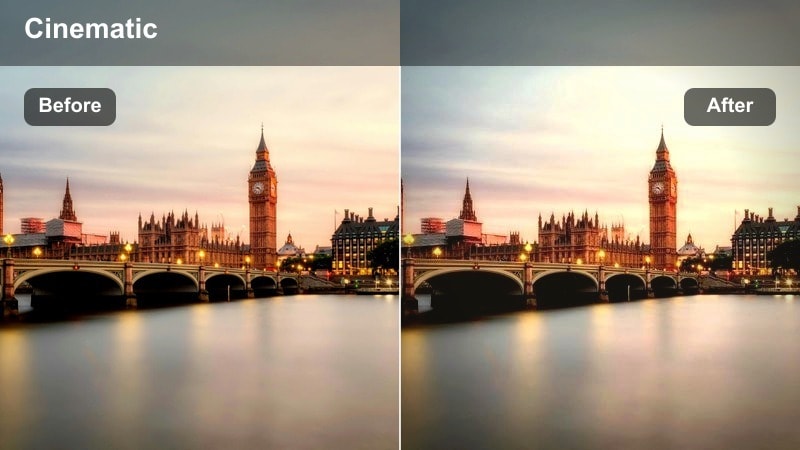
- Effect look: Matte shadows and gentle highlights that flatten harsh sunlight for soft, editorial skyline shots.
- Best for: Rooftops, balcony views, and time-lapses of city skylines under clear or slightly hazy skies.
- Editing tip: Use a slow zoom or pan and slightly lower contrast to enhance the matte, editorial feel.
Skyline Soft Matte takes the bite out of direct sunlight by adding a subtle matte finish to shadows while keeping highlights controlled. It works especially well on rooftop or balcony views where you want the skyline to look polished, not crunchy or overexposed.
Apply this filter in Filmora to wide skyline frames, then reduce contrast a touch more and add smooth pans or push-ins for a cinematic establishing shot. This look shines in time-lapses or slow moves that you can place at the start of your Reel to set the urban scene.
White Space Walks
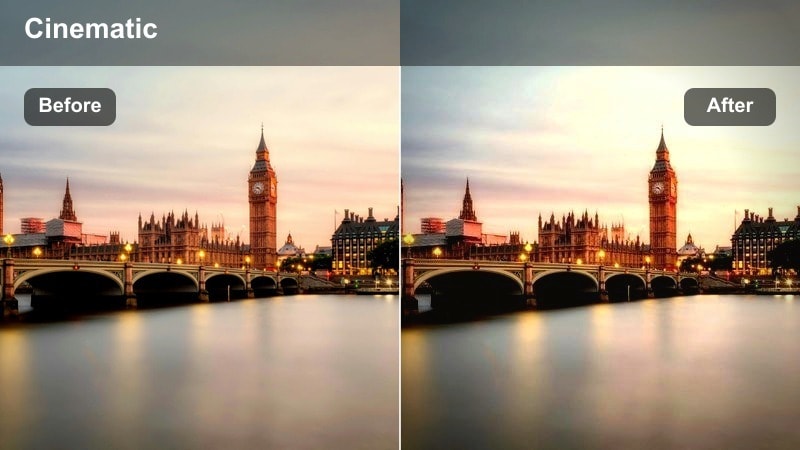
- Effect look: Bright, high-key whites with soft colors that emphasize open space and clean urban design.
- Best for: Clean walk-by shots near white walls, glass corridors, and modern shopping districts.
- Editing tip: Slightly increase exposure and reduce blacks to achieve a light, airy look without losing subject separation.
White Space Walks pushes your highlights toward a bright, high-key look that makes white walls and glass corridors feel expansive and calming. Colors stay soft and understated so your subject and the architecture share the frame without competing.
Inside Filmora, bump exposure gently while lifting black levels to create that airy, almost overexposed vibe Instagram minimal feeds love. Use simple, smooth camera moves and watch your framing so lines and symmetry feel intentional, giving your walk-by shots a gallery-like finish.
Gritty Street Details and Fast Urban Movement
Grit Lane Texture
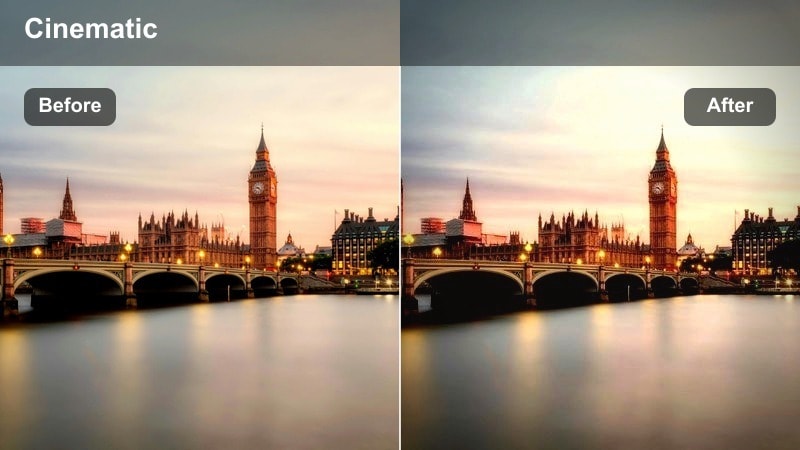
- Effect look: Muted colors with boosted texture and contrast that emphasize asphalt, bricks, and worn city details.
- Best for: Close-ups of crosswalks, bike lanes, street signs, and urban textures used as b-roll.
- Editing tip: Layer quick cuts and whip pans between textured shots to build energetic transitions for your Reels.
Grit Lane Texture dials down saturation while boosting micro-contrast to make asphalt, paint, brick, and rusted metal really stand out. It is ideal for shooting B-roll of crosswalks, bike lane markings, and other urban details that add character between your main clips.
In Filmora, stack short, handheld shots with this filter and cut them tightly on the beat to create gritty transition sequences. Combine whip pans, speed ramps, and sound design to turn simple textures into a high-energy intro or bridge between scenes in your Reel.
Subway Rush Grain
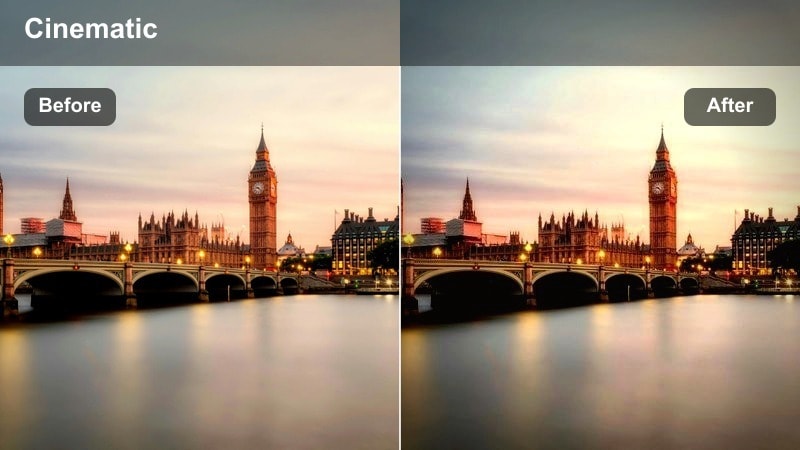
- Effect look: Slight film grain with cool shadows and boosted motion contrast that emphasize speed and movement.
- Best for: Fast-paced subway rides, train doors closing, and rush-hour platform shots.
- Editing tip: Use speed ramps and motion blur after applying the filter to make passing trains feel even faster.
Subway Rush Grain mixes cool shadows with a touch of film grain and strong motion contrast to highlight speed and hustle. It turns ordinary metro rides, platform shots, and door-closing moments into kinetic, almost music-video-style sequences.
After applying this filter in Filmora, add speed ramps as trains enter or exit frame and layer on motion blur effects to amplify the sense of velocity. Combine with jump cuts synced to your soundtrack to make rush-hour chaos feel stylish and deliberate in your Instagram Reels.
Bike Lane Rush
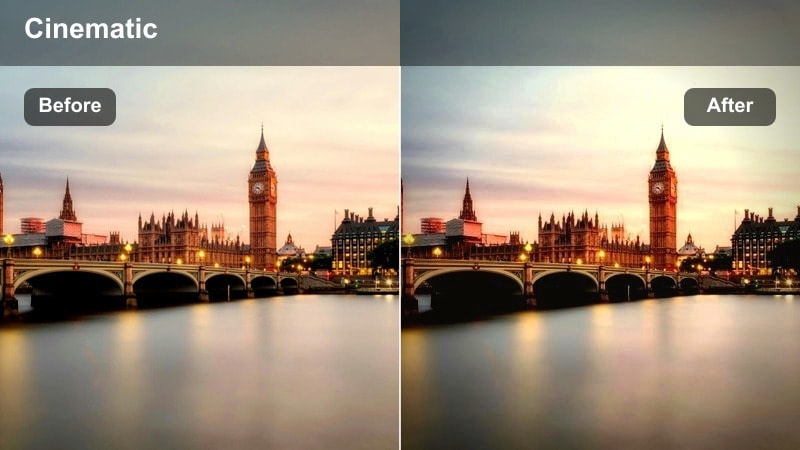
- Effect look: Punchy midtones with slightly cool highlights that keep motion sharp and vibrant for street rides.
- Best for: POV bike rides, electric scooter commutes, and low-angle tracking shots along bike lanes.
- Editing tip: Stabilize your clip and subtly increase saturation in blues and yellows to bring street markings and sky to life.
Bike Lane Rush keeps your footage crisp and energetic by boosting midtones while keeping highlights slightly cool, ideal for fast-moving POV rides. Street markings, cars, and buildings stay sharp, giving viewers a clear sense of speed and direction.
In Filmora, stabilize your helmet or handlebar footage first, then apply the filter and nudge saturation in blues and yellows to accent lane stripes and sky. Add gentle speed-ups on straight sections and around corners, syncing them to beat changes, so your entire commute plays like a seamless, cinematic city ride.
Tips for Using Instagram Reels Urban City Luts Filters in Filmora
- Shoot in vertical 9:16 and leave headroom for text overlays so your filters and city details stay visible on Reels.
- Group similar city scenes together (metro, alleys, rooftops) and keep the same filter across each group to avoid jarring color shifts.
- Lock your exposure in-camera to reduce flicker when you add high-contrast urban filters in Filmora.
- Use noise or film grain sparingly on night city shots so compression on Instagram Reels does not ruin fine details.
- Export a short test Reel and watch it on your phone before finalizing your filter choices for a full series.
- Combine base filters with subtle HSL and curve tweaks in Filmora, then save them as presets to speed up your urban Reel workflow.
- Match your music tempo to the energy of each filter, using faster cuts for gritty looks and slower moves for soft, minimal filters.
These Filmora filters give you a fast way to emulate popular Instagram reels urban city LUTs, from neon-soaked nights to clean, minimal architecture days.
Pick two or three signature looks from this list, save them as presets, and use them consistently so every city Reel you post feels like part of the same cinematic universe.
secure download