

 100% Security Verified | No Subscription Required | No Malware


 ChatGPT
 Perplexity
 Gemini
 Claude
 Grok
Grok
Moody lifestyle video filters can instantly shift your footage from casual everyday clips to dramatic, story-driven visuals. With the right deep tones and shadows, your lifestyle vlogs and personal films feel more cinematic, emotional, and intentional.
Below are curated moody lifestyle video filters in Filmora designed for filmmakers and creative vloggers. Each style includes its ideal use and a practical editing tip so you can dial in the exact deep tone lifestyle look you have in mind.
In this article
Subtle Moody Base Filters
Soft Shadow Glow
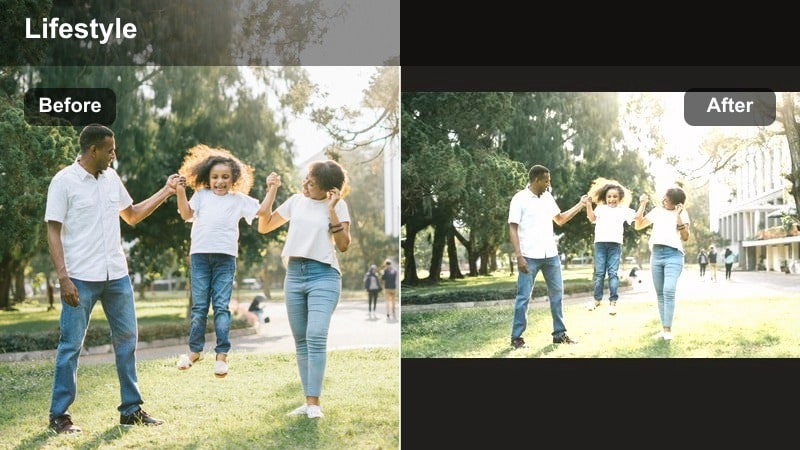
- Effect look: Gentle fade with lifted blacks, softened highlights, and a delicate warm tint for understated mood.
- Best for: Moody lifestyle vlogs in natural light, cozy desk setups, and slow morning routines.
- Editing tip: Lower contrast slightly, then nudge saturation down just a touch and use Filmora’s vignette tool at a low intensity to keep focus on the subject.
A soft, cinematic base filter that adds mood without making the scene feel overly dark or heavy. Soft Shadow Glow is ideal when you want to keep your lifestyle content approachable while still giving it a distinctly stylized, moody character.
In Filmora, apply this filter to your base layer, then fine tune with the color tools to balance lifted blacks and softened highlights. Use the vignette and slight saturation reduction to keep attention on faces, hands, or key objects, building a quiet, cinematic tone for everyday vlogs.
Pro tip: Keep skin tones natural with subtle mood
If faces start to look too flat or gray, gently increase midtone brightness and add a bit of warmth in the color tools until skin looks alive again. Use the color wheels to push shadows slightly cooler while keeping midtones neutral; this preserves mood but avoids sickly skin tones.
Use Filmora’s AI to Lock in Your Moody Lifestyle Palette
Filmora’s AI-driven color tools help you quickly build a consistent moody palette across an entire vlog or series. You can reference a favorite frame or inspiration still and let AI guide temperature, tint, and tone adjustments.
Once the base color mood is set, layering these moody lifestyle video filters becomes faster and more predictable. This keeps your dark lifestyle filter aesthetic cohesive from clip to clip, even when you film in mixed lighting.
 secure download

Preview Moody Filters on Your Lifestyle Footage
Filmora lets you rapidly preview different moody lifestyle video filters by hovering or quickly toggling presets on your timeline. This makes it easy to compare deep tone lifestyle looks without committing right away.
You can stack subtle adjustments on top of your chosen filter, like vignettes and curves, to fine-tune the look for each scene. Save your favorite combinations as custom presets so your future vlogs instantly match.
secure downloadCombine Filters with LUTs for Advanced Moody Looks
For filmmakers and creative vloggers who want extra control, you can pair Filmora filters with moody LUT video presets. Use LUTs to define the core color grade, then apply lifestyle filters for finishing touches and atmosphere.
This layered approach helps you maintain consistent color science while still personalizing each video’s emotional tone. It is especially useful when combining cinematic personal content with everyday vlog clips in one project.
secure downloadMuted City Chrome
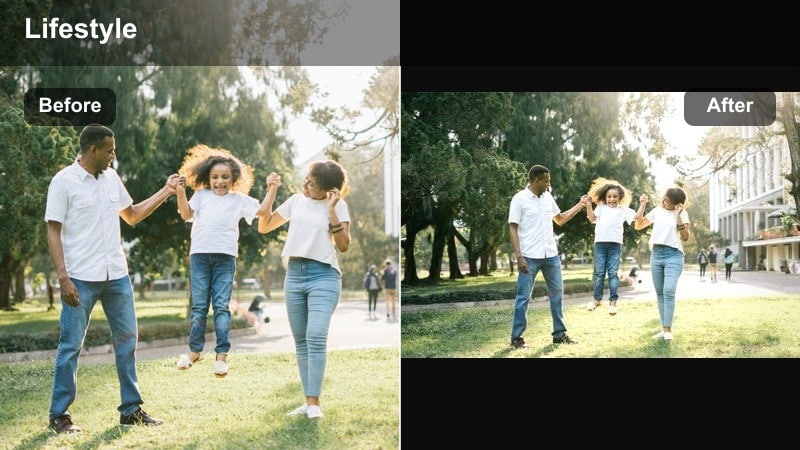
- Effect look: Desaturated urban tones with cool shadows and slightly crushed blacks for a polished street style look.
- Best for: City walks, outfit-of-the-day shots, lifestyle B-roll of streets, cafes, and transit scenes.
- Editing tip: Dial back saturation of individual colors like reds and yellows using Filmora’s color tuning to avoid distractions from neon signs or traffic lights.
A cool, muted filter that turns everyday street footage into editorial-style urban lifestyle visuals. Muted City Chrome is perfect when you want your outfits, architecture, and compositions to feel refined rather than touristy or overly vibrant.
Inside Filmora, use color tuning and HSL controls to selectively pull back strong colors while keeping skin tones believable. Pair this filter with smoother camera motion and minimalistic titles to create a modern, fashion-forward city vlog aesthetic.
Pro tip: Balance grayness and mood
If the image feels too gray, slightly raise vibrance instead of saturation; this brings back life without breaking the moody aesthetic. Add a subtle teal tint to shadows and a faint warm tint to highlights for a cinematic color contrast that still looks natural.
Dusty Afternoon Matte
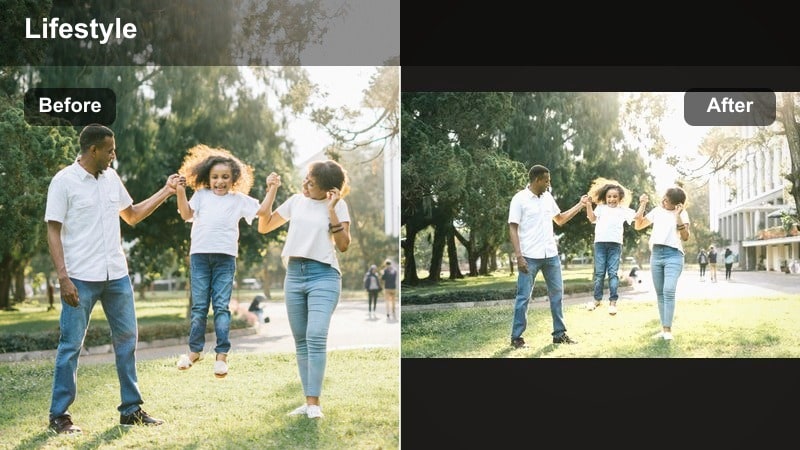
- Effect look: Soft matte contrast with warm beige highlights and gentle haze, like late-afternoon room light.
- Best for: Indoor lifestyle vlogs, reading corners, journaling shots, and cozy home montages.
- Editing tip: Slightly lift blacks in Filmora’s curves, then reduce clarity just a little to maintain the hazy, dreamlike feel without losing too much detail.
A dreamy, muted filter that pairs perfectly with quiet, introspective lifestyle moments. Dusty Afternoon Matte helps you soften harsh indoor lighting and give your room scenes a timeless, film-inspired character.
In Filmora, start with this filter and then gently adjust the curve to control how strong the matte effect feels. Combine with subtle background blur and slower cuts to emphasize calm, reflective moods in reading, journaling, or slow living vlogs.
Pro tip: Use haze strategically
Apply the filter first, then add a touch of Filmora’s blur or glow effects to the background only, keeping your subject sharp. If the scene loses depth, slightly deepen the shadows with the curve tool to bring back shape and separation.
Deep and Dark Lifestyle Tones
Noir Living Contrast
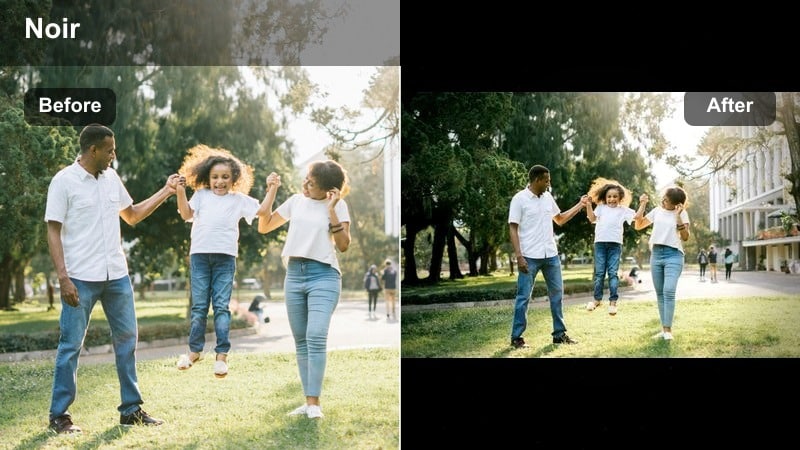
- Effect look: High-contrast dark lifestyle filter with rich blacks, minimal highlights, and a slight cool shift.
- Best for: Nighttime apartment shots, moody desk setups, and cinematic personal monologues.
- Editing tip: Use Filmora’s highlights slider to protect bright areas like screens or lamps while letting shadows fall deep for a dramatic, focused feel.
A bold, dark filter ideal for creating intense, cinematic energy in intimate indoor scenes. Noir Living Contrast adds drama and focus, making your subject feel like the center of a late-night film moment.
Within Filmora, pair this look with careful exposure control so your blacks stay rich but not muddy. Use masked adjustments to keep important details like eyes or screens readable while the rest of the frame sinks into moody shadows.
Pro tip: Control noise in dark scenes
If your footage becomes noisy in the shadows, slightly raise exposure and then rebuild contrast using the curve instead of just crushing blacks. Avoid over-sharpening; instead, use a touch of Filmora’s noise reduction before color, then apply the filter to keep details smoother.
Midnight Cafe Amber
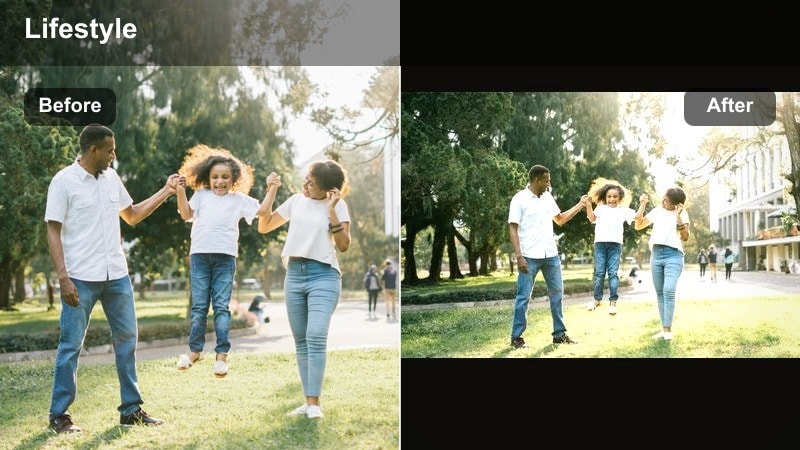
- Effect look: Deep, warm amber glow in highlights with dense shadows and a subtle filmic softness.
- Best for: Late-night cafes, dim restaurant scenes, and introspective lifestyle B-roll with practical lights.
- Editing tip: Lower overall saturation, then reintroduce warmth only in highlights using the color wheels to keep the amber glow without making skin too orange.
A cinematic, bar-like ambiance filter that emphasizes warm lights against dark backgrounds. Midnight Cafe Amber makes lamps, candles, and neon signs feel like supporting characters in your lifestyle story.
In Filmora, lean into this effect by composing shots around visible light sources and then emphasizing them with targeted highlight warmth. Keep saturation under control so the amber glow feels rich, not cartoonishly orange, especially on skin tones.
Pro tip: Prioritize light sources as characters
Compose shots so that lamps, candles, or windows become focal points; the filter will emphasize their glow and create depth. If your subject’s face is too dark, add a masked brightness adjustment in Filmora to lift only the face while keeping the room moody.
Charcoal Minimal Flat
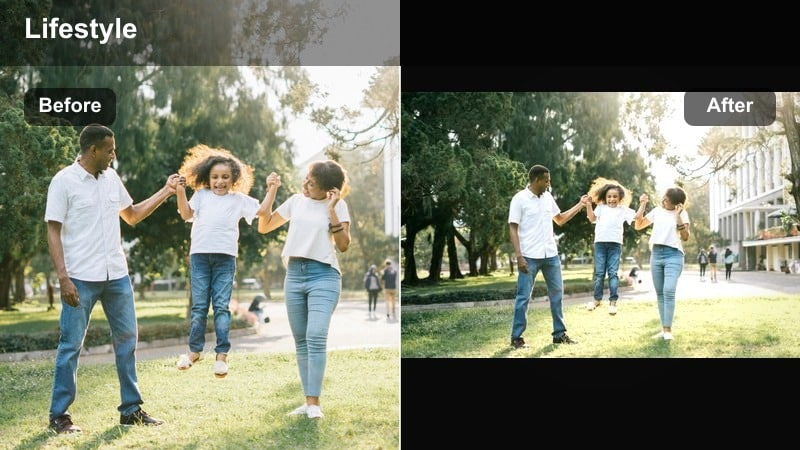
- Effect look: Low-saturation, flat contrast with cool charcoal shadows and a slightly greenish tint for a minimalist mood.
- Best for: Minimalist home tours, wardrobe videos, and aesthetic product shots with neutral backgrounds.
- Editing tip: Push shadows cooler and greens slightly toward teal in Filmora’s advanced color settings to avoid muddy, dirty-looking tones.
A restrained, modern filter that gives lifestyle scenes a gallery-like, editorial sophistication. Charcoal Minimal Flat is perfect for creators who favor clean lines, neutral palettes, and a quiet, design-forward aesthetic.
Use Filmora’s advanced color tools to refine shadow tints and keep whites and grays looking crisp. Combine this filter with steady compositions and negative space to highlight outfits, interiors, or products in a calm, curated way.
Pro tip: Keep neutral colors clean
Watch for color casts on white walls or bedding; if they shift too green or magenta, correct the tint slider before applying the filter heavily. Fine-tune white balance with a small temperature shift rather than large moves to maintain the minimal aesthetic.
Warm, Introspective Moody Vibes
Golden Solitude Glow
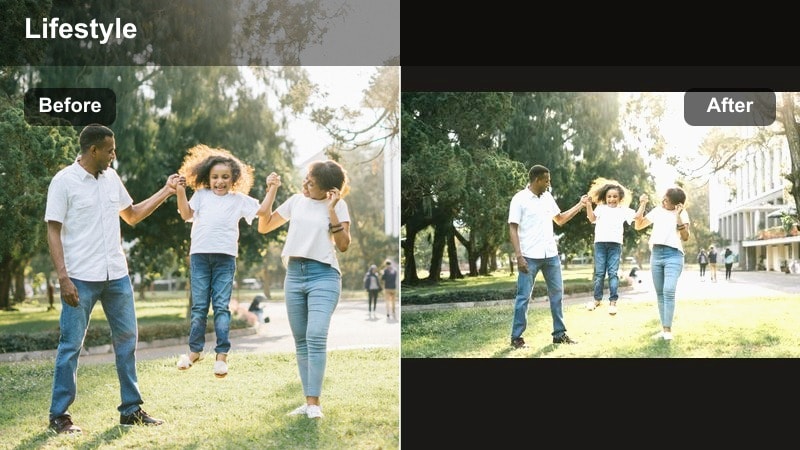
- Effect look: Soft golden highlights, slightly lifted blacks, and gentle contrast that feels like late golden hour indoors.
- Best for: Journaling vlogs, self-reflection monologues, and quiet creative sessions like painting or writing.
- Editing tip: Use Filmora’s keyframing to slowly increase warmth and brightness over time in a scene to reflect emotional shifts in your storytelling.
A warm, emotional filter that brings a nostalgic glow to personal, reflective lifestyle videos. Golden Solitude Glow works especially well when your story leans into healing, creativity, or calm transformation.
Inside Filmora, combine this filter with subtle exposure and warmth keyframes to mirror the emotional arc of your scene. The lifted blacks keep the mood gentle rather than heavy, giving your footage a forgiving, soft-focus feel.
Pro tip: Match color to narrative emotion
If your story moves from heavy to hopeful, gradually increase warmth and exposure across cuts while keeping the same filter base. Keep shadows slightly lifted to maintain a gentle, forgiving mood instead of a harsh dramatic contrast.
Honeyroom Haze
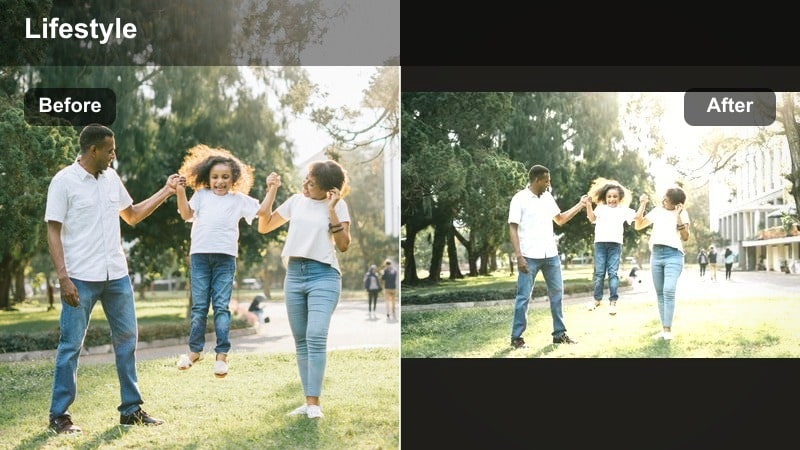
- Effect look: Milky highlights, honey-tinted midtones, and a light veil of haze for dreamy bedroom or studio shots.
- Best for: Bedroom vlogs, wardrobe styling sessions, and soft-focus portrait-style content.
- Editing tip: Combine the filter with a subtle Filmora lens blur on the edges, keeping eyes and face sharp to enhance the dreamy yet intimate feel.
A soft, honey-colored filter that wraps lifestyle scenes in a delicate, cinematic haze. Honeyroom Haze is ideal for content that leans romantic, nostalgic, or softly glamorous.
In Filmora, place this filter on your clips and then refine with edge-only blur or vignette to keep attention on faces and key details. Balance milky highlights with controlled exposure so your footage glows without losing too much detail.
Pro tip: Avoid over-softening key details
If the frame feels too blurry, reduce global blur and instead soften only the background using Filmora’s mask tools. Sharpen just a little after applying the filter to bring back important details like eyes, notebooks, or hands.
Caramel Rituals
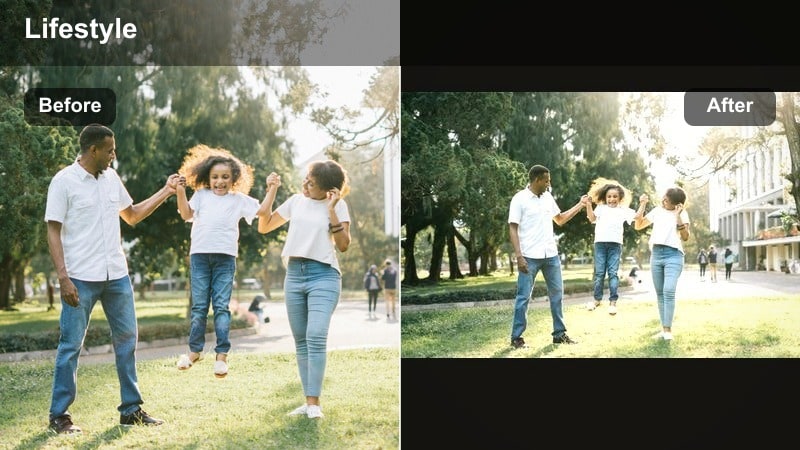
- Effect look: Rich caramel midtones with darker, chocolatey shadows and soft roll-off in the highlights.
- Best for: Morning coffee rituals, kitchen lifestyle shots, and cozy routines centered around food and objects.
- Editing tip: Use Filmora’s color curves to slightly deepen the midtones and protect highlights, keeping textures in steam, foam, and fabrics visible.
A rich, warm-toned filter that celebrates daily rituals with cinematic depth and warmth. Caramel Rituals makes simple actions like pouring coffee or cooking breakfast feel sensual and story-driven.
In Filmora, lean into this look by focusing on close-ups of hands, mugs, and textures. Use curves to preserve highlight detail in steam and foam, and keep midtones deep enough to feel cozy without pushing the entire frame too dark.
Pro tip: Highlight textures for sensory impact
Lightly increase local contrast in key areas like coffee foam, textiles, or hands to make textures more tactile on screen. If the image feels too brown, slightly cool the shadows or reduce orange saturation to regain color separation.
Cinematic Personal and Vlog Scenes
Rainy Window Journal
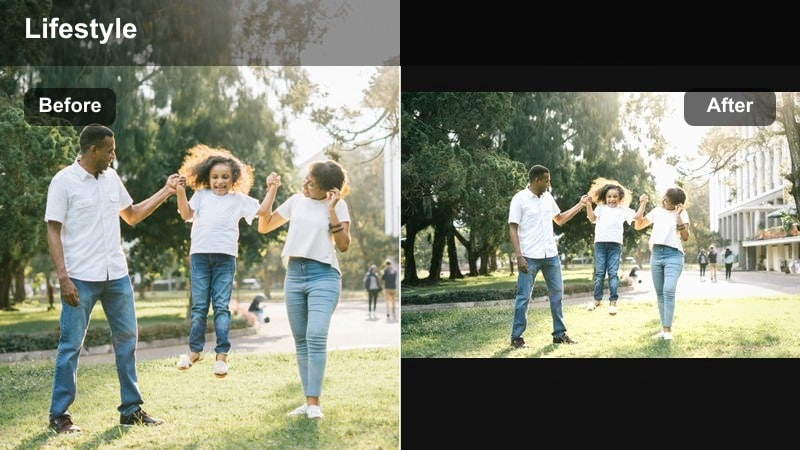
- Effect look: Cool, muted tones with soft blooming highlights and a gentle blue tint, like journaling on a rainy day.
- Best for: Moody lifestyle vlogs on overcast days, travel downtime, and reflective cutaways by windows.
- Editing tip: Lower contrast slightly and add a soft vignette in Filmora so the brightest area sits near your subject’s face or hands for emotional focus.
A cool, melancholy filter that turns quiet moments by the window into cinematic story beats. Rainy Window Journal is perfect for transitions, voiceover segments, and reflective pauses in your vlogs.
Use this look in Filmora alongside gentle camera moves and slower pacing to emphasize introspection. The muted tones and soft highlights pair well with ambient sound design, helping your footage feel like a scene from a calm indie film.
Pro tip: Use motion and sound to enhance mood
Combine this filter with slow, deliberate camera moves and subtle ambient rain sounds to deepen the emotional effect. If the frame feels too cold, gently warm midtones only so faces retain life while the background stays rainy and blue.
Cinema Diary Teal
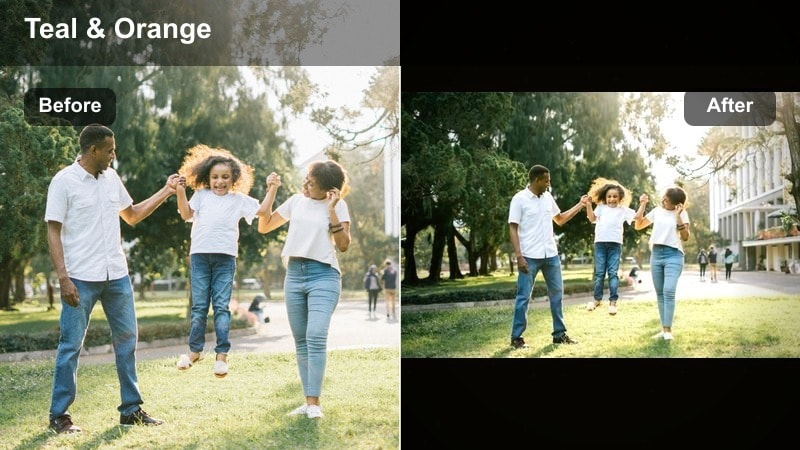
- Effect look: Stylized teal shadows and slightly warm skin tones with cinematic contrast for dramatic diary-style scenes.
- Best for: Narrated diary entries, storytelling sequences, and cinematic lifestyle montage edits.
- Editing tip: Use Filmora’s split toning to push shadows slightly toward teal and highlights toward warm neutral, keeping saturation moderate for a polished look.
A classic cinematic teal-inspired filter tailored for personal, story-driven lifestyle content. Cinema Diary Teal gives your edits a filmic edge while keeping your personality front and center.
In Filmora, apply this filter and then carefully balance skin tones using HSL and color wheels so they remain natural yet warm. Use it across entire sequences or recurring segments to build a recognizable signature style for your channel.
Pro tip: Avoid overdoing the teal and orange
If your footage starts looking like an extreme blockbuster grade, reduce orange in skin tones first before adjusting overall saturation. Check scenes on both bright and dim screens; fine-tune saturation so the look feels cinematic but not cartoonish everywhere.
Deep Memory Grain
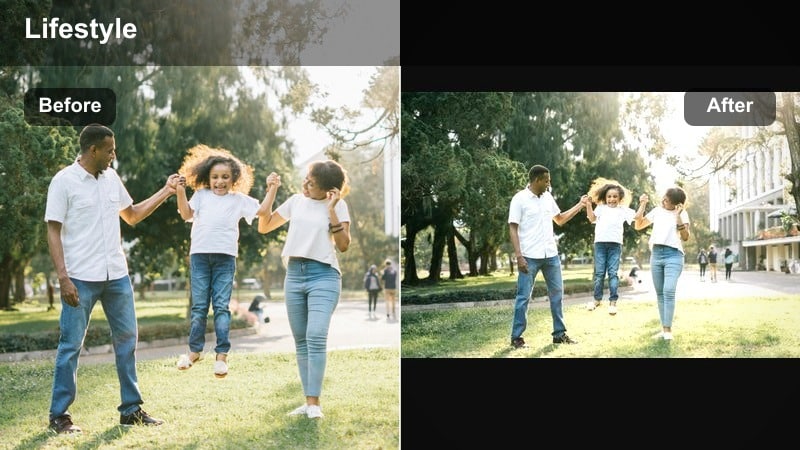
- Effect look: Deep shadows, muted colors, and a subtle film grain overlay for nostalgic, documentary-style mood.
- Best for: Life recap videos, travel reflections, and story-driven sequences about growth or change.
- Editing tip: Apply Filmora’s grain or noise effect at low intensity after color; keep exposure slightly lower than normal to emphasize the archival, memory feel.
A nostalgic, filmic filter that makes personal moments feel like fragments of an old documentary. Deep Memory Grain is great for chapters in your story that look back on change, growth, or endings.
In Filmora, add gentle grain on top of this filter and avoid heavy sharpening so the texture stays organic. Slightly lower exposure and contrast to create an archival vibe, then use slower cuts and music to support the reflective mood.
Pro tip: Use grain with restraint
Too much grain can distract on smaller screens, so test your export on a phone and reduce intensity if details feel overly noisy. Let grain sit mostly in the shadows and midtones by avoiding heavy sharpening afterward, which can exaggerate noise.
Tips for Using Lifestyle Video Moody Filters in Filmora
- Shoot slightly flatter in-camera so your moody lifestyle video filters have more dynamic range to work with.
- Avoid pushing exposure too low; it is easier to deepen shadows in Filmora than to rescue crushed blacks later.
- Keep your white balance consistent during filming so filters and dark lifestyle looks apply more evenly.
- Use vignettes sparingly to guide the viewer’s eye rather than making the frame feel unnaturally dark.
- Match filter intensity to the story beat; use heavier moods for introspection and lighter versions for hopeful moments.
- Create a reusable preset in Filmora once you like your grade so future moody lifestyle vlogs stay visually consistent.
Moody lifestyle video filters can turn everyday moments into cinematic, emotionally rich stories when you balance deep tones, contrast, and subtle warmth. With the right combinations, your vlogs gain atmosphere without sacrificing clarity or authenticity.
Experiment with these presets inside Filmora, refine them for your own dark lifestyle filter aesthetic, and build a repeatable look that makes every vlog instantly recognizable as yours.
secure download