

 100% Security Verified | No Subscription Required | No Malware


 ChatGPT
 Perplexity
 Gemini
 Claude
 Grok
Grok
Volcano inspired colors are all about heat, pressure, and movement. Deep maroons, lava reds, and ember oranges signal intensity, passion, danger, and transformation. Paired with ash neutrals and midnight blues, these tones instantly feel cinematic, like a scene lit by molten rock and smoke. That is why they are so powerful for intros, trailers, and thumbnails that need to grab attention in a split second.
For video creators and designers, volcano color palettes can shape how your audience feels before they even hit play. A controlled mix of lava reds, ember oranges, and ashy neutrals can define your brand identity, unify your YouTube channel, or tie together travel vlogs, gaming intros, and promo spots. Below are curated volcano color palettes with ready to use HEX codes so you can drop them straight into Filmora, your thumbnails, channel art, and social designs.
In this article
Cinematic Volcano Color Palettes
Molten Dusk Horizon
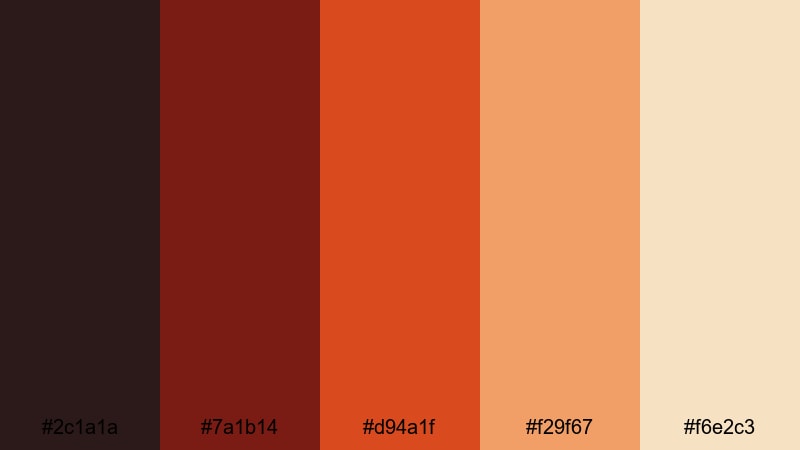
- HEX Codes: #2c1a1a, #7a1b14, #d94a1f, #f29f67, #f6e2c3
- Mood: Cinematic, dramatic, and slowly smoldering like a sunset over lava fields.
- Use for: Use for cinematic travel vlogs, moody title cards, and dramatic storytelling intros.
Molten Dusk Horizon moves from deep lava shadows into glowing ember oranges and a hazy, sun soaked highlight. It feels like the last light of day falling across an active crater, mixing danger with quiet beauty.
Use the darker reds for backgrounds, letterboxing bars, or lower thirds, then reserve the bright orange and soft beige for text, logos, and key moments in your edit. This palette works beautifully for travel stories, cinematic B roll, or any intro where you want your visuals to feel like a slow burning eruption.
Pro Tip: Build a Cinematic Volcano Look in Filmora
To keep a molten look consistent from intro to end screen, save Molten Dusk Horizon as a reference in Filmora. Use the darkest shade (#2c1a1a) for background solids or overlays, the mid lava reds for titles and callouts, and the soft highlight (#f6e2c3) for readable text against dark footage.
You can combine these colors with subtle vignette effects, film grain, and slow zooms in Filmora to create a cohesive cinematic volcano aesthetic across travel vlogs, storytime videos, and shorts formatted recaps.
AI Color Palette
Have a still frame or mood board that perfectly captures your volcano vibe? Filmora's AI Color Palette feature lets you sample those tones and apply them across your entire timeline. That way, every shot shares the same lava reds, ember oranges, and dusk neutrals without endless manual tweaking.
Import a key frame graded with the Molten Dusk Horizon palette, then use AI Color Palette to match the rest of your clips. It is an efficient way to unify intros, B roll, and closing scenes so your whole video feels like one continuous volcanic sunset.
 secure download

HSL, Color Wheels & Curves
To refine your volcano tones even further, use Filmora's HSL controls, color wheels, and curves. Push reds and oranges toward a slightly deeper, volcanic hue, cool down the shadows for more contrast, and lift the highlights just enough to keep skin tones natural. A short guide to color correction tips can help you understand how each tool shapes the final mood.
On the color wheels, keep midtones warm and rich, then use the shadows wheel to add a touch of blue or charcoal for that night around the crater feeling. With curves, create a gentle S shape to add cinematic depth without crushing detail in your lava glow.
secure download1000+ Video Filters & 3D LUTs
If you want a fast way to stylize volcano palettes, Filmora's video filters and 3D LUTs make it easy to lock in a signature look. Combine your chosen HEX colors with cinematic LUTs to add film like contrast, glow, or teal and orange style tones that complement lava colors.
You can start with a LUT that fits your story, then adjust opacity and fine tune HSL to keep the Molten Dusk Horizon palette intact. This gives your channel intros, thumbnails, and shorts a repeatable volcano identity without rebuilding the grade for every project.
secure downloadCrimson Ash Overture
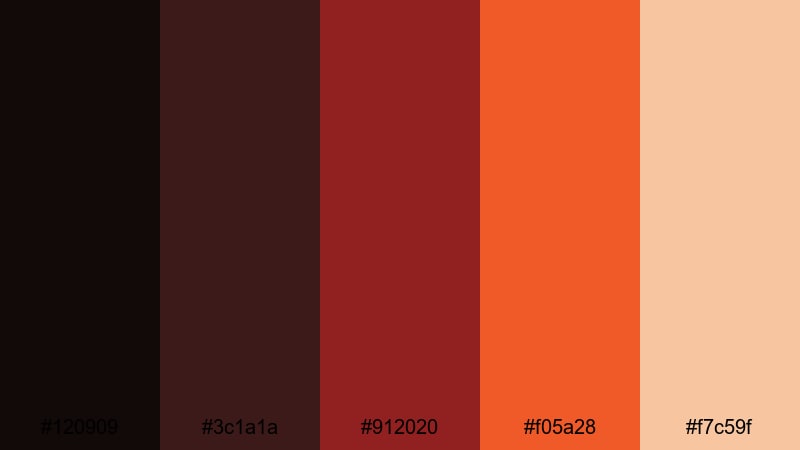
- HEX Codes: #120909, #3c1a1a, #912020, #f05a28, #f7c59f
- Mood: Intense and theatrical with a slow-burning sense of tension.
- Use for: Use for trailer-style edits, cinematic shorts, and intense storyline thumbnails.
Crimson Ash Overture balances heavy, smoke like shadows with explosive crimson and a soft, cinematic highlight. It feels like the opening act of a disaster movie or a high stakes drama, full of suspense and glowing embers in the dark.
Use the darkest tones as gradient overlays to vignette your footage, then let the bright orange and beige frame titles, subtitles, or key characters. This palette is ideal for trailer style openers, suspenseful storytelling, or any thumbnail that needs fiery drama without losing readability.
Lava Trail Cinematic
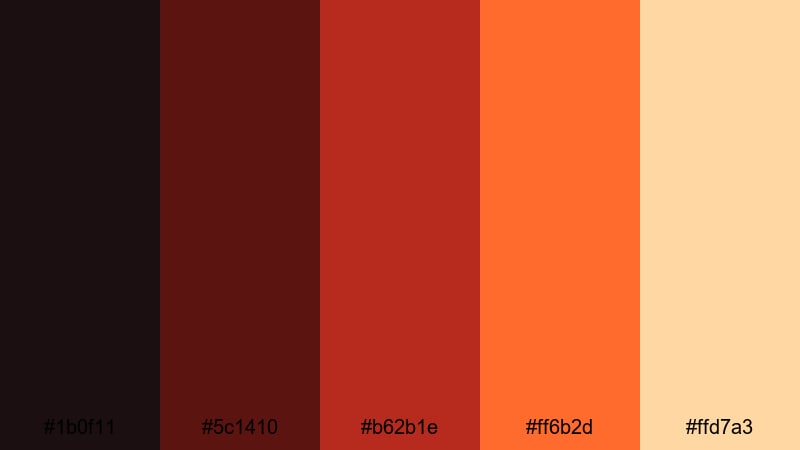
- HEX Codes: #1b0f11, #5c1410, #b62b1e, #ff6b2d, #ffd7a3
- Mood: Dynamic and story driven, like a glowing lava trail cutting through the dark.
- Use for: Use for cinematic B-roll sequences, hero text screens, and dramatic logo reveals.
Lava Trail Cinematic moves from almost black maroon into blazing lava orange and a gentle cream highlight. It looks like a river of fire carving a path across the screen, guiding the viewer's eye from dark edges into a bright focal point.
Use the brightest lava tone (#ff6b2d) to highlight hero text, logos, or key frames, while the darker reds and maroons sit behind as letterbox bars or solid color backgrounds. This palette works especially well for logo reveals and cinematic B roll sequences that need a clear, fiery center of attention.
Night Eruption Glow
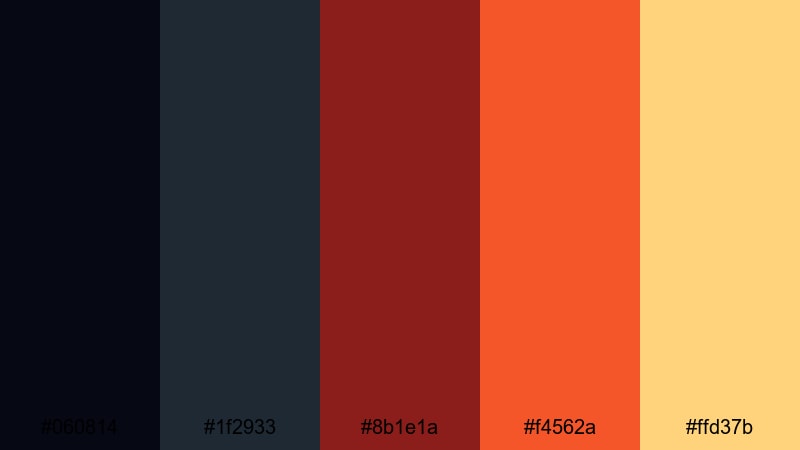
- HEX Codes: #060814, #1f2933, #8b1e1a, #f4562a, #ffd37b
- Mood: Nocturnal and thrilling, with sparks of lava against a cool night sky.
- Use for: Use for night shoots, drone footage over cities, and action packed cinematic edits.
Night Eruption Glow contrasts cool navy and charcoal blues with sharp volcanic reds and glowing amber. It feels like a nighttime eruption captured on a long exposure shot, with city lights and lava sparks alike glowing through the darkness.
Grade your footage cooler, then use the warm tones for overlays, lower thirds, and call to action buttons. This palette is excellent for action intros, drone flights over cityscapes, or any nightlife content where you want lava like highlights without losing the mood of night.
Soft & Moody Volcano Color Palettes
Smoldering Rose Mist
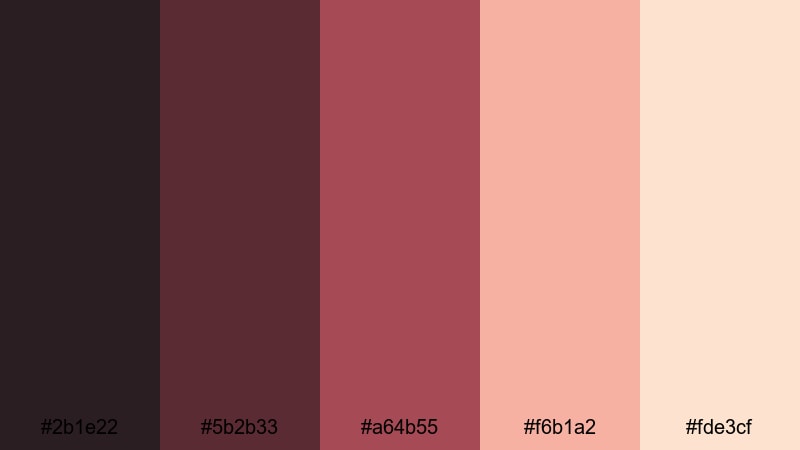
- HEX Codes: #2b1e22, #5b2b33, #a64b55, #f6b1a2, #fde3cf
- Mood: Soft, romantic, and slightly melancholy with a warm volcanic undercurrent.
- Use for: Use for emotional vlogs, lyric videos, and soft storytelling montages.
Smoldering Rose Mist replaces harsh lava with dusty rose, ember reds, and creamy peach tones. It feels like lava seen through soft fog, giving your visuals a romantic and introspective energy instead of pure chaos.
Use the deeper reds for text shadows and subtle gradients, and rely on the lighter pinks and creams for backgrounds or bokeh elements. This palette is perfect for emotional vlogs, lyric videos, and dreamy reels where you want warmth and tenderness with a hint of volcanic intensity under the surface.
Ashen Terracotta Dream
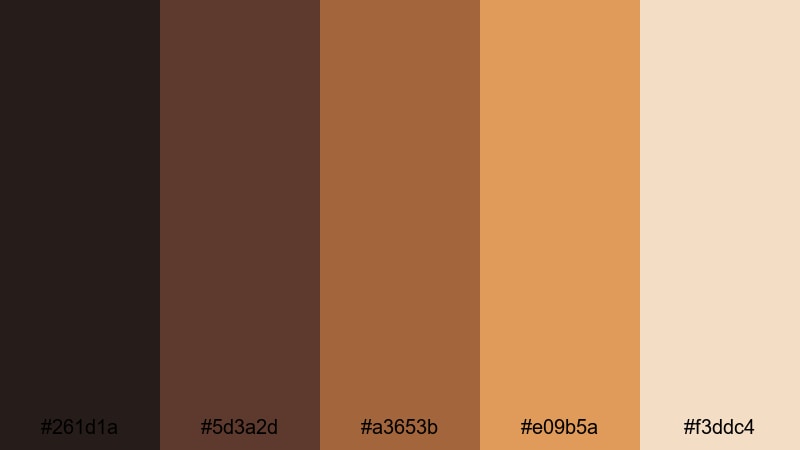
- HEX Codes: #261d1a, #5d3a2d, #a3653b, #e09b5a, #f3ddc4
- Mood: Earthy, grounded, and nostalgic like warm ash and sun baked clay.
- Use for: Use for lifestyle vlogs, cozy home videos, and aesthetic reels.
Ashen Terracotta Dream blends ashy browns and terracotta oranges with a soft sand highlight. It feels earthy and grounded, like footage shot around a dormant volcano or in a clay walled village at golden hour.
Pair the mid terracotta and amber with footage of coffee, interiors, and travel details. The darkest brown works well for subtle titles or borders, while the pale sand keeps text and UI elements legible. It is a strong choice for cozy home vlogs, lifestyle reels, and brands that want warm, volcanic depth without harsh reds.
Emberlit Twilight Bloom
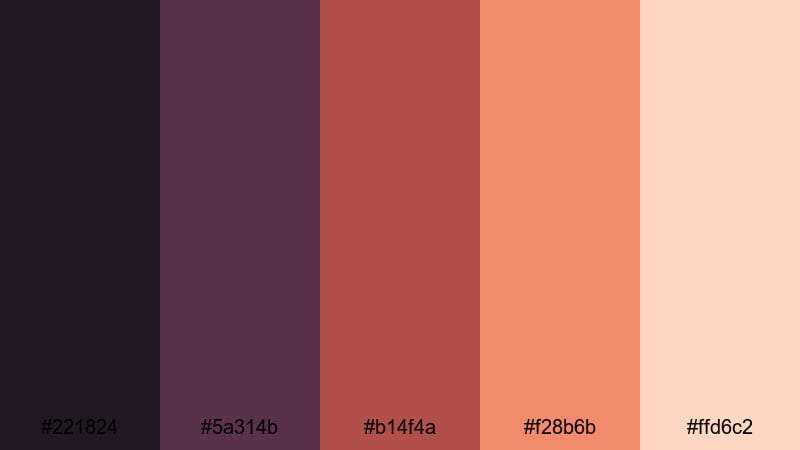
- HEX Codes: #221824, #5a314b, #b14f4a, #f28b6b, #ffd6c2
- Mood: Dreamy and introspective with glowing embers in a twilight haze.
- Use for: Use for music videos, mood edits, and aesthetic shorts with soft transitions.
Emberlit Twilight Bloom mixes moody plum shadows with ember reds and warm coral highlights. It has the feeling of watching a volcano at dusk, where the sky goes violet and the lava glow turns soft and surreal.
Use the purples on shadows and gradients, while the coral and soft peach tones guide attention to faces, product shots, or lyrical text. This palette is especially strong for music videos, slow motion edits, and aesthetic shorts where movement and color together tell the story.
Faded Lava Portrait
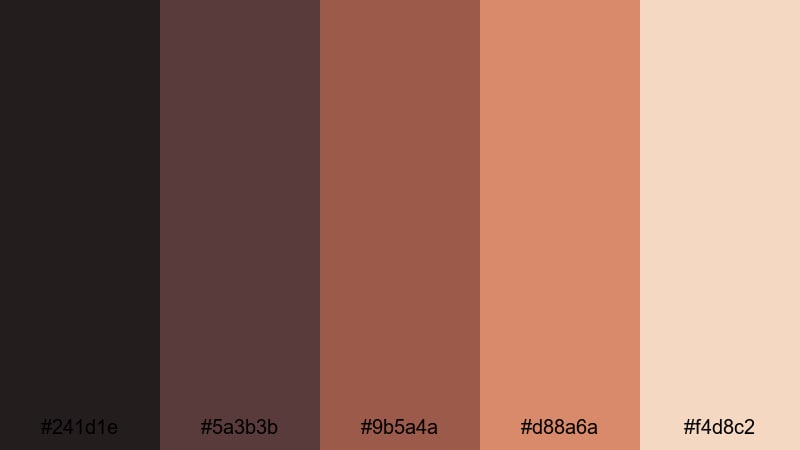
- HEX Codes: #241d1e, #5a3b3b, #9b5a4a, #d88a6a, #f4d8c2
- Mood: Gentle and introspective, like old film washed with volcanic warmth.
- Use for: Use for portrait edits, documentary style interviews, and soft brand stories.
Faded Lava Portrait brings volcanic heat into a muted, vintage space. The browns and faded oranges look like an old film print that has soaked up decades of sunlight and warmth, giving interview or portrait footage a gentle, human tone.
Use the warmer midtones for skin friendly grading, keeping saturation low so everything feels soft and approachable. The lightest cream is great for subtitles and chapter labels, while the dark maroon and brown can be used for subtle overlays, frames, and logo marks in your documentaries or brand stories.
Bold & Vibrant Volcano Color Palettes
Neon Lava Festival
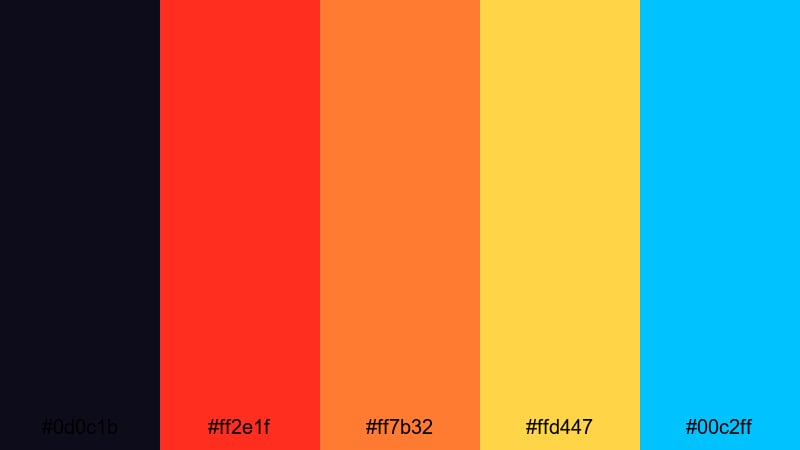
- HEX Codes: #0d0c1b, #ff2e1f, #ff7b32, #ffd447, #00c2ff
- Mood: High energy, party ready, and explosively bright like a lava rave.
- Use for: Use for YouTube thumbnails, festival recaps, and fast paced montage edits.
Neon Lava Festival takes volcanic reds and pushes them into neon territory, with blazing orange, bright yellow, and electric cyan over a deep indigo base. It feels like a lava flow mixed with concert lights and glow sticks.
Use the dark navy as your base and drop the neon tones onto text, icons, and motion graphics. This palette is perfect for festival recaps, event promos, gaming channels, and any thumbnail that needs instant, high contrast impact on crowded feeds.
Tropical Eruption Rush
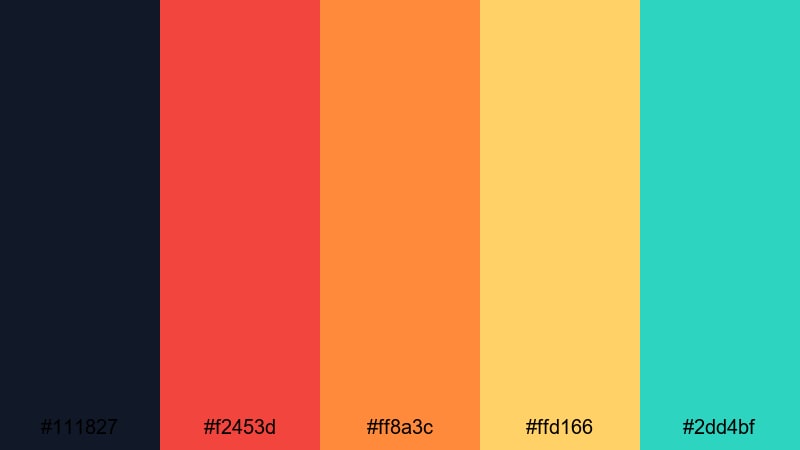
- HEX Codes: #111827, #f2453d, #ff8a3c, #ffd166, #2dd4bf
- Mood: Adventurous, fun, and volcanic with a tropical twist.
- Use for: Use for travel vlogs, adventure challenges, and upbeat social edits.
Tropical Eruption Rush fuses lava reds and oranges with fresh turquoise and deep navy. It feels like an island volcano meeting crystal water and bright sun, ideal for energetic, adventurous content.
Let the navy and charcoal hold your backgrounds, while reds and oranges mark key frames, transitions, and markers on maps or travel graphics. The minty turquoise and yellow are great accent colors for location tags, chapter markers, and animated stickers in travel vlogs and challenge videos.
Volcanic Gamer Energy
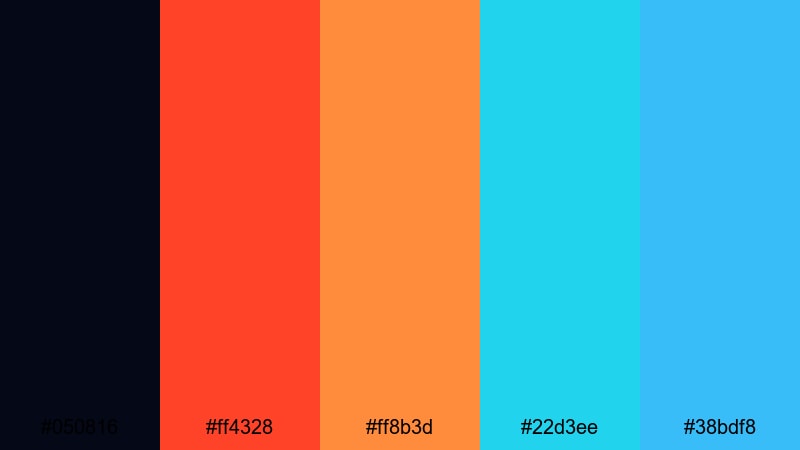
- HEX Codes: #050816, #ff4328, #ff8b3d, #22d3ee, #38bdf8
- Mood: Edgy, digital, and charged with esports level intensity.
- Use for: Use for gaming intros, streamer overlays, and tech themed content.
Volcanic Gamer Energy drops lava red and orange onto a deep digital navy, then adds bright cyan accents. It feels like molten rock under RGB lights, perfect for gaming, tech, and streamer branding.
Use the dark navy as your main background for overlays and face cams, then apply the lava tones to alerts, kill counts, and callouts. Cyan and light blue are ideal for outlines, borders, and animated strokes that pop on dark streams or YouTube gaming intros.
Inferno Pop Highlights
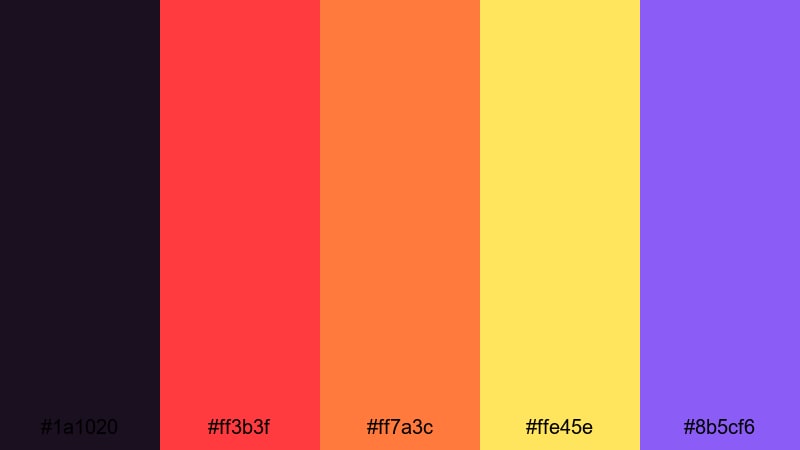
- HEX Codes: #1a1020, #ff3b3f, #ff7a3c, #ffe45e, #8b5cf6
- Mood: Playful yet intense, like a graphic poster lit by volcanic sparks.
- Use for: Use for promo spots, product launches, and bold social media graphics.
Inferno Pop Highlights mixes bold lava reds and oranges with sunny yellow and vibrant violet on a dark, inky base. It feels like a graphic novel take on a volcanic explosion: bold, playful, and made to stand out.
Use the darkest tone for backgrounds, the yellow and orange for urgent CTAs and sale badges, and the violet as a quirky accent around logos or characters. This palette is great for launch videos, social promo graphics, and any content that blends volcanic intensity with pop art flair.
Elegant & Modern Volcano Color Palettes
Charcoal Ember Luxe
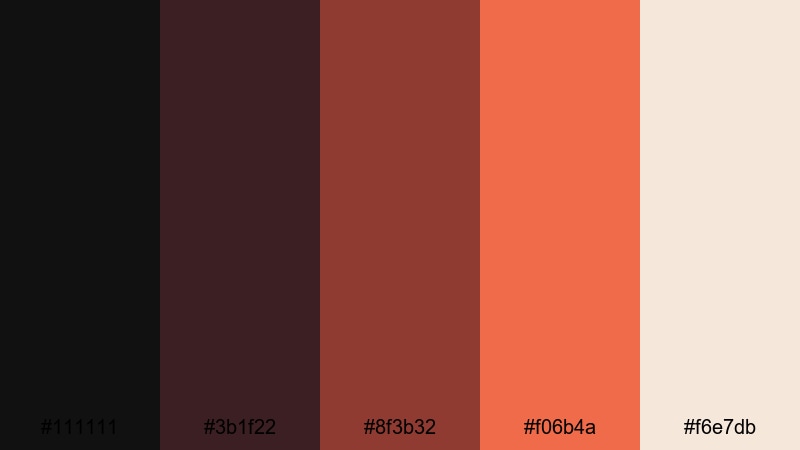
- HEX Codes: #111111, #3b1f22, #8f3b32, #f06b4a, #f6e7db
- Mood: Luxurious, refined, and quietly powerful with ember accents.
- Use for: Use for brand films, premium product videos, and stylish channel visuals.
Charcoal Ember Luxe turns volcanic energy into something sleek and premium. Deep charcoals and wine toned reds provide a sophisticated base, while warm coral and ivory bring in subtle light and softness.
Use the almost black shade (#111111) for backgrounds, lower thirds, and frames, then let ember and coral trace key details like logos, product edges, or UI highlights. This palette suits luxury brands, high end product showcases, and channel visuals where you want lava heat without sacrificing elegance.
Minimal Lava Accent
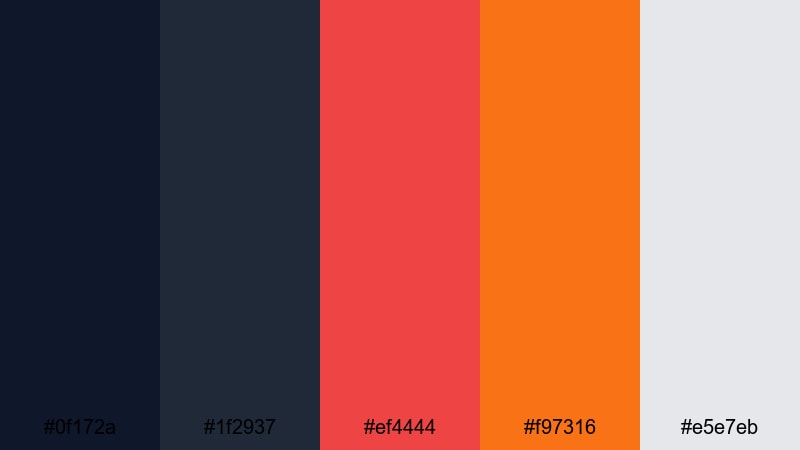
- HEX Codes: #0f172a, #1f2937, #ef4444, #f97316, #e5e7eb
- Mood: Clean and modern with sharp volcanic accents against cool neutrals.
- Use for: Use for tech explainers, UI style graphics, and minimal logo stings.
Minimal Lava Accent pairs cool slate blues and soft grays with a sharp lava red and orange. It feels like a calm interface suddenly lit up by volcanic notification colors, ideal for modern, minimal design.
Let the neutrals dominate, using the volcano accents very sparingly on buttons, icons, and critical text. This is a perfect palette for explainers, app demos, UI animations, and simple logo stings where a single pop of color directs all the attention.
Volcano Studio Branding
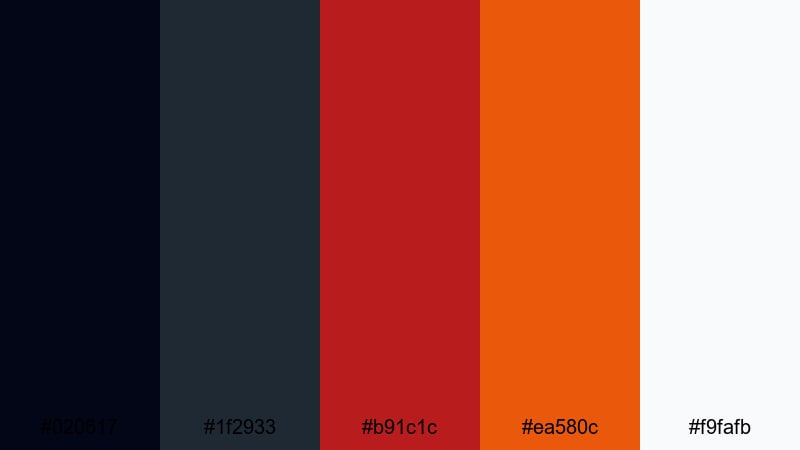
- HEX Codes: #020617, #1f2933, #b91c1c, #ea580c, #f9fafb
- Mood: Sleek, confident, and branded with a signature volcanic spark.
- Use for: Use for channel branding, studio bumpers, and consistent overlay systems.
Volcano Studio Branding provides a complete system: inky navy and graphite for base elements, bold lava red and orange for brand accents, and crisp white for text and icons. It feels confident and modern, built to last as a recognizable identity.
Use the dark tones for backgrounds, overlays, and transitions, and reserve red and orange for your logo, subscribe buttons, and key CTAs. With the white shade (#f9fafb) as your main text color, this palette translates cleanly across intros, lower thirds, thumbnails, banners, and social templates.
Tips for Creating Volcano Color Palettes
Volcano palettes work best when you balance fiery saturation with grounding neutrals and enough contrast for text and UI. Whether you are grading footage in Filmora or designing thumbnails, use these principles to keep your visuals powerful and clear.
- Pair lava reds and oranges with deep charcoals or navies so the warm tones stand out instead of overwhelming the frame.
- Always test text on your chosen background colors; use light neutrals or white for copy over dark lava shades, and dark charcoal over pale ember highlights.
- Limit your saturated volcano colors to 2 or 3 main accents, and let the rest of your palette be muted ash, sand, or slate for a cinematic feel.
- In Filmora, apply your volcano palette to key elements first (titles, lower thirds, overlays), then adjust footage color grading to support those tones rather than clash.
- Use gradients that move from shadowy maroon to bright lava orange to guide the viewer's eye toward faces, logos, and important actions.
- For branding, pick a signature lava shade that appears in your logo, end screens, and thumbnails so your channel is instantly recognizable.
- When mixing volcano with tropical or neon accents, keep one family (warm or cool) dominant and use the other only for highlights and motion graphics.
- Save your palette as reusable presets or templates in Filmora so new videos, shorts, and social clips can match your volcano aesthetic in a few clicks.
Volcano color palettes can turn any project into a dramatic, emotionally charged experience, from slow burning travel films to high impact gaming intros. By combining lava reds, ember oranges, ash neutrals, and deep night tones, you can set a mood that feels powerful, adventurous, or quietly intense.
Use the HEX codes above as starting points, then refine them in Filmora with AI powered color tools, HSL adjustments, and LUTs until they fit your story and brand. The more consistently you use these palettes across videos, thumbnails, and channel art, the stronger and more memorable your visual identity becomes.
Experiment with a few of these volcano palettes on your next edit in Filmora, save what works as presets, and build a signature look that viewers instantly associate with your name or channel.
secure downloadNext: Amber Color Palette
