หากคุณอยู่คนเดียวในห้องว่างขนาดใหญ่และพูดอะไรบางอย่าง คำพูดของคุณจะสะท้อนกลับมาทั่วทั้งห้อง ดูเหมือนว่าคุณพูดซ้ำคำเดิมหลายครั้งแต่เสียงจะเบาลงทุกครั้ง เมื่อคุณมีวิดีโอที่คุณกำลังอ่านบทกวีหรือส่งข้อความสำคัญ การเพิ่มเอฟเฟกต์เสียงสะท้อนในวิดีโอจะทำให้เสียงมีความน่าสนใจและมีพลังมากขึ้น
คุณจะต้องใช้โปรแกรมตัดต่อวิดีโอที่สามารถเพิ่มเสียงสะท้อนให้กับวิดีโอได้อย่างง่ายดาย ไม่ค่อยมีโปรแกรมตัดต่อวิดีโอที่สามารถเพิ่มเสียงสะท้อนได้ทันทีจากเอฟเฟกต์เสียงและพรีเซ็ตสำเร็จรูป นี่คือเหตุผลที่เราได้คัดสรรโปรแกรมตัดต่อวิดีโอที่ดีที่สุดสำหรับผู้ใช้ Windows PC และ Mac คุณยังสามารถเพิ่มเสียงสะท้อนให้กับวิดีโอออนไลน์จากอุปกรณ์ใดก็ได้ผ่านเว็บเบราว์เซอร์ของคุณโดยตรง
ในบทความนี้
ส่วนที่ 1 วิธีเพิ่มเอฟเฟกต์เสียงสะท้อนให้กับวิดีโอแบบออนไลน์
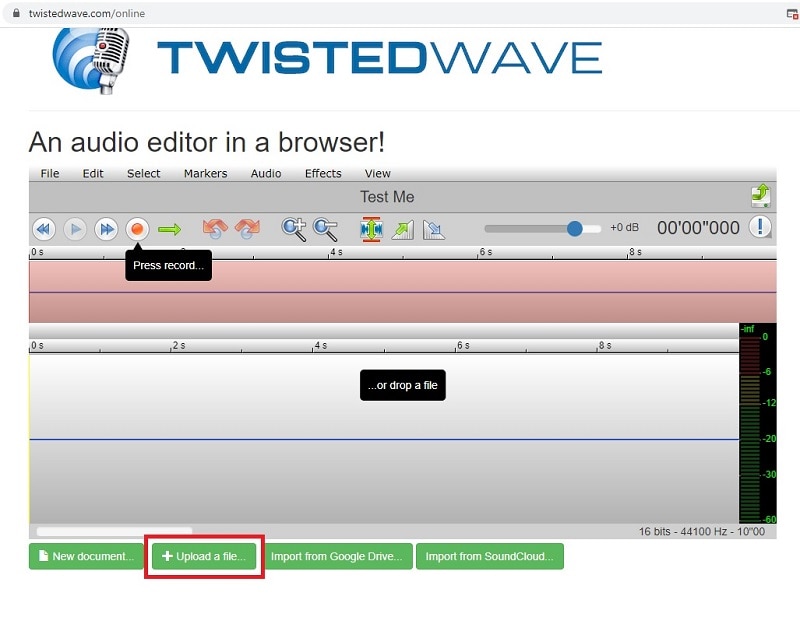
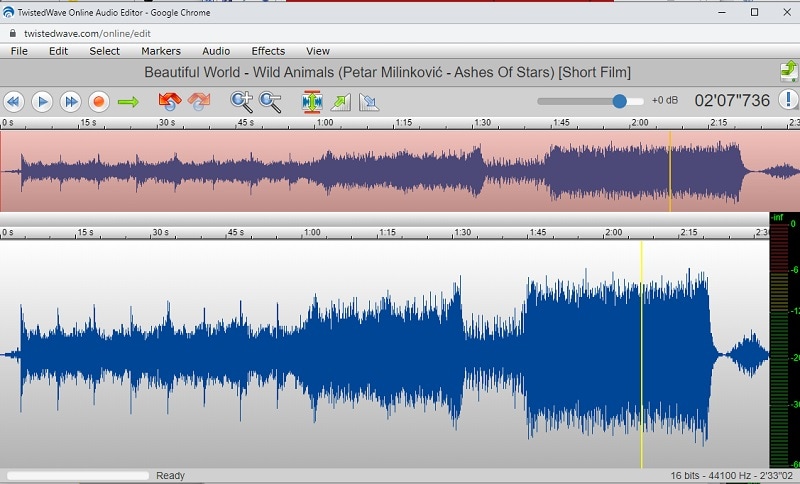
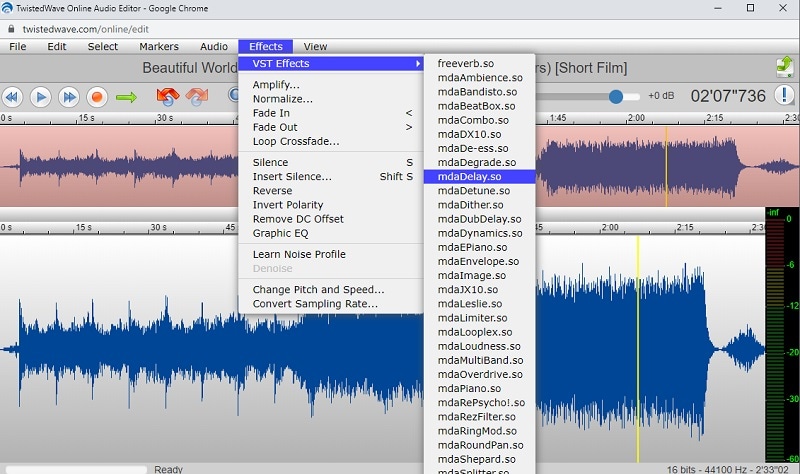
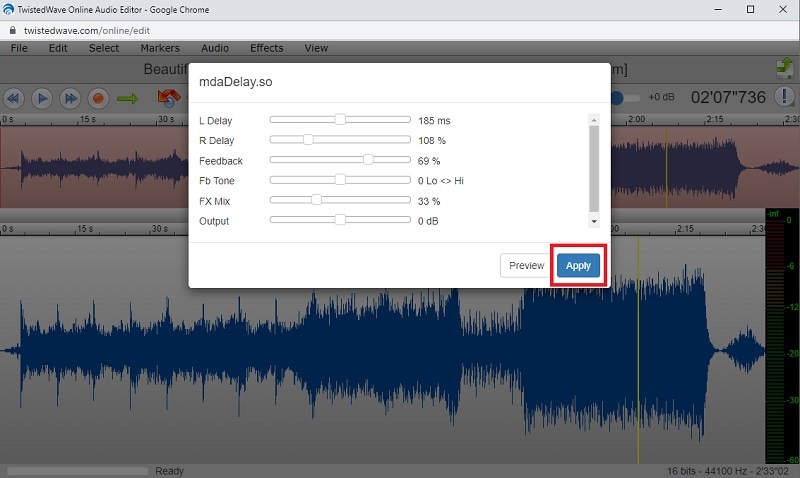
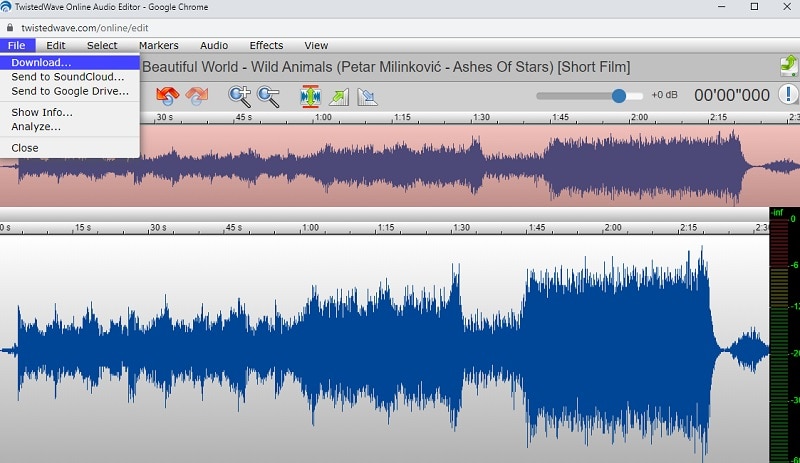
หากคุณต้องการเพิ่มเสียงสะท้อนให้กับวิดีโอเพียงครั้งเดียว ไม่จำเป็นต้องดาวน์โหลดโปรแกรมตัดต่อวิดีโอให้เสียเวลา คุณสามารถใช้โปรแกรมตัดต่อเสียงออนไลน์เพื่อเพิ่มเอฟเฟกต์เสียงสะท้อนและนำไฟล์เสียงที่ปรับแต่งแล้วไปประกอบกับไฟล์วิดีโอ TwistedWave คือหนึ่งในโปรแกรมตัดต่อวิดีโอออนไลน์ไม่กี่ตัวที่ให้คุณเพิ่มเสียงสะท้อนได้ นี่คือวิธีการเพิ่มเสียงสะท้อนในวิดีโอออนไลน์
ส่วนที่ 2 วิธีเพิ่มเสียงสะท้อนให้กับวิดีโอบน Windows PC
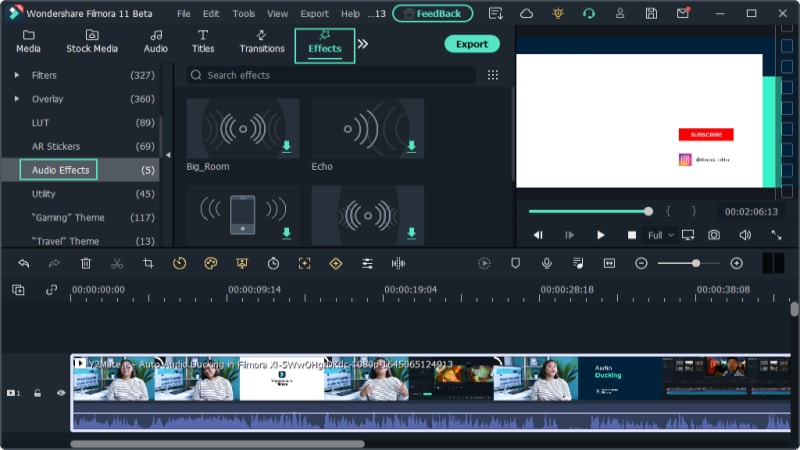
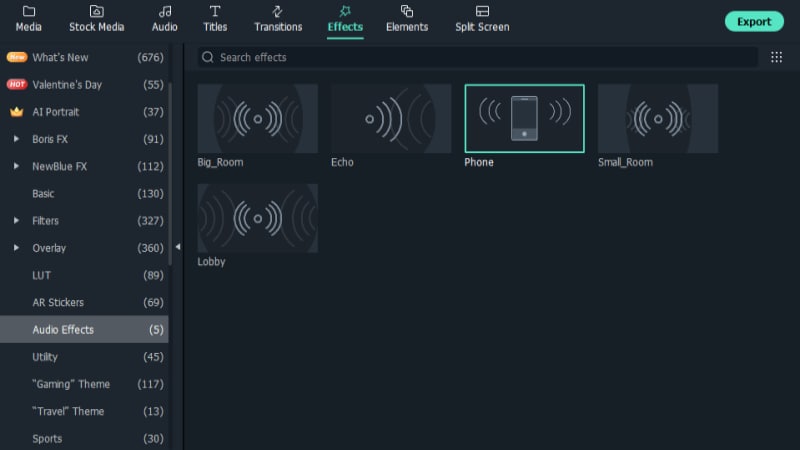
หากคุณใช้ Windows PC มีโปรแกรมตัดต่อวิดีโอไม่กี่ตัวที่สามารถเพิ่มเสียงสะท้อนได้ทันทีจากตัวเลือกภายใน แม้แต่โปรแกรมที่ได้รับความนิยมสูงสุดก็ไม่มีเสียงสะท้อนเป็นค่าพรีเซ็ตในเอฟเฟกต์เสียง เราแนะนำWondershare Filmoraซึ่งสามารถเพิ่มเสียงสะท้อนได้อย่างรวดเร็วเพียงไม่กี่ขั้นตอนจากเอฟเฟกต์ในตัว
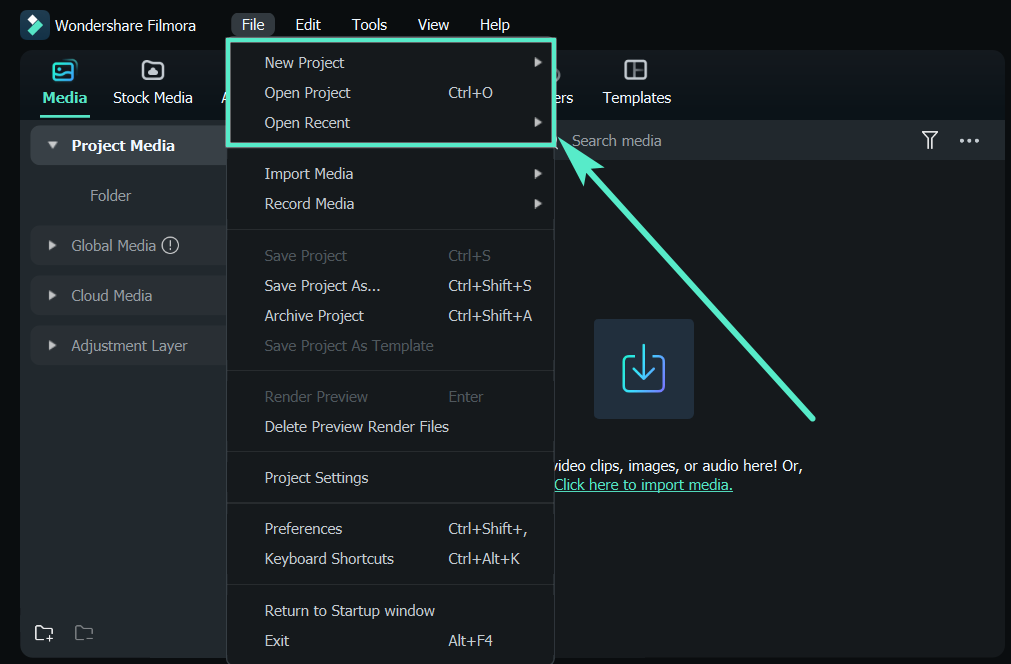
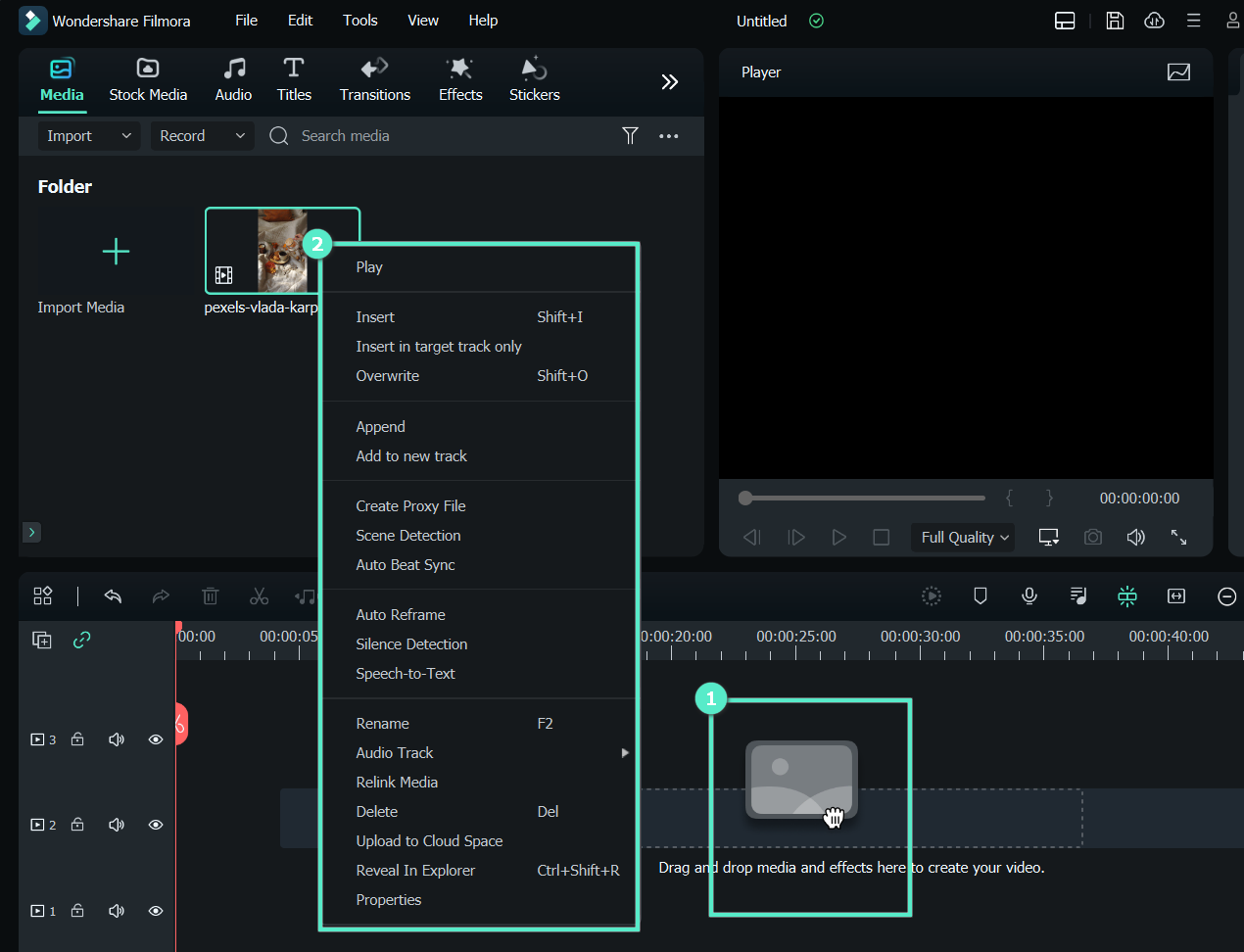
Filmora Video Editor เป็นแอปพลิเคชันที่ช่วยเพิ่มเสียงสะท้อนในวิดีโอของคุณได้อย่างง่ายดาย มีฟีเจอร์ครบครันที่ช่วยให้แม้แต่ผู้เริ่มต้นก็สร้างงานได้สวยในเวลาอันสั้น ในการเริ่มต้นเพิ่มเสียงสะท้อนด้วย Filmora ให้ทำตามขั้นตอนง่ายๆ ดังนี้:
-
Products Platforms
Features
-
Video
Assets
-
-
AI -
Content Generation -
Efficiency Level-Up
Video/Image
- AI Text to VideoVeo 3.1
- AI Image to VideoVeo 3.1
- AI Image Generator >
- AI Video ExtenderNEW
-
-
Solutions Marketing & Business
-
Resources -
Video Prompts
150+ FREE video prompts covered to quickly generate similar videos -
Video Trends
Discover top ten vdeo marketing trends 2025 -
Video Encyclopedia
Learn video editing technical terms -
Content Hub
Explore tips, creation ideas, and sparkling events -
Creator Hub
Get inspired by a wide range of content creators -
DIY Special Effects
Create video effects like a pro just by yourself
-
-
Help Center Support
-
FAQs >
Troubleshooting and help files -
Guide & Tutorials >
Product videos, tutorials, and guides -
Tech Specs >
Specific product requirements and functions -
Team & Business >
Flexible plans for teams and enterprises
Learn
-
What's New >
Our latest updates and problem fixes -
Version History >
To see how products and offerings have changed -
Reviews >
See what our users say
-
-
- search
Mon-Fri 6:00 PM to 11:00 AM Pacific Time
Search
Hot Tutorials


-
Products Platforms
Features
-
Video
Assets
-
-
AI -
Content Generation -
Efficiency Level-Up
Video/Image
- AI Text to VideoVeo 3.1
- AI Image to VideoVeo 3.1
- AI Image Generator >
- AI Video ExtenderNEW
-
-
Solutions Marketing & Business
-
Resources -
Video Prompts
150+ FREE video prompts covered to quickly generate similar videos -
Video Trends
Discover top ten vdeo marketing trends 2025 -
Video Encyclopedia
Learn video editing technical terms -
Content Hub
Explore tips, creation ideas, and sparkling events -
Creator Hub
Get inspired by a wide range of content creators -
DIY Special Effects
Create video effects like a pro just by yourself
-
-
Help Center Support
-
FAQs >
Troubleshooting and help files -
Guide & Tutorials >
Product videos, tutorials, and guides -
Tech Specs >
Specific product requirements and functions -
Team & Business >
Flexible plans for teams and enterprises
Learn
-
What's New >
Our latest updates and problem fixes -
Version History >
To see how products and offerings have changed -
Reviews >
See what our users say
-
-
- search
Mon-Fri 6:00 PM to 11:00 AM Pacific Time
Search
Hot Tutorials
ส่วนที่ 3 วิธีเพิ่มเสียงสะท้อนให้กับวิดีโอบนมือถือ?
การเพิ่มเสียงสะท้อนในวิดีโอบนอุปกรณ์มือถือทำได้รวดเร็วและง่ายมากด้วย Wondershare Filmora ไม่ว่าคุณจะอยากสร้างเสียงพูดแบบดราม่า เพิ่มเสียงพื้นหลัง หรือเติมมิติให้กับเสียง Filmora มีSound FXที่ให้คุณใส่เสียงสะท้อนในวิดีโอด้วยการแตะเพียงไม่กี่ครั้งด้านล่างนี้คือวิธีง่ายๆ ที่จะทำได้
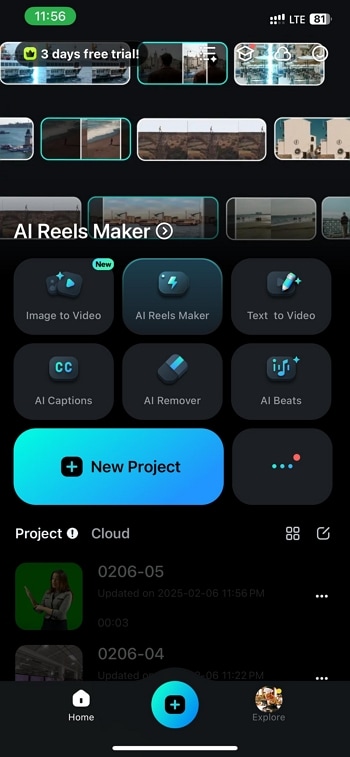
เปิดFilmoraบนสมาร์ทโฟนของคุณ ถ้ายังไม่ได้ติดตั้งให้ดาวน์โหลดจาก App Store หรือ Google Play เมื่อเปิดแล้ว ให้แตะ"New Project"เลือกวิดีโอที่ต้องการและนำไปวางใน timeline
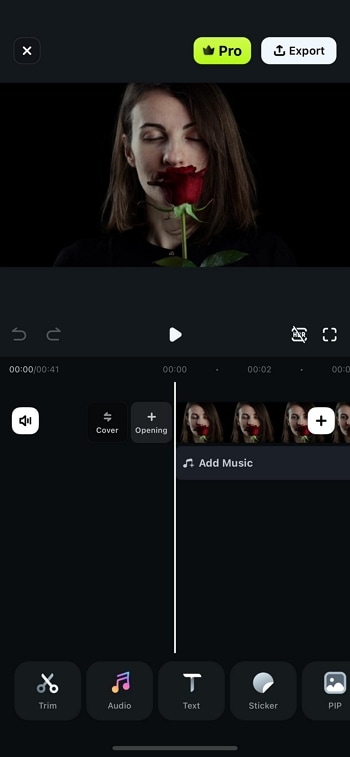
จากนั้นไปที่“Sound FX”ซึ่งเป็นคลังเสียงที่มีเอฟเฟกต์ต่างๆ ให้กับวิดีโอของคุณ
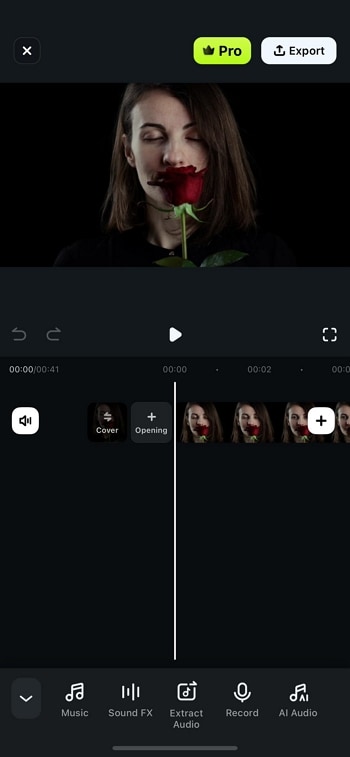
ใช้ช่องค้นหาในคลัง Sound FX เพื่อค้นหา"Echo"เมื่อพบแล้วแตะที่“+”เพื่อเพิ่มเสียงสะท้อนเข้าไปในวิดีโอของคุณ เอฟเฟกต์จะถูกเพิ่มในแทร็กเสียงของคุณแล้ว
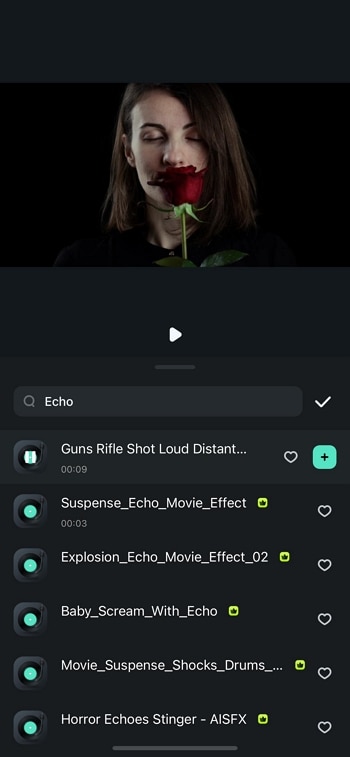
ปรับแต่งเอฟเฟกต์โดยใช้Volume Fade, Speed, Beats และตัวเลือกปรับเสียงอื่นๆลองปรับค่าต่างๆ เพื่อให้ได้เสียงสะท้อนที่เข้ากับธีมของวิดีโอ
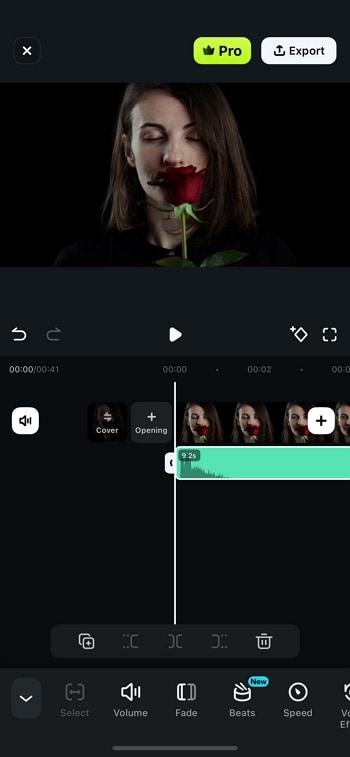
เมื่อพอใจกับการปรับแต่ง ให้แตะ"Export"เพื่อบันทึกวิดีโอ เลือกความละเอียดและรูปแบบที่ต้องการ จากนั้นส่งออก วิดีโอของคุณที่มีเสียงสะท้อนพร้อมแชร์แล้ว!
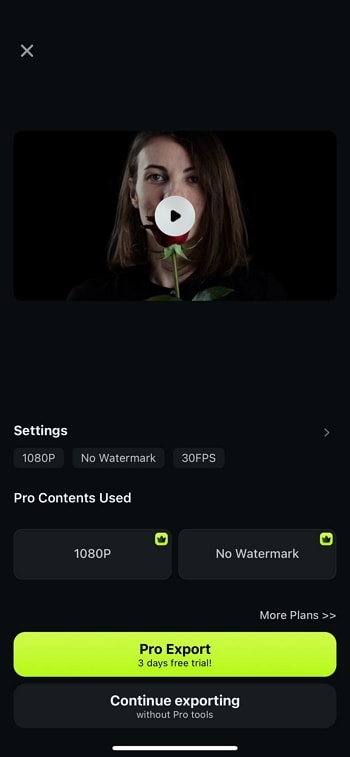
ด้วยขั้นตอนง่ายๆ เหล่านี้ Filmora ช่วยให้คุณปรับปรุงวิดีโอด้วยเสียงสะท้อนระดับมืออาชีพ เสียงจึงฟังดูสมบูรณ์และมีความลึกยิ่งขึ้น
-
Products Platforms
Features
-
Video
Assets
-
-
AI -
Content Generation -
Efficiency Level-Up
Video/Image
- AI Text to VideoVeo 3.1
- AI Image to VideoVeo 3.1
- AI Image Generator >
- AI Video ExtenderNEW
-
-
Solutions Marketing & Business
-
Resources -
Video Prompts
150+ FREE video prompts covered to quickly generate similar videos -
Video Trends
Discover top ten vdeo marketing trends 2025 -
Video Encyclopedia
Learn video editing technical terms -
Content Hub
Explore tips, creation ideas, and sparkling events -
Creator Hub
Get inspired by a wide range of content creators -
DIY Special Effects
Create video effects like a pro just by yourself
-
-
Help Center Support
-
FAQs >
Troubleshooting and help files -
Guide & Tutorials >
Product videos, tutorials, and guides -
Tech Specs >
Specific product requirements and functions -
Team & Business >
Flexible plans for teams and enterprises
Learn
-
What's New >
Our latest updates and problem fixes -
Version History >
To see how products and offerings have changed -
Reviews >
See what our users say
-
-
- search
Mon-Fri 6:00 PM to 11:00 AM Pacific Time
Search
Hot Tutorials
ส่วนที่ 4 วิธีเพิ่มเสียงสะท้อนให้กับวิดีโอบน Mac
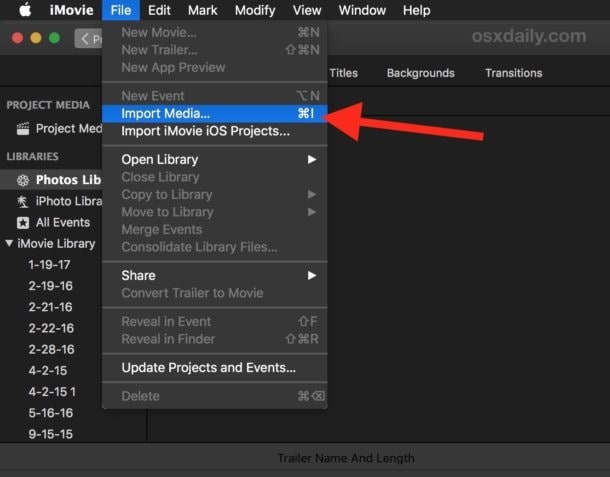
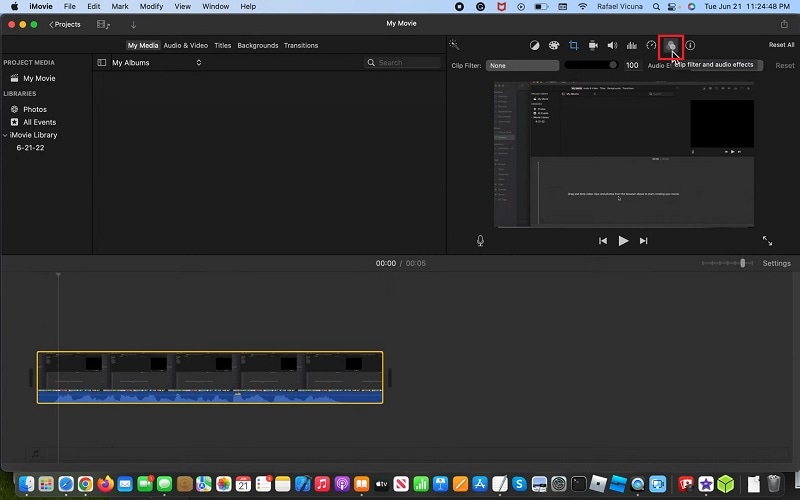
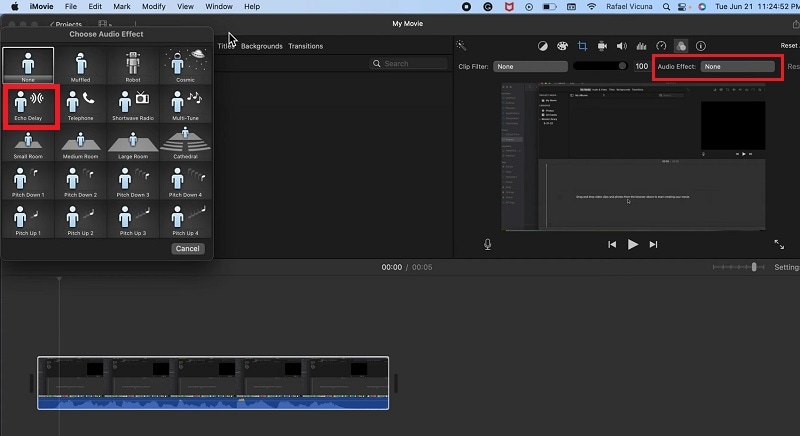
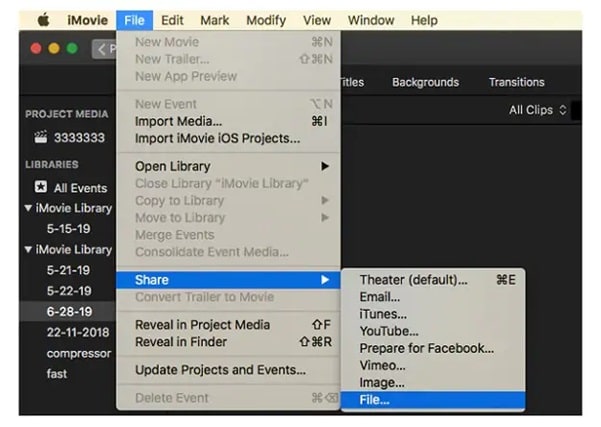
หากคุณใช้ Mac และค้นหาโปรแกรมตัดต่อวิดีโอฟรีในการเพิ่มเสียงสะท้อน คุณสามารถใช้แอป iMovie ซึ่งเป็นโปรแกรมตัดต่อวิดีโอโดย Apple ที่ผู้ใช้ Mac ส่วนใหญ่รู้จักและเคยใช้งาน iMovie มีเสียง Echo Delay ในตัวที่สามารถใช้ได้ทันที แต่เอฟเฟกต์นี้ปรับแต่งได้ไม่มากเหมือนใน Filmora นี่คือวิธีการเพิ่มเสียงสะท้อนในวิดีโอด้วย iMovie
ข้อสรุป
การเพิ่มเอฟเฟกต์เสียงก้องให้กับวิดีโอเป็นแนวโน้มที่นิยมเมื่อต้องการเน้นสิ่งที่คุณกำลังพูด เอฟเฟกต์เสียงก้องจะฟังแตกต่างและสามารถดึงดูดความสนใจของผู้ชมได้ทันที เราได้อธิบายวิธีการเพิ่มเอฟเฟกต์เสียงก้องให้กับวิดีโอของคุณทั้งทางออนไลน์และบนคอมพิวเตอร์ของคุณ ขอแนะนำ Wondershare Filmora อย่างยิ่งสำหรับการใส่เอฟเฟกต์เสียงก้องให้กับวิดีโอบนพีซี Windows และ Mac ของคุณทันที
-
Products Platforms
Features
-
Video
Assets
-
-
AI -
Content Generation -
Efficiency Level-Up
Video/Image
- AI Text to VideoVeo 3.1
- AI Image to VideoVeo 3.1
- AI Image Generator >
- AI Video ExtenderNEW
-
-
Solutions Marketing & Business
-
Resources -
Video Prompts
150+ FREE video prompts covered to quickly generate similar videos -
Video Trends
Discover top ten vdeo marketing trends 2025 -
Video Encyclopedia
Learn video editing technical terms -
Content Hub
Explore tips, creation ideas, and sparkling events -
Creator Hub
Get inspired by a wide range of content creators -
DIY Special Effects
Create video effects like a pro just by yourself
-
-
Help Center Support
-
FAQs >
Troubleshooting and help files -
Guide & Tutorials >
Product videos, tutorials, and guides -
Tech Specs >
Specific product requirements and functions -
Team & Business >
Flexible plans for teams and enterprises
Learn
-
What's New >
Our latest updates and problem fixes -
Version History >
To see how products and offerings have changed -
Reviews >
See what our users say
-
-
- search
Mon-Fri 6:00 PM to 11:00 AM Pacific Time
Search