

 100% Security Verified | No Subscription Required | No Malware


 ChatGPT
 Perplexity
 Gemini
 Claude
 Grok
Grok
Aesthetic vloggers and lifestyle creators rely on mood and color to tell their stories. With the right aesthetic vlog video filters, you can turn everyday clips into dreamy, cinematic visuals that match your personal style and feed.
This guide walks you through 12 Filmora filters designed for soft tone vlogs, dreamy vlog edits, and stylish video tones. Mix and match them to build a signature aesthetic that feels cohesive across your entire channel and socials.
In this article
Soft Glow Filters for Dreamy Aesthetic Vlogs
Pastel Soft Glow
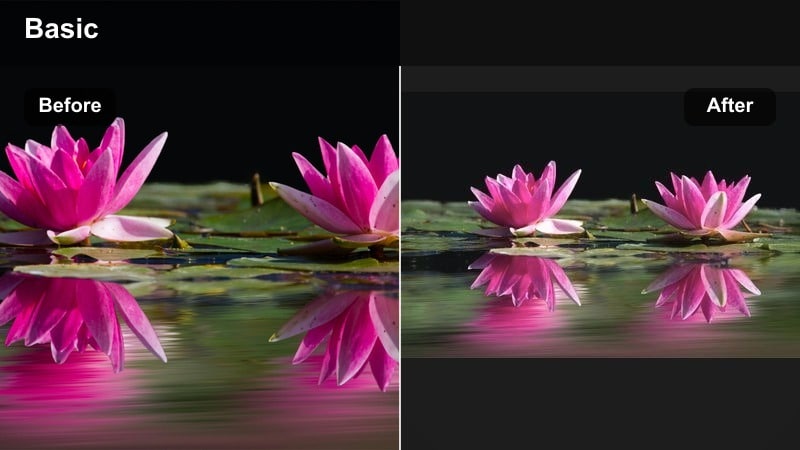
- Effect look: Soft haze with pastel highlights and gently lifted blacks for a dreamy vlog filter finish
- Best for: Morning routines, cozy desk setups, aesthetic video content with light, airy colors
- Editing tip: Dial down contrast slightly and add a touch of film grain to keep the pastel look from feeling too flat.
Pastel Soft Glow wraps your footage in a gentle haze, lifting blacks and emphasizing pastel highlights so every frame feels calm and dreamy. In Filmora, this filter is ideal when you want your vlogs to look light and airy without losing detail in faces or important objects on screen.
Apply it to softly lit scenes like bed making, journaling, or minimal workspace shots to instantly push them into a curated aesthetic. After dropping the filter on your clip, slightly reduce contrast and add a small amount of film grain in Filmoras color and effects panels to avoid a flat, washed-out look while still staying in that delicate pastel vibe.
Use AI Tools to Lock In Your Aesthetic Vlog Palette
Filmoras intelligent color tools help you quickly align your aesthetic vlog video filters with a consistent palette. Instead of manually guessing tones for every clip, you can let smart adjustments guide exposure, contrast, and color balance.
Once your base is set, layer your favorite dreamy vlog filter or stylish video tone on top. This workflow keeps skin tones natural while still achieving the soft, curated aesthetic that your audience recognizes instantly.
Open your next vlog project in Filmora and use AI-assisted color correction before applying these presets to keep your look cohesive.
 secure download

Preview Aesthetic Vlog Filters on Real Clips
Before you fully commit to a new look, test several aesthetic vlog video filters on the same clip. Filmoras side-by-side preview makes it easy to compare soft tone vlogs, moody edits, and clean creator styles in one view.
Pay attention to skin tones, backgrounds, and how the filter responds to movement or changing light. This helps you find a preset that works across indoor, outdoor, and low-light scenes without constant re-editing.
Import a short test sequence and audition three to five filters in Filmoras preview window to see what truly matches your brand.
secure downloadTurn Favorite Filters into Aesthetic LUTs for Vlogs
Once you find the perfect dreamy vlog filter, you can build a repeatable look by saving your adjustments and using LUTs alongside filters. This lets you recreate the same stylish video tone across different cameras and projects.
You can also mix Filmoras preset filters with custom aesthetic LUT vlog files to refine color further. This layered approach keeps your visual identity strong, whether you are filming daily vlogs, cinematic travel diaries, or short-form clips.
Save your favorite color settings as reusable looks, then combine them with these filters to create a signature aesthetic vlog pipeline.
secure downloadHazy Morning Light
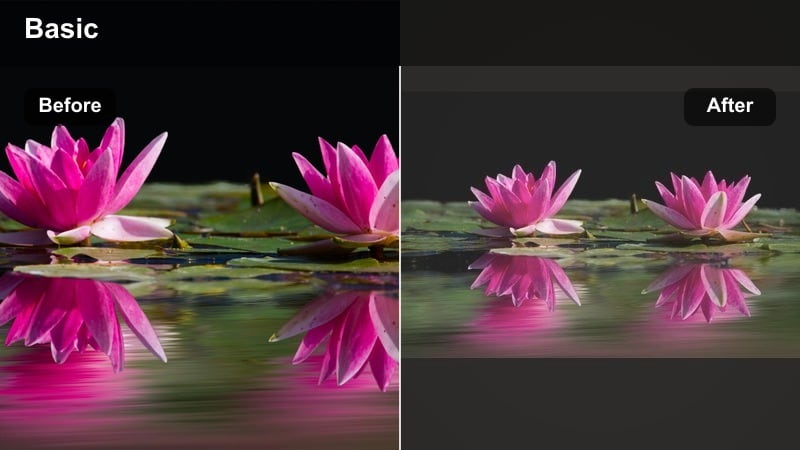
- Effect look: Milky highlights, soft bloom on bright areas, and a gentle fade in the shadows
- Best for: Slow morning vlogs, coffee rituals, window shots, and lifestyle intros with calm energy
- Editing tip: Lower clarity just a bit to enhance the haze, but keep sharpness on faces so details do not disappear.
Hazy Morning Light recreates the feeling of soft, early daylight with milky highlights and a bloom effect around bright areas. It is perfect for capturing steaming coffee, open windows, and slow-motion shots that introduce a laid-back vlog.
In Filmora, apply this filter to your opening scenes or any clip where you want viewers to feel relaxed and unhurried. Gently decrease clarity to boost the haze, but add a touch of sharpness on faces using Filmoras detail controls so eyes, lashes, and mugs still look crisp against the dreamy background.
Dream Cloud Soft
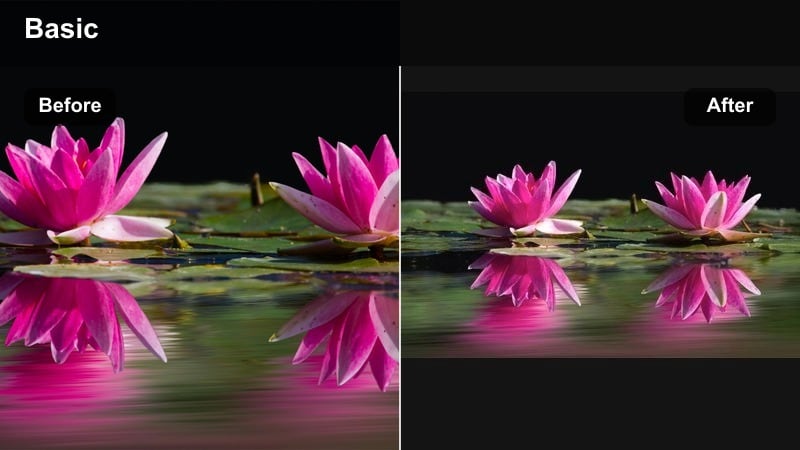
- Effect look: Diffused glow, muted saturation, and a dreamy vlog filter tone with slightly cooler shadows
- Best for: Dreamy vlog edits, moodboards, B-roll overlays, and aesthetic cutaway shots
- Editing tip: Keep transitions slow and minimal; cross-dissolves and simple fades fit better than flashy motion effects.
Dream Cloud Soft brings a diffused, cloud-like glow to your footage, pulling back saturation and cooling down shadows for a cinematic yet comforting vibe. It works especially well on B-roll, sky shots, and reflective moments where you want the visuals to feel almost like a daydream.
Drop this filter onto sequences you plan to use as overlays, chapter breaks, or moodboard-style edits in Filmora. Combine it with slow cross-dissolves or simple fades instead of fast zooms and flashes to maintain the soft atmosphere, and consider stacking it with subtle light-leak overlays at low opacity for layered depth.
Warm Aesthetic Filters for Lifestyle Creators
Golden Living Room
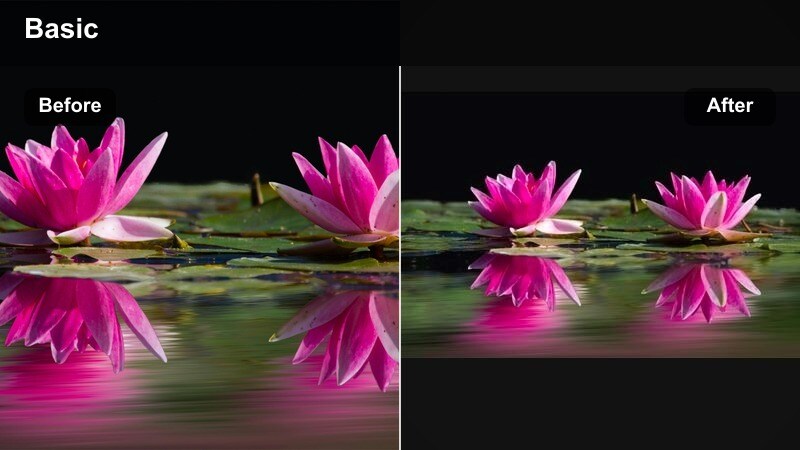
- Effect look: Warm, golden midtones with gentle contrast and cozy highlights for a homely vibe
- Best for: Home vlogs, decor tours, cozy nights in, and lifestyle creators filming indoors
- Editing tip: Reduce yellow saturation slightly if your lights are too warm so the scene looks intentional, not orange.
Golden Living Room leans into warm, golden midtones that make interiors feel cozy and inviting on camera. It is ideal for home tours, decor styling, or relaxed evenings on the couch where you want your space to look like a curated Pinterest board.
When you apply this filter in Filmora, keep an eye on overhead and lamp lighting so things do not skew overly orange. If your bulbs run warm, head into the color adjustment panel and gently lower yellow saturation while nudging overall temperature a bit cooler, letting the filter add flattering warmth without overpowering skin tones or white walls.
Sunset Street Journal
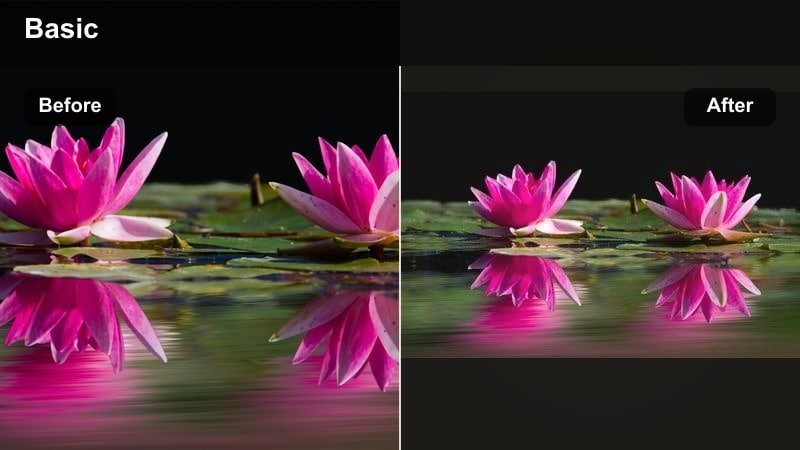
- Effect look: Soft sunset-inspired oranges and pinks with slightly lifted blacks and gentle fade
- Best for: Evening walks, city B-roll, weekend diary vlogs, and reflective talking segments at golden hour
- Editing tip: Lean into silhouettes and backlight; this filter shines when the sun is behind your subject.
Sunset Street Journal adds soft oranges and blush pinks to your footage, mimicking the romantic tones of golden hour even when the natural light is not perfect. With slightly lifted blacks and a gentle fade, your clips gain a nostalgic, diary-like feel that suits reflective storytelling.
Use this filter in Filmora on city walks, bridge overlooks, and backlit talking segments where the sun or streetlights sit behind you. Embrace silhouettes and rim light; if the sky starts clipping, lower highlights slightly in the color controls and use HSL to keep blues and cyans from turning muddy while letting those sunset hues dance across midtones and skin.
Cafe Film Warmth
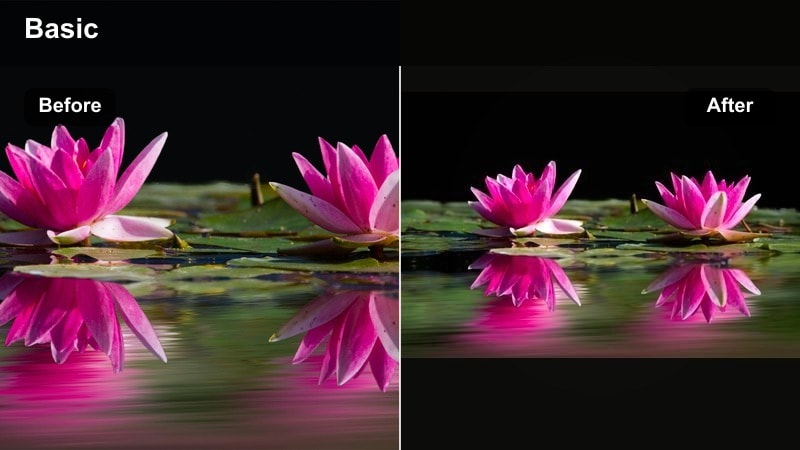
- Effect look: Film-inspired warmth with subtle grain, soft contrast, and rich browns in shadows
- Best for: Cafe vlogs, brunch dates, bookshop visits, and aesthetic video content in low light
- Editing tip: Add a touch of vignette and keep exposure slightly under to preserve that cozy cinematic mood.
Cafe Film Warmth channels a film-like atmosphere with soft contrast, gentle grain, and rich brown shadows that make coffee shops and bookshops feel cinematic. It is especially helpful in dim interiors where you want to turn noise and low light into a stylistic choice instead of a flaw.
Apply it in Filmora to brunch tables, latte pours, and pages turning in a novel, then slightly underexpose with the exposure slider to keep highlights from feeling harsh. Add a light vignette from the effects library to focus attention toward the center of the frame, and let subtle ambient audio carry the cozy, story-driven mood.
Moody Yet Minimal Filters for Stylish Video Tones
Minimal Charcoal Glow
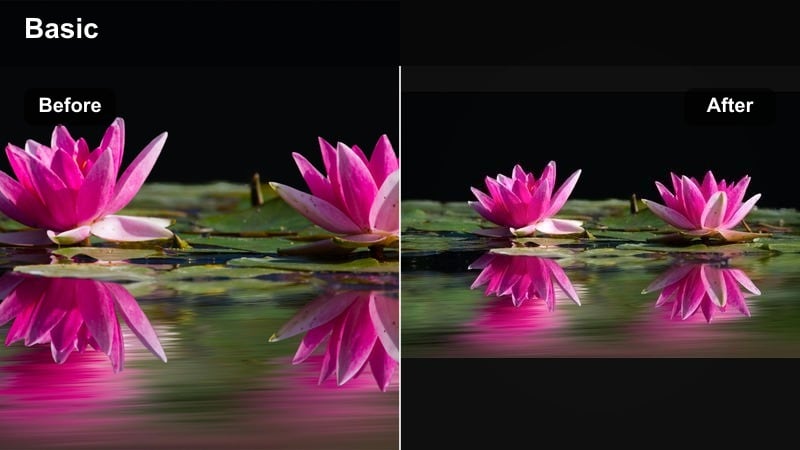
- Effect look: Soft, low-saturation shadows with charcoal depth and a faint glow on highlights
- Best for: Desk setups, tech vlogs, nighttime city shots, and clean minimal aesthetic content
- Editing tip: Lower saturation a bit more and keep your background elements simple to really highlight this minimal look.
Minimal Charcoal Glow strips your palette back with low-saturation shadows and charcoal depth, giving your footage a sleek, editorial feel. Highlights hold a faint glow so your scene looks polished instead of flat or overly dark.
In Filmora, this filter works best on organized desk layouts, product shots, or minimal city compositions with strong lines. After adding the filter, pull global saturation down a bit more and remove distracting colors from your set so the monochrome-inspired mood stands out, then use slower pans and gentle zooms in the timeline to complement the clean aesthetic.
Urban Mist Mood
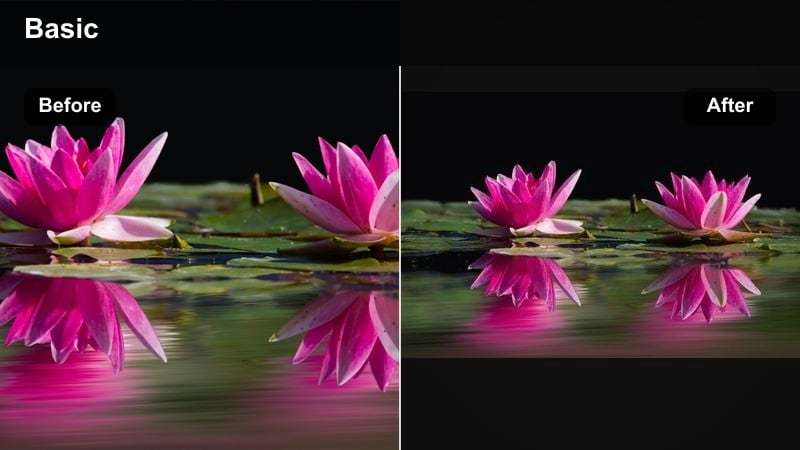
- Effect look: Desaturated city tones with cool shadows and a light mist overlay feeling
- Best for: City walks, metro rides, nighttime rain, and moody aesthetic vlog video filters for urban content
- Editing tip: Slow your shutter when filming (if possible) to introduce a slight motion blur that suits the misty tone.
Urban Mist Mood cools down your footage and desaturates most colors, giving streets, trains, and rainy sidewalks a reflective, cinematic edge. The look mimics a light mist overlay, perfect for night walks and thoughtful city monologues.
When editing in Filmora, use this filter on clips with reflections, puddles, or wet sidewalks, then selectively boost saturation of key colors like neon signs using HSL to keep them popping against the muted backdrop. If you filmed with a slower shutter for natural motion blur, lean into that softness with gentle crossfades and longer clip durations to emphasize the moody atmosphere.
Shadow Journal Soft Fade
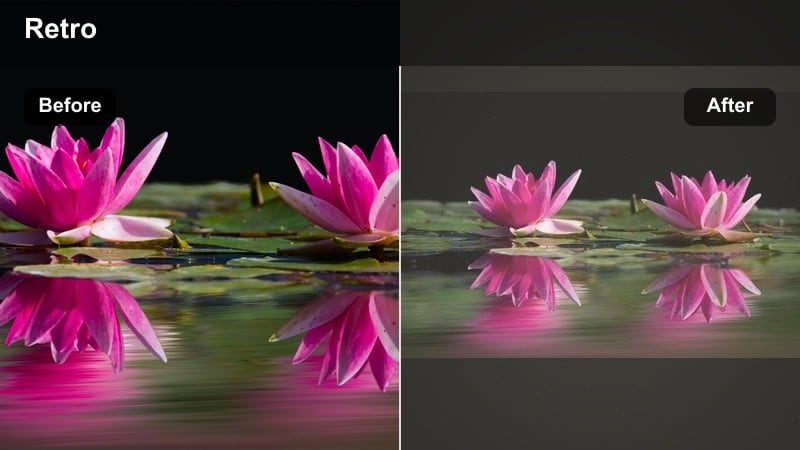
- Effect look: Soft faded blacks, gentle matte finish, and muted colors for an analog journal aesthetic
- Best for: Voiceover diary entries, reflective vlog chapters, and mood-based storytelling edits
- Editing tip: Pair with handwritten titles or simple text overlays for a scrapbook style aesthetic.
Shadow Journal Soft Fade lifts your blacks and mutes colors to create an analog, matte journal look that feels personal and introspective. It is well-suited to candlelit scenes, writing shots, and voiceover-heavy chapters that read like diary pages.
In Filmora, apply this filter to slower sequences and pair it with simple text overlays or handwriting-style fonts from the titles library. Keep transitions gentle, use slow zoom-ins, and leave small pauses of silence or very soft music so the visuals and audio both support the reflective mood.
Clean Creator Filters for Polished Aesthetic Vlogs
Studio Daylight Clean
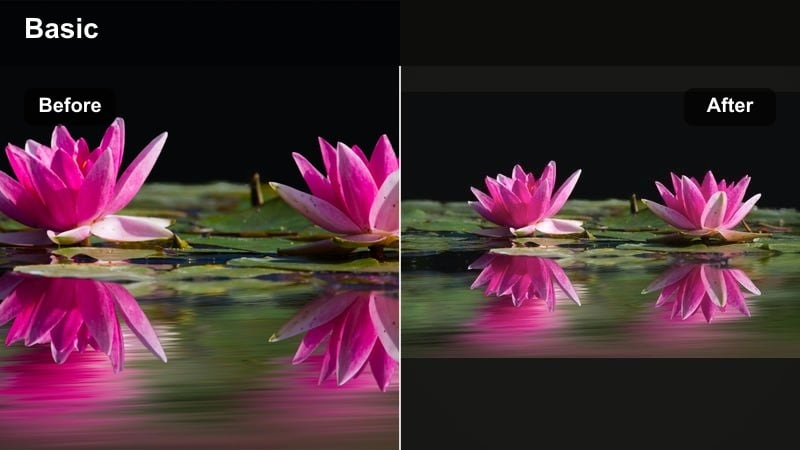
- Effect look: Bright, neutral whites with soft contrast and natural skin tones for a clean creator style
- Best for: Sit-down chats, tutorials, lifestyle tips, and aesthetic vloggers who want a polished feed
- Editing tip: Keep your background colors simple and cohesive so the clean filter feels consistent across shots.
Studio Daylight Clean is designed for bright, neutral whites and natural skin tones, giving your talking-head clips a professional studio feel even if you are filming at home. The soft contrast keeps details flattering without pushing your footage into harsh territory.
Use this filter in Filmora as your go-to base look for sit-down videos, tutorials, and advice-style content. Keep your backdrop tidy and color-coordinated, then save your adjustments as a custom preset so you can apply the same clean creator aesthetic across an entire series with just a couple of clicks.
Peachy Skin Softener
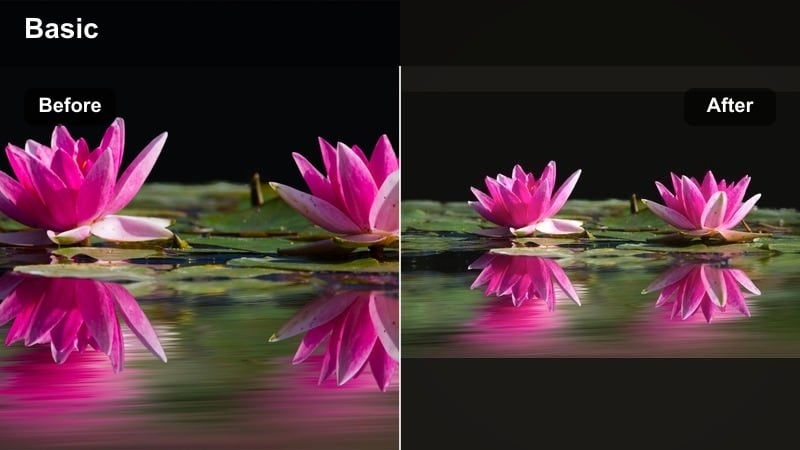
- Effect look: Soft skin focus with light peach warmth and gentle highlight roll-off
- Best for: Beauty vlogs, GRWM videos, product close-ups, and dreamy vlog edits focused on faces
- Editing tip: Use Filmoras masking tools to keep eyes and hair sharp while allowing cheeks and skin to stay soft.
Peachy Skin Softener adds a flattering, warm glow to skin while gently softening texture for a dreamy, camera-ready finish. It is particularly effective on close-ups where you want your base, blush, and highlight to look smooth without crossing into unrealistic territory.
In Filmora, apply this filter to beauty vlogs and GRWM segments, then fine-tune with masks so that eyes, lashes, brows, and hair stay sharp while cheeks and forehead get the softer treatment. If the look starts to feel too airbrushed, slightly raise midtone sharpness or texture until skin looks naturally radiant and trustworthy on screen.
Feed Matcher Aesthetic
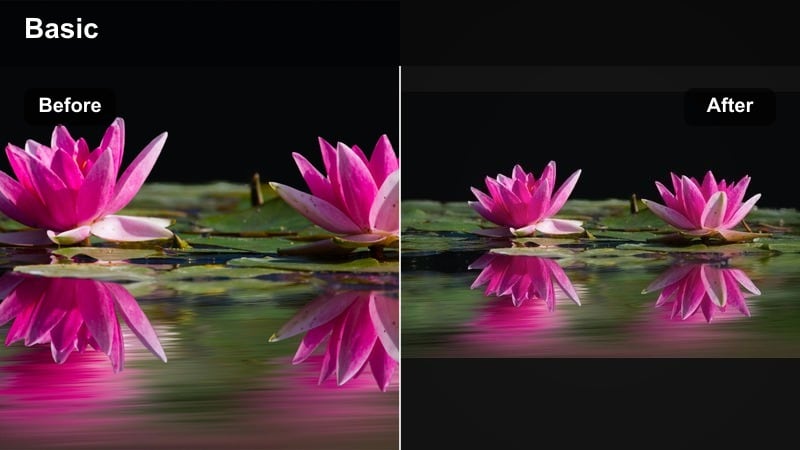
- Effect look: Balanced contrast and color with a subtle stylized tone designed to match IG and TikTok aesthetics
- Best for: Reels, Shorts, cross-posted vlog clips, and aesthetic video content aimed at social feeds
- Editing tip: Export a short test clip and compare next to your existing grid to fine-tune saturation and temperature.
Feed Matcher Aesthetic gives your clips a subtle yet stylish polish that plays well with modern Instagram and TikTok color trends. It balances contrast and color so your video still looks natural while carrying a recognizable, on-brand tone.
Use it in Filmora on vertical exports, Reels, Shorts, or repurposed vlog snippets, then export a few test clips and compare them next to your current grid or feed. Adjust saturation, temperature, and key accent colors so everything aligns with your existing palette, and save the final combo as a preset you can reuse for every social-ready export.
Tips for Using Vlog Video Aesthetic Filters in Filmora
- Film in consistent lighting whenever possible so your aesthetic vlog video filters behave predictably across shots.
- Create a short test timeline with indoor, outdoor, and night clips to see how each filter responds before editing a full vlog.
- Use filters lightly on top of basic corrections for exposure and white balance instead of relying on filters to fix bad footage.
- Save custom versions of your favorite filters with small tweaks for morning, midday, and night to speed up editing.
- Match your music and pacing to the mood of your filter; dreamy vlog filters work best with calmer cuts and softer tracks.
- Always check how your filtered footage looks on both phone and desktop screens before final export.
- Keep an unfiltered backup of each clip so you can quickly revert if a filter does not suit a specific scene.
- Build a naming system for your presets that references mood and use case, like soft-morning, cafe-warm, or city-moody.
With the right aesthetic vlog video filters, you can transform everyday moments into soft, dreamy, and stylish stories that feel uniquely yours. Start by choosing two or three core looks that match your brand, then apply them consistently so viewers recognize your aesthetic instantly.
As you refine your signature tone, experiment with layering filters, subtle grain, and light color tweaks to keep your visuals fresh but cohesive. When you are ready to explore deeper, move on to moodier options and more advanced color shaping to match every chapter of your vlog journey.
secure downloadNext: Explore Moody Vlog Video Filters for Cinematic Nights and Deep Tones
