

 100% Security Verified | No Subscription Required | No Malware


 ChatGPT
 Perplexity
 Gemini
 Claude
 Grok
Grok
If you are a food creator shooting TikTok restaurant videos, the right filters can make every dish look mouthwatering and cinematic in seconds.
Below you will find a curated set of Filmora filters designed for restaurant reviews and food content so you can dial in color, contrast, and mood without complex grading.
In this article
Warm and Cozy Dining Ambience
Golden Plate Glow
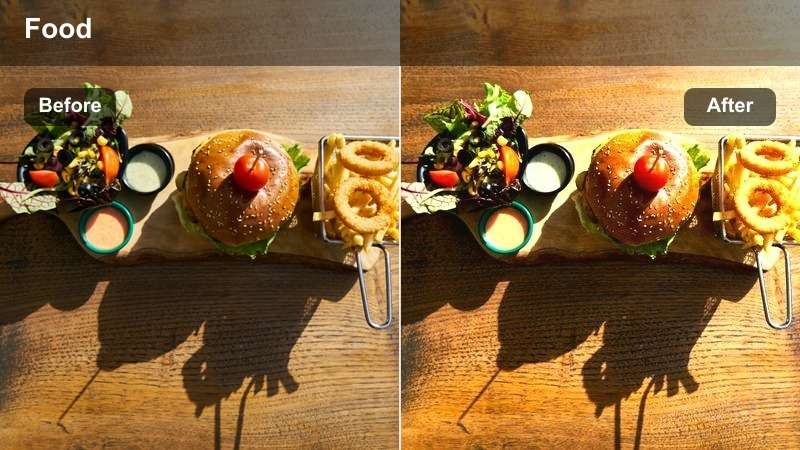
- Effect look: Soft golden warmth with lifted highlights that makes plates look freshly served under restaurant spotlights.
- Best for: Tabletop shots of plated dishes in warm bistros, brunch cafes, and intimate dinner settings.
- Editing tip: Lower contrast slightly for pale ceramics and increase saturation a bit on underexposed food to avoid a muddy look.
Golden Plate Glow adds a subtle golden cast and lifted highlights that mimic the flattering warmth of restaurant spotlights. In Filmora, this filter is ideal when you want dishes to feel freshly served and inviting without pushing colors too far from reality.
Apply it to medium and close-up tabletop shots, then fine-tune exposure and contrast in Filmora so sauces stay rich and plates do not clip. If your footage was captured under mixed lighting, adjust the Temperature and Tint sliders after applying the filter to balance skin tones and keep the food as the visual hero.
Let AI Suggest the Best Restaurant Filter
Filmora's AI tools can scan your TikTok restaurant footage and suggest filters that match the lighting and color of each scene. This is perfect when you are bouncing between cozy interiors, bright brunch cafes, and neon street bites in a single video.
Instead of testing dozens of looks, you get instant suggestions that keep your restaurant reviews visually consistent from clip to clip.
Import a few clips from your latest restaurant visit and let Filmora recommend a starting filter before you fine-tune the details.
 secure download

Preview Filters on Your Food Clips Instantly
Filmora lets you preview multiple filters on the exact same restaurant clip so you can see how each look treats whites, sauces, and steam. This side-by-side view helps you avoid over-stylizing your food while still making it pop for TikTok.
Use this workflow to compare warm ambience filters against bold neon looks before you commit to a color direction for your whole review.
Drop in a short restaurant clip and cycle through these filters to quickly find the one that fits your TikTok storyline.
secure download1000+ Video Filters and 3D LUTs
Beyond these restaurant-focused filters, Filmora includes 1000+ video effects and 3D LUTs so you can build a signature color grade for your TikTok food channel. You can stack filters with LUTs and then refine intensity, exposure, and color controls.
Use LUTs to lock in a consistent brand tone, then tweak each clip with Filmora's color tools so every restaurant, cafe, or night market still feels true to its real-world vibe.
Experiment with pairing a subtle filter from this list with your favorite LUT to build a repeatable color recipe for your food content.
secure downloadCandlelit Corner
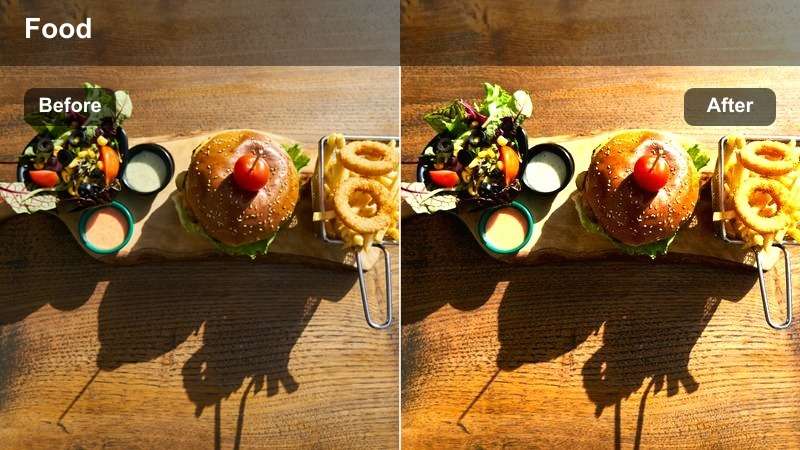
- Effect look: Soft contrast with gentle vignetting that mimics candlelight in a dim corner booth.
- Best for: Moody restaurant reviews, late-night tasting menus, and dim bar snacks on TikTok.
- Editing tip: Raise exposure slightly after applying to keep dark sauces and garnishes from disappearing into the shadows.
Candlelit Corner recreates the intimate glow of dining by candlelight with soft contrast and a delicate vignette. It works especially well for late-night tastings, wine bars, and cozy booths where you want the mood to feel relaxed and romantic.
In Filmora, apply this filter to low-light clips, then gently lift exposure and shadows so details in darker dishes remain visible on mobile screens. Combine it with slower pans, minimal transitions, and subtle background music to keep the soft ambience intact throughout your TikTok edit.
Brunch Sunrise
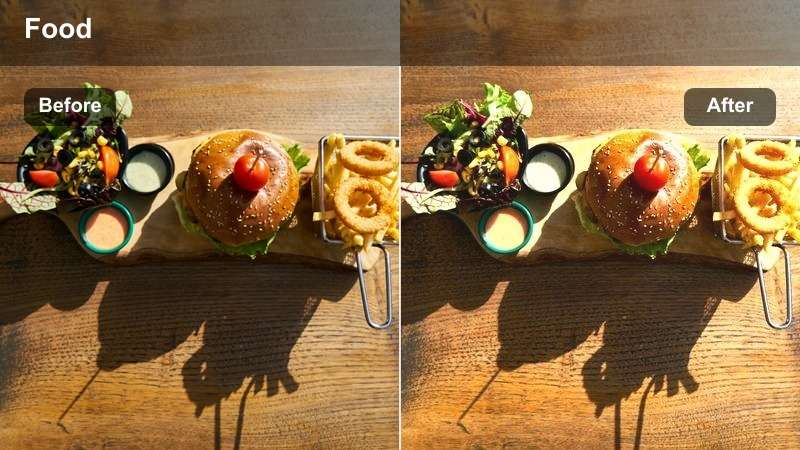
- Effect look: Bright, airy highlights with a hint of pastel warmth that suits sunny brunch scenes.
- Best for: Daytime brunch reviews, coffee shots near windows, and overhead clips of colorful plates.
- Editing tip: Keep whites slightly tamed to avoid blown-out plates by reducing highlights a touch after applying the filter.
Brunch Sunrise brightens your footage with airy highlights and a soft pastel tone that flatters colorful brunch spreads. It is ideal for sunlit cafes, latte art shots, and overhead views where multiple plates share the frame.
After adding the filter in Filmora, nudge down the Highlights and Whites controls to protect plate detail and keep foam, eggs, and pastries from blowing out. Pair this look with gentle camera movements and quick overhead sweeps so viewers can appreciate the full table styled under this light, playful grade.
Bold Street Food and Night Market Vibes
Neon Noodle Night
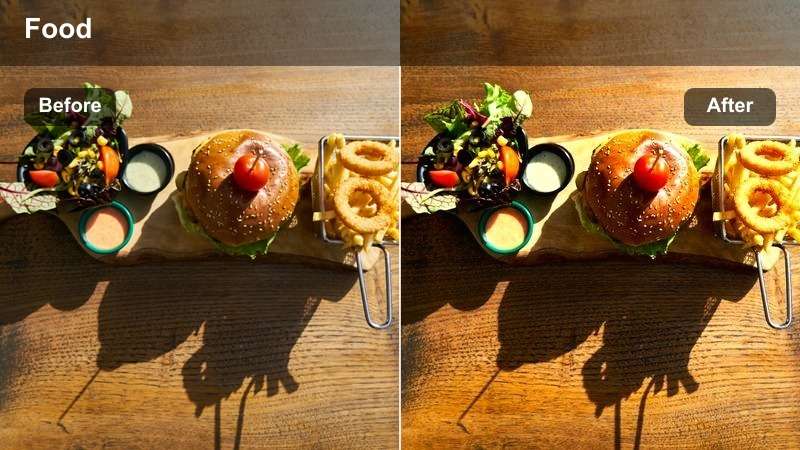
- Effect look: High-contrast, punchy colors that intensify neon signs and vibrant street food stalls.
- Best for: Night market walks, open kitchen clips, and bustling street food lines on TikTok.
- Editing tip: Reduce saturation on skin tones slightly if faces start to look oversaturated under bright neon lighting.
Neon Noodle Night is built for busy, colorful night markets, boosting contrast and saturation so neon signs, steam, and sizzling woks jump off the screen. Use it when you want your TikTok to feel energetic and immersive, like viewers are right in the crowd.
In Filmora, apply the filter, then fine-tune skin tones using the HSL or Color tools if faces get too intense under colored lights. Combine wide walking shots, stall reveals, and tight food close-ups in a quick-cut sequence to let this bold look amplify the street-food energy.
Crispy Street Crunch
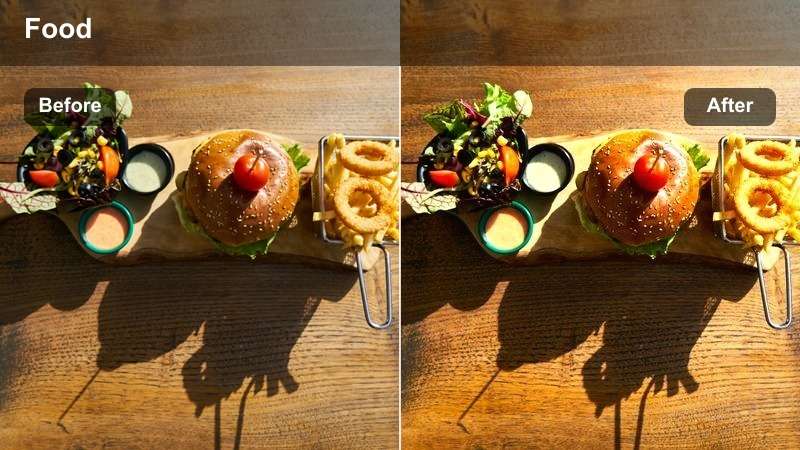
- Effect look: Clarity-boosting filter that sharpens texture and adds a slight warm contrast for fried food.
- Best for: Close-ups of fried snacks, crunchy sides, and handheld street bites filmed vertically.
- Editing tip: Zoom in slightly on the crunchiest parts of the dish so the added clarity draws attention to texture.
Crispy Street Crunch emphasizes fine textures and edges, making fried coatings, char marks, and bubbly batters look extra detailed. It is perfect for macro shots of wings, fries, tempura, and any bite where the crunch is the star.
In Filmora, use this filter on tight close-ups and punch in slightly with the Crop or Scale tools so the viewer's eye stays on the crispest area. Avoid stacking it with heavy sharpening to prevent an over-processed look, and sync your most dramatic crunch shots with audio beats or ASMR bites for maximum impact.
Market Motion Blend
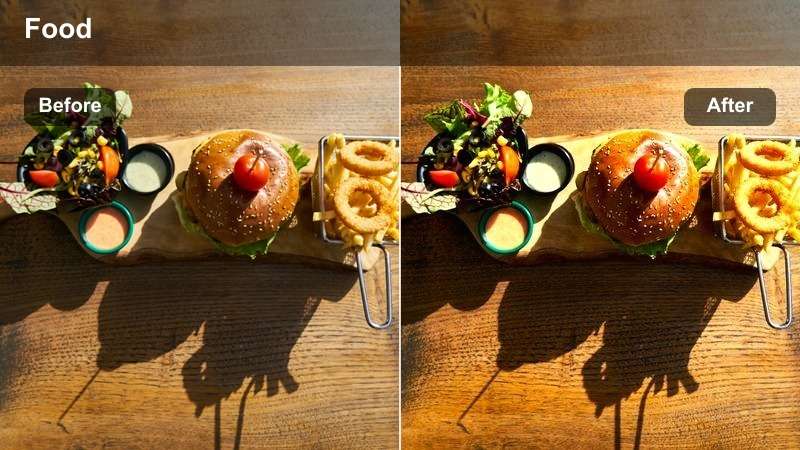
- Effect look: Subtle motion blur and boosted saturation that keeps focus on dishes while the crowd softens.
- Best for: POV walking shots through markets, queue scenes, and reveal shots of stalls.
- Editing tip: Use speed ramping with this filter when you move from the entrance to the main food stall for a dynamic transition.
Market Motion Blend enhances the sense of movement by softening background motion while keeping stalls and signage vibrant. It is especially effective in POV market walks and queue shots where you want to guide the viewer forward toward the food.
After applying the filter in Filmora, experiment with speed ramping on your walking clips so the pace accelerates into key reveals, like the main stall or final plate. Cutting from these motion-heavy shots into crisp close-ups of the food helps balance energy with clarity in your TikTok restaurant stories.
Fine Dining Plating and Detail Shots
Chef's Table Focus
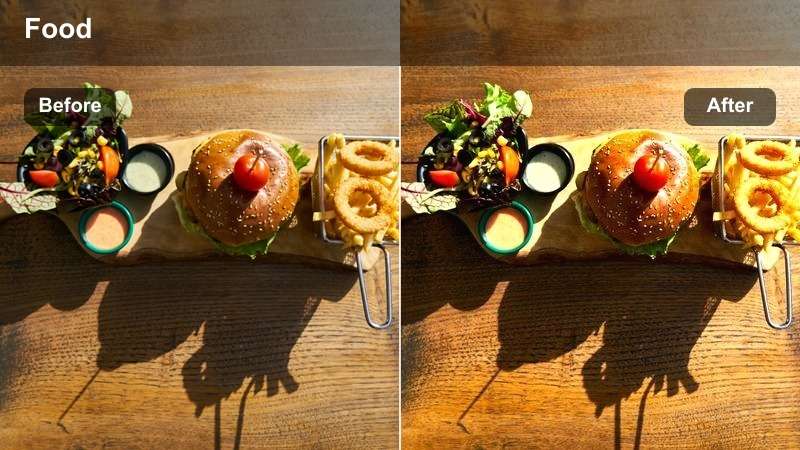
- Effect look: Clean, neutral tones with mild contrast and soft background blur emphasis.
- Best for: Fine dining plates, chef's tasting menus, and delicate garnish close-ups.
- Editing tip: Slow your clips slightly and avoid over-saturating so the refined plating feels elegant, not cartoonish.
Chef's Table Focus keeps colors accurate and refined, putting subtle emphasis on the plate while letting the background fall softly away. It suits chef's tasting menus, Michelin-style dishes, and any plate where composition and negative space matter.
In Filmora, apply this filter to static or slow-moving shots, then slightly reduce saturation if bright sauces start to look artificial. You can also use mild slow motion and gentle zoom-ins to give each plate a premium, cinematic reveal that matches the understated color grade.
White Linen Elegance
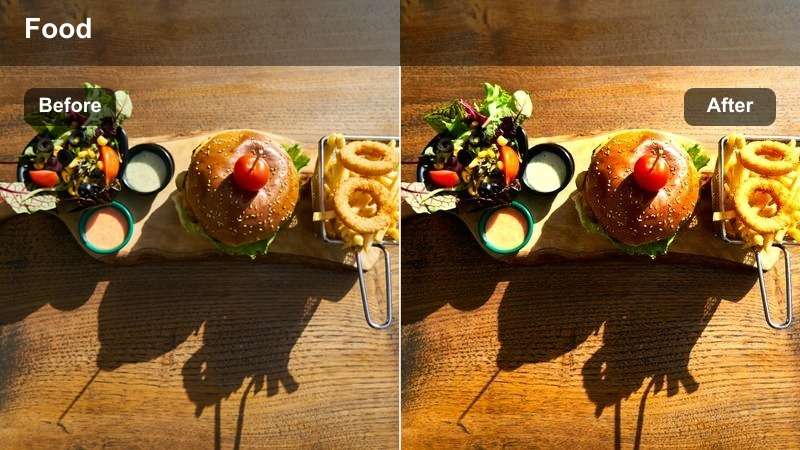
- Effect look: Bright, clean whites with controlled shadows that keep tablecloths and plates crisp.
- Best for: White-tablecloth restaurants, tasting menus, and wine-paired dinners.
- Editing tip: Lower brightness on extremely reflective plates or glasses to avoid distracting glare in TikTok's vertical frame.
White Linen Elegance is tailored for bright, high-end dining rooms with white tablecloths and polished glassware. It brightens whites while carefully holding detail, so your plates look pristine but not washed out.
Once applied in Filmora, watch out for hotspots on glossy plates and wine glasses; use the Highlights and Brightness sliders to tame reflections while keeping food colors rich. Framing shots to show a clear edge of the plate or tablecloth helps this filter accentuate clean lines and the upscale feel of your restaurant review.
Garnish Macro Pop
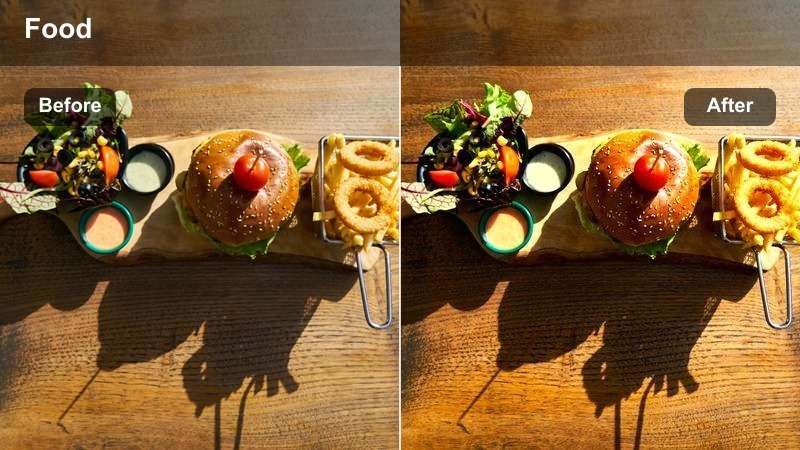
- Effect look: Micro-contrast boost and selective sharpness to make small details and garnishes stand out.
- Best for: Macro clips of garnishes, sauce pours, and close-up texture reveals.
- Editing tip: Use very short clips with this filter and cut on action, like a pour or sprinkle, to keep viewers hooked.
Garnish Macro Pop focuses on micro-contrast and detail, making herbs, salt flakes, sauce drizzles, and tiny textures feel hyper-real. It works best on extreme close-ups that you can sprinkle throughout your edit as eye-catching inserts.
In Filmora, apply this filter only to brief macro shots and place them between wider angles to create a cinematic rhythm. Cut precisely on actions such as a garnish sprinkle or sauce pour, and avoid overusing the effect so those hyper-detailed moments stay special and impactful.
Casual Cafes and Fast-Casual Spots
Counter Service Hype
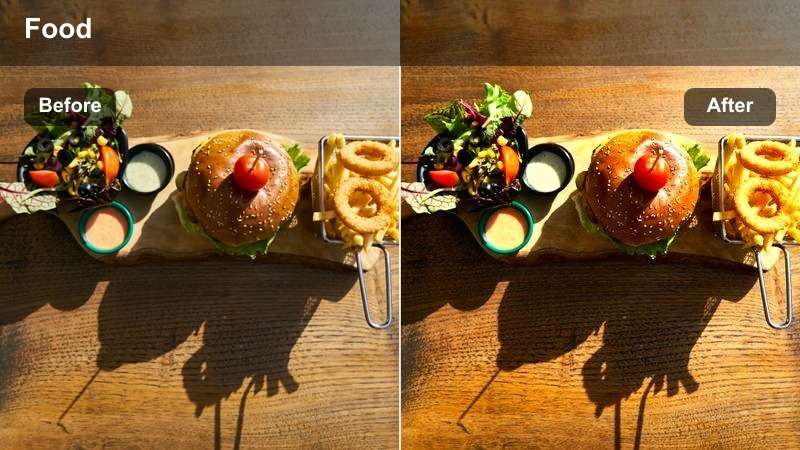
- Effect look: Vibrant midtones and added contrast that make fast-casual interiors look energetic and modern.
- Best for: Order counter shots, menu boards, and quick service restaurant walkthroughs.
- Editing tip: Combine with quick text overlays showing prices or ratings to match the high-energy color profile.
Counter Service Hype adds punchy contrast and lively midtones that suit bright, modern fast-casual interiors. It brings out menu boards, brand colors, and counter details so your viewers instantly feel the upbeat vibe of the spot.
Apply the filter in Filmora to wide walkthroughs and counter scenes, then layer bold, on-beat text overlays for prices, ratings, or quick pros and cons. Short, snappy clips cut to music will pair naturally with this energetic look and keep your TikTok reviews feeling fast and engaging.
Latte Bar Soft
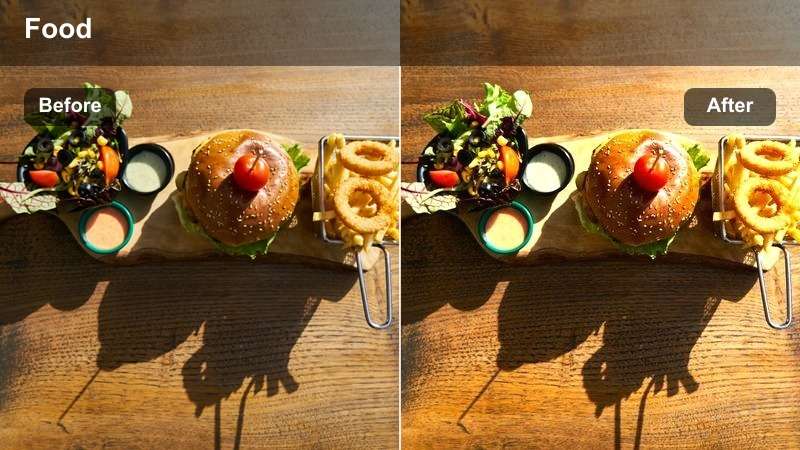
- Effect look: Soft, slightly desaturated tones with gentle contrast that flatter cafe interiors.
- Best for: Coffee bars, dessert counters, and cozy cafe review monologues on TikTok.
- Editing tip: Dial the filter intensity down for darker cafes to avoid making the scene look too hazy on smaller phone screens.
Latte Bar Soft gives cafe footage a relaxed, aesthetic feel with mild desaturation and gentle contrast. It is great for coffee bars, patisserie counters, and sit-down review segments where you speak directly to the camera.
In Filmora, adjust the filter intensity depending on how dark your cafe is so the scene stays clear, not foggy. Pair it with clips filmed near windows, and keep your cuts a bit slower to match the calm mood, using soft background music and minimal text overlays for a cozy TikTok vibe.
Tray Top Review
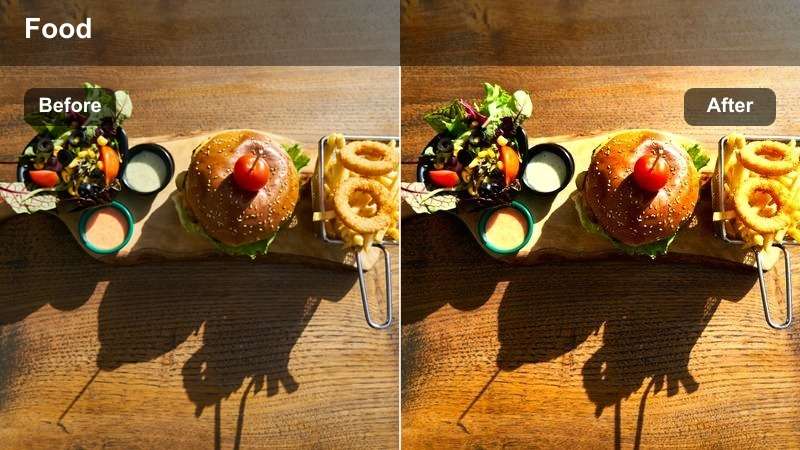
- Effect look: Balanced saturation and mid-level contrast that keeps multiple items on a tray evenly exposed.
- Best for: Fast-casual trays, combo meal breakdowns, and ranking-style TikTok reviews.
- Editing tip: Shoot directly from above and lock focus on the tray before applying the filter to keep every item sharp.
Tray Top Review is designed for overhead shots of combo meals and tasting trays, keeping all items evenly exposed and clearly visible. It is ideal for ranking-style TikToks where you compare several dishes from the same restaurant in one frame.
In Filmora, use this filter on locked-off top-down shots and add simple text labels or scores near each dish for clarity. Maintain consistent label colors and placement across videos to build a recognizable review format that pairs perfectly with this clean, balanced look.
Tips for Using Tiktok Restaurant Videos Filters in Filmora
- Shoot in consistent lighting when possible so your filters behave predictably across an entire TikTok restaurant review.
- Keep an eye on white balance, especially under mixed indoor lighting, before applying strong warm or cool filters.
- Use different filters for wide ambience shots and tight food close-ups, then tie everything together with similar saturation and contrast.
- Avoid over-sharpening food textures; a small boost is enough to make crispy items pop without looking artificial.
- Export a short test clip and watch it on your phone to confirm the filter still looks appetizing on smaller screens.
- Save your favorite filter and LUT combinations as Filmora presets so you can reuse the same restaurant looks quickly.
- Combine filters with subtle vignette and blur tools to guide attention toward key plates or bites in each scene.
- Match your color style to your TikTok brand identity so viewers recognize your restaurant content at a glance.
With a few well-chosen filters, your TikTok restaurant videos can go from flat to irresistible while still looking true to real life.
Test these looks on your next restaurant review or food content shoot, then layer in your favorite TikTok restaurant video LUTs to build a consistent style your audience will recognize instantly.
secure download