

 100% Security Verified | No Subscription Required | No Malware


 ChatGPT
 Perplexity
 Gemini
 Claude
 Grok
Grok
Cinematic family video filters in Filmora can turn casual clips into emotional family stories, giving every frame a filmic tone that feels intentional and nostalgic. With the right settings, you can mimic the soft roll-off, color depth, and mood of a movie while still honoring the authenticity of real-life family moments.
Whether you are cutting together intimate family short films or heartfelt holiday memory edits, choosing the right cinematic family filter makes the difference between a simple montage and a powerful narrative. Use this guide to match Filmora’s filters to your story’s emotional beats and build a cohesive, aesthetic family video look from start to finish.
In this article
Warm Nostalgia: Cozy, Memory-Driven Family Looks
Golden Afternoon Glow
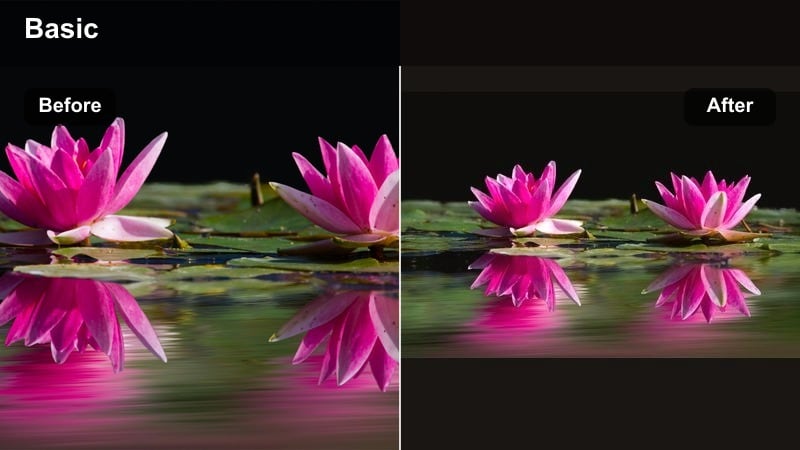
- Effect look: Soft golden warmth with gentle contrast, mimicking late afternoon sun for cozy family scenes.
- Best for: Backyard playtime, golden hour walks, and slow, candid family conversations.
- Editing tip: Lower the filter intensity slightly and add a subtle vignette to keep attention on faces and small gestures.
Golden Afternoon Glow wraps your footage in a soft, cinematic warmth that immediately suggests late-day sunlight and nostalgia. In Filmora, this filter is ideal when you want a cohesive, filmic family cinematic tone that flatters skin tones and adds emotional depth without feeling overly stylized.
Apply it to sequences like kids playing outside, sunset walks, or quiet backyard chats, then fine-tune intensity in the Effects panel. Slightly reducing the effect strength and adding a vignette helps center the viewer on faces and hand movements, making every candid interaction feel like a carefully lit movie scene.
Use AI to Find Your Family’s Core Color Story
Filmora’s AI-assisted color tools help you quickly audition different cinematic family video filters without rebuilding every look from scratch. Start with Golden Afternoon Glow or another base preset close to your target mood, then let AI refine saturation, contrast, and color temperature for a more polished filmic tone.
Once you arrive at a palette that fits your family short films or holiday memory edits, save it as a custom preset. This ensures consistent emotional family tones across multiple projects, even when footage comes from different cameras or lighting conditions.
 secure download

Preview Cinematic Family Filters on Real Footage
Before you lock in a final look, drop warm, cool, and vintage filters onto duplicated clips in a single Filmora timeline. Use split-screen previews to compare how Golden Afternoon Glow stacks up against more neutral or moody filters so your final choice supports pacing, music, and narrative flow.
Experiment with a short test sequence that includes outdoor, indoor, and close-up shots. Reviewing these side by side makes it easier to see which cinematic family filter delivers the most consistent film home video look across the entire edit.
secure downloadMatch Filters with LUTs for Deeper Filmic Tones
Filmora includes 1000 plus video filters and 3D LUTs you can layer together for more nuanced filmic tones. Start with a subtle LUT that shapes overall color and contrast, then apply your chosen cinematic family filter on top to control mood, softness, and texture.
Keep adjustments gentle to avoid heavy, artificial grading. The goal is a natural but elevated look where emotional family tones are enhanced, not hidden behind color effects, so viewers stay focused on faces and interactions.
secure downloadPro tip: Keep Skin Tones Natural Under Warm Filters
Warm filters can quickly push skin tones into orange territory, especially in holiday memory edits shot indoors with mixed lighting. In Filmora, balance this by slightly reducing saturation and nudging the temperature slider back toward neutral until skin looks natural again.
If background elements still feel too cool, isolate them with a mask and reapply warmth there. This keeps your family’s faces believable while preserving that cozy, golden-family-film feeling.
Hearthside Soft Focus
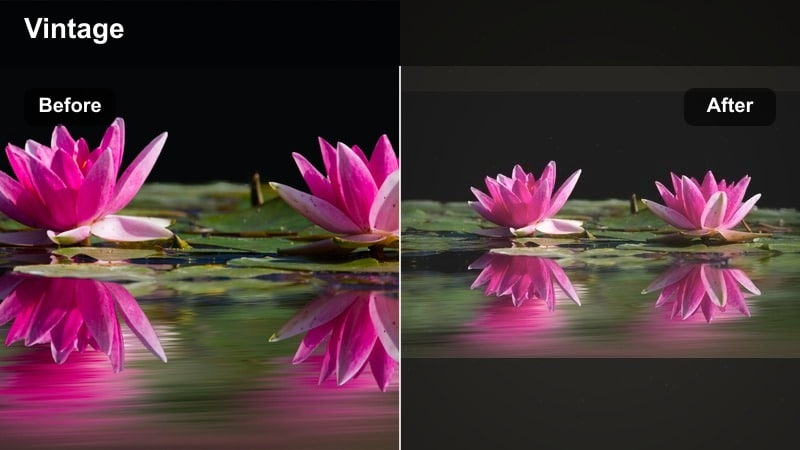
- Effect look: Gentle bloom around highlights with softened edges, similar to vintage home movie lenses.
- Best for: Indoor gatherings, bedtime story scenes, and candlelit or fireplace moments.
- Editing tip: Combine with a mild film grain effect and keep sharpening low to avoid clashing with the dreamy softness.
Hearthside Soft Focus creates a dreamy haze that flatters low-light interiors and makes candles, lamps, and fireplaces glow. In Filmora, this filter instantly adds intimacy to bedtime stories, quiet living-room conversations, and close-up shots of kids and parents relaxing together.
Layer it with a touch of film grain for a crafted, cinematic family filter that still feels tender and personal. To keep the look from turning muddy, avoid heavy sharpening and instead rely on gentle contrast adjustments to guide the viewer’s eye toward key faces and gestures.
Pro tip: Use Soft Focus to Hide Technical Imperfections
Slightly out-of-focus shots or noisy low-light clips can benefit from a soft-focus cinematic family filter. The intentional haze reframes small technical flaws as part of a deliberate, filmic style.
Dial in just enough softness to smooth noise and edges, then anchor the image with stable exposure and a touch of midtone contrast so the clip still feels grounded and watchable.
Warm Holiday Hues
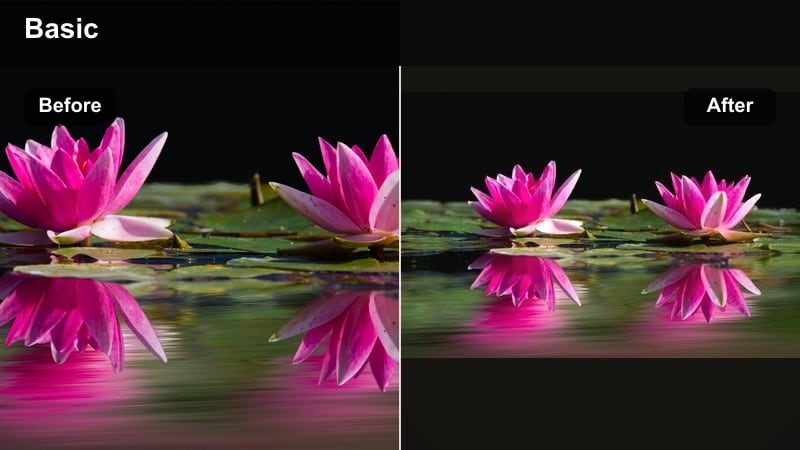
- Effect look: Rich, warm colors that enhance reds, ambers, and soft yellows for festive family frames.
- Best for: Holiday gatherings, gift-opening sequences, and kitchen scenes during festive meals.
- Editing tip: Keep white balance slightly cooler before applying the filter so whites and tablecloths do not turn overly yellow.
Warm Holiday Hues is built for festive footage, boosting reds, golds, and soft yellows so decorations, food, and lights feel rich and inviting. It is perfect in Filmora when you are cutting together holiday memory edits that jump between living rooms, kitchens, and dining tables.
To avoid an overcooked look, slightly cool your white balance before applying the effect, then tweak the intensity so skin tones stay flattering. Use it across your entire holiday sequence to unify shots from different cameras into one consistent, cinematic family tone.
Pro tip: Match Holiday Clips from Different Cameras
Holiday footage often comes from phones, DSLRs, and action cams mixed together. Apply Warm Holiday Hues as a unifying base filter, then fine-tune exposure and contrast on each clip to match overall brightness.
Compare similar shots side by side in Filmora’s timeline, toggling the filter on and off to ensure the final sequence feels like one cohesive, cinematic memory instead of a patchwork of devices.
Cool Calm: Reflective and Quiet Family Moments
Blue Hour Family Calm
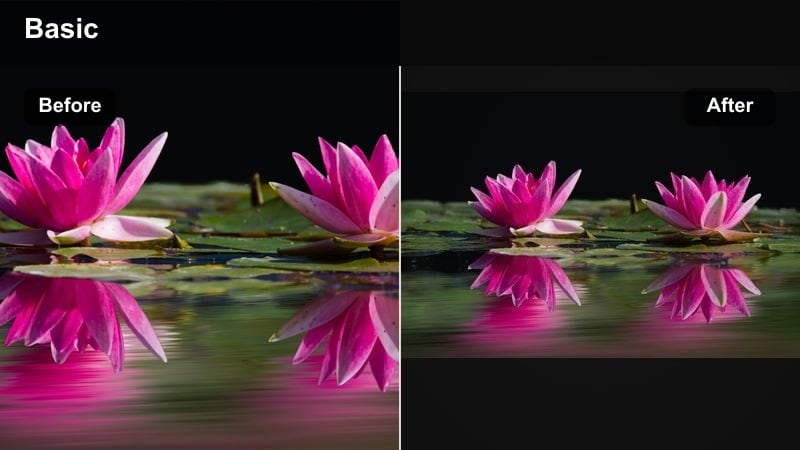
- Effect look: Cool, desaturated tones with soft contrast echoing the calm of early evening light.
- Best for: Reflective voiceovers, travel transitions, and quiet outdoor scenes near dusk.
- Editing tip: Lower saturation in the greens and blues slightly for a more cinematic, less digital look.
Blue Hour Family Calm cools your palette and softens contrast to echo the peaceful mood of early evening. In Filmora, this filter is ideal for reflective sequences with voiceover, slow walks, or travel transitions where you want emotion to feel gentle and introspective.
Apply it to dusk or cloudy-day shots, then slightly pull back saturation in greens and blues to reduce the digital feel. Used sparingly, this cinematic family filter can signal a tonal shift in your story, moving the viewer from high-energy moments into quieter, more thoughtful scenes.
Pro tip: Use Cool Tones to Signal Story Shifts
Cool filters like Blue Hour Family Calm are effective when you transition from energetic moments to reflective beats in your family short films. Introduce them subtly at the start of a new sequence rather than mid-shot.
Fade the filter in over a couple of clips so the viewer feels a gentle emotional shift, using music and pacing to support the cooler, more introspective tone.
Soft Rainy Day Journal
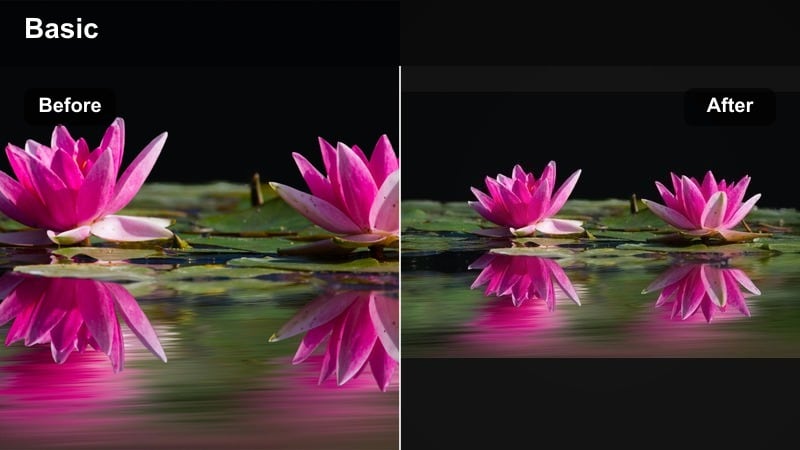
- Effect look: Muted colors with lifted blacks and a gentle haze, reminiscent of rainy window reflections.
- Best for: Indoor playtime on cloudy days, journaling sequences, or cozy, low-energy afternoons.
- Editing tip: Add subtle ambient sound layers and keep cuts longer to fully let the soft mood settle in.
Soft Rainy Day Journal mutes colors and lifts shadows, creating a gentle haze that mirrors the feeling of looking through a rain-streaked window. It works beautifully in Filmora for slow-paced indoor scenes, quiet play sessions, or reflective B-roll of kids drawing, reading, or daydreaming.
Because this look is subdued, support it with longer cuts and soft ambient audio like rain, pages turning, or distant chatter. The result is an introspective cinematic family tone that feels emotional without becoming overly dramatic or dark.
Pro tip: Preserve Detail While Lifting Blacks
When you lift the blacks for a dreamy, rainy-day mood, you risk losing shadow detail. In Filmora, compensate by adding a touch of clarity or local contrast to midtones so important story details remain readable.
Use this especially in scenes with toys, books, or family heirlooms where small objects carry emotional weight within your narrative.
Winter Morning Documentary
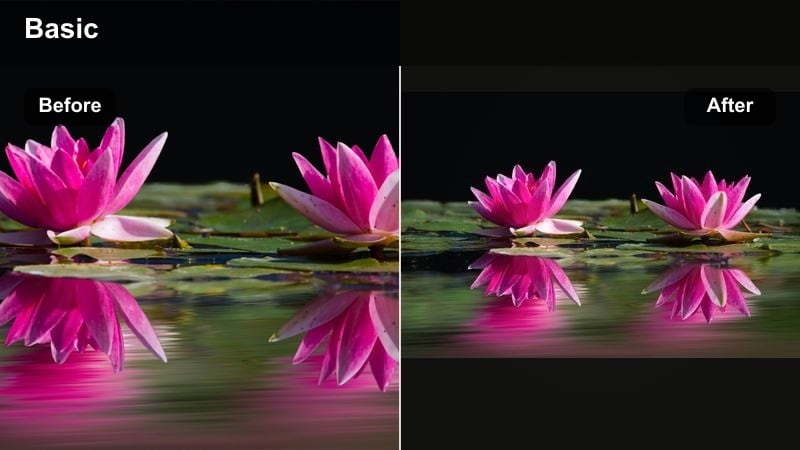
- Effect look: Neutral-cool color balance with crisp midtones and subtle film home video look.
- Best for: Documentary-style family sequences, morning routines, and travel intros.
- Editing tip: Use steadier pacing and minimal transitions to match the understated, documentary-style aesthetic.
Winter Morning Documentary sits between cinematic and natural, with a neutral-cool balance and crisp midtones that feel honest and observational. In Filmora, this filter is perfect for family vlogs, travel intros, or day-in-the-life sequences where you want authenticity with just a hint of filmic polish.
Pair this look with simple cuts, minimal transitions, and natural sound to strengthen the documentary feel. It is especially effective when you want the audience to feel like they are quietly observing real routines rather than watching stylized scenes.
Pro tip: Blend Documentary Honesty with Cinematic Style
Apply Winter Morning Documentary lightly so the footage still feels real and unpolished. Let imperfect framing and small background details remain in the shot to preserve authenticity.
Then, add subtle camera moves, gentle music, and thoughtful sequencing to weave those honest moments into a cinematic family story structure.
Vintage Film: Modern Takes on Home Video Looks
Super 8 Summer Days
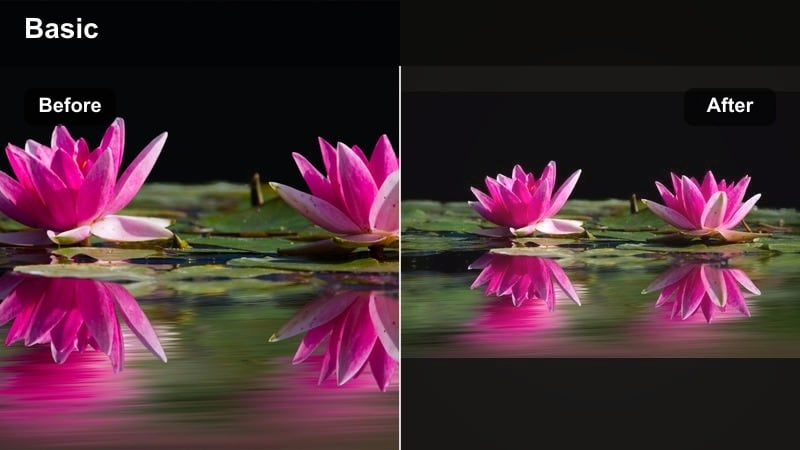
- Effect look: Warm, slightly faded colors with a grainy film home video look inspired by Super 8 reels.
- Best for: Beach trips, backyard barbecues, and retro-themed family short films.
- Editing tip: Shorten clip lengths and use jump cuts to mimic the choppy rhythm of real vintage home movies.
Super 8 Summer Days gives your footage a nostalgic, grainy charm that recalls classic home movies on film. In Filmora, this filter is ideal for sunlit outdoor clips, water play, and carefree summer adventures you want to frame as cherished memories.
To sell the retro illusion, cut clips shorter and use a few intentional jump cuts, mimicking the uneven recording habits of older cameras. The faded warmth and grain create a clear visual language that separates these moments as remembered, not current, events within your family cinematic tone.
Pro tip: Use Vintage Looks to Highlight Memory, Not Reality
Reserve heavy vintage filters like Super 8 Summer Days for sequences framed as memories or flashbacks in your family short films. This helps viewers subconsciously separate present-day events from remembered ones.
Add a simple title card, date overlay, or who-shot-this note to reinforce the feeling that these clips belong to a cherished, imperfect archive of family history.
90s Camcorder Charm
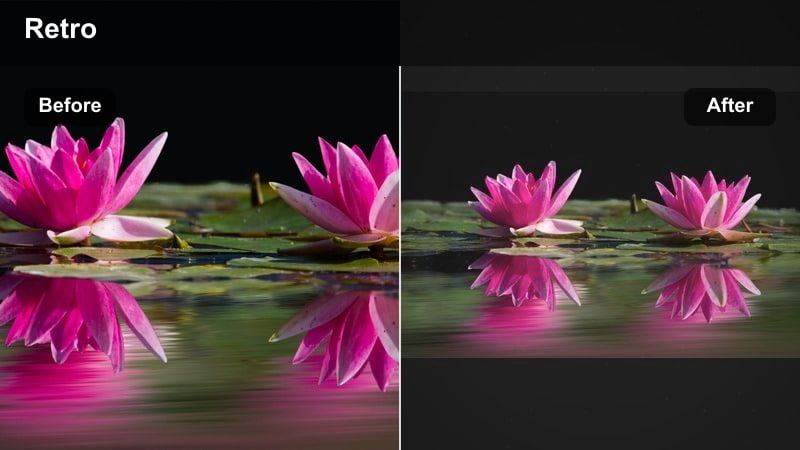
- Effect look: Slightly cool highlights, mild VHS-style softness, and boosted mids for a 90s camcorder vibe.
- Best for: Birthday parties, living room dance sessions, and playful holiday memory edits.
- Editing tip: Add subtle on-screen time stamps or simple titles to lean into the retro home video narrative.
90s Camcorder Charm brings back the look of old family tapes with gentle softness, cool highlights, and boosted midtones. In Filmora, this cinematic family filter is great for birthday parties, chaotic living-room fun, and humorous throwback edits centered on kids and siblings.
Lean into the nostalgia by adding simple date stamps or text labels and keeping camera moves handheld and loose. The result feels like an upgraded version of classic VHS footage that still plays comfortably on modern screens.
Pro tip: Balance Retro Softness with Modern Clarity
The 90s Camcorder Charm filter works best when you keep key emotional beats clear. Use Filmora’s sharpening and noise reduction tools sparingly on close-ups so expressions remain readable.
Then keep the wider, more chaotic shots softer and more degraded to enhance the sense of chaotic, joyful, throwback energy.
Faded Photo Album
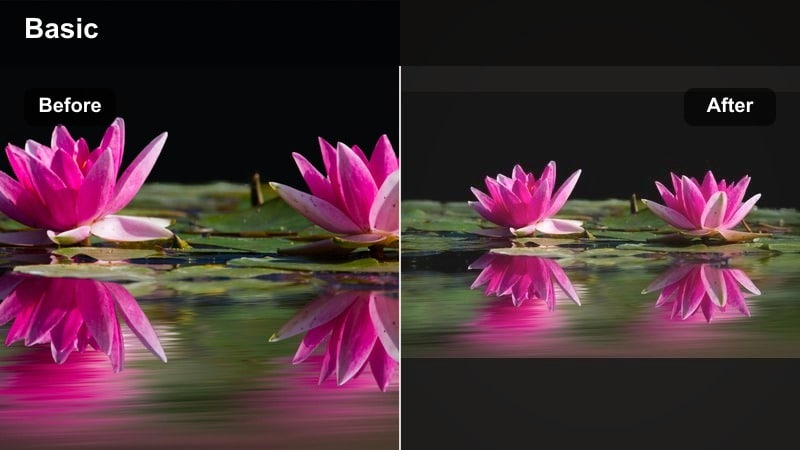
- Effect look: Desaturated, slightly warm tones with matte blacks that feel like aged photo prints.
- Best for: Montages of old photos mixed with modern clips, memory recaps, and generational family stories.
- Editing tip: Alternate between still photos and short video clips using simple dissolve transitions for a scrapbook effect.
Faded Photo Album is designed to bridge old photos and new footage with a soft, timeless tone. In Filmora, it is perfect for generational stories, tribute videos, and end-of-year recaps that weave scanned prints together with present-day clips.
Apply the filter across both images and video, then arrange them with gentle dissolves to mimic a scrapbook or album being flipped through. The matte blacks and mild warmth create a unified, sentimental family cinematic tone that connects decades of memories.
Pro tip: Unify Mixed Media with One Core Filter
When combining scanned photographs, phone footage, and DSLR clips, apply Faded Photo Album as your base cinematic family filter across everything. This creates a single visual language for your multi-decade story.
Then make only minimal per-clip adjustments for exposure and color balance so each moment feels unique but still part of one cohesive family archive.
Bold Story-Driven Looks for Family Short Films
Cinematic Family Drama
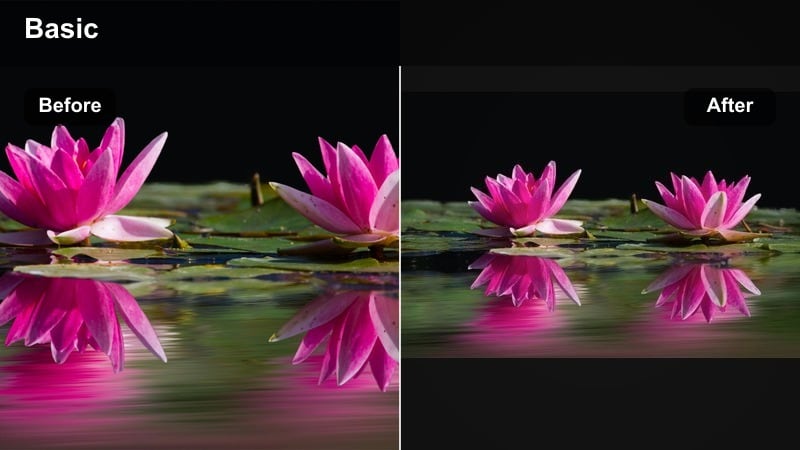
- Effect look: High contrast, rich colors, and deep shadows emphasizing emotional family tones.
- Best for: Dialogue-heavy scenes, staged reenactments, and narrative-style family short films.
- Editing tip: Use tighter framing and slower camera moves to match the intensity of the look.
Cinematic Family Drama pushes contrast and color richness to give everyday conversations a movie-like weight. In Filmora, this filter suits staged reenactments, serious talks, and narrative-driven sequences where you want the emotional stakes to feel higher.
Match the bold grade with deliberate camera work: tighter framing, slower pans, and lingering reaction shots. Used around key emotional peaks, this filter helps carve out pivotal story beats that stand apart from lighter, documentary-style moments.
Pro tip: Let Contrast Follow Emotional Peaks
Reserve the most dramatic filters, like Cinematic Family Drama, for your story’s key emotional peaks. Introduce the look as tension rises or as you move into pivotal conversations.
Ease back to more neutral filters for lighter scenes, giving your film a dynamic emotional arc that viewers can feel even with the sound off.
Storybook Color Pop
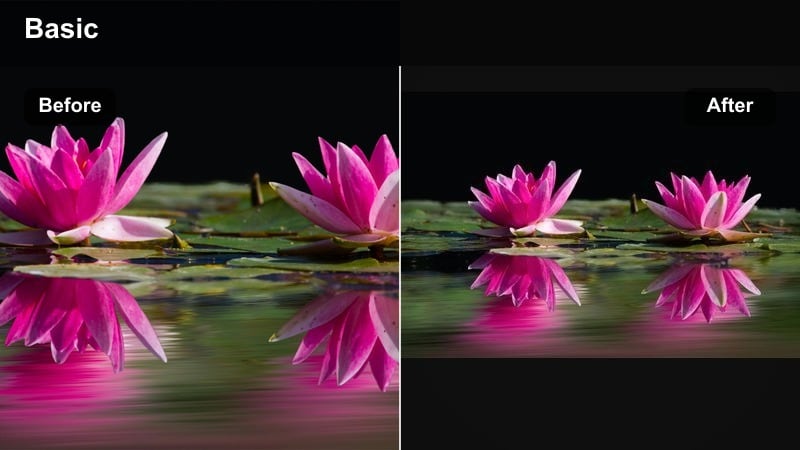
- Effect look: Vibrant, clean colors with low-to-medium contrast for a whimsical, storybook feel.
- Best for: Kids’ adventures, park days, and playful sequences with lots of movement and props.
- Editing tip: Cut to the beat of the music and mix in a few speed ramps to match the playful color energy.
Storybook Color Pop boosts saturation and maintains clean lines, creating a bright, whimsical look that suits energetic kids’ adventures. In Filmora, it is ideal for park days, costume play, and any sequence filled with colorful props and fast movement.
Cut on the beat of lively music and sprinkle in speed ramps or simple motion effects to match the filter’s playful energy. Keep an eye on bright skies and clothing; adjust highlights down so your vivid palette stays cinematic rather than cartoony.
Pro tip: Keep Highlights in Check with Bold Colors
When pushing saturation for a storybook feel, outdoor highlights can easily clip. In Filmora, pull highlights down slightly and reduce exposure on bright skies or reflective surfaces.
This preserves detail and keeps the strong colors feeling premium and cinematic rather than harsh or cartoony.
Nighttime Fairytale Glow
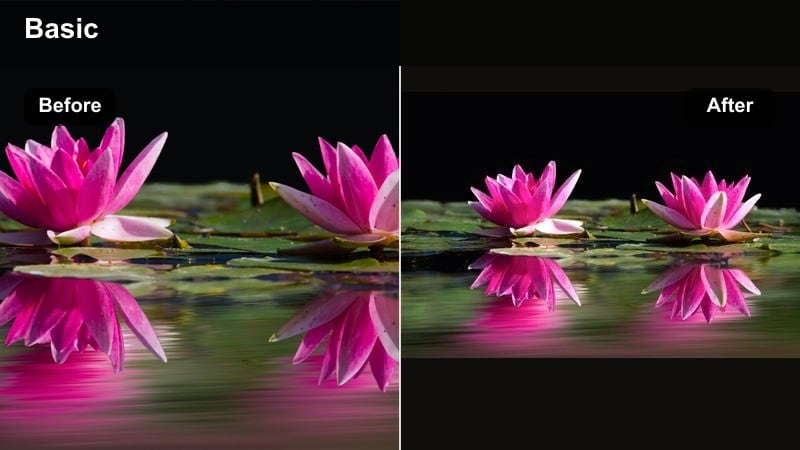
- Effect look: Soft, lifted shadows with glowing lights and cool-warm color contrast for magical night scenes.
- Best for: Holiday lights, bedtime rituals, backyard campfires, and evening celebrations.
- Editing tip: Stabilize handheld shots and reduce noise before adding glow to avoid amplifying camera shake and grain.
Nighttime Fairytale Glow turns ordinary evening footage into something magical, with glowing highlights and soft, lifted shadows. In Filmora, this cinematic family filter is perfect for holiday lights, campfires, and bedtime rituals where you want the night to feel safe and enchanted rather than dark.
Before applying the glow, use stabilization and noise reduction on shaky or grainy clips so the effect enhances the scene rather than emphasizing imperfections. The cool-warm color contrast makes string lights, candles, and lanterns stand out beautifully against soft, dreamy backgrounds.
Pro tip: Layer Glow with Subtle Sound Design
The Nighttime Fairytale Glow filter feels most powerful when paired with carefully chosen ambient sounds and gentle music. Let the visuals and audio both lean into the magic of nighttime family rituals.
Avoid overusing slow motion on every clip; instead, save it for key emotional actions, like a hug, a laugh, or a child’s awe-struck expression under the lights.
Tips for Using Family Cinematic Tone Filters in Filmora
- Choose one primary cinematic family filter for each project and use variations sparingly to keep a consistent visual language.
- Balance emotional family tones with skin tone accuracy by adjusting temperature, tint, and saturation after applying a filter.
- Edit the story and pacing first, then fine-tune filters and color to reinforce the emotional rhythm you have built.
- Create separate custom presets for daylight, indoor tungsten, and night scenes so your family short films stay cohesive across lighting changes.
- Use stronger, stylized filters for flashbacks, dreams, or memory sequences and subtler looks for present-day events.
- Leverage Filmora’s AI color and LUT tools to quickly test multiple family cinematic tone options on duplicated clips.
- Always preview your filters on different devices to ensure contrast and warmth feel cinematic on both phones and larger screens.
The right cinematic family video filters can turn casual home clips into cohesive, emotionally resonant stories that feel like scenes from a film rather than random moments on a camera roll.
Experiment with warm, cool, vintage, and bold looks in Filmora, then save your favorite combinations as presets so every family short film or holiday memory edit carries a signature visual tone that is uniquely yours.
secure downloadNext: Explore Aesthetic Family Video Filters for a Signature Look
