

 100% Security Verified | No Subscription Required | No Malware


 ChatGPT
 Perplexity
 Gemini
 Claude
 Grok
Grok
Cinematic city video filters help filmmakers and photographers transform ordinary skylines into dramatic city stories with rich contrast, stylized color, and film-inspired grain. With the right presets, every street, rooftop, and skyline shot can feel like a scene from a feature film.
This guide introduces the Cinematic City Filter. Epic Skyline preset and a full set of city cinematic looks tailored for cinematic city films, giving you quick, repeatable ways to build a cohesive film look urban style in your projects.
In this article
Golden Hour and Skyline Drama
Cinematic City Filter. Epic Skyline
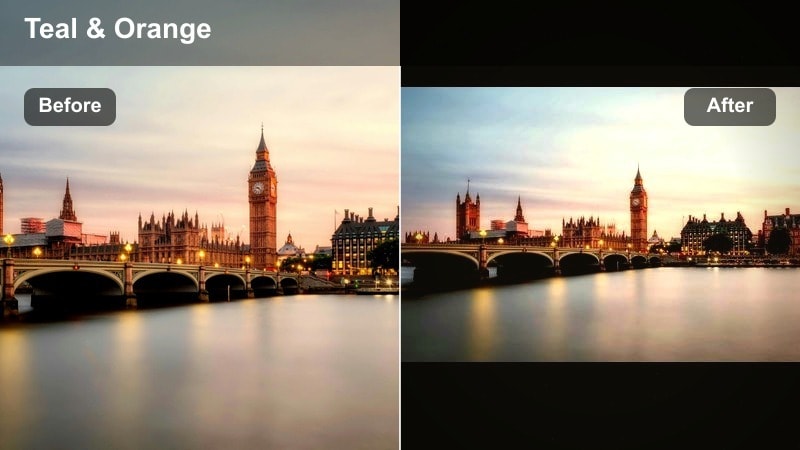
- Effect look: High-contrast cinematic grade with deep shadows, glowing highlights, and a subtle teal-and-amber color cast that emphasizes skyscraper edges and sky gradients
- Best for: Wide skyline shots, drone flyovers, and establishing scenes in cinematic city films where you want a bold film look urban style
- Editing tip: Lower overall contrast slightly for flat log footage, then fine-tune highlight roll-off to keep bright windows and clouds from clipping
The Cinematic City Filter. Epic Skyline preset is designed to turn any skyline into a dramatic, big-budget establishing shot with a bold cinematic grade. In Filmora, you can drop this preset onto your wide city views to instantly boost contrast, carve out skyscraper silhouettes, and add a stylized teal-and-amber wash that echoes high-end theatrical grades.
Use this look to unify mixed city footage captured at different times of day, especially when cutting between drone or crane shots and ground-level vistas. After applying the preset, refine exposure with Filmora sliders so details in windows, clouds, and distant buildings stay readable while the overall frame leans into a moody, film look urban atmosphere.
AI-Assisted Cinematic City Color Palettes
Filmora s AI tools can analyze your city footage and automatically suggest color balances that pair perfectly with cinematic city video filters. This keeps skylines, streets, and portraits feeling cohesive, even when shots were captured at sunrise, midday, and blue hour.
Combine AI-driven color suggestions with the Cinematic City Filter. Epic Skyline preset to quickly lock in a consistent film look urban base grade. From there, you can fine-tune contrast, saturation, and white balance per clip while preserving an overall city cinematic mood across your project.
Use AI color matching before applying your favorite city cinematic filters to save time and maintain a consistent visual style.
 secure download

See City Cinematic Filters in Action
To understand how each city cinematic filter shapes mood, load a short skyline or street clip into Filmora and apply presets back-to-back on the same footage. Toggling filters on and off helps you see how contrast, saturation, and color temperature transform the story your city images tell.
Pay close attention to windows, skies, and street lights as you switch looks. Small differences in highlight glow, shadow depth, and color balance around these elements can completely shift your urban sequence from grounded realism to stylized drama.
Preview each filter on a wide skyline shot and a close-up street scene to choose the best look for your project.
secure downloadPair Filters with LUTs for a Complete Film Look
Once you pick a favorite cinematic city video filter in Filmora, you can layer a subtle film-style LUT on top to refine highlight roll-off and color separation. This pairing adds gentle, celluloid-inspired shifts to skies, skin tones, and architecture without overpowering your base grade.
Keep LUT intensity low so the underlying filter mood stays in control while the LUT adds finesse. Adjust opacity until your dramatic city scenes feel polished and cohesive across skyline, street, and portrait shots.
Stack your preferred city cinematic filter with a light LUT in Filmora, then adjust opacity to taste for a polished, layered grade.
secure downloadSunset Amber Streets
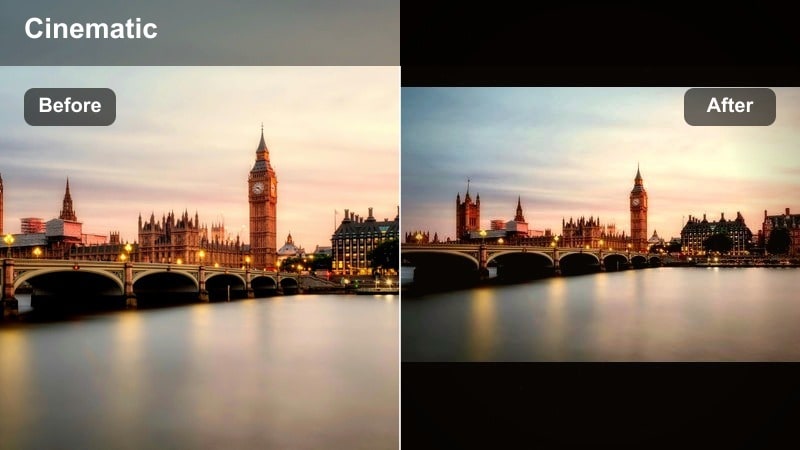
- Effect look: Warm, amber-rich toning with lifted blacks and soft halation around lights to mimic late-evening sun spilling through the streets
- Best for: Golden hour walks, rooftop meetups, and narrative scenes where characters move through a gently glowing urban environment
- Editing tip: Keep midtone contrast moderate to preserve skin tones while still allowing pavement and building textures to pop under warm highlights
Sunset Amber Streets wraps your city in a nostalgic golden glow, ideal for framing character moments against backlit avenues and rooftops. In Filmora, apply this filter to emphasize the warmth of low sun as it hits pavement, brick, and glass, then refine exposure so highlights bloom softly without losing detail.
Use HSL controls to protect skin tones from becoming overly saturated while keeping the environment richly amber. This preset is perfect for vlogs, walk-and-talk scenes, and romantic cutaways where you want streets and sidewalks to feel inviting and cinematic rather than harsh.
Horizon Neon Contrast
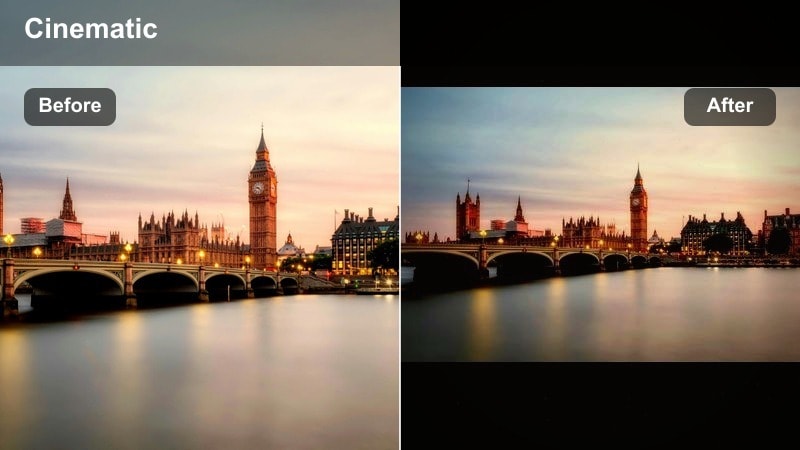
- Effect look: Punchy contrast with emphasized neon and signage, cooler shadows, and crisp micro-contrast for glass and metal details
- Best for: Busy commercial districts, billboards, and skyline sequences that mix twilight skylight with early city lights
- Editing tip: Apply light sharpening after the filter and avoid excessive clarity on faces so that only architecture and signs receive extra texture
Horizon Neon Contrast brings out the energy of commercial city cores by amplifying billboards, signage, and reflective windows. In Filmora, this filter pushes cool shadows and sharpens micro-contrast so glass, metal, and neon lines stand out crisply against the evening sky.
Apply it to twilight and blue-hour footage where lights are just beginning to glow, then selectively reduce clarity on human subjects so their faces remain flattering. The result is a punchy, modern city look where architecture and advertising feel bold, but your characters still read naturally within the frame.
Nighttime and Moody City Scenes
Noir Alley Fade
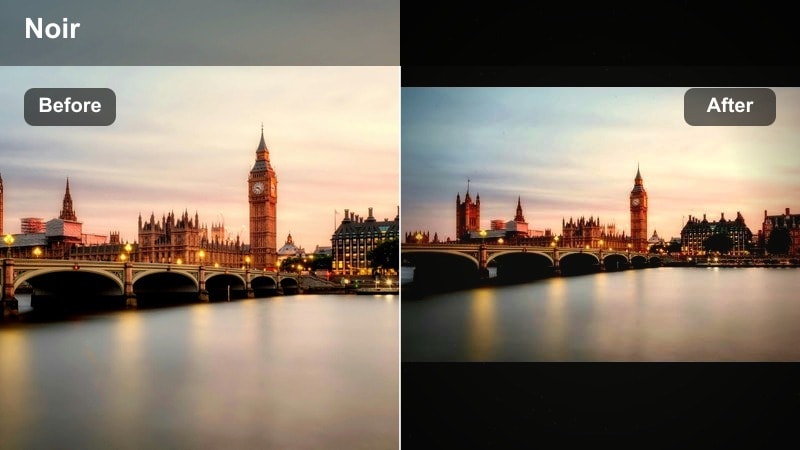
- Effect look: Muted, low-saturation grade with deep blacks, subtle film-like grain, and a monochrome-leaning palette for dramatic city tension
- Best for: Moody alleyways, crime thrillers, and character-driven moments that rely on shadow and negative space
- Editing tip: Fade the blacks slightly and lift shadows just enough to preserve detail in coats, hair, and building corners without losing the noir feel
Noir Alley Fade is built for high-tension urban storytelling, leaning into deep shadows and sparse color to echo classic noir cinema. In Filmora, adding this preset to alleyways, parking lots, or dim backstreets quickly strips away distraction and focuses your viewer on shape, light, and silhouette.
After applying the filter, use the curves tool to carefully balance black levels so you keep important texture in clothing and brickwork. Layer in subtle film grain to introduce a tactile, analog mood, perfect for thrillers, detective shorts, and any narrative that relies on atmosphere and mystery.
Rain-Slick Neon
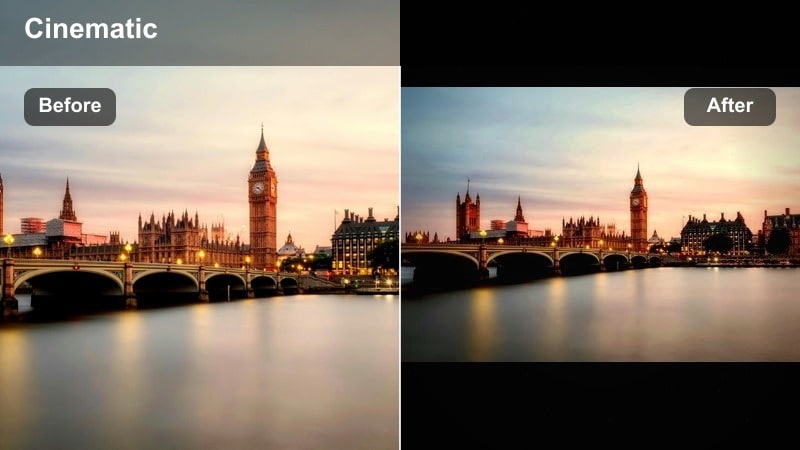
- Effect look: High-contrast neon with glossy highlights, cool cyan shadows, and saturated reflections on wet pavement for a cyberpunk edge
- Best for: Rainy intersections, reflective crosswalks, and futuristic city sequences with strong colored light sources
- Editing tip: Lower global saturation a touch, then selectively push blues, magentas, and cyans so neon reflections stay bold without overwhelming the frame
Rain-Slick Neon turns wet pavement and umbrellas into reflective canvases for saturated city lights. In Filmora, drop this filter onto rainy intersections and late-night streets to emphasize cyan shadows, magenta highlights, and glossy reflections that feel straight out of a cyberpunk frame.
Use selective color tools to push cool tones in the reflections while slightly easing saturation in less important areas of the frame. Combine this look with gentle glow effects on neon edges to soften transitions and create a dreamy but edgy mood that suits music videos, stylized b-roll, and futuristic city montages.
City Night Matte
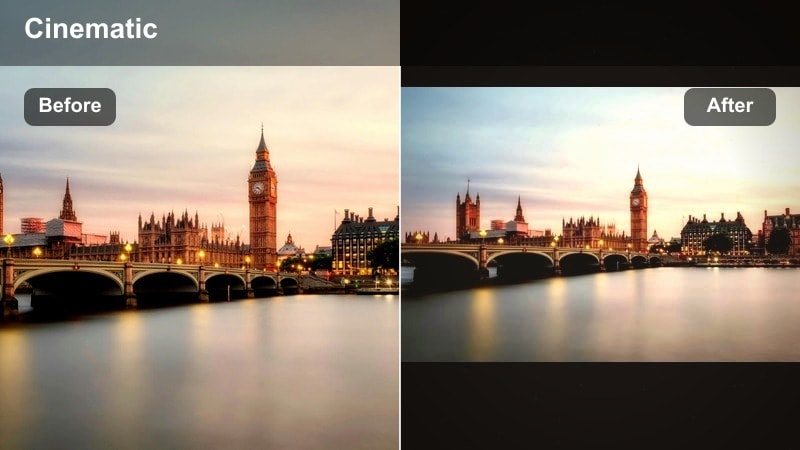
- Effect look: Soft matte blacks with gentle contrast, warm interior windows, and slightly cool exteriors to separate indoor and outdoor spaces
- Best for: Night skylines with apartment windows, office towers, and quiet city establishing shots in narrative films
- Editing tip: Use curves to create a subtle S-shape that maintains the matte feel while keeping small light sources crisp and defined
City Night Matte is ideal for quieter nighttime establishing shots where you want a refined, cinematic softness instead of harsh contrast. In Filmora, this filter slightly lifts blacks and tames highlights so the glow from windows feels inviting and gentle against cooler city exteriors.
Apply it to wide views of apartment blocks or office towers, then fine-tune the color temperature to subtly warm interiors. This separation between inside and outside spaces gives your shots depth and narrative context, helping transitions between interior dialogue scenes and exterior cutaways feel seamless.
Urban Street Life and Everyday City Motion
Street Documentary Neutral
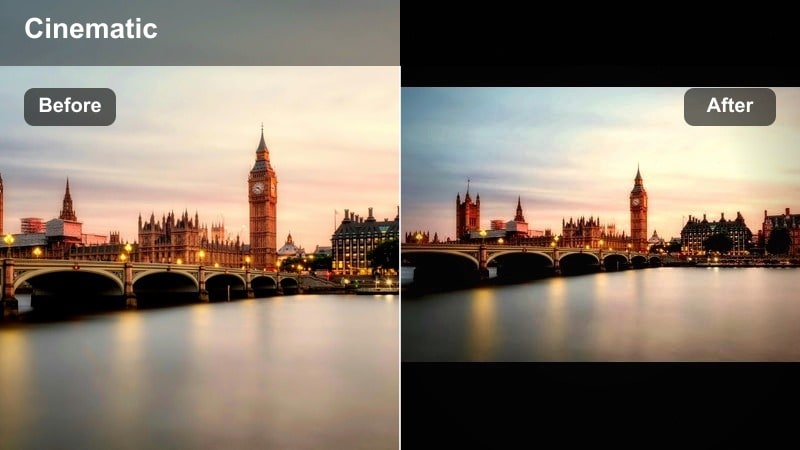
- Effect look: Balanced contrast, natural color, and subtle film softness that keeps city scenes authentic while quietly cinematic
- Best for: Run-and-gun street documentaries, travel vlogs, and handheld city walk-throughs where realism matters
- Editing tip: Dial back saturation slightly and add a gentle vignette to pull focus toward people and interactions instead of busy backgrounds
Street Documentary Neutral keeps your city footage grounded and believable while adding just enough polish for a professional finish. In Filmora, this preset maintains realistic colors and moderate contrast so sidewalks, traffic, and signage look true-to-life but more cohesive on the timeline.
It is especially useful for travel content and observational documentaries where authenticity is key. After applying the filter, adjust saturation slightly downward and add a light vignette so the viewer s eye stays on people, faces, and interactions rather than visual noise in the background.
Commuter Rush Motion
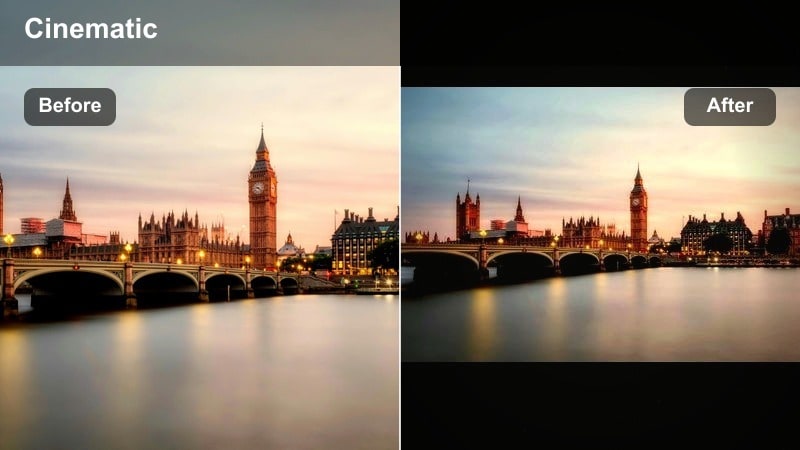
- Effect look: Slightly cooler tones, added clarity on architecture, and restrained saturation with emphasis on motion blur and light trails
- Best for: Time-lapses, crosswalk rush, subway exits, and city montages that showcase movement and flow
- Editing tip: Combine with motion blur or speed ramping, then relax micro-contrast in the background to keep the focus on leading lines and subject movement
Commuter Rush Motion is built for sequences that showcase the pulse and rhythm of city life. In Filmora, this filter cools down tones slightly while sharpening architectural lines, which works beautifully with time-lapses, speed ramps, and motion blur effects around crowds.
Apply it to busy crosswalks, train platforms, or traffic shots, then layer Filmora s motion effects to exaggerate movement. By easing micro-contrast in the background and emphasizing leading lines, you can guide the viewer through complex scenes while still conveying the city s constant motion.
Urban Film Grain Soft
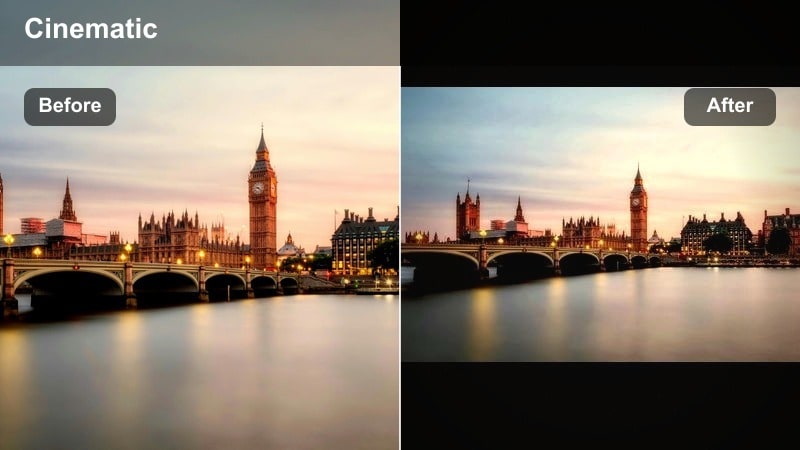
- Effect look: Soft contrast with organic film grain, slightly lifted blacks, and gentle color roll-off to mimic 16mm-inspired city footage
- Best for: Indie city narratives, character portraits against urban backdrops, and handheld sequences with a nostalgic tone
- Editing tip: Keep grain intensity lower in bright skies and large flat areas, and let it build more in midtones and shadows for a subtle analog touch
Urban Film Grain Soft gives your city stories an indie, film-school aesthetic with gentle contrast and refined texture. In Filmora, use this preset on handheld shots, character portraits, and street vignettes where you want the image to feel tactile and imperfect in a pleasing way.
Control grain levels so they are most visible in midtones and shadows, letting bright skies and flat walls stay cleaner. Combined with slightly lifted blacks, this approach echoes 16mm or Super 8 style footage and works well for music videos, personal essays, and low-key narrative shorts set in the city.
Architectural Details and Drone City Shots
Architect Blueprint Cool
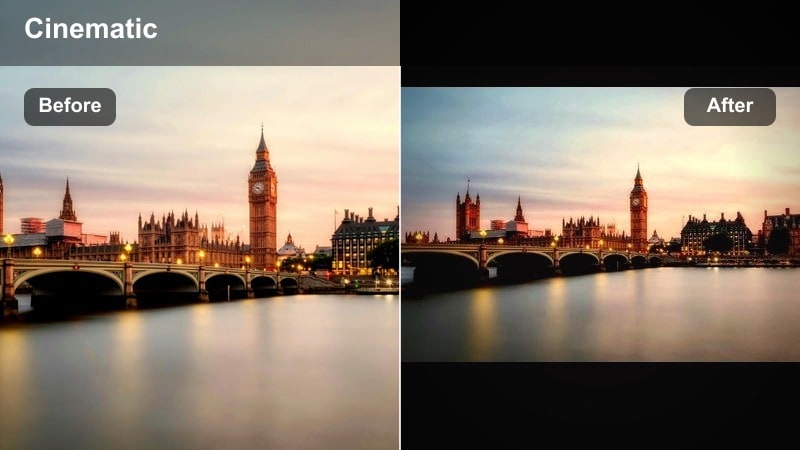
- Effect look: Cool, desaturated tones with strong edge contrast that emphasize lines, patterns, and shapes in high-rise architecture
- Best for: Architectural b-roll, structural close-ups, and graphic compositions of windows, bridges, and facades
- Editing tip: Add a slight vignette and reduce saturation in warm tones so the viewer focuses on geometry rather than color
Architect Blueprint Cool highlights the structural beauty of the city by de-emphasizing color and leaning into crisp lines and patterns. In Filmora, apply this filter to close-ups of buildings, bridges, and façades to create graphic, almost blueprint-like compositions.
Lower saturation in warm channels and introduce a modest vignette so viewers concentrate on geometry and repetition. This look is perfect for architectural reels, design-focused videos, and cutaways that separate your narrative from more emotionally driven, color-rich scenes.
Drone Orbit Cinematic
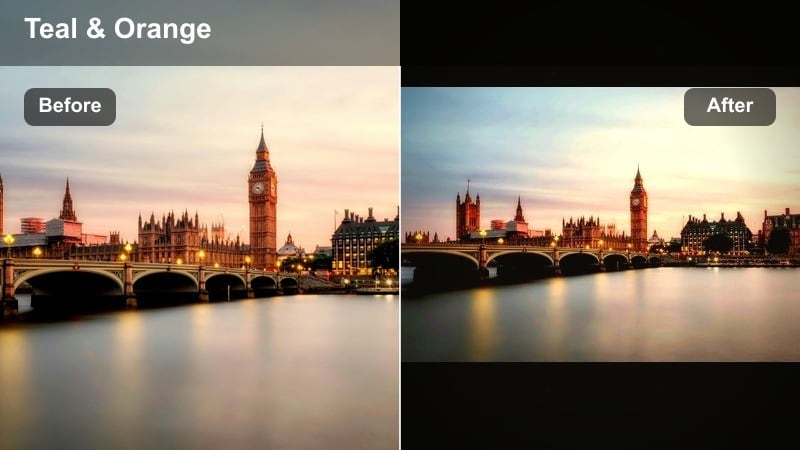
- Effect look: Smooth, moderately contrasty look with gentle saturation and a subtle teal-and-warm split to enhance depth from sky to streets
- Best for: Drone or crane shots orbiting skyscrapers, highways, and rivers that weave through the city grid
- Editing tip: Avoid over-sharpening drone footage; let the filter handle contrast and clarity, then add a light global sharpening pass only if needed
Drone Orbit Cinematic is tailored for sweeping aerials that reveal the scale and layout of your city. In Filmora, this preset balances contrast and saturation while adding a mild teal-and-warm color split, helping rooftops, streets, and sky separate clearly without looking over-processed.
Stabilize your drone clips first, then apply the filter and fine-tune exposure so clouds, buildings, and river details remain visible. With careful sharpening and noise control, your orbit shots can serve as premium-grade openers or transitions between story beats in your urban films.
Rooftop Dusk Portrait
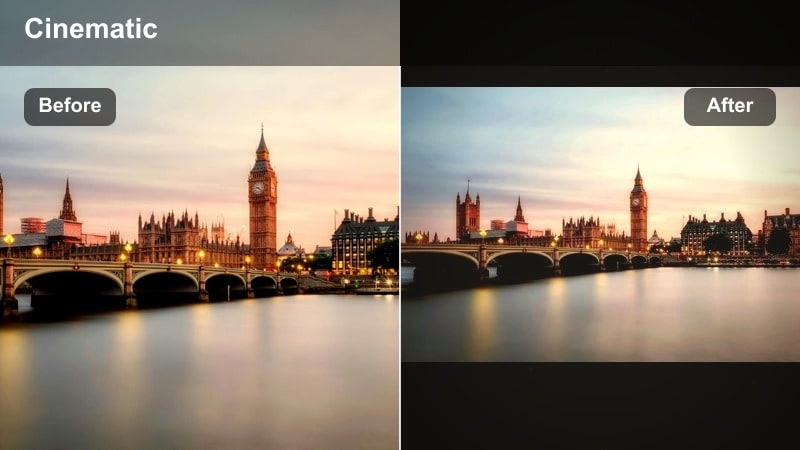
- Effect look: Soft, shallow-contrast dusk palette with gentle skin tones, slightly hazy backgrounds, and pastel-leaning city colors
- Best for: Rooftop portraits, music videos, and quiet character moments set against a distant skyline at blue hour
- Editing tip: Lower clarity on the background only so the subject pops while the city melts into a soft, dreamy wash of color
Rooftop Dusk Portrait is designed to keep your subject front and center while the city falls into a dreamy, pastel backdrop. In Filmora, use this filter on blue-hour rooftop scenes to soften distant buildings and gently roll off contrast for a romantic, music-video-ready mood.
Mask your subject to preserve natural skin tones and detail, then reduce clarity and saturation in the background so the skyline supports the story without competing. This approach works especially well for introspective performances, fashion pieces, and cinematic portraits with a strong sense of place.
Tips for Using City Cinematic Filters in Filmora
- Shoot in a flat or log profile when possible so cinematic city filters have more dynamic range to work with.
- Expose for highlights in skyline and night scenes to protect windows, billboards, and street lights from clipping.
- Group similar city shots on the timeline and apply the same filter to maintain a consistent film look urban style.
- Use masks and keyframes to adapt filters locally on skies, faces, and building facades for more precise control.
- Combine Filmora s AI color tools with your favorite city cinematic presets to quickly balance clips from different cameras.
- Export a short test reel with multiple filters applied to different scenes to compare overall mood before finalizing your grade.
Cinematic city video filters give filmmakers and photographers a fast, reliable way to turn everyday skylines, streets, and rooftops into dramatic city visuals with a cohesive film look urban style.
Combine presets like the Cinematic City Filter. Epic Skyline with thoughtful exposure, selective adjustments, and subtle LUTs to craft city cinematic films that feel polished, intentional, and ready for the big screen.
secure downloadNext: Explore City Moody Filter Styles for Darker Urban Stories
