

 100% Security Verified | No Subscription Required | No Malware


 ChatGPT
 Perplexity
 Gemini
 Claude
 Grok
Grok
Cool Denim Gray sits between blue and charcoal, giving it a calm, modern, and slightly cinematic feel. It can look like soft denim under studio lights or a moody city sky, which is why creators use it for grounded, trustworthy visuals that still feel stylish. In color psychology, these muted blue-grays suggest focus, clarity, and reliability, making them perfect for on-screen brands that want to feel professional without being cold.
In video editing, Cool Denim Gray works beautifully as a base color for intros, lower thirds, and end screens, or as a key tone in color grading. It is also a powerful choice for YouTube thumbnails, Instagram reels, and channel branding because it pairs well with both warm and neon accents. Below you will find ready-to-use Cool Denim Gray color palettes with HEX codes, curated for different moods and content types, plus tips on how to bring them to life in Filmora.
In this article
Soft & Minimal Cool Denim Gray Color Palettes
Overcast City Morning

- HEX Codes: #4f5b66, #a7b3c4, #dfe4ec, #2f3c4a
- Mood: Calm, urban, and contemplative.
- Use for: Great for lifestyle vlogs and urban b-roll sequences that need a soft cinematic tone without feeling too dark.
Overcast City Morning layers Cool Denim Gray with soft misty blues and pale concrete grays. It captures that quiet moment when the city is awake but not yet busy, perfect for content that feels thoughtful and slowed down.
Use this palette to grade city streets, train rides, and rainy window shots so everything feels cohesive and cinematic. For thumbnails and titles, try using the darkest shade (#2f3c4a) for text, with lighter tones (#a7b3c4, #dfe4ec) as background blocks or frames. It works especially well for minimalist channels that want a consistent blue-gray aesthetic across intros, b-roll, and social clips.
Pro Tip: Build a Cinematic Cool Denim Gray Look in Filmora
To keep this soft Overcast City Morning palette consistent, start by using Filmora to create a simple color grading preset. Adjust exposure and contrast to keep midtones gentle, then lean the temperature slightly cooler so your footage naturally gravitates toward Cool Denim Gray without becoming icy.
Once you are happy with the look, save it as a custom preset in Filmora and reuse it on intros, vlogs, and b-roll. This way, your channel thumbnails, talking-head shots, and cutaway clips all share the same calm Cool Denim Gray mood, even if they were filmed on different days or cameras.
AI Color Palette
If you have a still frame or a moodboard image that perfectly reflects your Overcast City Morning look, you can use Filmora's AI Color Palette feature to spread that palette across your whole edit. Filmora analyzes the colors in your reference shot and matches the rest of your clips to that same Cool Denim Gray tonality.
This is an easy way to unify vlog sequences shot in different lighting. Grab a frame where the Cool Denim Gray sky and buildings look ideal, feed it into AI Color Palette, and apply the style to your timeline. Your A-roll, B-roll, and even shorts or reels exported from the same project will feel like one cohesive visual story.
 secure download

HSL, Color Wheels & Curves
To fine-tune Cool Denim Gray in Filmora, use the HSL panel to gently desaturate blues and cyans so your image feels muted, not neon. Then, in the color wheels, push shadows slightly toward blue while keeping midtones neutral, so skin tones remain natural against your Cool Denim Gray cityscapes. You can see a full workflow in Filmora's tutorial on using color wheels and curves for cinematic grading on YouTube.
Curves are ideal for giving Overcast City Morning more depth. Add a subtle S-curve for contrast, then lift the very bottom of the curve slightly to keep blacks soft and filmic instead of harsh. This preserves the calm, contemplative atmosphere while still adding structure to your footage.
secure download1000+ Video Filters & 3D LUTs
If you want a quick way to stylize this Cool Denim Gray mood, explore Filmora's video filters and 3D LUTs. Start with soft cinematic or vlog-style LUTs, then tweak intensity so Cool Denim Gray stays the hero while contrast and grain give your footage a more filmic presence.
You can stack gentle filters like vignette, glow, or diffusion on top to make your Overcast City Morning scenes feel even more atmospheric. Save your favorite combination as a preset and apply it to thumbnails, intros, and shorts for a recognizable channel identity built around Cool Denim Gray.
secure downloadCozy Knit Sweater
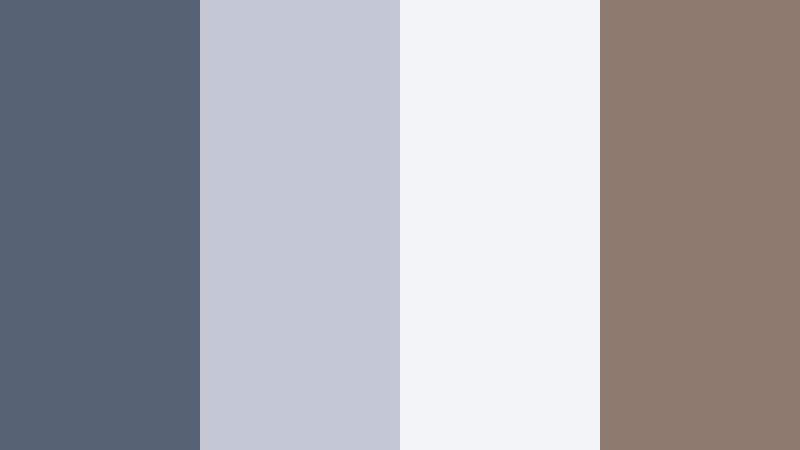
- HEX Codes: #566273, #c3c8d4, #f2f3f7, #8d7b70
- Mood: Comforting, intimate, and homey.
- Use for: Perfect for home decor tutorials, cozy vlogmas intros, and soft-spoken creator branding.
Cozy Knit Sweater softens Cool Denim Gray (#566273) with creamy whites and a warm taupe accent. The palette feels like a quiet evening with blankets, candles, and soft music, ideal for content that aims to relax your audience.
Use the lightest tone (#f2f3f7) as a thumbnail background, add text in denim gray, and sprinkle taupe (#8d7b70) for icons or buttons. In Filmora, you can apply these colors to titles, lower thirds, and intro frames so your vlogs, decor videos, and winter series all share the same snug, at-home vibe.
Foggy Lakeside Stillness

- HEX Codes: #485666, #9cadaf, #d6dde5, #647d84
- Mood: Serene, reflective, and nature inspired.
- Use for: Use this palette for calm travel vlogs, meditation content, or cinematic b-roll of nature scenes and water reflections.
Foggy Lakeside Stillness wraps Cool Denim Gray tones in misty greens and silvery blues. It mimics the way fog sits over water, giving your footage an introspective, meditative quality.
For video, lean on #485666 and #647d84 for shadows and foliage, while #d6dde5 and #9cadaf can appear in text boxes, overlays, or simple logo locks. This palette works especially well with slow camera moves, drone shots over lakes, and timelapses in Filmora where you want your grading to feel peaceful rather than dramatic.
Studio Workspace Calm

- HEX Codes: #535f6d, #e3e6ec, #bac2ce, #8c9aa8
- Mood: Productive, clean, and focused.
- Use for: Ideal for productivity channels, desk setup videos, and app or software UI demos that need a neutral visual base.
Studio Workspace Calm combines Cool Denim Gray (#535f6d) with cool whites and muted blue tints, echoing a tidy desk and organized digital workspace. The palette is neutral enough to keep attention on what you are explaining, not just how it looks.
Use #e3e6ec as a clean background for screen recordings or overlay panels, while #bac2ce and #8c9aa8 highlight sections, captions, and callouts. In thumbnails, placing your subject against these cool tones creates a modern, clutter-free aesthetic that fits productivity, tech reviews, and Notion-style tutorials.
Monochrome Denim Drift

- HEX Codes: #414c57, #4f5b66, #6d7783, #9ba4b0
- Mood: Understated, modern, and cohesive.
- Use for: Best for channels that want a strong, consistent brand look across intros, lower thirds, and end screens.
Monochrome Denim Drift is a full gradient of Cool Denim Gray shades, from deep slate to soft steel blue. Without any contrasting accent color, it feels sophisticated, minimal, and very cohesive.
Apply darker tones (#414c57, #4f5b66) to backgrounds or bars, and mid to light tones (#6d7783, #9ba4b0) to text, icons, and graphic elements. In Filmora, this palette is perfect for animated titles, simple logo reveals, and end screens that stay on-brand without visual clutter.
Bold & Cinematic Cool Denim Gray Color Palettes
Neon Alley Nights

- HEX Codes: #505d6d, #151820, #00ffc8, #ff3366
- Mood: Edgy, electric, and cinematic.
- Use for: Use this for gaming intros, cyberpunk edits, and energetic promo trailers that need vivid contrast.
Neon Alley Nights anchors your visuals with Cool Denim Gray (#505d6d) and deep midnight (#151820), then blasts them with neon teal (#00ffc8) and hot magenta (#ff3366). The result is a retro-futuristic glow straight out of a cyberpunk city.
Use the dark tones as your base for gameplay footage or night city b-roll, and reserve the neon colors for titles, HUD overlays, and key thumbnail elements. In Filmora, glow and blend modes enhance the neon accents so your Cool Denim Gray shadows feel like a believable urban backdrop for all that electric color.
Denim And Ember Contrast

- HEX Codes: #4a5664, #1f252d, #ff7a3c, #ffd6a0
- Mood: Dramatic, warm-against-cool, and story-driven.
- Use for: Great for short films, cinematic travel logs, and narrative projects with golden-hour highlights against cooler shadows.
Denim And Ember Contrast sets deep Cool Denim Gray (#4a5664) and charcoal (#1f252d) against ember orange (#ff7a3c) and soft apricot (#ffd6a0). This creates that classic cinematic mix of cool shadows and warm highlights.
Use the cool tones for environments and wardrobe, then bring in the oranges via sunset skies, interior lamps, or title accents. In thumbnails, placing a warm subject against a Cool Denim Gray background instantly draws the eye, making this palette perfect for emotional stories and travel edits that chase golden hour.
Stormfront Spotlight

- HEX Codes: #3b4652, #202732, #f4f4f6, #f5c84a
- Mood: Tense, cinematic, and focused.
- Use for: Perfect for trailers, commentary channels, and dramatic storytime thumbnails with a clear focal point.
Stormfront Spotlight balances moody storm-cloud blues (#3b4652, #202732) with a bright neutral (#f4f4f6) and a sharp, golden spotlight (#f5c84a). It feels like a single beam of light cutting through dark weather.
In your thumbnails and titles, use Cool Denim Gray for the background, then apply the yellow spotlight carefully to faces, key words, or objects you want viewers to notice first. In Filmora, vignettes and light leaks that echo #f5c84a can reinforce that focused, suspenseful energy for trailers and commentary videos.
Indie Record Sleeve

- HEX Codes: #505b68, #1e1e24, #f04e4e, #f7efe5
- Mood: Artsy, nostalgic, and expressive.
- Use for: Use this palette for music videos, indie film titles, and retro-inspired montage edits.
Indie Record Sleeve mixes Cool Denim Gray (#505b68) and deep black (#1e1e24) with a punchy red (#f04e4e) and soft off-white (#f7efe5). It channels vintage album covers and old posters while still looking fresh on modern feeds.
Design titles or lyric screens in off-white on denim gray, and use the red as a bold accent for key phrases, icons, or your logo mark. This palette works best with grain, overlays, and film-burn effects in Filmora, giving your edits a nostalgic yet curated feel.
Midnight Tech Glare

- HEX Codes: #44515f, #0b1016, #36a9ff, #9fe2ff
- Mood: High-tech, sleek, and energetic.
- Use for: Ideal for tech reviews, app launches, and motion graphics that highlight futuristic products or interfaces.
Midnight Tech Glare anchors your visuals in Cool Denim Gray (#44515f) and inky black (#0b1016), then highlights them with electric blues (#36a9ff, #9fe2ff). It feels like glossy screens, holograms, and dashboard lights in a dark room.
Use the darker tones as backgrounds for product shots or screen captures, and apply the bright blues to UI-style shapes, lines, and lower thirds. In Filmora, combine this palette with light streaks, motion blur, and clean typography to make tech content feel premium and futuristic.
Warm & Lifestyle Cool Denim Gray Color Palettes
Coffee Shop Corner

- HEX Codes: #576271, #f0e5da, #c29b7a, #8a6a4f
- Mood: Warm, social, and inviting.
- Use for: Perfect for cafe vlogs, productivity in public videos, and lifestyle thumbnails featuring laptops, lattes, and journals.
Coffee Shop Corner combines Cool Denim Gray (#576271) with latte creams (#f0e5da) and caramel browns (#c29b7a, #8a6a4f). It feels like a cozy table by the window, full of notebooks and warm cups.
Use denim gray for captions and frames, cream for background cards, and browns for accent graphics like coffee icons or call-to-action buttons. In Filmora, you can color-grade your footage slightly cooler in the shadows and warmer in the midtones, echoing this palette for cafe vlogs, study sessions, or podcast-style recordings.
Autumn Street Stroll

- HEX Codes: #4d5967, #f5ede3, #d37b46, #915032
- Mood: Seasonal, nostalgic, and cinematic.
- Use for: Use this for fall lookbooks, city walks, and cinematic day-in-the-life edits during autumn.
Autumn Street Stroll pairs muted Cool Denim Gray (#4d5967) with pumpkin and chestnut tones (#d37b46, #915032) plus a soft cream (#f5ede3). It feels like walking through a city street covered in fallen leaves after the rain.
In thumbnails, use Cool Denim Gray for the base with warm leaves, jackets, or headlines in the orange-brown range. For video, this palette suits slow-motion shots of streets, outfits, and coffee cups, and it looks especially good when you add a gentle film LUT in Filmora to enhance that nostalgic fall mood.
Sunlit Apartment Blue

- HEX Codes: #506072, #f8f4ee, #f0c38e, #b3c5d6
- Mood: Airy, optimistic, and relaxed.
- Use for: Ideal for morning routines, apartment tours, and minimalist interior content with lots of window light.
Sunlit Apartment Blue mixes Cool Denim Gray (#506072) shadows with sunwashed cream (#f8f4ee), sandy gold (#f0c38e), and a soft sky-tinted blue (#b3c5d6). It is bright and airy, perfect for lifestyle content in naturally lit spaces.
Use the light tones for background cards and frame borders, while denim gray anchors text and lines. In Filmora, a slight exposure lift and warm tint in the highlights will help your real footage match this palette, making morning routines and apartment tours feel fresh and welcoming.
Weekend Roadtrip Denim

- HEX Codes: #3f4c5b, #7f8b9a, #f6f2ea, #d9915d
- Mood: Adventurous, nostalgic, and free-spirited.
- Use for: Great for travel vlogs, car POV footage, and highlight reels from weekend getaways.
Weekend Roadtrip Denim leans into dusty denim blues (#3f4c5b, #7f8b9a) with soft off-white (#f6f2ea) and a warm leather-inspired accent (#d9915d). It feels like a favorite jacket, car seats, and sunlight streaming through the windows.
For travel thumbnails, use denim gray for background frames, off-white for text panels, and the warm accent for destination names or time stamps. In Filmora, stabilize your handheld car shots, then grade toward cooler shadows and warm highlights to echo the relaxed, free-spirited vibe of this palette.
Modern & Professional Cool Denim Gray Color Palettes
Clean SaaS Dashboard

- HEX Codes: #4c5867, #111827, #e5e9f0, #38bdf8, #22c55e
- Mood: Trustworthy, modern, and data-driven.
- Use for: Perfect for software demos, UI walkthroughs, explainer videos, and startup pitch decks.
Clean SaaS Dashboard uses Cool Denim Gray (#4c5867) and deep navy-black (#111827) to frame bright UI neutrals (#e5e9f0) and friendly accent colors (#38bdf8, #22c55e). It looks like a polished web or app interface brought to life.
Use the neutrals as backgrounds for screen mockups or data panels, with denim gray for navigation bars and titles. The blue and green accents are ideal for buttons, metrics, and "subscribe" or "sign up" calls in your onscreen graphics. In Filmora, this palette works well for animated explainers, overlay graphics on top of screen recordings, and LinkedIn-ready promo videos.
Editorial Denim Columns

- HEX Codes: #535f6e, #ffffff, #dcdfe6, #111111
- Mood: Sophisticated, minimalist, and editorial.
- Use for: Use this for channel rebrands, typography-forward intros, and portfolio showcases with strong grid layouts.
Editorial Denim Columns pairs Cool Denim Gray (#535f6e) with pure white (#ffffff), soft gray (#dcdfe6), and deep black (#111111). It resembles a clean magazine layout or a high-end portfolio site.
In practice, use white and light gray for generous negative space, denim gray for headings and lines, and black for strong, legible body text or logos. In Filmora, this palette is perfect for text-led openers, case-study videos, and portfolio reels where type and layout are the star of the show.
Tips for Creating Cool Denim Gray Color Palettes
Cool Denim Gray works as a flexible base tone, but it really shines when you pair it thoughtfully with warm accents, soft neutrals, or electric brights. Use these tips to design palettes that look great in both video and static designs.
- Balance cool and warm: Combine Cool Denim Gray with one warm accent (like amber or taupe) to keep your visuals human and approachable instead of overly cold.
- Protect text readability: When using Cool Denim Gray as a background, check contrast by placing white or near-white text on top and avoid overly low contrast for mobile thumbnails.
- Limit accent colors: For a strong brand identity, keep 1 to 2 accent colors beside Cool Denim Gray so your thumbnails and intros look consistent at a glance.
- Match your footage lighting: If your scenes are lit with warm lamps or sunsets, let Cool Denim Gray live mostly in UI elements and titles; if lighting is cool or overcast, you can push the grade closer to denim in the shadows.
- Use gradients for depth: Blend darker and lighter Cool Denim Gray tones in subtle gradients for backgrounds, lower thirds, and overlays to add depth without distracting from your subject.
- Adapt for platforms: On YouTube, push contrast slightly higher so Cool Denim Gray does not look washed out in small thumbnails; on Instagram, softer, more muted versions can feel more aesthetic.
- Test in grayscale: Quickly desaturate your design or frame in Filmora to check contrast; if it still reads clearly in grayscale, your Cool Denim Gray palette is strong.
- Create reusable presets: Once you dial in your ideal Cool Denim Gray grade in Filmora, save it as a preset so future videos, shorts, and reels stay on-brand with minimal effort.
Cool Denim Gray is a powerful foundation color for creators who want a calm, cinematic, and trustworthy aesthetic across their brand. Whether you pair it with neon for gaming, caramel browns for lifestyle vlogs, or crisp whites for professional explainers, it helps your videos feel polished and intentional.
Try dropping these palettes into Filmora as you design titles, transitions, and color grades. With tools like AI Color Palette, HSL, and LUTs, you can quickly turn a simple Cool Denim Gray swatch into a complete visual identity that runs through your thumbnails, intros, and social content.
The more you experiment, the easier it becomes to pick a Cool Denim Gray palette that fits your story and audience. Save your favorite combinations as Filmora presets and reuse them so your channel stays cohesive as your content grows.
