

 100% Security Verified | No Subscription Required | No Malware


 ChatGPT
 Perplexity
 Gemini
 Claude
 Grok
Grok
Couple content dominates Reels, but only clips with strong visual style truly stop the scroll. The right couple video filters for Reels can turn simple handheld shots into cinematic, emotional moments that viewers watch to the end.
Below are 12 Filmora-inspired filter ideas tailored for Reels creators and social video editors making romantic montages, engagement video styles, and short lifestyle edits. Use them as a blueprint to style your footage fast while keeping every reel on-brand and emotionally engaging.
In this article
Warm Romantic Filters for Soft, Intimate Couple Reels
Golden Hour Glow
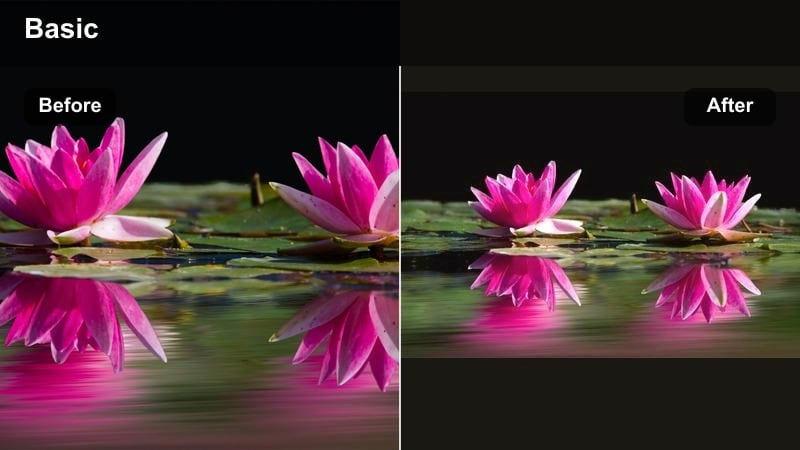
- Effect look: Soft warm contrast with gentle highlights that mimic sunset light and flattering skin tones.
- Best for: Outdoor couple walks, beach dates, rooftop sunsets, and slow-motion romantic montages.
- Editing tip: Lower sharpness slightly and add a subtle vignette to keep attention on faces and intertwined hands.
A warm, dreamy filter that makes any couple clip feel like it was shot during golden hour, even on cloudy days. In Filmora, you can get this look by increasing temperature, slightly lifting shadows, and adding a soft glow so hair, skin, and backgrounds catch that sunset-like shimmer.
For Reels and short romantic edits, combine Golden Hour Glow with slow motion and gentle push-in zooms on hands, hugs, and silhouettes. Use Filmora keyframes on exposure and warmth so the glow blooms right on the beat drop, and layer a low-opacity bokeh overlay to give your couple reel a polished, cinematic finish.
Use Filmora’s AI Tools to Lock in a Signature Couple Reel Look
Instead of rebuilding your color every time, use Filmora s AI-driven color matching and presets to keep your couple reels consistent. Once you land on a favorite couple filter style, save it as a reusable preset that you can apply in one click to new projects.
AI tools can analyze reference clips from your favorite creators and bring your footage closer to that mood in seconds. This keeps your romantic montages, engagement-style edits, and short lifestyle reels visually unified without manual tweaking on every clip.
 secure download

Preview Filters on Real Couple Footage Before You Commit
Filmora s live preview makes it easy to test multiple couple video filters for Reels on the same timeline. Drop three or four versions onto duplicate clips and compare them rapidly to see which style feels most on-brand for your couple or client.
Focus on how each filter handles skin tones, background colors, and highlight detail. The right combination will keep your couple looking natural while still delivering the scroll-stopping contrast or soft romantic glow you want.
secure downloadTurn Your Favorite Couple Filter Into a LUT for Fast Reuse
Once you fine-tune a couple filter that works for your romantic montages and engagement video style, export or save the grading as a LUT-style preset. This lets you apply the same look across multiple shoots, reels, or even other platforms with minimal effort.
Using LUTs keeps your brand identity consistent, especially if you post daily couple content or edit for multiple pairs. Filmora makes it simple to stack LUTs with light adjustments like exposure or saturation tweaks so you can adapt the look to any location or lighting.
secure downloadCozy Café Warmth
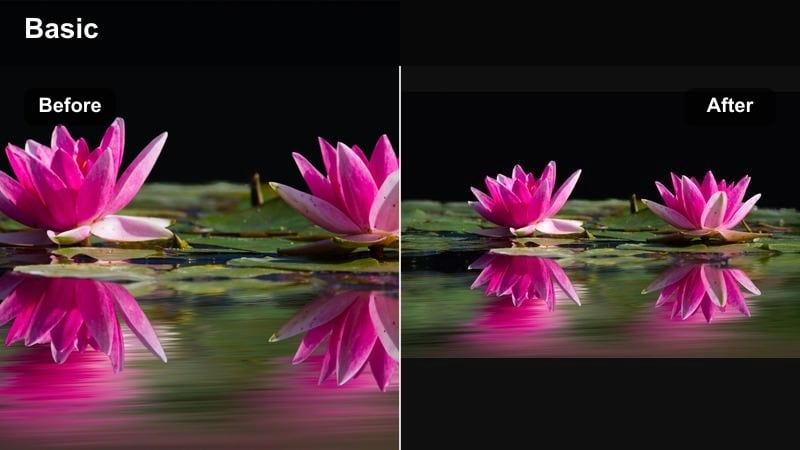
- Effect look: Muted contrast with rich browns and ambers that evoke coffee shop and candlelit interiors.
- Best for: Date nights, indoor lifestyle edits, baking together, and rainy-day couple routines.
- Editing tip: Reduce saturation of bright background colors and subtly boost orange in midtones for skin-flattering warmth.
A moody, intimate filter designed to make indoor couple reels feel cinematic and cozy instead of flat. In Filmora, you can lower global contrast slightly, warm the midtones, and pull down saturation on distracting background colors so skin and warm highlights stand out.
If your indoor footage is a bit noisy, add light noise reduction and lift the blacks so grain looks intentional, like film texture. Focus your short romantic edits on micro-moments such as fingers brushing a mug, steam rising, or a shy smile, and let this warm filter pull everything together into an engaging, candlelit vibe.
Rose-Tint Romance
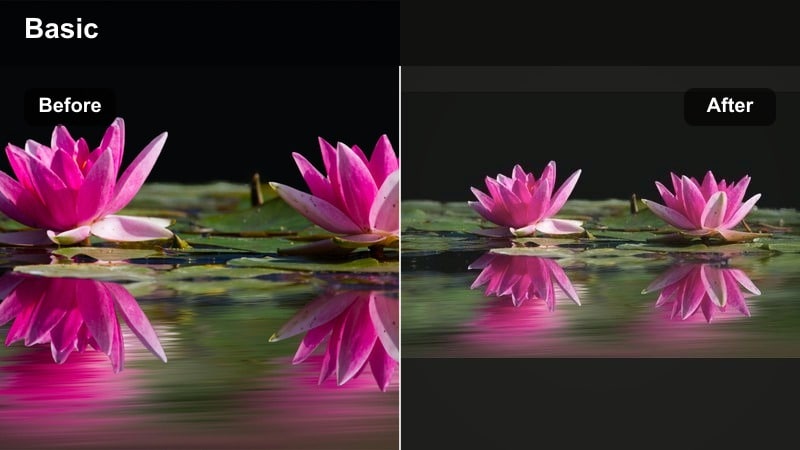
- Effect look: Soft pink highlights, gentle bloom, and lightly faded blacks for a dreamy, nostalgic romance vibe.
- Best for: Engagement video style reels, proposal reveals, wedding countdowns, and anniversary tributes.
- Editing tip: Pair with slow cross-dissolves and speed ramping only on emotional beats to keep the mood soft and sentimental.
A pastel-inspired filter that wraps your couple clips in soft pinks and creamy highlights for extra sweetness. In Filmora, add a subtle magenta tint to highlights, lift shadows slightly, and apply a soft focus or glow effect to create that dreamy, engagement-worthy glow.
Use this look across a sequence of short clips showing the location, ring close-ups, and reactions to build a complete mini love story in one reel. Reuse the same color preset, text style, and subtle cross-dissolves so all your proposal or anniversary edits feel like part of the same romantic series.
Clean Modern Contrast for High-Engagement Couple Reels
Scroll-Stopping Contrast
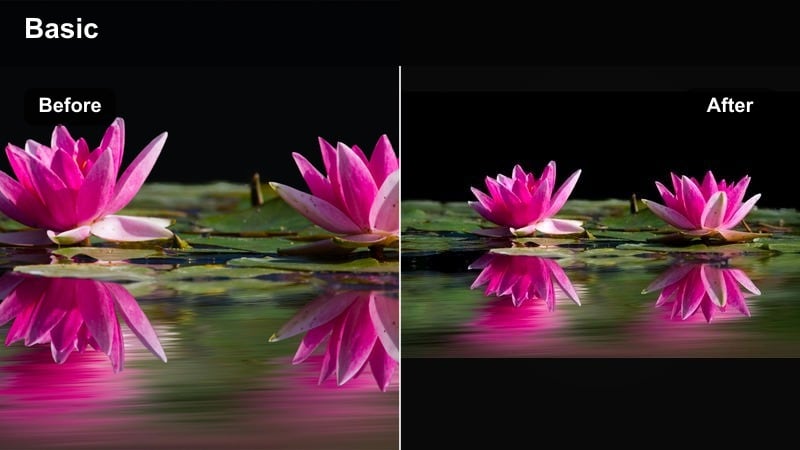
- Effect look: Punchy contrast, crisp edges, and slightly boosted saturation for a bold, modern Instagram look.
- Best for: High-energy lifestyle edits, travel couple reels, and quick transitions synced to trending audio.
- Editing tip: Keep clips under one second during high-energy sections and use whip or match cuts to maintain momentum.
A signature high-contrast filter that makes every frame pop on small screens and grabs viewers in the first second. In Filmora, push contrast and clarity, sharpen slightly, and bump saturation just enough to make skies, outfits, and environments feel vivid without breaking skin tones.
Pair this look with tight, energetic cutting and beat-synced transitions so your couple reels feel fast, fun, and watchable on loop. Save it as a Filmora preset so everything from travel vlogs to everyday lifestyle clips keeps the same bold, recognizable style that stands out in the Reels feed.
Urban Date Night
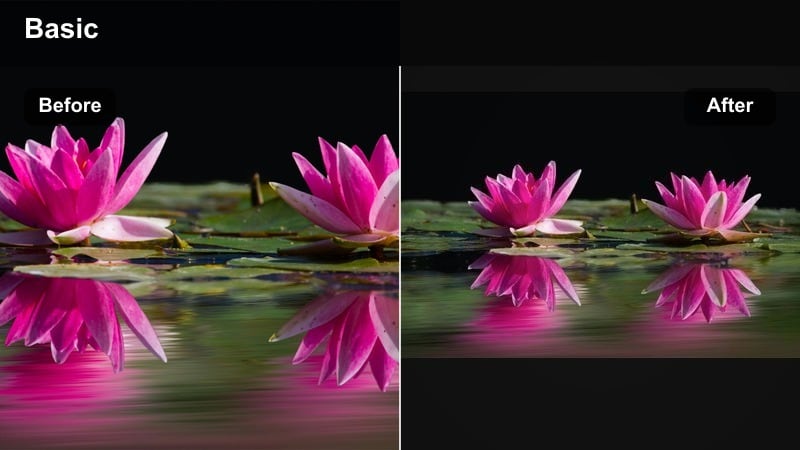
- Effect look: Cool shadows, crisp highlights, and neon-friendly saturation that enhances city lights and signage.
- Best for: Nighttime city walks, rooftop dates, neon-lit shots, and street-style couple reels.
- Editing tip: Boost saturation in blue and magenta while keeping skin tones natural with selective color or HSL tools.
A sleek city filter that turns night footage into sharp, cinematic date-night visuals. In Filmora, cool down the shadows, selectively boost blues and magentas, and gently lift exposure in darker areas so faces stay visible against neon backdrops.
Layer in a touch of motion blur for handheld moves and cut on movement such as steps, twirls, or hair flips to create fluid transitions between scenes. With this filter, even quick clips from a night out can become a stylish urban story that feels polished enough for both Reels and TikTok.
Minimal Portrait Pop
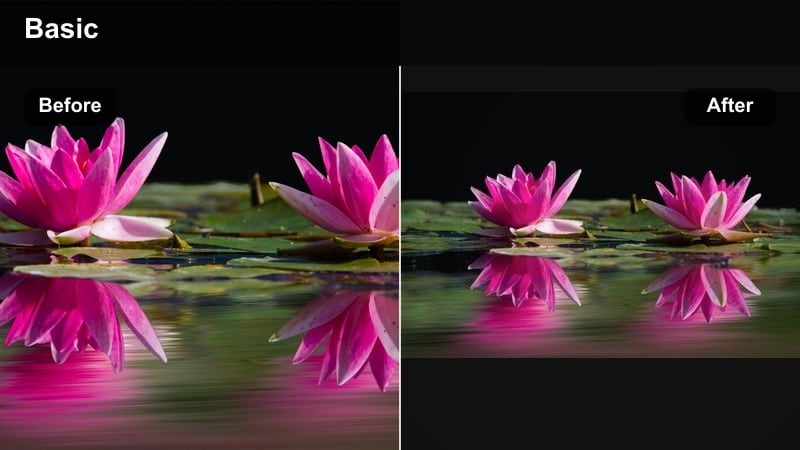
- Effect look: Clean whites, neutral contrast, and selective sharpening around eyes for portrait-focused couple shots.
- Best for: Close-up portrait video filters, detail shots of faces, and slow romantic gazes into the camera.
- Editing tip: Use subtle background blur or depth-of-field effects and keep transitions minimal to prioritize facial expressions.
A modern, minimal filter that makes portrait-oriented couple clips look fresh, sharp, and editorial. In Filmora, even out white balance, keep contrast moderate, and use selective sharpening around eyes and lashes to draw attention to expressions rather than the background.
Combine this look with gentle background blur or AI-powered depth-of-field effects so busy environments fade softly behind your subjects. Keep cuts slower and transitions simple, then reuse the same preset across multiple outfits and locations to build a signature portrait reel series your audience instantly recognizes.
Soft Vintage Vibes for Nostalgic Couple Stories
Super 8 Weekend
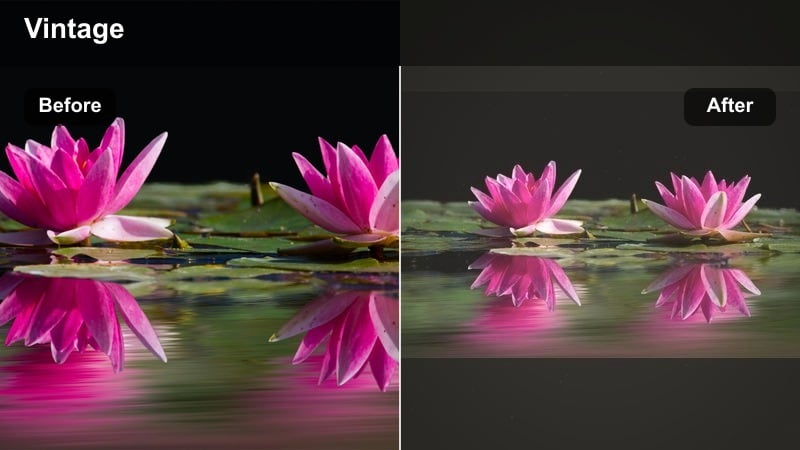
- Effect look: Low contrast, faded colors, subtle grain, and warm highlights inspired by vintage home movies.
- Best for: Weekend recap reels, road trips, picnics, and old-photo style relationship timelines.
- Editing tip: Add light film grain and occasional frame jitter or zoom-in to mimic real analog camera imperfections.
A retro-inspired filter that makes everyday couple clips feel like they were captured on classic film. In Filmora, lower contrast, slightly desaturate colors, warm the highlights, and add a gentle film-grain overlay so your footage feels like digitized Super 8.
Let shots breathe a little longer than usual and occasionally add tiny zoom-ins or jitter keyframes to mimic analog camera movement. This works beautifully for weekend recaps and relationship timelines where the nostalgic look adds emotional weight to even the most ordinary moments.
Polaroid Soft Fade
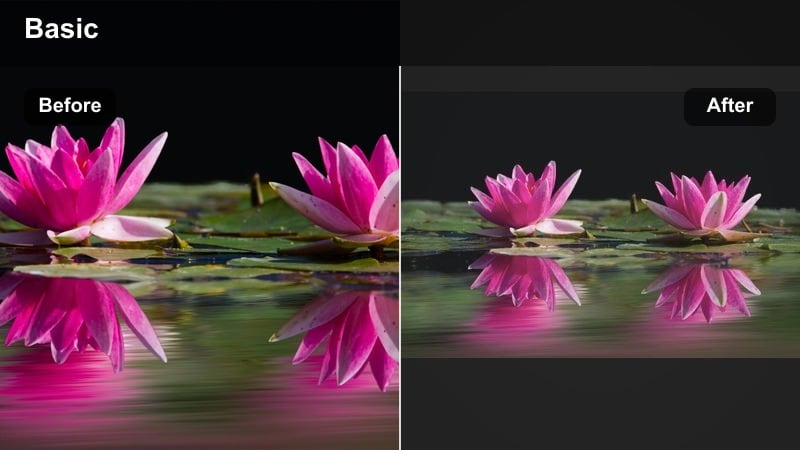
- Effect look: Bright highlights, slightly washed colors, and gentle vignette reminiscent of instant film prints.
- Best for: Photo-dump style reels, first-date flashbacks, and aesthetic couple montages for Instagram and TikTok.
- Editing tip: Use still-frame pauses and quick zoom-ins on key moments so the filter feels like flipping through printed photos.
A light, airy filter that gives your clips the charm of old instant photos with a modern twist. In Filmora, raise exposure, slightly reduce saturation, and add a soft vignette so the edges gently darken while the center stays bright and inviting.
Mix still photos and short video bursts together with this same preset for a cohesive photo-dump feel. Use simple fades or swipe transitions and add quick zoom-ins on key smiles, hugs, or locations to mimic the sensation of flipping through a stack of Polaroids in reel form.
Sepia Memory Lane
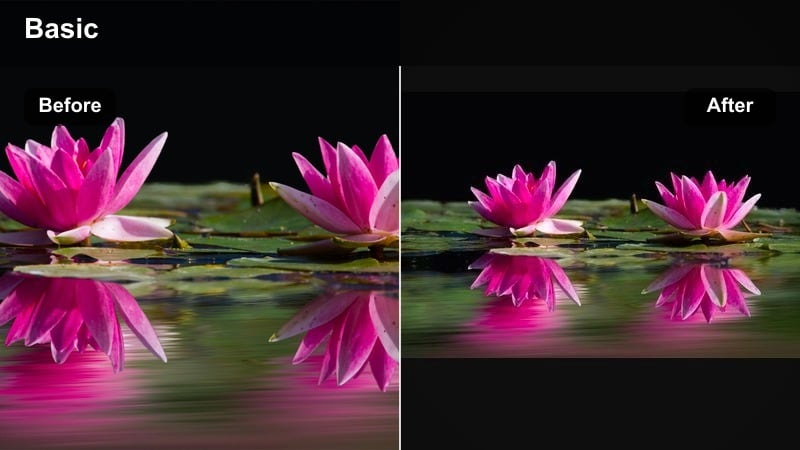
- Effect look: Warm brown midtones, softened contrast, and slightly blurred edges for a classic sepia memory feel.
- Best for: Long-term relationship recaps, anniversary stories, and emotional narration-based reels.
- Editing tip: Record a soft voiceover and keep background music low so the emotional storytelling shines through the visuals.
A timeless sepia filter that turns your relationship history into an emotional, storybook-style reel. In Filmora, shift the color balance toward warm browns, soften contrast, and apply a touch of blur or glow around the edges to create that classic memory look.
Arrange clips in chronological order and overlay simple year or date captions so viewers can follow your journey clearly. Combine this with a gentle voiceover and understated music bed, keeping audio levels balanced so the story, not the effect, takes center stage.
Trendy Filters for Swipe-Worthy Couple Reels
Pastel Trend Glow
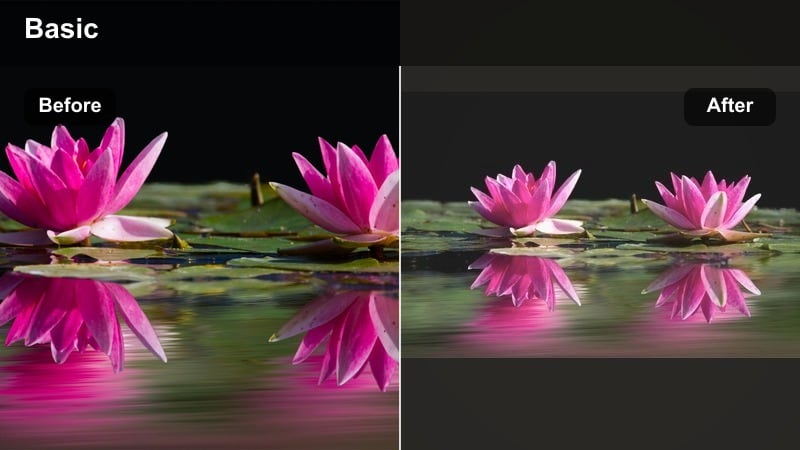
- Effect look: Soft pastel colors, slightly lifted blacks, and glow around highlights for a dreamy, aesthetic look.
- Best for: Trendy TikTok-style edits, aesthetic morning routines, and matching outfit couple reels.
- Editing tip: Keep camera moves slow and add a slight speed ramp into transitions for smooth, dreamy motion.
A pastel filter that nails the current soft-aesthetic trend while keeping your couple reels clean and bright. In Filmora, gently lift the blacks, soften overall contrast, and add a mild glow to highlights so whites, windows, and light fabrics bloom slightly.
Use this style for morning routines, cozy at-home snippets, or coordinated outfit reveals where soft colors are part of the story. Add subtle speed ramps and lens flare overlays at low opacity to keep motion smooth and dreamy, then sync key transitions to beat changes for that swipe-worthy, on-trend feel.
Cinematic Teal & Amber
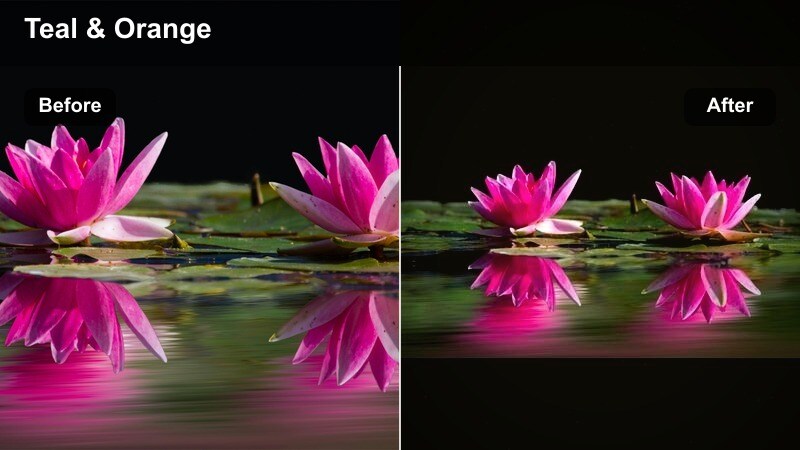
- Effect look: Teal shadows with warm skin tones and controlled highlights for a movie-style color grade.
- Best for: Travel couple films, dramatic slow-motion shots, and high-production engagement video styles.
- Editing tip: Add subtle letterbox bars and use slower, more deliberate cuts so the cinematic grade has room to breathe.
A bold cinematic filter that makes your couple reels look like frames from a feature film. In Filmora, use color wheels or LUTs to push shadows toward teal while protecting warm skin tones, then refine contrast so details in clouds, water, and landscapes stay crisp.
Add subtle letterbox bars and favor slow, confident camera moves like pans and push-ins to match the filmic grade. Apply this look consistently across all scenic B-roll in a travel or engagement story so every cut feels like part of one cohesive movie rather than disconnected clips.
Monochrome Heartbeat
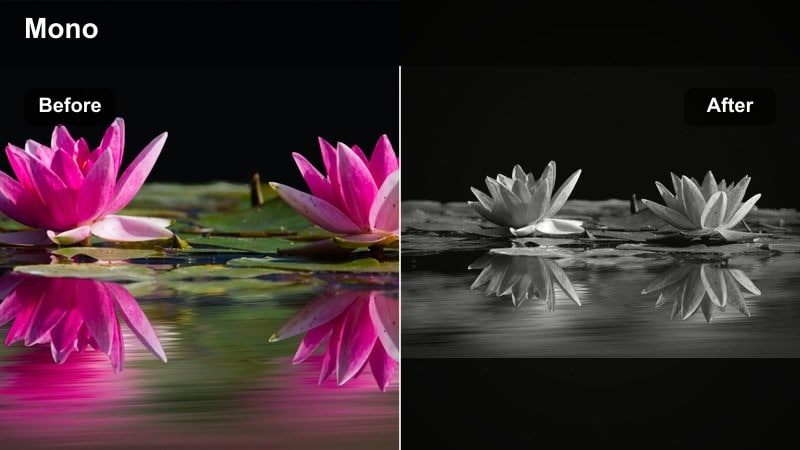
- Effect look: High-contrast black and white with deep blacks and sharp midtones that emphasize expressions.
- Best for: Intense emotional close-ups, spoken vows, storytelling reels, and dance-in-the-living-room moments.
- Editing tip: Cut to the beat of a simple piano or acoustic track and keep transitions minimal to preserve the raw emotion.
A striking black-and-white filter that strips away distractions and puts all focus on your connection. In Filmora, desaturate completely, deepen the blacks, and fine-tune contrast and clarity so eyes, hands, and subtle expressions stand out clearly.
This look is perfect for vows, letters read aloud, or quiet moments where color does not add much but emotion does. Try starting your reel in color and cutting to monochrome at the emotional peak, using a quick flash or beat-synced edit to make the shift feel powerful and intentional.
Tips for Using Couple Reels Engaging Filters in Filmora
- Keep at least one or two signature filters across all your couple reels so followers immediately recognize your work.
- Always check how your couple filter looks on skin tones first, then fine-tune saturation and contrast before posting.
- Edit to the emotion of the song: bold contrast for hype tracks, soft faded filters for slow romantic audio.
- Mix wide establishing shots with tight detail shots using the same filter so your story feels cinematic but cohesive.
- Export a short five-second test reel with text and music to see how the filter looks on mobile before finalizing a full edit.
- Use Filmora presets and LUTs to keep your couple reels consistent across different shoots, locations, and lighting conditions.
- Duplicate your timeline and experiment with two or three filters on the same sequence to quickly compare which look engages best.
- Combine subtle overlays like bokeh, grain, or light leaks with color filters sparingly so they enhance rather than overwhelm your couple footage.
The right couple video filters for Reels can turn everyday clips into emotional mini-movies that stop viewers from swiping away. By choosing a handful of warm, modern, vintage, and trendy looks, you can quickly match any mood while still keeping your overall style consistent.
Experiment with these filter ideas in Filmora, save your favorites as presets, and build a recognizable visual identity for your couple content. With a strong, cohesive look in place, every new romantic montage or lifestyle edit will feel professional, intentional, and ready to perform on Reels.
secure downloadNext: Moody Selfie Video Filters: Deep Shadows & Emotion for Late-Night Portraits
