

 100% Security Verified | No Subscription Required | No Malware


 ChatGPT
 Perplexity
 Gemini
 Claude
 Grok
Grok
Daily vlogs move fast on Instagram, so your colors need to hook viewers in the first second. The right daily vlog filters for Reels can turn everyday clips into polished, bingeable stories that look consistent on your grid.
Below are 12 Filmora-inspired filter ideas tailored for Instagram Reels vlogs and short daily content, with simple editing tips so Reels creators and Instagram video makers can match the exact vibe they want in just a few taps.
In this article
Bright Everyday Vlog Filters for Reels
Sunny Morning Pop
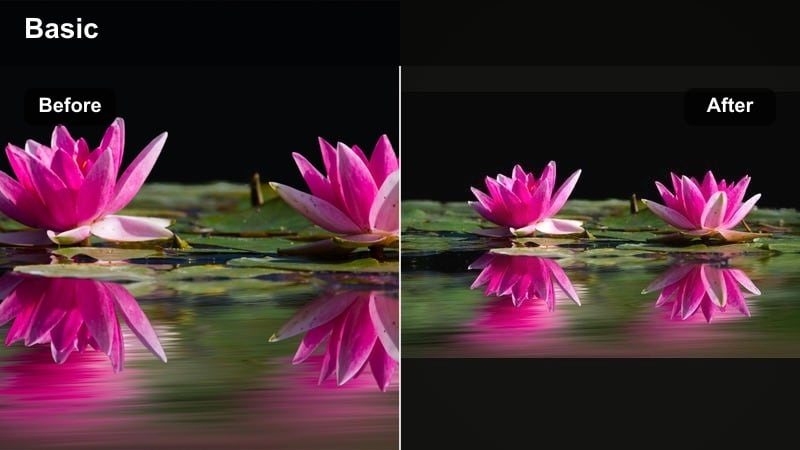
- Effect look: Clean, bright, slightly warm with gentle contrast and crisp whites.
- Best for: Morning routines, coffee runs, desk setups, soft lifestyle Reels.
- Editing tip: Lift exposure and whites, add a touch of warmth, then slightly lower saturation to avoid neon skin tones.
Sunny Morning Pop is perfect when you want your daily vlog Reels to feel like a fresh start to the day. By gently brightening exposure and whites in Filmora, you can make windows, mugs, and notebooks look airy while still keeping detail in highlights. A touch of warmth keeps your scene feeling inviting without pushing colors into orange territory.
In Filmora, apply this style to all your morning B-roll, then fine-tune with slight saturation reductions so skin stays natural on every device. If you are filming in a bright kitchen or home office, use the scopes and highlight sliders to hold window details, then save the result as a preset so every morning reel in your series instantly matches.
Pro tip: Avoid blown-out windows
If your vlog has big windows or strong daylight, lower highlights before you raise exposure so your background still holds detail.
In Filmora, balance brightness with contrast at the end, not the beginning, so faces stay flattering and not too crunchy.
Let AI Match Your Daily Vlog Mood
Filmora’s AI color tools can quickly analyze your daily vlog clip and apply a balanced base grade, giving you clean exposure and neutral white balance before you touch any filter. That way, your daily vlog filters for Reels sit on top of an even foundation instead of trying to fix mixed lighting or underexposed shots.
Once the AI sets your base look, you can layer bright, cinematic, or cozy presets and adjust vibrance, contrast, and temperature in seconds. This workflow is especially handy if you post daily and need fast, repeatable results without manual grading from scratch every time.
 secure download

Preview Filters on Short Reels Clips
Instead of committing to a filter on an entire vlog, import a 10 to 15 second snippet into Filmora and rapidly test different looks. You will see right away which presets handle skin tones, home interiors, and outdoor walks the best for your specific footage.
Use split-screen or side-by-side preview to compare a bright daily filter against a cinematic or cozy one, and then apply your favorite to the full timeline. This helps your Reels stay cohesive from the first frame to the last transition.
secure downloadTurn Favorite Filters Into Reusable LUT-Style Presets
After you find a daily vlog filter that fits your Reels brand, you can turn it into a reusable preset in Filmora. This works like having your own custom Instagram Reels LUT, ready to apply to any new clip you import.
Build a small library of go-to looks for mornings, cinematic city walks, and cozy nights, then apply them with one click. Your short videos will not only be faster to edit, but your grid will look more professional and consistent for returning viewers.
secure downloadSoft Cream Diary
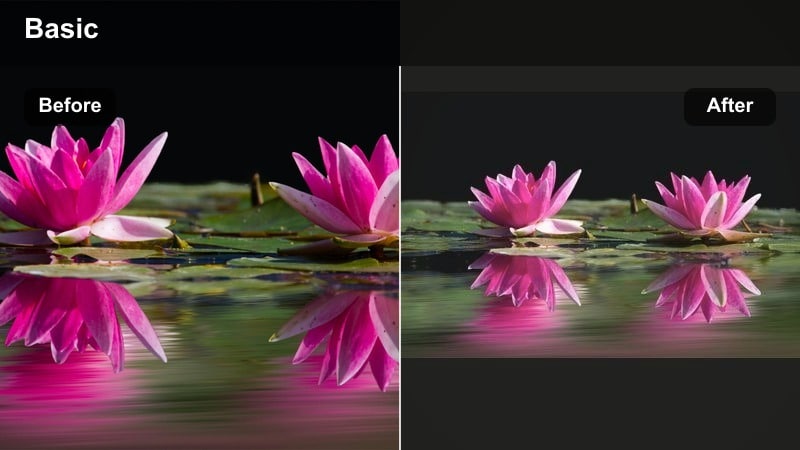
- Effect look: Milky whites, low contrast, pastel tones and gentle skin smoothing.
- Best for: Aesthetic routines, study vlogs, soft girl content, book and journaling Reels.
- Editing tip: Reduce contrast and clarity slightly, lift shadows, then nudge temperature warmer and tint toward magenta for creamy skin.
Soft Cream Diary is ideal when you want your Reels to feel like pages from a calm, handwritten journal. By lowering contrast and clarity in Filmora, you soften edges and blend colors into gentle pastels that flatter skin and backgrounds alike. Lifting shadows keeps desk corners and bookshelves visible without making the frame feel harsh.
In Filmora, combine this look with warm temperature and a subtle magenta tint to create creamy skin tones suited to close-ups of hands, faces, and stationery. It is a great default preset for study sessions, quiet coffee breaks, or any daily vlog filter for Reels that leans into softness and comfort.
Pro tip: Keep text readable
When using soft low-contrast looks, add a tiny bit of local contrast or sharpening to text overlays so on-screen captions stay clear.
Test your filter with your usual font and brand colors to be sure they still pop on small phone screens.
Daily Fresh & Clean
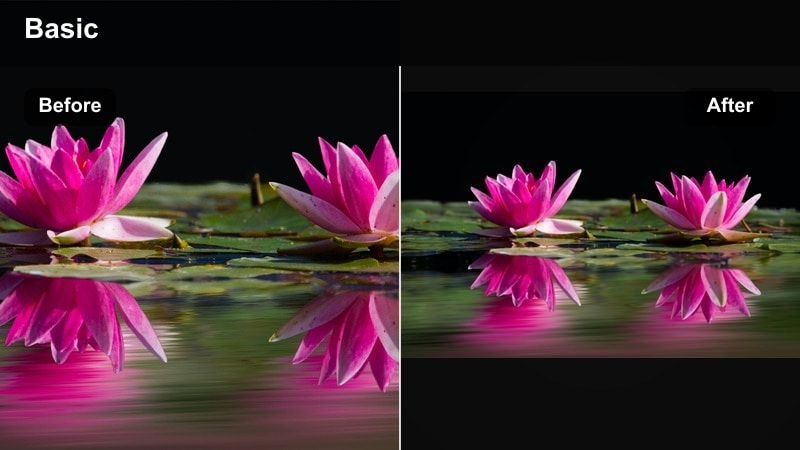
- Effect look: Neutral, crisp colors with boosted clarity and subtle saturation for a natural but polished vlog feel.
- Best for: Day-in-the-life Reels, productivity vlogs, simple talking-to-camera clips.
- Editing tip: Keep white balance neutral, add a touch of vibrance instead of saturation, and sharpen just enough to make details stand out.
Daily Fresh & Clean gives your Reels a professional, honest look that feels close to reality but a little more refined. In Filmora, use neutral white balance and gentle vibrance boosts so your workspace, outfits, and backgrounds look crisp without drifting into overly stylized territory.
This is a strong all-purpose preset when you film on different days or devices because it helps normalize color and clarity across your timeline. Apply it before adding text, stickers, or transitions, and your daily vlog filters for Reels will look consistent from clip to clip.
Pro tip: Match shots from different phones
If you mix clips from multiple phones or cameras, use this neutral look as your base, then slightly adjust temperature per clip to match.
Save it as a Filmora preset so every new vlog starts from the same clean reference point before you stylize further.
Cinematic Daily Vlog Filters for Reels
Urban Film Matte
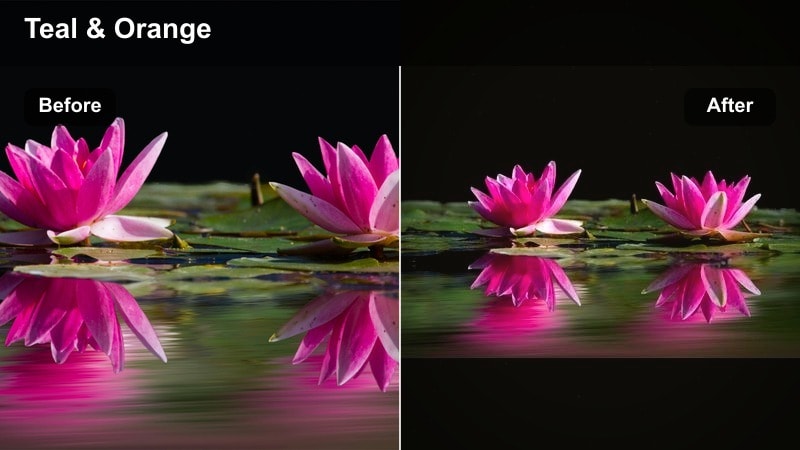
- Effect look: Matte blacks, cool shadows, warm skin tones and a subtle teal-orange balance for a filmic city vibe.
- Best for: Street vlogs, commute Reels, night walks, city coffee runs and moody daily clips.
- Editing tip: Add a gentle S-curve, lift the lower shadow point for matte blacks, then cool shadows while slightly warming midtones.
Urban Film Matte turns simple city errands into mini movie moments. In Filmora, you can lift the shadow point in the curves panel to create that cinematic matte look, then cool down shadows for sidewalks, buildings, and sky while preserving warm skin tones using HSL controls.
The slight teal-orange balance works well with neon lights, street signs, and storefront windows, making them pop without overwhelming your subject. Save this preset to give your daily commute or city lifestyle content a cohesive, Instagram-ready film style.
Pro tip: Protect skin tones in teal-orange looks
When pushing teal into shadows, use HSL to reserve oranges and reds so skin tones stay natural and not overly tanned.
In Filmora, keep saturation of orange lower than blues to keep vlogs cinematic instead of looking like a heavy Instagram filter.
Golden Hour Glow
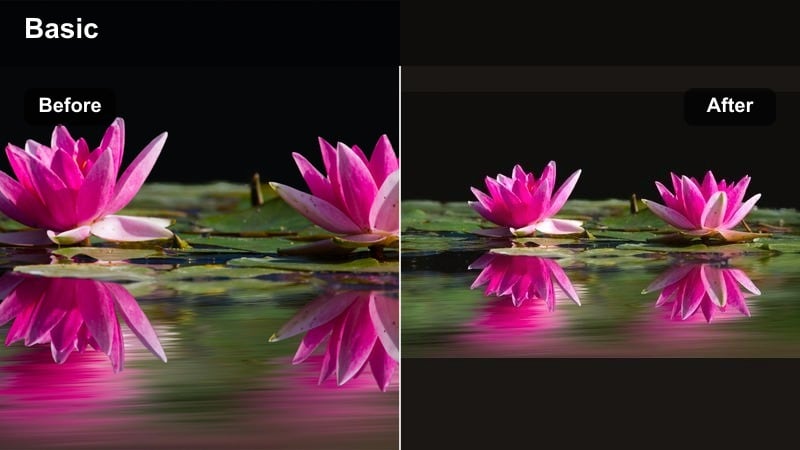
- Effect look: Rich warm highlights, soft flares and slightly lowered clarity to mimic golden hour even at other times of day.
- Best for: Sunset walks, date vlogs, rooftop hangs and cozy end-of-day check-in Reels.
- Editing tip: Push temperature warmer, add a bit of bloom or glow, and keep contrast moderate so your highlights feel soft, not harsh.
Golden Hour Glow recreates that flattering end-of-day light even when you shoot earlier or indoors. In Filmora, increase temperature and use softening tools or glow effects to give hair, faces, and backgrounds a gentle halo while controlling contrast to avoid crunchy edges.
Apply this look to outdoor B-roll, slow-motion clips, and reflective voiceovers to give your Reels a cohesive, romantic warmth. You can also blend it at lower intensity for daytime footage so your overall series keeps a subtle, sun-kissed signature style.
Pro tip: Fake golden hour indoors
Shoot near a window and angle your subject toward the light, then add this warm filter to mimic sunset tones on indoor clips.
Lower overall saturation but selectively boost orange and yellow to keep skin and lamp light glowing without turning walls orange.
Muted Cinematic Journal
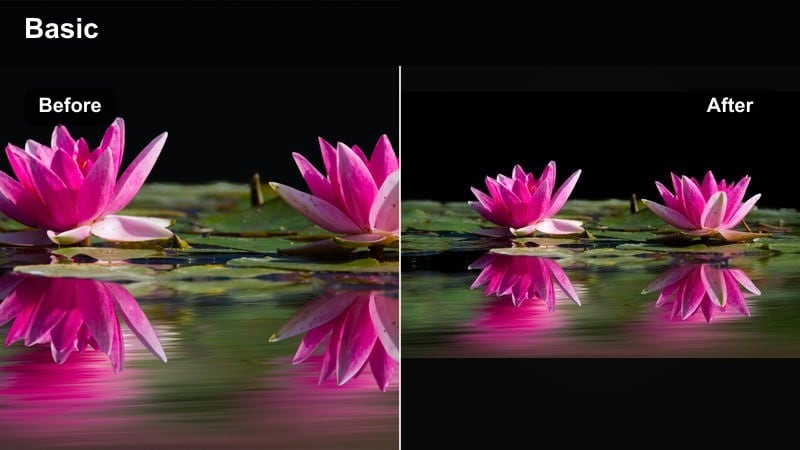
- Effect look: Desaturated background colors, strong midtone contrast and gentle film grain for a diary-style movie mood.
- Best for: Voiceover vlogs, reflective storytelling Reels and longer narrative daily content.
- Editing tip: Reduce saturation across greens and blues, keep skin tones slightly saturated, and add subtle grain for texture.
Muted Cinematic Journal pulls focus to your story by softening busy background colors without making the frame look flat. In Filmora, lightly desaturate greens and blues so plants, signs, and decor do not steal attention, while increasing midtone contrast to keep your face defined.
A light layer of film grain disguises minor noise and adds texture that feels intentional and cinematic. This daily vlog filter for Reels is a strong choice for sit-down updates, mental health check-ins, or any narrative where emotion and voiceover take center stage.
Pro tip: Support voiceovers with color
When your reel is story-driven, choose muted colors so subtitles and voiceover carry the emotion instead of bright backgrounds.
In Filmora, fine-tune specific color ranges like green or blue to control how busy your environment feels behind you.
Cozy Home and Lifestyle Vlog Filters
Warm Homey Hug
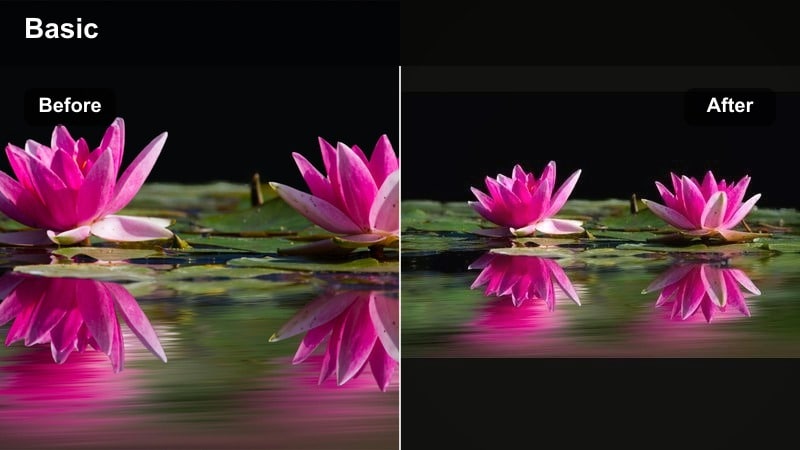
- Effect look: Soft warm tones, lifted shadows, and gentle contrast that make indoor vlogs feel inviting.
- Best for: Cooking Reels, cleaning montages, home decor tours and cozy night-in vlogs.
- Editing tip: Increase warmth slightly, raise shadows for softer corners, and add a subtle vignette to pull focus to the center.
Warm Homey Hug is designed to make everyday home clips look like scenes from a cozy lifestyle commercial. In Filmora, nudging temperature toward warm and lifting shadows turns hard corners and dark hallways into gentle gradients, helping your kitchen or bedroom feel more welcoming on camera.
A soft vignette guides the viewer’s eye toward the center where your hands, plates, or pets are. Use this filter for recurring cleaning timelapses or cooking Reels so your entire home-focused series shares the same comforting color story.
Pro tip: Fix mixed indoor lighting
If your room mixes daylight and warm bulbs, use the tint slider to reduce green and get more consistent walls and counters.
Try lowering saturation of yellow separately so wooden tables and cabinets do not turn neon when you warm the whole frame.
Minimal Beige Grid
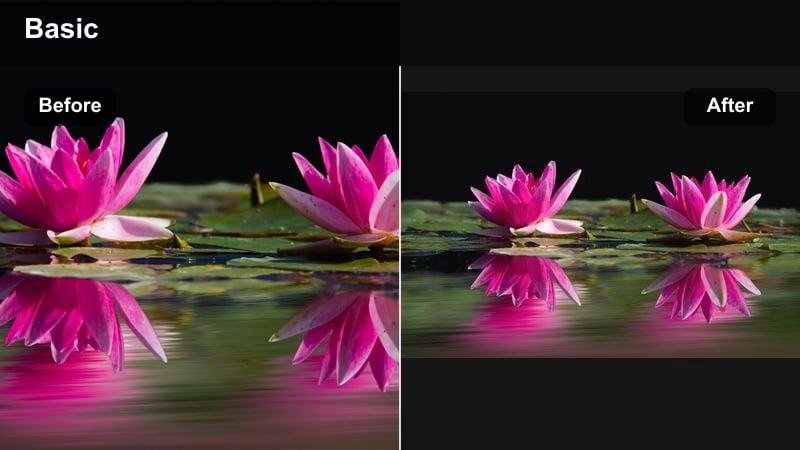
- Effect look: Desaturated blues and greens, soft beige emphasis and consistent neutral whites for a curated feed look.
- Best for: Interior aesthetic vlogs, outfit of the day Reels and minimal lifestyle content.
- Editing tip: Reduce saturation of blue and green, lift exposure slightly and adjust white balance to keep whites looking creamy, not blue.
Minimal Beige Grid gives your Reels the neutral, editorial aesthetic common on curated lifestyle feeds. In Filmora, lower the saturation of blues and greens so denim, plants, and sky step back, while emphasizing warm beiges in furniture, clothing, and decor.
This approach keeps your thumbnails and grid tiles looking harmonized even if you shoot in many different locations. Apply this preset to mirror OOTDs, room makeovers, and desk setups so followers instantly recognize your signature beige-forward Reels style.
Pro tip: Keep your grid consistent
Export a few test Reels thumbnails with this filter and lay them out like a grid to see how your overall profile aesthetic feels.
Once you are happy, lock this as your default preset in Filmora so every new daily vlog matches the same palette automatically.
Cozy Night Grain
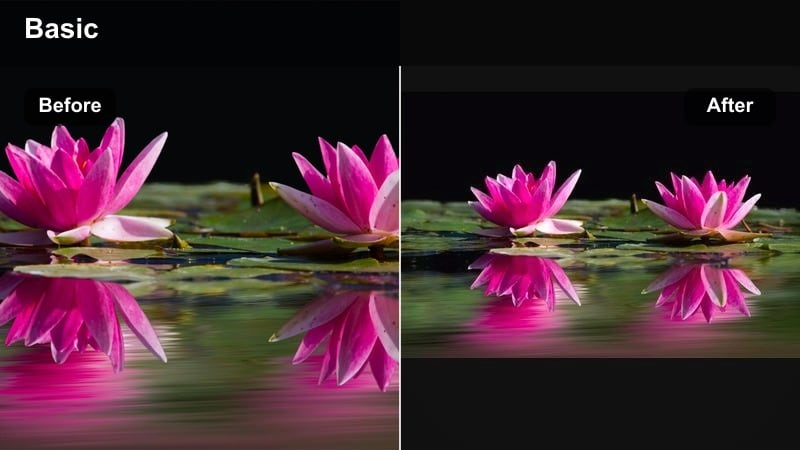
- Effect look: Warm indoor tones, slightly crushed blacks and noticeable but soft grain that hides low-light noise.
- Best for: Evening routines, bed-time vlogs, Netflix and chill Reels or rainy-night content.
- Editing tip: Lower exposure just a touch, deepen blacks, add grain, then selectively brighten faces so the scene feels intimate, not muddy.
Cozy Night Grain is perfect for low-light evening Reels where you want mood, not clinical brightness. In Filmora, slightly darken the overall exposure and crush blacks so corners fall off into rich shadow, then add a layer of film grain to make digital noise look intentional.
Use masks or selective adjustments to keep faces a little brighter than the rest of the scene, maintaining a comfortable viewing experience. This daily vlog filter for Reels works well for bedroom check-ins, movie nights, or rainy-window B-roll.
Pro tip: Turn noise into style
Phone clips shot at night can look noisy, so lean into it by adding film-style grain and slightly softening the image.
Use Filmora’s noise reduction gently first, then layer grain so the image feels textured, not just blurry.
Bold and Trendy Daily Reels Filters
Punchy Color Pop
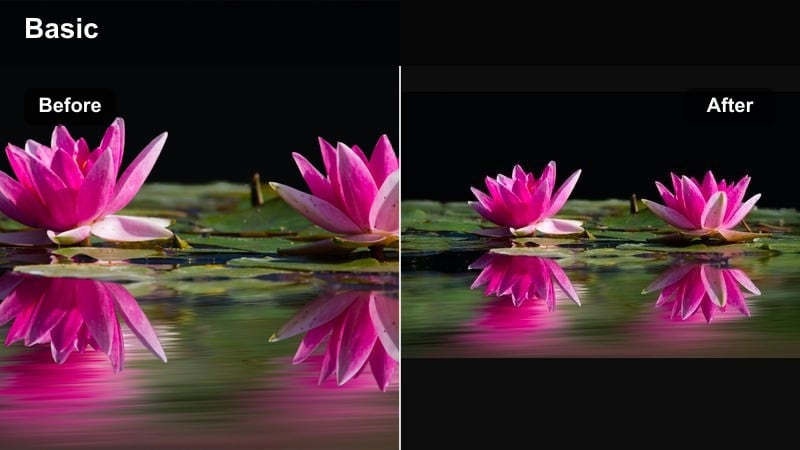
- Effect look: Strong contrast, deep blacks and vivid saturated colors that jump off the screen.
- Best for: Fast-cut daily highlight Reels, travel vlogs, outfit transitions and trends.
- Editing tip: Boost vibrance and saturation moderately, deepen blacks, and add a touch of sharpening for crispy details.
Punchy Color Pop is made for high-energy Reels where you want every frame to feel scroll-stopping. In Filmora, increase contrast and deepen blacks to give your shots more structure, then use vibrance and modest saturation boosts to make clothes, city lights, and skies stand out.
This filter suits transitions, jump cuts, and trend-based content where visual impact matters more than subtlety. Just watch skin tones as you push color; small HSL tweaks will help your face stay flattering while backgrounds explode with color.
Pro tip: Balance bold color with skin tones
When pushing saturation, keep an eye on reds and oranges so faces do not look sunburnt or oversharpened.
Use HSL in Filmora to pull back orange saturation slightly while keeping outfits and skies vivid.
Pastel Trend Vibes
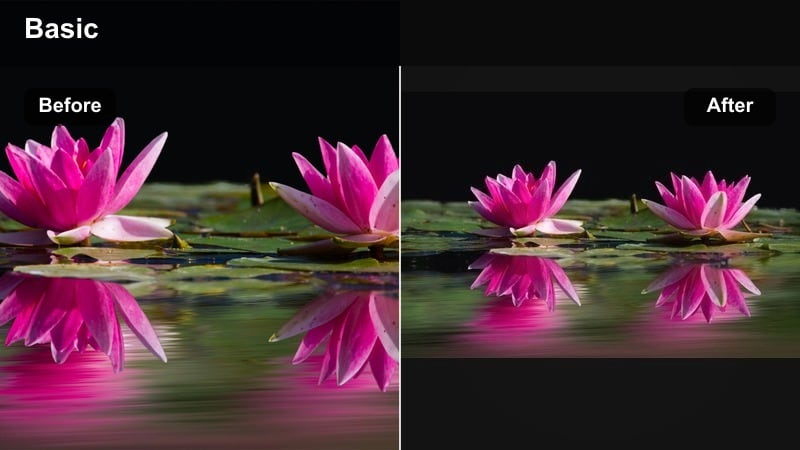
- Effect look: Low contrast pastel palette with slightly cool highlights and softened edges.
- Best for: Trendy lip-syncs, GRWM Reels, aesthetic transitions and creator intros.
- Editing tip: Slightly lower contrast, raise shadows, then reduce saturation on strong colors to bring everything into a pastel range.
Pastel Trend Vibes gives your Reels that soft, trendy creator look that feels right at home on explore pages. In Filmora, lower contrast and lighten shadows to remove harsh edges, then pull back saturation on strong colors so outfits, makeup, and backgrounds shift into a pastel spectrum.
A touch of cooler highlight tint prevents the image from going too warm, keeping whites crisp in mirrors and backgrounds. This daily vlog filter for Reels is especially effective on GRWM, fit checks, and playful transitions where vibe matters as much as detail.
Pro tip: Pastels that still stand out
Even with low contrast, add slight local contrast to eyes, hair and text overlays so the key details remain sharp.
Test your reel on low phone brightness to be sure your pastel look does not become too washed out for viewers.
Retro Reels LUT Style
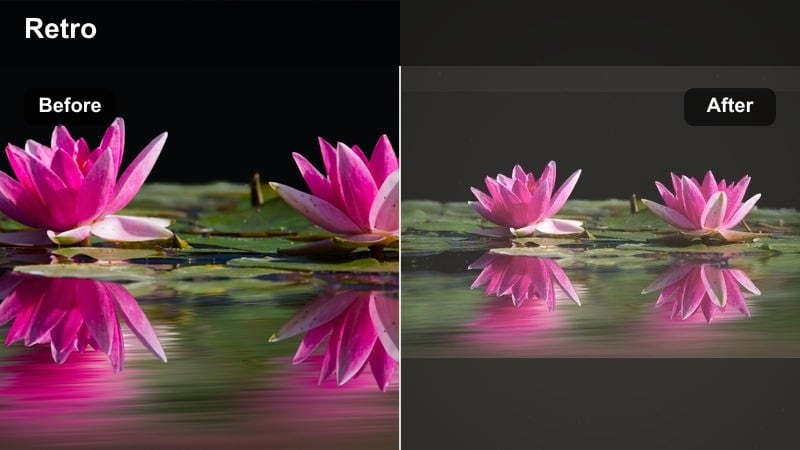
- Effect look: Retro-inspired color shift with faded shadows, slightly greenish midtones and a subtle halation glow.
- Best for: Nostalgic daily vlogs, throwback trends, retro outfit Reels and flashback story clips.
- Editing tip: Experiment with Filmora’s LUT-style filters, then tone down intensity to around 60 to 70 percent for a modern, wearable retro feel.
Retro Reels LUT Style wraps your daily clips in a nostalgic, film-inspired color wash. In Filmora, you can start with a LUT or preset that adds greenish midtones and faded blacks, then dial down the strength so it feels like a modern nod to vintage rather than a heavy overlay.
Add subtle glow or halation around lights to complete the throwback mood, and use this preset on flashback sequences, story-time cutaways, or retro outfit posts. Saving a few intensity variations lets you pick between strong or subtle nostalgia depending on the Reel.
Pro tip: Mix LUT looks with subtle grading
Apply your favorite LUT or preset lightly, then finish with manual tweaks to exposure and white balance so every clip still matches.
Save different intensity versions in Filmora so you have quick options for strong retro or more subtle daily vlog looks.
Tips for Using Daily Vlog Filter Reels Filters in Filmora
- Shoot in the most neutral camera setting your phone offers, then rely on Filmora filters to create your final vlog look.
- Keep a single signature filter for at least a few weeks so your audience starts to recognize your Reels style at a glance.
- Always check your daily vlog filters for reels on both bright and dim screen settings to make sure details and text stay readable.
- If colors look inconsistent between clips, match exposure and white balance first, then apply your preset so the filter behaves predictably.
- Export a short private test Reel with your new filter and watch it in the Instagram app before committing it to a full series.
- Save different Filmora presets for morning, cinematic city, and cozy night looks so you can switch moods quickly without rebuilding grades.
- Use Filmora’s split-screen comparison to A/B test two filters on the same clip and choose the one that best fits your brand.
- Back up your custom Filmora presets so you can reuse your favorite daily vlog filters for Reels across devices or future projects.
Daily vlog filters for Reels work best when they support your story, feel consistent across clips and are fast to apply to every new piece of short daily content.
Build a small set of presets in Filmora for mornings, cinematic moments and cozy nights so your Instagram Reels vlogs always look intentional, polished and on-brand.
secure downloadNext: Cinematic Daily Vlog Filters: Give Your Reels a Film-Like Finish
