

 100% Security Verified | No Subscription Required | No Malware


 ChatGPT
 Perplexity
 Gemini
 Claude
 Grok
Grok
Deep Onyx is a rich, near-black shade that feels confident, cinematic, and quietly luxurious. It absorbs light instead of shouting for attention, which makes it perfect for building mood, focusing the eye, and giving your visuals a polished, professional base. In color psychology, dark neutrals like Deep Onyx suggest stability, mystery, and sophistication, which is why they show up so often in premium branding and film posters.
For video creators, Deep Onyx is a powerful anchor tone for intros, YouTube thumbnails, lower thirds, and end screens. It lets accent colors, skin tones, and typography stand out clearly, while keeping the whole frame cohesive. Below you will find ready-made Deep Onyx color palettes with HEX codes you can plug directly into Filmora for color grading, graphics, and branding across vlogs, cinematic edits, reels, and more.
In this article
Cinematic Deep Onyx Color Palettes
Neo Noir Streets

- HEX Codes: #0b0c0f, #1f2933, #4b5563, #9ca3af, #f9fafb
- Mood: Moody, urban, and cinematic with a cool, late-night energy.
- Use for: Ideal for cinematic vlogs, cityscape b-roll, and dramatic title cards that need a refined edge.
Neo Noir Streets leans into the classic city-at-night aesthetic: Deep Onyx shadows, layered steel grays, and a soft off white highlight. It feels like wet pavement under streetlights, perfect for framing silhouettes, skyline shots, and high contrast typography.
Use this palette in your video intros, chapter cards, and YouTube thumbnails when you want a grounded, cinematic look without bright distractions. In Filmora, you can build lower thirds and title screens with Deep Onyx as the background, then set text and icons in the lighter grays and off white for clear readability.
Pro Tip: Build a Cinematic Deep Onyx Look in Filmora
To keep a Neo Noir Streets feel across your whole edit, pick Deep Onyx as your base for backgrounds, frames, and overlay bars. Then, in Filmora, repeat the same gray and off white accents in your titles, lower thirds, and subscribe banners so every element looks connected, from the opening shot to the end screen.
You can also use this palette when mixing formats: widescreen b-roll, vertical shorts, and square social teasers. Reusing the Deep Onyx base and consistent accent grays in Filmora templates helps your channel thumbnails, reels, and banners instantly read as part of the same brand.
AI Color Palette
If you have a still frame or mood board that already nails this Neo Noir Streets look, Filmora's AI Color Palette feature lets you lift that Deep Onyx mood and spread it across all your clips. Import your reference image, sample the palette, and apply the same tone to your whole sequence in a few clicks.
This is especially useful when you shoot in different locations or lighting setups. AI Color Palette helps you match contrast, shadows, and highlights, so Deep Onyx stays rich and consistent, and your grays do not suddenly shift between scenes.
 secure download

HSL, Color Wheels & Curves
Once your Deep Onyx base is in place, you can fine tune it with Filmora's HSL, color wheels, and curves controls. Slightly deepening the shadows and cooling the midtones creates a sharper noir look, while lifting the highlights keeps faces and text readable against the dark background. Tools like the color wheels and curves for grading help you dial in a precise balance between contrast and softness.
Use HSL to gently desaturate blues and greens in your footage so the Deep Onyx and neutral grays take the lead. Then, with the curves tool, add a subtle S-curve to give your video more punch without crushing shadow detail, keeping the palette cinematic instead of flat.
secure download1000+ Video Filters & 3D LUTs
To speed up your Deep Onyx workflow even more, Filmora's video filters and 3D LUTs make it easy to apply a unified style in seconds. Choose cinematic LUTs that deepen blacks and cool midtones for a noir atmosphere, or pick softer filters that keep Deep Onyx rich but gentle for lifestyle content.
Once you find a filter that fits, you can use it as a base and tweak brightness, contrast, and saturation until your Neo Noir Streets palette sits perfectly. Save this as a custom preset so future videos on your channel share the same Deep Onyx signature look.
secure downloadMidnight Studio Glow

- HEX Codes: #090a0c, #1f2937, #6366f1, #e5e7eb, #f97316
- Mood: Sleek, creative, and modern with a subtle neon pop.
- Use for: Best for creator intros, tech reviews, and motion graphics overlays where contrast and focus matter.
Midnight Studio Glow combines Deep Onyx with a crisp indigo accent and a punch of warm orange. It feels like a modern content studio lit by LED strips: focused, techy, and energetic without being overwhelming.
Use Deep Onyx and dark gray for backgrounds and panels in your YouTube intros, then highlight calls-to-action in electric indigo and orange. In Filmora, this palette works brilliantly for kinetic titles, subscribe buttons, and HUD-style overlays in tech reviews or gadget breakdowns.
Foggy Harbor Reel

- HEX Codes: #0b0c10, #111827, #374151, #9ca3af, #d1d5db
- Mood: Atmospheric, reflective, and calm like a misty coastal morning.
- Use for: Great for travel films, reflective BGM edits, and calm cinematic openers with slow transitions.
Foggy Harbor Reel wraps Deep Onyx in layers of cool slate gray, creating a soft, misted atmosphere. It feels introspective and slow, ideal for storytelling that leans on emotion and space instead of speed.
Apply this palette to travel b-roll, documentary title cards, or minimalist slides in Filmora. Keep text in the lighter grays for easy reading, and let Deep Onyx live in the letterboxing bars, overlays, and fade-to-black transitions for a subtle, filmic touch.
Shadowbox Cinema Fade
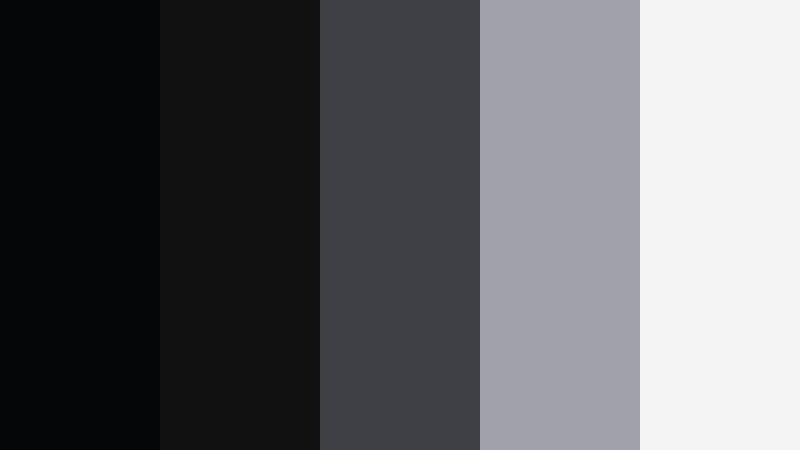
- HEX Codes: #050608, #111111, #3f3f46, #a1a1aa, #f4f4f5
- Mood: Minimal, dramatic, and gallery like with strong contrast.
- Use for: Perfect for art films, photo slideshows, and luxury product teasers needing a stark, curated vibe.
Shadowbox Cinema Fade is a stripped-back monochrome built around Deep Onyx, charcoal, and smooth light gray. It feels like a gallery wall or museum lightbox, where every frame is treated as art.
Use this palette when you want your images or product shots to take center stage. In Filmora, place Deep Onyx behind photo carousels, draw attention with soft gray frames, and keep titles minimalist in near white. It is ideal for slideshows, lookbooks, and elegant teaser trailers.
Ember In The Dark
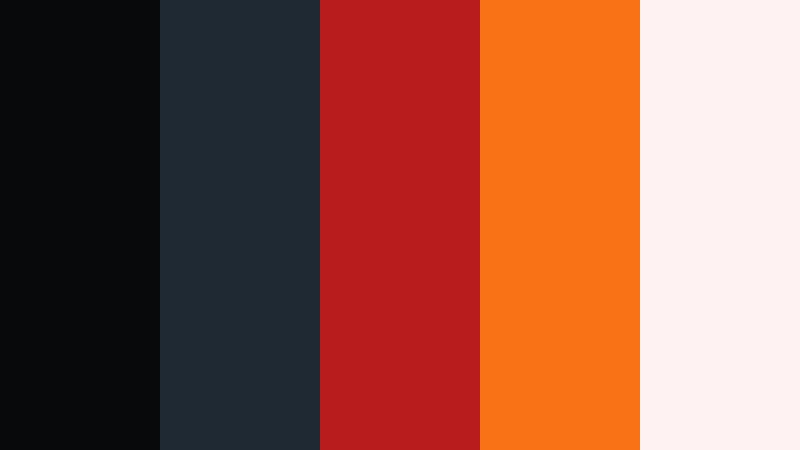
- HEX Codes: #08090b, #1f2933, #b91c1c, #f97316, #fef2f2
- Mood: Intense, dramatic, and fiery against a deep, dark backdrop.
- Use for: Use for trailers, game edits, and high stakes reveal sequences that need powerful contrast and urgency.
Ember In The Dark sets burning reds and oranges against a Deep Onyx base for maximum drama. It captures the feeling of sparks and warning lights cutting through the night, perfect for high energy edits.
Use Deep Onyx and dark gray for your main frames, then reserve the red and orange for countdowns, alert text, and impact transitions in Filmora. This palette works especially well in gaming montages, trailer-style intros, and any video that needs urgency and tension in its visuals.
Minimal & Modern Deep Onyx Color Palettes
Monolith Minimal Brand

- HEX Codes: #050608, #111827, #4b5563, #e5e7eb, #ffffff
- Mood: Crisp, minimal, and design forward with a professional tone.
- Use for: Great for logo stings, channel branding, and clean UI overlays on tutorials or walkthroughs.
Monolith Minimal Brand uses Deep Onyx, cool grays, and pure white to create a timeless, corporate ready look. It feels sharp and dependable, making it a strong choice for educational channels or brands that want to appear organized and expert.
In Filmora, design logo stings and transitions with Deep Onyx backplates and white or light gray type. Use the mid-tone gray for buttons, info panels, and lower thirds in tutorials so your audience can read everything clearly without visual noise.
Graphite Interface Grid

- HEX Codes: #0b0c0f, #1e293b, #64748b, #cbd5f5, #f8fafc
- Mood: Technical, balanced, and quietly futuristic.
- Use for: Best for SaaS explainers, dashboard demos, and any UI heavy screen recordings.
Graphite Interface Grid pairs Deep Onyx with slate blues and soft, desaturated highlights for a calm, tech-focused feel. It looks like a modern app interface, clean and trustworthy.
Use this palette when you showcase software, analytics, or dashboards. In Filmora, keep Deep Onyx in the background bars, use the slate blues for frames around screen recordings, and rely on the pale tones for titles and annotations so everything feels part of one product ecosystem.
Slate Workspace Clean

- HEX Codes: #111111, #1f2933, #6b7280, #e5e7eb, #fafafa
- Mood: Neutral, calm, and carefully organized like a tidy desk setup.
- Use for: Ideal for productivity videos, study vlogs, and minimalist lifestyle content aesthetics.
Slate Workspace Clean offers a quiet spread of Deep Onyx, slate gray, and soft off white. It mimics a tidy, neutral workspace where nothing feels cluttered or loud.
Use this palette for productivity channels, Notion walkthroughs, and desk setup tours. In Filmora, create simple title bars and caption boxes in the slate gray, keep the background dark but not fully black, and use off white text for maximum clarity.
Monochrome Creator Frame

- HEX Codes: #000000, #1f1f23, #4b4b52, #9f9fa7, #f5f5f5
- Mood: Refined monochrome with a creative studio atmosphere.
- Use for: Use for creator idents, photography portfolios, and black and white themed edits.
Monochrome Creator Frame builds a nearly pure black and white look that still feels nuanced. Deep Onyx and charcoal tones create depth, while light gray and near white bring subtle contrast.
Try this palette for photography reels, portfolio videos, or black-and-white themed channels. In Filmora, desaturate your footage, then lean on these grays for frames, borders, and type to keep everything cohesive and modern.
Carbon Fiber Tech Shell

- HEX Codes: #050608, #111827, #334155, #22c55e, #e2e8f0
- Mood: Edgy, tech focused, and confident with a hint of neon energy.
- Use for: Perfect for gadget reviews, esports overlays, and motion graphics with tech flair.
Carbon Fiber Tech Shell merges Deep Onyx and cool blue-grays with a vivid neon green accent. It instantly suggests high performance hardware, gaming gear, and futuristic interfaces.
Use Deep Onyx for your HUD backgrounds and panels in Filmora, then apply the green accent sparingly to highlight stats, scores, and calls-to-action. The soft light gray is ideal for any body text so your overlays remain legible on top of noisy gameplay footage.
Moody & Luxe Deep Onyx Color Palettes
Onyx Gold Premiere
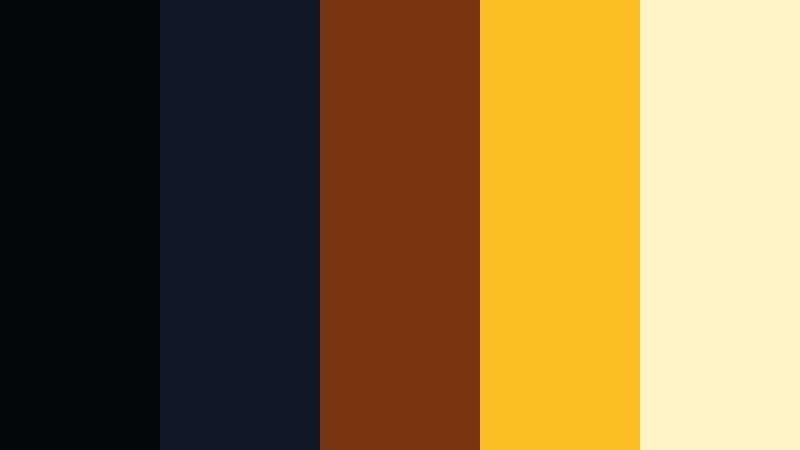
- HEX Codes: #050608, #111827, #78350f, #fbbf24, #fef3c7
- Mood: Luxurious, cinematic, and red carpet ready.
- Use for: Use for awards intros, premium course branding, and high end product promos.
Onyx Gold Premiere pairs Deep Onyx with rich, golden tones for an unmistakably premium look. It feels like a gala night or film festival opening, full of lights and polished surfaces.
Use this palette for paid course intros, brand campaigns, or high-end product features. In Filmora, alternate between Deep Onyx backgrounds and golden accents on your titles and badges to give your content a glamorous, VIP finish.
Velvet Night Lounge
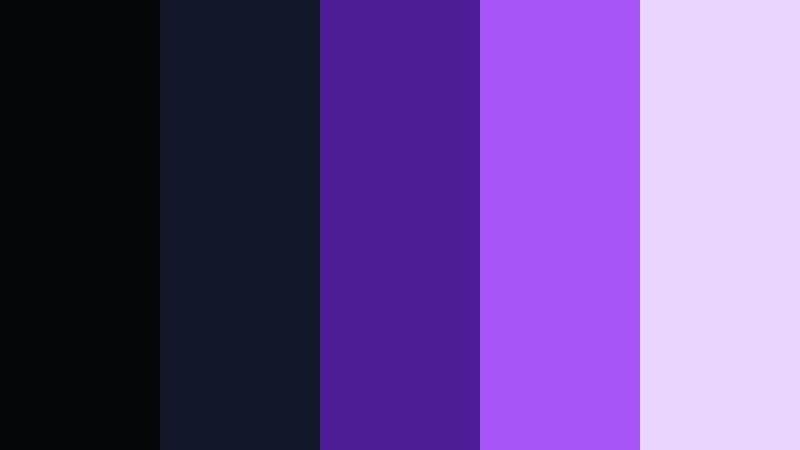
- HEX Codes: #050608, #111827, #4c1d95, #a855f7, #e9d5ff
- Mood: Opulent, intimate, and slightly dreamy like a neon lit lounge.
- Use for: Great for music videos, fashion edits, and nightlife reels with a polished edge.
Velvet Night Lounge sits Deep Onyx under velvet purples and soft lilac highlights. It feels like a neon lounge or late-night club, moody but stylish.
Choose this palette for music videos, lookbooks, and nightlife recaps. In Filmora, combine Deep Onyx backdrops with purple glow effects and lilac type to create dreamy title cards and overlays that complement colorful stage lighting.
Espresso Noir Blend
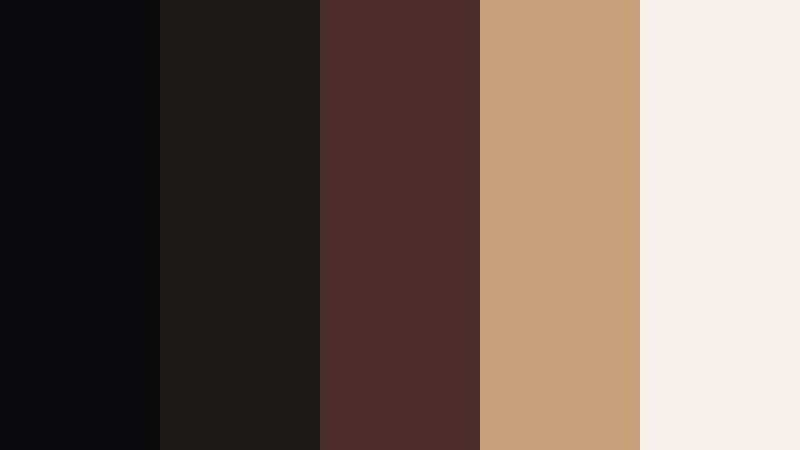
- HEX Codes: #09090b, #1c1917, #4b2e2b, #c7a17a, #f5f1e8
- Mood: Warm, cozy, and sophisticated with a cafe at midnight vibe.
- Use for: Perfect for coffee vlogs, lifestyle sit downs, and brand content focused on warmth and comfort.
Espresso Noir Blend mixes Deep Onyx with espresso browns and creamy beige for a cinematic cafe feel. It suggests late night conversations, warm light, and slow, thoughtful pacing.
Use this palette for sit-down videos, cozy vlogs, and brand content around coffee, books, or slow living. In Filmora, grade your footage warmer, then lean on the beige and tan for titles and chapter markers placed over Deep Onyx or dark brown frames.
Gala Night Spotlight

- HEX Codes: #050608, #111827, #1e3a8a, #0ea5e9, #e5f6ff
- Mood: Formal, cool, and spotlight driven with a gala event sparkle.
- Use for: Use for event recaps, corporate highlights, and trophy or award graphics.
Gala Night Spotlight balances Deep Onyx with deep navy and icy blue accents, echoing stage lighting and camera flashes at a formal event. It feels professional yet celebratory.
Use this palette for award ceremonies, conference recaps, or sponsor highlight reels. In Filmora, keep backgrounds dark and cool, then use bright blue and icy white type for titles, winner cards, and lower thirds that stand out like spotlights.
Creative & Vlog Deep Onyx Color Palettes
Desk Setup Aesthetic

- HEX Codes: #050608, #111827, #475569, #f97316, #facc15
- Mood: Productive, energetic, and creator centric with bold accents.
- Use for: Great for desk setup tours, productivity vlogs, and channel rebrands focused on creators.
Desk Setup Aesthetic grounds your visuals with Deep Onyx and muted blue-grays, then injects energy through bright orange and yellow accents. It feels like a creator workspace lit by LED strips and warm task lights.
Use this palette for desk tours, workflow breakdowns, and productivity vlogs. In Filmora, keep your frames and backgrounds dark and cool, then use orange and yellow for arrows, highlight boxes, and CTA text on thumbnails so key elements pop instantly in the feed.
Indie Film Journal

- HEX Codes: #0b0c0f, #111827, #374151, #f59e0b, #fef3c7
- Mood: Nostalgic, indie, and softly cinematic with journal like warmth.
- Use for: Best for travel diaries, study montages, and soft spoken commentary videos.
Indie Film Journal supports Deep Onyx and slate grays with warm amber highlights and mellow cream. It feels like annotated film stills or handwritten notes in a travel journal.
Use this palette for narrative vlogs, soft commentary, and study montages. In Filmora, create handwritten style titles and frame borders in warm amber and cream, letting Deep Onyx sit in the shadows and letterboxes to add a gentle indie film atmosphere.
Tips for Creating Deep Onyx Color Palettes
Deep Onyx is a versatile base for many aesthetics, from minimal tech to moody noir. When you combine it with the right supporting colors, your videos and designs become clearer, more cinematic, and easier to recognize as part of your brand.
- Use Deep Onyx as a background anchor and let brighter or lighter tones handle text, icons, and key UI elements for readability.
- Balance contrast carefully: high contrast (Deep Onyx plus near white) works well for thumbnails and titles, while softer grays create a calmer mood for long form viewing.
- Limit accent colors to one or two hues so your palette feels intentional; use those accents only for CTAs, important data, or key story beats.
- Match your palette to your footage by grading shadows slightly toward Deep Onyx so overlays, frames, and live action clips share the same depth.
- Test your titles on both desktop and mobile previews in Filmora to ensure text on Deep Onyx backgrounds is legible at small sizes.
- Keep branding consistent: reuse the same Deep Onyx HEX code across intros, lower thirds, end screens, and channel art so your style becomes recognizable.
- For skin tones, avoid pushing everything too dark; let Deep Onyx live in backgrounds and borders while midtones stay natural and flattering.
- Create and save custom presets or LUTs in Filmora that lock in your favorite Deep Onyx combinations for faster, more consistent edits.
Deep Onyx color palettes give you a powerful way to shape mood, focus attention, and build a recognizable visual identity. Whether you lean into cinematic noir, clean tech, or cozy lifestyle vibes, this dark neutral can tie together your thumbnails, intros, overlays, and color grading.
Try dropping a few of these palettes into Filmora and experiment with titles, filters, and AI Color tools until you find a Deep Onyx look that matches your style. Once you save it as a preset, you can apply that same aesthetic across every new upload, from long form videos to short vertical clips.
With the right combination of Deep Onyx, accent colors, and Filmora's editing tools, your channel or brand can feel more polished, cohesive, and cinematic in just a few sessions of testing and tweaking.
secure download