

 100% Security Verified | No Subscription Required | No Malware


 ChatGPT
 Perplexity
 Gemini
 Claude
 Grok
Grok
Deep Pine Green is a rich, grounded shade that immediately feels calm, stable, and cinematic. It echoes dense forests, deep shadows, and natural textures, which is why it works so well for creators who want their visuals to feel intentional and immersive. In branding and channel design, Deep Pine Green suggests reliability and depth, while still feeling modern and sophisticated rather than flashy.
For video creators, this color is a powerful base for color grading, YouTube thumbnails, intros, lower thirds, and end screens. Used with the right supporting tones, Deep Pine Green can make travel vlogs feel more documentary, lifestyle content feel cozy, or product promos feel premium. Below are curated Deep Pine Green color palettes with HEX codes for Filmora users and other creators who want ready to use, cinematic combinations.
In this article
Cinematic Nature Deep Pine Green Color Palettes
Forest Documentary Grade
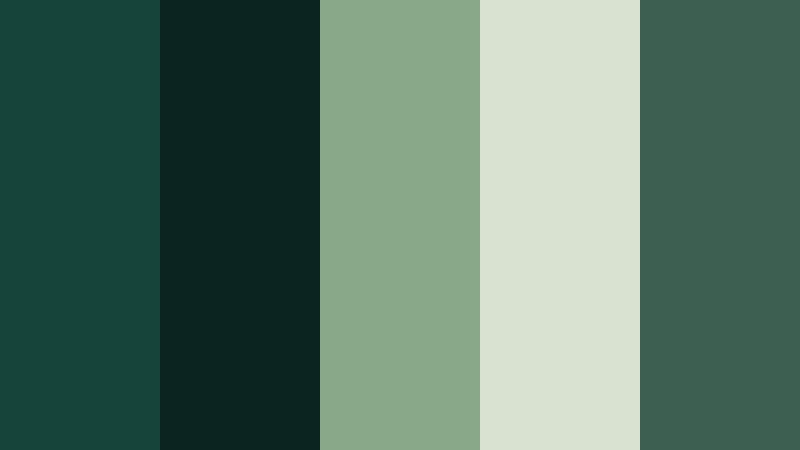
- HEX Codes: #16443a, #0b2420, #87a889, #d9e2d0, #3c5f52
- Mood: Grounded, documentary, and quietly immersive, like trekking through dense woodland at dawn.
- Use for: Ideal for nature documentaries, outdoor travel vlogs, and cinematic B-roll overlays that need a grounded, organic look.
This palette builds a moody forest atmosphere with Deep Pine Green, moss tones, and light foggy neutrals. The darkest greens (#16443a and #0b2420) feel like shadowed pines, while the muted greens and off whites soften the frame so it does not look too harsh or contrast heavy.
Use the deep tones for text backgrounds, frame borders, and color grading shadows, and keep the lighter hues for titles, lower thirds, and thumbnail text so everything stays readable. In Filmora, you can apply these HEX codes to shapes, titles, and filters so your intros, B roll, and social cutdowns all share the same grounded forest look.
Pro Tip: Build A Cinematic Deep Pine Green Look In Filmora
To keep a Forest Documentary Grade aesthetic across your edit, start by sampling the darkest Deep Pine Green for your base grade and UI elements. In Filmora, you can reuse this tone for lower thirds, title backgrounds, and overlays so your entire project feels like one cohesive forest story, from opening drone shot to closing card.
Balance the moody greens with the lighter fog inspired HEX codes for text, icons, and simple line graphics. This contrast keeps everything legible on YouTube thumbnails, shorts, and widescreen exports, while still preserving a natural, documentary feel.
AI Color Palette
If you have a favorite still frame of your forest scene, you can use Filmora's AI Color Palette feature to spread that Deep Pine Green mood across all your clips. Import one reference image or shot that already has the balance of pine, moss, and mist that you like.
Then, apply the AI Color Palette to other clips in your sequence so your sunrise timelapses, trail B roll, and talking head segments all share the same nuanced greens and soft highlights. It saves you from manually matching each clip and keeps your entire video visually consistent.
 secure download

HSL, Color Wheels & Curves
Once the base palette is in place, fine tune your Deep Pine Green tones using HSL, color wheels, and curves in Filmora. Use HSL to push your greens slightly more teal or more earthy depending on how modern or natural you want the footage to feel, and tweak luminance so foliage is detailed without looking neon.
With color wheels and curves, you can deepen shadows toward pine and cool your highlights for that misty forest air. This type of grading, similar to what is shown in Filmora's color correction tutorials on YouTube, helps you create a cinematic separation between foreground, midtones, and background.
secure download1000+ Video Filters & 3D LUTs
To speed up the look development process, combine your Deep Pine Green palette with Filmora's video filters and 3D LUTs. Start with a LUT that tilts your footage toward a cinematic teal green base, then gently adjust to match your chosen HEX values.
You can stack soft vignettes, film grain, and glow filters to make the forest feel deeper and more atmospheric, or keep things clean for brand work. Saving your settings as custom presets lets you reuse the same Deep Pine Green style on future series, thumbnails, and shorts.
secure downloadEvergreen Trail Adventure
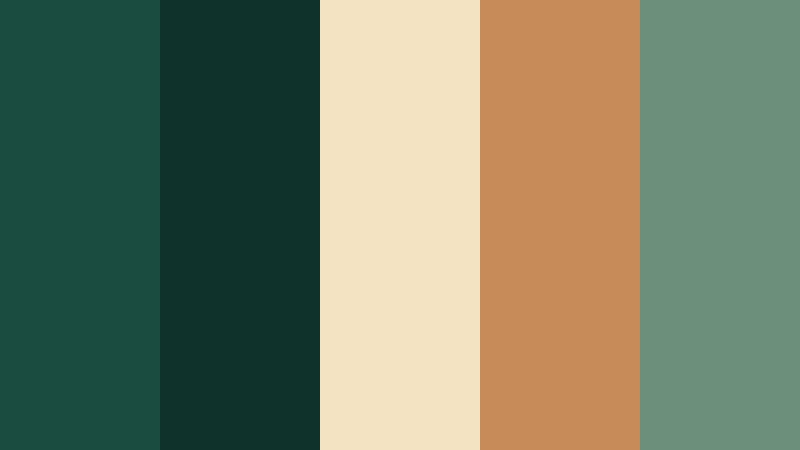
- HEX Codes: #1a4d40, #0f332a, #f4e3c3, #c68b59, #6c8f7b
- Mood: Adventurous and cinematic, balancing rugged greens with warm trail-inspired accents.
- Use for: Perfect for outdoor adventure intros, camping gear promos, and rugged lifestyle thumbnails.
Evergreen Trail Adventure mixes strong forest greens with sunlit sand, leather browns, and muted sage. It feels like a backpacking trip at golden hour, where each frame carries both grit and warmth.
Use the Deep Pine Green shades for your primary brand color and title bars, then highlight call to action buttons or gear close ups with the warm browns and creams. This palette works especially well in Filmora for split screen gear showcases, thumbnail contrasts, and sequence titles for hiking or overlanding series.
Misty Conifer Sunrise
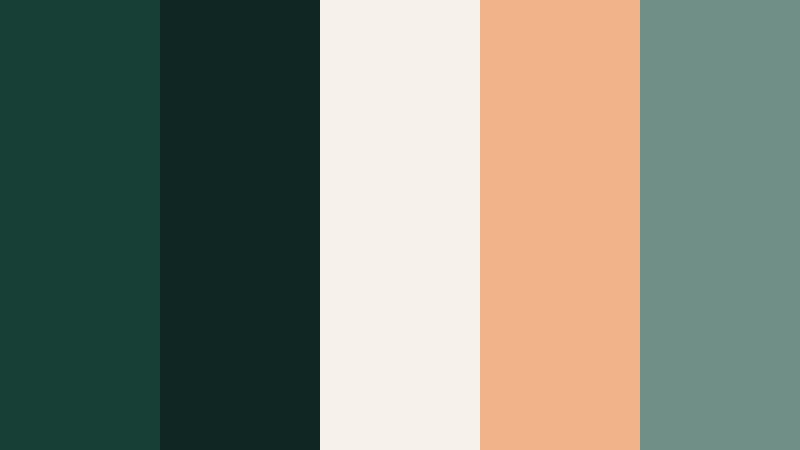
- HEX Codes: #173f35, #0f2622, #f6f2ea, #f1b38a, #708f86
- Mood: Soft and cinematic, like pale sunlight cutting through cool conifer fog.
- Use for: Use in time-lapse sequences, peaceful nature montages, and calm cinematic title screens.
Misty Conifer Sunrise leans into slightly cooler greens contrasted with airy cream and a muted peach highlight. The result is a gentle, slow cinema feeling, ideal for meditative timelapses or ASMR style nature videos.
Use the peach tone sparingly as an accent on key words in your titles or thumbnail text. In Filmora, pair this palette with slow dissolves and soft focus overlays to create a tranquil, early morning atmosphere that carries across your series branding.
River Gorge Depths
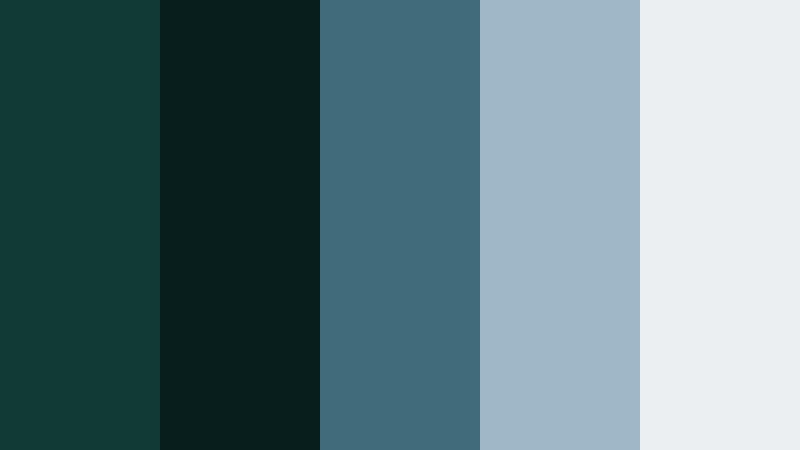
- HEX Codes: #123a34, #071e1c, #3f6b7a, #9fb7c6, #eceff2
- Mood: Deep, mysterious, and aquatic, evoking shadowed gorges and cool mountain rivers.
- Use for: Great for moody travel edits, drone shots over water, and intros that need depth without harsh contrast.
River Gorge Depths blends inky greens with slatey blues and pale mist tones. It feels cinematic and slightly mysterious, like flying a drone through a narrow, shadowy canyon.
Apply the darkest greens to your shadows in color grading, then let the blue grays control midtones and highlights. Use the lightest gray white for titles and overlays so they read well on top of darker drone or underwater footage. This palette is ideal for travel channels that want a serious, adventure documentary look in Filmora.
Cabin In The Pines
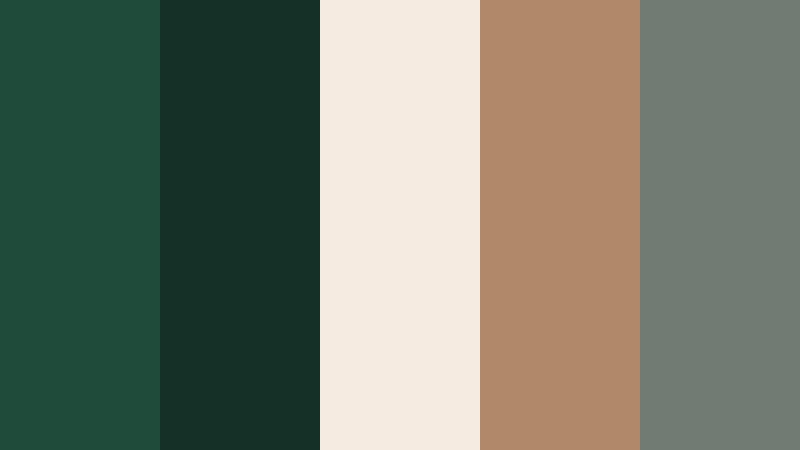
- HEX Codes: #1f4b3b, #143027, #f5ebe0, #b08968, #6f7b73
- Mood: Cozy, rustic, and nostalgic, like a warm cabin surrounded by tall pines.
- Use for: Ideal for lifestyle vlogs, cozy cabin retreats, and title cards for slow living or homestead content.
Cabin In The Pines anchors Deep Pine Green with soft cream, cocoa brown, and muted gray. It feels like a knit sweater, wood stove, and forest backdrop all in one palette, perfect for slow living and homestead channels.
Use the neutrals for background blocks in your title templates and the browns for buttons or icons, while the greens tie your footage to the surrounding landscape. In Filmora, this palette can define your entire channel identity, from intro animations to end screens and lower thirds.
Elegant & Modern Deep Pine Green Color Palettes
Emerald Studio Minimal
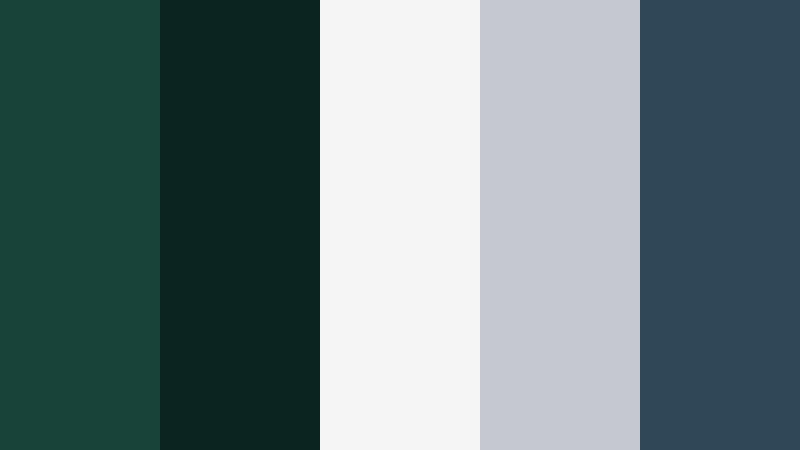
- HEX Codes: #174338, #0c2420, #f5f5f5, #c5c9cf, #2f4858
- Mood: Clean, modern, and editorial with a luxe studio feel.
- Use for: Perfect for brand idents, tech explainers, and minimalist YouTube channel branding.
Emerald Studio Minimal pairs Deep Pine Green with crisp white and sleek steel gray for a modern, editorial look. The result feels premium and studio lit, with just enough color to stay distinctive.
Use the darkest green as your main accent color for title shapes, progress bars, and logo reveals, while white and gray give plenty of negative space. In Filmora, this palette is great for clean motion graphics, tech explainers, and channels that want a refined, design forward identity.
Urban Atrium Luxe
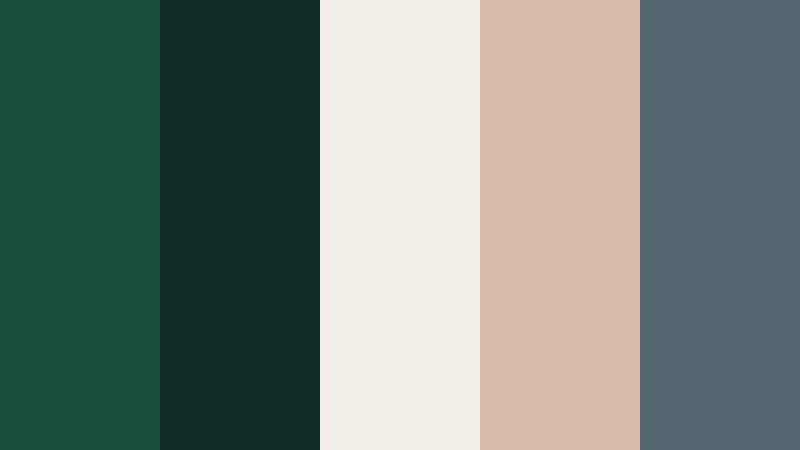
- HEX Codes: #1b4d3c, #102c28, #f3ede7, #d7bba8, #556771
- Mood: Sophisticated and polished, like a glass atrium filled with curated greenery.
- Use for: Great for upscale product promos, interior design reels, and portfolio showreels.
Urban Atrium Luxe mixes Deep Pine Green with soft taupes, blush beige, and cool slate. It suggests a modern city space filled with carefully styled plants and warm neutral surfaces.
Use this palette to grade interior shots slightly greener and cooler, then bring warmth back through text boxes and graphic elements. It is ideal for real estate tours, design portfolios, and aesthetic reels built in Filmora where you want both sophistication and warmth.
Boardroom Canopy Brand
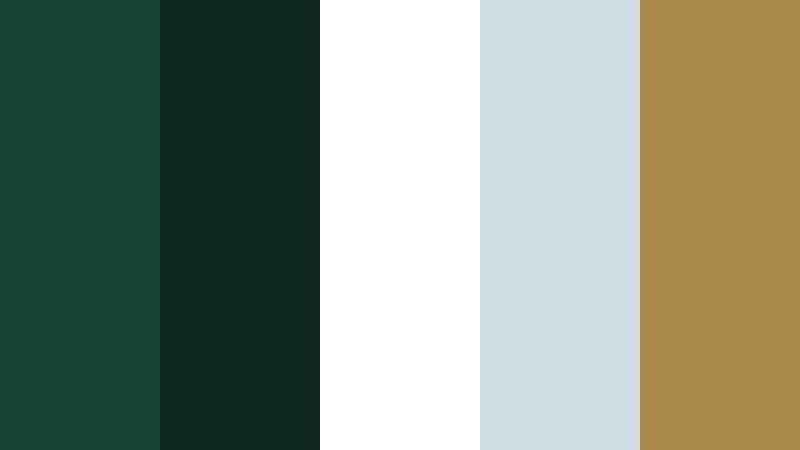
- HEX Codes: #184436, #0f2922, #ffffff, #d0dde0, #a8884b
- Mood: Professional, confident, and grounded with a subtle executive flair.
- Use for: Ideal for brand guidelines, corporate intros, LinkedIn video frames, and pitch decks.
Boardroom Canopy Brand blends corporate ready Deep Pine Greens with clean white, cool gray, and a touch of gold. It feels stable and trustworthy, but the green gives it a fresher, more sustainable angle than traditional blue.
Use white as your base canvas, with greens for headers and lower thirds, and the gold accent for CTAs or key statistics. In Filmora, this palette works beautifully in motion slides, talking head overlays, and LinkedIn style video frames that need to look both polished and contemporary.
Gallery Wall Verdant
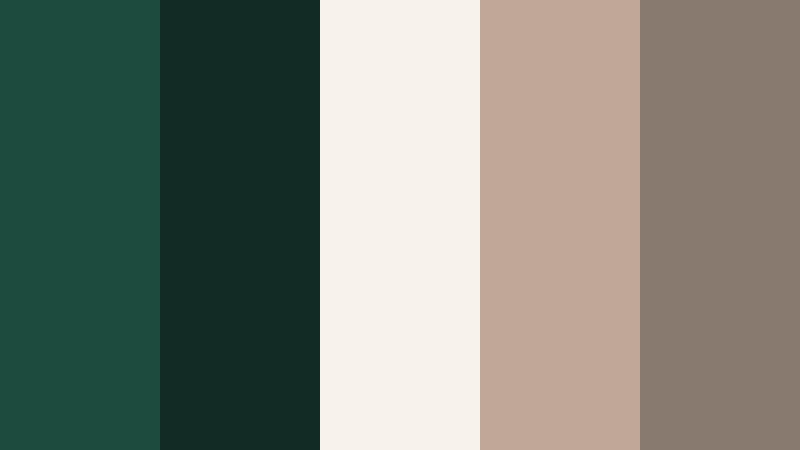
- HEX Codes: #1d4b3d, #122b25, #f7f2ec, #c1a798, #897a70
- Mood: Artful and composed, like a modern gallery with plant-filled corners.
- Use for: Use for channel aesthetics, lookbooks, and typography-led motion graphics that need quiet sophistication.
Gallery Wall Verdant layers rich greens with creamy off white and putty like neutrals. It has an art gallery calm, perfect for design focused creators and typography led content.
Let the off white act as your primary background, while the greens frame content in borders, dividers, and accent shapes. The warm neutrals are great for subtle drop shadows or supporting text styles in Filmora title templates, keeping your channel aesthetic cohesive and refined.
Noir Green Title Card
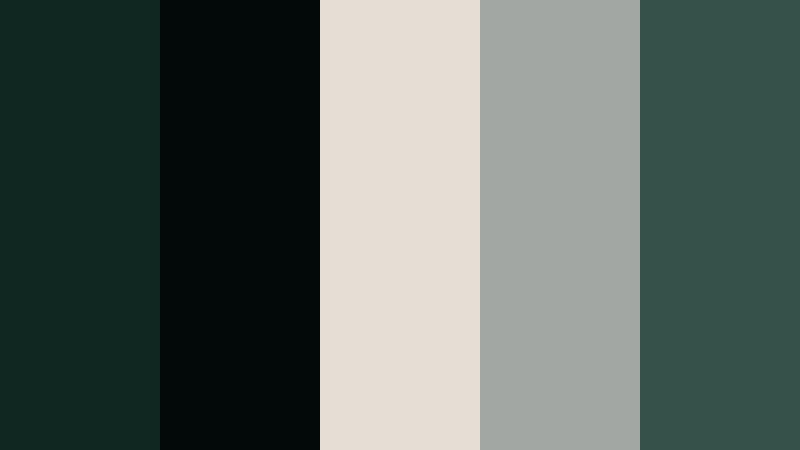
- HEX Codes: #0f2621, #020908, #e5ded4, #a3a7a4, #365149
- Mood: Moody, cinematic, and slightly mysterious with a modern noir twist.
- Use for: Best for title cards, end screens, and cinematic trailers that need drama without bright color pops.
Noir Green Title Card uses almost black greens, soft bone white, and smoky grays to create a minimalist noir effect. It delivers drama without relying on bright reds or oversaturated tones.
Use this palette for opening titles, credit sequences, and episode cards. Build high contrast text in off white on Deep Pine Green backgrounds, then add subtle animated grain and letterbox bars in Filmora to complete the moody, cinematic look.
Soft & Romantic Deep Pine Green Color Palettes
Pine And Blush Vows
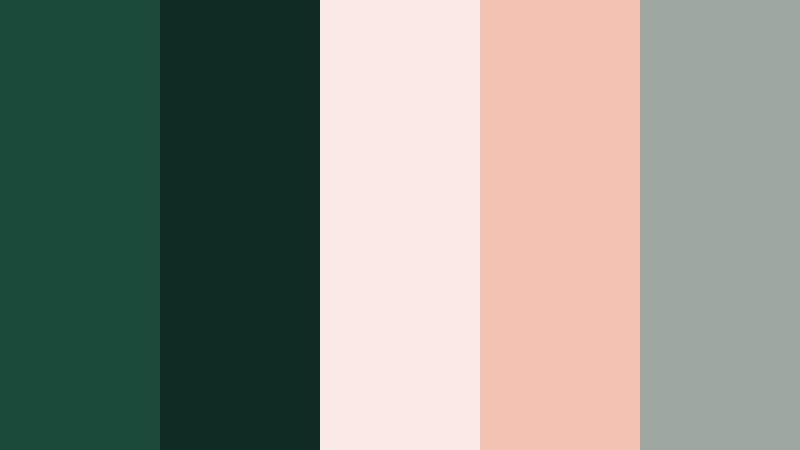
- HEX Codes: #1a4a3a, #102b24, #fbe9e6, #f4c2b3, #9ca8a1
- Mood: Romantic, tender, and cinematic, like a wedding in a pine grove at golden hour.
- Use for: Perfect for wedding films, engagement reels, and love story montages.
Pine And Blush Vows softens Deep Pine Green with airy blush and peach tones. It captures the mix of greenery and delicate florals you see in modern forest weddings.
Use the greens in shadows and accents, and let the blush and peach shades color your text boxes, overlays, and lower thirds for names and dates. In Filmora, this palette is perfect for template intros, highlight reels, and vertical reels for couples, keeping the mood emotional yet timeless.
Sage Ribbon Letters
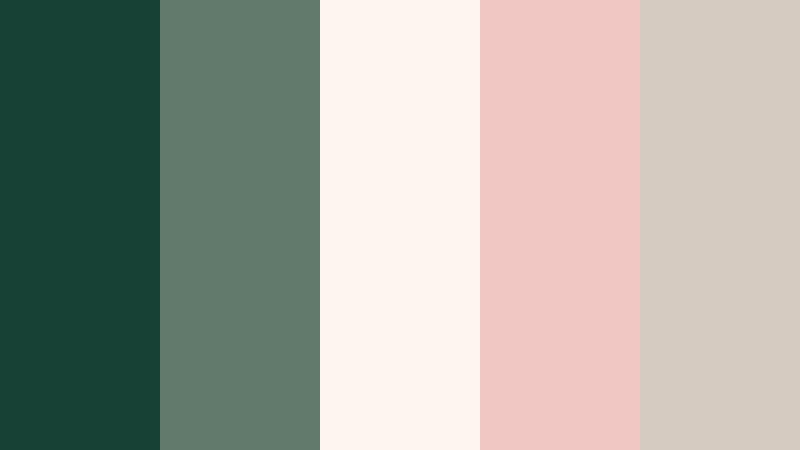
- HEX Codes: #184135, #617a6b, #fdf6f0, #f0c7c2, #d6cbc0
- Mood: Gentle, nostalgic, and handwritten, like letters tied with sage and rose ribbons.
- Use for: Use in journaling vlogs, stationery promos, and soft aesthetic shorts or reels.
Sage Ribbon Letters leans toward softer greens mixed with dusty rose and parchment neutrals. It feels like opening a box of old letters or a handmade journal, making it ideal for quiet, introspective content.
Use the light parchment as your main background and frame it with sage greens for borders. The dusty rose can highlight key phrases or chapter titles in Filmora, giving your journaling vlogs, study with me videos, or stationery promos a cohesive, handwritten aesthetic.
Greenhouse Afternoon Glow
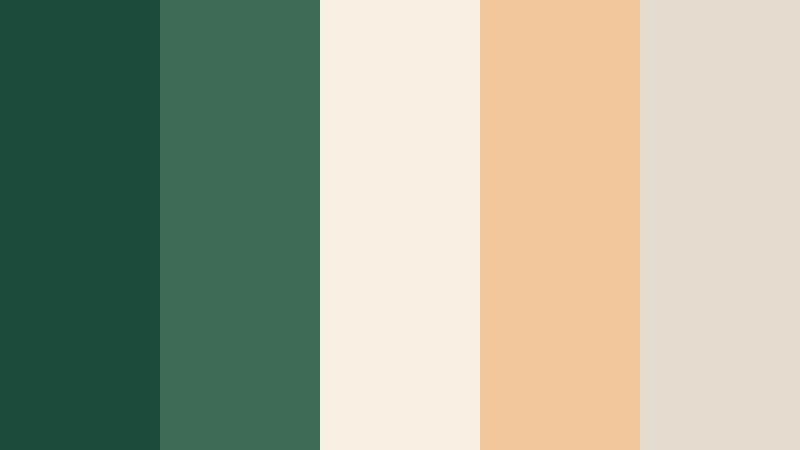
- HEX Codes: #1b4b3b, #3f6b56, #f8efe3, #f1c79b, #e4dccf
- Mood: Warm, dreamy, and sunlit, like light streaming through old greenhouse glass.
- Use for: Great for plant care channels, cozy vlogs, and dreamy TikTok edits with soft transitions.
Greenhouse Afternoon Glow combines sunwarmed greens with honeyed beige and creamy light tones. It brings a soft, golden hour warmth to leafy scenes and indoor plant content.
Use the greens to anchor your footage and UI, while the creams and beiges keep titles and graphic elements light and inviting. In Filmora, pair this palette with gentle blur transitions, slow zooms, and subtle film light leaks for a dreamy, greenhouse inspired aesthetic.
Vintage Pine Postcards
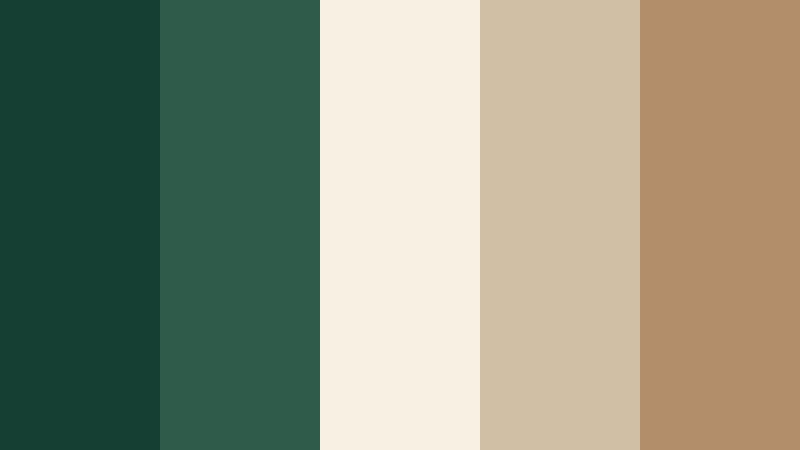
- HEX Codes: #163f33, #2f5c4a, #f7f1e4, #d0bfa5, #b38e6a
- Mood: Nostalgic and slightly faded, like old travel postcards from forest retreats.
- Use for: Ideal for travel diaries, analog film emulations, and nostalgic montage sequences.
Vintage Pine Postcards uses muted Deep Pine Greens with tea stained neutrals and warm browns. It looks slightly faded on purpose, echoing analog prints and old postcards.
Apply this palette to travel diaries, especially if you like adding film grain and soft vignette effects in Filmora. The warm neutrals flatter skin tones and make landscapes feel timeless, while the greens keep the forest setting at the heart of the story.
Bold & Vibrant Deep Pine Green Color Palettes
Neon Market Jungle

- HEX Codes: #135043, #0a2b25, #ffb347, #ff6f61, #f4f4f4
- Mood: Bold, energetic, and urban, like a night market bursting with color under jungle foliage.
- Use for: Perfect for dynamic intros, fashion hauls, and energetic vlog openings or thumbnails.
Neon Market Jungle clashes punchy oranges and corals against Deep Pine Green for a high energy, urban jungle vibe. It feels like walking through a neon lit street market with plants overhead and color everywhere.
Use the greens as your grounding base for backgrounds and shadows, then let the oranges and corals drive attention to titles, stickers, and callouts. In Filmora, this palette is ideal for kinetic text, punchy transitions, and bold thumbnails that must stand out in crowded social feeds while still feeling a bit organic.
Tips for Creating Deep Pine Green Color Palettes
When you build your own Deep Pine Green color palettes for video and design, focus on balancing depth with readability and making sure your colors match real footage, not just look good on a flat canvas.
- Pair Deep Pine Green with a light neutral (off white, cream, or pale gray) so text stays readable on thumbnails, titles, and lower thirds.
- Add one warm accent (beige, tan, blush, or muted gold) to stop the palette from feeling too cold or corporate, especially for lifestyle and travel content.
- For cinematic grades, keep greens slightly desaturated and control luminance so foliage looks rich but not fluorescent.
- Test your palette on both dark and light scenes; what works on a forest shot may not read the same on a studio talking head.
- Use consistent HEX codes for titles, frame borders, and call to action buttons so your brand identity carries across videos and social platforms.
- Check contrast on mobile; Deep Pine Green can look darker on small screens, so adjust brightness for key text and icons.
- Limit each palette to 3 to 5 active colors in any single frame to avoid visual noise and keep the look focused.
- Create presets in Filmora using your chosen colors for titles and overlays, so every new project automatically follows your Deep Pine Green style.
Deep Pine Green is a versatile base that can feel cinematic, romantic, corporate, or bold depending on how you combine it with neutrals and accents. Whether you are grading forest B roll, designing channel branding, or building stylish intros, the right palette helps your work feel intentional and recognizable.
Use these ready made HEX palettes as starting points, then fine tune them inside Filmora to match your footage and personal style. Once you save your favorite looks as presets, you can apply your signature Deep Pine Green aesthetic to thumbnails, shorts, long form edits, and social teasers in just a few clicks.
Experiment with different moods, from misty nature grades to neon jungle vibes, and see how consistent color turns your channel into a coherent visual brand powered by Deep Pine Green.
secure download