

 100% Security Verified | No Subscription Required | No Malware

Explainer videos depend on instant trust. Color is often the first cue that a product is credible, friendly, or cutting-edge. Deep navy and slate read as corporate and calm, which is why they show up in SaaS walkthroughs and finance intros. Coral, mint, and peach keep tutorials approachable. Cyan and indigo make interfaces feel current, while amber and terracotta wrap lessons in warmth so facts feel human instead of cold.
The 15 Explainer Video Color color palettes below include HEX codes you can drop into titles, lower thirds, thumbnails, UI mockups, and motion graphics. Filmora users can lock the same system across intros, b-roll, and social cuts so branding stays consistent from the first frame to the end card.
In this article
Clean & Corporate Explainer Video Color Palettes
Trust Blue Boardroom

- HEX Codes: #1e3a5f, #3d7ea6, #f4f7fa, #2ecc71, #16324f
- Mood: Confident, calm, and professionally trustworthy
- Use for: Use this palette for B2B brand intros, corporate explainer videos, SaaS thumbnails, and clean UI mockups.
Trust Blue Boardroom pairs steady navy with a lighter sky blue so expertise shows up without feeling icy. Pale off-white backgrounds keep captions and logos sharp, while a green accent can mark success states, checkmarks, or a single call to action.
It is a strong default for finance, consulting, and product walkthroughs that need credibility in the first three seconds. Use navy for title cards, sky blue for diagrams, and the deepest navy for lower thirds so LinkedIn ads and website heroes stay on-brand.
Pro Tip: Keep Explainer Video Color Branding Consistent in Filmora
Once you pick a boardroom-ready mix like this, the hard part is repeating it on every clip. Filmora lets you save title presets, color-match B-roll, and grade talking-head footage so navy fields, sky highlights, and green CTAs stay aligned from intro to end card.
Build a short template: navy opener, off-white body scenes, green buttons on UI screen recordings. Reuse that structure across SaaS explainers, customer stories, and social cuts so the brand looks intentional instead of pieced together.
AI Color Palette
If you already have a brand card or a still from a product screenshot, you can push this Explainer Video Color look across an entire timeline. Filmora's AI Color Palette feature reads the dominant tones from a reference image and maps them onto your footage so talking heads, screen captures, and motion graphics share the same navy-and-sky balance.
Drop in a HEX-accurate color board, apply the result, then tweak intensity so skin tones stay natural while UI blues remain crisp. That workflow is especially useful when you mix stock clips with original product shots.
 secure download

HSL, Color Wheels & Curves
Corporate palettes fail when blues turn muddy or whites clip. Use Filmora's HSL and color wheel controls to isolate navy, lift midtone contrast, and keep the green accent from drifting toward yellow on compressed social exports.
Curves help you darken shadows for a boardroom feel without crushing text on slides. Pull highlights slightly toward cool blue so UI screenshots stay clean, then add a gentle S-curve so charts and captions pop on mobile.
secure download1000+ Video Filters & 3D LUTs
When you need a fast corporate grade, Filmora's video filters and 3D LUTs can push footage toward cooler, cleaner tones that match this palette. Start with a subtle LUT, then reduce strength so product colors stay accurate.
Filters also help unify mixed sources: webcam, screen recording, and stock office footage. Aim for a restrained look so the navy branding, not the filter, carries the story.
secure downloadSlate Saas Studio

- HEX Codes: #2c3e50, #5d6d7e, #ecf0f1, #3498db, #1abc9c
- Mood: Organized, modern, and quietly ambitious
- Use for: Ideal for software demos, onboarding sequences, dashboard animations, and LinkedIn video ads.
Cool slate neutrals keep interfaces readable, while crisp blue and teal accents point to buttons, cursors, and feature callouts. The pale gray field behaves like a product canvas, so icons and type stay sharp even in small social crops.
Use this mix for feature tours, startup pitch explainers, and dashboard animations. Assign slate to backgrounds, blue to primary actions, and teal to secondary highlights so viewers always know where to look next.
Navy Insight Grid

- HEX Codes: #0b1f3a, #1f4e79, #e8eef5, #f39c12, #5dade2
- Mood: Analytical, focused, and decisive
- Use for: Works well for data explainers, annual-report videos, infographic motion graphics, and thought-leadership clips.
Deep navy fields create a grid-like stage for charts, while a single amber color pulls the eye to the stat that matters. Light blue supports labels and connecting lines without competing with the headline number.
This palette shines when logos, captions, and infographics must stay sharp. Keep amber for one job only, such as KPIs or CTAs, so data explainers feel focused rather than decorative.
Graphite Briefing Desk

- HEX Codes: #2d3436, #636e72, #dfe6e9, #0984e3, #00b894
- Mood: Serious, clear, and efficient
- Use for: Best for internal training videos, HR explainers, policy walkthroughs, and muted brand packaging.
Graphite neutrals keep long-form instruction easy to read. Blue and mint marks highlight numbered steps, so employees can scan a process even with the sound off.
It is a reliable system for HR explainers, policy walkthroughs, and muted packaging videos. Use graphite for text plates, blue for "do this" moments, and mint for completed steps in training sequences.
Friendly & Playful Explainer Video Color Palettes
Sunny Onboarding Pop

- HEX Codes: #ffcc33, #ff6b6b, #4ecdc4, #fff8e7, #2c3e50
- Mood: Cheerful, welcoming, and energetic
- Use for: Use for app onboarding explainers, social ads, YouTube intros, and first-time user tutorials.
Sunshine yellow and coral pop against cream and charcoal, which makes first-run tutorials feel approachable on mobile. Teal keeps icons from blending into the yellow, and charcoal holds body copy so energy never costs readability.
This mix helps new viewers stay engaged through simple how-to scenes. Use yellow for intro bursts, coral for buttons, and cream for card backgrounds in app onboarding explainers and YouTube openers.
Coral Tutorial Spark

- HEX Codes: #ff6f61, #ffeaa7, #74b9ff, #ffffff, #2d3436
- Mood: Warm, upbeat, and easy to follow
- Use for: Great for thumbnail designs, Instagram Reels explainers, course trailers, and friendly brand intros.
Coral buttons and sky-blue helpers sit on bright white for high contrast. Soft yellow supports highlights and sticky notes, while charcoal keeps titles from looking washed out on Reels.
The mix keeps educational clips lively without looking childish. Reserve coral for taps and CTAs, blue for tips, and white for slide-style scenes in course trailers and thumbnail designs.
Mint How To Bounce

- HEX Codes: #7bed9f, #2ed573, #f1f2f6, #5352ed, #2f3542
- Mood: Fresh, optimistic, and lighthearted
- Use for: Fits wellness explainers, eco product videos, kids-and-family education, and sticker-style motion graphics.
Mint greens plus a violet accent create bounce for step-by-step scenes. Soft gray backgrounds keep icons and captions clean on every device, so sticker-style graphics still feel premium.
Use mint for progress, violet for "new" badges, and charcoal for voiceover titles. It is a natural fit for wellness explainers, eco product clips, and family education videos that need optimism without visual noise.
Peach Lesson Balloon

- HEX Codes: #ffb8a1, #ff7f50, #70a1ff, #fff5f0, #2f3640
- Mood: Soft, inviting, and conversational
- Use for: Use in lifestyle explainers, creator vlogs, community onboarding videos, and packaging for learning kits.
Peach balloons of color feel human next to cool blue notes. Warm off-white scenes make talking-head lessons look like a conversation, not a lecture.
It is a natural fit for story-led lessons and warm brand storytelling. Use peach for shapes and stickers, coral for emphasis, and blue for links or community callouts in vlogs and onboarding videos.
Tech & Modern Explainer Video Color Palettes
Cyan Circuit Glow
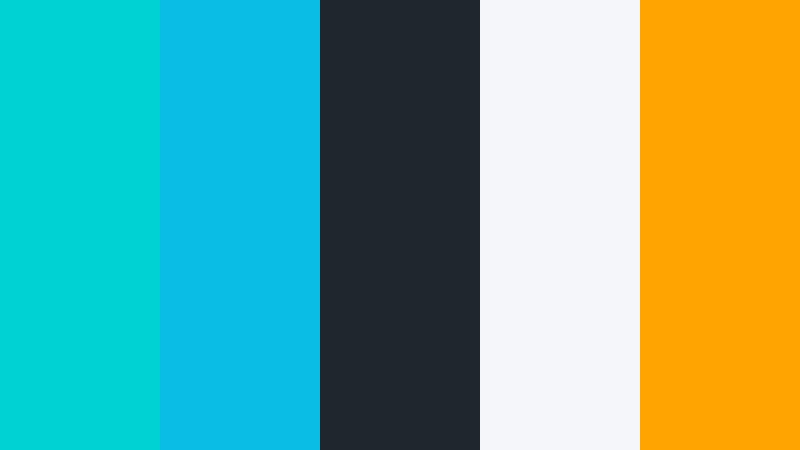
- HEX Codes: #00d2d3, #0abde3, #1e272e, #f5f6fa, #ffa502
- Mood: Futuristic, sharp, and innovative
- Use for: Designed for tech product launches, AI tool explainers, night-mode UI shots, and developer conference recaps.
Electric cyan on near-black reads like a live dashboard. Light gray type stays legible, and an orange spark marks CTAs so viewers know where to tap next.
Use cyan for circuit lines, hover states, and kinetic type. Keep orange scarce so launch trailers, AI tool explainers, and night-mode UI shots feel precise instead of neon-heavy.
Indigo Product Launch

- HEX Codes: #3c40c6, #575fcf, #0f0f23, #d2dae2, #ff9f43
- Mood: Bold, premium, and forward-looking
- Use for: Strong for app launch trailers, keynote openers, hero animations, and high-end brand intros.
Rich indigo fields give software stories a cinematic frame. Silver-gray type and a single amber highlight keep the message premium and clear on dark hero shots.
This palette works for keynote openers and high-end brand intros. Let indigo own the background, use lighter indigo for UI chrome, and save amber for the product name or download button.
Teal Dashboard Pulse

- HEX Codes: #0abab5, #1289a7, #f8f9fa, #ee5a24, #1e3799
- Mood: Precise, digital, and action-ready
- Use for: Excellent for analytics explainers, CRM walkthroughs, UI kits, and SaaS social content.
Teal charts on pale gray feel native to product screens. Orange and navy accents separate alerts from navigation in fast cuts, which is useful when you jump between dashboard panels.
Assign teal to data, navy to menus, and orange to warnings or upgrade prompts. The system holds up in analytics explainers, CRM walkthroughs, and short SaaS ads.
Violet Feature Reveal
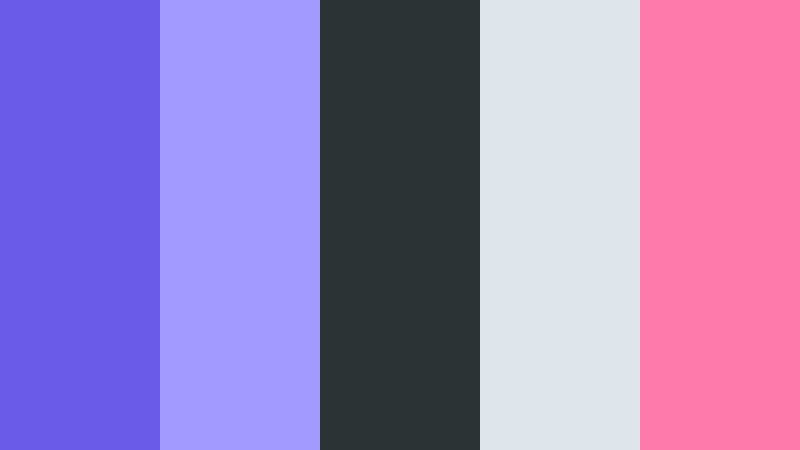
- HEX Codes: #6c5ce7, #a29bfe, #2d3436, #dfe6e9, #fd79a8
- Mood: Creative, sleek, and slightly magical
- Use for: Use for creative-tool explainers, plugin demos, feature-drop videos, and designer portfolio reels.
Violet and lilac suggest imagination while charcoal keeps UI readable. A pink accent is perfect for new-feature badges, cursor trails, and end cards that need a little sparkle.
Use this mix when you are selling creativity itself: plugin demos, feature-drop videos, and portfolio reels. Keep lilac for hover glows and pink for "new" so the reveal feels designed, not noisy.
Warm & Educational Explainer Video Color Palettes
Amber Classroom Light

- HEX Codes: #f5a623, #f8e9a1, #3d5a80, #f7f7f2, #293241
- Mood: Curious, grounded, and encouraging
- Use for: Ideal for e-learning modules, teacher explainers, museum clips, and textbook companion videos.
Amber light over cream paper tones feels like a well-lit classroom. Navy notes add structure so lessons stay easy to scan, and charcoal holds longer paragraphs on screen.
Use amber for highlighters and chapter marks, cream for slide backgrounds, and navy for headings in e-learning modules, museum clips, and textbook companion videos.
Terracotta Story Frame

- HEX Codes: #c0392b, #e67e22, #fdebd0, #2c3e50, #16a085
- Mood: Narrative, earthy, and memorable
- Use for: Works for history explainers, nonprofit stories, documentary-style intros, and craft-brand packaging.
Terracotta and sand colors wrap facts in a human story. Teal highlights keep maps, quotes, and lower thirds distinct, while slate navy grounds titles so the look stays documentary rather than rustic-only.
This palette is memorable for history explainers, nonprofit films, and craft-brand packaging videos. Let terracotta own emotional beats and teal own information so viewers can follow both heart and fact.
Golden Knowledge Path

- HEX Codes: #f1c40f, #e67e22, #34495e, #ecf0f1, #1abc9c
- Mood: Inspiring, clear, and achievement-focused
- Use for: Great for course sales videos, certification explainers, milestone recaps, and YouTube education thumbnails.
Gold and orange suggest progress along a learning path. Slate and mint keep diagrams professional while celebrating completion, so achievement never looks gaudy.
Use gold for badges and progress bars, orange for enroll buttons, and mint for "you finished" states. It is a clear system for course sales videos, certification explainers, and education thumbnails.
Tips for Creating Explainer Video Color Color Palettes
A strong Explainer Video Color palette does two jobs at once: it sets mood and it guides the eye. Combine one dominant field color, one readable neutral, and one accent for actions. Then test the mix on titles, UI, and compressed social exports before you lock branding.
- Keep body text on high-contrast neutrals (off-white, slate, or charcoal) so HEX accents never fight captions.
- Assign one accent to CTAs only. If amber, coral, or orange appears everywhere, buttons disappear.
- Match screen recordings to the palette. Recolor UI highlights or add color overlays so product blues do not clash with brand navy.
- Check mobile crops. Thumbnail type should stay readable when the palette is reduced to two colors plus a face or logo.
- Use dark fields for tech and data, light fields for onboarding and education, so genre and color agree.
- Repeat the same HEX codes in intros, lower thirds, end cards, and YouTube art so the brand feels like a system.
- Grade skin tones separately from graphics. Preserve faces, then push backgrounds toward the palette.
- Export a short color board with HEX labels and reuse it in Filmora titles, shapes, and motion graphics for every episode.
Explainer Video Color palettes shape how fast a viewer trusts a product. Corporate navy signals expertise, playful coral invites first-time users, cyan sells innovation, and amber makes lessons feel like a classroom instead of a lecture.
Copy the HEX codes, build a simple template, and test a 15-second intro in Filmora. Once titles, UI, and B-roll share the same system, your explainers look more intentional on every platform.
Start with one palette from this list, save it as a preset, and reuse it across a full campaign so branding stays consistent from thumbnail to end card.
secure download