

 100% Security Verified | No Subscription Required | No Malware

Turn cake-cutting, candle-blowing, and dance-floor chaos into cinematic memories with free birthday party video filters designed for families, vloggers, and social creators.
Whether you are editing a first-birthday montage, a sweet-16 vlog, or a surprise party reel, these Filmora filters give you fast, ready-made looks that match every celebration style.
In this article
Warm Family Daylight Moments
Golden Candle Glow
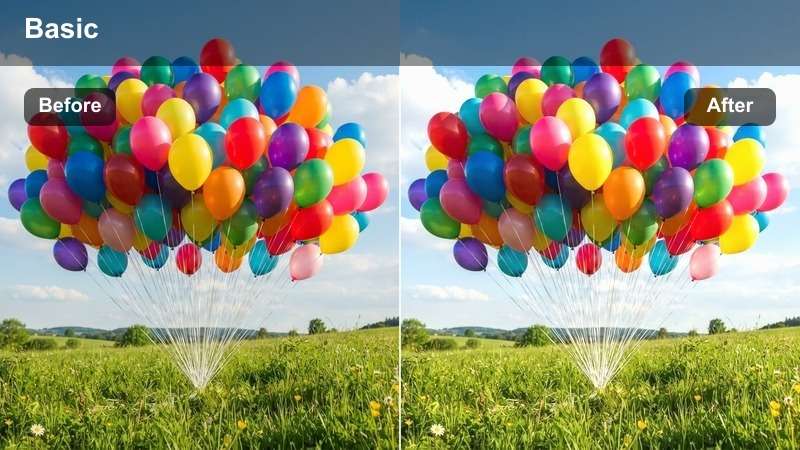
- Effect look: Soft warm tones that emphasize candlelight, skin warmth, and cozy highlights.
- Best for: Cake-cutting moments, blowing out candles, and close-up family hugs around the table.
- Editing tip: Lower contrast slightly and add a gentle vignette to keep attention on faces and candle flames.
Golden Candle Glow wraps your birthday footage in a warm, candlelit atmosphere that flatters skin tones and makes flames feel richer and more cinematic. In Filmora, it is ideal for close-up shots where the cake and faces share the frame, helping you avoid that flat, yellowish cast that often appears in low indoor light.
Apply the filter to your cake-cutting sequence, then fine-tune exposure and contrast so the brightest candle areas stay detailed instead of blown out. For intimate hugs and wishes, combine the look with a light vignette and subtle sharpen around the eyes so expressions remain crisp while the rest of the scene feels soft and cozy.
Smart Matching Filters for Any Birthday Scene
Filmora's AI-powered color tools can quickly analyze your birthday clips and suggest adjustments that keep Free Birthday Party Video Filters looking balanced, even when lighting shifts from bright windows to dark dining rooms. Instead of manually tweaking every shot, you can rely on AI to keep skin tones consistent and avoid harsh color casts.
Open your birthday project, try a few filters on different scenes, and then let Filmora's AI refine exposure, white balance, and tones so each part of the celebration feels like it belongs in the same story.
 secure download

See Birthday Filters in Action
Inside Filmora, you can preview how different birthday filters reshape cake shots, decor reveals, and dance clips before you lock anything in. By toggling effects on and off or using side-by-side previews, you will quickly see which style brings out the mood you want, from warm family gatherings to high-energy kids parties.
Import a short sequence from your party, test several filters, and compare how they handle faces, decorations, and lighting, then keep the one that supports your story the best.
secure downloadCombine Filters with LUTs for a Signature Look
Filmora includes 1000+ video filters and 3D LUTs you can layer together to craft a signature birthday style for your family or channel. Start with one of the Free Birthday Party Video Filters, then add a subtle LUT that slightly shifts overall tone, creating a repeatable look you can reuse every year.
Once you like the combination, save it as a custom preset so you can apply that same polished style to future birthday, holiday, and family event videos with a single click.
secure downloadSunny Backyard Bright
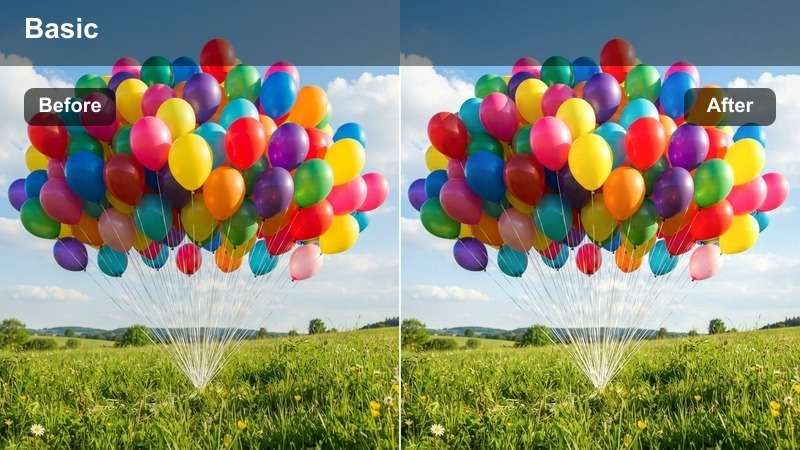
- Effect look: Clean, vibrant brightness with soft contrast for outdoor daytime parties.
- Best for: Backyard birthday parties, garden games, and kids running around in daylight.
- Editing tip: Reduce saturation a touch if balloons and decorations look too intense under full sun.
Sunny Backyard Bright is designed to handle strong daylight, boosting color while controlling harsh contrast so kids, balloons, and picnic tables all remain clearly visible. It keeps shadows soft and skies inviting, which is perfect for backyards, parks, and garden setups.
Use this filter on wide shots of lawn games and group photos to keep everyone evenly lit, then trim your clips down to the most joyful actions. If your decor colors start to feel overpowering, pull down saturation slightly in Filmora while the filter is applied so your footage stays vibrant but comfortable to watch.
Pastel Party Soft
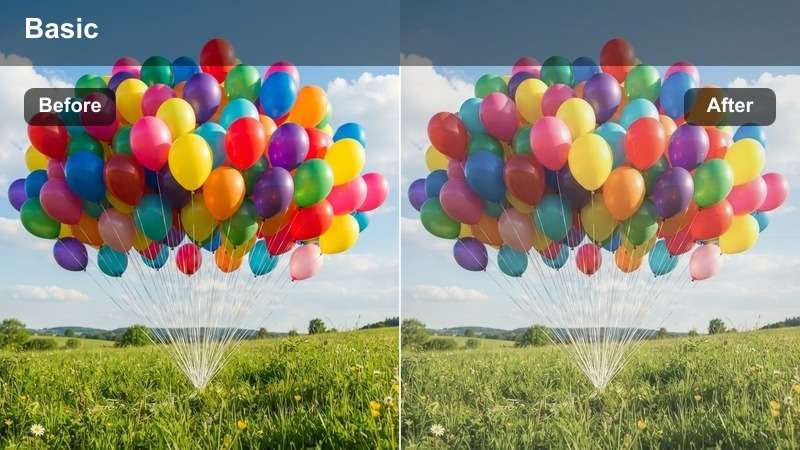
- Effect look: Soft pastel colors with gentle fade for a dreamy, kid-friendly aesthetic.
- Best for: First birthdays, toddler parties, and gentle family highlight reels.
- Editing tip: Add slower crossfades between clips to match the relaxed, dreamy mood of the pastel look.
Pastel Party Soft mutes harsh edges and shifts your palette into gentle pastel shades, creating a storybook feeling that suits babies and toddlers. It slightly fades contrast while keeping important details like eyes and smiles preserved.
Apply it to close-ups of little ones exploring cake, toys, and balloons, then pair the look with slow transitions and calm background music in Filmora for a soothing highlight reel. If faces begin to look washed out, lightly increase vibrance or use the skin tone tools so complexions stay warm and natural against the softer background tones.
Colorful Kids' Party Fun
Confetti Pop Vivid
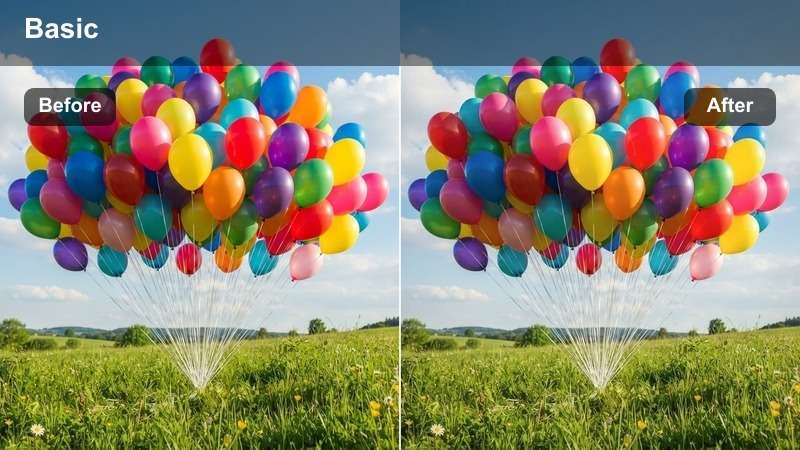
- Effect look: High saturation, crisp contrast, and punchy colors that make decorations stand out.
- Best for: Balloon drops, confetti cannons, and high-energy group shots.
- Editing tip: Trim clips tightly on laughter, jumps, and confetti bursts to match the energetic feel of the filter.
Confetti Pop Vivid is built to make every color in the room leap off the screen, from balloons and streamers to party hats and table decor. It increases contrast and saturation just enough to feel exciting without completely distorting your original footage.
Use it on the loudest parts of the celebration, like group countdowns, confetti blasts, and piñata hits, then cut your clips so each big reaction lands right on the beat of your soundtrack. If skin tones start to look too intense, reduce global saturation slightly or use color controls in Filmora to tone down reds while keeping decor bold.
Neon Dance Floor
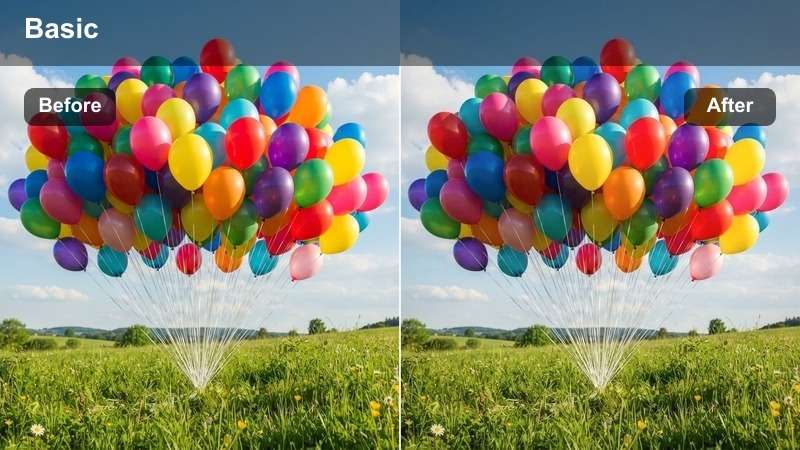
- Effect look: Bold neon highlights with cool shadows for dance, disco lights, and DJ scenes.
- Best for: Evening dance parties, glow-stick games, and living-room dance floors.
- Editing tip: Sync quick cuts to the beat of your party music track to accentuate the neon flashes.
Neon Dance Floor enhances colored LEDs and glow sticks, pushing bright tones into a neon range while cooling down the shadows for a fun mini-club vibe. It works especially well in darker rooms where light sources come from strips, lamps, and party projectors.
Drop the filter onto your dance sequences, then add beat-matched cuts and occasional speed ramps in Filmora so each transition lines up with kicks and claps in the music. To keep noise under control in low light, run a light denoise pass and slightly soften the image while ensuring the neon edges stay crisp.
Rainbow Banner Boost
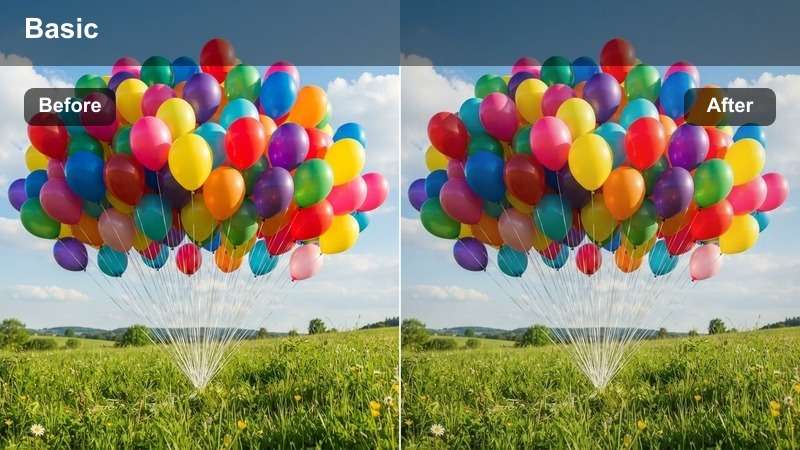
- Effect look: Vibrant, multi-color boost that enhances banners, garlands, and themed decor.
- Best for: Room reveals, decor tours, and slow pans across themed birthday setups.
- Editing tip: Use slower camera moves and stabilize shaky clips to let viewers enjoy the colorful decorations.
Rainbow Banner Boost is tailored to decorations, making banners, garlands, and table setups richer and more saturated without overpowering your footage. It is perfect for those pre-party walkthroughs or big reveal shots when guests first see the room.
Apply it to slow pans and tilt shots of your decor, then use Filmora's stabilization and speed controls to keep camera movement smooth and cinematic. Add simple text labels or animated titles over key areas, such as dessert tables or photo booths, so viewers can appreciate the details alongside the boosted colors.
Cozy Indoor Evening Celebrations
Fairy Light Soft Glow
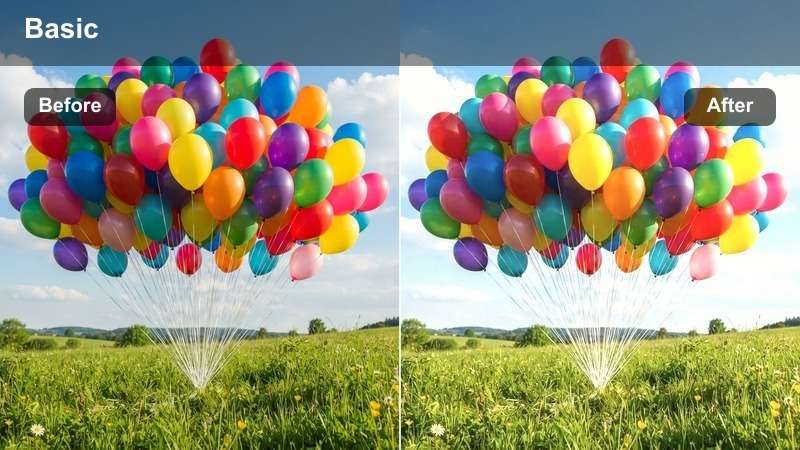
- Effect look: Softened highlights, gentle blur, and warm tones that flatter string lights and lamps.
- Best for: Living-room parties, intimate family gatherings, and low-light birthday dinners.
- Editing tip: Add a subtle blur or bokeh overlay to the corners for extra dreamy light spots.
Fairy Light Soft Glow turns small indoor parties into cozy, magical scenes by softening bright light sources and warming up the overall color. String lights, candles, and table lamps all gain a pleasing glow that draws attention to the center of your frame.
Use it on moments like group singing, quiet dinners, and board games around the coffee table, then add a mild vignette so clutter at the edges becomes less noticeable. Layer in gentle bokeh overlays or blur effects within Filmora to enhance the dreamy quality without losing clarity on faces.
Cozy Living Room Film
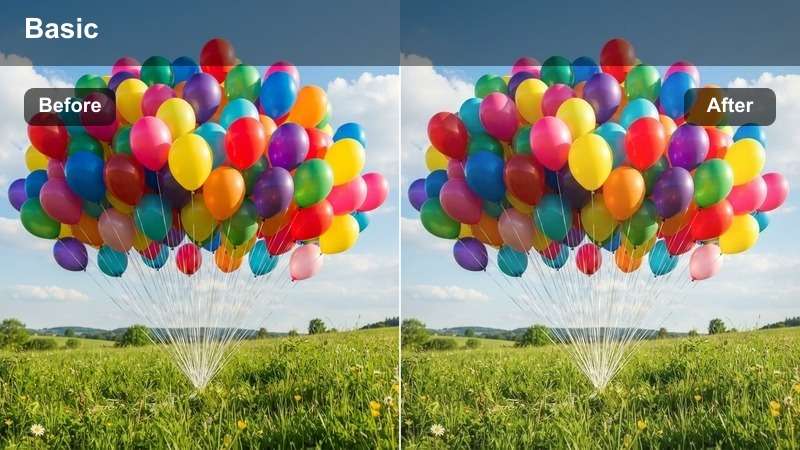
- Effect look: Slight film-style fade with warm midtones and subtle grain for a nostalgic home-movie feel.
- Best for: Family toasts, opening presents, and sit-down birthday speeches.
- Editing tip: Use longer takes and slower cuts to let emotions and reactions play out on screen.
Cozy Living Room Film adds a gentle fade and film-like grain that echoes classic home movies, making modern footage feel instantly nostalgic. Warm midtones flatter skin and wooden furniture, tying together couches, tables, and background details.
Apply it to quieter, emotional scenes such as present unwrapping and birthday speeches, then avoid overly fast cuts so reactions feel genuine. You can overlay simple date stamps or title cards in Filmora to reinforce the home-video aesthetic while the subtle grain keeps everything feeling organic.
Midnight Surprise Warm
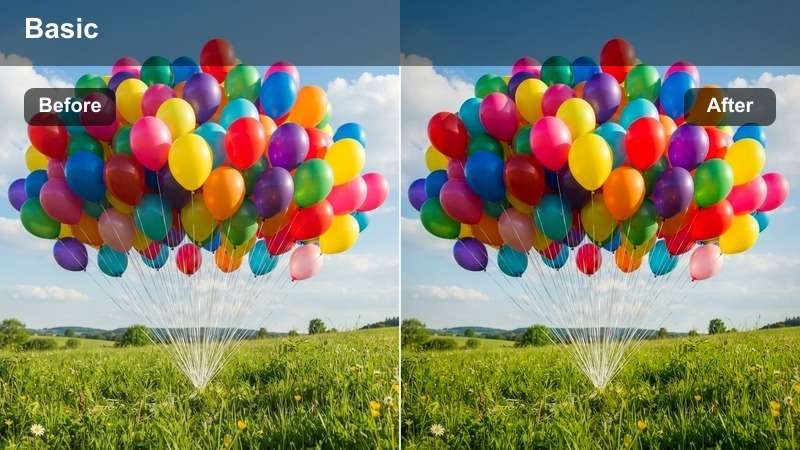
- Effect look: Rich shadows with warm highlights that keep surprise entrances and late-night shots visible.
- Best for: Surprise entrances, lights-off moments, and late-night living-room celebrations.
- Editing tip: Raise shadows slightly and reduce blacks so reactions stay visible when the room goes dark.
Midnight Surprise Warm is tuned for low-light environments where you still want to see faces clearly during dramatic entrances and lights-off moments. It warms up highlights from candles and lamps while preserving enough detail in the shadows for expressions to remain readable.
Use it on surprise walks into a dark room, or when the lights go off for singing, then nudge exposure and shadows upward in Filmora until you can clearly see reactions without flattening the scene. If candle flames are too bright, pull back highlights slightly so the glow looks rich rather than harsh.
Social-Ready Reels and Vlog Styles
Reel Ready Punch
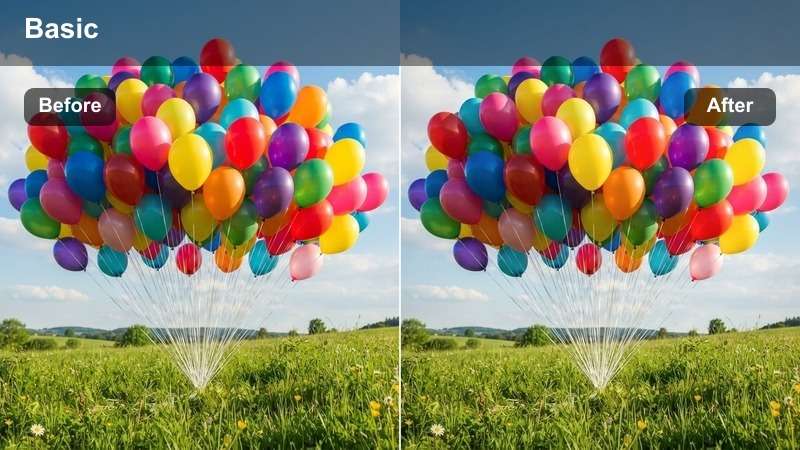
- Effect look: High contrast, crisp clarity, and modern color grading tailored for vertical party clips.
- Best for: Short birthday reels, TikTok stories, and fast-paced social edits.
- Editing tip: Combine this filter with jump cuts, speed ramps, and text stickers to match social media energy.
Reel Ready Punch is optimized for mobile viewing, boosting contrast and clarity so birthday clips stand out on small screens. Colors feel modern and bold, with enough sharpening to keep cake details, sparkler flames, and confetti clearly visible.
Crop your key shots to 9:16 in Filmora, apply this filter, and then build a fast sequence with tight cuts, speed changes, and bold captions. Place text near the lower third of the frame so viewers can follow the action even with sound off while the punchy grade keeps the reel scrolling-stopping.
Soft Vlog Storyline
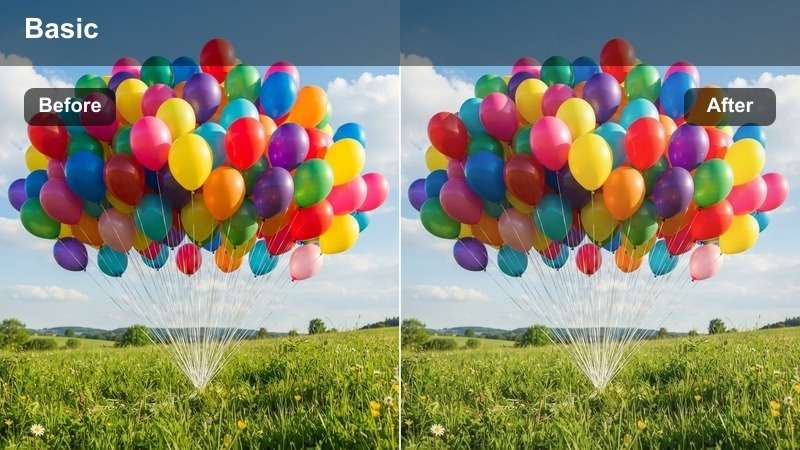
- Effect look: Muted contrast and gentle color lift for narrative-style family or creator vlogs.
- Best for: Talking-to-camera birthday vlogs, preparation montages, and behind-the-scenes clips.
- Editing tip: Use L-cuts and J-cuts so voiceover or dialogue overlaps B-roll for a smooth vlog flow.
Soft Vlog Storyline gives your birthday content a calm, narrative feel, lifting colors slightly while lowering harsh contrast for a relaxed, lifestyle aesthetic. It works well on both A-roll talking-to-camera segments and B-roll of decorations, cooking, and setup.
Record your story in a few longer takes, then cut away to B-roll while the audio continues, letting this filter unify all the footage. Slightly boost midtones on face shots in Filmora so the storyteller remains the focus, and add simple lower-third titles to introduce sections like prep, party, and recap.
Retro Birthday Throwback
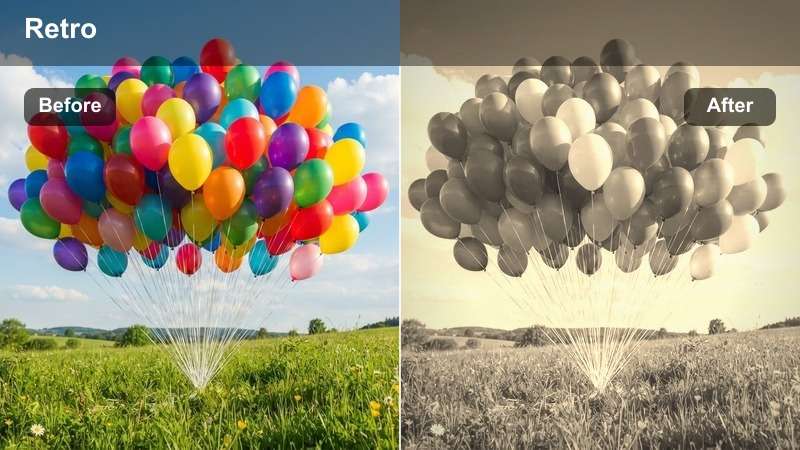
- Effect look: Faded colors, subtle film grain, and a slight tint that mimics old camcorder footage.
- Best for: Throwback edits, slideshow-style family compilations, and multi-year birthday mashups.
- Editing tip: Mix old photos, VHS-style overlays, and this filter on new clips to create a faux vintage timeline.
Retro Birthday Throwback fades your colors, adds a hint of grain, and introduces a gentle tint that recalls VHS and early camcorder footage. It is ideal when you want to blend decades of birthday moments into one cohesive, nostalgic edit.
Apply the filter to all modern clips you want to mix with older footage, then adjust tint and grain until everything feels visually aligned. Enhance the effect with date stamps, subtle VHS overlays, and slow crossfades in Filmora so your final timeline plays like a rediscovered family tape.
Tips for Using Birthday Party Video Filters Filters in Filmora
- Shoot a neutral object like a white plate or wall at the start of each scene so you can see how every filter shifts color when you start editing.
- Group similar shots on separate tracks in Filmora and apply the same birthday filter to each group to keep lighting and color consistent.
- Trim out long pauses, blurred takes, and repeated angles before adding effects so your filters only enhance the strongest birthday moments.
- For social edits, design your vertical 9:16 version first so subjects stay centered under the filters, then adapt to horizontal if needed.
- Use Filmora's AI and color tools to balance exposure and white balance before you stack multiple party filters or LUTs.
- When mixing indoor and outdoor clips, slightly adjust temperature and tint per scene so your chosen filter still matches skin tones naturally.
- Export a short test render and watch it on your phone to confirm that colors, brightness, and text remain clear on smaller screens.
Free Birthday Party Video Filters in Filmora make it easy to turn everyday celebrations into polished, shareable stories without advanced color-grading skills.
Experiment with a few styles, combine them with simple edits and music, and build a birthday look you can reuse for every new celebration, from kids parties to milestone events.
secure download