

 100% Security Verified | No Subscription Required | No Malware

Make every yes, smile, and quiet glance feel cinematic with free engagement video LUTs and filters tailored to romantic couple moments.
Whether you are filming an intimate proposal, sunny engagement shoot, or playful couple reels, these presets help couples and wedding videographers give footage a polished, emotional look in a few clicks.
In this article
Golden Hour Romance Engagement Shoots
Sunlit Soft Glow
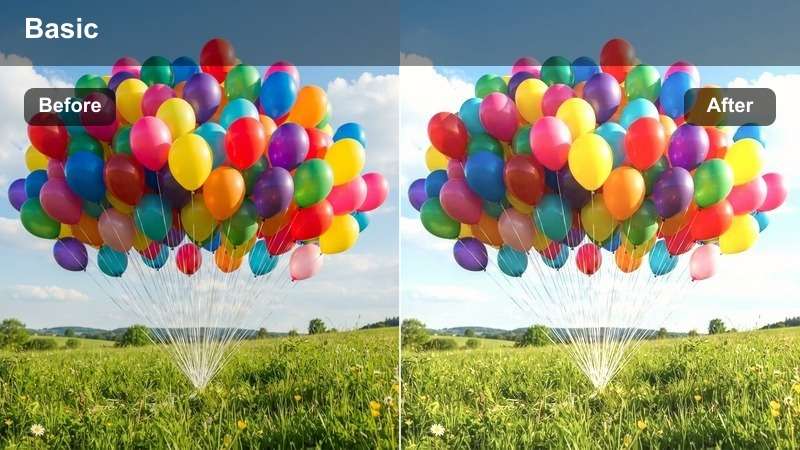
- Effect look: Warm, hazy glow with gentle contrast and creamy highlights for a dreamy engagement feel.
- Best for: Outdoor engagement shoots at sunset, backlit couple portraits, and slow-motion walking shots.
- Editing tip: Lower contrast slightly if the scene is already very bright and add a subtle vignette to keep focus on the couple.
Sunlit Soft Glow wraps your engagement footage in a golden, dreamy haze that flatters skin and lets backlit moments feel cinematic instead of washed out. In Filmora, this style works especially well with clips shot against the sun, because the creamy highlights and softened contrast keep details visible while still feeling romantic.
Apply the LUT to your base-corrected footage, then fine-tune contrast and vignetting with Filmora color controls to keep attention centered on the couple. If tones drift too orange, gently cool the temperature and use HSL adjustments to tame orange and yellow saturation while preserving rich sky color.
Match Engagement Filters with AI-Powered Color Tools
Filmora AI color tools can quickly correct exposure and white balance before you apply any engagement LUT or filter. This gives Sunlit Soft Glow and similar looks a cleaner base, so highlights stay soft without losing detail.
Once the base correction is ready, your romantic filters will deliver more natural skin tones and consistent color across proposal videos, engagement sessions, and social reels.
Open your engagement project in Filmora and run AI color correction before trying these filters.
 secure download

Preview Engagement Filters on Real Couple Footage
To compare different engagement video LUTs, duplicate your favorite proposal or couple clip on the Filmora timeline and apply a different filter to each layer. This lets you see how each look treats skies, clothing, and skin without re-editing the sequence.
Toggle visibility or use split-screen previews to evaluate mood and color quickly so couples can choose the exact style that matches their story.
Load a favorite proposal clip and preview at least three filters side by side before exporting.
secure downloadCombine LUTs and Filters for Signature Engagement Styles
Filmora includes more than 1000 video filters and 3D LUTs you can stack to create a recognizable look for every engagement project. Start with a base romantic LUT, then layer a soft glow or vignette-style filter for a distinctive mood.
Save your favorite combinations as custom presets so future proposal videos, engagement shoots, and couple reels match in just a few clicks.
Create a custom engagement preset that layers a LUT with your favorite soft-glow filter and save it for future projects.
secure downloadPeachy Sunset Romance
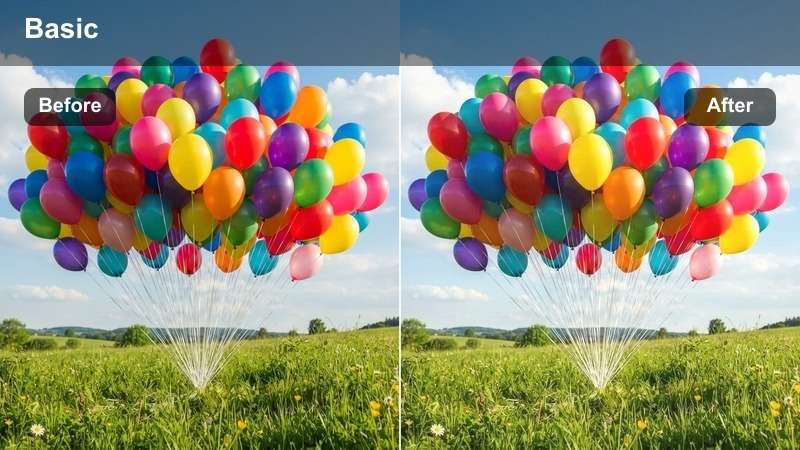
- Effect look: Soft peach tones, lifted shadows, and subtle fade for a nostalgic, cinematic sunset look.
- Best for: Engagement shoots on rooftops, beaches, or fields with visible skies and rich sunset colors.
- Editing tip: Boost saturation slightly and add a light film grain overlay to reinforce the nostalgic, cinematic feeling.
Peachy Sunset Romance turns your skies and highlights into delicate peach tones that feel like a film still from a memory. The raised shadows and gentle fade soften contrast, making it ideal for clips where you want nostalgia without losing detail in hair, clothing, or city skylines.
In Filmora, apply this engagement LUT to well-exposed sunset footage, then adjust highlight and shadow sliders to protect cloud texture while keeping faces bright. A touch of film grain and a mild saturation boost in the reds and oranges will help the sunset glow feel rich yet still believable.
Golden Kiss Highlight
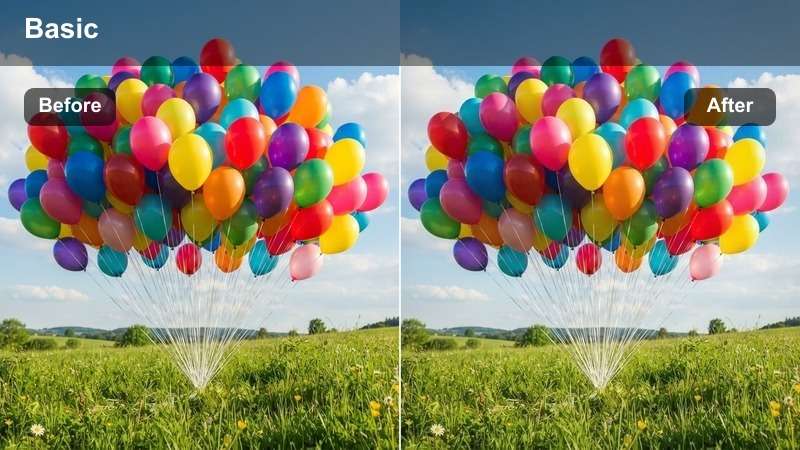
- Effect look: High-impact golden highlights and slightly deeper shadows to sculpt faces and enhance intimacy.
- Best for: Close-up engagement shots, almost-kiss moments, and ring reveals in warm natural light.
- Editing tip: Add a subtle radial blur or vignette around the couple to make the golden tones feel more focused and cinematic.
Golden Kiss Highlight is built for emotional close-ups, deepening shadows just enough to carve out cheekbones and jawlines while golden highlights wrap around faces. This gives engagement detail shots a luxurious, high-end feel that looks great on both desktop and mobile screens.
Use this LUT in Filmora on micro-moments like ring reveals, hand squeezes, or almost-kisses, then refine with selective sharpening on the eyes and jewelry. Keep global sharpening low and rely on subtle vignettes or radial blur to draw the viewer into the center of the frame without making the background distractingly crisp.
Indoor Cozy Proposal Videos
Candlelit Warmth
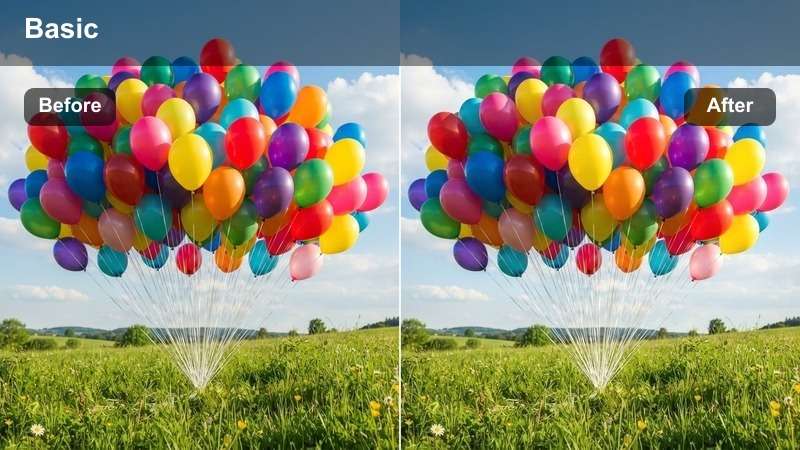
- Effect look: Rich warm tones, soft contrast, and gentle desaturation in shadows to mimic candlelight.
- Best for: Living-room or restaurant proposals, intimate indoor celebrations, and low-light engagement dinners.
- Editing tip: Raise exposure slightly and reduce digital noise before applying so the warm style stays clean, not grainy.
Candlelit Warmth brings a cozy, amber glow to low-light engagement scenes, smoothing harsh edges and taming mixed lighting from lamps and candles. The soft contrast and slightly muted shadows help keep noise less noticeable, so reactions and emotions stay front and center.
In Filmora, start with noise reduction on dim indoor clips, then drop this LUT on top to create a candlelike atmosphere. If the scene feels overly yellow, reduce yellow saturation in HSL while leaving reds and oranges strong, so skin stays flattering and the room still feels warmly lit.
Soft Apartment Glow
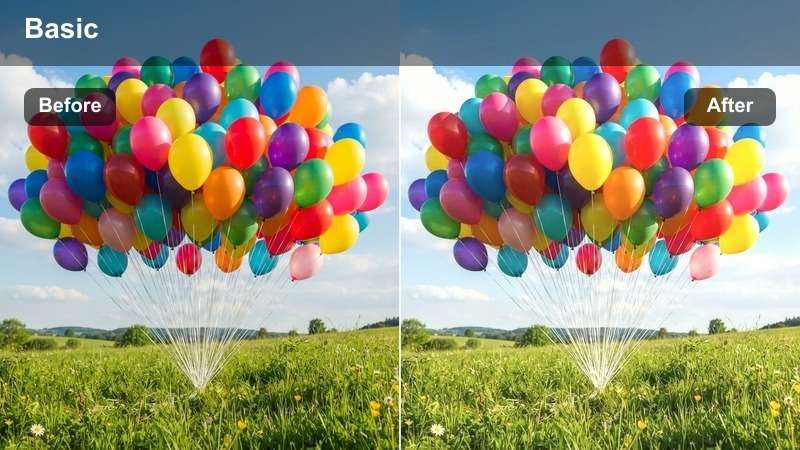
- Effect look: Softened highlights, neutral warmth, and gentle fade for cozy, modern apartment proposals.
- Best for: Home proposals, apartment engagement reveals, and candid couple moments on the couch.
- Editing tip: Straighten horizons and crop out visual clutter so the soft filter highlights the couple and home setting.
Soft Apartment Glow is balanced to look natural in modern interiors, softening bright windows and practical lamps without turning everything orange. The neutral warmth and subtle fade give home proposals a polished, lifestyle-video feel that still looks authentic.
Use this engagement LUT on clips where the couple interacts naturally in their space, then refine composition with Filmora cropping and straightening tools. Add slow, keyframed push-ins or light background blur overlays around the frame edges to make everyday rooms feel cinematic while preserving the genuine reactions in the center.
Nighttime City Window
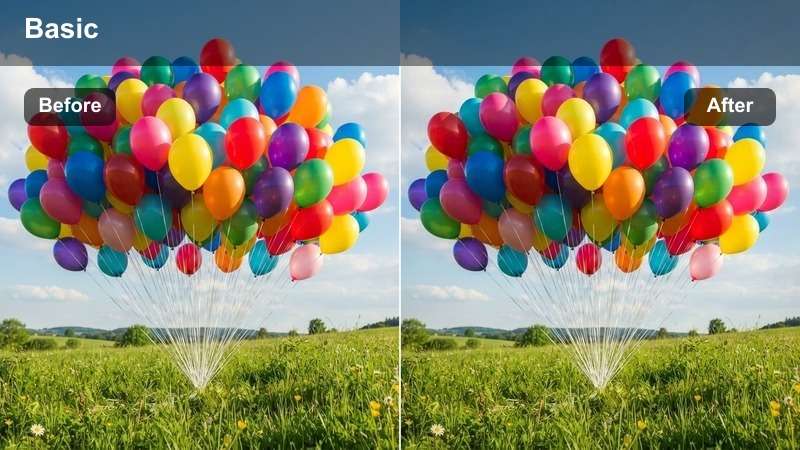
- Effect look: Deepened blacks, cooler shadows, and warm interior highlights for contrasty night proposals.
- Best for: Indoor proposals shot near windows with city lights in the background or hotel-room surprise engagements.
- Editing tip: Lower highlight clipping and add a slight blue tint to shadows to separate city lights from indoor warmth.
Nighttime City Window gives your engagement footage a cinematic contrast between cool city exteriors and cozy interior light. Blacks fall deeper to emphasize silhouettes and window frames, while warm highlights keep the couple and decor feeling inviting.
In Filmora, protect detail in city lights by pulling back highlights before or after applying the LUT, then add a touch of blue into the shadow color wheels. Enhance the bokeh outside the window with a light blur mask, and boost saturation only on the brightest sign colors to create a magical, sparkling backdrop behind the couple.
Urban Engagement Reels and Street Sessions
City Chic Romance
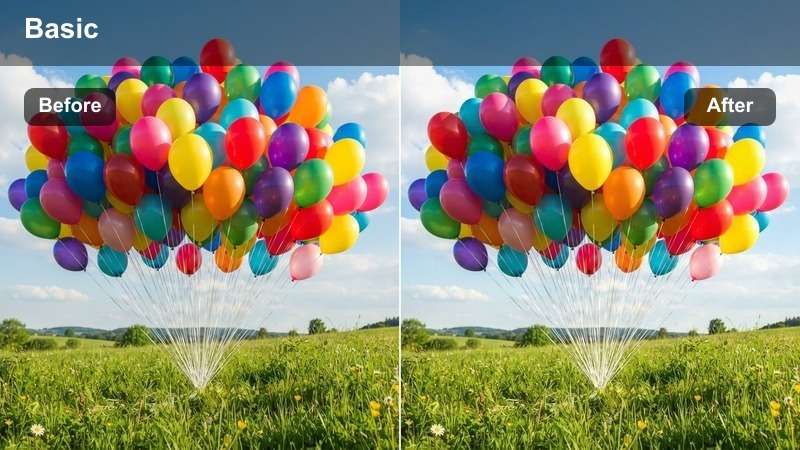
- Effect look: Clean contrast, soft teal shadows, and warm skin tones for stylish urban couple shoots.
- Best for: Street engagement sessions, crosswalk kisses, and city-park walks filmed for social reels.
- Editing tip: Add a 9:16 vertical crop and speed-ramp a few transitions to match trendy engagement reel styles.
City Chic Romance uses a modern teal-and-warm look to separate urban backgrounds from flattering skin tones, perfect for social-ready engagement reels. Buildings, roads, and distant cars lean into cool hues, so the couple naturally becomes the warm focal point in each frame.
Apply this LUT in Filmora, then switch to a 9:16 project or crop for Instagram Reels and TikTok. Enhance energy with speed ramps between wide city shots and close-up laughter moments, and time whip-pan transitions to your music beat so the color grade and pacing feel like a cohesive, stylish montage.
Subtle Film Street
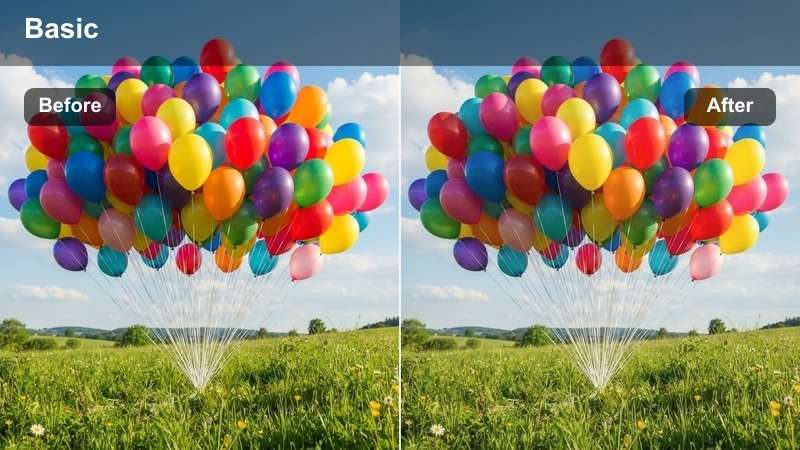
- Effect look: Soft film-like contrast, muted colors, and gentle grain feel for editorial-looking city footage.
- Best for: Urban engagement portraits near brick walls, staircases, and minimal storefronts.
- Editing tip: Slightly lower saturation and add a film grain overlay to sell the editorial, analog mood.
Subtle Film Street dials back saturation and contrast for a calm, editorial mood that suits brick walls, stairways, and simple storefronts. The look is designed to feel timeless, giving engagement videos a more magazine-style finish rather than a high-contrast social filter.
In Filmora, pair this LUT with slow-motion walks, spins, and gentle camera moves so viewers can appreciate the fine grain and tonal nuance. Drop saturation just a bit more if clothing is very bright, and add a film grain overlay from Filmora effects to complete the analog-inspired, romantic street aesthetic.
Neon Night Romance
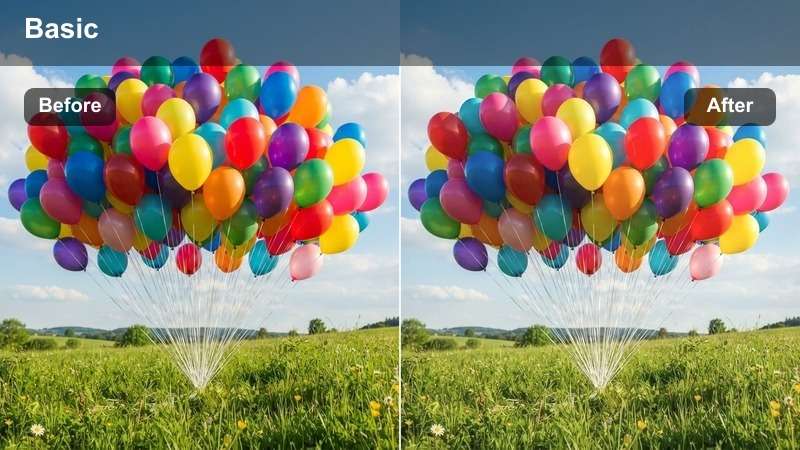
- Effect look: Punchy contrast, saturated neon colors, and slightly lifted blacks for playful night city reels.
- Best for: Engagement reels under neon signs, city nightlife walks, and rooftop bar proposal celebrations.
- Editing tip: Use mask tools to keep skin tones natural while allowing signs and city lights to stay vivid and colorful.
Neon Night Romance is built for nightlife engagement shoots, amplifying bright sign colors and reflections while gently lifting blacks for a glossy, modern look. The vibrancy of pinks, blues, and cyans makes every frame feel energetic and perfect for short-form social edits.
Use this LUT in Filmora on footage captured under neon signs or city nightlife, then refine mixed lighting with HSL so skin does not turn green or magenta. Keep exposure slightly darker than usual to hold neon detail, and use masks to isolate faces if necessary so you can reduce saturation on skin while letting the background stay eye-catching and bold.
Nature Retreat Engagement Sessions
Forest Trail Romance
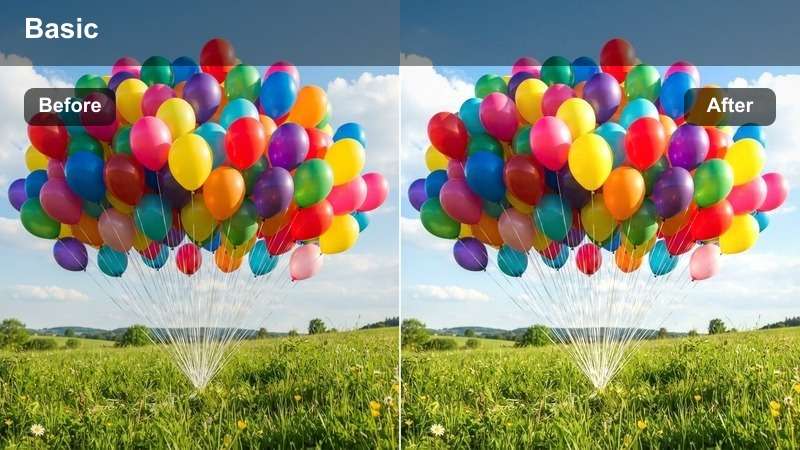
- Effect look: Balanced contrast, slightly cooled greens, and warm skin tones for calm forest walks.
- Best for: Engagement shoots along wooded paths, lakeside boardwalks, and tree-lined trails.
- Editing tip: Drop saturation on greens a little so clothing and expressions stand out more clearly.
Forest Trail Romance gently cools down greens while maintaining warm, flattering skin, preventing foliage from overpowering the couple. The balanced contrast works well in dappled sunlight or shade, keeping detail in both leaves and faces without harsh color shifts.
In Filmora, apply this LUT to forest or park engagement clips and fine-tune green saturation to taste so the environment supports rather than steals attention. If foliage casts color onto faces, warm midtones slightly and add a touch of magenta in the tint control, then use a subtle vignette to guide the eye toward the center trail or boardwalk.
Lakeside Reflection Soft
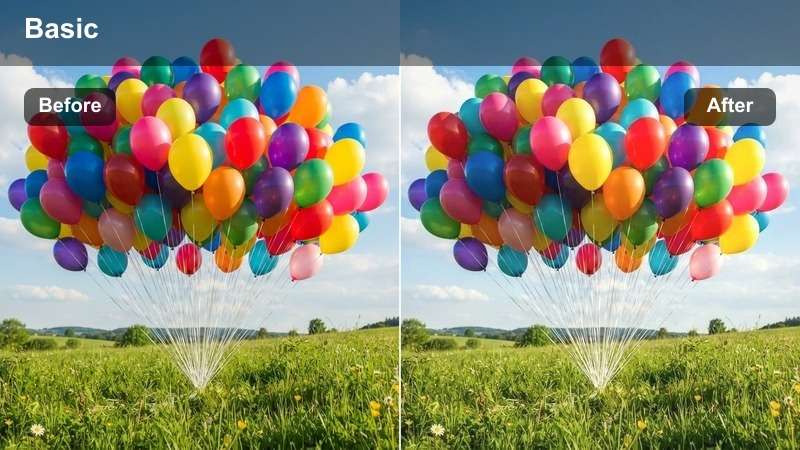
- Effect look: Soft clarity, gentle cool highlights, and airy midtones for peaceful water-side scenes.
- Best for: Engagement shoots beside lakes, riverside docks, or quiet waterfront piers.
- Editing tip: Lower texture slightly and add just a bit of clarity on the couple so the background stays dreamy and soft.
Lakeside Reflection Soft brings an airy, tranquil mood to any engagement shot near water, introducing cool highlights and softened detail in the surroundings. This helps reflections in lakes and rivers feel dreamy without making the couple look flat or washed out.
In Filmora, drop this LUT onto lakeside or riverside clips and then control clarity so the couple remains crisp against a soft, atmospheric background. Use slow vertical or horizontal tilts in editing to reveal reflections first and then the couple, and keep overall contrast moderate so the calm, romantic mood stays intact.
Overcast Soft Vows
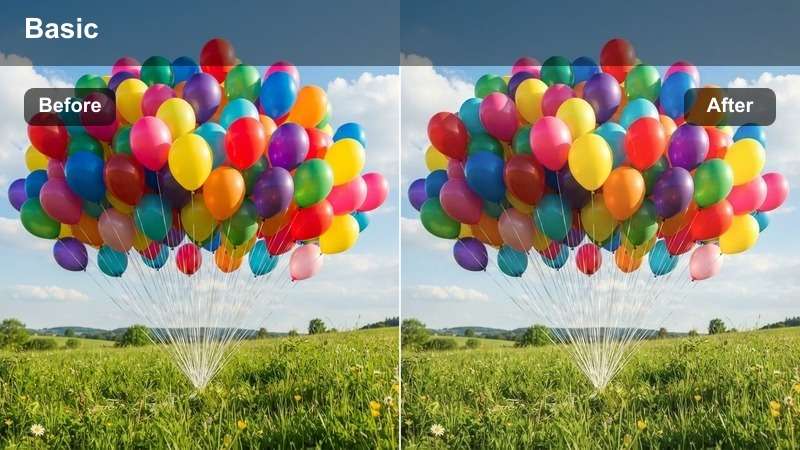
- Effect look: Low contrast, neutral color balance, and gentle lift in shadows for cloudy-day sessions.
- Best for: Overcast engagement shoots in open fields, city parks, or hilltop overlooks.
- Editing tip: Increase micro-contrast slightly with clarity but keep overall contrast low to preserve the soft cloudy mood.
Overcast Soft Vows is designed to turn gray, flat skies into a romantic, soft-lit backdrop that flatters every skin tone. By keeping overall contrast low and lifting shadows gently, it preserves the natural softness of cloudy days without making footage feel dull or lifeless.
Use this LUT in Filmora on open-field or hilltop engagement sessions shot under clouds, then nudge clarity up a bit to regain micro-contrast in clothing and hair. Add a hint of color into the highlights using color wheels, such as soft blue or lavender, and finish with a delicate film grain so even the flattest lighting looks intentional and cinematic.
Tips for Using Engagement Video Luts Filters in Filmora
- Shoot engagement footage with a slightly flatter picture profile so your LUTs and filters have more room to shape contrast and color.
- Keep white balance as neutral as possible on location to avoid strong color casts that are harder to fix in post.
- Record key proposal moments at 60 fps or higher so you can slow them down in Filmora for dreamy, emotional playback.
- Mix wide establishing shots with medium and close-up details so your filters can highlight both the setting and intimate reactions.
- Export 9:16 vertical versions of your favorite engagement clips with filters applied for Instagram Reels, YouTube Shorts, and TikTok.
- Be cautious with saturation on warm filters, prioritizing natural skin tones over extremely intense sunset colors.
- Add subtle background music and light ambient sounds under your graded proposal videos to support the romantic mood.
- Save your preferred filter intensity and color tweaks as Filmora presets so every new engagement project keeps a consistent style.
With these free engagement video LUTs and romantic filters, you can transform raw couple footage into polished, emotional stories that feel ready for sharing and saving. From golden-hour walks to candlelit proposals, each style helps you craft a specific mood with minimal effort.
Test a few looks on your next proposal video or engagement shoot, adjust intensity for each scene, and then explore birthday party video filters next to build out a complete celebration style toolkit for your channel or clients.
secure downloadNext: Free Birthday Party Video Filters for Fun Celebrations
