

 100% Security Verified | No Subscription Required | No Malware


 ChatGPT
 Perplexity
 Gemini
 Claude
 Grok
Grok
These free food video LUTs and filters are designed for creators and editors who want every dish to look fresh, tasty, and scroll-stopping without spending hours on color grading.
From bright brunch plates to moody cafe shots and sizzling street food, use these presets in Filmora to keep your food videos consistent, on-brand, and ready to publish fast.
In this article
Bright Brunch Plates and Daylight Dining
Sunny Brunch Pop
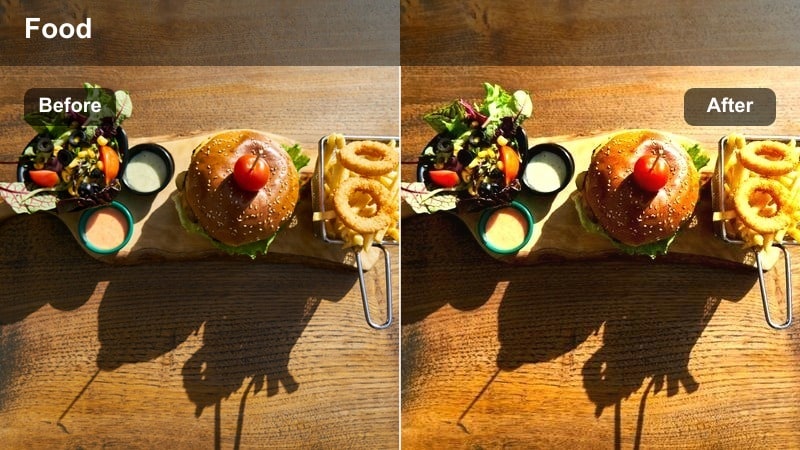
- Effect look: Clean, high-key brightness with soft contrast and crisp whites
- Best for: Egg dishes, smoothie bowls, pancakes, and daylight cafe spreads near windows
- Editing tip: Slightly lower highlights to protect white plates and add a touch of clarity for extra texture on toppings.
Sunny Brunch Pop is ideal when you want your brunch content to feel airy, bright, and ready for social feeds. By pushing clean whites and gentle contrast, it keeps plates, cups, and linens looking fresh while still preserving detail in eggs, fruit, and toppings so your food never feels washed out.
In Filmora, apply this LUT-style filter to clips shot near large windows or in soft midday light, then fine-tune highlights and exposure to prevent clipping on white plates. For taste-test A-roll, slightly reduce overall brightness and add a hint of warmth so faces look natural while the food remains crisp and vibrant in every frame.
Match Food Colors Automatically with AI
Filmora's AI color tools help you keep greens fresh, sauces rich, and plates consistent across different cameras and lighting setups. Once you dial in a food look you like, you can reuse it across an entire series without manually tweaking every clip.
After you apply one of these free food filters, use AI color matching to copy that palette to other shots so your brunch b-roll, talking segments, and overheads all share the same appetizing tone.
 secure download

Preview Filters in Real Time on Your Dishes
Filmora lets you hover and preview filters directly on your footage, so you can instantly see how a look will treat whites, greens, and skin tones before you commit. This makes it easy to compare bright brunch styles, neutral looks, and warmer tones on the same clip.
Import a short test shot of your dish, then scrub through your timeline and hover over different LUTs and filters in the Effects panel to find the one that makes your food look its best without breaking your workflow.
secure download1000+ Video Filters and 3D LUTs
Alongside these free food video LUT-style filters, Filmora includes a large library of built-in filters and 3D LUTs for different genres, from cinematic travel to lifestyle vlogs. You can mix these with your food looks to give intros, outros, and B-roll a more stylized mood.
Start with a subtle base LUT for consistency, then stack Filmora filters for extra contrast, grain, or vignettes until your food videos develop a distinct, recognizable style across platforms.
secure downloadFresh Salad Crisp
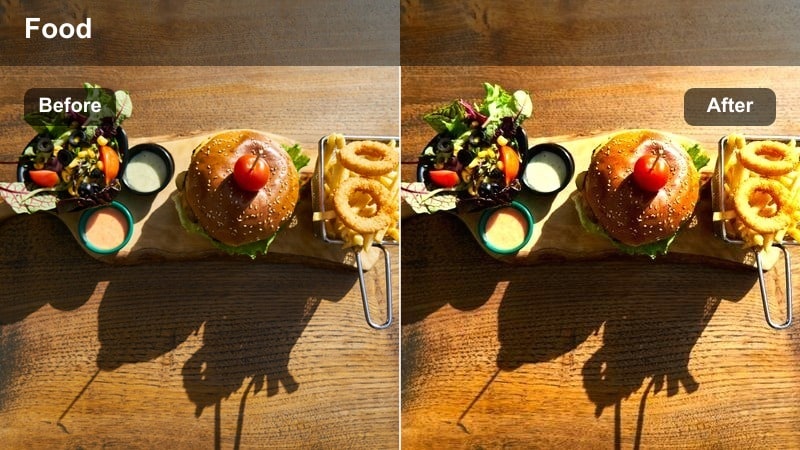
- Effect look: Cool, crisp tones with boosted greens and gentle micro-contrast
- Best for: Salads, poke bowls, and veggie-focused plates shot in soft natural light
- Editing tip: Increase saturation in the green channel only to keep lettuce vivid but avoid neon, and reduce sharpening on noisy clips.
Fresh Salad Crisp is tuned to make greens look snappy and clean, which is perfect for salads, bowls, and any plant-forward recipe. It leans slightly cool so leafy textures, cucumbers, and herbs feel ultra-fresh rather than warm or muddy.
In Filmora, apply this look to overhead and close-up shots of salads, then open the HSL controls to gently boost saturation on greens while pulling yellows back for a more natural tone. If your footage is a bit noisy from indoor lighting, reduce sharpening and add minor noise reduction before grading to keep the finish smooth.
Pastel Bakery Soft
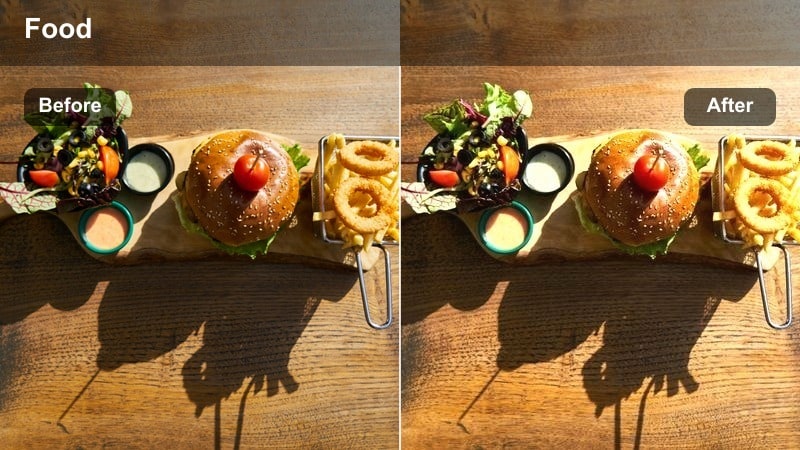
- Effect look: Soft pastel tones with lifted shadows and creamy highlights
- Best for: Pastries, donuts, cakes, and colorful desserts in bright bakery scenes
- Editing tip: Lower contrast slightly for frosted desserts, and add a touch of vibrance rather than full saturation to keep tones gentle.
Pastel Bakery Soft gives dessert footage a dreamy, creamy character by lifting shadows and softening highlights, which flatters frosting, sprinkles, and glazes. It is especially effective for bakery b-roll where you want everything to feel light, inviting, and slightly whimsical.
Apply this filter in Filmora to cake reveals, donut racks, and cupcake close-ups, then reduce global contrast a bit so whites stay milky rather than harsh. Use vibrance instead of strong saturation boosts to keep icings and decorations colorful but avoid an overly cartoonish or artificial look on camera.
Warm Home Cooking and Cozy Kitchen Scenes
Cozy Stovetop Glow
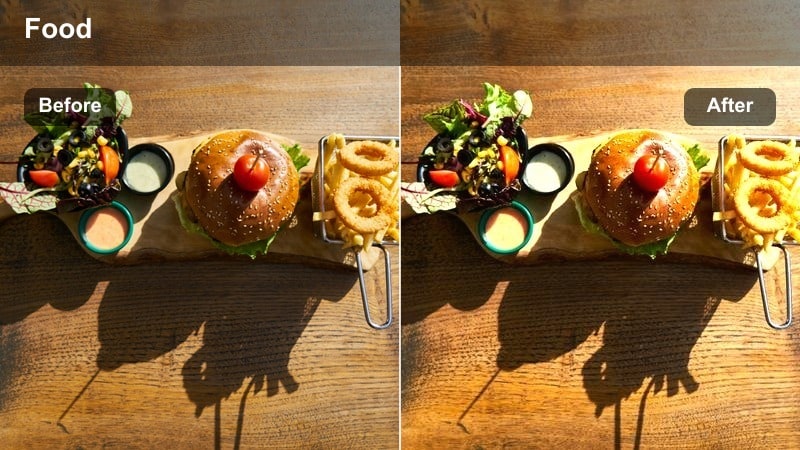
- Effect look: Warm amber highlights with soft contrast and gentle film-style grain
- Best for: Home-cooked stews, soups, and simmering shots on the stove or in cast-iron pans
- Editing tip: Boost midtone warmth but keep saturation moderate to avoid orange skin tones in cooking demos.
Cozy Stovetop Glow leans into warm amber tones that make bubbling pots, stews, and cast-iron dishes feel comforting and homemade. The subtle grain adds a nostalgic, film-inspired vibe that pairs nicely with ASMR cooking sounds and slower-paced recipes.
In Filmora, apply this filter to stovetop b-roll captured under tungsten or warm LED lighting, then fine-tune white balance to prevent the entire frame from drifting too orange. If you include talking segments at the stove, keep saturation restrained and adjust orange hues to protect natural skin tones while still preserving that inviting glow on the food.
Rustic Table Amber
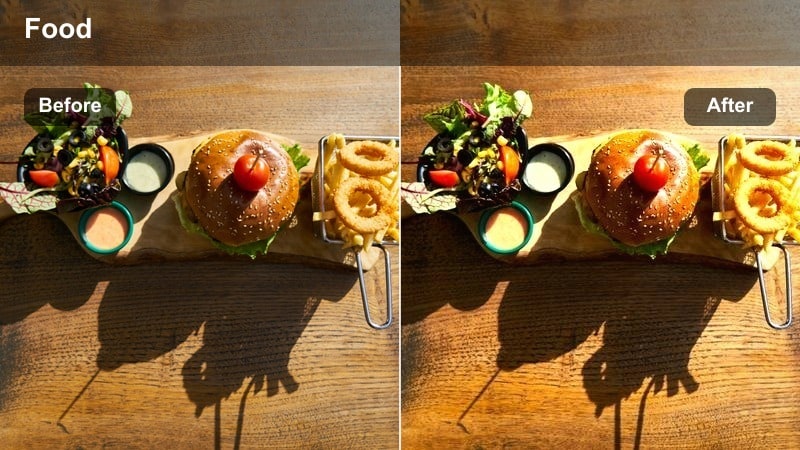
- Effect look: Warm earthy tones, enhanced browns, and rich wood textures
- Best for: Family-style servings, roasting pans, and shared dishes on wooden tables
- Editing tip: Add a slight vignette and lower blacks to make dishes feel grounded and rich on darker tabletops.
Rustic Table Amber emphasizes earthy browns and warm hues, making wooden tables, roasting trays, and comfort foods look hearty and substantial. It is best suited for family-style spreads and sharing platters where texture and depth sell the story of a big meal.
Use this look in Filmora for overheads of sharing boards and multi-dish dinners, then add a subtle vignette to keep focus on central plates. Lower the black levels slightly to deepen wood grain and pan edges, and use local exposure adjustments on key dishes so they remain a touch brighter than the background for easy visual hierarchy.
Evening Kitchen Soft
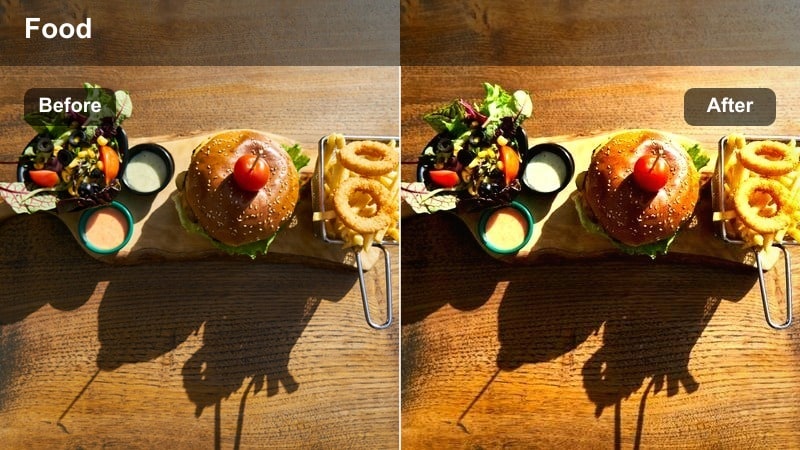
- Effect look: Muted contrast with warm midtones and gentle highlight roll-off
- Best for: Nighttime cooking, candlelit dinners, and dim kitchen prep scenes
- Editing tip: Reduce noise before applying this filter on high ISO clips to keep shadows smooth and flattering.
Evening Kitchen Soft is built to rescue and flatter low-light cooking footage, smoothing out harsh contrast while keeping enough warmth to feel cozy. It softens highlight roll-off so overhead fixtures and candles do not blow out, which helps plates and hands stay readable.
In Filmora, run noise reduction on high ISO night clips first, then apply this filter to lift shadows and even out tones. Add a hint of coolness to the shadows to subtly separate warm food and skin tones from the darker background, and keep saturation modest so the scene remains cinematic rather than overly vibrant.
Street Food, Markets, and Vendor Stalls
Street Grill Sizzle
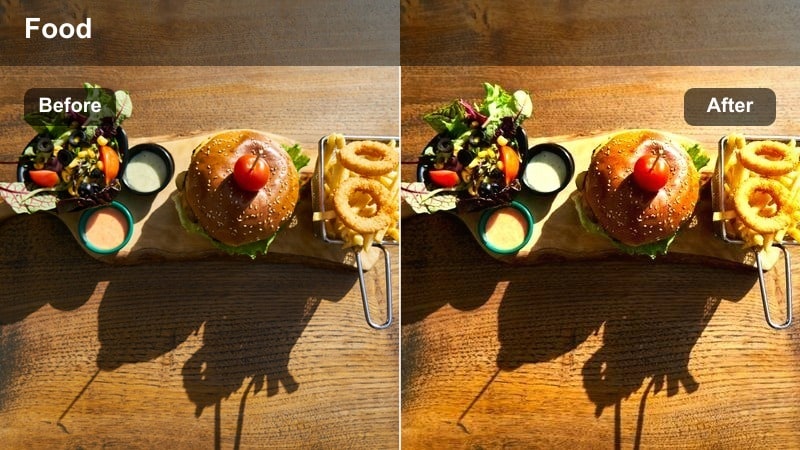
- Effect look: Punchy contrast with rich reds and warm highlights on flames and coals
- Best for: Grilled meats, skewers, and barbecue at outdoor markets and street stalls
- Editing tip: Slightly pull back red saturation to keep sauce and meat tones realistic while maintaining intensity.
Street Grill Sizzle pushes contrast and warms up highlights so flames, coals, and grill marks feel intense and mouthwatering. It boosts reds and oranges enough to make sauces and char pop without losing the gritty texture that makes street food appealing.
Apply this filter in Filmora to close-ups of skewers, grills, and sizzling pans, then dial down red saturation a touch if meats start to look too artificial. Lower global highlights to preserve detail in fire and reflections, and consider adding slow motion or speed ramping to emphasize sizzling, flipping, and basting moments.
Market Fresh Burst
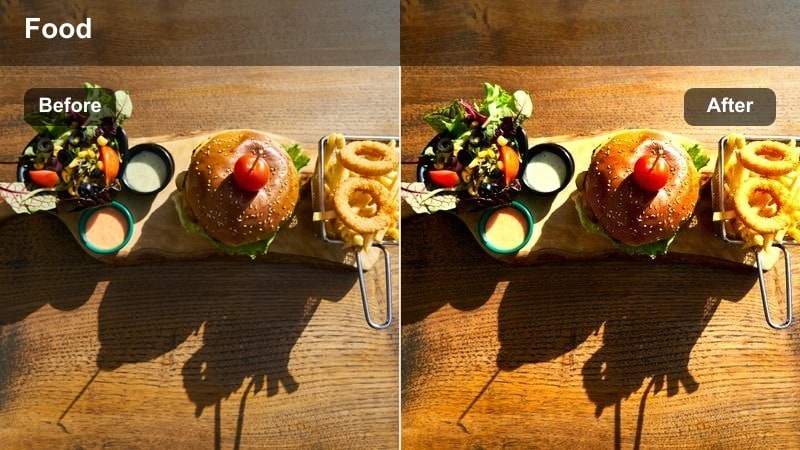
- Effect look: Vibrant saturation with clean whites and bright primary colors
- Best for: Farmers markets, produce stands, and street vendors with colorful displays
- Editing tip: Use selective saturation to boost greens and reds while keeping yellows under control on sunlit stalls.
Market Fresh Burst is tuned for busy, colorful scenes where fruits, vegetables, and packaged snacks all compete for attention. It amplifies saturation while maintaining clean whites, which helps labels, signs, and plates stay readable even in visually crowded frames.
In Filmora, use this filter for walk-through shots of markets and vendor rows, then reach for selective color controls to balance primaries. Boost reds and greens for produce, keep yellows slightly restrained to avoid glare in harsh sunlight, and darken backgrounds with masks so the most intense colors live on the food itself.
Night Market Neon
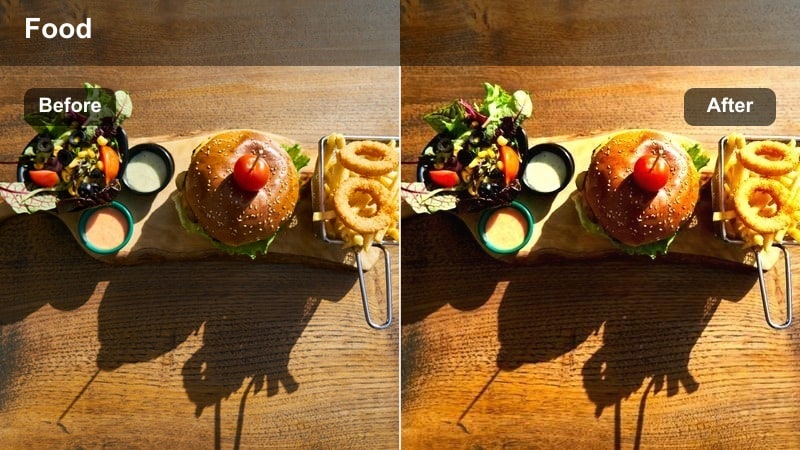
- Effect look: Moody contrast with deep shadows and saturated neon signs
- Best for: Night markets, food trucks, and neon-lit vendor alleys
- Editing tip: Lift shadows just enough to reveal details in sauces and toppings while keeping the overall frame dramatic.
Night Market Neon is designed for dramatic, neon-heavy environments where signs, reflections, and colorful lights are part of the story. It deepens shadows for mood while preserving enough detail so your noodles, buns, or skewers do not disappear into darkness.
Apply this filter in Filmora to night market b-roll and food truck scenes, then gently lift shadows until key ingredients are visible without flattening the image. If neon signs dominate the frame, reduce blue channel luminance or saturation so food remains the star, and consider adding a bit of motion blur or slower shutter footage for energy and atmosphere.
Hero Plates, Overheads, and YouTube Thumbnails
Hero Plate Focus
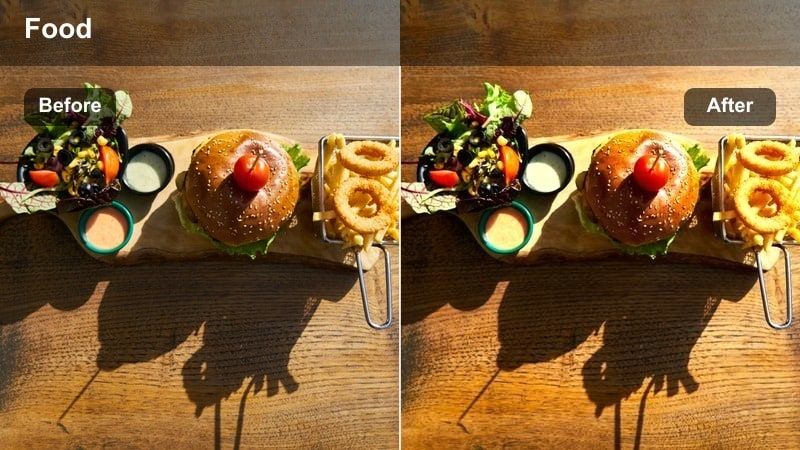
- Effect look: Clean, neutral color balance with strong subject contrast and subtle vignette
- Best for: Single hero dishes, thumbnails, and plated close-ups for recipe reveals
- Editing tip: Add a gentle vignette and slightly sharpen only the main dish area to pull attention to your key plate.
Hero Plate Focus gives your main dish a polished, professional finish by keeping colors neutral and enhancing contrast around the subject. It is perfect for thumbnail frames and hero reveals where you want the food to stand out cleanly against minimal props or backgrounds.
In Filmora, apply this filter to your key hero shot, then add a subtle vignette and use masking or the sharpening controls to focus crispness on the core of the plate. Export a high-resolution still from this graded frame to use as your YouTube or social thumbnail, ensuring the preview matches the final edit.
Flatlay Feast Balance
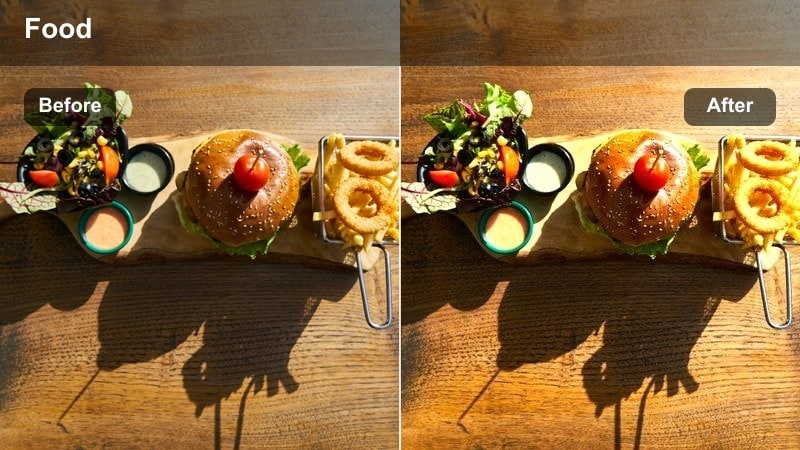
- Effect look: Even exposure with gentle contrast and natural, slightly warm tones
- Best for: Top-down feast layouts, tasting boards, and multi-dish spreads
- Editing tip: Use minor perspective correction before applying this filter so plates sit straight and symmetrical in frame.
Flatlay Feast Balance is tailored for overhead tables filled with multiple dishes, where clarity and even exposure matter more than heavy stylization. It adds just enough warmth and contrast to keep food appetizing while preserving detail across the entire frame.
In Filmora, correct perspective and straighten your top-down shots first, then apply this filter to refine color and exposure. Slightly increase micro-contrast so smaller dishes and garnishes remain readable on mobile screens, and leave some darker negative space at the edges if you plan to add titles or on-screen graphics.
Cinematic Bite Close-Up
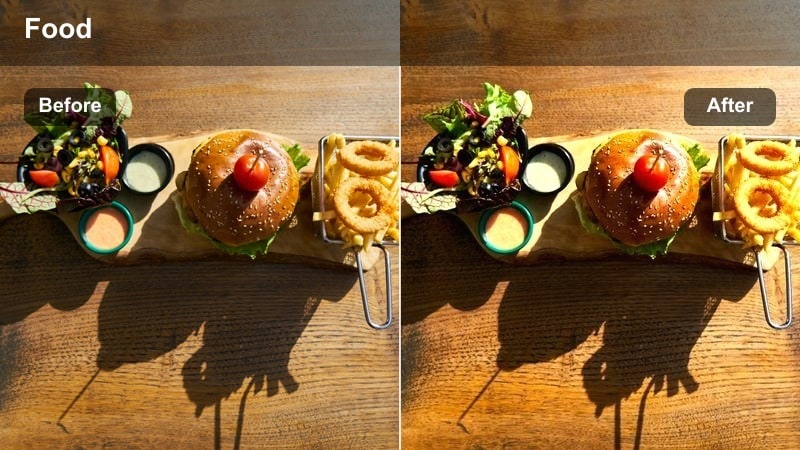
- Effect look: Cinematic contrast with soft highlights and rich, saturated food tones
- Best for: Slow-motion bites, cheese pulls, and extreme close-ups of textures
- Editing tip: Use a touch of blur or reduced clarity in the background to emphasize the bite moment and keep focus on the texture.
Cinematic Bite Close-Up is made for those ultra-satisfying bite and texture shots that sell your recipe on social media. It combines stronger contrast with controlled highlights and rich food colors to make cheese pulls, crumb shots, and gooey interiors feel cinematic and indulgent.
In Filmora, apply this filter to slow-motion bite clips or macro close-ups, then soften background clarity using blur or depth-of-field style effects so all attention stays on the food. Add local contrast around crusts, fillings, and toppings, and sync the visuals with clean crunch or sizzle audio for maximum sensory impact in reels and shorts.
Tips for Using Free Food Video Luts Filters in Filmora
- Shoot in flat or log profiles when your camera allows, so these food filters have more room to add contrast and color without causing banding or clipping.
- Lock white balance during filming to keep your food tones consistent from shot to shot, then fine-tune warmth in Filmora to match each scene's mood.
- Use different looks for A-roll and B-roll, keeping talking segments neutral while pushing stylized LUTs on close-up food shots and hero plates.
- Always recheck skin tones in tasting scenes after applying food filters, and gently adjust orange and red hues if faces start to look oversaturated.
- Mix LUTs with Filmora's native filters, vignettes, and grain to create a repeatable, branded style you can apply across entire recipe series.
- Export a few high-resolution still frames from your graded timeline to reuse as thumbnails, cover art, and social teasers for each video.
These free food video LUT-style filters give creators and editors fast, reliable ways to make every dish look fresh, vibrant, and on-brand without deep color grading skills. Whether you shoot on a phone or a mirrorless camera, you can quickly elevate your brunch spreads, home-cooking scenes, and street food adventures.
Import your next recipe or food vlog into Filmora, test a few of these looks on key shots, and then save your favorite combinations as presets for a simple workflow you can reuse on every upload.
secure download