

 100% Security Verified | No Subscription Required | No Malware


 ChatGPT
 Perplexity
 Gemini
 Claude
 Grok
Grok
These free LUTs for beauty video are designed to smooth skin, refine tones, and keep faces looking natural on camera so your audience focuses on the story, not on distracting color issues.
Whether you shoot makeup tutorials, GRWM vlogs, or cinematic portraits, these beauty-focused filters will help you even out skin, soften contrast, and create flattering looks that are easy to apply in Filmora.
In this article
Soft Natural Daylight Beauty Looks
Fresh Morning Glow
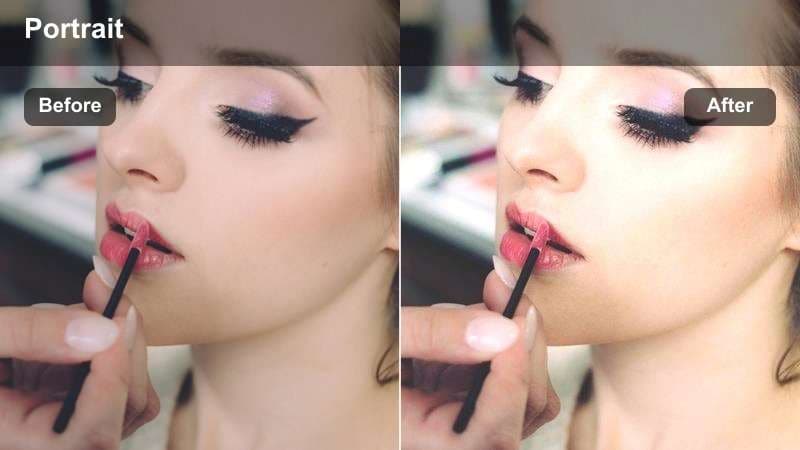
- Effect look: Soft, bright daylight with gentle skin smoothing and subtle warmth for fresh morning beauty shots.
- Best for: GRWM mornings, skincare routines, simple no-makeup makeup vlogs shot near a window.
- Editing tip: Reduce contrast slightly for harsh sunlight and drop saturation a bit if strong lipstick looks too intense.
Fresh Morning Glow is the kind of LUT you reach for when you want clean, honest beauty that still feels polished. It lifts exposure, adds a hint of warm tone to skin, and gently smooths texture so your subject looks like they are lit by perfect soft morning light, even if the real window light is a bit uneven.
In Filmora, apply this LUT on your adjustment layer or directly to your clip, then fine-tune with the Color panel. Dial the LUT intensity to around 70 to 80 percent for natural results, then lower global contrast and saturation if your footage was shot in strong sunlight or with vivid makeup so skin remains believable and not overprocessed.
Let AI balance your beauty colors automatically
Filmora's AI color tools can quickly balance exposure and white balance so your free LUTs for beauty video work better out of the box. Instead of manually fighting mixed lighting or off skin tones, you can let AI create a clean neutral base in seconds.
Use AI to fix mixed lighting, remove strange color casts, and get a consistent starting point across all your beauty clips before you drop in Fresh Morning Glow or any other beauty LUT.
How to use it: Open your clip in Filmora, run AI color correction, and then stack your chosen beauty LUT or filter on top.
 secure download

Preview beauty filters on your footage in real time
Filmora's filter browser lets you hover to preview beauty looks directly on your clip before committing. You can quickly compare soft, natural, and glam options to see which one flatters your subject and matches the mood of the video.
Mix and match softening, color, and vignette filters on top of your base LUT until you create a look that feels unique to your channel without needing complex manual grading.
Try it now: Load a test clip, cycle through the beauty presets, and save your favorite combo as a custom preset.
secure downloadCombine filters and LUTs for signature looks
Filmora includes 1000 plus video filters and 3D LUTs you can stack to create a custom beauty grade for your channel. Start with a natural beauty LUT for skin tone, then add glow, blur, and subtle vignettes from the filter library to refine contrast and focus.
By saving these combinations as presets, you can apply the same polished look across entire series of makeup tutorials, GRWM videos, and portrait content with one click.
Build your look: Create a custom preset that mixes your preferred free LUTs for beauty video with Filmora's filters, then reuse it across your series.
secure downloadStudio Softbox Natural
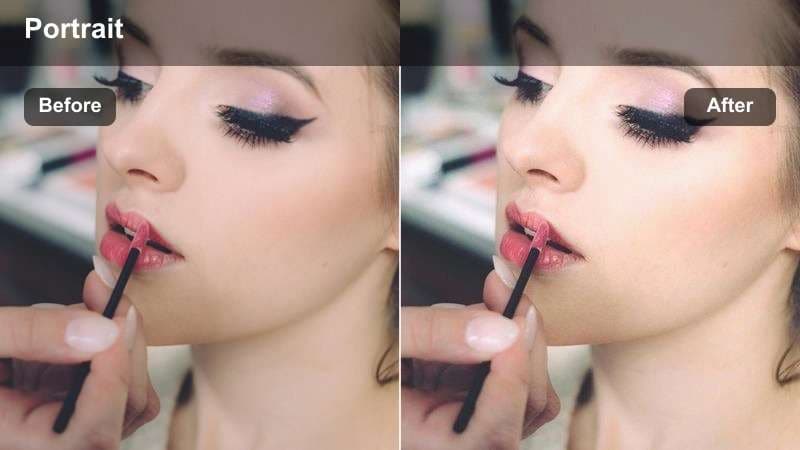
- Effect look: Balanced neutral tones with gentle highlights and soft contrast tailored for softbox lighting.
- Best for: Seated talking-head beauty reviews, product hauls, and neutral studio portraits.
- Editing tip: Add a slight vignette for focus and nudge clarity down a little to soften fine skin texture.
Studio Softbox Natural is tuned for controlled studio setups where your subject is lit with softboxes or ring lights. It keeps white balance neutral, protects highlights on the forehead and cheeks, and gently lowers contrast so features look smooth without losing structure.
Inside Filmora, drop this LUT onto your talking-head clips and then use the Color settings to add a minimal vignette and reduce clarity or sharpness slightly. Keeping the background a touch darker than the face and softening fine detail will pull more attention to eyes and lips, ideal for review and haul formats.
Window Light Soft Skin
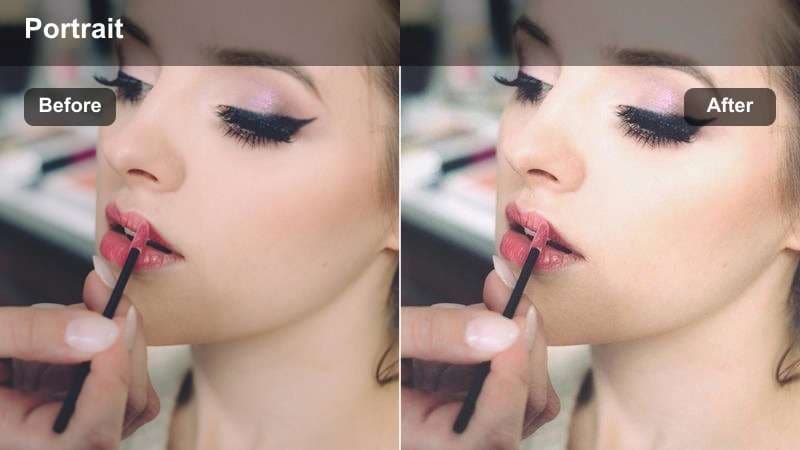
- Effect look: Low-contrast, airy tones that smooth skin while keeping highlights soft and roll-off gentle.
- Best for: Beauty tutorials filmed in small rooms with a single window as the key light.
- Editing tip: Lift the shadows slightly if your background is too dark, and keep sharpness low to avoid emphasizing pores.
Window Light Soft Skin is designed for creators who film near a side window in small bedrooms or bathrooms. It rolls off highlights smoothly on the bright side of the face and gently opens up shadows on the opposite side so the image feels light and airy rather than contrasty.
In Filmora, apply the LUT and then raise shadow levels just enough to reveal hair and background details without flattening the image. Leave global sharpness on the low side and, if needed, add a touch of blur or skin-smoothing filter so natural texture remains while blemishes and pores are less visible.
Glam and Makeup Showcase Filters
Glam Detail Pop
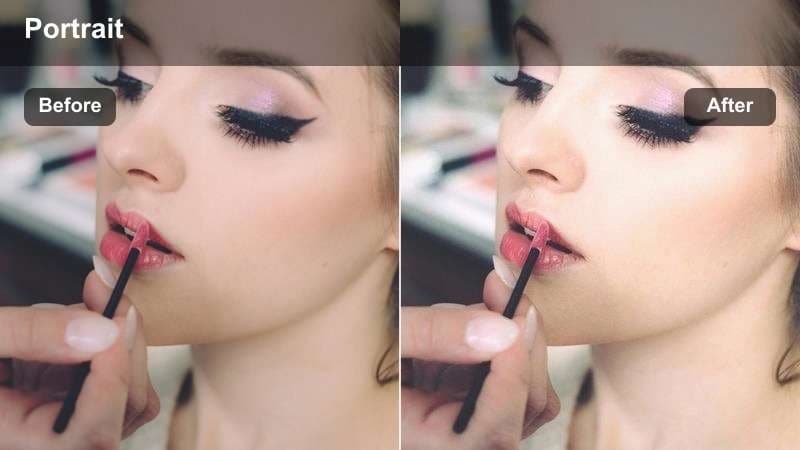
- Effect look: High-clarity yet flattering look that sharpens eye and lip details while keeping skin soft.
- Best for: Close-up makeup reveals, bold eye looks, and lipstick swatch videos.
- Editing tip: Mask out the eyes and lips to raise sharpness slightly there while leaving skin smoother overall.
Glam Detail Pop is ideal when the goal is to showcase artistry: sharp cut creases, crisp liner, and precise lip shapes. It adds clarity, targeted contrast, and richer saturation to color pigments while applying a more forgiving curve to skin so the face does not look overly textured in macro shots.
Use this LUT in Filmora on close-ups, then add a mask or adjustment layer focused on the eyes and lips where you can slightly increase sharpness and local contrast. Keep global noise reduction and softening active on the rest of the frame to retain a smooth, editorial finish that still shows off shimmer and fine detail.
Evening Event Glam
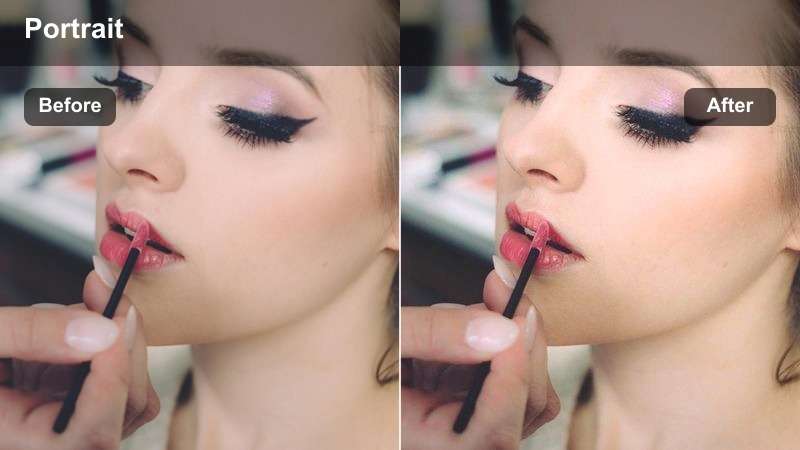
- Effect look: Richer contrast with subtle warm highlights that mimic evening event lighting without crushing skin tone.
- Best for: Night-out looks, event-ready glam, and formal beauty transformations.
- Editing tip: Add a slight warm temperature boost if your original footage is too cool or green from LED lights.
Evening Event Glam recreates the mood of getting ready under warm vanity lights or soft ambient lamps. It deepens shadows for drama, adds warmth to highlights on cheekbones and shoulders, and increases saturation in a controlled way so dark lipsticks and smokey eyes stay rich but not muddy.
In Filmora, apply this LUT to your night-out or event looks, then correct any leftover green or blue casts from LEDs with the white balance sliders. You can also add a subtle vignette and raise midtone contrast to emphasize facial structure while still preserving softness under the eyes and around the mouth.
Bold Color Correct
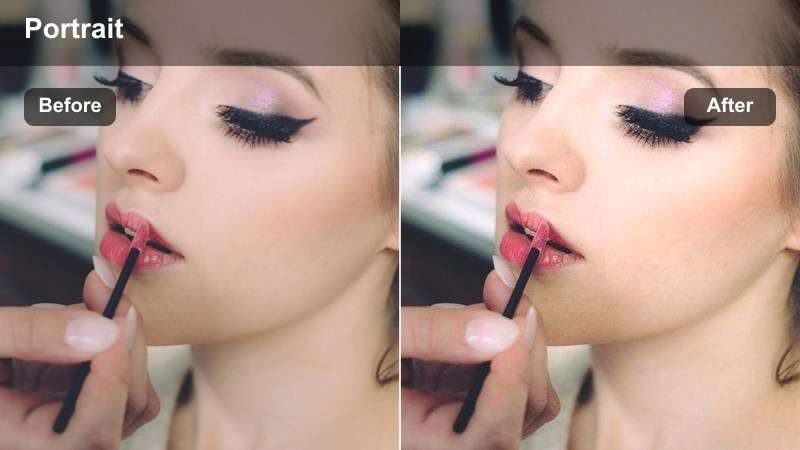
- Effect look: Corrected skin tones with punchy but controlled colors for strong blush, contour, and eye looks.
- Best for: Colorful makeup tutorials, festival looks, and experimental glam content.
- Editing tip: Use the filter at 60–70 percent and fine-tune saturation on reds and magentas to keep blush realistic.
Bold Color Correct is built for creators who love bright palettes, graphic liner, and intense blush or contour. It pushes color contrast so hues separate clearly on camera while using a neutral curve on skin to avoid the common problem of faces turning too red, orange, or magenta.
Inside Filmora, lower the LUT intensity slightly, then jump into the HSL or color tuning controls to pull back red and magenta saturation just enough to keep cheeks and nose natural. This lets you keep full intensity in eyeshadow and lip color while ensuring skin remains flattering and believable, even under strong studio lights.
Vlog and Lifestyle Beauty Vibes
Soft Vlog Beauty
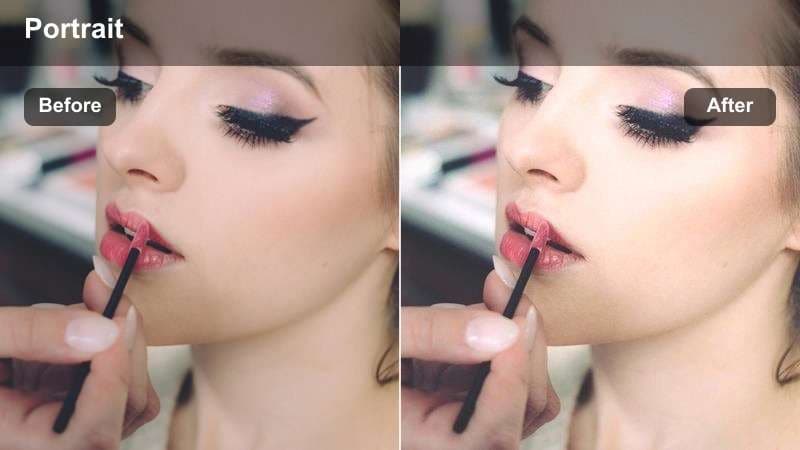
- Effect look: Gentle pastel-like tones that soften blemishes and keep vlog footage cohesive across different rooms.
- Best for: Day-in-the-life beauty vlogs, casual routines, and handheld behind-the-scenes clips.
- Editing tip: Apply a light noise reduction before this filter if you shoot on a phone in low light to avoid muddy textures.
Soft Vlog Beauty is meant to tie together a whole day of footage shot in mixed lighting as you move from bathroom to bedroom to kitchen. It lightly desaturates harsh colors, softens contrast, and gives skin a gentle pastel-touch so transitions between locations feel smooth and cohesive.
In Filmora, add this LUT to a top adjustment layer covering all your vlog clips, then pre-correct any extremely dark or noisy shots with a bit of exposure and noise reduction. This approach keeps your skin tone consistent from scene to scene, making your vlog feel intentional and aesthetically unified even when it was filmed on the go.
Sunny Day Out Beauty
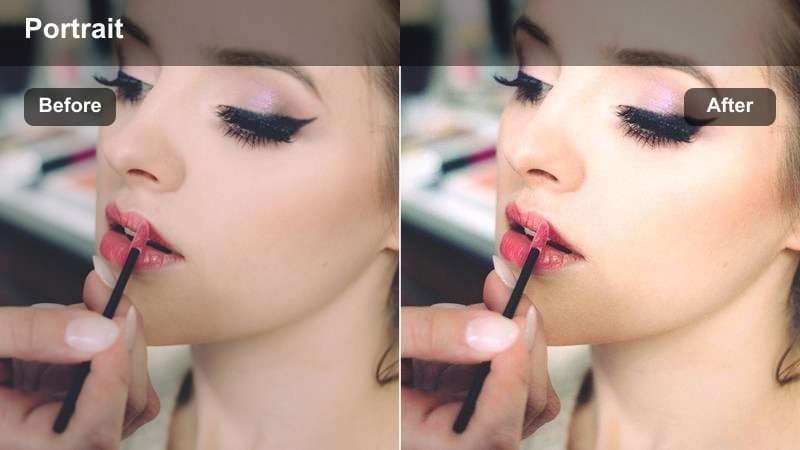
- Effect look: Warm, sunny tones with controlled highlights that keep outdoor skin tones from blowing out.
- Best for: Outdoor beauty vlogs, hair tutorials in natural light, and shopping trip content.
- Editing tip: Pull down highlights and whites a touch if you filmed in direct midday sun to keep cheeks from clipping.
Sunny Day Out Beauty is optimized for hard natural light, such as walking down a bright street or filming hair content outside. It adds a pleasant golden warmth while reining in extreme highlights on the forehead, cheeks, and nose so skin looks bright but not overexposed.
Once in Filmora, apply the LUT and then use the basic Color controls to reduce highlights and whites slightly if you shot in midday sun. You can also add a bit of shadow lift to reveal detail in hair and background, creating a warm, travel-friendly aesthetic without sacrificing flattering skin tones.
Cozy Indoor Beauty
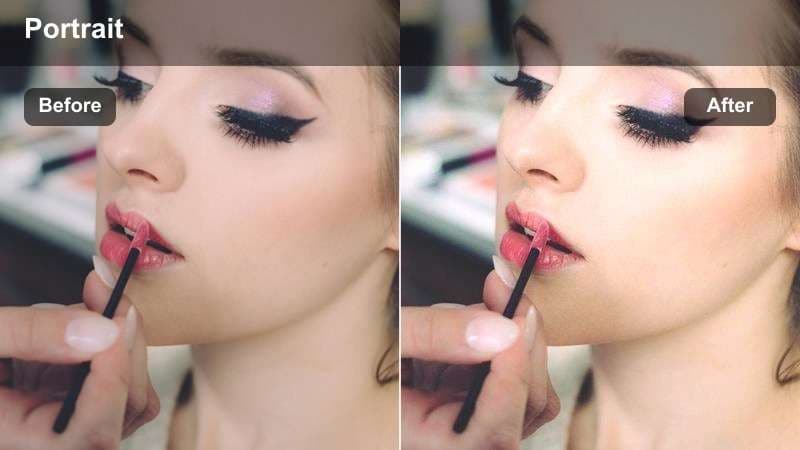
- Effect look: Soft, warm indoor tones that tame orange lamps and make skin appear calm and even.
- Best for: Bedroom routines, nighttime skincare, and couch beauty chats under warm bulbs.
- Editing tip: Drop orange saturation slightly after applying the filter if your room has extra-warm bulbs.
Cozy Indoor Beauty helps you keep that comfortable nighttime ambience without turning skin into an orange patch. It softens contrast, gently cools overly warm highlights, and smooths out the influence of household lamps so your complexion looks even and relaxed.
In Filmora, place this LUT on clips shot under bedside lamps or fairy lights, then tweak the saturation of the orange and yellow ranges if the room is still too warm. Light noise reduction can also help if you shot at high ISO, giving your nighttime skincare or chatty videos a calm, cinematic feel that still looks like real life.
Cinematic Portrait Beauty Filters
Cinematic Soft Focus
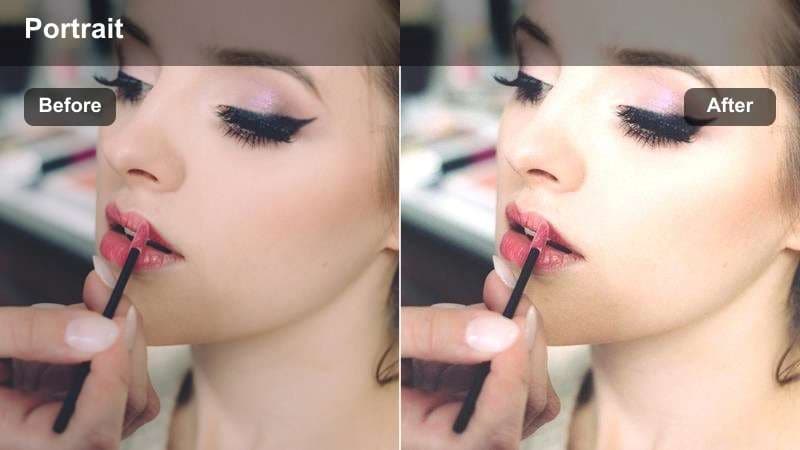
- Effect look: Film-inspired soft contrast with a gentle glow around highlights that flatters close-up portraits.
- Best for: Cinematic beauty b-roll, slow-motion hair flips, and elegant product close-ups with faces.
- Editing tip: Combine with a slight blur or diffusion overlay around the frame edges while keeping eyes sharp.
Cinematic Soft Focus is designed to give your portrait clips a dreamy, filmic character. It adds a delicate bloom to highlights on cheekbones and hair, lowers contrast in shadows, and subtly mutes colors so the overall look feels refined and luxurious rather than like a raw vlog.
Inside Filmora, apply this LUT to your beauty b-roll and pair it with a blur or diffusion effect around the frame edges, making sure the eyes remain crisp. This technique draws attention to your subject's gaze and high points of the face while backgrounds melt into a soft, aesthetic haze ideal for intros and product shots.
Neutral Skin Match
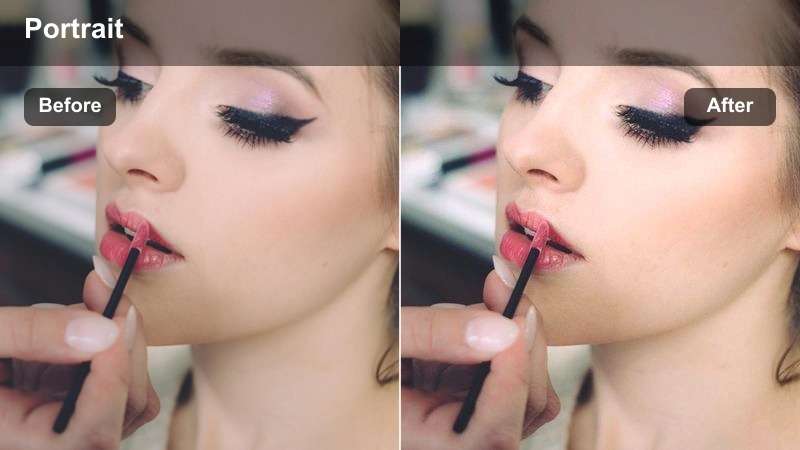
- Effect look: Balanced, true-to-life skin tones with minimal color shift and subtle smoothing across complexions.
- Best for: Multi-person beauty videos, collabs, and tutorials featuring a variety of skin tones.
- Editing tip: Use separate exposure and white balance adjustments per clip to match subjects before applying the filter.
Neutral Skin Match focuses on accurate, respectful representation of different skin tones in the same frame. It minimizes strong color casts, keeps saturation realistic, and applies balanced contrast so deep, medium, and fair complexions all look true-to-life under shared lighting.
In Filmora, first balance exposure and white balance for each camera angle or person, then apply Neutral Skin Match as your final unifying LUT. This workflow helps group beauty collabs, challenge videos, and tutorial panels feel cohesive while preserving the individual character of every complexion.
Dramatic Portrait Depth
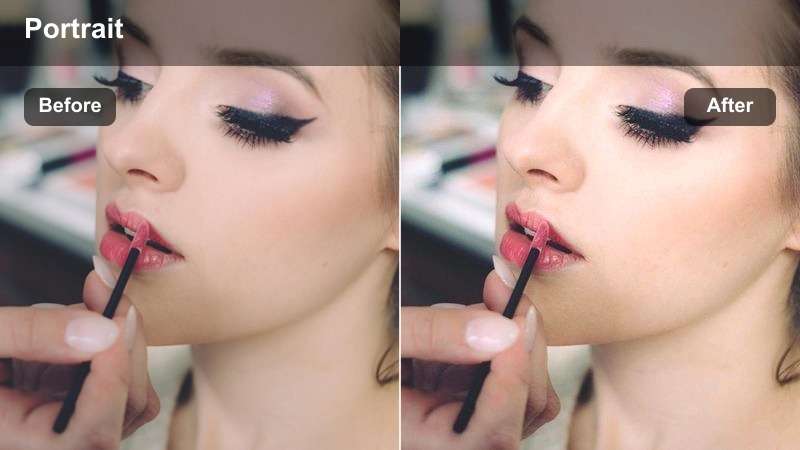
- Effect look: Deeper shadows, muted backgrounds, and sculpted highlights to emphasize facial structure.
- Best for: Moody portrait intros, dramatic beauty reveals, and editorial-style hair and makeup shots.
- Editing tip: Add a small amount of local contrast to cheekbones and jawline areas while keeping under-eyes soft.
Dramatic Portrait Depth leans into contrast and shadow to carve out cheekbones, jawlines, and contour work. It deepens the background, slightly mutes overall saturation, and brightens selective highlights so your subject stands out with strong, editorial-style presence.
Apply this LUT in Filmora for dramatic reveals, lookbook intros, and moody portrait reels. Use masks or keyframed adjustments to add extra local contrast along the cheekbones and jaw while softening under-eye areas, maintaining flattering skin even as the overall image becomes more cinematic and bold.
Tips for Using Free Luts For Beauty Video Filters in Filmora
- Shoot slightly flatter and brighter than you want the final result so beauty filters have room to smooth skin without crushing detail.
- Avoid strong colored walls or neon lights near the face, as they can tint skin in ways that filters and LUTs struggle to fix.
- Always check your grade on a phone screen because that is where most beauty content is watched and small color shifts show up fastest.
- Use subtle sharpening on eyes and lashes only and keep global sharpening low to avoid emphasizing pores and texture.
- Batch-grade similar clips by copying and pasting filter settings to maintain consistent skin tone across an entire episode.
- Stack LUTs with Filmora's built-in beauty and blur filters gradually, increasing intensity just until the face looks polished but still natural.
- Save different presets for daylight, indoor, and nighttime filming so you can apply the right beauty look quickly in future projects.
With the right free LUTs for beauty video and a few carefully chosen filters, you can turn raw portrait footage into polished content that flatters every complexion.
Save the complete beauty setup as a Filmora preset for future edits. For a portable color base, Filmora can also export the compatible color adjustments from a selected video or image clip as a .cube LUT for reuse across clips or for collaborators using DaVinci Resolve, Adobe Premiere Pro, or Final Cut Pro.
secure download