

 100% Security Verified | No Subscription Required | No Malware


 ChatGPT
 Perplexity
 Gemini
 Claude
 Grok
Grok
These free LUT-style filters for reels video are designed for creators and editors who want fast, cinematic color without spending hours on grading or buying expensive packs.
Use them as your go-to presets to match trends, polish your brand look, and keep your short-form content looking consistent across Instagram reels, TikTok, and YouTube shorts.
In this article
Warm Golden Hour Reels Outdoors
Sunset Glow Reel
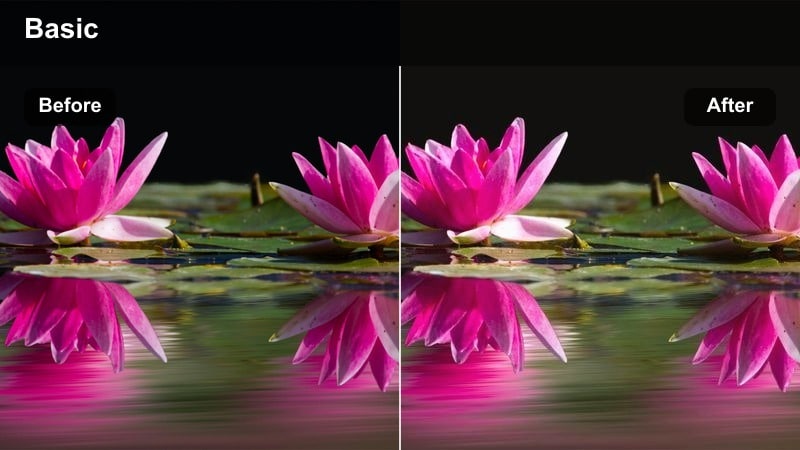
- Effect look: Soft golden highlights with lifted shadows and a gentle warm tint that mimics perfect sunset light.
- Best for: Outdoor lifestyle reels, travel vlogs, and beach moments shot close to sunset or sunrise.
- Editing tip: Reduce contrast slightly on overexposed clips and add a subtle vignette to keep attention on your subject.
Sunset Glow Reel gives your footage the warm, flattering tones of golden hour even if you shot when the light was a little too harsh or too flat. In Filmora, this free LUT-style filter wraps your scene in soft golds, lifts the shadows, and gently warms the entire frame so skies, hair light, and skin all feel cinematic and cohesive.
Apply it to backlit clips, beach walks, rooftop hangs, or any outdoor reels where you want a romantic, scroll-stopping mood. After you drop the filter on your vertical clips in Filmora, fine-tune exposure and contrast on each shot so details in faces and backgrounds stay clean while the warm color remains consistent across your full reel.
Instead of building every look from scratch, Filmora's AI tools analyze your reels and suggest color presets that feel like ready-made LUTs for your scene. These AI-powered looks give you quick, cinematic starting points so you can focus more on storytelling and pacing.
You can start from these smart suggestions and then fine-tune exposure, contrast, and saturation to match your brand or the trend you are chasing. This workflow makes it easy to keep a consistent style across multiple reels without manually grading every clip.
 secure download

Filmora lets you scroll through filters and see instant previews right on your vertical timeline so you can quickly compare looks. As you audition different filters, you will immediately see how they affect skin tones, skies, city lights, and text overlays.
This live preview workflow helps you land on a filter that matches your location and mood while still standing out in the feed. It also makes it easy to keep the same LUT-style filter across multiple clips in your reel for a professional, unified finish.
secure downloadYou can combine Filmora filters with external LUTs to create custom grades that feel unique but are still fast to apply across multiple reels. This layered approach lets you use a base LUT for overall color and then stack Filmora filters to push mood, contrast, or stylized tones.
Once you have dialed in a look you love, save it as a preset so you can reuse the same signature style on Instagram reels, TikTok, and YouTube Shorts in one click. Over time, this helps your short-form content build a recognizable, professional visual identity.
secure downloadWarm Street Amber
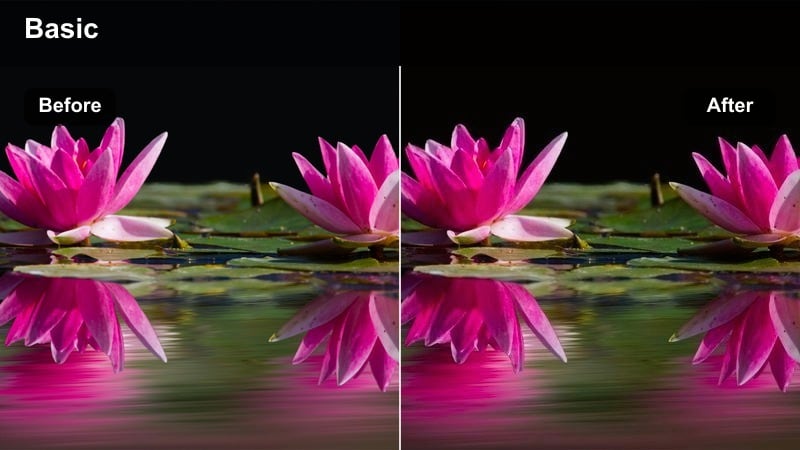
- Effect look: Amber-tinted highlights with slightly muted blues for cozy, nostalgic city reels.
- Best for: Evening city strolls, outfit-of-the-day reels, and handheld POV walking shots.
- Editing tip: Add a bit of motion blur or speed ramping to emphasize the warm city movement in your vertical frame.
Warm Street Amber wraps your city footage in an inviting amber wash while gently toning down cool blues for a soft, nostalgic feel. In Filmora, this LUT-style filter helps streetlights, shop windows, and reflective surfaces glow without overpowering your subject.
Use it on OOTD walks, cozy date-night POVs, or handheld B-roll where you want the city to feel warm and cinematic rather than harsh. After applying the filter, experiment with subtle motion blur effects and speed ramps in Filmora to highlight footsteps, car passes, or hair flips, keeping the energy up while the color stays rich and consistent.
Golden Travel Diaries
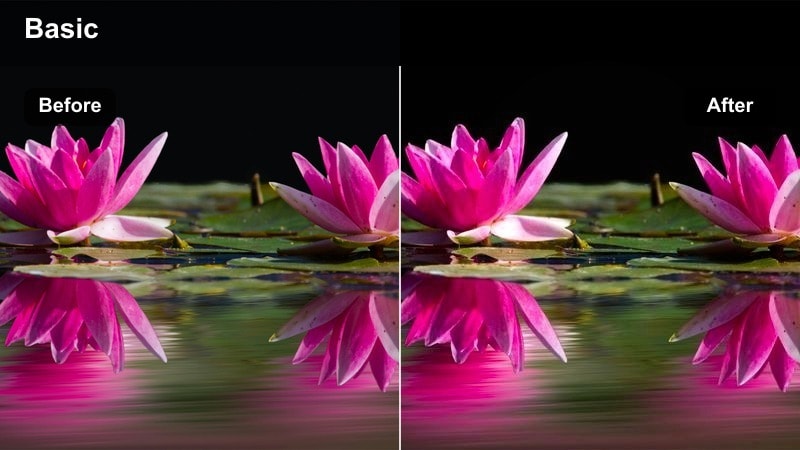
- Effect look: High-contrast golden tones with crisp details and subtly boosted saturation for postcards-in-motion.
- Best for: Travel montage reels, city skylines, and landmark shots captured in late afternoon light.
- Editing tip: Cut on movement like whip pans or quick head turns to keep the energy high and match the punchy grade.
Golden Travel Diaries gives your travel reels a bold, high-contrast glow that makes skylines, landmarks, and street scenes look like living postcards. In Filmora, this filter sharpens details, boosts golden hues, and deepens contrast so buildings, clouds, and foliage all pop on mobile screens.
Apply it across all clips in a destination reel for a cohesive, explore-page-ready look. Then, use Filmora to trim clips tightly and cut on whip pans, turns, or quick camera moves so the energetic pacing matches the punchy color, creating a dynamic montage that viewers want to rewatch.
Neon City and Nightlife Reels
Neon Pop Reel
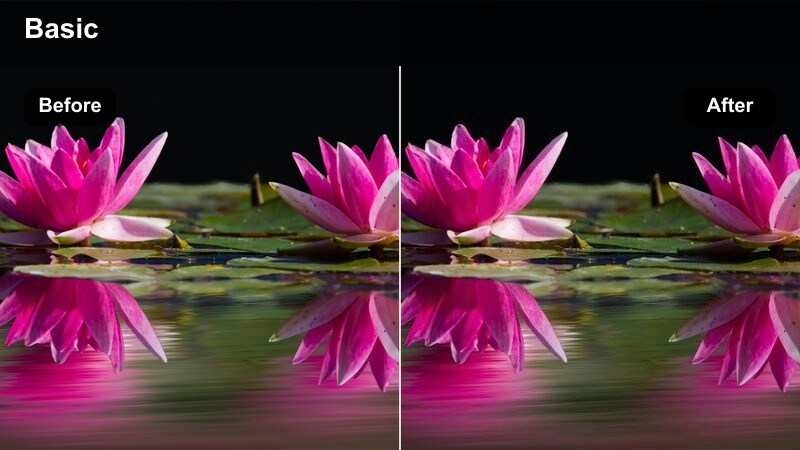
- Effect look: Punchy contrast with saturated neon blues, pinks, and purples, plus slightly crushed blacks.
- Best for: Night city reels, club entrances, street signs, and rainy sidewalks reflecting neon lights.
- Editing tip: Lean into slow-motion or hyperlapse and sync transitions with beat drops to match the bold colors.
Neon Pop Reel is built to make city nights explode with color, pushing blues, pinks, and purples to give any street a cyberpunk vibe. In Filmora, the slightly crushed blacks and boosted saturation create strong separation between your subject and background signs, screens, or reflections.
Use it on rainy sidewalks, nightlife alleys, and storefront reels where neon is a key part of the story. After applying the filter, sync your cuts, speed ramps, and slow-motion moments to the music in Filmora so every beat drop lines up with a new burst of neon color, keeping viewers locked in.
Midnight Street Cinematic
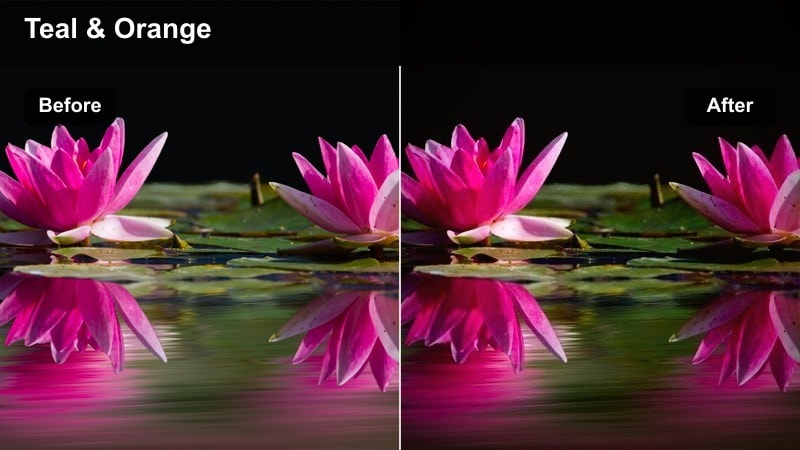
- Effect look: Cool teal shadows with warm highlights and a subtle fade in the blacks for a filmic night look.
- Best for: Moody walking shots under street lamps, parking garage reels, and late-night storytelling.
- Editing tip: Use gentle handheld camera shake or a slight slow zoom to create tension and cinematic atmosphere.
Midnight Street Cinematic gives classic teal shadows and warm highlights to your night reels, producing a film-style contrast that feels moody but controlled. In Filmora, the soft fade in the blacks prevents crushed details while still keeping the frame dark and atmospheric.
Apply it to narrative reels, solo walks, or parking garage scenes where you want a movie-trailer tone. Combine the filter with Filmora tools like subtle zooms, gentle shake, and masked exposure adjustments on faces so your subject moves from pool to pool of light while the environment stays rich and dramatic.
Club Lights Reel
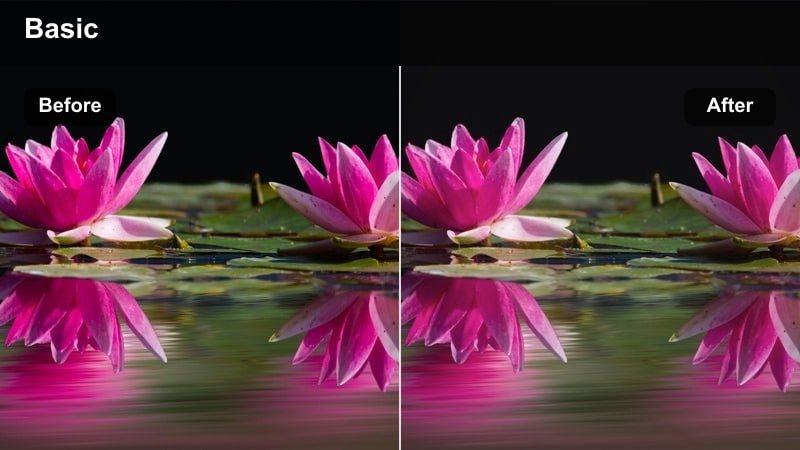
- Effect look: Strong color contrast between magentas and cyans with raised blacks for a hazy party aesthetic.
- Best for: Nightlife reels, DJ sets, concert clips, and festival crowd shots with flashing lights.
- Editing tip: Cut on light flashes or beat changes and add a light flicker effect to enhance the energetic grade.
Club Lights Reel is tuned for concerts, DJ sets, and nightlife clips, exaggerating magenta and cyan lighting to create a thick, hazy party mood. In Filmora, the raised blacks and stylized colors keep the scene energetic and dreamy instead of just dark and noisy.
Apply it to crowd shots, stage close-ups, and POV moments from the dance floor, then edit your reel to the music using Filmora beat detection, light flash cuts, and flicker effects. Fine-tune HSL in Filmora afterward to protect skin tones so friends, performers, and VIP moments still look flattering under heavy color shifts.
Bright Minimal and Lifestyle Reels
Clean Creator Desk
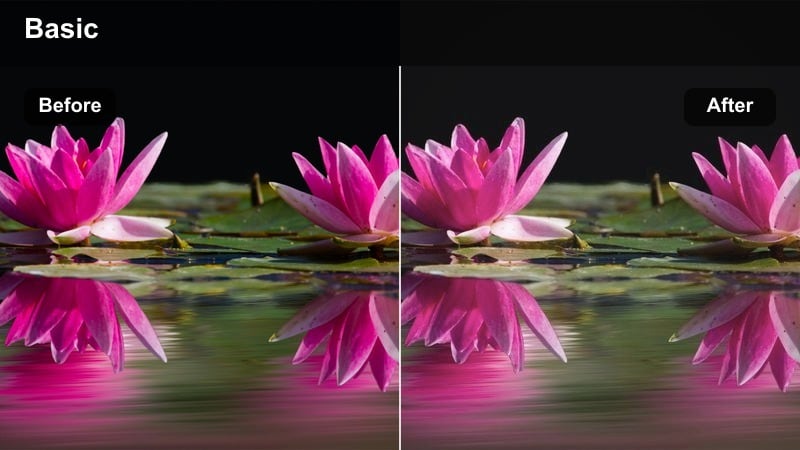
- Effect look: Bright, low-contrast whites with soft pastel tones and gentle clarity on details.
- Best for: POV workspace reels, editing setups, and creator behind-the-scenes content shot near windows.
- Editing tip: Straighten lines and crop tighter in vertical to highlight your setup and keep the frame satisfying.
Clean Creator Desk brightens whites and softens contrast to give your workspace a calm, minimal aesthetic that feels ready for Pinterest and reels alike. In Filmora, this filter adds just enough clarity to keyboards, gear, and coffee mugs so the scene looks crisp without becoming harsh.
Use it for desk tours, editing POVs, and behind-the-scenes clips shot near natural window light. After applying the filter, straighten vertical lines with Filmora cropping tools, tighten your vertical framing around the most important objects, and lightly adjust highlights so white tables and walls stay bright but still show texture.
Soft Lifestyle Pastel
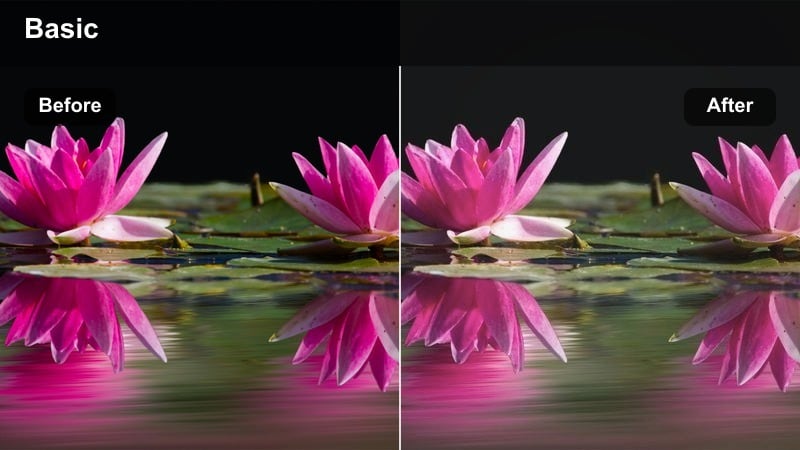
- Effect look: Muted contrast with creamy highlights and gentle pastel shifts in blues and greens.
- Best for: Morning routine reels, coffee walk POVs, and soft urban lifestyle B-roll.
- Editing tip: Use slow pans and subtle speed ramps instead of hard cuts to match the relaxed mood.
Soft Lifestyle Pastel turns everyday sidewalks and cafes into dreamy, pastel-toned scenes with creamy highlights and reduced contrast. In Filmora, this LUT-style filter smooths out harsh shadows and gently shifts blues and greens so skies, buildings, and plants all feel calm and airy.
It is ideal for morning routines, journaling clips, and gentle city walks where you want a relaxed, comforting mood. Apply the filter first, then in Filmora use slow pans, subtle speed ramps, and longer clips instead of rapid transitions so the visual pacing matches the soft, pastel color treatment.
Crisp Daylight Creator
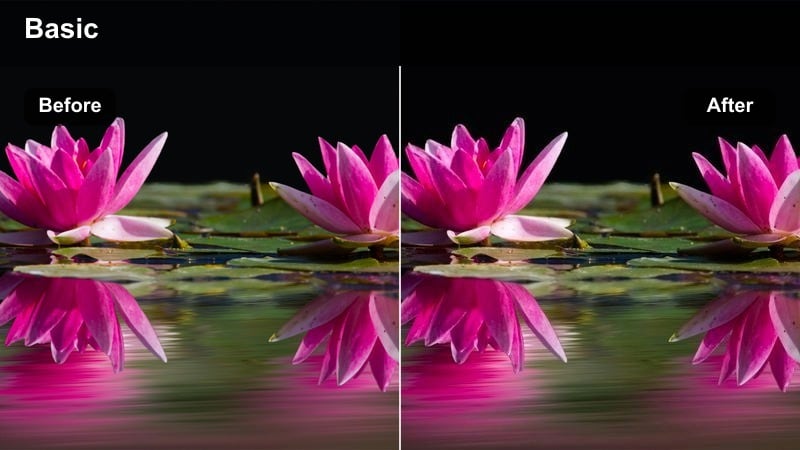
- Effect look: Neutral, slightly cool whites with clean contrast and natural skin tones optimized for talking-head reels.
- Best for: Educational reels, tutorials, talking-to-camera content, and product explainers shot in daylight.
- Editing tip: Keep your background a bit darker than your face and use this filter to maintain a sharp, professional look.
Crisp Daylight Creator is tuned for talking-head and tutorial content, keeping whites neutral and skin tones natural while adding clean, professional contrast. In Filmora, this filter immediately polishes your A-roll so it looks ready for feed placement or ad use without heavy manual grading.
Use it on any daylight educational reel, from how-tos to list-style tips. Position yourself near a window, keep your background slightly darker in-camera, then apply the filter and adjust exposure in Filmora so your face stays the brightest point of the frame, reinforcing authority and making text overlays easy to read.
Moody Cinematic Storytelling Reels
Urban Cinema Teal
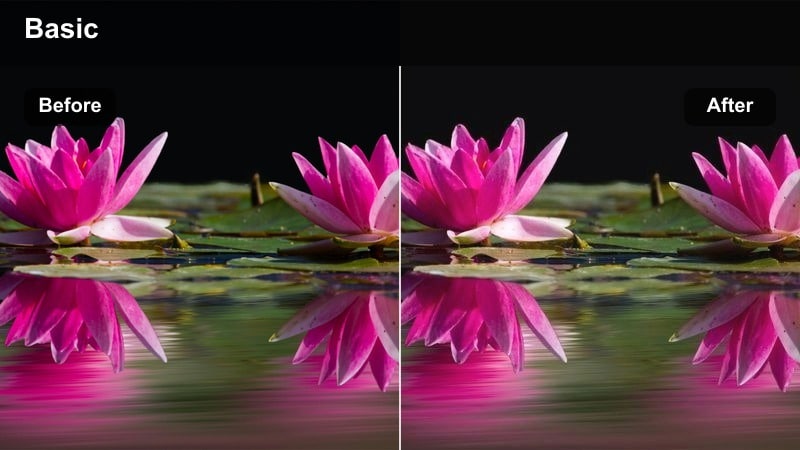
- Effect look: Teal shadows with warm skin tones, slightly faded blacks, and restrained saturation for a film look.
- Best for: Short cinematic story reels, moody alleyways, and character-focused city portraits.
- Editing tip: Use longer takes with gentle push-in shots and J-cuts to emphasize emotion over quick transitions.
Urban Cinema Teal delivers the classic teal-shadows, warm-skin combo that instantly adds cinema vibes to urban storytelling. In Filmora, the faded blacks and controlled saturation keep the look stylish and modern without oversaturating your footage or making it feel like a heavy filter.
Apply it to portrait reels, alleyway walks, or small character-driven stories framed against city textures. Then, build your edit in Filmora with longer shots, slow push-ins, and J-cuts where audio leads into the next scene, allowing the filter and composition to carry the emotional weight rather than flashy transitions.
Story Frame Fade
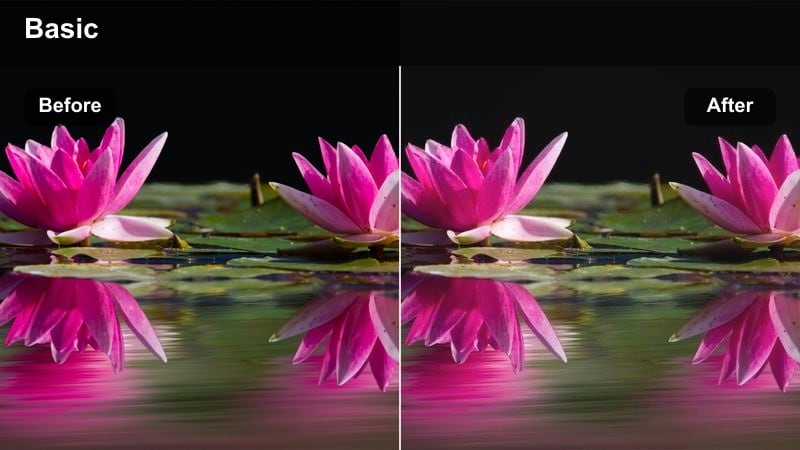
- Effect look: Muted contrast with gently lifted blacks and a soft cool cast in the shadows for a diary-style film feel.
- Best for: Narrated reels, text-on-screen stories, and reflective urban walks or commute clips.
- Editing tip: Overlay subtitles or captions with lots of breathing room so the faded grade feels intentional and calm.
Story Frame Fade mutes contrast, lifts blacks, and adds a subtle cool tint to shadows, giving everyday footage a reflective, diary-style mood. In Filmora, this filter is perfect when you want the grade to support voiceovers, captions, or personal storytelling without competing for attention.
Use it on commute clips, window views, or slow walks where text and audio are the focus. After applying the filter, design simple captions or subtitles in Filmora with ample negative space around your subject, and keep camera movement minimal so the viewer can settle into the calm, journal-like aesthetic.
Gritty Street Journal
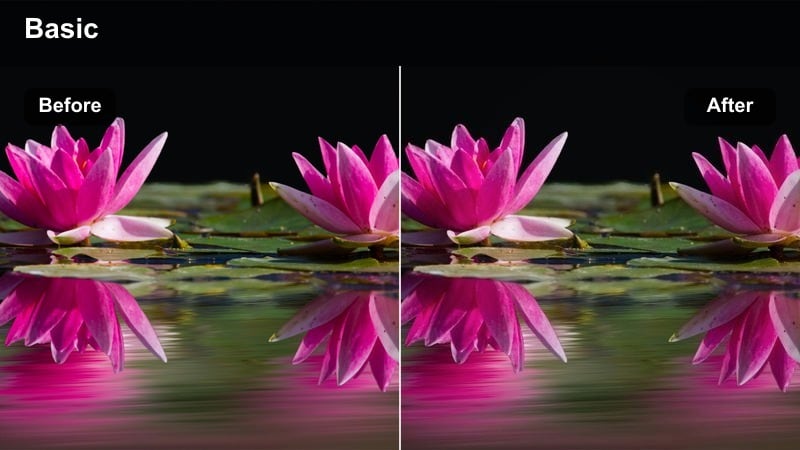
- Effect look: Crunchy midtones, slightly desaturated colors, and textured shadows that emphasize city grit.
- Best for: Street reels, skate clips, graffiti walls, and handheld walking shots in older parts of the city.
- Editing tip: Stabilize only lightly to keep some handheld texture, and match cuts to footsteps or board impacts.
Gritty Street Journal pulls back saturation, toughens midtones, and leans into textured shadows to highlight the raw side of city life. In Filmora, this LUT-style filter makes cracked pavement, graffiti, and worn walls feel intentional and cinematic instead of just low contrast or underexposed.
Use it on skate sessions, street photography B-roll, or documentary-style walks shot handheld. Apply the filter, then lightly stabilize clips in Filmora so some shake remains, and cut to footsteps, board landings, or traffic sounds, letting the gritty visual style reinforce the rough, energetic pacing of your reel.
Tips for Using Free Luts For Reels Video Filters in Filmora
- Shoot with consistent lighting across your clips so the same filter looks natural on every part of your reel.
- Always adjust exposure and white balance before applying filters so the grade stays clean and predictable.
- Test your reel on a phone screen and in bright sunlight to make sure details and text remain readable.
- Create one or two signature looks for your brand and reuse them so your audience recognizes your style.
- Keep skin tones in check by fine-tuning HSL sliders after you apply bold filters, especially on night or neon scenes.
- Save your favorite filter and LUT combinations as presets in Filmora to speed up color grading across multiple reels.
- Use Filmora keyframing to slowly increase or decrease filter intensity for scenes that move from bright to dark.
- Balance strong color styles with clean audio and clear captions so your reel stays both cinematic and easy to follow.
With these free LUT-style filters for reels video, you can quickly turn raw clips into polished, platform-ready edits that hold viewers for the full duration. Each look is tuned to solve a specific scenario, from neon nightlife to soft morning routines, so you can match your grade to the story you are telling.
Save your favorite looks as presets, keep your lighting consistent, and apply the same style to your next free LUTs for shorts video so your content feels cohesive everywhere. Combined with Filmora tools for AI-assisted color and fast vertical editing, you can build a recognizable visual identity across Instagram, TikTok, and YouTube Shorts without a complex color workflow.
secure download