

 100% Security Verified | No Subscription Required | No Malware

Give Reddit videos a consistent look with the Free Reddit Video LUT Pack, designed for educators and community creators who edit posts, explainers, and highlight reels in Filmora. These filter styles help shape readable, recognizable visuals without making screenshots, captions, or on-screen discussion details difficult to follow.
Use the pack to explore practical Reddit video color grading for different community moods, from clean educational walkthroughs to energetic comment highlights. Apply each look lightly, then adjust exposure, contrast, and skin tones so your final video stays authentic to the original post and audience.
In this article
Clear Feed Explainers
Clean Thread
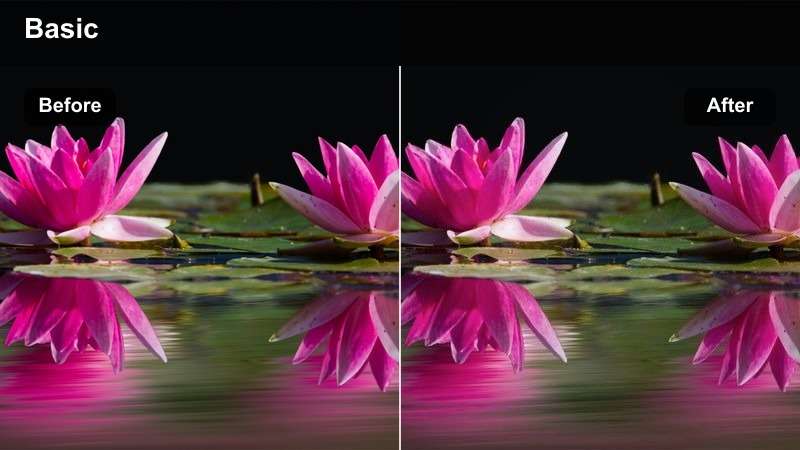
- Effect look: Bright neutral contrast with crisp whites and balanced skin tones
- Best for: Educational Reddit posts, screen recordings, and step-by-step explainers
- Editing tip: Keep intensity moderate so post text and interface details remain easy to read
Clean Thread gives Reddit explainers a bright, balanced appearance that keeps white browser panels, captions, and presenter footage easy to distinguish. Its neutral contrast works well when the video needs to feel clear and informative.
In Filmora, apply the filter at moderate strength, then check exposure and highlights before exporting. This helps preserve small usernames, vote counts, comment text, and other interface details that are important to the explanation.
Build a Consistent Community Color Palette
Use Filmora's color tools to create a repeatable palette for Reddit posts, presenter footage, captions, and highlight graphics. A consistent palette helps educators and community creators make different source clips feel like part of one series.
Start with the dominant colors in your community branding or subreddit graphics, then adjust filter intensity so those colors remain recognizable across screen recordings and camera footage.
 secure download

Soft Study
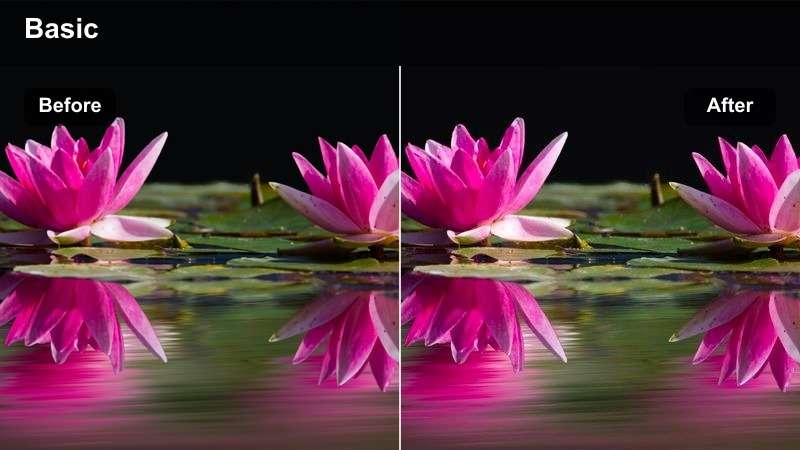
- Effect look: Gentle warmth with soft highlights and restrained shadows
- Best for: Learning communities, advice threads, and calm voice-over lessons
- Editing tip: Add a small amount of sharpening after applying the filter to maintain screen clarity
Soft Study adds gentle warmth and smooth highlights to educational Reddit videos without making the footage feel overly stylized. It suits thoughtful discussions, advice threads, and calm lessons where an approachable mood supports the message.
Use the temperature controls in Filmora to match the filter to the original lighting, then add a small amount of sharpening for screen recordings. Keep saturation restrained so screenshots and community branding remain natural.
Paper White
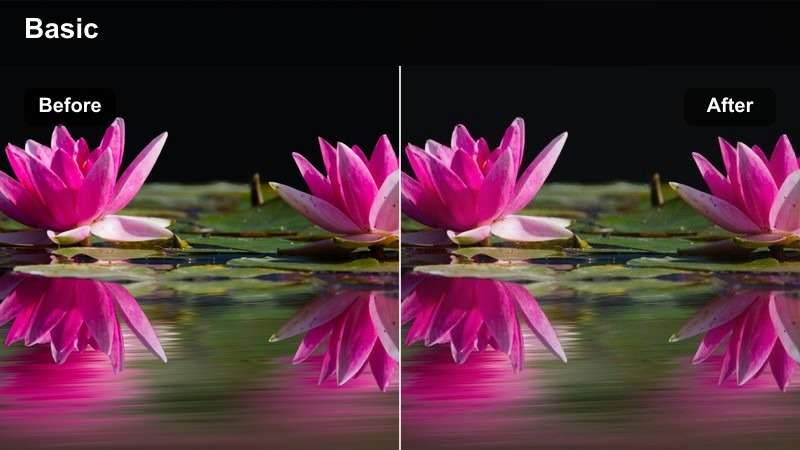
- Effect look: Clean whites, low saturation, and lifted midtones
- Best for: Tutorials that rely on screenshots, diagrams, and text-heavy posts
- Editing tip: Lower highlights slightly when white backgrounds compete with captions
Paper White creates a restrained, polished look for Reddit tutorials built around screenshots, diagrams, and text-heavy posts. Lifted midtones keep the content bright while low saturation reduces visual distractions.
In Filmora, lower highlights when white browser panels compete with captions or graphics. This keeps the background controlled while preserving enough brightness for faces, diagrams, and presenter footage.
Conversation and Commentary Scenes
Commentary Warmth
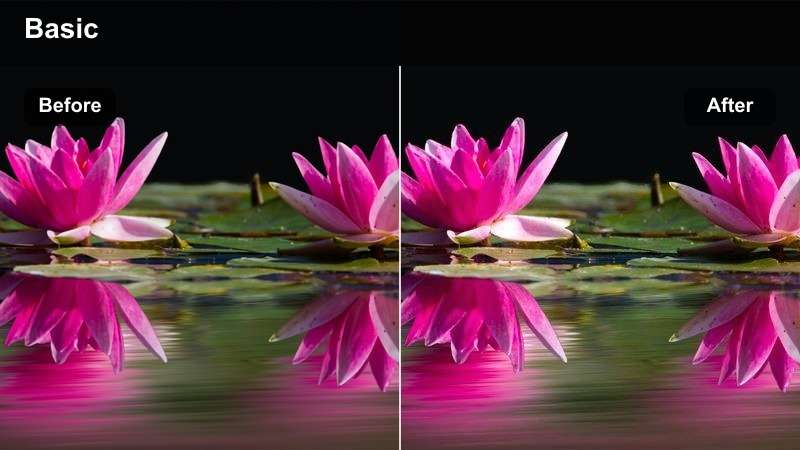
- Effect look: Warm midtones with gentle contrast and comfortable skin tones
- Best for: Creator commentary, reaction videos, and narrated community discussions
- Editing tip: Match the talking-head clip to the screen-recording segment before applying the full effect
Commentary Warmth gives reaction videos and narrated Reddit discussions a personable appearance. Warm midtones and gentle contrast help talking-head footage feel comfortable while keeping the community content visible.
Correct each source clip in Filmora before applying the shared look. Match webcam footage, phone clips, and screen recordings by adjusting white balance and exposure so transitions feel consistent.
Thread Cool
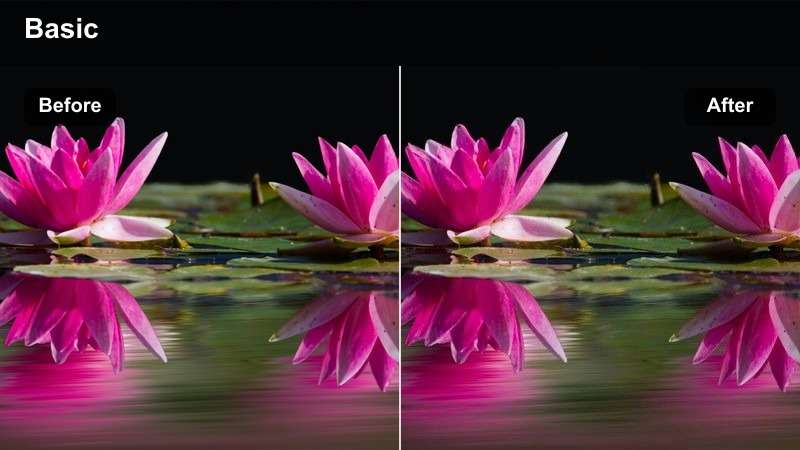
- Effect look: Cool shadows, controlled saturation, and modern digital contrast
- Best for: Technology communities, software walkthroughs, and analytical Reddit posts
- Editing tip: Add a subtle warm adjustment to faces if the cool shadows make the presenter look pale
Thread Cool uses blue-leaning shadows and controlled saturation to create a modern style for technology communities and analytical Reddit posts. It works especially well with software walkthroughs and digital interfaces.
After applying the look in Filmora, inspect faces and skin tones for gray or blue shifts. Use temperature and tint adjustments to restore natural presenter footage without removing the cool technical atmosphere.
Balanced Discussion
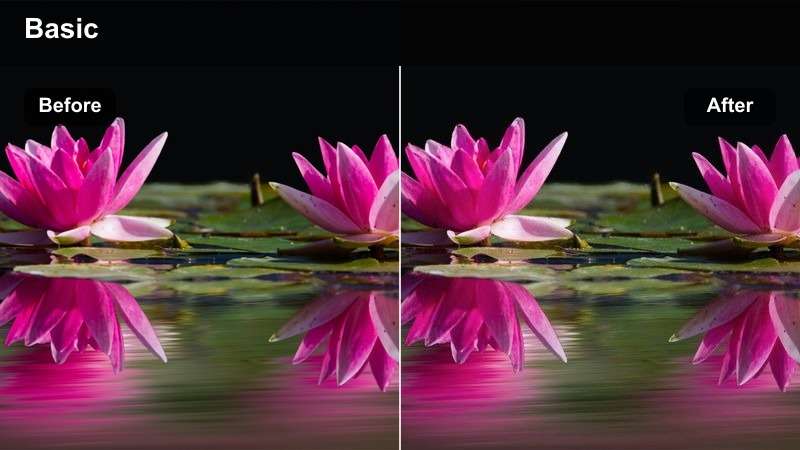
- Effect look: Neutral color, moderate contrast, and smooth highlight rolloff
- Best for: Debate recaps, community interviews, and multi-speaker discussions
- Editing tip: Use the same filter strength across camera angles to maintain continuity
Balanced Discussion is a flexible all-purpose look for debate recaps, interviews, and multi-speaker community videos. Neutral color and smooth highlights allow several viewpoints to share one visual style.
Apply the same filter strength across camera angles in Filmora, then make small exposure corrections clip by clip. This approach maintains continuity when contributors record under different lighting conditions.
Preview Reddit Video Filters Before Exporting
Compare several filter looks on the same Reddit clip to see how contrast, warmth, saturation, and clarity affect post screenshots and captions. This makes it easier to choose a style that supports the message instead of distracting from it.
Test the preview at the final aspect ratio, especially for vertical community highlights where interface text and comment cards occupy much of the frame.
secure downloadCommunity Highlight Reels
Highlight Pop
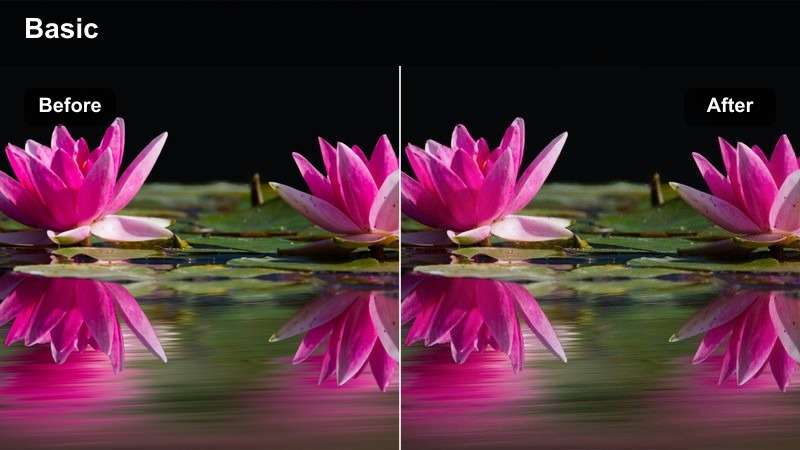
- Effect look: Crisp contrast, lively color, and bright accent tones
- Best for: Top comment compilations, memorable replies, and fast community recaps
- Editing tip: Use short bursts of the effect on key moments and soften it during dense text sections
Highlight Pop brings crisp contrast and lively color to quick-cut Reddit compilations. Bright accents can help memorable replies, top comments, and punchlines stand out in a fast-moving recap.
Use the strongest intensity only on key moments in Filmora and soften the effect during dense text sections. Keyframes or split clips can help control the visual energy across a longer highlight reel.
Upvote Glow
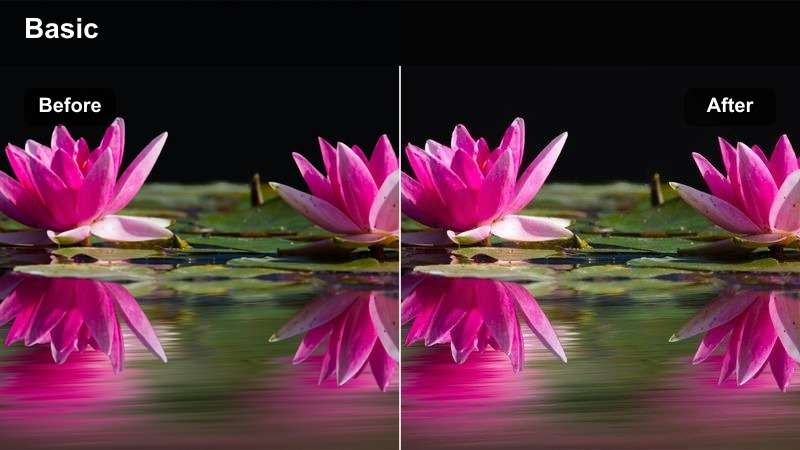
- Effect look: Warm highlights, rich midtones, and a subtle polished glow
- Best for: Celebratory community milestones, popular posts, and creator thank-you videos
- Editing tip: Reduce glow around small interface elements to keep icons and counters defined
Upvote Glow adds warm highlights and a polished finish to milestone videos, popular posts, and creator thank-you messages. Its rich midtones support a celebratory tone without requiring heavy graphic effects.
Reduce glow intensity around vote counters, icons, and small interface elements in Filmora. If the screen still looks soft, add a small amount of sharpening after controlling the diffusion.
Rapid Recap
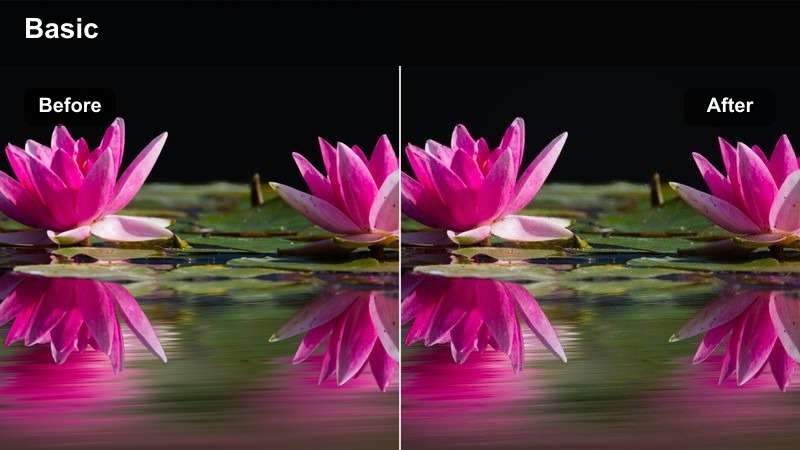
- Effect look: Punchy contrast, saturated accents, and quick visual energy
- Best for: Daily subreddit recaps, trending discussion summaries, and short vertical videos
- Editing tip: Check vertical crops carefully so faces, captions, and comment panels stay inside the safe area
Rapid Recap creates a punchy style for daily subreddit updates, trending discussions, and short vertical videos. Saturated accents and stronger contrast help the main information remain visible on small screens.
Review vertical crops in Filmora and on a mobile device before publishing. Keep faces, captions, and comment panels inside the safe area, then adjust saturation and caption size for comfortable viewing.
1000+ Video Filters and 3D LUTs
Use this Reddit video LUT pack as a practical starting point for community video color grading in Filmora. Apply a selected LUT or filter, then refine exposure, white balance, contrast, and skin tones for the footage you are editing.
For consistent series production, save a customized version of your preferred look and reuse it across Reddit posts, how-to explainers, and community highlights.
secure downloadAuthentic Community Stories
Natural Post
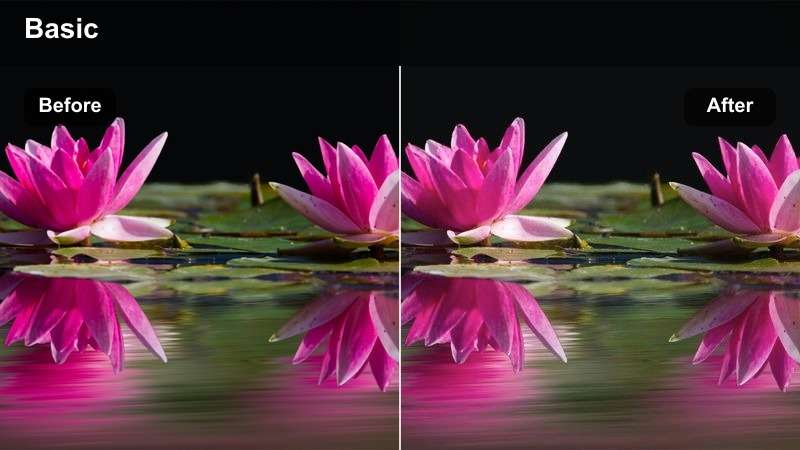
- Effect look: Minimal correction, natural saturation, and soft realistic contrast
- Best for: Personal stories, community updates, and documentary-style Reddit posts
- Editing tip: Use it as a starting point and correct exposure separately for each source clip
Natural Post provides minimal correction for personal stories, community updates, and documentary-style Reddit content. Natural saturation and soft contrast let the people and context of the post remain the focus.
Use the filter as a starting point in Filmora, then correct exposure separately for each source clip. Transitions, captions, and pacing can create emphasis without relying on heavy effects.
Memory Thread
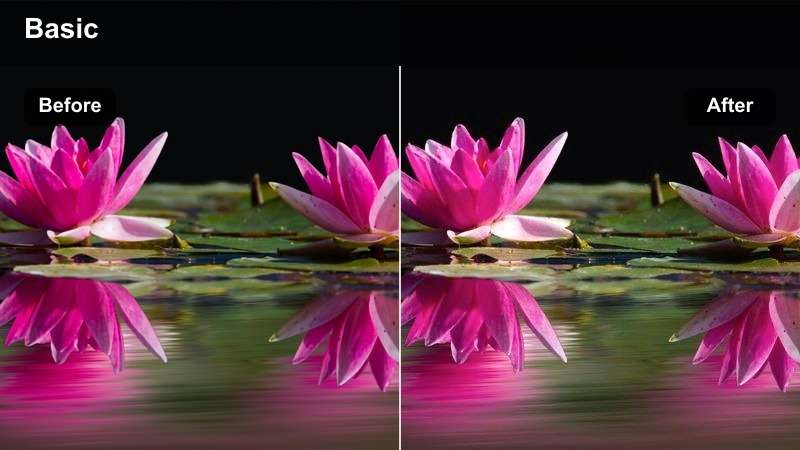
- Effect look: Soft warmth, faded contrast, and a gentle nostalgic finish
- Best for: Archived community posts, anniversary videos, and reflective story recaps
- Editing tip: Add the nostalgic treatment after matching older and newer footage for consistent exposure
Memory Thread adds soft warmth and faded contrast to archived discussions, anniversary videos, and reflective community recaps. The gentle nostalgic finish can signal history without overwhelming the story.
Match older and newer footage in Filmora before applying the treatment. Keep text layers sharp and use the softer effect mainly on background footage or transition clips so screenshots stay readable.
Creator Documentary
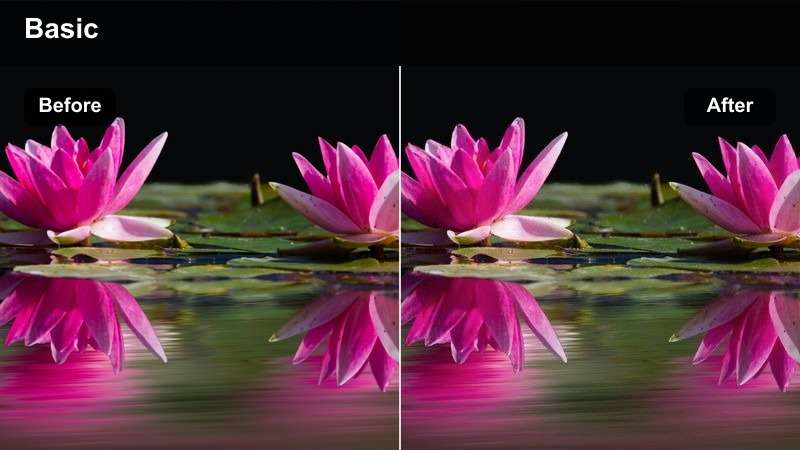
- Effect look: Rich natural contrast, controlled highlights, and documentary-style depth
- Best for: Long-form community profiles, moderator interviews, and issue-focused explainers
- Editing tip: Use cutaway screenshots and measured color changes to separate context from commentary
Creator Documentary gives long-form community profiles, moderator interviews, and issue-focused explainers a grounded visual structure. Rich natural contrast adds depth while controlled highlights protect faces and supporting screenshots.
Use the filter as a base in Filmora, then vary brightness or saturation slightly between interviews, screenshots, and cutaway footage. These measured changes help viewers understand each storytelling layer without breaking continuity.
Tips for Using Reddit Video Lut Download Filters in Filmora
- Correct exposure and white balance before applying a Reddit video filter.
- Keep LUT or filter intensity low when videos contain small post text, comment cards, or interface details.
- Match screen recordings and talking-head footage before using the same final look across the timeline.
- Preview exports on both desktop and mobile devices, especially for vertical community highlights.
- Save customized filter settings as reusable presets for recurring Reddit posts and explainers.
- Use stronger effects for transitions and highlight moments, but keep informational sections clean and readable.
The Free Reddit Video LUT Pack gives educators and community creators flexible Filmora-friendly styles for clear explainers, thoughtful discussions, fast highlight reels, and authentic community stories. Choose a look that supports the tone of each Reddit post, then fine-tune it for readable text and natural footage.
Start with the Natural Post or Clean Thread style for everyday content, and explore more expressive options when you are editing milestones, recaps, or high-energy community highlights.
secure download