

 100% Security Verified | No Subscription Required | No Malware

These Free Summer Vacation LUTs in Filmora are designed for travelers and vloggers who want bright, punchy colors in their summer trip footage without spending hours on color grading.
Whether you are filming vacation vlogs, casual travel videos, or quick clips for social media, these ready-made filters help you balance sunlight, boost blues and skin tones, and keep your summer memories looking fresh and cinematic.
In this article
Sunny Beach Days and Ocean Escapes
Golden Sand Glow
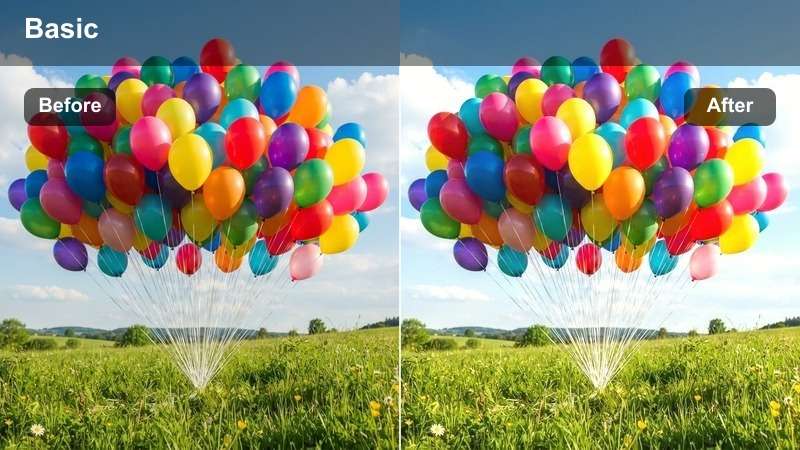
- Effect look: Warm sun-kissed tones that deepen sand color and gently soften harsh midday light on beach scenes.
- Best for: Beach walks, shoreline vlogs, and wide shots of tropical resorts under strong sunlight.
- Editing tip: Lower contrast slightly if your footage is shot at noon to preserve skin detail and sand texture.
Golden Sand Glow adds a warm, sun-kissed wash to your vacation clips, deepening sand tones and easing the harsh edges of bright sunlight. In Filmora, this LUT-style filter is ideal when your beach footage looks too clinical or flat, quickly shifting it toward a more cinematic, postcard-ready look.
Use it on wide shots of resorts, shoreline walks, or establishing shots at the start of your vlog to set a warm summer mood. After applying in Filmora, fine-tune contrast and highlights so skin stays soft and natural while the sand and sky still feel bright and inviting.
Filmora combines these Free Summer Vacation LUT-inspired filters with AI tools that analyze your footage and suggest balanced color adjustments automatically. Instead of manually dialing in exposure and white balance for every shot, you can let AI get you close in one click and then apply your favorite summer LUT-style filter on top.
Open your summer project in Filmora and try the AI-powered color tools before stacking your favorite vacation filters. This workflow gives you a clean base color correction and helps each LUT deliver consistent results across clips shot in different locations and lighting.
 secure download

Test each summer travel filter on a short clip of your vacation vlog to quickly see how it handles different lighting, from beaches and cities to mountain trails. Filmora lets you preview multiple filters side by side, so you can immediately compare sky color, skin tones, and shadow detail.
Import three or four clips from your latest trip and preview multiple filters in Filmora's effects panel to find your signature summer style. Once you know which LUT-style look works best for your channel, you can apply it across an entire sequence for a consistent vibe.
secure downloadOnce you find a combination of Filmora filters and basic corrections that you like, you can save the setup as a custom preset that works like your own Summer Vacation LUT. This makes it easy to keep the same bright, cinematic look from one vlog to the next without rebuilding your color grade every time.
Using the same preset across beach days, city walks, and road trips helps your channel feel cohesive, even when lighting and locations change. After you tweak a filter to match your taste, save it as a preset in Filmora so you can apply your summer look to every new travel video with one click.
secure downloadTurquoise Water Pop
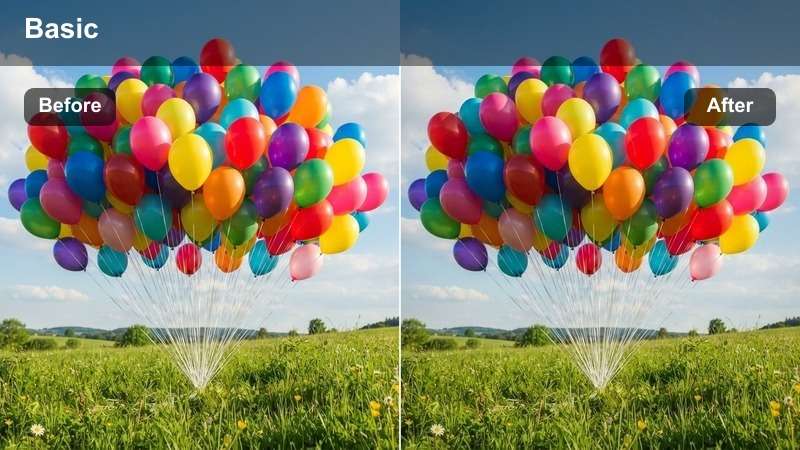
- Effect look: Bold turquoise and teal boost that makes ocean and pool water look vivid and refreshing.
- Best for: Poolside shots, snorkeling clips, and aerial footage over clear blue ocean water.
- Editing tip: Dial back saturation in greens if foliage starts to look neon, and add a slight vignette to draw attention to the water.
Turquoise Water Pop is designed to rescue dull or gray-looking water by intensifying aqua and teal channels without completely destroying realism. In Filmora, this LUT-style filter is perfect for drone passes over clear water, underwater action, or slow-motion pool shots where you want the blues to take center stage.
Apply it to clips where the ocean looks washed out, then fine-tune vibrance and HSL to keep skin tones pleasing while the water gains that glossy resort feel. A subtle vignette or framing crop in Filmora can further guide the viewer's eye to the brightest turquoise areas in your travel vlog.
Sun Lotion Soft
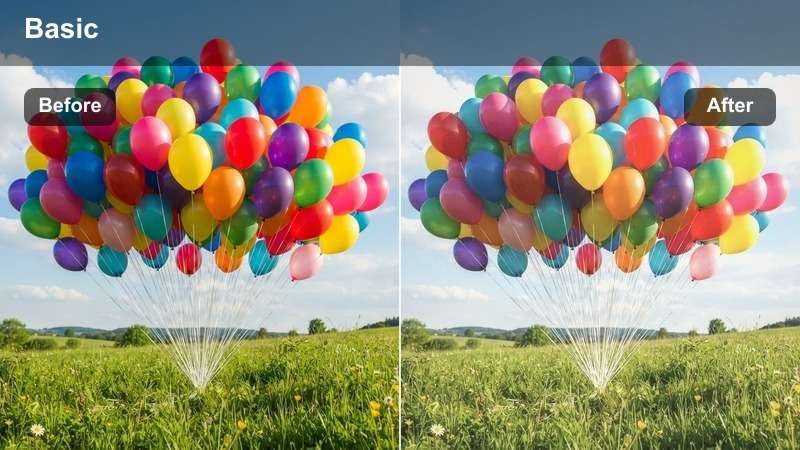
- Effect look: Soft, hazy highlights with gentle pastel colors that mimic a dreamy sunscreen-ad beach look.
- Best for: Slow-motion beach b-roll, handheld family vacation moments, and lifestyle pool scenes.
- Editing tip: Reduce sharpness a bit and add a subtle blur or glow to the brightest areas to enhance the dreamy atmosphere.
Sun Lotion Soft wraps your footage in gentle pastels and lowered contrast, ideal when you want a nostalgic, ad-style beach aesthetic. In Filmora, this LUT-style filter helps tame harsh sunlight and flattering skin, making it great for family clips, kids playing in the sand, or relaxed poolside shots.
Use it on close-ups or slow b-roll sequences where you want mood rather than maximum detail. After applying, experiment with Filmora's glow or blur effects on highlights and adjust whites slightly downward so your skies and waves keep enough detail within the dreamy look.
City Summer Adventures and Street Exploring
Sunset Rooftop Vibe
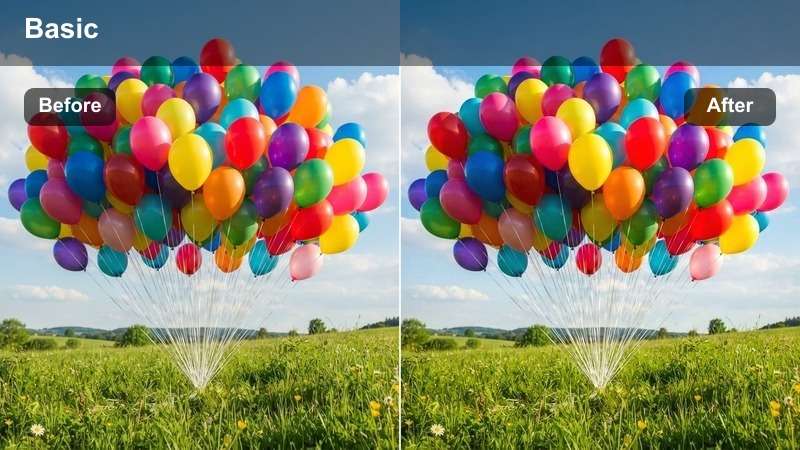
- Effect look: Warm orange and magenta tint that makes city skylines at golden hour look cinematic and saturated.
- Best for: Rooftop bars, skyline time-lapses, and city sunset walk-and-talk vlogs.
- Editing tip: If skin tones skew too red, adjust the hue of orange slightly toward yellow after applying the filter.
Sunset Rooftop Vibe enhances the natural warmth of golden hour with a subtle orange-magenta shift, giving skylines and rooftop scenes a more cinematic punch. In Filmora, it is especially effective on backlit silhouettes, skyline pans, and closing shots where you want your city to glow.
Apply it to clips shot just before or after sunset, then refine orange and red tones in the color panel to keep faces from looking too intense. Pair this look with smooth camera moves or time-lapses in your edit to create dramatic openers or outros for summer city vlogs.
Heatwave Street Clean
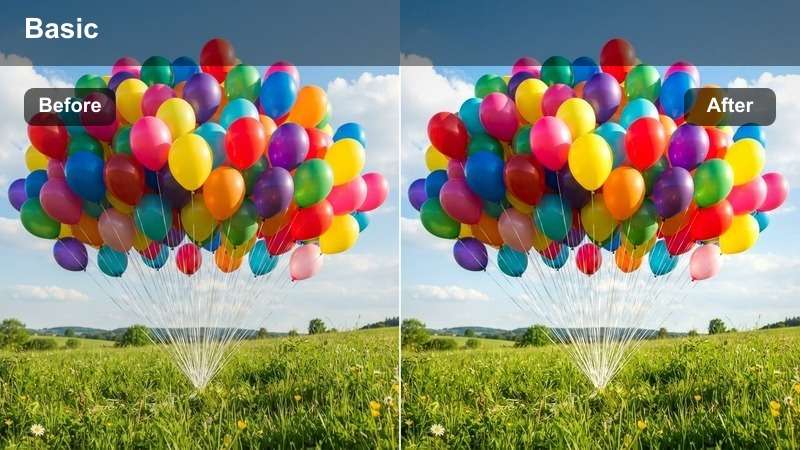
- Effect look: Clean, high-contrast look with crisp whites and subtle warm tones that cut through city haze.
- Best for: City walking tours, handheld street vlogs, and daytime market exploration.
- Editing tip: Use stabilization and add a tiny bit of film grain to pair with this sharp contrast look for a polished street style.
Heatwave Street Clean gives daytime city footage a crisp, contrasty finish that keeps whites bright and details sharp even in hazy heat. It is a strong match for travel vlogs that feature lots of motion, signage, and busy markets where you need definition.
In Filmora, apply this filter to your A-roll walking segments and wide street views, then add light stabilization and a touch of grain for a high-end, documentary feel. Watch saturation on already colorful scenes, using vibrance and individual color controls to keep the look punchy but not cartoonish.
Urban Summer Film
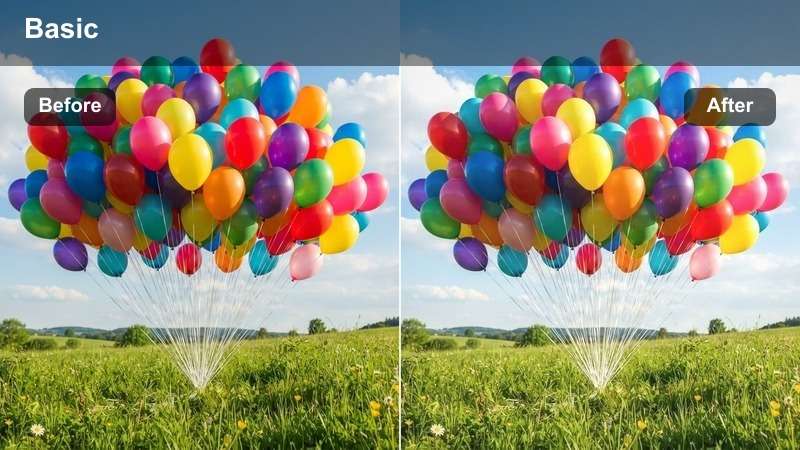
- Effect look: Soft film-like contrast with slightly faded blacks and a hint of warm grain for nostalgic city travel stories.
- Best for: Old town streets, café hopping, and cinematic b-roll of city details like doors, windows, and alleyways.
- Editing tip: Lower saturation just a touch to keep the film vibe, and add a subtle vignette for more vintage character.
Urban Summer Film tones down harsh contrast and deep blacks to imitate a gentle, film-inspired city palette. It is ideal in Filmora when you want your old town walks, cafe visits, and architectural details to feel like part of a relaxed, nostalgic travel diary.
Use it on B-roll clips of street corners, shop signs, and textures, and then add a light vignette to draw focus toward the center of the frame. Slightly lowering overall saturation while keeping warm tones present will help the film-like mood stay intact across your edit.
Mountain Escapes and Road Trip Views
Roadtrip Sunflare
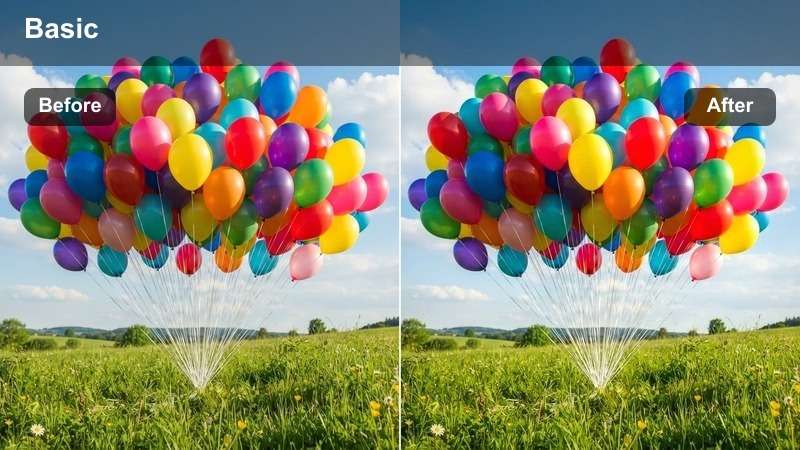
- Effect look: Bright highlights with warm flares and boosted saturation for blue skies and roadside scenery.
- Best for: Car window shots, highway time-lapses, and roadside stops during long summer drives.
- Editing tip: Add a slight tilt-shift blur at the top and bottom of the frame for a dreamy road-trip feel.
Roadtrip Sunflare amplifies blue skies and warm sunlight, making even simple highway shots feel energetic and cinematic. In Filmora, it works especially well for dashboard views, passing landscapes, and quick cutaways that show the journey between destinations.
Apply it to timelapse or sped-up road clips, then consider using tilt-shift or selective blur at the frame edges to emphasize motion and direction. Matching the vivid color with upbeat music and rhythmic cuts will help your audience feel the excitement of your summer drive.
Alpine Breeze Bright
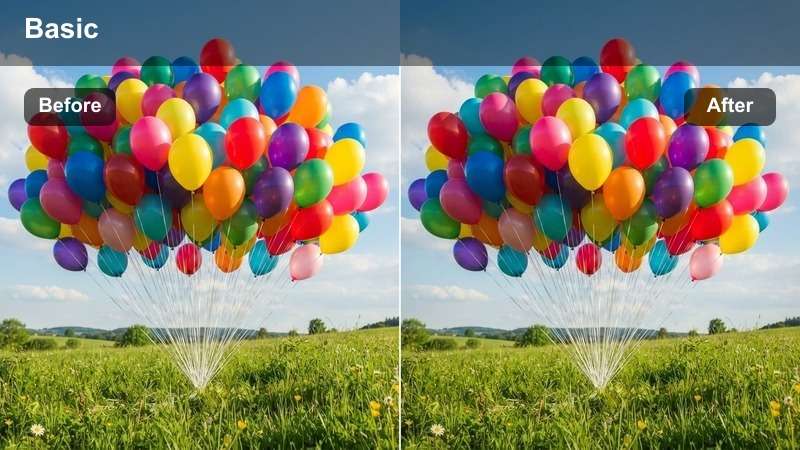
- Effect look: Cool, crisp tones that deepen skies and make mountains and lakes look clean and refreshing.
- Best for: Hiking trails, mountain overlooks, lakeside campsites, and drone shots over valleys.
- Editing tip: Bring down blues slightly in saturation if the sky starts to distract from your subject.
Alpine Breeze Bright leans into cool, clean tones that highlight mountain ridges, lakes, and high-altitude skies. Use it in Filmora for hiking vlogs, overhead drone shots, and any scene where you want landscapes to look clear and refreshing without heavy stylization.
After applying, watch the saturation of the blue channel so your sky supports the composition instead of stealing focus from people or foreground elements. Adjust shadows to keep detail in trees and rock faces, and keep the overall look slightly cooler than your beach LUTs to give each location its own character.
Campfire Evening Warm
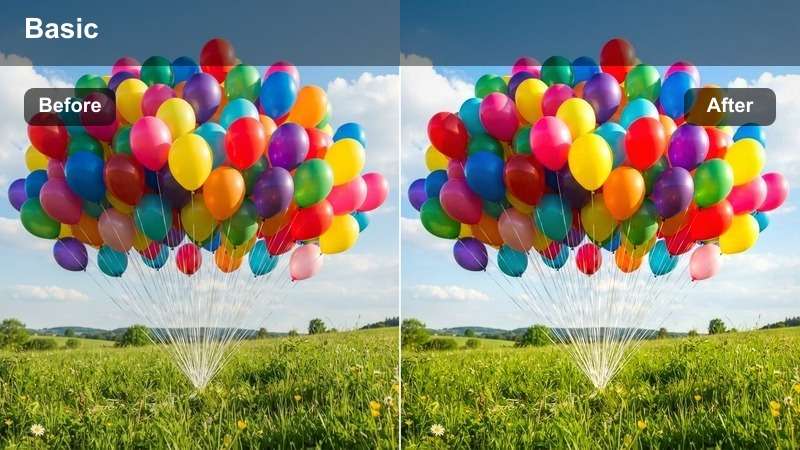
- Effect look: Rich warm glow that emphasizes oranges and reds, perfect for late evening and campfire scenes.
- Best for: Campfire storytelling, tent setups at dusk, and cozy outdoor dinners on road trips.
- Editing tip: Raise shadows carefully to keep faces visible while preserving the intimate low-light mood.
Campfire Evening Warm is tuned for low-light clips, emphasizing oranges and reds so flames and lanterns feel rich and cinematic. In Filmora, it helps noisy or slightly underexposed dusk footage feel intentional and cozy instead of just dark.
Use it on storytelling moments around the fire, tent setups, or outdoor dinners, then gently lift shadows so faces are readable while the background stays moody. Reducing contrast slightly can also make digital noise appear softer and more film-like, especially on clips shot with smaller cameras or phones.
Resort Pools, Parties, and Social Moments
Poolside Neon Fun
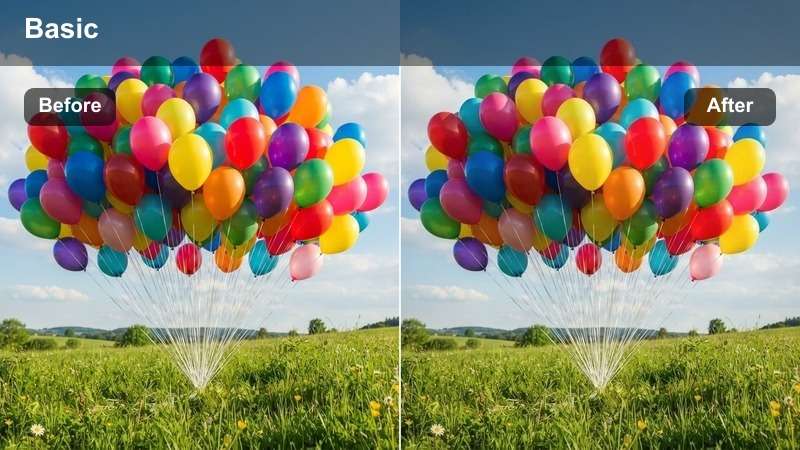
- Effect look: Bright, saturated blues and pinks that give pool parties and resort scenes a fun, social media-ready style.
- Best for: Day parties, floaties in the pool, and playful group shots around resort decks.
- Editing tip: Use slightly faster cuts and sync with upbeat music to match the energy of the bold colors.
Poolside Neon Fun pushes saturation and contrast to deliver a bold, eye-catching look that stands out on social feeds. In Filmora, it is a strong choice for Reels, Shorts, and TikTok-style edits of pool parties, colorful floaties, and laughter-filled group shots.
Apply it primarily to your most playful clips, then trim them tightly and cut on the beat of your music to match the visual energy. If skin tones become too intense, use Filmora's HSL controls to pull down reds and magentas while keeping the pool water bright and electric.
Brunch Terrace Soft
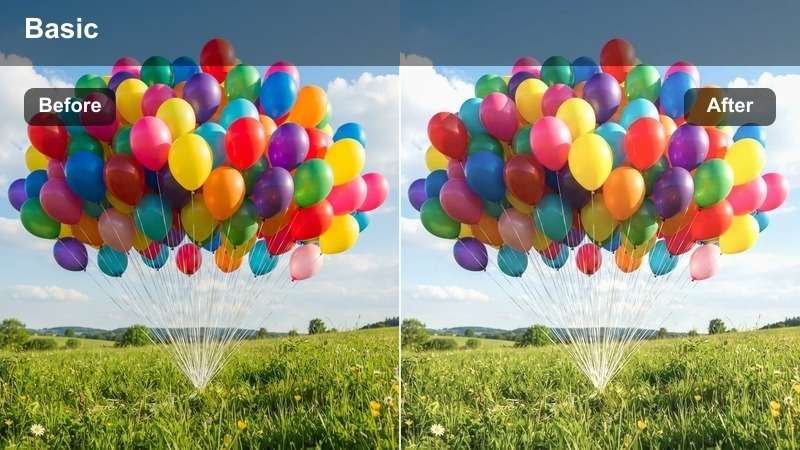
- Effect look: Gentle pastel highlights with balanced skin tones for late-morning and afternoon social scenes on terraces.
- Best for: Hotel terraces, balcony chats, and casual brunch vlogs on vacation.
- Editing tip: Lower clarity a touch to reduce harsh lines in backlit shots and keep the mood relaxed.
Brunch Terrace Soft is built to flatter faces in strong daylight, smoothing harsh lines and leaning into pastel tones that feel light and relaxed. It works well in Filmora on talking-to-camera segments filmed on balconies, rooftops, or cafe terraces where background views matter but your face is the focus.
Apply it to A-roll where you explain your travel plans or recap the day, then slightly reduce clarity and contrast to maintain a calm, lifestyle feel. Combine this LUT-style filter with clean audio and minimal background distractions so your viewers can comfortably watch longer updates.
Sunset Party Glow
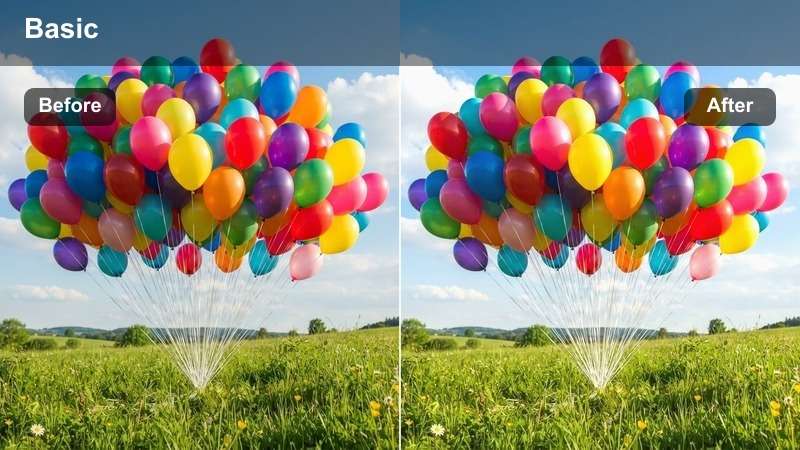
- Effect look: Golden and amber tones that intensify sunset light while keeping shadows soft for group shots and parties.
- Best for: Beach bars, sunset rooftop parties, and evening resort events.
- Editing tip: Add just a bit of slow motion on cheers or laughter moments to emphasize the warm glow.
Sunset Party Glow is tuned for celebration moments, boosting amber and gold to make cheers, hugs, and dance shots feel like cinematic highlights. In Filmora, it is perfect for your end-of-day montage, wrapping up a vlog with warm, emotional group scenes.
Apply it to your best sunset-party clips, then consider slowing key moments slightly so viewers can soak in the glow and expressions. Keep exposure just a touch under to protect the sky and sun, and lift shadows selectively on faces so people stay visible without flattening the overall mood.
Tips for Using Summer Vacation Luts Filters in Filmora
- Shoot a few seconds of test footage in each new location so you can quickly check how your chosen summer filter handles the light.
- Try different filters for A-roll and B-roll, using softer looks for talking segments and bolder colors for scenery.
- Keep an eye on skin tones and adjust orange and red channels if people start to look too sunburned or overly saturated.
- Mix one consistent summer preset with small exposure tweaks per clip instead of changing filters in every scene.
- Export a short test video and watch it on your phone outdoors to be sure your colors still look good in bright sunlight.
With these Free Summer Vacation LUT-style filters in Filmora, travelers and vloggers can quickly turn raw summer footage into bright, polished vacation videos that feel consistent from beach to city to mountain.
Start by picking one or two filters that match your favorite destinations, save them as presets, and use them across all your summer trips to build a recognizable, professional look for your travel content.
secure downloadNext: Free Coastal Video Filters for Beach and Ocean Footage
