

 100% Security Verified | No Subscription Required | No Malware


 ChatGPT
 Perplexity
 Gemini
 Claude
 Grok
Grok
These Fujifilm XT5 travel LUT-style filters are designed to bring out the color science and detail of your XT5 footage while keeping your edits fast and consistent inside Filmora.
Whether you are shooting sunrise hikes, historic streets, or low-light city breaks, the Fujifilm XT5 Travel LUTs collection gives videographers and creators polished, cinematic looks that match real travel scenarios.
In this article
Golden Hour Journeys and Scenic Overlooks
Sunrise Soft Amber
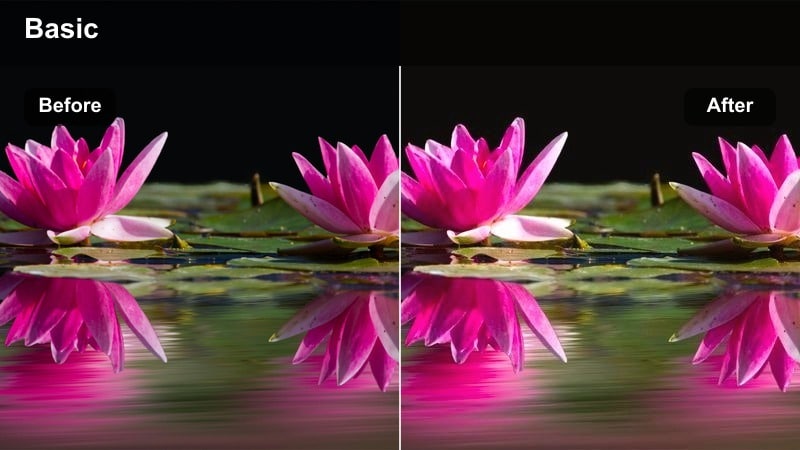
- Effect look: Warm, low-contrast glow that wraps highlights and gently lifts shadows for sunrise scenes.
- Best for: Early-morning coastal shots, mountain viewpoints, and slow-moving handheld travel sequences.
- Editing tip: Slightly reduce contrast on XT5 F-Log2 footage before applying this filter, then fine-tune white balance toward cooler tones to keep skin natural.
Sunrise Soft Amber is designed to complement Fujifilm XT5 sunrise footage by gently brightening the shadows while keeping the first light of the day soft and flattering. The filter leans into warm amber tones that feel natural rather than overly stylized, so details in clouds, water, and distant mountains remain clean and textured.
In Filmora, apply Sunrise Soft Amber on top of a lightly flattened XT5 clip and then refine temperature and exposure to taste. This filter works especially well for slow pans, tripod shots, and gimbal moves where you want a calm, cinematic glow that ties multiple sunrise angles into a single, cohesive look.
Speed Up Your XT5 Travel Grades with AI Color Tools
Filmora's AI-driven color tools help you quickly balance exposure and white balance from your Fujifilm XT5 before you stack on travel filters or LUT-style looks. With just a click, AI can correct inconsistent lighting so morning, midday, and evening clips sit on the same starting point.
Use AI to normalize different lighting situations across your trip so every clip feels like part of the same story, then apply your favorite Fujifilm XT5 travel LUTs-inspired filters for consistency and style.
 secure download

Preview Fujifilm XT5 Travel Filters in Real Time
Filmora lets you hover and preview each Fujifilm XT5 travel filter on your footage so you can instantly see how golden hours, rooftops, and night markets will look. This real-time preview helps you match filters to each scene without endless test renders.
Drag a few clips from different locations onto the timeline and quickly preview several filters to discover a consistent signature look that carries through your entire travel video.
secure downloadBuild a Fujifilm Travel LUT-Style Library in Filmora
By pairing Filmora's filters with your Fujifilm XT5 film simulations, you can create repeatable LUT-style looks that define your travel brand. Once you dial in a combination you love, Filmora makes it easy to save it as a preset for future projects.
Over time, you can build a small library of XT5 travel aesthetics tuned for golden hours, city walks, and neon nights, so every new trip is faster to edit and more visually consistent.
secure downloadGolden Ridge Travel
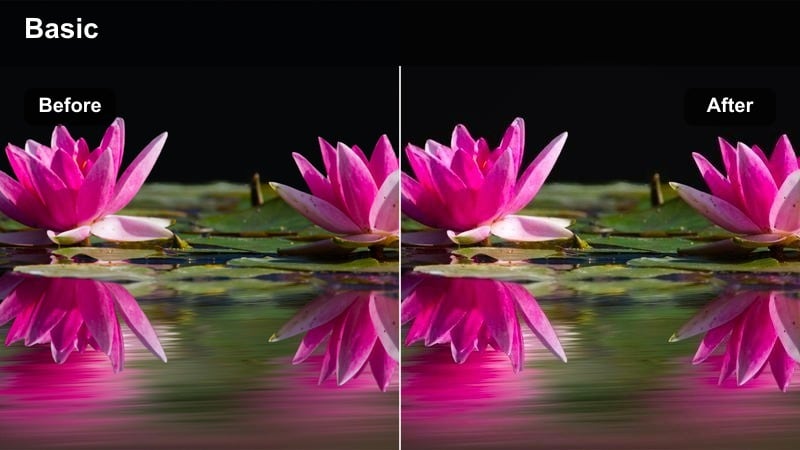
- Effect look: Punchy golden-hour contrast with crisp edges and rich warm highlights.
- Best for: Backlit ridge hikes, drone passes over valleys, and sweeping gimbal moves at sunset.
- Editing tip: Increase Filmora vibrance instead of saturation to keep Fujifilm colors clean while emphasizing golden tones in the sky and ground.
Golden Ridge Travel builds on your XT5's dynamic range to create a rich, contrasty sunset look that still preserves important details in clouds and ridgelines. Highlights take on a dramatic golden sheen while midtones and shadows gain depth, making landscapes and silhouettes feel more cinematic.
When grading in Filmora, apply this filter after basic exposure correction to quickly set the overall mood, then refine vibrance and shadows to match each shot. It is ideal for sequences where the sun is low and behind your subject, giving ridge hikes, drone sweeps, and gimbal passes a cohesive golden-hour punch across the entire timeline.
Pastel Horizon Glow
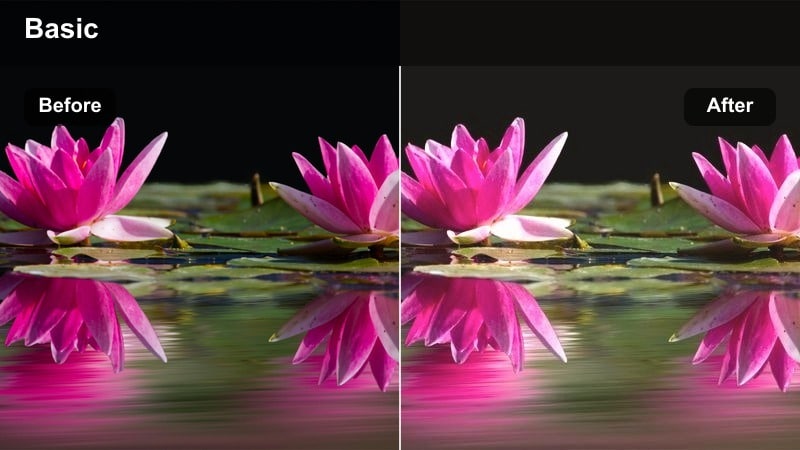
- Effect look: Soft pastel colors with lowered contrast and airy highlights for dreamy horizons.
- Best for: Beach walks, bayside promenades, and handheld b-roll during calm sunset or sunrise.
- Editing tip: Slightly reduce clarity or sharpness in Filmora after applying this filter to emphasize the dreamy pastel travel aesthetic.
Pastel Horizon Glow transforms standard XT5 coastline footage into soft, dreamy sequences with gentle color separation and airy highlights. Instead of strong contrast, it favors lighter tones and pastel gradients, which work beautifully on skies, reflections, and softly lit faces.
In Filmora, apply this filter to clips where the light is already even, such as hazy sunsets or calm mornings, then reduce sharpness slightly to enhance the cinematic softness. It pairs especially well with slow motion, subtle camera movement, and wide shots that showcase long stretches of shoreline or expansive bays.
Old Towns and Atmospheric City Streets
Cobbled Street Chrome
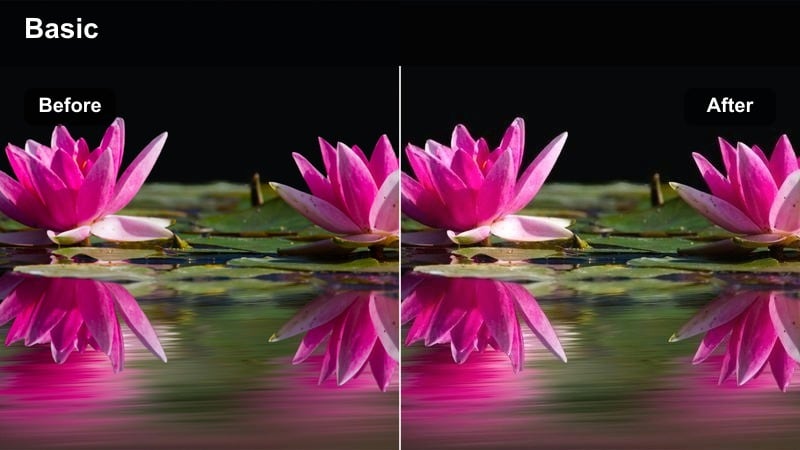
- Effect look: Muted, cool-leaning tones with subtle contrast inspired by classic street-film aesthetics.
- Best for: Historic lanes, alleyways, and walk-and-talk vlog shots in European or old-town districts.
- Editing tip: Drop saturation a touch, then push Filmora's shadow tint slightly toward blue to emphasize the cool street mood without losing skin tone.
Cobbled Street Chrome gives your XT5 city footage a restrained, film-inspired palette that suits cobblestones, stone facades, and overcast lanes. Colors are slightly desaturated and cooled, while contrast remains controlled so you keep texture in bricks, doors, and pavements.
Use this filter in Filmora when you want your old-town b-roll and vlogs to feel grounded and documentary-like rather than overly vibrant. After applying, fine-tune saturation and shadow tint to ensure people still look natural while the environment takes on a subtle, cinematic chrome mood.
Warm Alley Journal
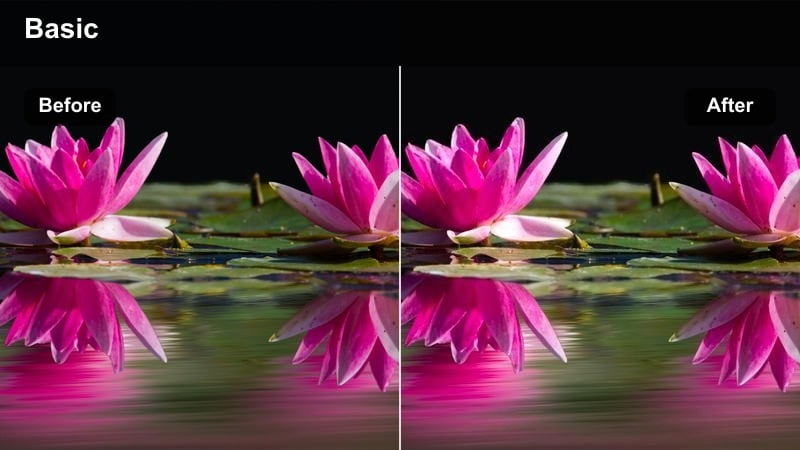
- Effect look: Gentle warm lift in midtones with pleasing roll-off for cozy, journal-style city travel logs.
- Best for: Cafe streets, sunlit alleyways, and handheld personal vlogs in city centers.
- Editing tip: Use Filmora's skin tone slider sparingly after applying this filter to keep faces neutral while the environment stays warm and inviting.
Warm Alley Journal leans into soft warmth in the midtones, adding a welcoming, diary-like feel to Fujifilm XT5 city footage. It preserves highlight detail while wrapping your subject in gentle warmth that flatters skin tones and storefronts alike.
In Filmora, this filter is perfect for A-roll and walk-and-talk segments where you want viewers to feel like they are strolling beside you. Apply it to both primary and supporting shots, then use subtle skin-tone adjustment and exposure tweaks so your face stays true-to-life while the alley or cafe street around you glows with inviting color.
City Mist Soft Matte
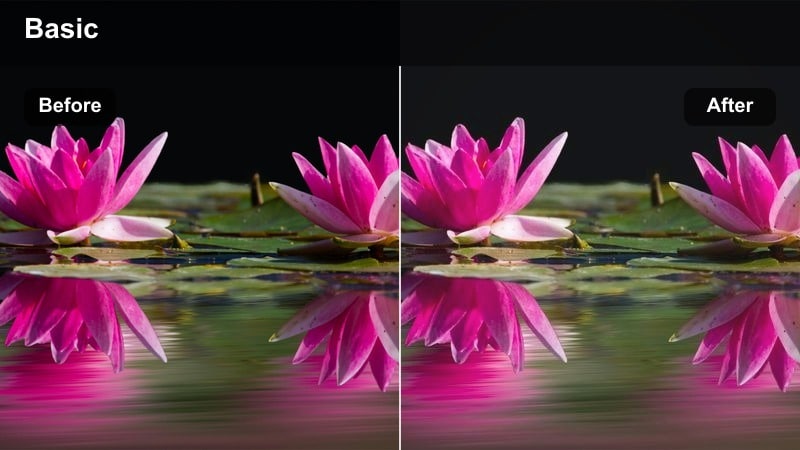
- Effect look: Low-contrast, soft-matte finish with slightly lifted blacks for moody urban walks.
- Best for: Overcast city days, misty plazas, bridges, and static architectural frames.
- Editing tip: After applying this filter, add a subtle Filmora film grain layer to enhance the moody, documentary-style city feel.
City Mist Soft Matte pulls down harsh contrast and gently lifts black levels to create a muted, atmospheric look that suits cloudy days and foggy bridges. Details remain intact, but the overall frame feels softer and more reflective, ideal for quiet urban sequences and transitions.
Inside Filmora, apply this filter to XT5 clips captured under flat or overcast light to instantly add a cinematic, documentary-style tone. Finish the grade with a light grain overlay and a touch of vignetting so your viewer's attention stays on the subject against the softened, matte city backdrop.
Night Markets and Neon Cityscapes
Neon Lane Punch
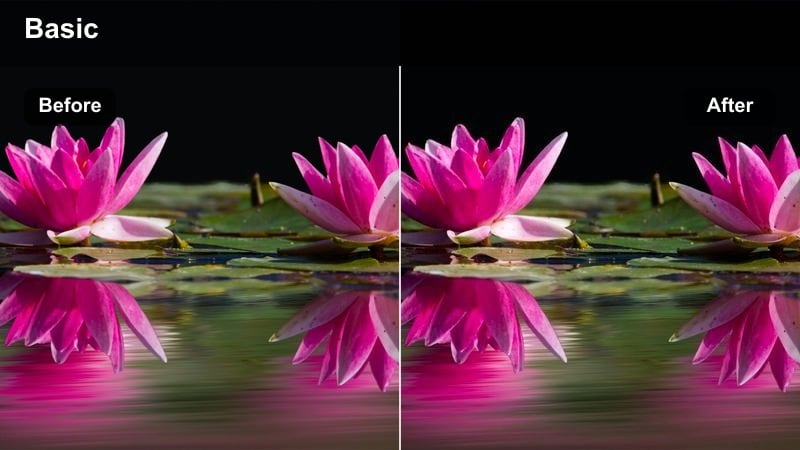
- Effect look: High-contrast neon emphasis with saturated blues and magentas for energetic nightlife.
- Best for: Neon alleys, bustling night markets, and handheld nightlife b-roll in big cities.
- Editing tip: Use Filmora's HSL to gently tame red channel saturation after this filter so skin tones stay controlled among strong neon signs.
Neon Lane Punch amplifies the color intensity of XT5 night scenes, pushing blues and magentas for a bold, energetic street look. Contrast is boosted to make signs, reflections, and vendor stalls pop, while maintaining enough detail in midtones so faces and food still look appetizing.
In Filmora, apply this filter to your night-market and nightlife b-roll, then fine-tune HSL controls to keep reds and oranges from overwhelming skin tone. It works especially well with handheld motion and quick cuts, turning busy lanes and neon corridors into visually striking sequences that stand out on social platforms.
Amber Night Bazaar
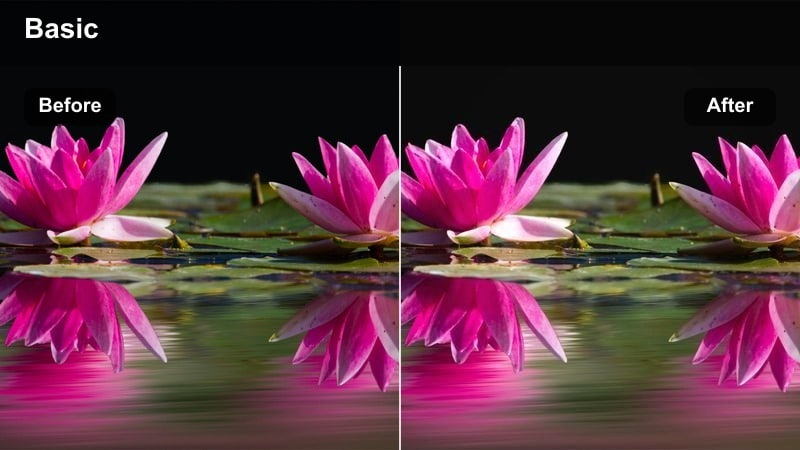
- Effect look: Warm amber glow with gentle halation-like highlights ideal for intimate market scenes.
- Best for: Street food corridors, hanging lantern markets, and slow-motion detail shots of stalls and crowds.
- Editing tip: Keep Filmora contrast moderate and slightly lift shadows after this filter to maintain a cozy, inviting nighttime feel.
Amber Night Bazaar leans into the warm glow of lanterns and street food stalls, giving XT5 footage a cozy, intimate character. Highlights take on a soft, halation-like glow while shadows remain open enough to show crowd movement and market details without feeling harsh.
Use this filter in Filmora for slower, more atmospheric night sequences where you want viewers to feel immersed in the sights and textures of a market. Apply it to close-up shots of food, faces, and hanging lights, then nudge shadows and contrast to keep the mood warm and welcoming across the entire scene.
Urban Noir Glow
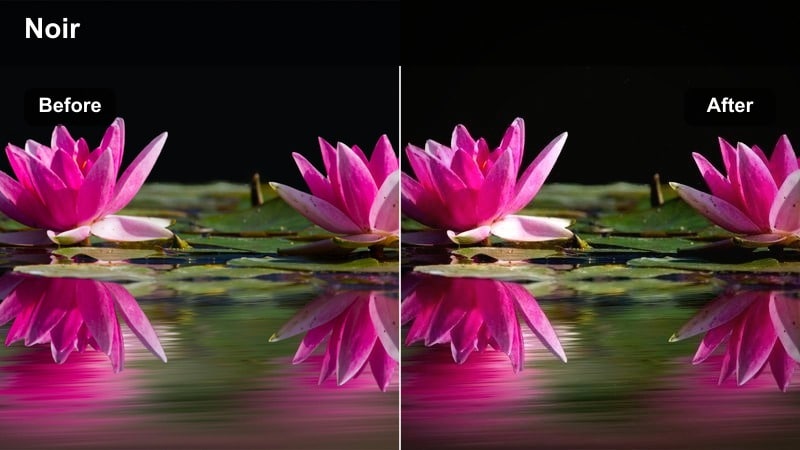
- Effect look: Cool, contrasty night look with deep shadows and soft glow around point lights.
- Best for: Rainy intersections, reflective streets, and cinematic walk-through-the-city sequences.
- Editing tip: Add a slight Filmora vignette and reduce midtone detail to emphasize silhouettes and reflections in your XT5 footage.
Urban Noir Glow gives your XT5 night footage a moody, cinematic feel with cool tones and deep, sculpted shadows. Streetlights and neon signs gain a soft halo, while wet roads and reflections become more dramatic, channeling a classic noir-inspired atmosphere.
In Filmora, pair this filter with slow, deliberate camera moves or tripod shots that highlight silhouettes and reflections. After applying, add a subtle vignette and adjust midtone detail so subjects stand out against the darker environment, resulting in night sequences that feel polished and story-driven.
Coastal Trails and Rooftop Views
Aqua Coastline Clean
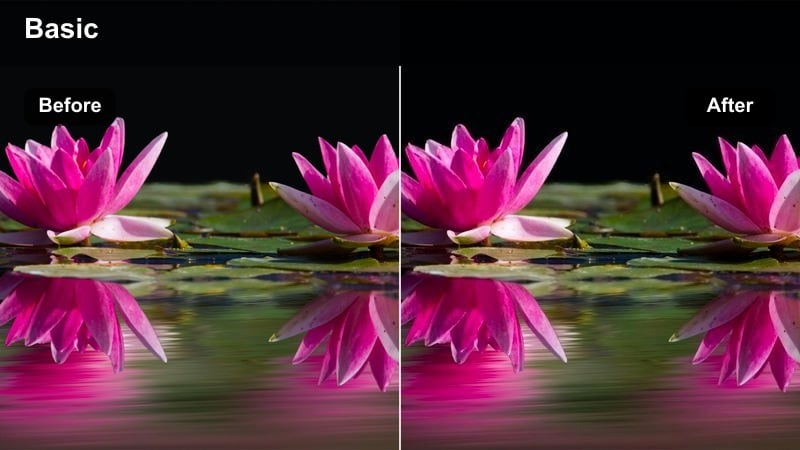
- Effect look: Crisp, clean color with emphasized cyans and teals for bright coastal footage.
- Best for: Cliffside paths, seaside promenades, and aerial-style shots looking down on the water.
- Editing tip: Use Filmora's color temperature to cool the image slightly before adding this filter if your XT5 footage was shot overly warm.
Aqua Coastline Clean is tuned to bring out the vivid teals and cyans in clear water while keeping skies, cliffs, and skin tones natural. The look remains crisp and bright, making it ideal for sunny days when you want the sea to stand out without turning neon or artificial.
When editing in Filmora, apply this filter to XT5 clips of beaches, harbors, and coastal trails, then nudge temperature and exposure to balance between sky and sea. It pairs nicely with drone-style shots and wide-angle views from clifftops, helping your ocean scenery look both polished and believable.
Sun-Bleached Rooftops
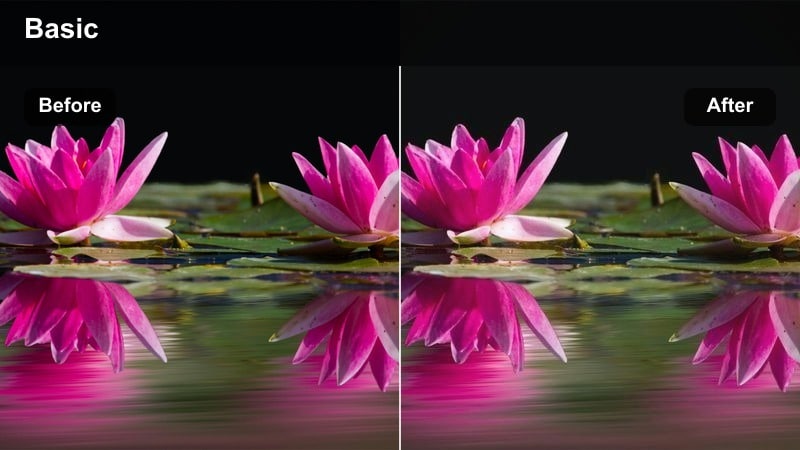
- Effect look: Soft, lightly desaturated tones with hazy highlights for midday rooftop scenes.
- Best for: Rooftop cafes, skyline views, and stationary talking segments under harsh midday sun.
- Editing tip: Pull down Filmora highlights and whites before adding this filter to manage XT5 midday contrast, then let the filter add the sun-bleached character.
Sun-Bleached Rooftops is built to tame the harsh, contrasty look of midday XT5 footage without making it feel dull. Colors are gently desaturated, highlights soften, and the overall image takes on a relaxed, hazy character that suits rooftop terraces and city views shot in strong light.
In Filmora, first correct exposure and reduce highlights so nothing is clipped, then apply this filter to introduce the stylized, sun-washed mood. It is especially helpful for rooftop vlogs or static skyline shots where you want to keep detail in the scene but avoid the hard look of direct overhead sunlight.
Hazy Trail Wander
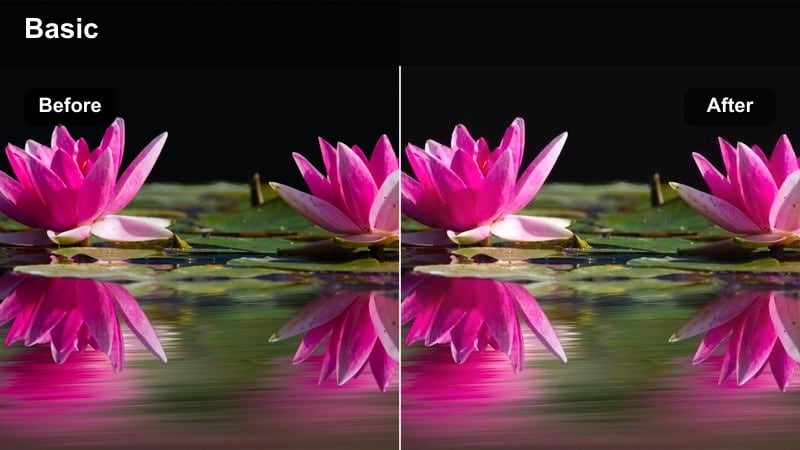
- Effect look: Soft contrast with slightly warm highlights and gentle color separation for scenic trails.
- Best for: Cliff walks, hilltop paths, and POV hiking footage shot on the move.
- Editing tip: Stabilize your XT5 clips in Filmora first, then apply this filter so the hazy look supports, not exaggerates, motion.
Hazy Trail Wander adds a soft, slightly warm haze to XT5 hiking and walking shots, giving distant scenery a gentle glow while keeping the path and subject readable. The lowered contrast and mild warmth hint at dust, humidity, or afternoon sun without overwhelming the original colors.
Use this filter in Filmora on stabilized POV clips, follow shots, and cutaway views from trails to create a unified, story-like feeling across your hike. After applying, refine exposure and saturation just enough to keep foliage and sky natural, letting the haze carry the mood of relaxed exploration.
Tips for Using Fujifilm Xt5 Travel Luts Filters in Filmora
- Shoot in a consistent Fujifilm XT5 film simulation like Eterna or Classic Chrome for the entire trip so Filmora filters react predictably to your footage.
- Lock white balance for each location instead of relying on auto to prevent color shifts that are harder to match when adding travel LUT-style filters.
- Expose slightly to protect highlights on the XT5, especially at sunrise, sunset, and in neon scenes, then recover shadows in Filmora before adding filters.
- Use Filmora's scopes to quickly check for clipped highlights or crushed blacks after applying a strong contrast travel filter.
- Stabilize handheld walking clips first, then apply stylistic filters so the mood comes from color and tone, not accidental camera movement.
- Batch-apply your chosen Fujifilm XT5 travel filter to similar scenes, then make small shot-by-shot adjustments rather than grading every clip from scratch.
With the right Fujifilm XT5 travel LUT-style filters in Filmora, you can turn raw trip footage into cinematic stories that feel cohesive from the first sunrise to the last neon-lit walk.
Build a simple workflow of clean base exposure, scene-matched filters, and light final tweaks, and your XT5 travel edits will stay fast, polished, and ready to share on any platform.
secure downloadNext: Panasonic GH6 V-log LUTS
