

 100% Security Verified | No Subscription Required | No Malware

Gaming Video Color is built around energy, focus, and visual immersion. Deep blues, electric purples, neon greens, bright cyans, and vivid pinks can make viewers think of digital worlds, competitive play, futuristic interfaces, and fast-paced action. Dark foundations help glowing accents stand out, while warm highlights can add excitement and personality.
These Gaming Video Color palettes are useful for gaming thumbnails, livestream overlays, intros, channel branding, UI graphics, social videos, and esports content. Below, you will find Gaming Video Color color palettes with HEX codes for creators and Filmora users who want to build a consistent visual identity across their videos and designs.
In this article
Neon Arcade Energy Gaming Video Color Palettes
Pixel Pulse
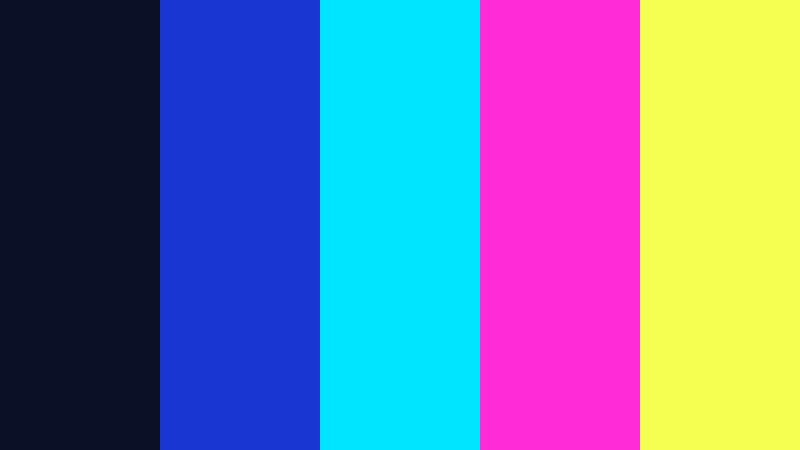
- HEX Codes: #0b1026, #1936d2, #00e5ff, #ff2bd6, #f5ff4f
- Mood: Electric, playful, fast-paced, and competitive.
- Use for: Use this palette for gaming thumbnails, arcade-style intros, livestream overlays, and energetic social clips.
Pixel Pulse combines deep space blue with cyan, magenta, and lime accents for an instantly recognizable arcade feel. The dark base creates a strong background for glowing interface details, animated text, and fast cuts.
Use the cyan and lime tones to highlight scores, usernames, or calls to action, while magenta can add motion and contrast to thumbnails. This palette is especially effective for bold gaming content, tournament announcements, and high-energy motion graphics.
Pro Tip: Enhance Your Gaming Video Color Visuals with Filmora
Use Pixel Pulse as a visual guide when building your gaming edit in Filmora. Apply the deep blue tone to backgrounds and shadows, then reserve cyan, magenta, and lime for transitions, captions, HUD elements, and key moments in the gameplay.
Keeping the same accent colors across your intro, b-roll, webcam frame, and social cutdowns creates a more recognizable gaming brand. Filmora makes it easy to reuse titles, effects, overlays, and color adjustments so every version of your content feels connected.
AI Color Palette
Creators can capture this Gaming Video Color palette from a reference image, brand card, or thumbnail and use it as a guide for an entire project. Filmora's AI Color Palette feature helps transfer the visual character of the reference across clips, making different gameplay recordings feel more consistent.
This is useful when footage comes from different sessions, cameras, or lighting conditions. Apply the palette to gameplay, facecam footage, intros, and supporting b-roll, then make small manual adjustments where needed.
 secure download

HSL, Color Wheels & Curves
Use HSL controls to refine the cyan, magenta, and lime accents without changing the overall contrast of the gameplay. You can push blue shadows toward a richer arcade navy, increase cyan saturation for a glow effect, or reduce bright tones when the interface becomes distracting.
Color wheels can cool the shadows and add subtle blue or purple warmth to the highlights. Curves are useful for creating a deeper black point and brighter neon details. For a practical guide to balancing these adjustments, use Filmora's color correction and grading workflow.
secure download1000+ Video Filters & 3D LUTs
Filmora's filters and LUTs can quickly shift Pixel Pulse from a clean digital look to a more intense arcade style. Start with a high-contrast filter, then reduce its strength if the neon colors begin to overpower gameplay details or small text.
Filmora's video filters and 3D LUTs make it easy to test different visual directions while keeping the strongest cyan, pink, and lime accents visible. Use the same treatment across your intro, gameplay montage, and vertical social edits for a unified result.
secure downloadLaser Quest

- HEX Codes: #10152f, #4727a8, #00f0b5, #ff5c35, #ffe66d
- Mood: Adventurous, futuristic, and action-packed.
- Use for: Use this palette for game trailers, challenge videos, esports graphics, channel banners, and animated title cards.
Laser Quest blends violet and mint with warm orange and yellow highlights to create a colorful competitive atmosphere. Its dark violet foundation gives the brighter accents room to glow without making the composition feel chaotic.
Use mint for technical details, orange for action cues, and yellow for scores or important labels. The strong contrast keeps text and gameplay details easy to notice in trailers, esports graphics, and challenge videos.
Turbo Circuit

- HEX Codes: #07151f, #146c94, #00c2a8, #ff8c42, #f7f3ce
- Mood: Energetic, technical, and sporty.
- Use for: Use this palette for racing game videos, speedrun content, HUD-inspired graphics, and performance-focused thumbnails.
Turbo Circuit pairs dark teal with bright aqua and orange for a sleek motorsport-inspired look. The cool base suggests speed and precision, while orange adds the feeling of movement and competition.
Use the pale cream accent for lap times, speed indicators, and small interface labels. It adds clarity to thumbnails and HUD-inspired graphics without taking attention away from the main gameplay.
Quantum Coins
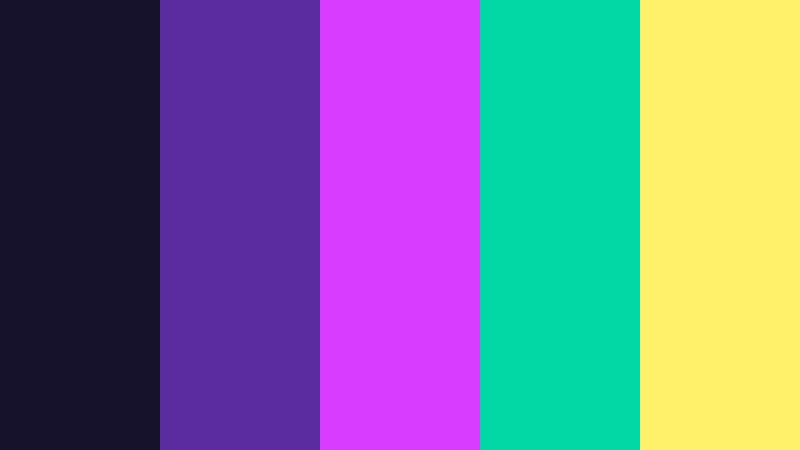
- HEX Codes: #17122b, #5b2ca0, #d83cff, #00d9a5, #fff16a
- Mood: Magical, futuristic, and rewarding.
- Use for: Use this palette for RPG content, game reward screens, fantasy thumbnails, animated badges, and creator branding.
Quantum Coins creates a magical digital mood with violet, glowing pink, mint, and soft yellow. It feels like a reward screen or fantasy game world where every color signals discovery, progress, or achievement.
Use violet for backgrounds, bright pink for rare items, mint for progress indicators, and yellow for rewards or calls to action. This palette is a strong choice for fantasy gaming videos and achievement-focused designs.
Cyberpunk Night World Gaming Video Color Palettes
Midnight Megacity
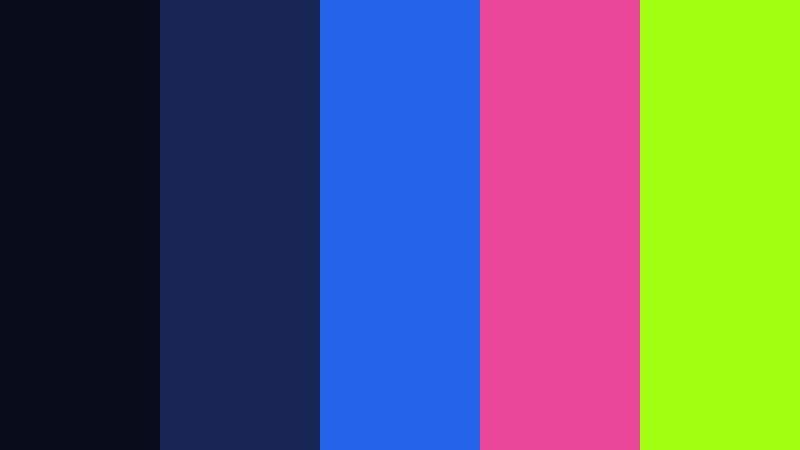
- HEX Codes: #080b1a, #172554, #2563eb, #ec4899, #a3ff12
- Mood: Urban, mysterious, and technologically advanced.
- Use for: Use this palette for cyberpunk gameplay, city-building videos, dark mode interfaces, cinematic intros, and futuristic channel art.
Midnight Megacity uses layered navy tones with vivid blue, pink, and green highlights to evoke a glowing skyline. The dark foundation gives neon details maximum impact and creates a dramatic cinematic mood.
Use the electric blue for interface elements, pink for signs or transitions, and lime green for warnings and focal points. It works well for cyberpunk gameplay, futuristic channel art, and cinematic intros.
Chrome Outrun

- HEX Codes: #121212, #3b3b4f, #9ca3af, #ff3d81, #20e3b2
- Mood: Sleek, rebellious, and retro-futuristic.
- Use for: Use this palette for synthwave gaming videos, racing montages, logo animations, thumbnails, and metallic interface concepts.
Chrome Outrun balances charcoal and silver with hot pink and aqua for a polished synthwave look. The metallic neutrals give the palette structure, while the bright accents bring back the rebellious spirit of retro arcade culture.
Use silver for borders and title treatments, pink for emotional emphasis, and aqua for motion graphics or technical labels. It is a flexible choice for racing montages, logo animations, and gaming thumbnails.
Toxic Terminal
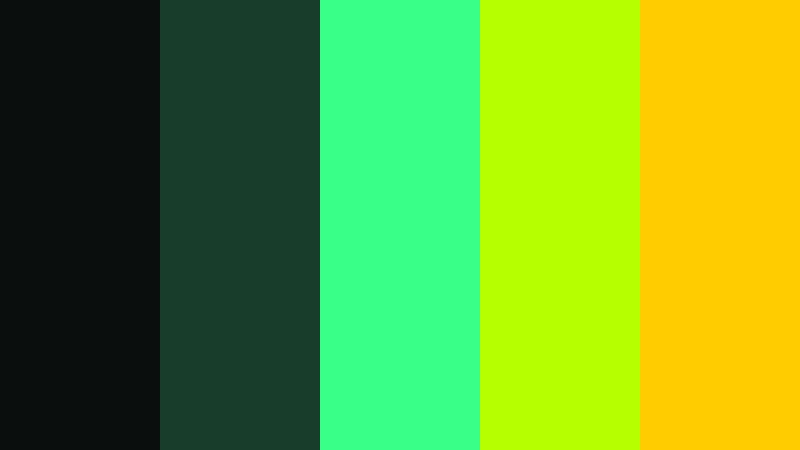
- HEX Codes: #0a0f0d, #183d2b, #39ff88, #b6ff00, #ffcc00
- Mood: Edgy, experimental, and high-alert.
- Use for: Use this palette for survival games, hacker-themed edits, horror gaming thumbnails, warning screens, and glitch transitions.
Toxic Terminal builds a tense digital mood from near-black greens, neon chartreuse, and warning yellow. It feels urgent and slightly dangerous, making it suitable for content where the viewer should expect risk, suspense, or unexpected events.
Use the green shades for terminal-style backgrounds and the chartreuse tones for glitch effects, warning icons, and important captions. Keep yellow accents limited so they retain their alert-like impact.
Neon Rain

- HEX Codes: #0d1b2a, #1b4965, #5fa8d3, #ff4d8d, #f7d488
- Mood: Cinematic, reflective, and atmospheric.
- Use for: Use this palette for story-driven game edits, cinematic trailers, ambient streams, anime gaming content, and moody social videos.
Neon Rain combines cool blue shades with pink and muted gold for a cinematic night-time feeling. It adds emotional depth to gameplay clips while keeping a clear connection to futuristic gaming environments.
Use the darker blues for atmospheric scenes, pink for character or story highlights, and muted gold for warm lights and important details. This palette works especially well with slow camera movement and music-led editing.
Stream Friendly Contrast Gaming Video Color Palettes
Streamer Spotlight
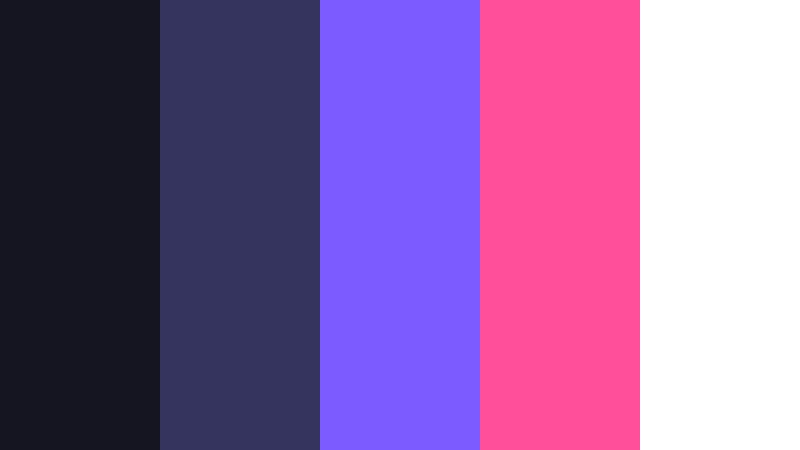
- HEX Codes: #151522, #34345e, #7c5cff, #ff4f9a, #ffffff
- Mood: Confident, social, and polished.
- Use for: Use this palette for streamer branding, webcam frames, alerts, YouTube thumbnails, community posts, and channel graphics.
Streamer Spotlight uses a dark violet base with purple, pink, and white accents for a clean creator-focused style. The palette feels energetic without becoming too aggressive, making it suitable for both gameplay and community content.
Use white for readable text, purple for recurring brand elements, and pink for alerts or calls to action. The balanced contrast supports webcam frames, thumbnails, channel banners, and social templates.
Victory Banner

- HEX Codes: #102a43, #1f7a8c, #2dc653, #ffd166, #fefae0
- Mood: Optimistic, celebratory, and approachable.
- Use for: Use this palette for win screens, esports announcements, tutorial videos, community updates, and friendly gaming channels.
Victory Banner combines navy and teal with green, gold, and warm cream for a welcoming competitive look. It feels upbeat and celebratory without relying on overly bright neon tones.
Use green for success messages, gold for awards or rankings, and cream for text on dark backgrounds. This palette is a good fit for win screens, tutorials, esports announcements, and friendly gaming channels.
Cozy Co-Op

- HEX Codes: #2d1e2f, #634b66, #b8e0d2, #f6bd60, #f7ede2
- Mood: Warm, relaxed, and collaborative.
- Use for: Use this palette for cozy game streams, multiplayer videos, lifestyle gaming content, thumbnails, and relaxed social media posts.
Cozy Co-Op softens gaming visuals with muted plum, sage mint, golden yellow, and cream. It creates a welcoming environment for content centered on friendship, conversation, exploration, and shared play.
Use plum for backgrounds, mint for interface details, and golden yellow for friendly highlights. The gentle contrast is well suited to cozy streams, multiplayer videos, lifestyle gaming content, and relaxed social posts.
Ranked Match

- HEX Codes: #111827, #374151, #ef4444, #f59e0b, #f3f4f6
- Mood: Focused, competitive, and decisive.
- Use for: Use this palette for ranked gameplay, strategy breakdowns, esports commentary, match recaps, and performance dashboards.
Ranked Match uses slate neutrals with red and amber signals to create a focused tournament-ready style. The restrained color system makes the content feel organized and performance driven.
Use red for mistakes, threats, or losses, and amber for rankings, warnings, or key decisions. The light gray accent helps important stats and labels stand out in dashboards, match recaps, and strategy videos.
Retro Console Glow Gaming Video Color Palettes
Cartridge Sunset
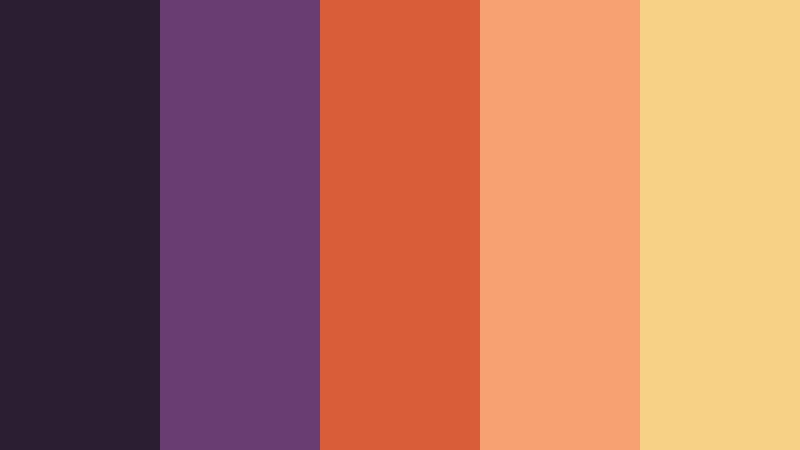
- HEX Codes: #2b1d32, #693c72, #d95d39, #f7a072, #f6d186
- Mood: Nostalgic, warm, and expressive.
- Use for: Use this palette for retro game reviews, pixel art videos, emulator content, nostalgic thumbnails, and vintage-inspired channel design.
Cartridge Sunset brings together plum, coral, peach, and soft gold for a warm throwback atmosphere. It recalls classic game packaging, sunset screens, and the tactile feeling of older consoles.
Use plum for depth, coral for energetic graphics, and soft gold for titles or nostalgic details. This palette gives retro gaming reviews, emulator content, and pixel art videos a distinctive analog personality.
8-Bit Garden

- HEX Codes: #1a1c2c, #3e5c76, #5ab552, #f2d53c, #ef7d57
- Mood: Cheerful, playful, and nostalgic.
- Use for: Use this palette for pixel game content, indie game showcases, retro tutorials, playful thumbnails, and animated social posts.
8-Bit Garden mixes dark blue gray with leafy green, sunny yellow, and coral orange for a bright pixel-era feel. It has enough contrast for clear thumbnails while keeping a friendly, approachable personality.
Use green for nature or progress themes, yellow for rewards, and coral for characters, buttons, or animated accents. It works well for indie game showcases, retro tutorials, and colorful gaming stories.
Arcade Afterglow
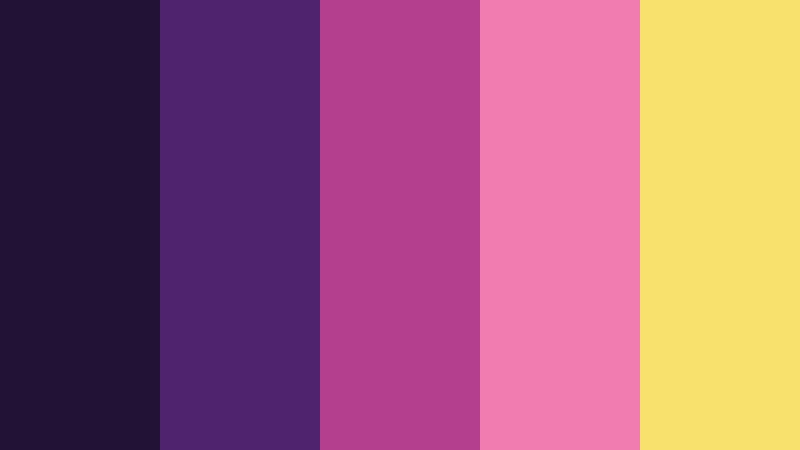
- HEX Codes: #201335, #4f236d, #b43f8f, #f17cb0, #f8e16c
- Mood: Dreamy, vibrant, and nostalgic.
- Use for: Use this palette for arcade compilations, retro livestream overlays, gaming podcasts, video intros, and creator merchandise.
Arcade Afterglow layers rich violet with berry pink and glowing yellow for a dreamy arcade-inspired finish. The colors feel vibrant and playful while still offering a strong, recognizable visual system.
Use violet as the main brand color, berry pink for highlights and transitions, and yellow for buttons, logos, or important words. It creates a memorable look for retro-focused creators, gaming podcasts, and merchandise.
Tips for Creating Gaming Video Color Color Palettes
A strong Gaming Video Color palette should support the content instead of competing with it. Combine a dark base with one or two bright accents, then use neutral or lighter tones to protect readability. The best combinations should work across gameplay footage, thumbnails, intros, overlays, channel art, and vertical social edits.
- Use a dark foundation for backgrounds and shadows so neon accents remain easy to see.
- Choose one primary accent color for branding and one secondary accent for highlights, alerts, or calls to action.
- Check text contrast on thumbnails and overlays, especially when using bright colors over detailed gameplay footage.
- Match the palette to the game genre: neon colors suit arcade and cyberpunk content, while muted tones may work better for strategy or cozy games.
- Keep recurring elements such as logos, webcam frames, subtitles, and transition effects in the same color family.
- Use warm colors sparingly when you want to direct attention to a score, warning, achievement, or important moment.
- Test the palette on both desktop and mobile screens because small displays can reduce the difference between similar dark shades.
- Save your final HEX values and reuse them in Filmora titles, effects, overlays, and thumbnail designs for consistent branding.
Gaming Video Color palettes can shape the identity of an entire channel. Electric combinations create excitement and speed, cyberpunk tones add mystery and immersion, and softer retro or co-op colors can make a gaming brand feel more welcoming.
Try these HEX combinations across thumbnails, intros, livestream graphics, and social edits to find the look that best fits your content. Filmora can help you apply a consistent treatment, fine-tune individual colors, and keep every video connected to the same visual system.
Start with one palette, compare it against your existing footage, and adjust the saturation or contrast until the colors support the story. A consistent Gaming Video Color system can make your videos easier to recognize while giving your creative projects a more professional finish.
secure download