

 100% Security Verified | No Subscription Required | No Malware


 ChatGPT
 Perplexity
 Gemini
 Claude
 Grok
Grok
Golden Ochre sits between warm gold and earthy brown, evoking sunlight, dried grass, and vintage film warmth. It feels grounded, nostalgic, and optimistic at the same time, which makes it a powerful color for creators who want their visuals to feel cinematic yet approachable. In thumbnails, overlays, and titles, Golden Ochre draws the eye without shouting, guiding viewers toward what matters most on the screen.
In video branding, intros, and channel design, a Golden Ochre color palette can quickly define your style, whether you are building a cozy lifestyle vlog, a polished startup brand, or a travel film reel. Below you will find curated Golden Ochre color combinations with HEX codes, created for Filmora users and content creators who want consistent, on-brand color grading across videos, thumbnails, overlays, and social posts.
In this article
Warm Cinematic Golden Ochre Color Palettes
Desert Storyframe Glow
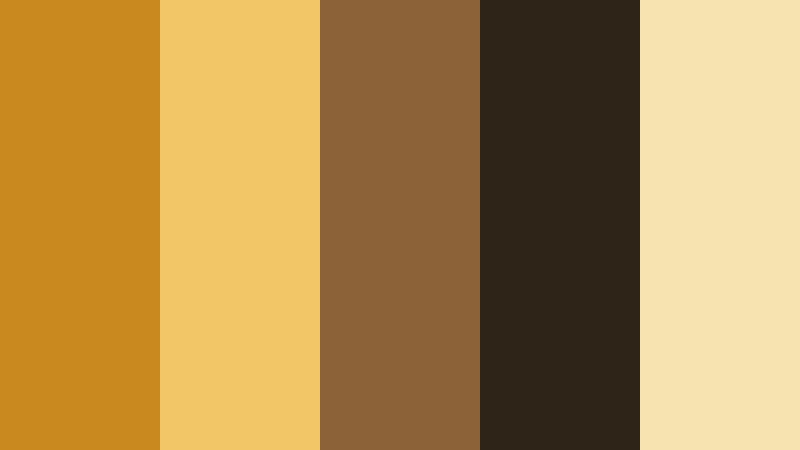
- HEX Codes: #c88a1f, #f2c567, #8c6239, #2e2418, #f7e3b0
- Mood: Cinematic, warm, and adventurous with a sunlit travel-film feel.
- Use for: Ideal for travel vlogs, cinematic b-roll sequences, and documentary-style title cards.
This palette feels like a road trip at golden hour, with Golden Ochre highlights, sun-baked sand, and deep brown shadows. The contrast between #c88a1f and #2e2418 gives your frames that drama you see in travel documentaries and festival films, while #f7e3b0 keeps skin tones and skies feeling soft.
Use it to grade wide landscape shots, map overlays, and chapter cards in your travel series. In thumbnails and intros, Golden Ochre accents can frame your subject, while the dark brown anchors text and UI elements so everything stays readable even on small screens.
Pro Tip: Build a Cinematic Golden Ochre Look in Filmora
To keep this Desert Storyframe Glow palette consistent, start by setting one graded clip as your reference inside Filmora. Once you are happy with the balance between warm Golden Ochre mids and deep browns in the shadows, you can reuse that look across your intro, b-roll, talking-head segments, and social cutdowns.
Save your adjustments as a custom preset in Filmora so every time you edit travel or documentary content, you can apply the same Golden Ochre mood in just a few clicks. This keeps your series feeling like one cohesive film instead of a mix of unrelated clips.
AI Color Palette
If you have a still frame, LUT screenshot, or moodboard image that perfectly captures your Golden Ochre style, you can turn it into a grading shortcut. Filmora's AI Color Palette feature analyzes that reference image and transfers its color balance to the rest of your footage.
Import your best Desert Storyframe Glow shot, let AI read the warm ochres and deep browns, then apply that look to every clip in your sequence. It is a fast way to unify drone shots, handheld travel footage, and phone clips, even if they were recorded on different days or cameras.
 secure download

HSL, Color Wheels & Curves
Once the base look is in place, refine your Golden Ochre tones with Filmora's HSL, color wheels, and curves. Subtly pull the yellows and oranges toward a more earthy hue so Golden Ochre stays rich without turning neon, and cool down the blues to create gentle teal contrast in skies or shadows.
Use the color wheels to warm midtones while keeping highlights slightly creamy, and deepen your shadows with an S-curve for a more cinematic, Desert Storyframe feel. You can see how tonal tweaks shape mood in Filmora's YouTube tutorials on advanced color grading, then adapt those ideas to your own Golden Ochre palette.
secure download1000+ Video Filters & 3D LUTs
If you want instant Golden Ochre moods without building a grade from scratch, Filmora's video filters and 3D LUTs make it easy. Browse through cinematic, vintage, and warm-toned filters, then layer them lightly over your Desert Storyframe Glow base to add grain, halation, or subtle color shifts.
You can also stack LUTs with reduced intensity to keep your Golden Ochre core intact while exploring different storytelling flavors, from dusty road films to polished branded travel ads. Save your favorite combinations as presets so your future videos match with almost no extra work.
secure downloadGolden Hour Street Reel
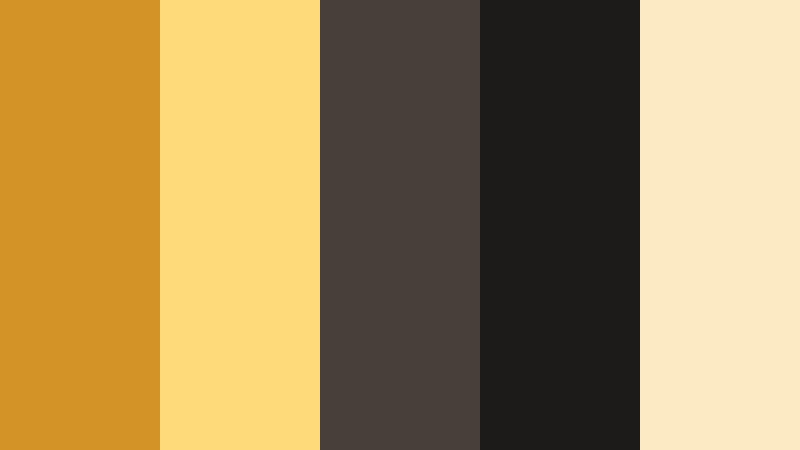
- HEX Codes: #d29426, #ffda7a, #47403a, #1c1b1a, #fbeac2
- Mood: Moody yet inviting, like late afternoon light on city concrete.
- Use for: Perfect for urban lifestyle reels, sneaker promos, and moody street photography edits.
Golden Hour Street Reel balances warm Golden Ochre with asphalt grays and creamy highlights, turning everyday sidewalks into cinematic frames. The darker neutrals #47403a and #1c1b1a add a subtle, gritty edge, while #ffda7a and #fbeac2 keep the highlights glowing.
Use this palette on urban b-roll, slow-motion street shots, and fashion walk-throughs. In thumbnails and titles, let Golden Ochre hit the logo, product, or subject outline, while the charcoals carry your typography and UI elements for clear contrast.
Cinematic Harvest Fade
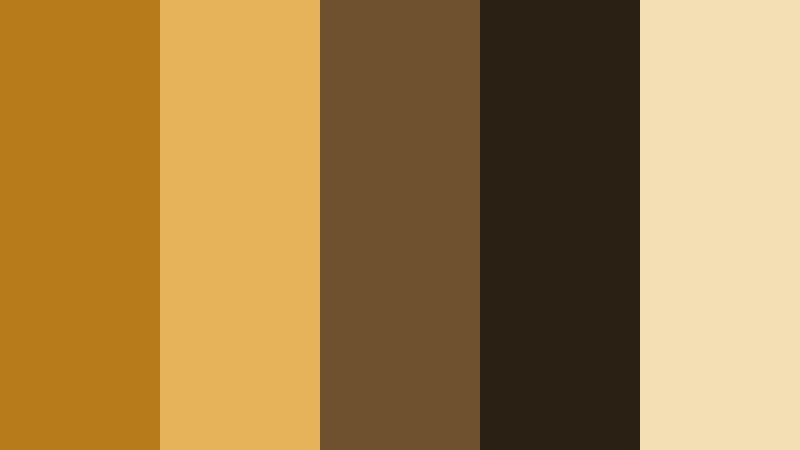
- HEX Codes: #b87b1c, #e7b35a, #70512e, #2a2014, #f2dfb3
- Mood: Nostalgic and filmic, echoing harvest fields and vintage film stock.
- Use for: Use for documentary intros, nostalgic family videos, and rustic brand stories.
Cinematic Harvest Fade leans into warm, toasted browns with a soft Golden Ochre glow that feels like old family footage. The deep #2a2014 shadows and #70512e mid browns emulate the depth of vintage film, while #f2dfb3 gently lifts skin and highlight details.
This palette works well for memory sequences, archival-style montages, and rustic product stories. Apply it to intro cards, lower thirds, and transitions to connect photos, video clips, and text with one cohesive, nostalgic atmosphere.
Sunlit Travel Montage

- HEX Codes: #cc8f22, #ffd988, #56727a, #24303a, #fff2ce
- Mood: Optimistic, bright, and adventurous with a film-trailer energy.
- Use for: Great for upbeat travel montages, destination promos, and fast-cut vacation reels.
Sunlit Travel Montage brings Golden Ochre into a classic teal-and-gold cinematic combo. #cc8f22 and #ffd988 glow against the cool #56727a and #24303a shadows, while #fff2ce preserves a clean, airy highlight region for skies and light flares.
Use this palette to grade drone shots, beach clips, and city skylines for high-energy trailers and destination reels. In thumbnails, pair Golden Ochre titles with teal accent bars or icons so your video stands out immediately in crowded feeds.
Vintage Caravan Frames
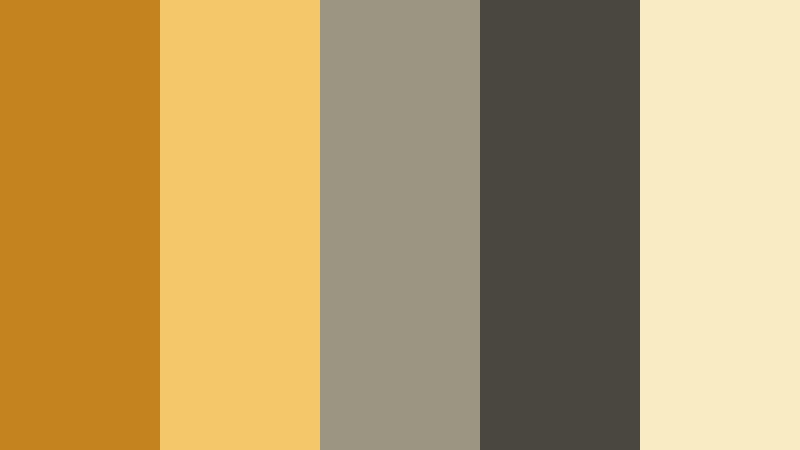
- HEX Codes: #c3841f, #f4c76a, #9b9582, #4a4740, #f9ecc5
- Mood: Retro and cozy, inspired by faded postcards and analog road trips.
- Use for: Best for retro-inspired edits, van-life vlogs, and nostalgic travel channels.
Vintage Caravan Frames softens Golden Ochre with muted neutrals for a delicate, postcard-like look. The combination of #c3841f and #f4c76a with #9b9582 and #4a4740 creates a slightly faded, analog mood, while #f9ecc5 keeps the overall feel warm and approachable.
Apply this palette to van-life sequences, roadtrip diaries, and cozy campsite scenes. In channel branding and end screens, use the muted Golden Ochre tones for badges, icons, and buttons to create a timeless, travel-journal identity.
Modern Brand & UI Golden Ochre Color Palettes
Minimal Studio Ochre
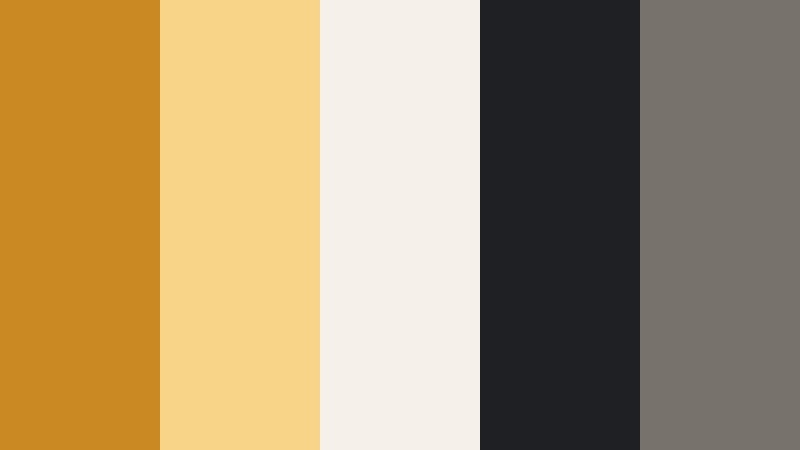
- HEX Codes: #c98a24, #f7d487, #f5f1e8, #1e2023, #77736a
- Mood: Clean, modern, and design-forward with a subtle editorial edge.
- Use for: Ideal for channel branding, YouTube banners, and minimalist UI screens in tutorials.
Minimal Studio Ochre treats Golden Ochre as a confident accent on a neutral, editorial backdrop. #c98a24 and #f7d487 draw attention to key elements, while #f5f1e8, #1e2023, and #77736a keep layouts calm, breathable, and premium.
Use this palette for overlays in design tutorials, software explainers, and studio-based talking-head videos. In thumbnails and channel art, let Golden Ochre highlight your logo, subscribe buttons, or main headline against the off-white and charcoal for a sleek, modern identity.
Creative Workspace Pop
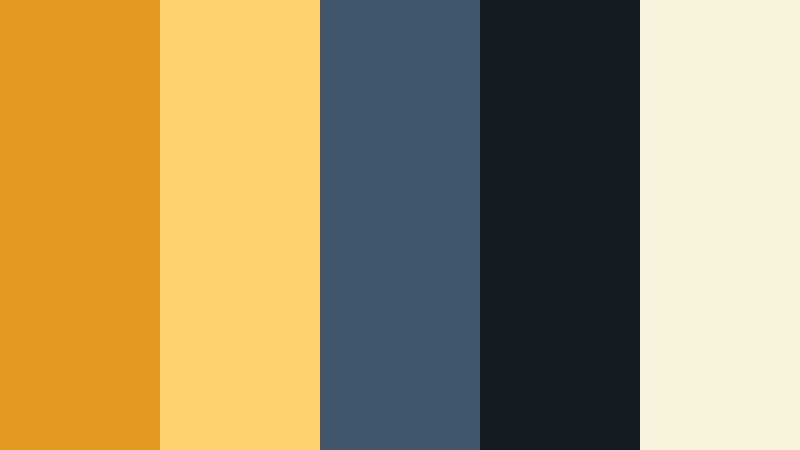
- HEX Codes: #e39a23, #ffd36c, #3e5869, #151b22, #f9f3dd
- Mood: Energetic and innovative, with a tech-meets-designer-studio feel.
- Use for: Use in motion graphics, SaaS explainers, and productivity app walkthroughs.
Creative Workspace Pop combines vibrant Golden Ochre accents with deep navy and inky black for a fresh, tech-ready feel. #e39a23 and #ffd36c bring energy, while #3e5869 and #151b22 ground dashboards, UI frames, and lower thirds.
This palette works especially well for animated explainers, feature breakdowns, and productivity content. Use Golden Ochre to highlight call-to-action buttons, timeline markers, and key stats in your videos, keeping the cream #f9f3dd as a soft background for text.
Urban Startup Identity
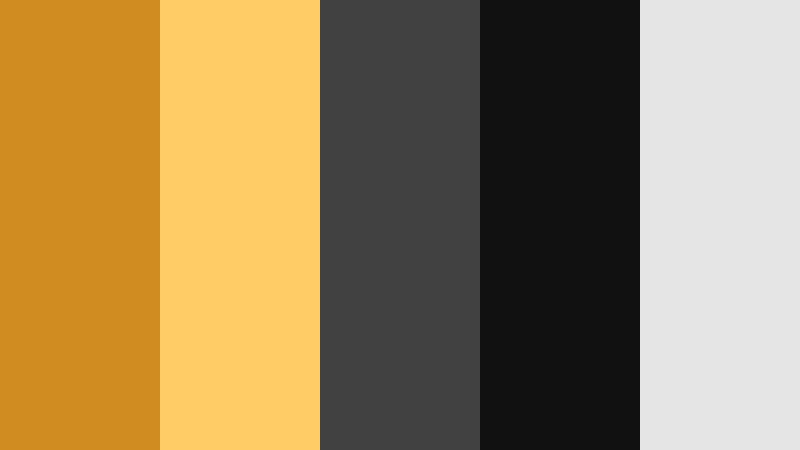
- HEX Codes: #d18c21, #ffcc66, #414141, #111111, #e5e5e5
- Mood: Bold, confident, and brand-ready with a strong digital presence.
- Use for: Great for logo stings, pitch decks, and tech channel intros or outros.
Urban Startup Identity is built for clarity and confidence. Golden Ochre tones #d18c21 and #ffcc66 sit cleanly against #414141 and #111111, with #e5e5e5 brightening layouts for accessible, high-contrast visuals.
Use this palette for logo reveals, subscribe animations, and branded slides inside your videos. It translates well to thumbnails, channel banners, and website hero sections, giving your brand a consistent tech-meets-creative aesthetic.
Editorial Ochre Headlines
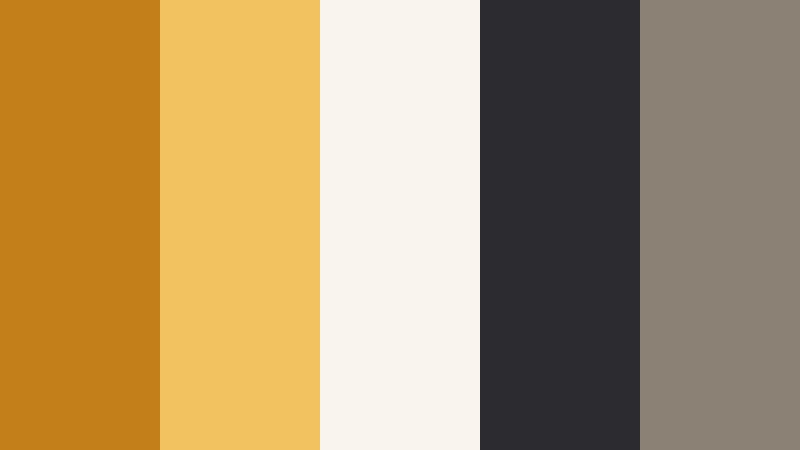
- HEX Codes: #c37f19, #f2c160, #f9f5ee, #2c2b30, #8b8175
- Mood: Polished and editorial, inspired by high-end magazines and design blogs.
- Use for: Perfect for title cards, lower thirds, and typography-focused explainer videos.
Editorial Ochre Headlines gives you a magazine-ready combination of Golden Ochre, soft cream, and ink-like charcoal. #c37f19 and #f2c160 stand out beautifully on #f9f5ee, while #2c2b30 and #8b8175 keep text sharp and legible.
Use this palette for typography-focused content like list videos, educational explainers, or commentary pieces. Golden Ochre can highlight key words, section numbers, and icons on clean layouts that feel refined and timeless.
Content Creator Toolkit
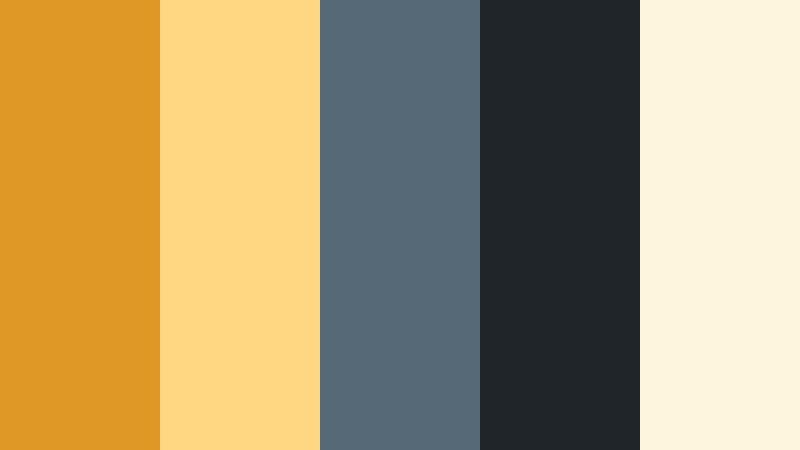
- HEX Codes: #df9825, #ffd780, #556976, #20252a, #fdf5de
- Mood: Friendly and accessible with a polished creator-brand aesthetic.
- Use for: Built for how-to channels, course branding, and social media kits.
Content Creator Toolkit blends optimistic Golden Ochre with approachable blues and creamy highlights. #df9825 and #ffd780 inject warmth and friendliness, while #556976 and #20252a add trust and structure, with #fdf5de keeping compositions soft.
It is ideal for tutorial overlays, course slides, and social templates. Use Golden Ochre for progress bars, chapter markers, and button accents, while the blues hold navigation, captions, and annotation-style callouts inside your videos.
Earthy Lifestyle Golden Ochre Color Palettes
Cozy Autumn Flatlay
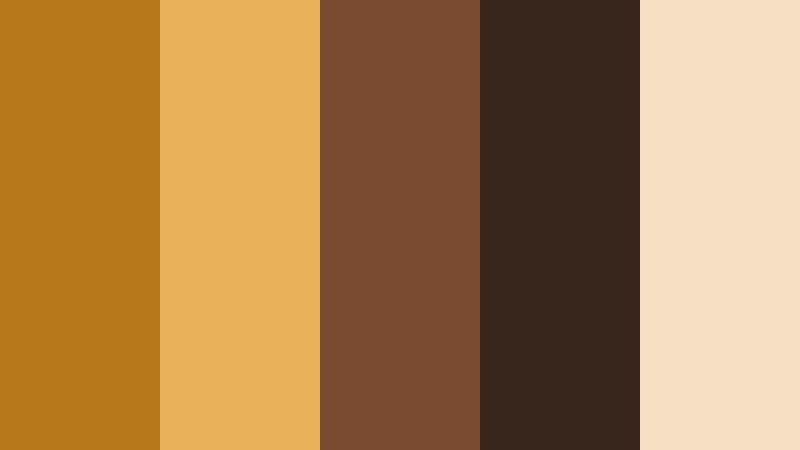
- HEX Codes: #b6781a, #e9b159, #7a4b30, #38251b, #f5e0c3
- Mood: Warm, cozy, and seasonal with strong fall lifestyle vibes.
- Use for: Great for cozy vlogs, cooking channels, and autumn lookbooks or hauls.
Cozy Autumn Flatlay captures the warmth of coffee, cinnamon, and fallen leaves. The Golden Ochre pair #b6781a and #e9b159 glow against deeper browns #7a4b30 and #38251b, softened by the creamy #f5e0c3.
Use it to grade table setups, candles, baking scenes, and knitwear shots. In thumbnails, push Golden Ochre into titles and props while using the dark browns for drop-shadows and borders to create a snug, seasonal look.
Slow Living Kitchen
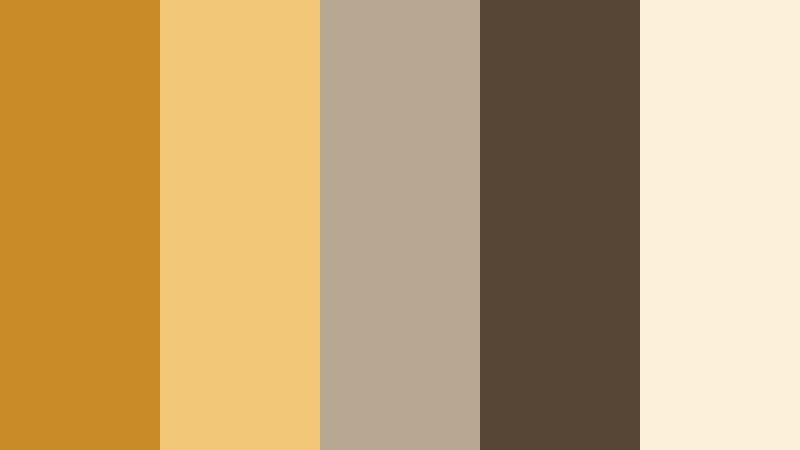
- HEX Codes: #c88b27, #f2c777, #b7a892, #564434, #fbefda
- Mood: Calm, grounded, and wholesome like sun through a farmhouse window.
- Use for: Use for recipe videos, home decor content, and slow living documentaries.
Slow Living Kitchen softens Golden Ochre with milky neutrals and gentle browns for a relaxed, homely ambiance. #c88b27 and #f2c777 bring warmth without harshness, while #b7a892, #564434, and #fbefda keep everything subtle and calm.
Apply this palette to overhead recipe shots, morning routines, and interior details. In graphics and intro cards, use Golden Ochre sparingly on icons and section labels so your visuals stay soothing and minimal.
Market Morning Stroll
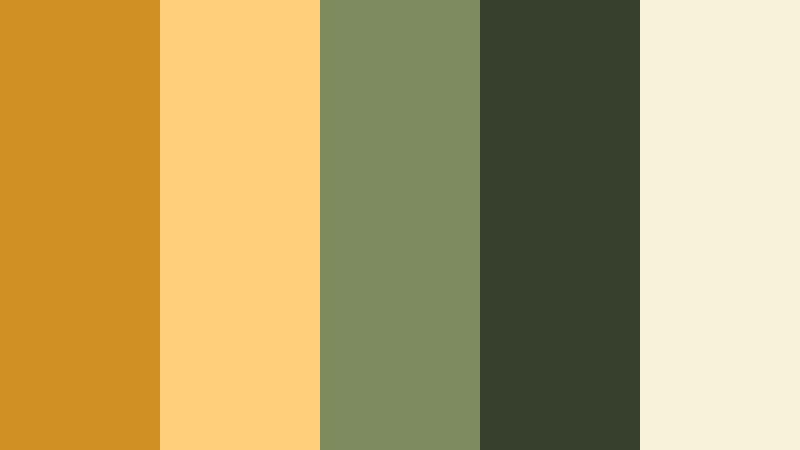
- HEX Codes: #cf9023, #ffd079, #7d8b5f, #37402d, #f7f1d7
- Mood: Fresh and lively, evoking farmers markets and outdoor brunches.
- Use for: Perfect for lifestyle montages, travel food guides, and city-days-in-my-life vlogs.
Market Morning Stroll mixes sunny Golden Ochre with herbaceous greens and soft creams. #cf9023 and #ffd079 energize the frame, while #7d8b5f and #37402d echo fresh produce and foliage, grounded by #f7f1d7 highlights.
Use this palette to color food stalls, brunch tables, and park walks in lifestyle vlogs. In thumbnails, let Golden Ochre mark prices, labels, or episode numbers while the greens frame your subject and hint at freshness and outdoor life.
Crafted Studio Bench
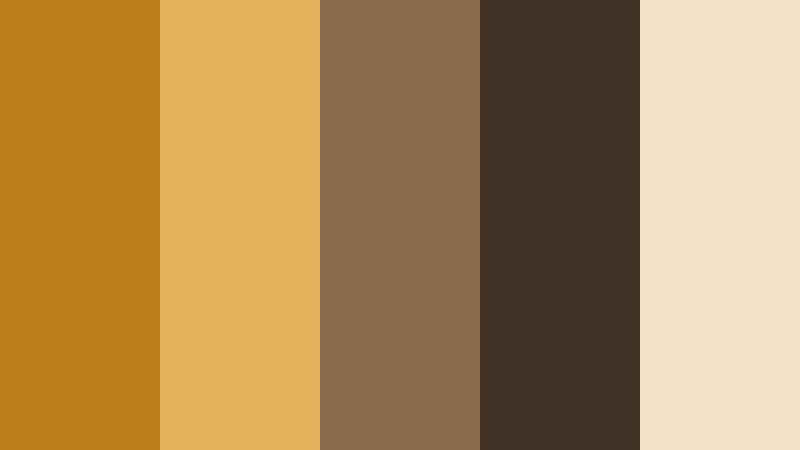
- HEX Codes: #bc7e1a, #e4b25b, #8b6b4b, #423226, #f2e1c9
- Mood: Artisanal and tactile, inspired by wood, leather, and handmade objects.
- Use for: Great for maker channels, DIY tutorials, and product close-ups in small-batch brands.
Crafted Studio Bench leans into Golden Ochre and wood tones that highlight texture and craftsmanship. #bc7e1a and #e4b25b read like polished timber, while #8b6b4b and #423226 deepen grains and shadows, with #f2e1c9 adding soft contrast.
Use it when filming woodworking, ceramics, jewelry, and other handmade projects. In branding, bring Golden Ochre into your logo and chapter cards, using the darker browns for borders and text to create a warm, artisan identity.
Soft Pastel Golden Ochre Color Palettes
Soft Morning Sketchbook
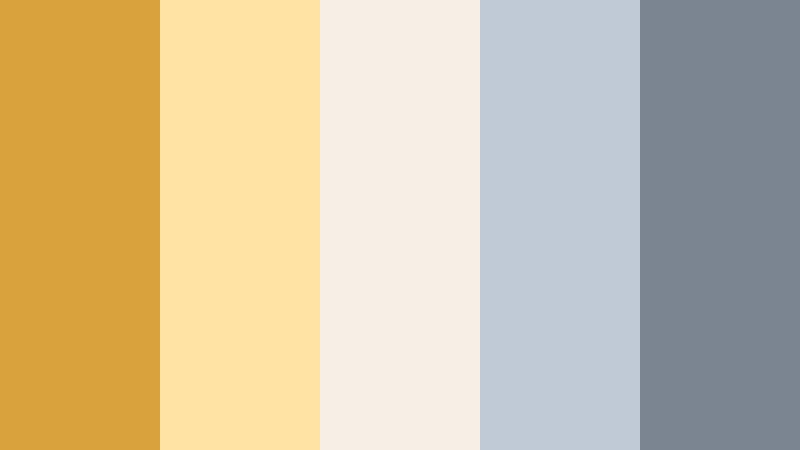
- HEX Codes: #d9a23c, #ffe3a4, #f5efe5, #c0c9d6, #7b8592
- Mood: Gentle and reflective, like a quiet creative morning with coffee and notes.
- Use for: Use for journaling vlogs, study-with-me videos, and gentle productivity content.
Soft Morning Sketchbook floats a muted Golden Ochre accent over soft creams and desaturated blues. #d9a23c and #ffe3a4 provide warmth, but the overall look stays delicate thanks to #f5efe5, #c0c9d6, and #7b8592.
Apply this palette to lo-fi study edits, note-taking overheads, and reflective voiceover videos. In overlays and thumbnails, use Golden Ochre to underline headings or highlight key timestamps, while the cool blues support subtle grid lines, timers, and subtle icons without overwhelming the frame.
Tips for Creating Golden Ochre Color Palettes
Golden Ochre works best when it has room to breathe, balanced with deep shadows, soft neutrals, or cool counterpoints. These tips will help you combine it with other tones for video, branding, and design that feel intentional and easy to watch.
- Pair Golden Ochre with deep charcoals or dark browns for readable titles and UI elements, especially on thumbnails viewed on small screens.
- Use cool tones like teal, navy, or desaturated blue as contrast colors to keep warm Golden Ochre palettes from feeling too heavy or monotone.
- Limit your accent colors: let Golden Ochre handle highlights (buttons, icons, callouts) and keep the rest of your layout neutral for a professional look.
- Check skin tones after grading: if Golden Ochre pushes faces too orange, reduce saturation in the yellow and orange HSL channels until they look natural.
- Maintain branding consistency by reusing the same HEX codes across intros, lower thirds, end screens, and social thumbnails.
- Test your palette on both light and dark backgrounds to be sure text, logos, and key shapes stay legible in all parts of your video.
- For lifestyle and slow living content, soften Golden Ochre by mixing it with off-whites and muted browns instead of pure black or pure white.
- Create reusable presets in your editor so every new project with Golden Ochre starts from the same base grade and design system.
Golden Ochre color palettes can make your videos feel cinematic, welcoming, and instantly recognizable. Whether you are shooting city streets at golden hour, cozy kitchen scenes, or clean studio explainers, the right combination of ochres, neutrals, and complementary colors will shape the mood before viewers even hit play.
Use these HEX-coded palettes as starting points for your own thumbnails, intros, overlays, and grading styles. Inside Filmora, you can lock in your favorite Golden Ochre look, then duplicate it across episodes, series, and platforms so your brand always feels cohesive.
Experiment with a few palettes, refine them with Filmora's color tools, and then turn your favorite Golden Ochre combination into your channel signature.
secure download