

 100% Security Verified | No Subscription Required | No Malware


 ChatGPT
 Perplexity
 Gemini
 Claude
 Grok
Grok
Give your beach content the bright, blue, cinematic finish it deserves with Instagram Beach LUTs Bright Blue Tone filters tailored for content creators. This collection is designed to make water look clearer, skies more vibrant, and skin tones flattering in seconds.
Whether you film lifestyle vlogs, travel reels, or coastal B-roll, these filters help you quickly turn flat clips into eye-catching Instagram videos with crisp turquoise seas and sunlit highlights that stand out in the feed.
In this article
Golden Morning Shores
Sunrise Aqua Pop
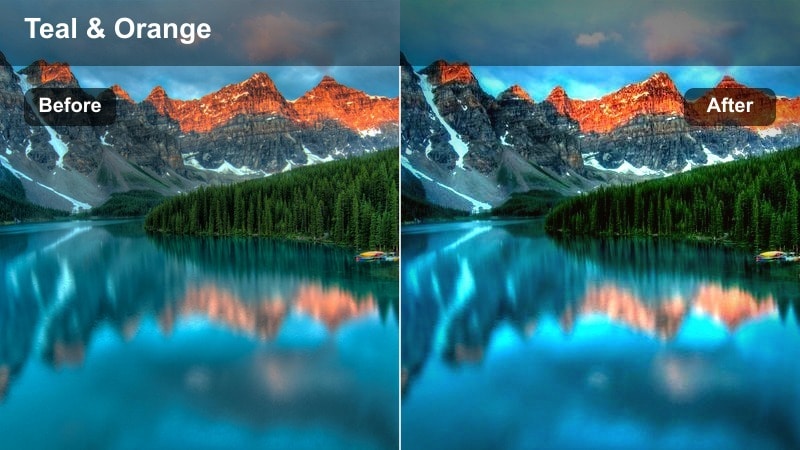
- Effect look: Bright teal water with a soft sunrise glow and clean, crisp highlights.
- Best for: Early morning beach walks, slow-motion waves, and quiet shoreline B-roll.
- Editing tip: Lower contrast slightly if your footage has heavy shadows to keep the blue tones smooth and not too intense.
In Filmora, Sunrise Aqua Pop is ideal when you want your early morning shoreline clips to feel fresh and cinematic without overpowering the pastel sky. Apply the LUT to your clip, then gently reduce contrast in the Color tab so the teal water stays smooth and the soft sunrise gradients remain clean.
For talking shots or walking sequences, combine this filter with Filmora stabilization and a light vignette so viewers focus on your subject against the bright turquoise shore. If faces look too cool, add a touch of warmth in white balance or use a mask on the subject to warm skin while preserving that crisp teal ocean pop in the background.
Smart Blue Toning with Filmora's AI Tools
Combine Instagram Beach LUTs Bright Blue Tone styles with Filmora's AI color correction to quickly fix exposure and white balance before you start creative grading. Let AI balance the image so your blues respond more predictably when you apply bright turquoise or teal beach filters.
This workflow keeps skin tones looking natural even when you push the sea and sky into vibrant electric blues, which is especially helpful for creators editing frequent Reels and Stories on tight schedules.
 secure download

Preview Bright Blue Beach Looks in Real Time
Filmora's filter previews let you scroll through multiple bright blue beach looks and instantly see which one fits your clip, from soft morning aquas to intense neon tides. You can hover or click to compare styles without committing to an edit, making experimentation fast and risk free.
Once you find a blue tone you like, simply adjust intensity with opacity controls so it matches your Instagram aesthetic rather than overpowering it.
secure download1000+ Video Filters and 3D LUTs
Beyond these Instagram Beach LUTs Bright Blue Tone styles, Filmora includes hundreds of additional filters and 3D LUTs so you can build a complete visual identity for your channel. Mix cinematic looks, film emulations, and seasonal presets with your favorite blue beach tones for a polished feed.
Use the Effects and LUTs panels together, then fine tune color with HSL controls to match skies, ocean hues, and brand colors across multiple videos and platforms.
secure downloadMorning Sky Wash
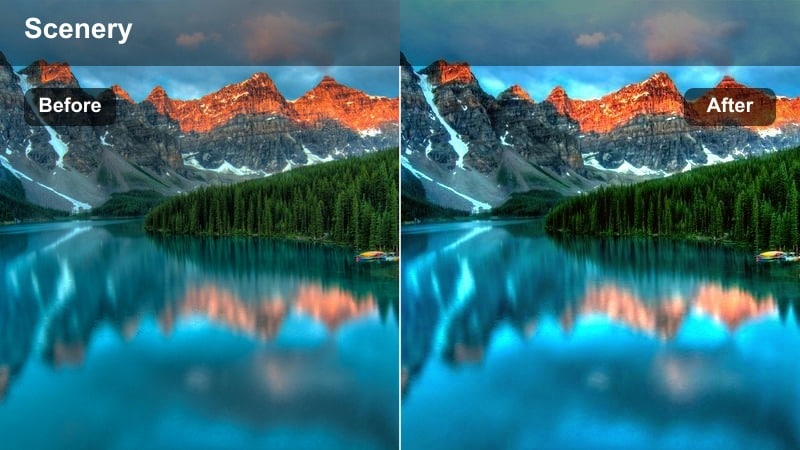
- Effect look: Soft, hazy blue tones with lifted shadows and gentle warm highlights.
- Best for: Calm beach vlogs, storytelling intros, and talking-to-camera clips near the water.
- Editing tip: Increase exposure by a small amount for backlit shots to keep the haze dreamy without losing detail in your subject.
Morning Sky Wash in Filmora creates a pastel, low contrast feel that is perfect for reflective vlogs and relaxed intros. Apply the LUT, then slightly raise exposure on backlit clips so your subject does not sink into the lifted shadows while the background stays airy and soft.
To preserve the cinematic pastel mood, avoid pushing saturation too far. Instead, use Filmora's vignette and a gentle blur or depth-of-field effect around the edges so attention stays on the creator while the sea and sky remain dreamy, washed in light blues.
Coastal Fade Blue
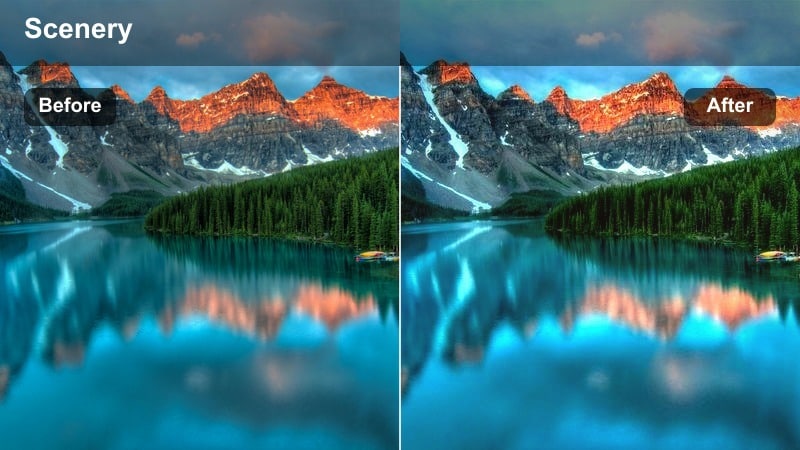
- Effect look: Lightly faded contrast with punchy cyan highlights in the water and sky.
- Best for: Minimalist beach clips, aesthetic B-roll, and cinematic establishing shots.
- Editing tip: If your footage is already flat, add a touch of clarity before applying this filter to keep details in sand and waves.
Coastal Fade Blue gives your beach shots a subtle film-inspired fade while still keeping cyan highlights bright in the water and sky. In Filmora, add a small bump of clarity or sharpness before applying the LUT if your source is log or very flat so sand textures and wave details remain defined.
For aesthetic B-roll and opening shots, pair this look with slower transitions such as dissolve or smooth zoom, and gently deepen blacks with curves if you want a slightly more modern feel while keeping the overall faded cyan character intact.
Midday Turquoise Waves
Turquoise Crisp Boost
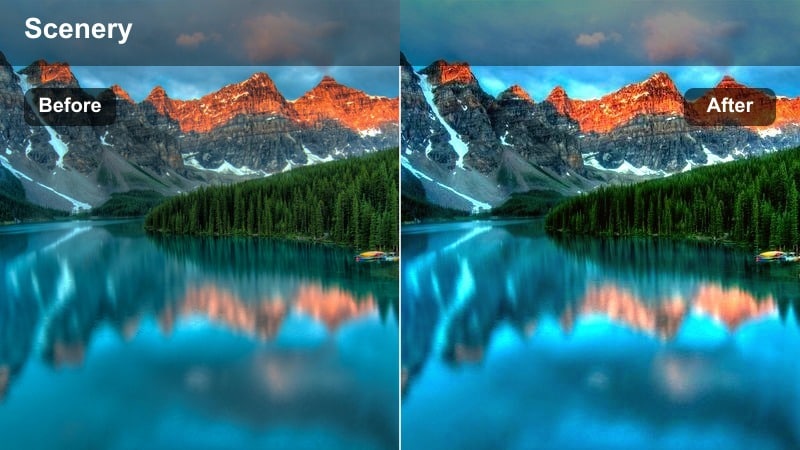
- Effect look: High-clarity turquoise water with bright whites and bold, sunny blues.
- Best for: Drone shots, overhead wave clips, and high-energy Instagram reels.
- Editing tip: Dial down highlights slightly for harsh midday light to avoid clipping on white foam and bright sand.
Turquoise Crisp Boost is built for bright daytime beach footage where you want every ripple and wave to stand out. In Filmora, apply the LUT to drone and overhead shots, then pull back the highlights slider to protect detailed foam and sand while keeping the turquoise water vivid.
For Reels, combine this look with speed ramps and beat-synced cuts using Filmora's editing tools so the crisp blues and whites match the dynamic pacing of your edit. Use scopes to ensure you are not blowing out the brightest areas as you push saturation and contrast.
Electric Blue Breaker
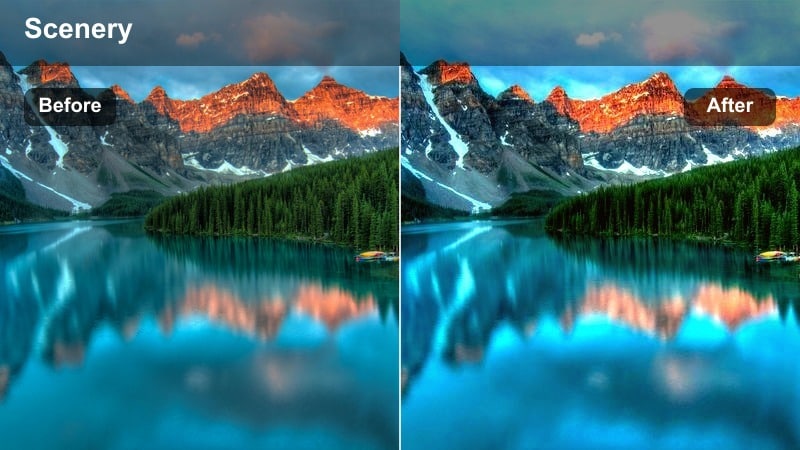
- Effect look: Intense bright blue tones with strong contrast and slightly cooler midtones.
- Best for: Surf videos, action shots, and beach sports content with lots of movement.
- Editing tip: Apply light motion blur or speed ramps to match this filter's energetic contrast for reels and short-form clips.
Electric Blue Breaker in Filmora is perfect for action heavy footage where you want the water to feel powerful and graphic. Apply the LUT to surf clips or beach sports shots, then fine tune contrast to balance deep shadows with punchy electric blues.
To keep athletes looking natural, use Filmora's HSL or color masking to protect skin tones from going too cold while you push the ocean to a more stylized blue. Add motion blur effects, dynamic transitions, and speed ramps so the energetic grade is matched by equally energetic editing.
Shoreline Glow Blue
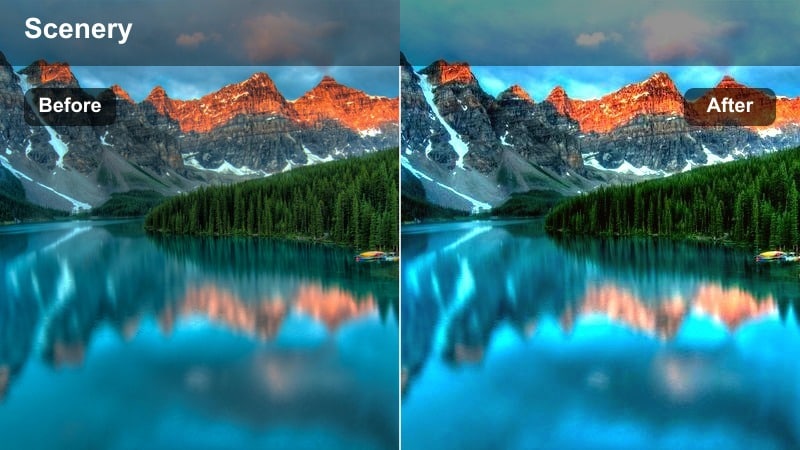
- Effect look: Bright blue midtones with slightly warm skin and reflective highlights on wet sand.
- Best for: Walking along the shore, lifestyle shots, and fashion content by the waterline.
- Editing tip: Increase saturation only in blues and aquas to keep clothing and skin tones from becoming overly vibrant.
Shoreline Glow Blue emphasizes blue reflections in shallow water and wet sand while keeping skin tones flattering. In Filmora, apply the LUT to lifestyle and outfit clips, then selectively boost blue and aqua saturation so reflections pop without oversaturating your subject's clothing or face.
Use gradient masks along the bottom of the frame to lift exposure where reflections live, drawing the eye naturally toward the shoreline path. Pair this with subtle camera movement and clean cuts to create smooth, aspirational walk-along-the-beach sequences ready for Instagram.
Golden Hour Coastline
Amber Blue Glow
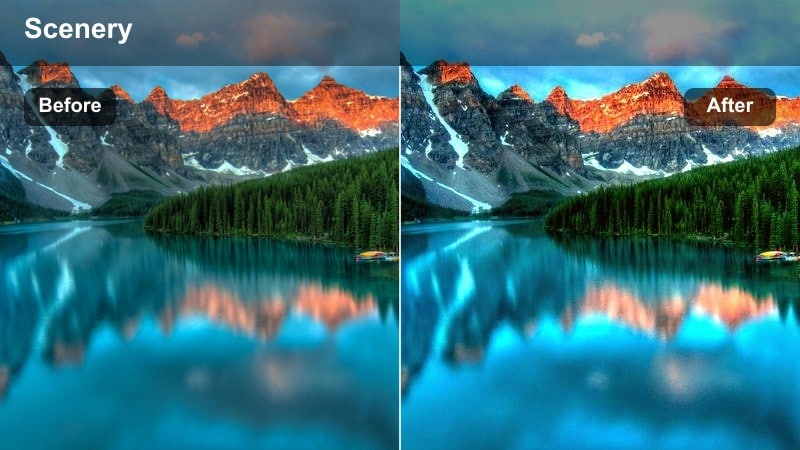
- Effect look: Golden highlights with bright blue water and a soft cinematic roll-off in shadows.
- Best for: Golden hour walking shots, silhouettes by the surf, and romantic couple scenes.
- Editing tip: Increase warmth globally, then cool only the shadows for a rich contrast between amber light and blue water.
Amber Blue Glow lets you enjoy rich golden light on skin and sand while the sea stays clean and blue. In Filmora, warm the entire image slightly, then use color wheels or curves to cool shadows so you get a pleasing contrast between amber highlights and blue water.
This filter works especially well for couples or silhouette shots. Add a soft vignette and gentle slow motion, then use Filmora's fade in and fade out transitions to keep the mood cinematic and romantic for Reels and carousel videos.
Sunset Azure Film
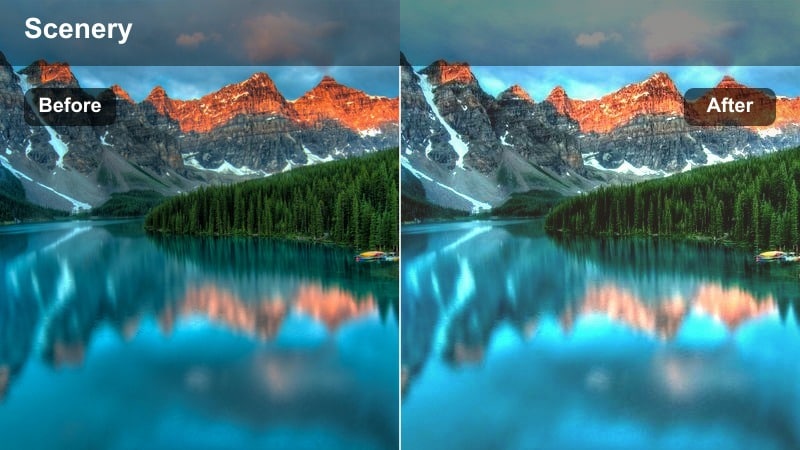
- Effect look: Muted film-style contrast with soft azure blues and gentle sunset pinks.
- Best for: Story-driven travel reels, cinematic outros, and panning sunset shots along the shore.
- Editing tip: Slow your footage slightly and use smoother transitions to match the relaxed, cinematic feeling of this filter.
Sunset Azure Film delivers a classic filmic profile with pastel blues and pinks that are perfect for storytelling reels. In Filmora, apply the LUT to your sunset pans, then slightly reduce playback speed and use smooth transitions to emphasize the relaxed, cinematic tone.
You can enhance the analog feel by adding a subtle film grain overlay and lightly muting saturation across all channels. This keeps the colors gentle and cohesive while your narrative text, voiceover, or music drives the emotional impact of the beach scene.
Honey Blue Lens
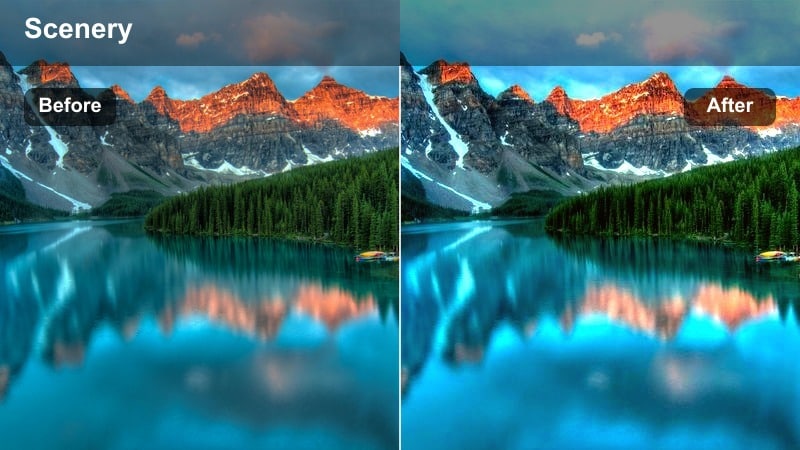
- Effect look: Soft honey warmth on skin with rich blue seas and delicate highlights.
- Best for: Portraits on the sand, influencer outfit videos, and lifestyle brand content by the shore.
- Editing tip: Use shallow depth-of-field shots and slightly lift shadows to match this filter's creamy, polished look.
Honey Blue Lens is optimized for portraits and branded lifestyle shots where the creator is the focus. In Filmora, apply the LUT to close-ups, then gently lift shadows and lower clarity slightly to get a creamy, polished aesthetic while the ocean stays richly blue behind your subject.
Sharpen eyes and key facial features with local adjustment tools so the face remains crisp against the softer background. This combination of warm skin, deep blue sea, and subtle detail is ideal for sponsored content, cover shots, and Instagram profile videos.
Blue Hour and Twilight Beach Scenes
Twilight Cyan Mist
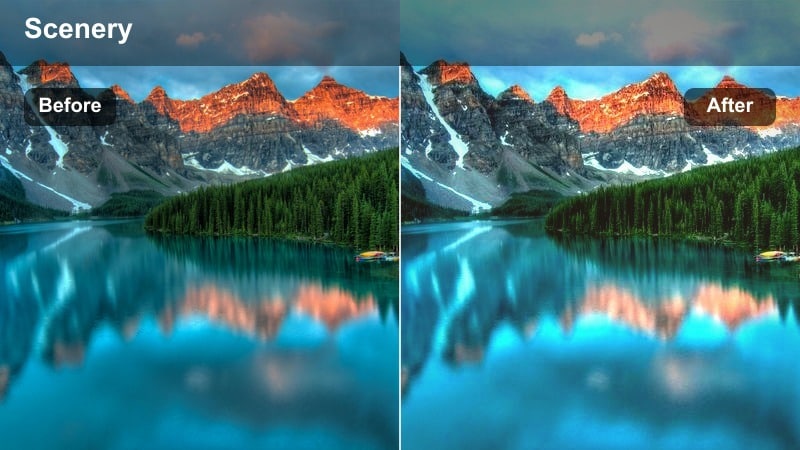
- Effect look: Cool cyan-blue shadows with a gentle misty fade and preserved midtone detail.
- Best for: Blue hour shoreline walks, reflective vlogs, and moody transition shots.
- Editing tip: Slightly dehaze darker clips so the mist effect comes from color, not real fog or sensor noise.
Twilight Cyan Mist leans into cool cyan shadows and a soft haze to create a moody blue hour atmosphere. In Filmora, lightly dehaze or raise midtones before applying the LUT so important details in rocks, sand, and your subject are preserved under the blue tint.
For reflective vlogs or transitions between day and night in a reel, keep movements slow and add gentle music. If noise appears in shadows, apply a touch of denoising and then introduce a fine film grain layer so the final look is cinematic rather than muddy.
Neon Tide Glow
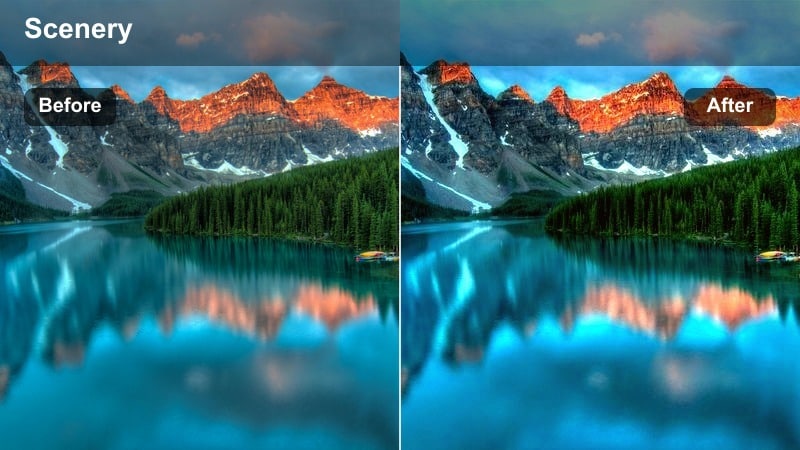
- Effect look: Bold, almost neon blue waves with punchy contrast and darker skies.
- Best for: Night-time beach reels, dance clips near the shore, and stylized lifestyle videos.
- Editing tip: Limit exposure pushes; instead, brighten specific areas with masks so the dramatic blue glow stays intense and controlled.
Neon Tide Glow turns waves into a graphic, almost neon blue light source that stands out in night reels. In Filmora, keep overall exposure conservative and use masks to brighten only your subject or key foreground elements so the dramatic tide glow does not wash out.
Pair this stylized look with bold text overlays, energetic music, and quick cuts for dance or fashion content. Keep subjects slightly warmer and brighter than the water using color correction tools so they pop against the deep, electric shoreline.
Midnight Coast Soft
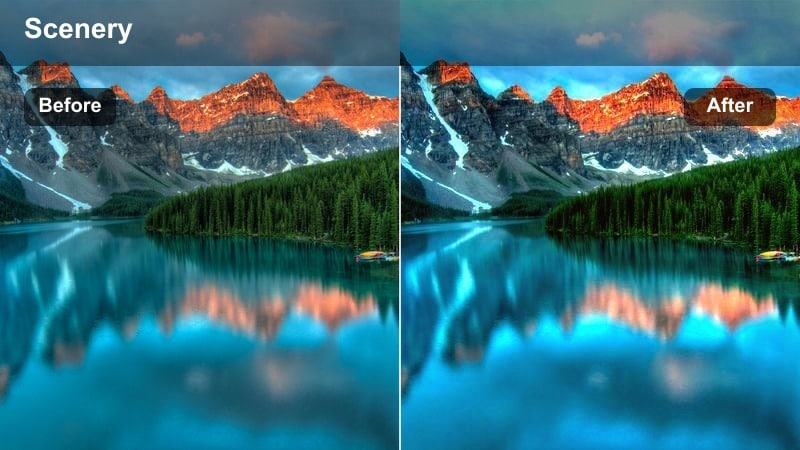
- Effect look: Deep navy blues with softened contrast and subtle highlight sparkle on waves.
- Best for: Low-light beach walks, quiet narrative clips, and outro shots facing the ocean at night.
- Editing tip: Reduce sharpness slightly to avoid accentuating high-ISO noise in very dark beach footage.
Midnight Coast Soft is designed for calm, reflective night coastline scenes where you want depth without harsh contrast. In Filmora, reduce sharpness a bit before or after applying the LUT to keep high ISO noise from standing out, and let the deep navy tones carry the mood.
For outros or narrative endings, maintain low brightness and let your subject be gently lit with a masked exposure lift. Smooth camera moves and minimal transitions will help preserve the tranquil, late night vibe while the subtle highlight sparkle on the waves adds visual interest.
Tips for Using Instagram Beach Luts Bright Blue Tone Filters in Filmora
- Shoot slightly underexposed at the beach to protect sky and water detail, then recover brightness with your chosen bright blue beach filter in Filmora.
- Use a polarizing filter on your camera or phone attachment to naturally deepen ocean blues before you start color grading.
- Keep white balance slightly on the cooler side in camera or during editing if you want extra crisp turquoise water with these blue tone LUTs.
- Stabilize handheld shoreline shots using Filmora's stabilization so smooth blue gradients in water and sky do not get lost in shake.
- Mix close-up details like feet in the tide with wide shoreline shots using the same LUT to create a cohesive Instagram reel.
- Adjust LUT intensity with Filmora's opacity or blending controls so brighter blue looks stay flattering for skin tones.
- Use masks to treat the ocean and sky separately from people, protecting faces while you push blues more aggressively.
- Save your favorite blue beach combinations as custom presets in Filmora to speed up editing for future trips and vlogs.
Instagram Beach LUTs Bright Blue Tone filters in Filmora give content creators an easy way to transform ordinary shoreline clips into vibrant, cinematic ocean visuals that stand out in the feed.
Experiment with different blue-focused looks for morning, midday, golden hour, and blue hour scenes, then save your favorites as presets so every new beach shoot can be edited in a consistent, scroll-stopping style.
secure download