

 100% Security Verified | No Subscription Required | No Malware


 ChatGPT
 Perplexity
 Gemini
 Claude
 Grok
Grok
Misty Turquoise sits between soft teal and pastel aqua, evoking calm seas, clean air, and gentle clarity. Psychologically it feels soothing and optimistic, which makes it ideal for content that should look fresh, friendly, and easy to watch. It is a natural fit for wellness creators, travel vloggers, beauty channels, and minimalist brands that want a tranquil but modern visual identity.
In video editing, Misty Turquoise works beautifully in overlays, titles, lower thirds, and color grading, especially when combined with blush, ivory, or deep navy. The palettes below give you ready-made Misty Turquoise color combinations with HEX codes, so you can design cohesive thumbnails, intros, branding kits, and color grades in Filmora and keep your visuals consistent across platforms.
In this article
Soft & Romantic Misty Turquoise Palettes
Seafoam Morning Glow

- HEX Codes: #a6d9d2, #fbe9e7, #ffd1dc, #f7f3e9, #89b6b0
- Mood: Gentle, airy, and romantic like a calm beach sunrise.
- Use for: Ideal for dreamy wedding highlight reels, soft lifestyle vlogs, and romantic Instagram reels.
Seafoam Morning Glow mixes Misty Turquoise with blush pinks and creamy off-whites to create a light, hazy morning feel. It softens skin tones and gives footage a pastel, almost film-like glow that works especially well with natural light.
Use this palette for wedding teasers, couple montages, and cozy slow-living vlogs. In Filmora, apply the aquas to lower thirds and transitions, keep titles in the creamy tones for readability, and reserve the blush accents for call-to-action buttons, YouTube thumbnails, and cover images on playlists.
Pro Tip: Build a Dreamy Misty Turquoise Look in Filmora
To keep a Seafoam Morning Glow aesthetic consistent, start by picking one of the Misty Turquoise HEX codes as your main brand color inside Filmora. Use it for titles, motion graphics, and key overlays so every intro, b-roll section, and end screen feels unified. Then, use the softer blush and cream tones on backgrounds and subtitle boxes to avoid harsh contrast.
When you grade your clips, gently lift the shadows and add a hint of teal into the midtones to echo the palette without pushing skin tones too far. Save this look as a custom preset so you can apply it across wedding highlight reels, Instagram Reels exports, and short-form clips without redoing the work every time.
AI Color Palette
You can capture this exact Misty Turquoise mood from a reference image, such as a coastal wedding photo or the palette card itself, and let Filmora match it across your whole project. Filmora's AI Color Palette feature analyzes the colors from one clip or image and transfers that look to other shots in a few clicks.
Import your hero shot that represents Seafoam Morning Glow, run AI Color Palette, and apply the matched look to talking-head clips, b-roll, and social cutdowns. This keeps skin tones, turquoise accents, and pastel highlights aligned, making your brand or series instantly recognizable.
 secure download

HSL, Color Wheels & Curves
To refine your Misty Turquoise tones, use HSL to target aquas and greens, gently lowering saturation for a softer pastel or boosting it for more vivid coastal shots. With Filmora's color tools and tutorials on color grading, you can balance the turquoise against blush and cream so nothing looks too cold or too warm.
Use the color wheels to push shadows slightly toward teal and highlights toward warm cream, then fine-tune with curves to keep contrast low and cinematic. This combination preserves the airy Seafoam Morning Glow feel while still giving your footage depth and polish that looks professional on YouTube and social feeds.
secure download1000+ Video Filters & 3D LUTs
If you want a fast starting point, Filmora's video filters and 3D LUTs make it easy to push your Misty Turquoise palette toward vintage romance, bright lifestyle, or cinematic pastel. Stack gentle diffusion or glow filters over your base grade to reinforce the soft, dreamy atmosphere.
Once you find a filter and LUT combo that matches Seafoam Morning Glow, save it as a custom preset or apply it to multiple clips at once. This speeds up editing for wedding highlights, montage reels, and full-length vlogs while keeping your Misty Turquoise and blush color story intact.
secure downloadCotton Candy Tide

- HEX Codes: #a9ddd7, #ffe3f1, #ffc7de, #fef4d7, #7fb6b0
- Mood: Playful and romantic with a pastel candy-shop charm.
- Use for: Great for kawaii vlog channels, playful title cards, and lighthearted product promos.
Cotton Candy Tide wraps Misty Turquoise in sugary pinks and buttery cream, giving your visuals a sweet, whimsical energy. It feels like a pastel theme park: soft, cute, and instantly eye-catching.
Use the brighter pinks for YouTube thumbnail text and sticker-like graphics, keep Misty Turquoise for borders and frames, and use the cream tone as a clean background. This palette is perfect for kawaii edits, beauty hauls, stationery unboxings, and playful channel branding.
Turquoise Love Letters

- HEX Codes: #98d2ca, #fde2cf, #f9c5bd, #f6ebe6, #6fa9a2
- Mood: Softly nostalgic and intimate, like handwritten notes and pressed flowers.
- Use for: Perfect for storytelling shorts, engagement announcements, and heartfelt documentary moments.
Turquoise Love Letters combines Misty Turquoise with peach and rose tones for a warm, nostalgic mood. The colors feel like aged stationery and sunlit rooms, balancing cool and warm hues in a flattering way.
Apply the warmer tones to background cards, frames, and on-screen captions, while using Misty Turquoise for lower thirds, dividers, and subtle overlays. This palette is ideal for narrative vlogs, engagement videos, proposal recaps, and any sequence where you want gentle emotion without heavy contrast.
Whispering Lagoon

- HEX Codes: #9fd6cf, #f6f2ff, #e7dbff, #f7f6f0, #6aa9a1
- Mood: Quiet, poetic, and slightly dreamy with a lagoon-like stillness.
- Use for: Use in slow-paced vlogs, cinematic b-roll overlays, and reflective brand films.
Whispering Lagoon blends Misty Turquoise with soft lilacs and ivory, creating a gentle, almost ethereal vibe. It feels hushed and reflective, like a calm lagoon at twilight.
These hues work beautifully over slow b-roll, meditative voiceovers, or reflective personal stories. In thumbnails and intros, use the lilac and ivory for backgrounds and keep Misty Turquoise as the accent in titles, icons, and simple line illustrations for a modern yet soothing look.
Blushed Coastal Mist

- HEX Codes: #a3d7cf, #ffe6dd, #ffcbc2, #f4eee9, #7eb5ac
- Mood: Romantic coastal escape with warm blush highlights.
- Use for: Ideal for couples travel vlogs, retreat promos, and soft brand intros with a seaside vibe.
Blushed Coastal Mist merges Misty Turquoise with warm blush and sand-like neutrals. It feels like a seaside getaway at golden hour, romantic but still light and fresh.
Use the turquoise shades for ocean-inspired accents and text, and lean on the blush tones for backgrounds, overlays, and call-to-action elements. This palette is great for retreat promos, travel agency branding, and intros or outros of couple or travel vlogs that want a refined yet approachable coastal identity.
Fresh & Minimal Misty Turquoise Palettes
Nordic Turquoise Air
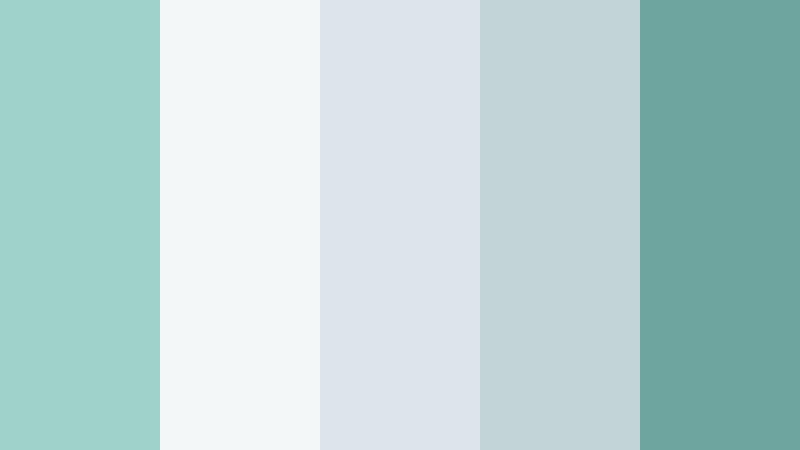
- HEX Codes: #9fd2ca, #f4f7f8, #dde5eb, #c3d4d9, #6ea69f
- Mood: Calm, breathable, and Scandinavian-inspired minimalism.
- Use for: Great for tech explainers, productivity channels, and clean UI overlays in tutorials.
Nordic Turquoise Air pairs Misty Turquoise with cool greys and crisp whites for a modern, Scandinavian feel. It keeps visuals airy and uncluttered, letting your content and typography stand out.
Use Misty Turquoise for highlight elements such as progress bars, UI callouts, and key phrases in titles. Let the light greys and off-whites act as neutral backgrounds for screen recordings, info graphics, and minimalist thumbnails, ideal for productivity, tech, and education channels.
Minted Workspace Calm

- HEX Codes: #a7d9d0, #f7faf9, #e0f0e8, #c6d7cf, #6baba1
- Mood: Productive, focused, and soothing like a tidy creative studio.
- Use for: Perfect for Notion tours, desk setup videos, and branded tutorial lower thirds.
Minted Workspace Calm leans into soft greens and Misty Turquoise to build an organized, zen workspace look. It feels clean and low-stress, which is ideal for long-form tutorials and workflow breakdowns.
Use this palette on lower thirds, step indicators, and chapter cards in your videos. For branding, base your logo and channel banner around the deeper turquoise while letting the lighter mints fill the background, making your workspace and on-screen elements feel cohesive on both mobile and desktop.
Cloudlight Turquoise
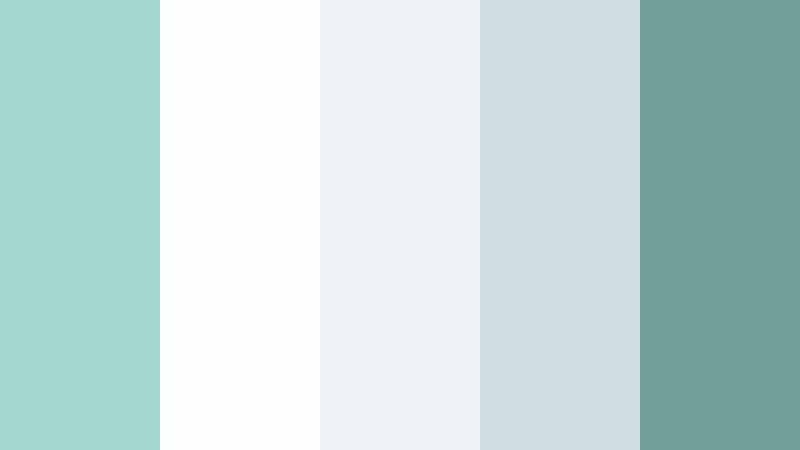
- HEX Codes: #a5d6cf, #fdfefe, #edf3f6, #d0dde2, #739f99
- Mood: Weightless and bright, like light diffused through soft clouds.
- Use for: Use for app walkthroughs, SaaS promos, and airy logo animations.
Cloudlight Turquoise is almost monochrome, mixing Misty Turquoise with soft whites and gentle greys. It creates a clean, weightless look that feels modern and tech-ready.
This palette is excellent for app demos, SaaS launch videos, and simple animated logos. Keep the brightest white for backgrounds, use soft grey for subtle containers and cards, and let Misty Turquoise highlight buttons, icons, and key data points for clarity and brand recall.
Clean Coastline Studio

- HEX Codes: #9fd5cd, #f7fbfb, #e4f1f0, #cadedd, #5f9f98
- Mood: Fresh, professional, and coastal without feeling too playful.
- Use for: Ideal for personal brand channels, course slides, and minimalist title screens.
Clean Coastline Studio anchors Misty Turquoise among pale aquas and whites. It keeps the coastal feeling but dials back the playfulness for a more polished, studio-ready look.
Use this palette for online course branding, coach or consultant channels, and minimalist title screens. Let the deeper turquoise act as your primary brand color, while the lighter aquas give soft gradients, backgrounds, and gentle borders that feel fresh but professional.
Bold & Cinematic Misty Turquoise Palettes
Neon Harbor Night
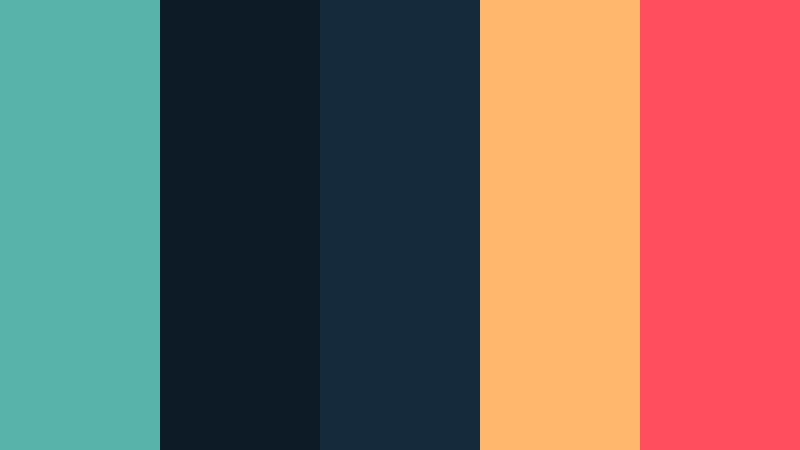
- HEX Codes: #58b3aa, #0c1b26, #152a3b, #ffb86b, #ff4f5e
- Mood: Edgy and cinematic, like neon lights reflected on dark water.
- Use for: Perfect for cinematic travel edits, gaming intros, and music video-style title cards.
Neon Harbor Night contrasts Misty Turquoise with deep navy, charcoal, and bright coral and amber accents. The result is a high-impact, cinematic palette that feels like city neon over dark water.
Use the dark blues for backgrounds and shadow-heavy grading, then let Misty Turquoise, coral, and amber hit titles, HUD elements, and animated shapes. It works especially well for gaming intros, travel night scenes, and music video-style thumbnails that need instant drama.
Tropical Splash Energy

- HEX Codes: #4fbcb0, #ffcf4a, #ff7a5c, #15202b, #fdebd2
- Mood: High-energy, sun-soaked, and festival ready.
- Use for: Use in summer vlogs, sports content, and thumbnail designs that need instant impact.
Tropical Splash Energy throws Misty Turquoise together with golden yellow, hot coral, and dark navy. It is bright, bold, and perfect for sun-soaked, high-action edits.
Use turquoise and yellow for dynamic text and motion graphics, coral for calls to action or key moments, and navy for depth in backgrounds or shadows. This palette is ideal for travel, beach parties, festivals, sports montages, and any content where you want thumbnails that stand out at a glance.
Urban Teal Noir

- HEX Codes: #4faea3, #101318, #21252b, #f0f4f5, #f95f62
- Mood: Modern, cinematic, and slightly mysterious with a street-style edge.
- Use for: Great for city-night b-roll, techy intros, and edgy fashion lookbooks.
Urban Teal Noir puts Misty Turquoise against inky charcoals and a crisp coral accent, creating a sleek street-style look. It is cinematic without feeling overdone, with a hint of tech and fashion editorial energy.
Let the dark tones carry your backgrounds and grading, while Misty Turquoise lines, grids, or typography hint at a modern interface. Use coral sparingly for emphasis in titles, lower thirds, or thumbnail badges so key information jumps out immediately.
Aurora Screen Glow

- HEX Codes: #4bb7b1, #182038, #253656, #b1ffea, #ffed9a
- Mood: Futuristic and luminous, inspired by glowing auroras and screens.
- Use for: Ideal for motion graphics, sci-fi intros, and app launch teasers.
Aurora Screen Glow uses Misty Turquoise with deep midnight blues and luminous mint and soft yellow highlights. It feels like an aurora or a glowing OLED screen, perfect for futuristic designs.
Use the darker blues as your main background or grade, Misty Turquoise for UI-style elements and outlines, and the bright mint and yellow for pulsating accents and light streaks. This palette is ideal for tech promos, sci-fi intros, app launch trailers, and animated explainers that need a polished digital atmosphere.
Elegant & Modern Misty Turquoise Palettes
Turquoise Marble Luxe

- HEX Codes: #8fd0c7, #f5f7f9, #e4e1dd, #c3b6a4, #4c8c86
- Mood: Sophisticated and spa-like with a quiet luxury finish.
- Use for: Perfect for beauty brands, spa promos, and premium course branding.
Turquoise Marble Luxe pairs Misty Turquoise with stone-inspired neutrals and soft taupe. The overall look is spa-like and luxurious, evoking marble lobbies and premium packaging.
Use the neutrals for backgrounds and product mockups, and reserve Misty Turquoise for refined accents in titles, borders, or logo marks. This palette works well for skincare, wellness, spa promos, premium online courses, and any visual identity that should feel calming yet upscale.
Modern Atrium Mist

- HEX Codes: #95d0c8, #f9fbfb, #e1e8e7, #b5c4c3, #507f79
- Mood: Polished, architectural, and quietly confident.
- Use for: Use in brand story films, architecture reels, and modern portfolio sites.
Modern Atrium Mist blends Misty Turquoise with cool architectural neutrals, resembling a sunlit glass atrium. It looks polished and editorial without feeling cold or distant.
For brand story films, use the lighter neutrals as a base for text blocks and frames, while Misty Turquoise highlights logos, icons, and subtle line details. This palette fits architecture reels, design portfolios, and modern business channels that want to appear forward-thinking and calm at the same time.
Tips for Creating Misty Turquoise Color Palettes
Misty Turquoise is versatile, but it works best when you balance its cool calmness with thoughtful contrast, typography, and consistent grading. Use the tips below to adapt these palettes to your own videos, thumbnails, and branding.
- Pair Misty Turquoise with warm accents like blush, peach, or soft gold when you want friendly, human-centered content such as vlogs or lifestyle channels.
- For professional or tech-forward work, combine Misty Turquoise with cool greys and navy, keeping turquoise as the accent and not the background.
- Check text readability by testing your title and subtitle colors over both light and dark parts of your footage; adjust brightness and contrast as needed.
- Limit your main palette to 3–5 colors in each design or thumbnail: one background, one main accent (Misty Turquoise), one neutral, and one highlight color.
- Match your color palette to your footage by nudging shadows, midtones, and highlights toward your chosen hues using Filmora color controls.
- Keep brand consistency by reusing the same HEX codes in titles, overlays, and end screens across all videos, shorts, and community posts.
- When grading, protect natural skin tones by shifting greens and cyans toward Misty Turquoise while keeping oranges closer to neutral.
- Create and save color presets or LUTs in Filmora so you can apply your Misty Turquoise look instantly to new projects and batch exports.
Misty Turquoise color palettes can completely change how your channel, brand, or video series feels. From soft romantic edits to bold cinematic intros and clean UI explainers, this color adds freshness, calm, and a modern edge when combined carefully with blush, neutrals, or deep blues.
Use the HEX codes in this guide as your base, then adjust saturation and contrast to match your own footage and style in Filmora. By saving your favorite combinations as presets, you can build a recognizable Misty Turquoise identity across thumbnails, intros, lower thirds, and social clips.
Open your next project in Filmora, pick one of these palettes, and experiment with overlays, filters, and color tools until the visuals match the mood you want. With a consistent Misty Turquoise look, your videos will feel more cohesive, professional, and on-brand.
secure download