

 100% Security Verified | No Subscription Required | No Malware


 ChatGPT
 Perplexity
 Gemini
 Claude
 Grok
Grok
These Filmora filters are crafted to emulate popular Sony ZV-E10 vlog LUTs, giving you fast, cinematic looks optimized for Sony color science without complicated grading.
Whether you film daily lifestyle vlogs, travel adventures, or talking-head content, you can drop these presets onto your ZV-E10 footage to dial in contrast, color, and mood in just a few clicks.
In this article
Warm Street Vibes for Golden Hour City Walks
Sunset Soft Glow
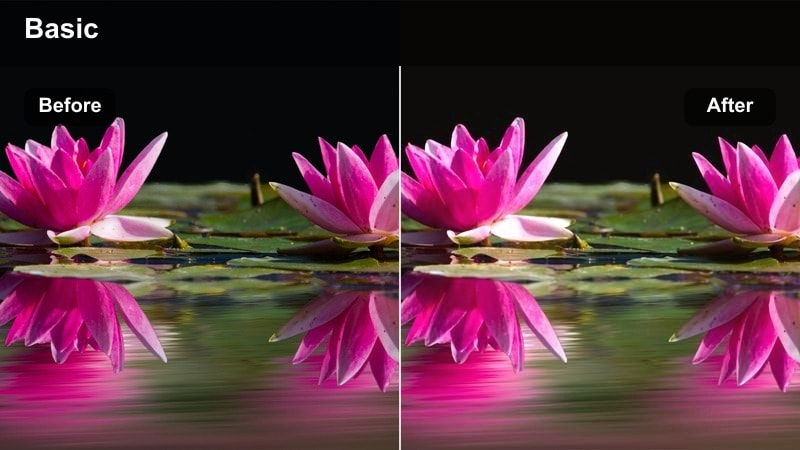
- Effect look: Gentle golden warmth with soft contrast and flattering skin tones for handheld city vlogs at sunset.
- Best for: Golden hour walking monologues, street lifestyle b-roll, and Sony ZV-E10 face-tracking shots in warm light.
- Editing tip: Lower the filter intensity to around 60 percent and slightly reduce highlights to keep skies from clipping on bright Sony log or PP footage.
Sunset Soft Glow is ideal when your Sony ZV-E10 footage already has that rich end-of-day light but needs a unified, cinematic polish. The filter leans into the natural golden tones, smooths contrast, and keeps skin tones flattering so your face stays clean and inviting even when the background is bursting with color.
In Filmora, apply this look as your base correction on sunset city walk sequences, then fine-tune exposure with the basic controls so highlights sit comfortably below clipping. If you shoot in a flat profile, let the filter add contrast and warmth, and only nudge saturation or temperature if your environment pushes too orange or too pink.
Speed Up Sony Vlog Grading with AI Color Tools
Filmora's AI-driven color tools help you quickly balance and stylize Sony ZV-E10 vlog clips so these LUT-style filters look consistent from shot to shot. Instead of manually correcting each scene, let AI analyze exposure and color balance in seconds.
Use AI to auto-correct exposure and white balance first, then layer your favorite filter from this collection for a polished, cinematic vlog in minutes. This keeps your workflow fast while still giving you full creative control for fine-tuning.
 secure download

Preview Filters on Real Sony ZV-E10 Footage
To see how each LUT-style filter reacts to Sony color science, load a short ZV-E10 sequence into Filmora and cycle through your options. Real-time preview lets you compare how the same clip looks with different moods, from neutral lifestyle to bold cinematic travel.
Test each filter on a mix of talking-head, outdoor, and night shots from the same vlog so you can quickly pick a base look you will reuse across multiple episodes. This helps keep your channel visuals cohesive without spending hours experimenting shot by shot.
secure download1000+ Video Filters and 3D LUTs
Filmora includes a large library of video filters and 3D LUTs you can stack with these Sony ZV-E10 vlog looks to create a unique style. Mix subtle film grain, light leaks, or creative color tints to push your footage toward cinematic, vintage, or modern social-media ready aesthetics.
Once you find combinations that match your brand, save them as presets so you can grade future vlogs in just a few clicks. Over time you will build a personal LUT-style toolkit tuned specifically to your camera, lighting, and content niche.
secure downloadUrban Amber Pop
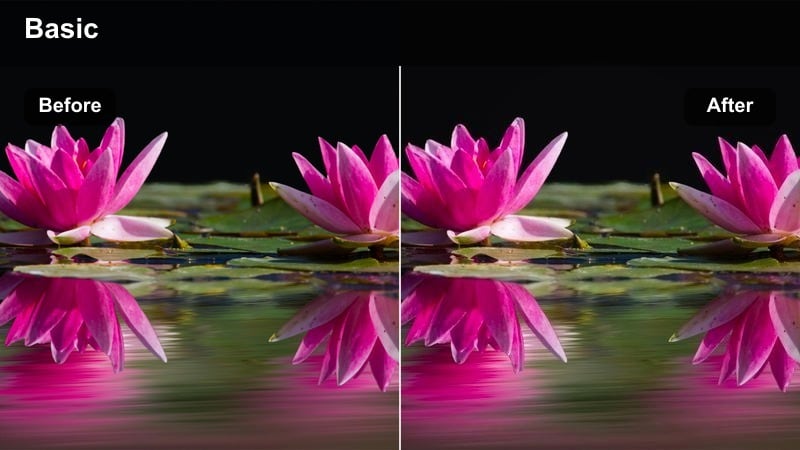
- Effect look: Punchy amber highlights with deeper contrast, ideal for energetic city vlog intros and transitions.
- Best for: Fast-paced urban b-roll, scooter rides, street fashion vlogs, and dynamic Sony ZV-E10 sequences.
- Editing tip: Combine this filter with a subtle motion blur effect on cuts to give your Sony footage a more cinematic, high-energy feel.
Urban Amber Pop adds intensity and punch to your Sony ZV-E10 city footage, pushing highlights toward warm amber while keeping blacks rich and impactful. It works especially well for sequences with quick camera movement, traffic, and bright signage where you want the scene to feel alive.
In Filmora, drop this filter onto your b-roll layers or transition montages and then fine-tune clip speed, motion blur, and beat-synced cuts. Keeping your A-roll slightly more neutral while using this look on inserts and transitions helps maintain viewer comfort while still delivering a high-energy, stylized city aesthetic.
Hazy Street Dream
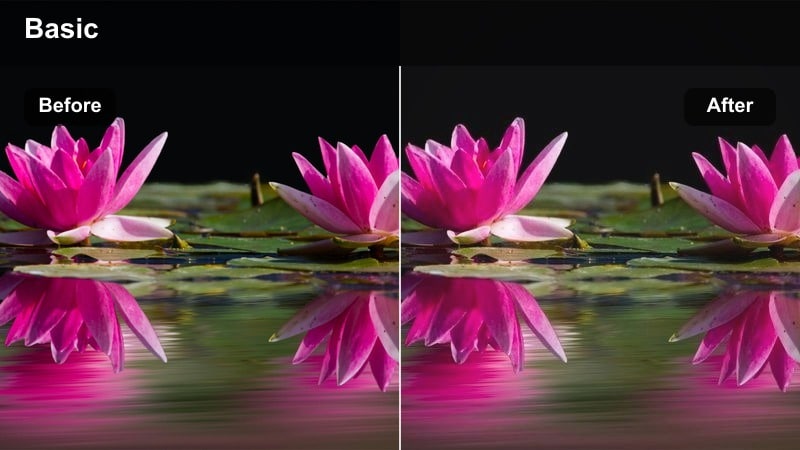
- Effect look: Soft, slightly desaturated city tones with lifted shadows for a dreamy, cinematic street vlog look.
- Best for: Slow-paced storytelling, reflective monologues, and Sony ZV-E10 handheld walks on cloudy evenings.
- Editing tip: Add a subtle vignette and reduce sharpness a bit to enhance the soft, dreamy aesthetic without losing subject detail.
Hazy Street Dream is tailored for introspective, cinematic vlogs where mood matters more than punchy color. By lifting shadows and gently desaturating the scene, it gives your Sony ZV-E10 footage a soft, filmic quality that suits slower pacing and voiceover-driven storytelling.
Apply this filter in Filmora when editing dusk walks, rainy day footage, or quiet city corners, then complement it with slower cuts and simple sound design. Light vignettes and a touch of reduced sharpness can help reinforce the dreamy character without making your image look blurry or unprofessional.
Clean, Cozy Looks for Indoor Talking-Head Vlogs
Neutral Skin Balance
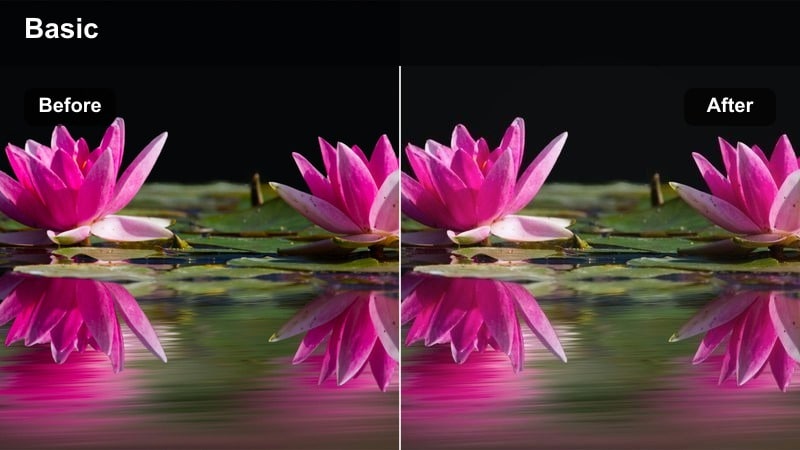
- Effect look: Balanced contrast with neutral color and gentle skin-tone emphasis tailored for Sony vlog setups.
- Best for: Desk setups, tutorials, channel updates, and any Sony ZV-E10 talking-head content under soft lighting.
- Editing tip: White-balance your footage first, then apply this filter and fine-tune exposure so histograms sit comfortably in the midtones.
Neutral Skin Balance is built to keep your face looking natural and professional, even under mixed or imperfect room lighting. It smooths contrast, avoids heavy color casts, and gently emphasizes skin tones so your Sony ZV-E10 talking-head footage feels clean and trustworthy.
Use this filter in Filmora as your go-to base for tutorials, commentary, and intros, then layer subtle adjustments only where needed. Once applied, minor tweaks to exposure and saturation will usually be enough, letting you focus on editing structure and captions instead of wrestling with complex color grading.
Warm Home Vlog
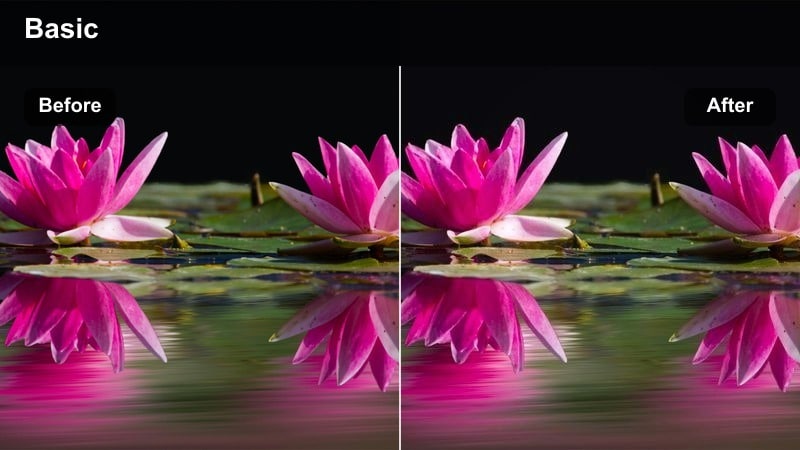
- Effect look: Soft warmth and lowered contrast to make indoor rooms feel cozy while keeping whites relatively clean.
- Best for: Lifestyle vlogs, daily routines, and behind-the-scenes content filmed with the Sony ZV-E10 at home.
- Editing tip: Dial back saturation of yellows slightly if your room lights are very warm, so the image stays pleasing and not overly orange.
Warm Home Vlog is perfect when you want your Sony ZV-E10 footage to feel inviting and intimate, matching the vibe of morning routines or cozy evening recaps. The filter leans into warm hues without wrecking white objects, so backgrounds feel soft while your face remains clean and readable.
In Filmora, apply this look to all clips from your home environment, then make minor per-clip adjustments where lighting shifts. If your bulbs are very yellow, tame the yellows and oranges with HSL to avoid color overload, and keep contrast slightly low so shadows feel gentle rather than harsh.
Clean Studio Tech
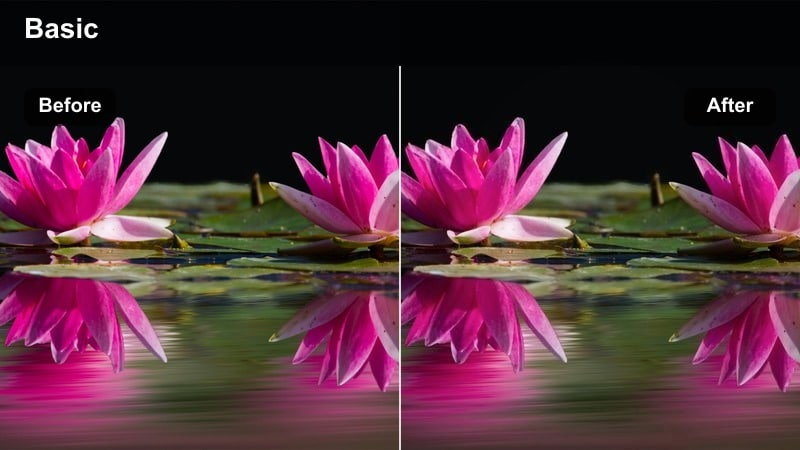
- Effect look: Crisp, slightly cool toning with clear contrast for tech-focused desk setups and product shots.
- Best for: Tech reviews, unboxings, and productivity-style desk vlogs shot on the Sony ZV-E10.
- Editing tip: Boost clarity and sharpness slightly for product close-ups, but keep noise reduction balanced to avoid plastic textures.
Clean Studio Tech is tuned for crisp lines, clear UI screens, and product detail, giving your Sony ZV-E10 desk footage a professional, editorial look. The slightly cool cast helps whites and grays feel modern, while controlled contrast keeps text and small details extremely legible.
In Filmora, use this filter on all your tech-focused shots, then selectively increase clarity and sharpness on close-ups of devices or accessories. Be careful not to overdo denoising or sharpening, as a natural amount of texture keeps your reviews looking authentic rather than overly processed.
Adventure and Travel Colors for Outdoor Vloggers
Vibrant Travel Pop
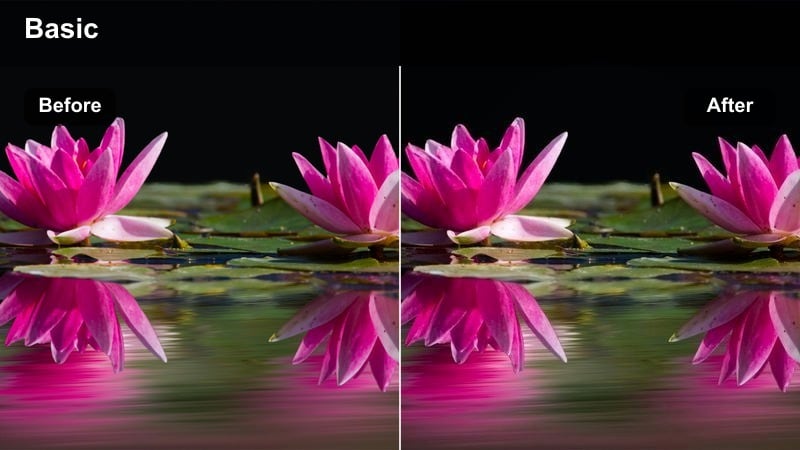
- Effect look: Bold saturation and crisp contrast that make skies, buildings, and clothing colors stand out.
- Best for: City travel guides, destination vlogs, and Sony ZV-E10 wide-angle shots of landmarks.
- Editing tip: Use it mostly on b-roll and keep your A-roll slightly more neutral so viewers do not get color fatigue.
Vibrant Travel Pop maximizes the impact of colorful destinations, pushing blues, reds, and greens while keeping edges sharp and contrast snappy. On your Sony ZV-E10 wide shots, this look makes skylines, murals, and crowded markets feel instantly thumbnail-ready.
In Filmora, reserve this filter primarily for b-roll and establishing shots, then blend it with a softer or more neutral grade on your talking-head segments. If skin starts to look too intense, reduce orange saturation while leaving blues and cyans strong so skies and water remain dramatic.
Cool Urban Explorer
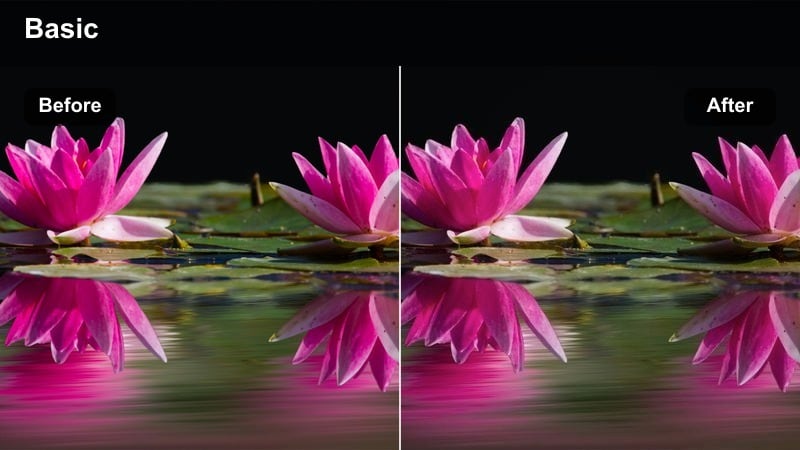
- Effect look: Cool-tinted shadows with preserved midtone skin for moody, stylish exploration vlogs.
- Best for: Alleyway walks, rooftop sequences, and Sony ZV-E10 gimbal shots in modern cityscapes.
- Editing tip: Increase contrast slightly and add a subtle vignette to keep viewer attention on your subject in busy backgrounds.
Cool Urban Explorer gives your Sony ZV-E10 footage a sleek, modern tone by cooling down shadows while keeping skin tones relatively neutral. This contrast in temperature creates a stylish separation between you and the environment, especially in glass, concrete, and steel-heavy cityscapes.
Apply this filter in Filmora to gimbal walks, rooftop scenes, or architecture-driven b-roll, then refine with vignettes and contrast adjustments to focus attention. Keeping your subject well-exposed while letting backgrounds fall cooler and darker enhances depth and adds a cinematic, fashion-forward feel.
Cinematic Street Nomad
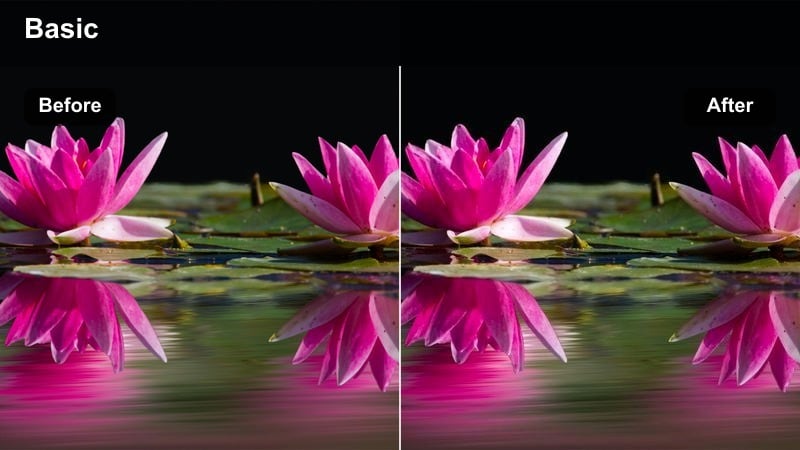
- Effect look: Film-inspired contrast with slightly muted colors and rich shadows for narrative-style travel stories.
- Best for: Documentary-style city walks, street storytelling, and Sony ZV-E10 handheld sequences in mixed light.
- Editing tip: Shoot in a flat profile on your Sony body and expose to protect highlights, then let this filter handle the punch and mood.
Cinematic Street Nomad is designed to make your travel vlogs feel closer to a short film than a casual trip log. It softens overly bright colors, deepens shadows, and adds a film-like density to your Sony ZV-E10 street scenes, ideal for storytelling with strong ambient details.
In Filmora, use this look across entire narrative sequences to maintain continuity as you move between alleys, markets, and interiors. Limit heavy additional effects; instead, let the muted colors and strong contrast work alongside careful sound design and longer takes to create a grounded, documentary vibe.
Night City and Low-Light Looks for Sony ZV-E10
Neon City Vlog
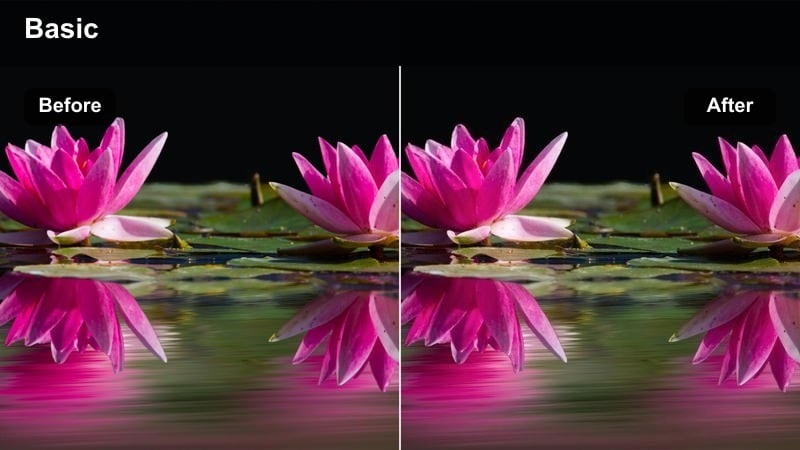
- Effect look: Deep contrast with boosted neon colors and protected skin tones for nightlife vlogs.
- Best for: Night street vlogs, neon-lit storefronts, and Sony ZV-E10 handheld shots in busy downtown areas.
- Editing tip: Reduce digital noise with Filmora's noise reduction, then apply this filter and avoid over-sharpening low-light footage.
Neon City Vlog heightens the drama of busy nightlife scenes by amplifying colored lights while keeping your face from turning into a colored blur. It pairs well with the Sony ZV-E10's strong low-light performance, giving neon signs, billboards, and traffic lights a vivid glow against deep shadows.
In Filmora, clean up noisy clips lightly before applying the filter, then adjust exposure to protect the brightest signs and screens. Avoid aggressive sharpening or heavy denoising, which can introduce artifacts; instead, let the natural grain and contrast support the energetic, neon-soaked style.
Soft Night Portrait
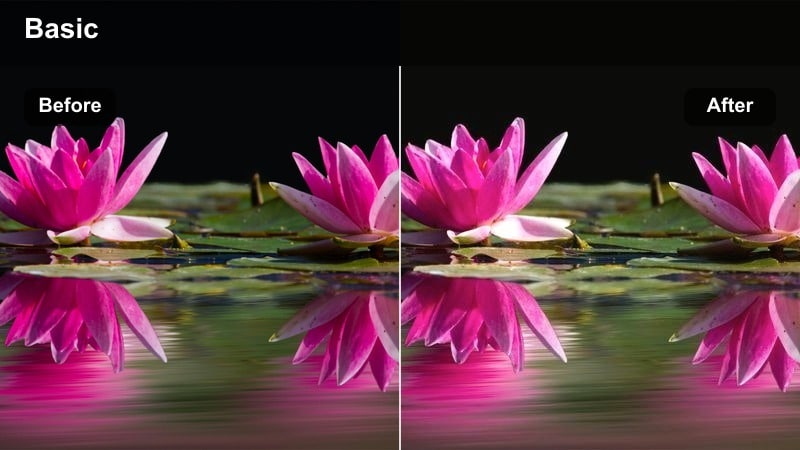
- Effect look: Gentle contrast with softened highlights to flatter faces under streetlights and shop windows.
- Best for: Romantic night walks, sit-down chats on benches, and Sony ZV-E10 face-framing close-ups after dark.
- Editing tip: Lower sharpness slightly and add a faint glow to highlights to enhance the dreamy nighttime atmosphere.
Soft Night Portrait focuses on flattering your face in low light, smoothing harsh highlights from streetlamps and storefronts while keeping eyes and facial features clear. It suits emotional or reflective scenes shot on the Sony ZV-E10 where your expression carries most of the storytelling.
Apply this filter in Filmora to close-ups and medium shots at night, then refine with a hint of highlight glow and reduced global sharpness. Keep ISO as low as practical when shooting, and avoid heavy crops in post, so the gentle, romantic look stays clean instead of noisy or smeared.
Gritty Midnight Run
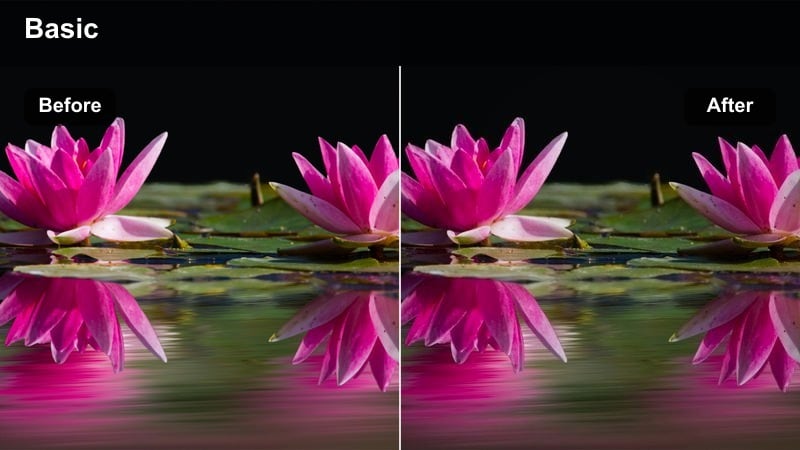
- Effect look: Crunchy contrast with a slight green-cyan cast in shadows for edgy, energetic night sequences.
- Best for: Nighttime b-roll runs, skate or bike vlogs, and Sony ZV-E10 action shots through dimly lit streets.
- Editing tip: Embrace a little grain, keep your shutter speed higher for crisp motion, and avoid heavy denoising that kills the gritty vibe.
Gritty Midnight Run adds a raw, urban edge to your Sony ZV-E10 night footage, with hard contrast and cool-tinted shadows that emphasize silhouettes and motion. It works especially well with running, skating, or cycling sequences where streetlights, car headlights, and storefronts flash past quickly.
In Filmora, combine this look with snappy cuts, handheld shots, and minimal stabilization to preserve a sense of urgency and realism. Allow a bit of visible noise and film grain, keep shutter speeds higher to avoid motion smearing, and resist the urge to over-polish so the gritty, cinematic character stays intact.
Tips for Using Sony Zv-E10 Vlog Luts Filters in Filmora
- Shoot in a consistent picture profile on your Sony ZV-E10 so these filters react predictably across different vlog sessions.
- Always set custom white balance on location before recording to avoid extreme color corrections later.
- Use one main filter for your entire vlog episode and only add variations on b-roll to keep your channel's look cohesive.
- Keep exposure slightly conservative on bright days so highlights stay recoverable when you add contrasty looks.
- For talking-head videos, prioritize accurate skin tones first, then tweak overall mood with small filter intensity changes.
- Save your favorite filter plus minor tweaks as Filmora presets so future Sony ZV-E10 projects can be graded in a few clicks.
- When mixing day, indoor, and night scenes, test your chosen filter on sample clips from each environment before locking it in.
- Use Filmora's scopes and histograms to confirm contrast and exposure levels instead of relying only on your display.
By pairing your Sony ZV-E10 with these Filmora filters, you can mimic the feel of polished vlog LUTs while staying fast and flexible in the edit. The presets help you lock in cinematic color and contrast quickly, so you can spend more time on storytelling and pacing instead of manual grading.
Save a few favorite looks as presets, apply them consistently across your uploads, and your channel will quickly develop a professional, cinematic visual identity. Next up, explore how to craft a more cinematic look on Sony cinema bodies with tailored LUTs and grading techniques for bigger productions and client work.
secure downloadNext: Sony FX6 Film Look LUTS
