

 100% Security Verified | No Subscription Required | No Malware


 ChatGPT
 Perplexity
 Gemini
 Claude
 Grok
Grok
The Urban Coffee Street Vlog LUT filter pack is designed for content creators who live between espresso bars and busy crosswalks, turning ordinary city footage into warm, cinematic coffeehouse stories.
From handheld walks past neon cafes to slow-motion latte shots by the window, these filters help you dial in rich browns, soft highlights, and textured urban contrast that feels made for modern street vlogs.
In this article
Soft Morning Coffee Runs and Quiet Streets
Soft Flat White Glow
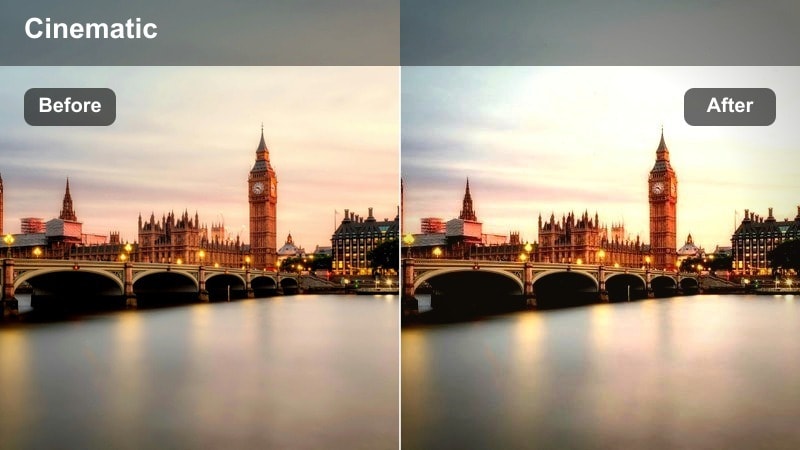
- Effect look: A soft, creamy highlight lift with gentle contrast for cozy early-morning coffee runs.
- Best for: Vlogs shot outside cafes just after sunrise, walking intros, and first-sip moments near big windows.
- Editing tip: Lower contrast slightly and add a subtle vignette to keep attention on the face and coffee cup in frame.
Soft Flat White Glow wraps your morning city footage in creamy highlights, easing off harsh contrast so sidewalks, storefronts, and sky blend smoothly together. In Filmora, this look is perfect when you want your early street sequences to feel calm and inviting rather than sharp and crunchy, especially on clips shot with phones or action cameras.
Apply the filter, then gently reduce overall contrast and add a light vignette using Filmora s effects panel so the viewer naturally focuses on your face and the coffee cup. If the glow makes details feel too soft, increase clarity or sharpness slightly and run a mild noise reduction pass to keep skin and soft backgrounds clean without losing the dreamy quality.
AI-Assisted Urban Coffee Color Harmony
Filmora s AI color tools help you quickly balance warm cafe interiors with cooler street exteriors so your urban coffee street vlog LUT filters never feel mismatched. The AI analyzes each frame to suggest tone, exposure, and color shifts that keep browns, skin tones, and city lights working together from clip to clip.
Use AI Color Matching when you jump between cameras or locations, then fine-tune warmth and contrast so your coffee browns stay rich while skies and sidewalks remain natural.
 secure download

Preview Urban Coffee Street Filters in Real Time
Filmora lets you preview multiple urban coffee street vlog LUT style filters directly on your timeline so you can see how each one responds to your lighting and motion. As you scrub through busy crossings or quiet cafe corners, you can instantly compare how skin, bricks, and coffee tones shift with each style.
Toggle filters on and off, use split-screen previews, and quickly narrow down a look that fits the pacing and mood of your current episode before you start detailed color work.
secure download1000+ Video Filters and 3D LUTs
Beyond this urban coffee street vlog pack, Filmora includes a wide collection of cinematic filters, HSL controls, and 3D LUTs so you can build a signature city look. You can start from a LUT that matches your camera profile, then layer additional filters to refine shadows, midtones, and highlight roll off for each location.
Save your favorite combinations as custom presets so every new cafe episode starts with a consistent base grade and only needs minor tweaks for exposure and white balance.
secure downloadBrick Latte Contrast
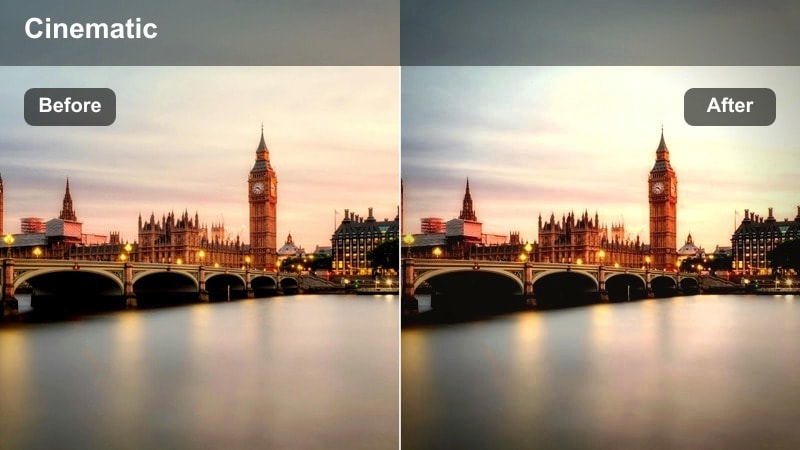
- Effect look: Rich brown tones and crisp edges that make brick walls, benches, and coffee cups feel textured and tangible.
- Best for: Walk-and-talk segments beside brick cafes, alley coffee B-roll, and urban lifestyle shots with backpacks and street signage.
- Editing tip: Reduce saturation on reds slightly to prevent skin tones from turning too warm against brick backgrounds.
Brick Latte Contrast adds punchy texture to brick, stone, and wood, giving your city streets a tactile, cinematic feel. It deepens browns so coffee cups, benches, and doorways stand out without crushing detail in the shadows, making it ideal for walk-and-talk sequences by cafe exteriors.
After applying the filter in Filmora, lower red saturation a touch in the color panel so skin tones do not become overly orange next to warm walls. If your frame feels too heavy, lift blacks or slightly reduce midtone contrast while keeping enough edge sharpness so your subject remains separated from busy backgrounds and signage.
Window Seat Mist
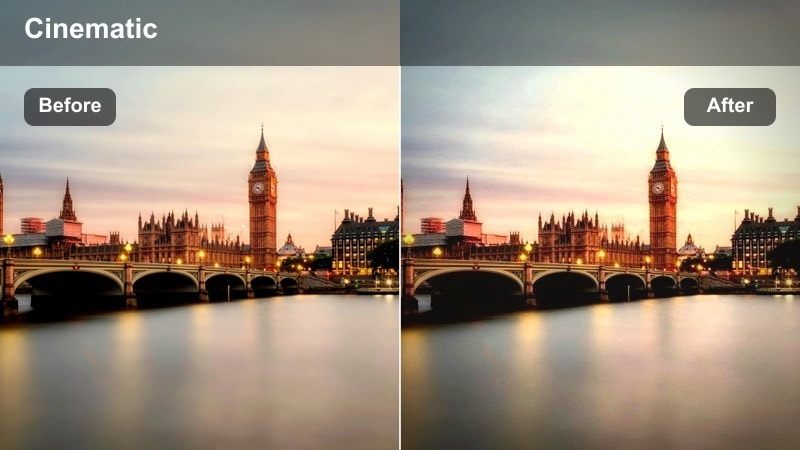
- Effect look: A slightly hazy, backlit look that simulates soft window light and faint reflections for introspective coffee scenes.
- Best for: Sitting-by-the-window coffee monologues, journaling shots, and B-roll of streets through cafe glass.
- Editing tip: Add a touch of blur or Filmora s focus effect to the edges of the frame to enhance the dreamy, misty feeling.
Window Seat Mist creates a gentle haze that mimics natural window flare, ideal for reflective monologues and slow, observational shots inside cafes. It softens contrast and highlights so reflections on the glass and passing traffic outside the window feel more cinematic than distracting.
In Filmora, enhance the mood by adding a soft edge blur or focus effect around the frame so the viewer s attention stays on your face and notebook. Position your subject so the window sits behind or beside you in the original footage, then apply the filter and slightly reduce sharpness in the background while keeping your eyes crisp for an intimate storytelling vibe.
Midday City Hustle Around Busy Cafes
Crosswalk Espresso Pop
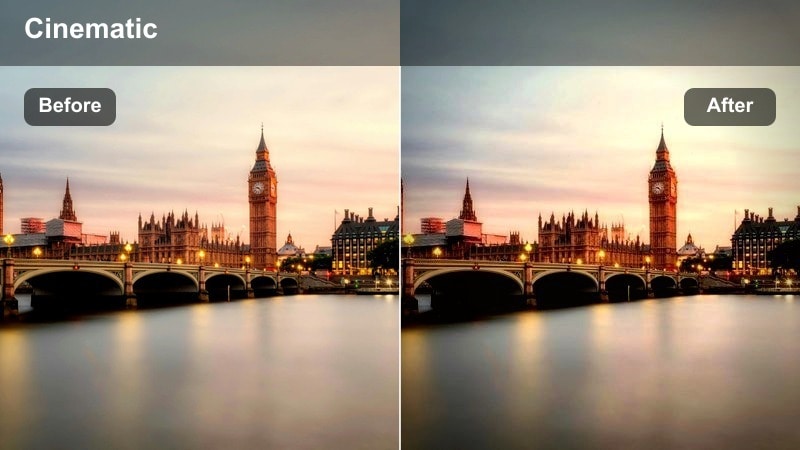
- Effect look: Punchy contrast and vibrant yet controlled color that makes crosswalks, buses, and coffee cups pop in motion.
- Best for: Fast-paced walking shots, handheld street coffee reviews, and wide-angle city scenes with lots of movement.
- Editing tip: Stabilize shaky clips first, then use this filter and slightly boost saturation to highlight signs and cup branding.
Crosswalk Espresso Pop is built for energy, adding crisp contrast and vibrant color to busy intersections, buses, and traffic lights. It is ideal when you want your coffee cup and street details to pop even as you move quickly through the frame with a handheld or action camera.
Stabilize your clips in Filmora before applying the filter so the extra contrast does not exaggerate camera shake. Once stabilized, nudge saturation up to make signs and branding stand out, and slightly lower exposure on bright skies or headlights so key details like your face and cup stay clear during speed ramps and quick transitions.
Sidewalk Cappuccino Neutral
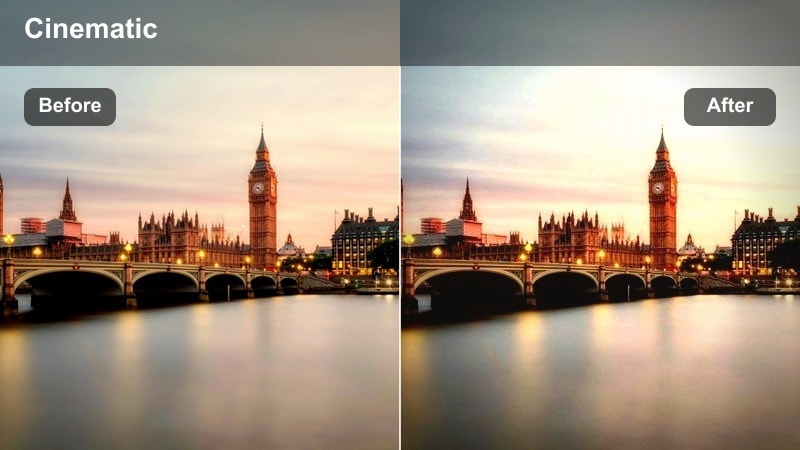
- Effect look: Balanced, documentary-style tones that keep colors true-to-life while adding a subtle warmth to browns and skin tones.
- Best for: Talking-to-camera segments on sidewalks, sit-down reviews outside cafes, and everyday city walk vlogs.
- Editing tip: Slightly increase sharpness to help details like pavement texture, railings, and building edges feel more defined.
Sidewalk Cappuccino Neutral keeps your footage grounded and realistic, adding only a gentle warmth to skin tones and coffee browns. It works especially well for vlog segments where you speak directly to camera on sidewalks or benches and want the city to feel authentic, not overly stylized.
Apply this look across all your A-roll clips in Filmora to create a consistent base grade when mixing different cameras. Increase sharpness slightly to bring out pavement and building texture, then fine-tune white balance if necessary so your skin tone remains natural, letting you easily layer stronger creative filters on B-roll while maintaining a clean primary narrative.
Bike Lane Mocha Motion
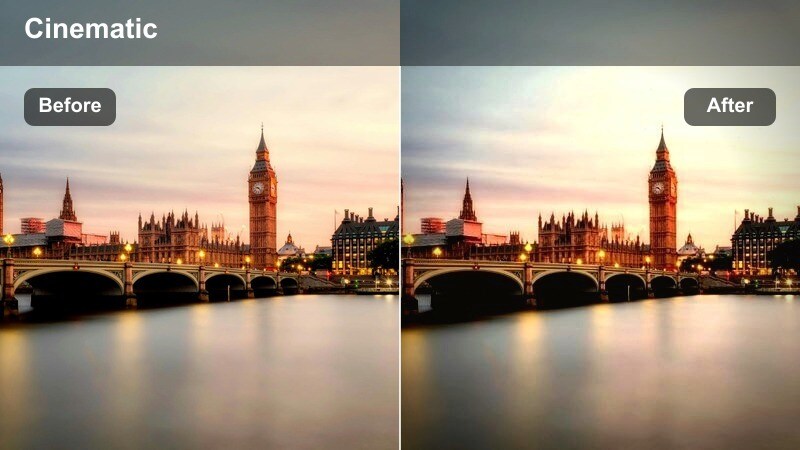
- Effect look: Slight motion-friendly contrast with smooth midtones that keeps fast-moving backgrounds from becoming too harsh.
- Best for: Riding a bike or scooter with coffee, POV shots along bike lanes, and fast-travel transitions between cafes.
- Editing tip: Pair with subtle motion blur and a lower shutter-speed style look for smoother movement in city traffic.
Bike Lane Mocha Motion is tuned for movement, smoothing midtones so fast-passing buildings and cars do not become overly sharp or distracting. It adds just enough contrast to keep road markings, rails, and your coffee cup readable while preserving a fluid, easy-to-watch feel in POV or handlebar-mounted shots.
In Filmora, combine this filter with motion blur effects or optical flow interpolation when creating speed ramps between cafes. Avoid pushing contrast too hard in these sequences; instead, keep blacks slightly lifted and use stabilization on the most chaotic clips so your viewers can follow the commute and enjoy the mocha-toned streets without visual fatigue.
Golden Hour Cafe Corners and Street Shadows
Sunset Cortado Glow
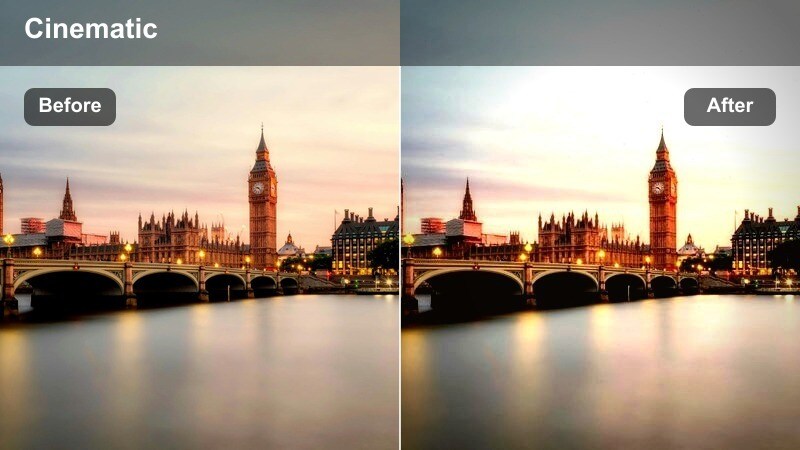
- Effect look: Warm, golden highlights that emphasize sun flares and long shadows across city streets and cafe tables.
- Best for: Golden hour street walks, rooftop cafe sessions, and slow-motion pours of coffee in orange light.
- Editing tip: Dial down the orange hue slightly if skin begins to look too tanned or saturated during peak sunset.
Sunset Cortado Glow leans into golden hour, intensifying warm highlights and stretching shadows so every step down the street feels cinematic. It brings out the amber tones in coffee, tabletops, and building facades while keeping enough detail in darker areas for a layered, late-afternoon look.
When grading in Filmora, apply this filter to shots captured within an hour of sunset, then gently desaturate oranges in the color controls if skin becomes too intense. Position your shots to catch reflections off glass and parked cars, and if highlights risk clipping, reduce whites slightly so the glow stays controlled, preserving detail in clouds and reflective surfaces.
Alley Macchiato Matte
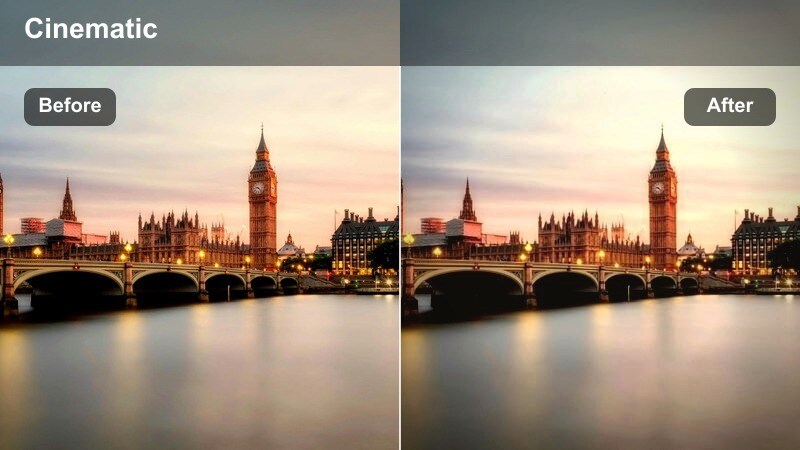
- Effect look: Matte shadows and flattened contrast that give an editorial, film-like finish to narrow alley and side-street shots.
- Best for: Slow walks through alleys, moody coffee shots on steps, and street art B-roll near independent cafes.
- Editing tip: Add a tiny grain effect over this filter to enhance the filmic alley vibe, especially on static frames.
Alley Macchiato Matte trades punchy contrast for a soft, editorial finish, lifting shadows and flattening highlights to create a filmic, magazine-style mood. It is perfect for tighter compositions in alleys, staircases, or side streets where you want viewers focused on your expression and the texture of walls and steps.
In Filmora, pair this filter with a subtle grain overlay to reinforce the analog vibe, particularly on slower, static B-roll like close-ups of coffee on steps or shoes passing street art. If the matte effect makes your scene feel too flat, nudge midtone contrast or clarity up just a bit to restore facial definition while leaving the overall shadow curve soft enough to hide distracting clutter in the background.
Corner Booth Honey Tone
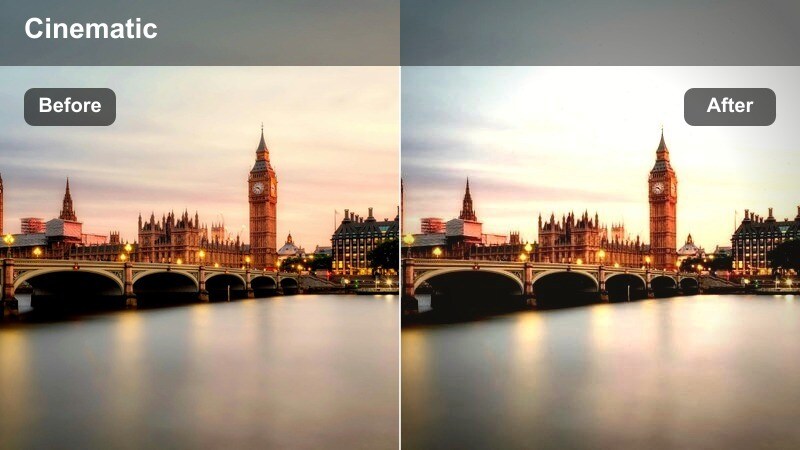
- Effect look: Soft honey-colored warmth focused on midtones that flatters skin and wooden interiors without oversaturating.
- Best for: Indoor cafe corner booths, laptop work sessions, and Q&A storytelling segments with warm lamps.
- Editing tip: Lower highlights slightly to stop indoor lamps from clipping while you preserve the cozy honey feel.
Corner Booth Honey Tone centers its warmth on midtones, flattering both skin and wood grain in cozy cafe interiors. It softens the harshness of overhead lighting and turns simple laptop or journal sessions into inviting scenes that feel like recurring chapters in your vlog series.
When editing in Filmora, apply this filter across all your indoor corner setups, then pull highlights down a touch so bright bulbs and window reflections do not blow out. If you film in cafes with cooler LED lighting, warm the temperature slightly before applying the filter, and save the finished look as a preset so every indoor sequence in your channel carries the same honey-toned visual identity.
Evening Commutes and Neon Coffee Stops
Metro Americano Deep
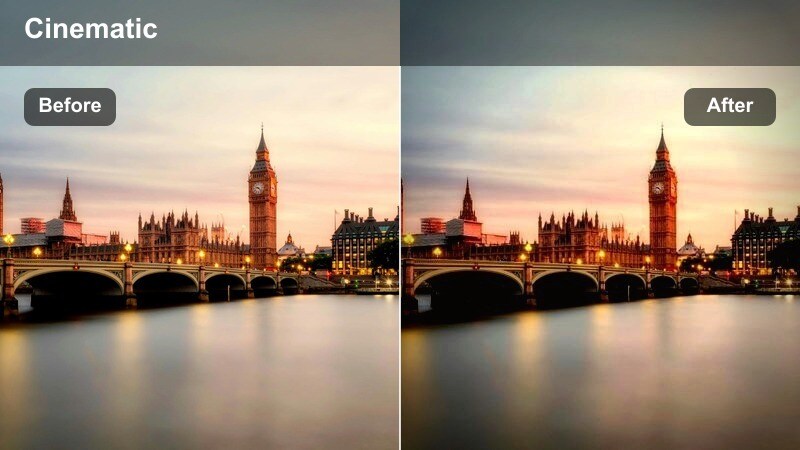
- Effect look: Deeper blacks and cool-toned contrast that suits subways, underpasses, and evening platforms while keeping coffee browns rich.
- Best for: Subway rides with a takeaway cup, escalator shots, and low-light station vlogs on the way home.
- Editing tip: Brighten midtones slightly if platforms are underlit so your face remains visible against darker tunnels.
Metro Americano Deep carves out crisp, cool shadows for subways and underpasses while preserving rich browns in your coffee cup and clothing. It is built to handle the mixed, often greenish lighting of underground stations by tightening contrast and steering the overall tone toward a clean, cinematic cool.
In Filmora, apply a light noise reduction before deepening shadows with this filter to avoid amplifying grain in low light. If your face sinks too far into the darkness, lift midtones globally or use masks to brighten only the subject, keeping tunnels moody but ensuring your expressions are always visible as the train approaches and departs.
Neon Latte Streetline
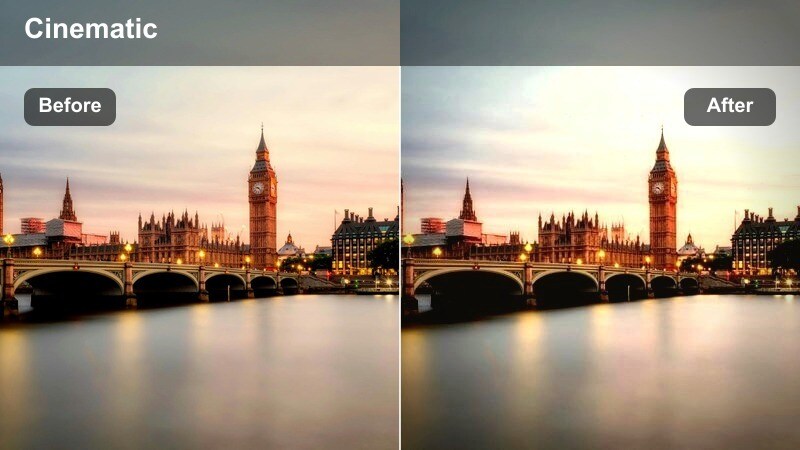
- Effect look: Vibrant neon highlights with protected skin tones, combining colorful signs with warm latte hues.
- Best for: Nighttime coffee pickups at neon storefronts, busy intersections, and streetline B-roll with passing cars.
- Editing tip: Shift neon colors slightly toward teal or magenta if store signs clash with your channel s palette.
Neon Latte Streetline amplifies the glow of night signs and traffic lights while carefully protecting skin and latte tones. It creates a punchy contrast between cool neon blocks and the warm coffee in your hand, ideal for night cafe pickups, crosswalks, and car-lined streets.
After applying this look in Filmora, use color tuning or HSL controls to nudge sign colors toward your brand palette, for example tilting greens toward teal or pushing pinks into magenta. If darker corners become noisy, slightly lift blacks instead of boosting ISO in-camera, maintaining a smooth yet atmospheric street texture while your face and cup stay clearly readable under the lights.
Tramline Ristretto Cool
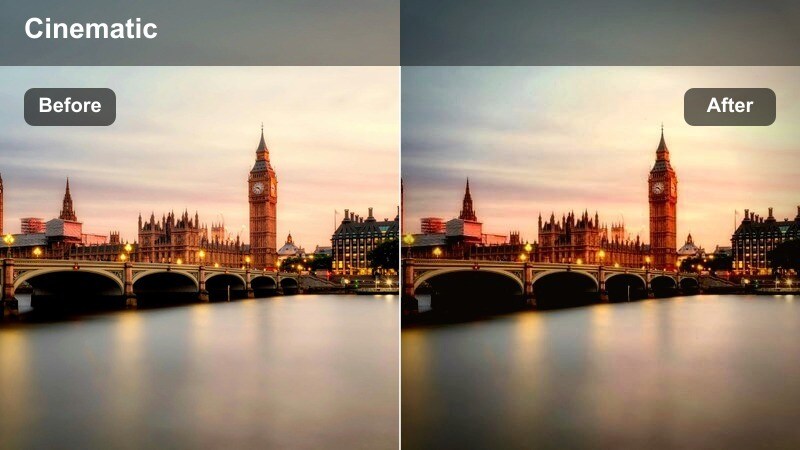
- Effect look: Cooler, cinematic blues in shadows with tight contrast, ideal for tram rides and streetcar commutes after dusk.
- Best for: Evening tram window reflections, overhead cable shots, and long-lens street vlogs from platforms.
- Editing tip: Reduce saturation in blues if jackets or jeans start pulling too much attention away from your face.
Tramline Ristretto Cool shifts your evening commute into a cooler palette, infusing shadows with cinematic blues while maintaining a crisp overall contrast. Reflections in tram windows, overhead cables, and passing streetlights take on a stylized, almost movie-like quality that contrasts nicely with the warmth of your coffee.
In Filmora, apply this filter to all tram or streetcar sequences, then watch for overly saturated blues in jackets, jeans, or signs. Use HSL adjustments to dial back blue saturation if it steals attention from your face, and maintain consistent exposure between transit shots and warmer cafe interiors so the temperature change feels like a deliberate storytelling device rather than a jump in camera settings.
Tips for Using Urban Coffee Street Vlog Lut Filters in Filmora
- Shoot with a slightly flatter picture profile in-camera so your urban coffee street vlog filters have more highlight and shadow detail to shape.
- Lock a consistent white balance inside cafes and on the street to minimize color jumps when applying the same filter across different scenes.
- Pair punchy outdoor filters with softer indoor looks to guide viewers emotionally from noisy sidewalks into calm, intimate coffee corners.
- Keep a close eye on skin tones when you boost warmth for coffee browns, pulling back orange saturation if faces start to look unnatural.
- Stabilize handheld walking and biking shots in Filmora before adding high-contrast filters so motion feels dynamic but not chaotic.
- Add subtle vignettes around warm filters to draw attention to your face and cup when backgrounds are crowded or visually busy.
- Test each filter at reduced intensity first, increasing strength only until it enhances the footage without looking obviously processed.
- Use noise reduction lightly on night street scenes so you preserve a bit of natural city grit and character in the final grade.
The Urban Coffee Street Vlog LUT inspired filters in Filmora give content creators a fast way to build warm, cinematic city stories that move naturally from sidewalks to cafe corners. Each look is tuned to a specific time of day and shooting style so you can keep your channel s visuals consistent while your locations keep changing.
Experiment with different combinations, save your favorite looks as presets, and keep refining until your viewers instantly recognize your unique urban coffee style. Over time, your filter choices will become as much a part of your brand as your intro, music, and storytelling.
secure download