

 100% Security Verified | No Subscription Required | No Malware


 ChatGPT
 Perplexity
 Gemini
 Claude
 Grok
Grok
Warm family video filters can instantly turn everyday footage into golden, nostalgic memories, especially for sunlit home videos and outdoor family days. With the right presets, you can flatter skin tones, soften harsh light, and add a cozy glow that feels like a memory you want to replay.
This guide walks family creators and lifestyle vloggers through Filmora’s best warm family video filters, how they look, when to use them, and simple editing tips so your home videos always feel sunlit, inviting, and story ready.
In this article
Golden Morning Family Vibes
Soft Sunrise Glow
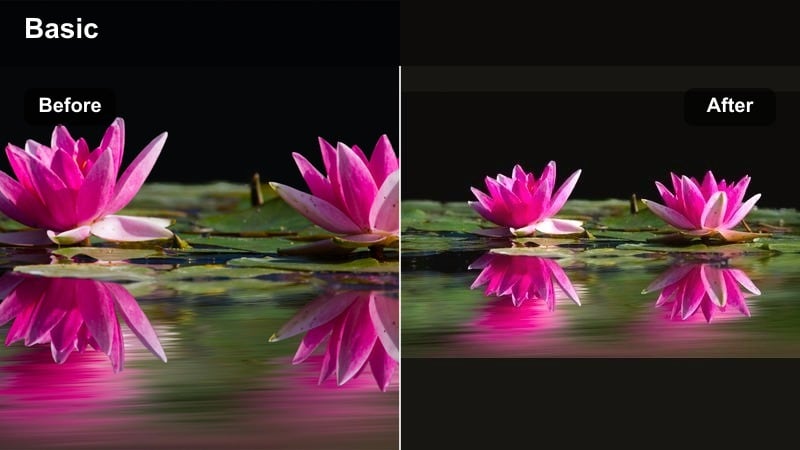
- Effect look: A gentle golden wash that warms midtones and subtly softens shadows for a calm, early morning family feel.
- Best for: Slow weekend breakfasts, kids playing by a window, and quiet family routines in natural morning light.
- Editing tip: Lower the filter intensity to around 60-70 percent and slightly reduce contrast so white shirts and walls do not blow out.
Soft Sunrise Glow is ideal when you want your morning family clips to feel peaceful and softly lit, even if your original footage looks a little flat. The filter focuses on warming midtones and gently rolling off shadows, so skin tones pick up a subtle golden cast without losing their natural color.
Inside Filmora, apply Soft Sunrise Glow to your breakfast or morning routine clips, then dial the opacity down until the warmth feels believable for the natural window light in your shot. If your scene includes bright walls or white mugs, pull contrast and highlights down slightly so those elements stay detailed while faces keep that gentle sun kissed look.
Let Filmora’s AI keep your warm tones consistent
When you mix outdoor family days with indoor home videos, color can shift from clip to clip, making your warm filters look different across the timeline. Filmora’s AI driven color tools help you keep your golden family tones consistent so skin looks natural and cozy in every scene.
Use color match and AI powered adjustments to quickly align exposure and white balance before you start grading. Once your clips share a similar base look, you can apply Soft Sunrise Glow or any other warm preset on top for a smoother, more professional result.
Try using Filmora’s AI color match on a short family montage before you add your filters so every shot already starts from a clean, consistent base.
 secure download

Preview warm family filters in real time
Filmora lets you hover over warm family filter presets to preview how they will look on your clip before you apply them. This makes it easy to compare subtle styles like Soft Sunrise Glow, Golden Breakfast Table, or Sunlit Home Memory on the same shot without breaking your editing flow.
You can stack multiple filters, adjust their opacity, and then save your favorite combinations as custom presets. Over time, this helps you build a small library of go to warm looks so every family vlog keeps a consistent golden tone.
Open your latest family clip, hover over a few warm filters, and compare them side by side to see which one best flatters your skin tones and home lighting.
secure downloadCombine filters with LUTs for a signature look
For even more control, you can pair Filmora’s warm family filters with gentle LUTs that shape contrast and refine color separation. The filter delivers the cozy golden tone, while the LUT gives your home videos a subtle cinematic depth that still feels friendly and authentic.
Keep LUT strength low so it supports your warm family filter instead of overpowering it. This way, your golden skin tones stay flattering, and the background gains a little extra polish and richness.
Experiment by adding a warm filter first, then apply a soft film style LUT at 20-30 percent intensity to see how it enhances depth without overpowering your family footage.
secure downloadGolden Breakfast Table
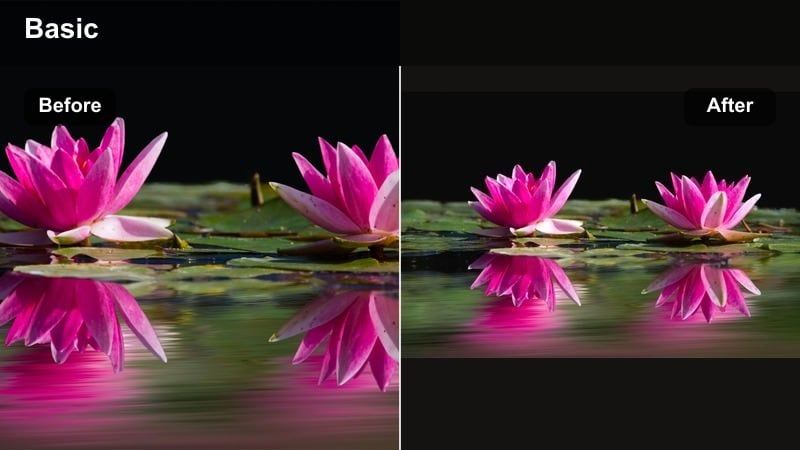
- Effect look: Rich, honey toned warmth that boosts yellows and oranges for a cozy, golden kitchen feel.
- Best for: Family cooking clips, pancake stacks, coffee pours, and close up shots of hands and faces around the table.
- Editing tip: Slightly desaturate orange in the color panel if skin starts looking too intense while keeping the golden home video glow in the background.
Golden Breakfast Table is designed to make busy kitchen scenes feel like a cozy postcard, adding depth to wood, food, and warm appliances while keeping faces inviting. The filter leans into yellows and oranges, which is perfect for sunlight bouncing off cabinets, countertops, and breakfast plates.
In Filmora, apply this warm family filter to your cooking montages and tabletop shots, then fine tune orange and yellow saturation in the HSL or color controls so skin does not drift into overly strong tones. This lets you keep a glowing, golden backdrop while food stays appetizing and natural, ideal for family vloggers who share recipes or morning routines.
Morning Memory Fade
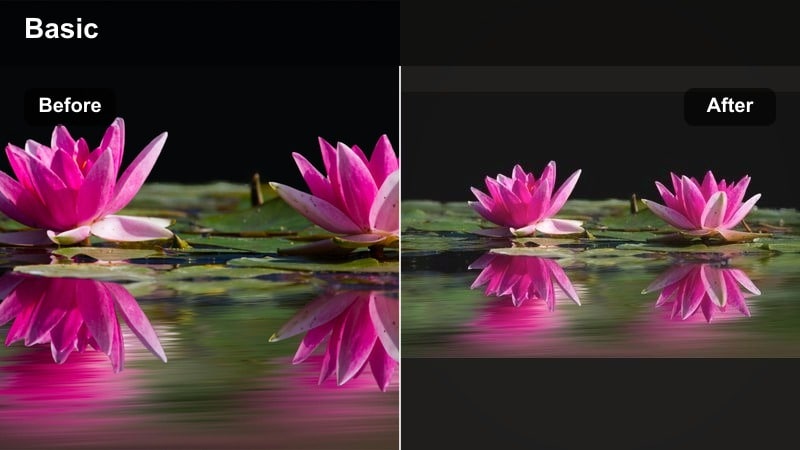
- Effect look: A low contrast, slightly hazy warm filter that makes clips feel like soft, distant memories.
- Best for: Montages of kids waking up, making beds, or stretching sunlight moments between scenes in family vlogs.
- Editing tip: Use it only for B roll and transition shots, and add a gentle cross dissolve to emphasize the dreamy family memory effect.
Morning Memory Fade turns simple morning actions into dreamy visual snippets, using lowered contrast and mild haze to suggest distance and nostalgia. It works especially well on slow movements like stretching, opening curtains, or walking down a hallway in soft natural light.
Use this filter in Filmora on your B roll between key story beats, keeping clips short and placing them over gentle music or natural room sounds. Add cross dissolves or fade ins and outs between these shots, and keep your main speaking clips with a slightly cleaner look so viewers feel the difference between present day moments and memory like visuals.
Sunlit Home Video Warmth
Living Room Golden Hour
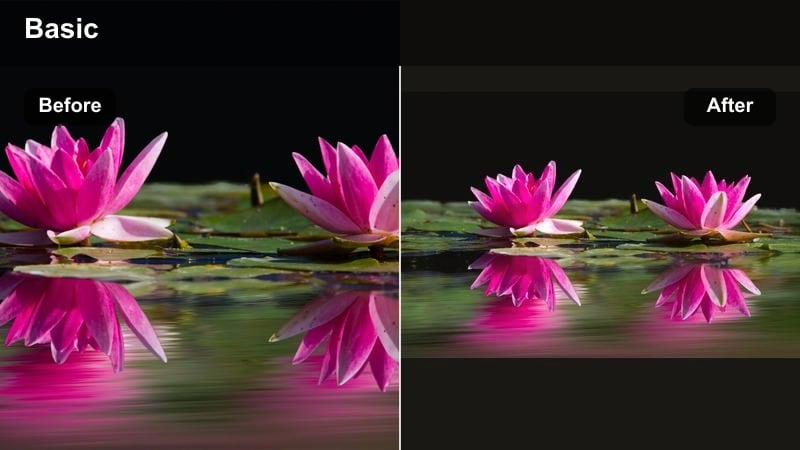
- Effect look: Deep, amber warmth that mimics golden hour sunlight pouring into living room spaces.
- Best for: Kids playing on the floor, board games, story time on the couch, and pet moments in sun patches.
- Editing tip: Nudge shadows slightly cooler in color controls to keep depth while preserving the overall golden family feel.
Living Room Golden Hour is made to simulate late afternoon sun even if you filmed earlier in the day, wrapping furniture, rugs, and faces in rich amber light. This filter deepens the cozy atmosphere in shared spaces where your family spends the most time together.
Inside Filmora, apply it to playtime or couch scenes and then tweak the shadow color temperature a bit cooler if the room starts feeling too uniformly warm. This small balance keeps depth in darker areas like furniture gaps or hair shadows while your highlights and midtones stay beautifully golden.
Sunlit Home Memory
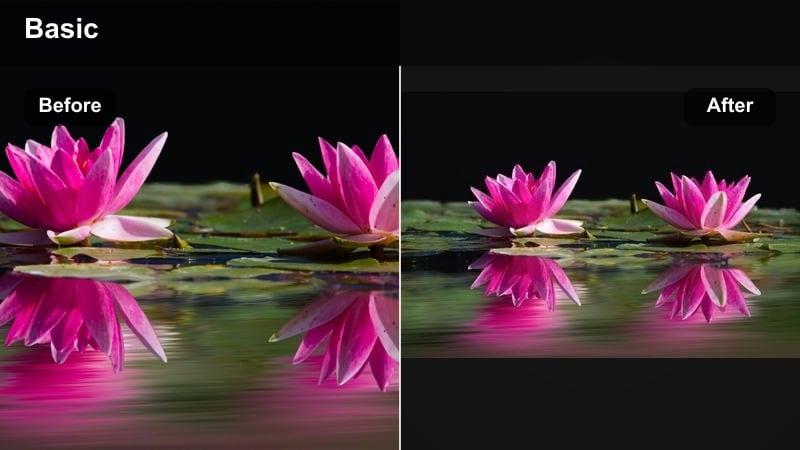
- Effect look: Soft warm highlights, gentle bloom around bright windows, and slightly lifted blacks for a nostalgic living room look.
- Best for: Family decorating the house, birthday mornings, kids opening gifts, and candid living room laughter.
- Editing tip: Reduce clarity or sharpness just a touch after applying the filter to keep edges gentle and flattering on faces.
Sunlit Home Memory adds a gentle glow around bright areas like windows and lamps, lifting the darkest parts of the frame so nothing feels too harsh. The result is a flattering, hazy warmth that suits emotional moments such as gift openings, celebrations, and shared laughter.
In Filmora, drop this filter on your key living room memories, then soften sharpness slightly so skin and fabric textures look extra smooth and forgiving. If you have strong backlight from a window, lower highlights first before applying the filter so the halo effect enhances detail instead of wiping it out.
Golden Home Video Classic
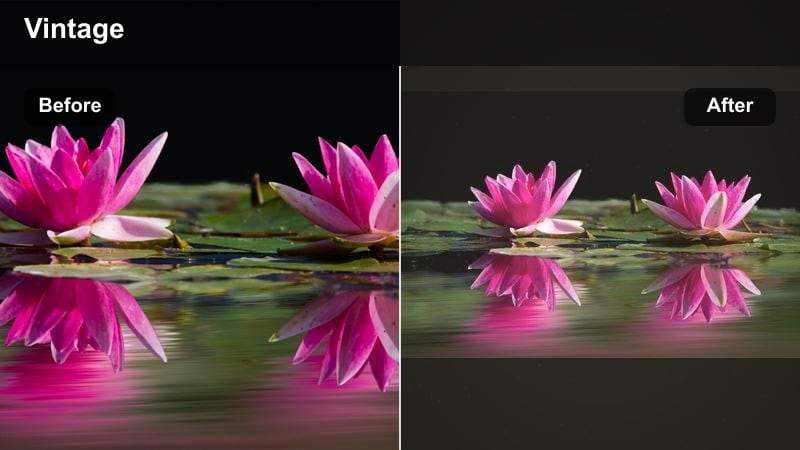
- Effect look: Vintage inspired warm tint with subtle color shift and slightly raised grain that echoes old camcorder footage.
- Best for: Home movie compilations, family recap videos, and storytelling intros showing throwback moments.
- Editing tip: Lower saturation in blues and greens so the golden family filter emphasizes skin tones and keeps the frame focused on people.
Golden Home Video Classic captures the charm of old camcorder tapes by combining warm color shifts with a hint of grain and faded contrast. It is perfect for sequences where you want to make new footage feel like it belongs in your family’s archive.
Apply this filter in Filmora to recap sequences, yearly highlight reels, or any montage that mixes old and new clips. Pull back blue and green saturation so the color palette leans toward warm beiges and golds, ensuring skin tones and faces remain the emotional focus of each frame.
Outdoor Family Days in Warm Tones
Park Picnic Warmth
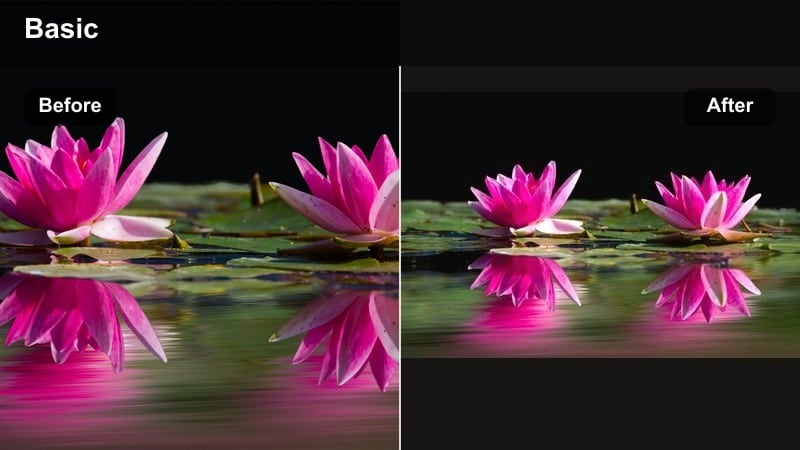
- Effect look: Balanced warmth that enhances greens and skin tones without turning grass too yellow or skies too orange.
- Best for: Picnics, playground trips, and park walks recorded in bright daylight or light shade.
- Editing tip: Add a small vibrance boost instead of global saturation, so clothing colors pop while skin tones stay natural.
Park Picnic Warmth is tuned to handle mixed outdoor colors, gently warming skin and foliage while keeping grass and sky believable. It is especially useful on sunny day footage where you want a cheerful tone but do not want the greens to shift into neon or yellow.
In Filmora, use this preset on park days, playground adventures, and picnic blankets, then enhance vibrance instead of overall saturation to bring out colorful outfits and toys. This keeps faces soft and realistic while the environment still feels bright and inviting.
Golden Field Play
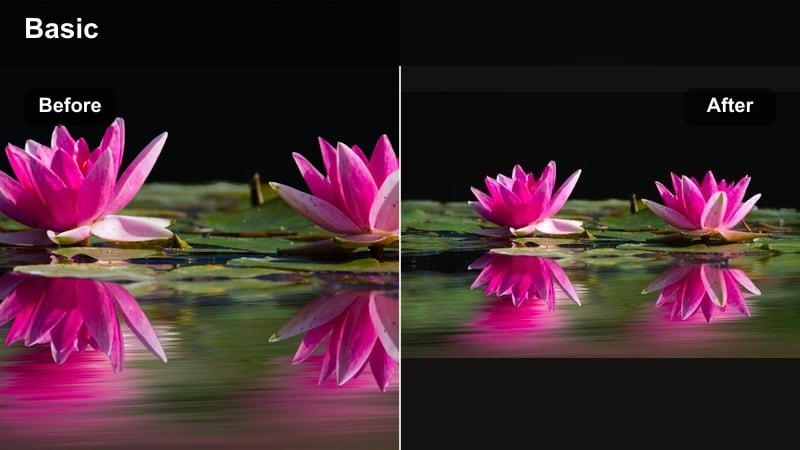
- Effect look: Strong golden sunset tones, boosted oranges, and soft highlight roll off for dramatic but cozy outdoor warmth.
- Best for: Running through fields, backlit hair shots, and slow motion spins at sunset on family trips.
- Editing tip: Reduce filter opacity on close up shots to keep skin tones flattering while leaving it stronger on wide, scenic frames.
Golden Field Play is built for those magical golden hour moments when the sun is low and backlighting your family as they move. It intensifies oranges and softens highlights, making hair glow and skies turn deeper gold without harsh clipping.
Apply this filter in Filmora to wide field shots and big motion scenes, then keyframe or lower the intensity on closer portraits where skin detail matters more. Pair it with slow motion on hugs, spins, and jumps to heighten emotion, and cut back to real time audio soon after so the energy feels natural.
Family Trail Glow
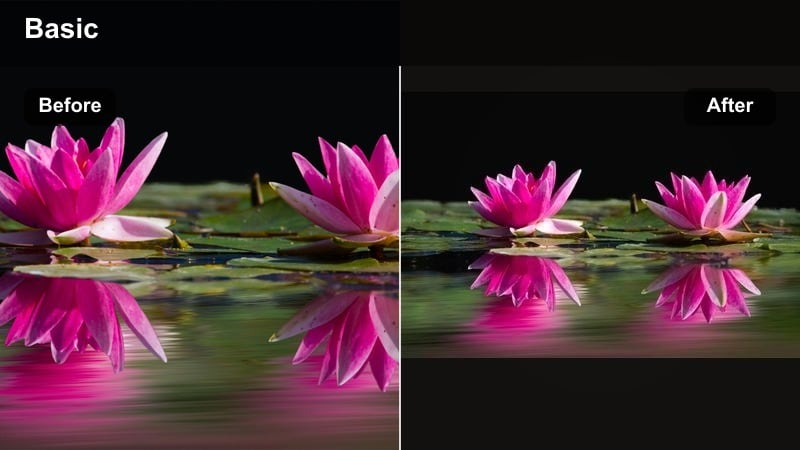
- Effect look: Warm, earthy tones that deepen browns and greens while adding a subtle sunlit family memory effect.
- Best for: Hikes, nature walks, camping trips, and backyard explorations with kids and pets.
- Editing tip: Lift shadows slightly so details in trees and clothing stay visible, then add a tiny vignette for a gentle storybook focus.
Family Trail Glow enriches outdoor scenes with a warmer, earthier palette, giving trees, dirt paths, and wooden textures more depth. It is great for storytelling style vlogs where you follow your family through forests, gardens, or campsites.
In Filmora, raise the shadows a touch after applying this filter to recover detail in foliage and darker clothing, then add a small vignette so viewers’ eyes naturally settle on your family. If lighting shifts quickly between shade and sun, consider adjusting filter intensity with keyframes to keep skin looking consistent across the walk.
Storytelling Looks for Family Creators
Cozy Evening Glow
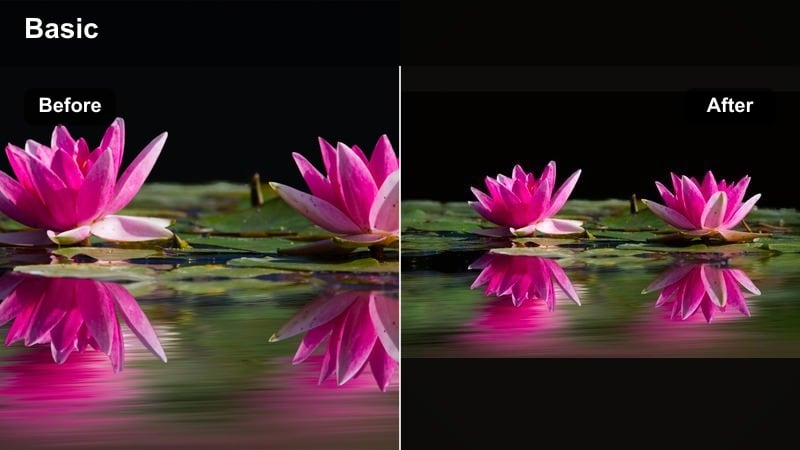
- Effect look: Warm, amber toned filter that mimics lamplight and candlelight with slightly deeper shadows for intimate scenes.
- Best for: Bedtime stories, movie nights, baking sessions, and quiet evening routines in the living room or kitchen.
- Editing tip: Raise exposure a touch before applying the filter so darker clips do not turn muddy as warmth deepens the tones.
Cozy Evening Glow leans into the warmth of indoor lamps and candles, deepening shadows just enough to feel intimate but not gloomy. It is perfect for bedtime routines, late night baking, or quiet moments on the sofa when you want viewers to feel like they are in the room.
In Filmora, lightly brighten darker clips first, then add this filter so the warmth enriches colors instead of hiding them. You can selectively darken the background with masks or exposure controls to keep attention on faces and hands, letting the filter amplify that wrapped in lamplight mood.
Sunlit Story Recap
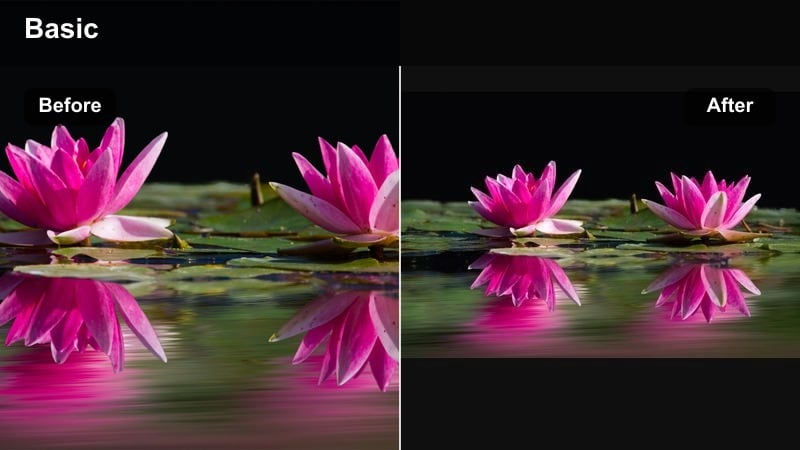
- Effect look: Bright, clean warmth that keeps whites neutral while lifting midtones for polished vlog recaps.
- Best for: Sit down family updates, voiceover segments, and to camera storytelling about the day’s adventures.
- Editing tip: Use it as a base filter, then fine tune white balance clip by clip so every recap segment feels like it was shot in the same light.
Sunlit Story Recap is a controlled warm look tailored for talking head segments, where you need both flattering skin and neutral whites on walls, text, or decor. It brightens midtones and adds a gentle golden touch without pushing the entire frame too yellow.
Apply this filter across all your sit down recaps in Filmora, then tweak white balance per clip so they match even if you recorded on different days. Once you have a version you love, save it as a custom preset so every new vlog intro and outro carries the same professional, recognizable warmth.
Sunlit Family Memory Effect
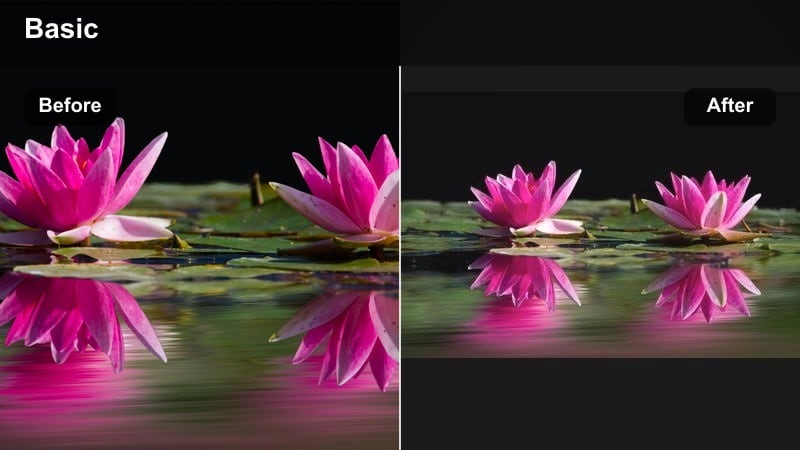
- Effect look: A cinematic warm family video filter that adds golden highlights, soft halation around bright areas, and gentle fade for a memory like finish.
- Best for: Highlight reels, emotional montages, milestone videos, and end of vlog family recaps.
- Editing tip: Use it on your strongest emotional clips only, and lower saturation slightly so warmth feels thoughtful rather than overly intense.
Sunlit Family Memory Effect is a more cinematic warm family filter designed for key emotional moments such as hugs, milestones, and goodbyes. It introduces soft halos around highlights and a mild fade in the darkest areas, giving clips a polished, memory like finish.
In Filmora, reserve this preset for your most powerful shots near the end of a vlog or in dedicated highlight reels. Slightly reduce saturation after applying it so the golden tone feels gentle and heartfelt, then pair it with slower cuts and soft music to give viewers time to absorb the moment.
Tips for Using Family Warm Tone Filters in Filmora
- Film slightly underexposed in bright sun so warm filters can add glow without clipping highlights on faces.
- Choose one or two warm looks as your channel staples and reuse them so viewers recognize your family style.
- Adjust filter opacity per clip; wide scenic shots can handle more warmth than tight face close ups.
- Tweak white balance before adding a filter so each preset behaves predictably across your edit.
- Avoid stacking too many strong effects; one warm filter plus light color tweaks usually looks more natural.
- Use warm filters more gently on indoor yellow walls so the scene does not become overly orange.
- Cut back saturation on reds and oranges if kids clothing or decor starts to steal attention from faces.
- Create a custom preset in Filmora once you dial in a look, and apply it to new projects for faster editing.
Warm family video filters are one of the fastest ways to turn everyday clips into golden, story ready memories, whether you are filming outdoor family days or quiet, sunlit home videos.
Start with one or two favorite warm looks, fine tune them to flatter your family and your home, and use them consistently so every new upload feels like another chapter in the same cozy story then explore cool family video filters when you want a fresh contrast for different moods.
secure downloadNext: Cool Family Video Filters: Fresh Tones for Playful Moments
