

 100% Security Verified | No Subscription Required | No Malware


 ChatGPT
 Perplexity
 Gemini
 Claude
 Grok
Grok
Warm fashion video filters are perfect for bringing out golden skin tones, cozy fabrics, and sun-kissed street style in a single click, especially when you are shooting outdoors.
Whether you film golden hour lookbooks or bright summer style videos, these Filmora warm fashion video filters will help lifestyle creators, fashion vloggers, and outdoor stylists keep every outfit looking rich, soft, and stylishly on-brand.
In this article
Sunlit Street Style Walks
Honey Boulevard Glow
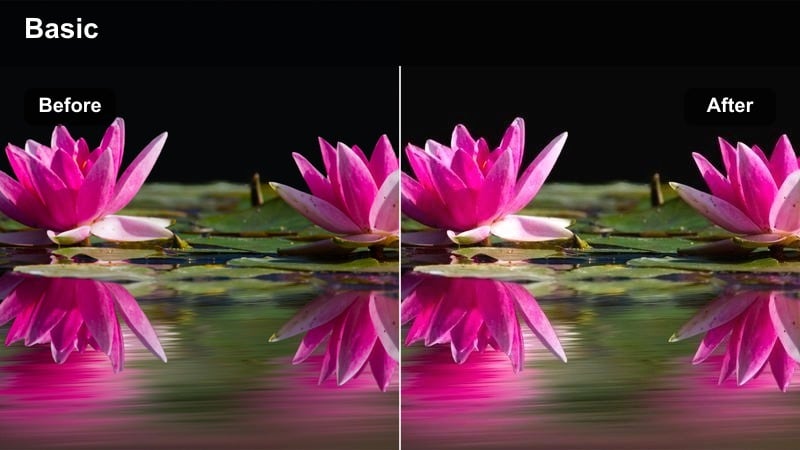
- Effect look: Soft honey glaze with lifted shadows that wraps outfits in a gentle city sunshine.
- Best for: Outdoor fashion walks on bright afternoons where you want glowing skin and rich fabric detail.
- Editing tip: Lower contrast slightly if your original footage is already high contrast to keep the honey glow smooth, not harsh.
Honey Boulevard Glow adds a buttery layer of warmth over your footage, lifting shadows so trench coats, blazers, and denim keep detail even in strong sun. In Filmora, it works especially well on stabilized walking shots where sidewalks and storefronts reflect light back into your outfit, giving skin a flattering golden tone without losing the neutral balance of beige, white, and black pieces.
Apply the filter first, then fine-tune with Filmoras basic color tools, nudging contrast and exposure down just a touch if your camera already captured punchy highlights. For sponsored fashion walks or shoppable street looks, keep saturation moderate so logos, stitching, and subtle textures stay crisp while the honey glow ties every clip into a cohesive, city-sunshine aesthetic.
Match Warm Fashion Tones with Filmora's AI Color Tools
Filmoras AI-powered color tools help you keep warm fashion video filters consistent across multiple clips so your golden and cozy tones always match your brand. Use AI to quickly even out exposure and white balance between locations, from shaded avenues to bright crosswalks, before you start styling your warm looks.
Once AI has created a clean base grade, your warm fashion filters sit more naturally on skin, fabrics, and backgrounds, so each outfit transition flows smoothly in your final edit.
 secure download

Preview Warm Fashion Filters in Real Time
Filmora lets you hover and preview warm fashion video filters instantly, so you can compare golden, sunny, and caramel looks on your outfits before committing. This makes it easy to pick a filter that flatters both your skin tone and your clothing palette, whether you are filming neutral streetwear or colorful summer dresses.
After choosing a filter, tweak exposure and saturation in small steps while scrubbing through your timeline, ensuring the look holds up from close-up detail shots to wide city scenes.
secure downloadCombine Warm Filters with LUTs for Signature Style
Pair Filmoras warm fashion video filters with LUTs to design a signature color grade viewers instantly associate with your channel. Start with a soft warm filter to set the mood, then add a LUT that refines contrast and color separation so skin tones stay natural while fabrics and backgrounds keep definition.
Once you are happy with the combination, save it as a custom preset in Filmora so you can apply that same golden or cozy look to future lookbooks, GRWMs, and outfit reels in a single click.
secure downloadUrban Amber Haze
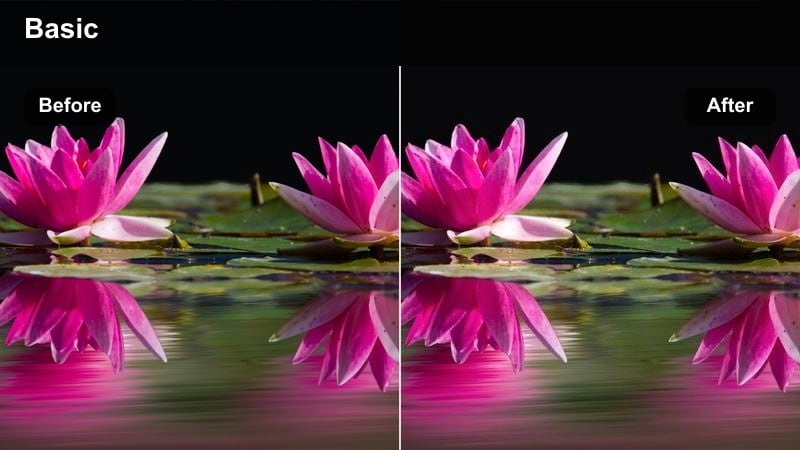
- Effect look: Amber-toned warmth with a soft haze that gently smooths textures and diffuses harsh city light.
- Best for: Fashion reels shot on busy streets where you want dreamy warmth and slightly softened backgrounds.
- Editing tip: Use this filter on clips with strong backlight, then reduce clarity a touch for extra hazy, editorial-style bokeh.
Urban Amber Haze drapes your street footage in a gentle amber mist, ideal for softening busy backgrounds of traffic, signage, and glass buildings. In Filmora, this gives your subject that editorial, almost perfume-campaign feel, while still preserving enough contour in coats, trousers, and tailoring to look polished.
Apply the filter, then experiment with Filmoras sharpness and clarity sliders to fine-tune how diffused you want the city to appear behind your subject. Combined with backlighting from the sun or bright shopfronts, this style transforms rim light into a halo around hair and lapels, making quick crosswalk poses and slow-motion struts feel instantly more cinematic.
Sidewalk Sunset Sheen
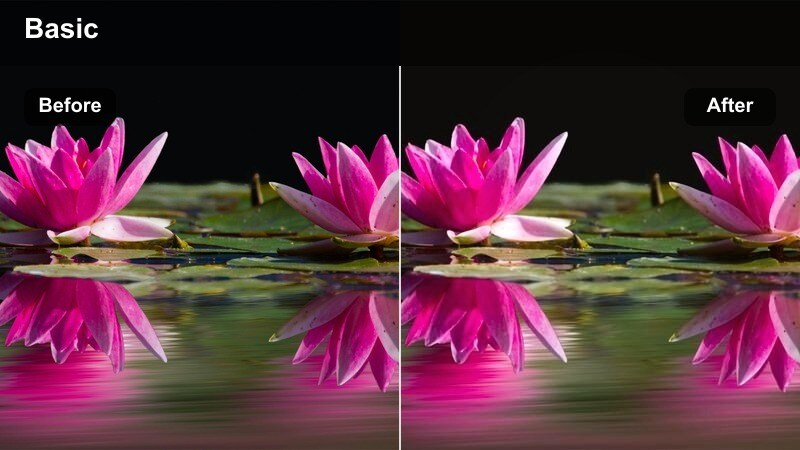
- Effect look: Warm orange-pink sunset tint that deepens midtones and adds a glossy sheen to city fashion frames.
- Best for: Sunset outfit transitions, match-cuts of shoes and accessories, and slow-motion street spins.
- Editing tip: Boost saturation on reds and oranges to make lipstick, bags, and statement shoes pop against the sunset vibe.
Sidewalk Sunset Sheen leans into orange-pink warmth, perfect for capturing golden hour twirls, flowing dresses, and glossy handbags against reflective pavements. The filter deepens midtones, so colors feel richer while highlights keep that signature sunset sparkle across windows, jewelry, and hair.
In Filmora, layer this style on your B-roll transitions and slow spins, then slightly increase saturation on warm hues so lipstick, nails, and statement bags stand out. Shooting at higher frame rates and slowing down the footage enhances the glossy sheen on satin, silk, and metallic fabrics, turning simple sidewalk moves into highlight-ready editorial moments.
Golden Hour Lookbooks and Hauls
Golden Wardrobe Wash
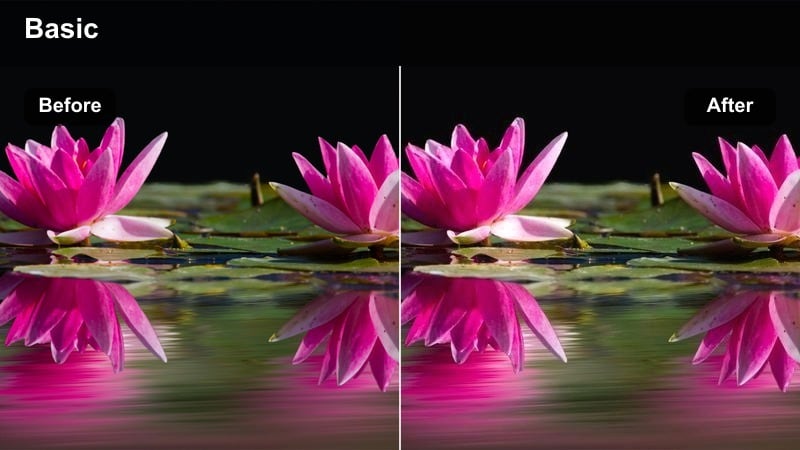
- Effect look: Clean golden wash that brightens whites, warms skin, and keeps colors balanced and shop-ready.
- Best for: Try-on hauls, closet tours, and static lookbook shots filmed near a window at late afternoon.
- Editing tip: If whites start to look too creamy, slightly pull down temperature while keeping the filter on for a refined, editorial warmth.
Golden Wardrobe Wash is designed to keep your whites bright and your skin softly warmed, making it a go-to for branded hauls and affiliate-heavy lookbooks. It adds a gentle commercial glow that flatters everything from crisp shirts to pastel basics without skewing product colors away from reality.
Apply it in Filmora to your main talking-head and try-on angles, then gently adjust temperature and tint so whites stay clean on clothing racks and backgrounds. This ensures labels, patterns, and subtle fabric differences remain accurate for viewers who are shopping from your links, while your overall frame still feels like late-afternoon sunshine pouring in through a window.
Sunny Loft Luxe
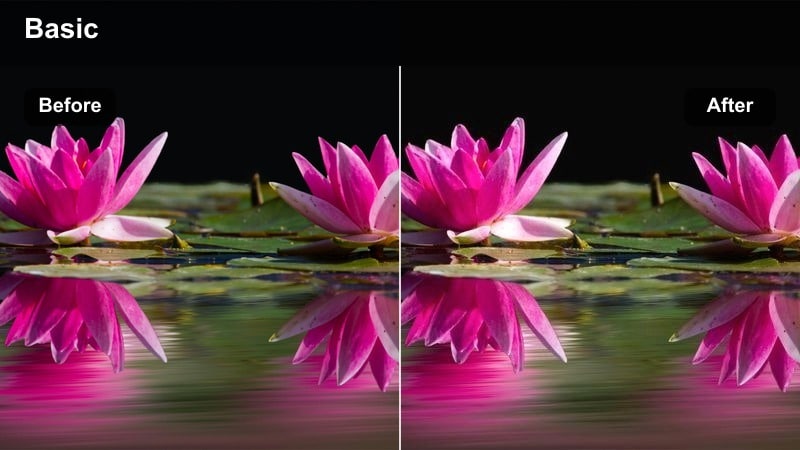
- Effect look: High-end loft feel with lifted exposure, warm highlights, and smooth creamy shadows.
- Best for: Lookbooks shot in studio apartments, lofts, or minimal interiors with big windows.
- Editing tip: Add a subtle film grain in Filmora after applying this filter to push the editorial, magazine-style impression.
Sunny Loft Luxe brightens your interior fashion shots, creating that aspirational studio-apartment vibe even if you are filming in a smaller space. The filter warms highlights while keeping shadows creamy, which makes neutral palettes, tailored pieces, and minimal decor look intentionally styled and softly luxurious.
Inside Filmora, combine this filter with simple camera moves like slow push-ins or side-to-side pans around mirrors and window frames. Add a touch of film grain on top for that print-editorial finish, so your lookbook sequences feel like pages from a magazine instead of casual room clips, all while maintaining flattering, warm skin tones.
Rack of Sunshine
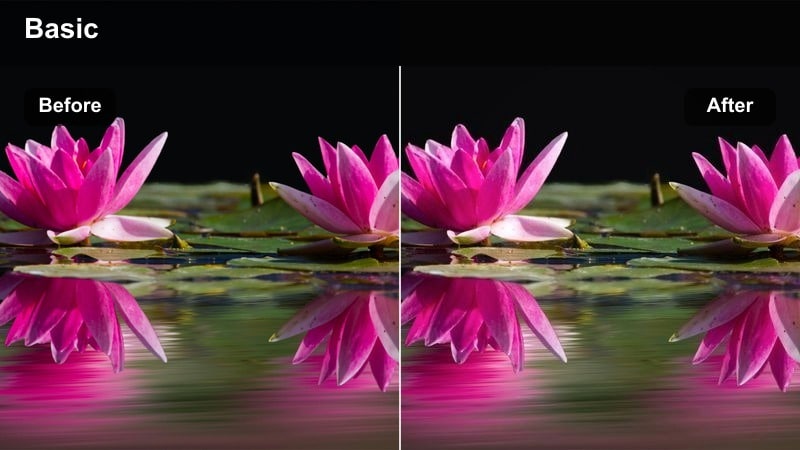
- Effect look: Golden-yellow emphasis that brightens clothing racks and adds micro-contrast to hangers and folds.
- Best for: Static shots of clothing racks, outfit flat-lays on hangers, and styling transitions.
- Editing tip: Trim shadows slightly darker to keep depth between garments so the rack does not turn into a flat block of color.
Rack of Sunshine is tailored for those in-between shots that show off your curated wardrobe, from hanging pieces to grouped color stories. It leans into golden-yellow brightness and micro-contrast, which helps separate hangers, folds, and layers so your rack looks like a boutique display rather than a cluttered rail.
Use it in Filmora on slow pans across your clothes or quick B-roll inserts between outfit changes. After applying the filter, gently deepen the shadows or blacks so spaces between garments stay defined, allowing viewers to appreciate each silhouette and texture while the entire rack glows like it is bathed in perfect shop-window light.
Summer Style in Parks and Plazas
Sunny Plaza Polish
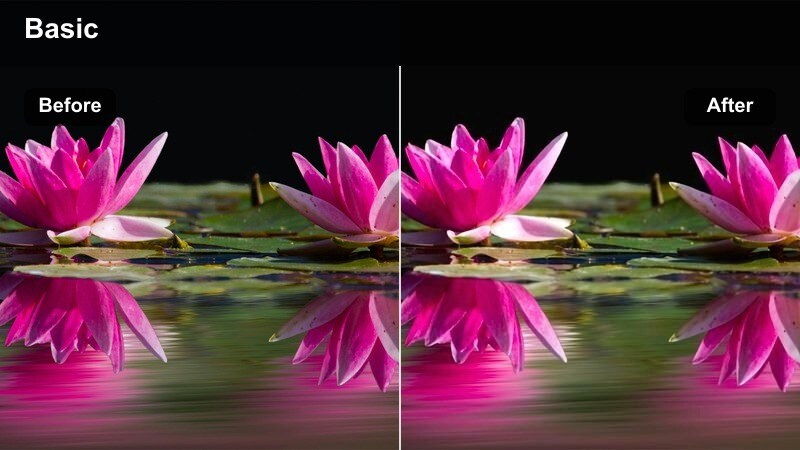
- Effect look: Warm, polished glow with crisp edges that suits wide shots of plazas and open outdoor spaces.
- Best for: Full-body outfit reveals, runway-style walks across plazas, and group lookbooks in open areas.
- Editing tip: Increase sharpness slightly for shoes and accessories, but keep skin smoothing subtle for a balanced polished look.
Sunny Plaza Polish brings structure and glow to wide outdoor scenes, making stone plazas, steps, and open squares feel like minimalist runways. The filter keeps edges crisp, which is perfect for showcasing shoe choices, hemlines, and coordinated group outfits walking in and out of frame.
In Filmora, apply it to your establishing shots and walking sequences, then add a touch of extra sharpness to highlight footwear and bags while relying on light skin-smoothing if needed. Maintaining consistent settings across multiple angles will make your mini campaign or lookbook montage feel expensive, cohesive, and ready for social ads or brand collaborations.
Park Day Sun Kiss
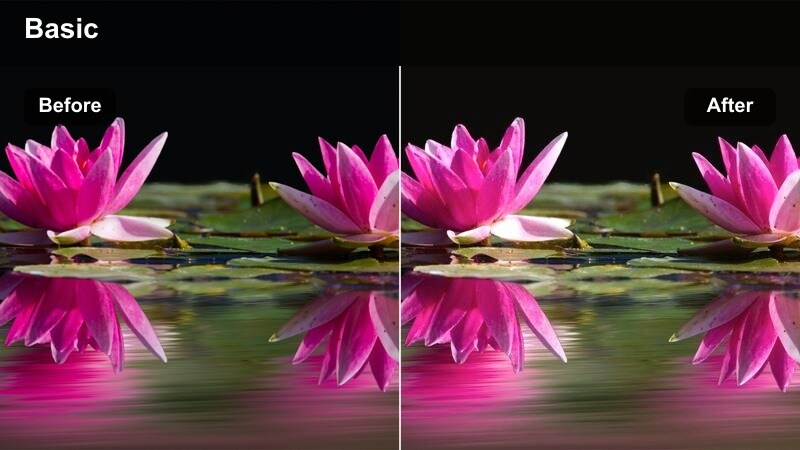
- Effect look: Soft sun-kissed warmth that gently brightens midtones and flatters skin in mixed light.
- Best for: Picnic-inspired outfits, casual date looks, and laid-back summer fashion in shaded city parks.
- Editing tip: If backgrounds look too busy, add a touch of blur or reduce saturation in greens while keeping the warm tone on your subject.
Park Day Sun Kiss smooths out the tricky mix of shade and dappled sunlight you get under trees, giving skin a natural, fresh-from-the-sun glow. It slightly lifts midtones so casual summer outfits in soft fabrics, denim, and cotton feel light and breathable on screen.
Inside Filmora, combine this filter with gentle background blur, masking, or reduced green saturation so foliage does not steal attention from your outfit. This keeps focus on your styling details while still capturing that relaxed, picnic-in-the-park atmosphere perfect for vlogs, date outfit ideas, or lifestyle B-roll.
Summer Boardwalk Bronze
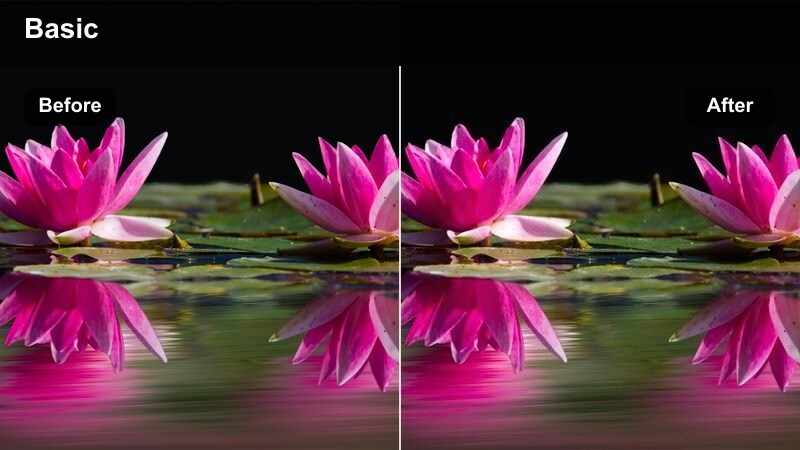
- Effect look: Bronzed warm tone that enhances tans, highlights metallic accessories, and deepens blues slightly.
- Best for: Boardwalk strolls, rooftop hangouts, and summer vacation outfits shot near water or open sky.
- Editing tip: Use this filter and then lower saturation in yellows if skin starts to look too orange; keep bronze in the highlights only.
Summer Boardwalk Bronze leans into sun-drenched, bronzed highlights, ideal for vacation content, rooftop looks, and outfits filmed near the sea or skyline. It subtly deepens blues, making skies and water feel richer while giving skin and metallic details that golden, editorial shimmer.
When editing in Filmora, use this filter on sequences with lots of open sky or reflective surfaces, then fine-tune yellow saturation to keep skin flattering rather than overly orange. Close-ups of jewelry, sunglasses, and bag hardware look especially luxe under this style, helping your summer reels and travel vlogs stand out in crowded feeds.
Cozy Evening Fashion and Indoor Warmth
Café Cozy Caramel
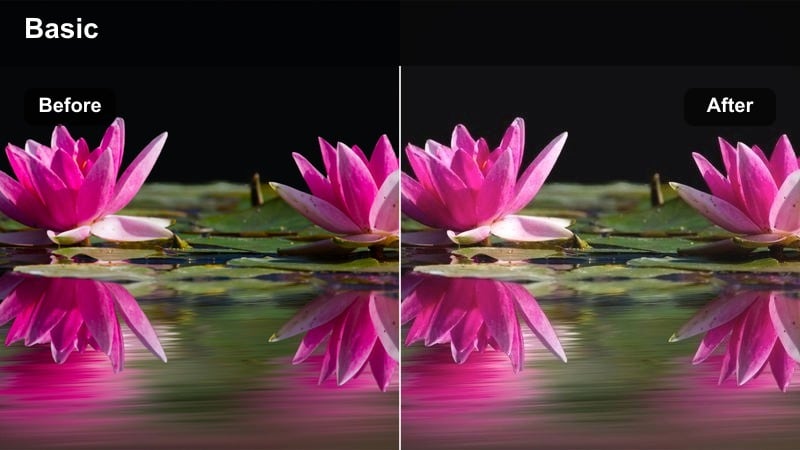
- Effect look: Deep caramel warmth with gentle fade in blacks, mimicking candlelight and café lamps.
- Best for: Nighttime outfit diaries, café date looks, and knitwear-focused fashion stories indoors.
- Editing tip: Pull highlights down slightly if practical lights are in frame to avoid clipping and keep the cozy vibe intact.
Cafe Cozy Caramel wraps your evening footage in deep, toffee-like warmth, echoing the glow of pendant lamps and candles. It softens blacks so shadows feel velvety rather than harsh, which is perfect for chunky knits, scarves, and textured outerwear filmed at intimate tables or window seats.
Apply it in Filmora to indoor sequences after dark, then gently lower highlights so visible bulbs and reflections keep detail instead of blowing out. This combination preserves atmosphere while keeping your makeup, accessories, and fabric textures clear for viewers who want to screenshot and recreate your cozy looks.
Apartment Amber Evening
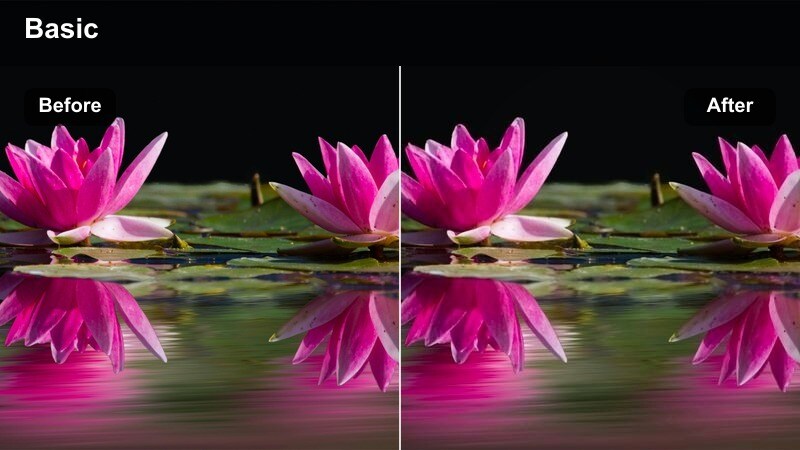
- Effect look: Amber-hued interior warmth with subtle filmic contrast and soft halation on bright spots.
- Best for: Nighttime mirror fits, get-ready-with-me videos, and pajama or loungewear styling indoors.
- Editing tip: Lower saturation on oranges slightly if interior bulbs are very warm to keep skin from turning too red.
Apartment Amber Evening is made for bedroom mirrors, vanity setups, and low-key GRWM clips shot under lamps and fairy lights. The filter adds a filmic amber cast and soft halation around bright points, making string lights, lampshades, and mirror edges glow in a flattering way.
In Filmora, drop this style onto your vertical and horizontal clips alike, then fine-tune orange saturation so your skin remains soft and natural despite the warm bulbs. This filter can unify multiple lighting sources in one room, giving all your night-in outfits, lounge sets, and PJs the same cozy, cinematic mood.
Wardrobe Candle Glow
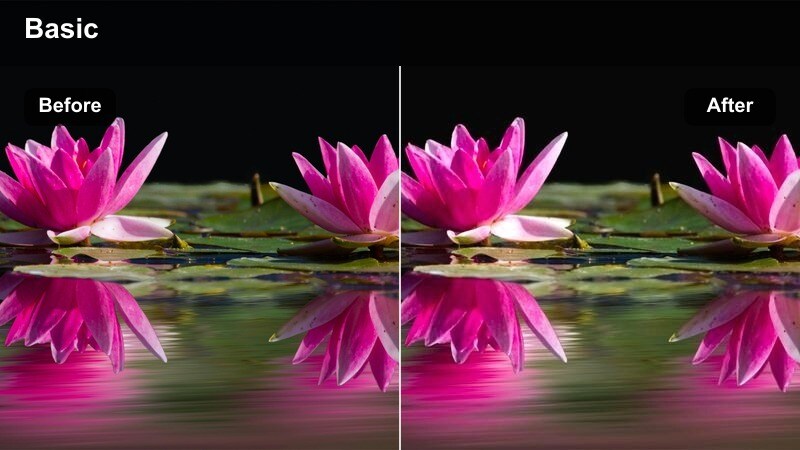
- Effect look: Subtle golden highlight lift that simulates candlelight catching on fabrics and hair.
- Best for: Intimate closet tours, jewelry close-ups, and slower, aesthetic B-roll of textures at night.
- Editing tip: Keep exposure slightly under before applying the filter so the glow feels intentional and moody, not blown out.
Wardrobe Candle Glow adds a gentle golden lift to highlights, as if a single candle or tiny lamp were grazing your fabrics and accessories. It excels in close-up shots of knitwear, leather, sequins, and jewelry, where small specular highlights can turn into dreamy, aesthetic accents.
When editing in Filmora, start with slightly underexposed clips and then apply this filter so the glow remains controlled and cinematic. Use it over handheld B-roll of your closet shelves, drawers, and detail shots, weaving these moments between full-body outfits to build a warm, story-driven fashion sequence that feels intimate and carefully curated.
Tips for Using Fashion Video Warm Filters in Filmora
- Shoot during golden hour whenever possible so your warm fashion video filters enhance natural light instead of fighting harsh midday sun.
- Lock white balance in-camera to avoid drastic color shifts between clips when applying the same warm filter across a full lookbook.
- Use neutral or complementary backdrops so your warm tones support the outfits instead of clashing with bold wall or sign colors.
- Keep skin tones as your main reference when adjusting warmth; if skin looks natural, most fabrics will stay within a believable range.
- Test exposure, contrast, and saturation on one clip in Filmora, then copy those settings across similar shots to keep your warm look consistent.
- Export short test clips before posting to social platforms, checking how your warm filters look on both mobile and desktop screens.
Warm fashion video filters are a powerful way to give your outdoor shoots, golden hour lookbooks, and cozy evening outfits a cohesive, stylish glow that fits your personal brand.
Start by testing a few golden or caramel filters in Filmora, save your favorites as presets, and then explore cool fashion video filters next to balance your content for all seasons and moods.
secure download