

 100% Security Verified | No Subscription Required | No Malware


 ChatGPT
 Perplexity
 Gemini
 Claude
 Grok
Grok
Warm influencer video filters make your content feel more human, approachable, and inviting, especially for lifestyle influencers and wellness creators who want viewers to feel like they are right there with you. With the right blend of golden highlights and soft midtones, even a regular room or cloudy outdoor space can look like a cozy, sun-kissed moment.
This guide walks you through a curated set of warm influencer video filters in Filmora that mimic golden hour, candlelit calm, and soft, flattering warmth for skin. Use these as quick-ready presets for warm lifestyle influencer content and golden hour brand videos, or as a base look you can tweak with Filmora’s color tools.
In this article
Soft Golden Warmth for Everyday Lifestyle Vlogs
Honey Glow
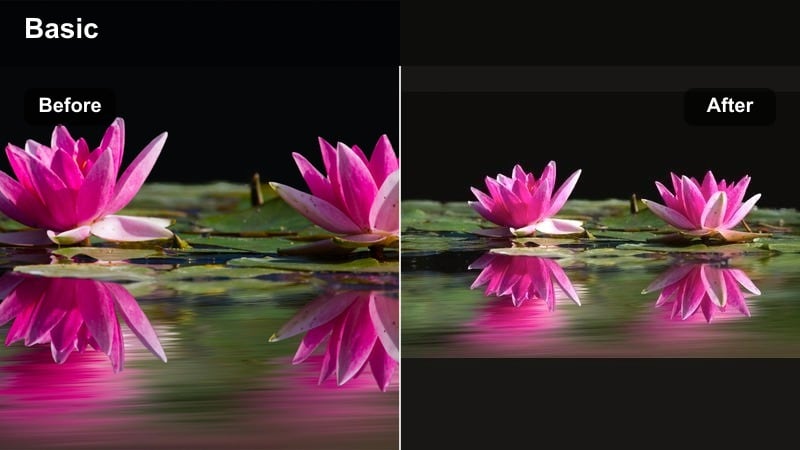
- Effect look: Gentle honey-toned warmth with soft contrast that flatters most skin tones while keeping whites clean and bright.
- Best for: Daily lifestyle vlogs, cozy morning routines, desk diaries, and soft wellness check-ins filmed indoors.
- Editing tip: Lower the filter intensity to around 60-70 percent and slightly raise shadows to avoid losing detail in darker corners of the frame.
Honey Glow wraps your footage in a subtle layer of golden light that works especially well in apartments, bedrooms, and home offices. In Filmora, you can apply this warm influencer video filter with one click, then adjust the strength slider so your clip picks up that honey tone without drifting into orange.
Because Honey Glow keeps whites clean, it is ideal if you film against white bedding, walls, or a light desk. Pair it with Filmora stabilization for handheld shots and use the color panel to nudge shadows up a bit so background corners stay visible while your face remains softly highlighted.
Pro tip: Match Honey Glow to Your Background Colors
If your backdrop has a lot of beige, cream, or wood, the Honey Glow filter will naturally enhance those tones and make the space look more designed and intentional.
In Filmora, lightly reduce saturation of yellows if your walls or furniture start to look too intense, so your skin stays the visual focus.
Let Filmora’s AI Help You Dial in the Perfect Warmth
If you are not sure how warm your influencer videos should be, Filmora’s AI-powered color tools can quickly analyze your footage and suggest balanced adjustments that keep skin natural while adding golden, inviting tones. This is a fast way to create a polished starting point before you dive into individual filters.
Use AI to create a base look, then layer your favorite warm influencer video filters from this guide on top for a custom combination that still feels consistent across your channel.
 secure download

Preview Warm Filters in Real Time Before You Commit
Filmora lets you hover and preview filters in real time, so you can quickly compare soft latte tones against a stronger golden influencer filter or a sun-kissed influencer video look without over-editing. This makes it easy to see how each effect responds to your current lighting and outfit.
Play a short portion of your vlog, click through your warm presets, and watch how they interact with your skin tone and background light before you lock anything in.
secure downloadTurn Warm Filters into a Signature Creator LUT Workflow
Once you find a warm filter combination you love, you can treat it like your own warm creator LUT by saving it as a custom preset and reusing it across vlogs, reels, and brand content. This keeps your workflow fast while locking in a consistent, cinematic personality.
Every time you import new footage into Filmora, apply your saved preset first, then make small per-clip tweaks to exposure and saturation. Over time, viewers will start to associate that warm, golden style with your personal brand.
secure downloadSoft Latte
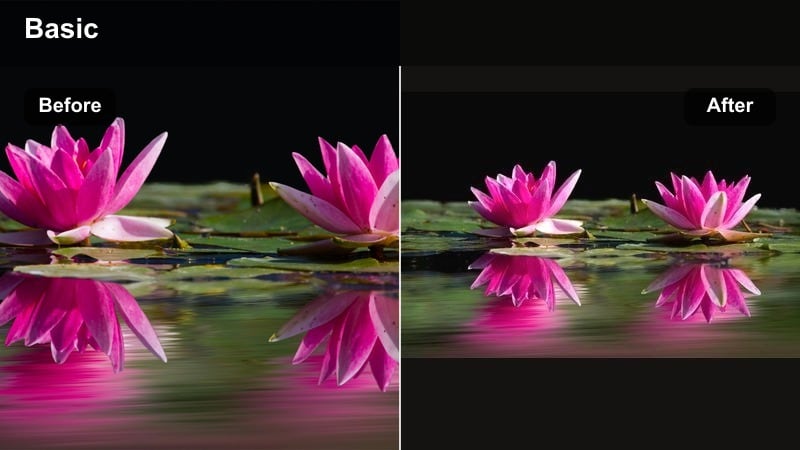
- Effect look: Muted warm tones with a creamy, latte-like finish that gently desaturates while keeping skin cozy and soft.
- Best for: Minimalist lifestyle feeds, aesthetic desk setups, and wellness content that leans into calm, slow living.
- Editing tip: Combine with a slight vignette and a touch of Filmora’s blur in the background to emphasize calm, editorial-style compositions.
Soft Latte adds a creamy, beige-forward wash that is perfect for creators who love neutrals, linen textures, and soft light. In Filmora, it can subtly pull distracting colors toward a cohesive palette, making your entire frame feel like it belongs on the same aesthetic mood board.
Because this filter also softens saturation, it is great for journaling shots, desk scenes, and cozy corners. Add a small vignette in Filmora and blur the background slightly so your viewers naturally focus on your hands, notebook, or face while the rest of the scene feels calm and editorial.
Pro tip: Use Soft Latte for Brand Consistency
If your brand palette includes neutrals, Soft Latte helps your feed feel cohesive by gently pushing every clip toward beige and cream tones.
Dial down saturation of greens in Filmora’s color wheels so plants and decor do not overpower the soft, latte-like background.
Golden Journal
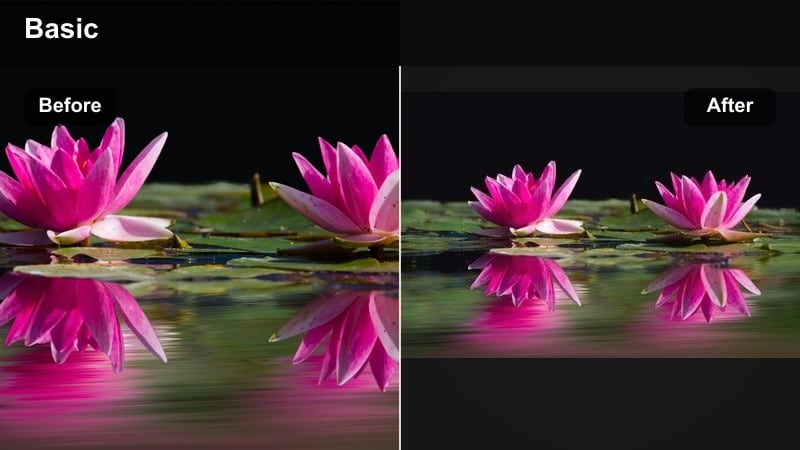
- Effect look: Subtle golden influencer filter effect with slightly lifted blacks and a soft matte finish that feels like film.
- Best for: Talking-to-camera entries, journal-style storytelling, and self-care night recaps with warm lamps.
- Editing tip: Reduce contrast and increase Filmora’s highlight roll-off to keep light sources like lamps or candles from clipping too harshly.
Golden Journal gives your clips a diary-like, cinematic feel with lifted blacks and a matte finish that is flattering in low light. In Filmora, it softens sharp edges and adds a gentle glow, making late-night reflections and self-care recaps feel more intimate.
Use it on bedroom or living-room scenes where table lamps or fairy lights are your main source. After applying the filter, fine-tune contrast and highlights in Filmora so bright practical lights stay soft, preserving that cozy, confessional mood without harsh hotspots.
Pro tip: Add Subtle Grain for a Diary-Like Feel
Layer a small amount of Filmora film grain over the Golden Journal filter to make your confessional clips feel like analog diary entries.
Keep grain strength low so your viewers can still clearly see your face and expressions, especially in dim scenes.
Sun-Kissed Outdoor Glow for Influencer Days Out
Sun-Kissed Brunch
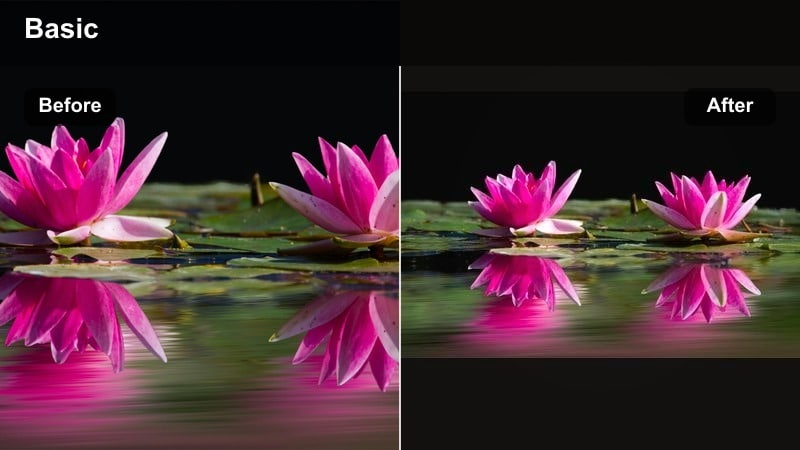
- Effect look: Bright, sun-kissed influencer video look with warm highlights, crisp whites, and gently boosted saturation for food and skin.
- Best for: Outdoor brunch vlogs, city walks, and brand collabs shot at cafes or patios during late morning or golden hour.
- Editing tip: Use Filmora’s HSL panel to selectively soften reds if your skin or food appears too saturated under strong sunlight.
Sun-Kissed Brunch is designed to make plates, drinks, and outfits pop while still keeping your skin flattering. In Filmora, this filter brightens highlights and adds warmth to midtones so even a casual cafe table feels ready for a brand partnership or thumbnail.
If midday sun pushes colors too far, open the HSL panel in Filmora and lower saturation in reds and oranges. This lets you keep juicy, appetizing food colors without making your skin look overcooked or overly edited.
Pro tip: Balance Warmth with Clean Whites
If napkins or plates start looking yellow, slightly reduce the temperature in Filmora’s color panel after applying the filter.
Keep whites neutral so the warmth reads as intentional on skin and food, not as a white balance mistake.
Golden Hour Walk
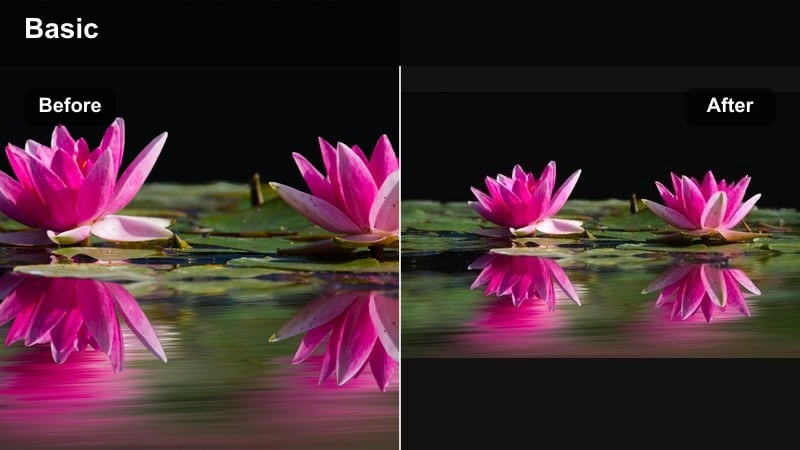
- Effect look: Deep, golden influencer filter with glowing highlights and a gentle orange tint in the midtones for that true golden hour feel.
- Best for: Evening walk vlogs, sunset skincare routines, and brand videos shot outdoors against the sky.
- Editing tip: Underexpose your footage slightly when shooting so the filter’s warm highlights do not blow out the sky or horizon line.
Golden Hour Walk gives you that cinematic, end-of-day glow even if your footage was shot a bit earlier or under light cloud cover. In Filmora, the filter enriches orange and gold tones while protecting darker areas, so silhouettes and backgrounds stay detailed.
To make the most of it, start with clips that are slightly underexposed, then apply the filter and raise exposure only as needed. This keeps skies rich and prevents faces from losing detail, giving your walk-and-talk vlogs a polished, campaign-ready finish.
Pro tip: Fake Golden Hour When You Miss the Light
Use Golden Hour Walk on slightly overcast clips and gently raise warmth and vibrance in Filmora to mimic a real sunset glow.
Avoid using it on already harsh midday sun; instead, soften highlights first with exposure controls, then apply the filter.
Weekend Market
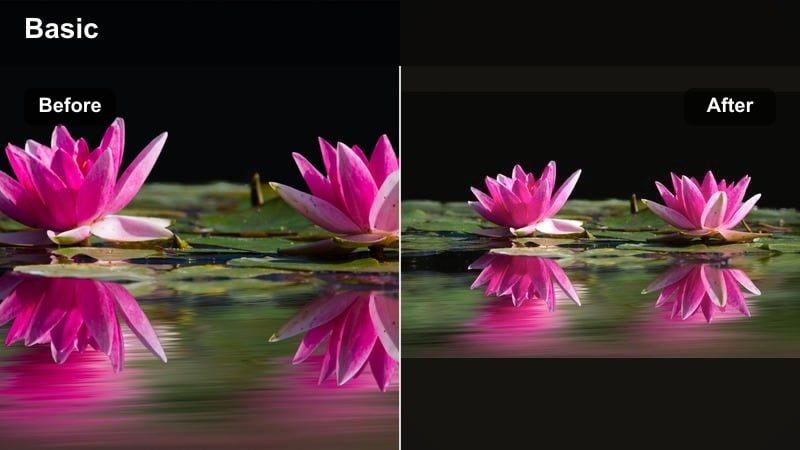
- Effect look: Warm, vibrant tones with lifted shadows and lively saturation that keep crowds and stalls feeling energetic but still polished.
- Best for: Farmers market days, thrift outings, travel vlogs, and brand shoots with colorful outdoor setups.
- Editing tip: Use Filmora’s color mask to keep faces natural while slightly boosting saturation of oranges and greens for produce and decor.
Weekend Market is built for movement, color, and busy backgrounds. In Filmora, the filter brightens shadows so stalls, signs, and crowds feel lively, while warm tones make the overall scene feel inviting rather than chaotic.
Combine the filter with Filmora’s color mask to target specific hues like greens and oranges, lifting produce, flowers, or signage without oversaturating skin. Add a touch of stabilization on handheld walk-through shots to keep your audience comfortably immersed in the scene.
Pro tip: Guide the Viewer’s Eye with Selective Warmth
Warm up your subject slightly more than the background in Filmora so viewers instantly focus on the creator, not just the busy market.
Use subtle blur or lower saturation in the background while keeping the filter strong on your face and key products.
Calm Warmth for Wellness & Self-Care Creators
Candlelight Wellness
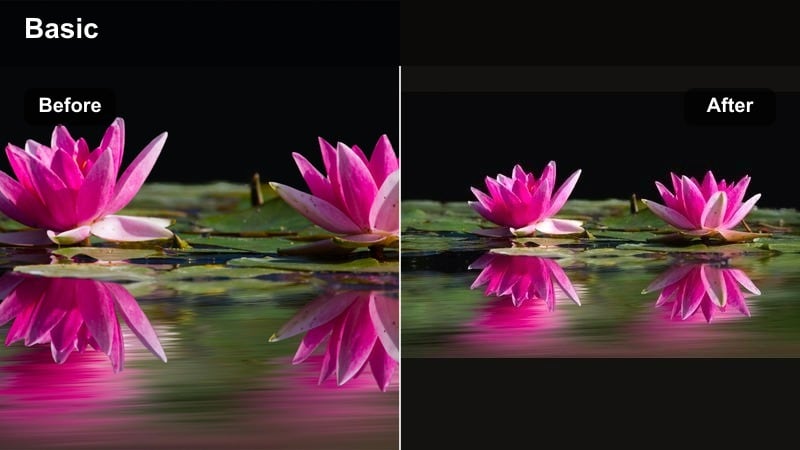
- Effect look: Soft amber warmth with gentle contrast and slightly muted colors that emulate a candlelit spa atmosphere.
- Best for: Nighttime skincare routines, guided breathwork, yoga flows, and meditative self-care content.
- Editing tip: Lower clarity and sharpness slightly in Filmora to maintain a dreamy, hazy feel that supports calm, slow visuals.
Candlelight Wellness turns ordinary bedrooms and living rooms into spa-like sanctuaries. In Filmora, the filter adds amber warmth and eases contrast so highlights from candles or warm bulbs glow softly instead of appearing harsh.
After applying it, reduce clarity and sharpness just a bit to keep the entire frame gentle on the eyes. This is especially effective for close-up skincare shots and slow, guided practices where you want viewers to feel like they are winding down with you.
Pro tip: Pair Candlelight Wellness with Soft Sound Design
Because the visuals are gentle and warm, choose ambient audio and softer voice levels so the full experience feels like a mini-retreat.
Avoid overly sharp sound effects or loud transitions; let the filter and music work together to support a soothing mood.
Warm Balance
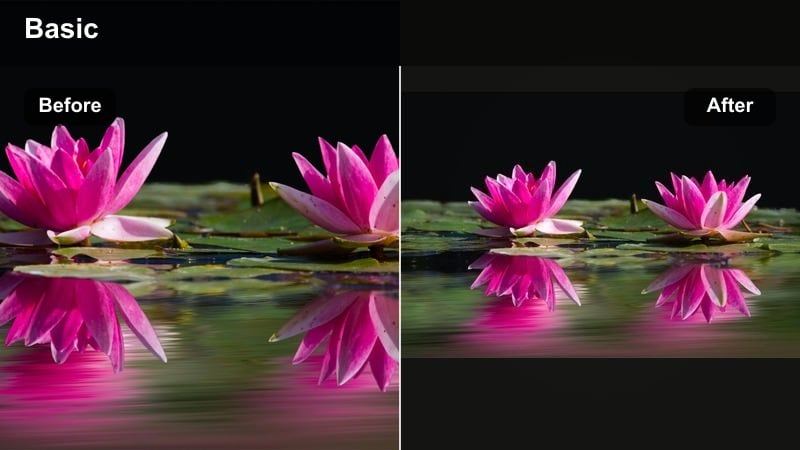
- Effect look: Neutral warm tones with balanced contrast, slightly lifted shadows, and natural skin tones ideal for speaking directly to camera.
- Best for: Mindset talks, affirmations, wellness coaching videos, and brand collaborations around mental health.
- Editing tip: Use Filmora’s face enhancement tools very lightly so the warmth stays authentic and not overly airbrushed.
Warm Balance is a clean, professional preset that gives your speaking videos a reassuring, human touch. In Filmora, it nudges your overall tone warmer while keeping skin tones believable and contrast moderate, so your message stays in focus.
Apply it to talking-head clips filmed against soft decor or neutral backdrops, then use Filmora’s face enhancement tools sparingly. The goal is to keep your features clear and bright while avoiding an over-processed, filtered look.
Pro tip: Keep Your Brand Colors True
If your brand uses specific pastel or neutral colors, use Warm Balance as a base and then fine-tune saturation in Filmora so your palette remains recognizable.
Save the tweaked settings as a custom preset so all your future mindset videos share the same warm creator LUT style.
Soft Yoga Sunrise
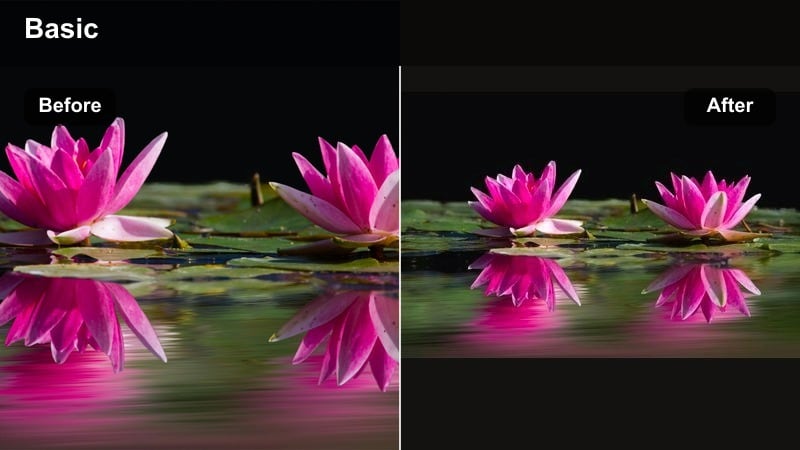
- Effect look: Gentle golden tint with slightly cooler shadows, giving sunrise energy without overpowering yoga mat colors or outfits.
- Best for: Morning yoga flows, stretch routines, and calm movement content filmed near windows or on balconies.
- Editing tip: Stabilize handheld clips in Filmora and then apply the filter to keep the overall vibe peaceful and intentional.
Soft Yoga Sunrise adds a hint of golden light to skin and highlights while keeping shadows cooler, which preserves the freshness of early-morning scenes. In Filmora, this filter works beautifully with natural window light, making your space look airy and energizing.
Apply it after stabilizing your clips so camera movements feel smooth and relaxing. Because the filter does not aggressively shift colors, your yoga mat, outfit, and plants will still look true to life while the overall frame takes on a sunrise-inspired glow.
Pro tip: Use Natural Light as Your Main Source
When using Soft Yoga Sunrise, rely on window light instead of mixed overhead lighting so the filter can enhance a single, clean light source.
If you must mix lights, warm up your bulbs to match the daylight temperature so skin tones remain consistent across clips.
Brand-Ready Warm Presets for Sponsored Content
Golden Brand Touch
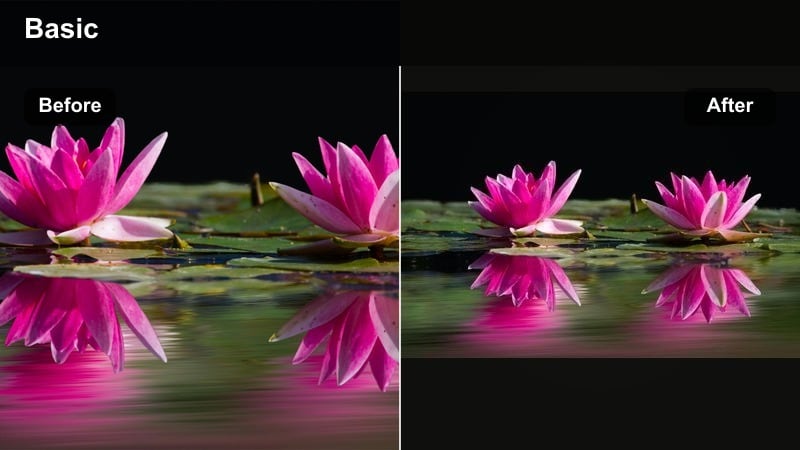
- Effect look: Polished golden influencer filter with crisp contrast, subtle vignette, and lifted midtones that emphasize products and packaging.
- Best for: Sponsored unboxings, tabletop product shots, and golden hour brand videos that need a premium feel.
- Editing tip: Use Filmora’s keyframing to slowly increase intensity of the filter as you reveal the product for a cinematic reveal.
Golden Brand Touch is designed to elevate your sponsored content with a premium golden sheen. In Filmora, it brightens midtones and tightens contrast so packaging, textures, and branding elements look sharp and intentional.
Use it on overhead shots, flat lays, and unboxing sequences, then animate the filter intensity with keyframes. Starting a bit cooler and gradually warming as you reveal the product creates a subtle, cinematic moment that feels higher budget without extra gear.
Pro tip: Protect Brand Colors While Keeping Warmth
If a brand has strict color guidelines, reduce overall saturation a bit and then selectively boost skin tones so the warmth does not shift their logo colors.
Test the filter on a close-up of the product and logo first, then adjust before applying it across the full sponsored video.
Studio Amber
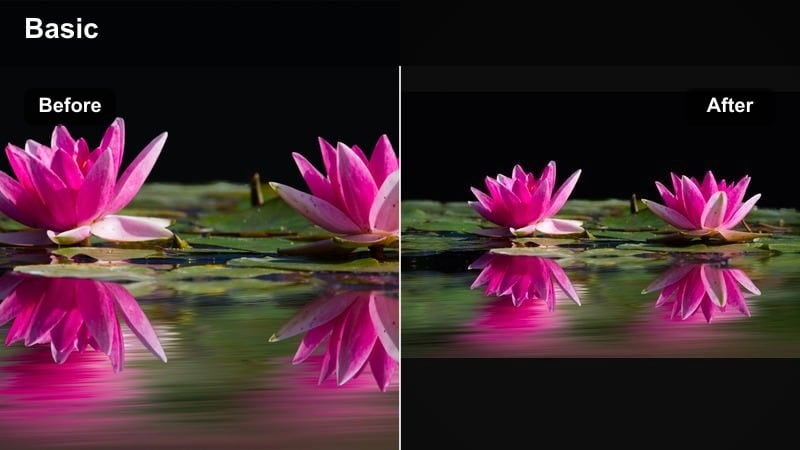
- Effect look: Controlled studio-style warmth with clean shadows and a subtle amber cast on highlights for a professional campaign look.
- Best for: In-studio brand shoots, talking-head campaigns, and polished reels filmed against seamless backdrops.
- Editing tip: Pair with Filmora’s light flare overlays to add subtle shine behind products or near hair highlights for a premium polish.
Studio Amber brings a commercial, studio-finished quality to your brand videos. In Filmora, it adds a restrained amber tone to highlights while keeping shadows clean, which works perfectly with seamless paper backdrops and softbox lighting.
After applying the filter, layer in a gentle light flare overlay near hair highlights or behind the product for extra dimension. This combination makes your campaign footage feel ready for ads, brand reposts, and website embeds.
Pro tip: Adjust Skin Tones for Different Complexions
Studio Amber works on a wide range of skin tones, but you may need to fine-tune oranges and reds in Filmora to keep each creator’s undertones true.
Create separate saved variations for each recurring collaborator so your brand projects always look consistent and flattering.
Creator Warm LUT Style
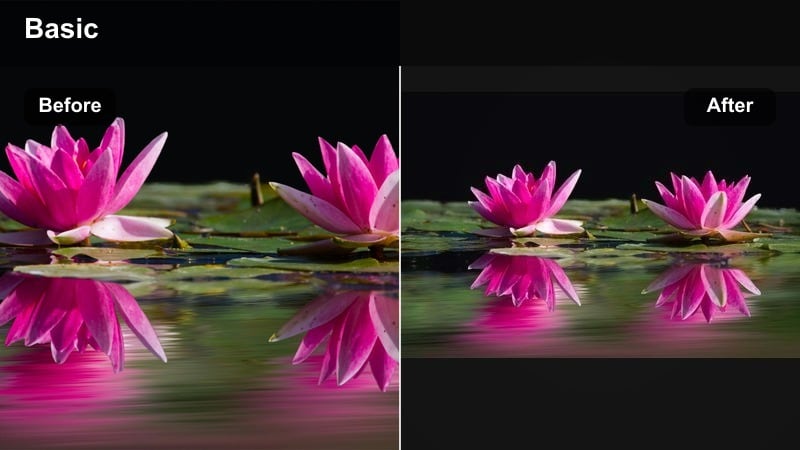
- Effect look: A warm creator LUT style filter with cinematic contrast, rich midtones, and a gentle film-like curve designed to unify entire campaigns.
- Best for: Multi-scene brand campaigns, reels with B-roll and A-roll mixes, and cohesive warm influencer video filters across platforms.
- Editing tip: Apply the filter first, then tweak exposure per clip in Filmora so every scene sits in the same brightness range and feels like one story.
Creator Warm LUT Style is your one-filter solution for making a full campaign feel cohesive. In Filmora, it adds a filmic curve and warm midtones that tie together indoor talking-head clips, outdoor B-roll, and close-up product shots.
Use it as your first step on every clip in a project, then adjust exposure individually so brightness levels match from scene to scene. The result is a recognizable, cinematic warmth that can become your signature look across YouTube, Instagram, and TikTok.
Pro tip: Build a Signature Look Around This Filter
Use Creator Warm LUT Style as your base across long-form, reels, and stories so followers instantly recognize your work from the color alone.
Create a Filmora preset with small custom tweaks that match your logo and feed colors, then apply it as a one-click solution for campaigns.
Tips for Using Influencer Video Warm Filters in Filmora
- Shoot slightly flatter and a touch underexposed so your warm influencer video filters have room to add contrast and glow without blowing out highlights.
- Keep an eye on pure whites like text, logos, and plates; if they turn yellow, gently reduce warmth or adjust color temperature after applying the filter.
- Create two or three intensity variations of your favorite warm filter in Filmora so you can match subtle indoor clips and strong outdoor light with the same core look.
- Test your warm presets on different skin tones before finalizing a campaign look, making targeted HSL tweaks in Filmora to keep everyone looking true to life.
- For golden hour brand videos, combine a warm filter with light stabilization and gentle slow motion to emphasize glow and movement.
- Use Filmora keyframes to gradually introduce warmth in story-based vlogs, starting more neutral and becoming richer as you reach the emotional peak of the video.
Warm influencer video filters help lifestyle influencers and wellness creators transform everyday scenes into golden, inviting moments that feel intentional and on-brand.
Start with one or two favorite warm presets in Filmora, customize them to match your colors and lighting, and use them consistently so your audience instantly recognizes your signature, sun-kissed style.
secure downloadNext: Explore Cool Influencer Video Filters for Fresh, Airy Aesthetics
