

 100% Security Verified | No Subscription Required | No Malware


 ChatGPT
 Perplexity
 Gemini
 Claude
 Grok
Grok
Warm vlog video filters instantly add cozy, golden tones to your footage, making travel and lifestyle content feel inviting, cinematic, and sun-kissed. Instead of flat or cool clips, warm filters enhance skin tones, sunsets, street lights, and city glow so every frame feels more alive and intimate.
Whether you are filming warm travel vlogs, outdoor adventures, or golden hour video edits, these Filmora-friendly filter ideas help you build a consistent warm tone vlog look. Use them as creative starting points, then fine-tune color, contrast, and glow to match your unique visual style.
In this article
Golden Hour Glow Warm Vlog Filters
Soft Sunset Glow
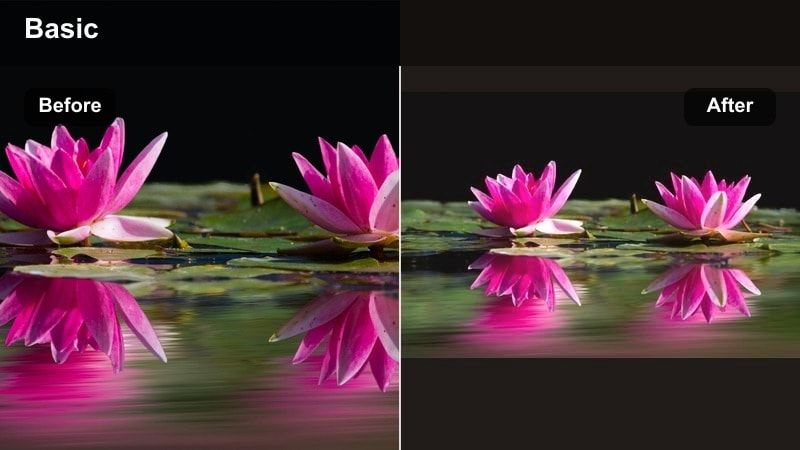
- Effect look: Gentle, hazy warmth with lifted shadows and a soft orange-pink tint that mimics real sunset light on skin and landscapes.
- Best for: Golden hour travel vlogs, couples walking at sunset, city rooftops, palm tree silhouettes, and seaside b-roll.
- Editing tip: Lower contrast slightly and add a touch of vignette; then reduce saturation on reds to avoid oversaturated skin while keeping the warm vibe.
This dreamy warm vlog video filter is perfect for recreating soft sunset light when your original footage looks a bit flat or dull. In Filmora, you can lift shadows and push temperature toward warm orange-pink tones so skin appears smooth and flattering while sky gradients stay romantic and cinematic.
Use Soft Sunset Glow on walking shots, rooftop views, and handheld beach clips to give your vlog a cohesive, sun-kissed storyline. Combine it with Filmora vignette and a subtle decrease in red saturation to keep complexions natural, then fine-tune brightness per clip so faces remain the focal point against glowing horizons.
Build a Warm Vlog Palette with Filmora’s AI Tools
Instead of guessing how warm to push your footage, you can start with Filmora’s AI-powered color tools to analyze your clips and suggest balanced, natural warmth. This helps you avoid overly orange skin while still leaning into cozy and golden tones for your travel and lifestyle vlogs.
Use AI color matching to apply one warm reference clip across your whole timeline, so your warm travel vlogs and golden hour edits share the same mood from start to finish. Then refine specific scenes with manual tweaks to keep skies, skin, and backgrounds looking clean and intentional.
 secure download

Preview Warm Vlog Filters in Real Time
Filmora lets you scroll through and preview warm filters directly on your vlog clips, so you can see how each look affects sky, skin, and background tones instantly. This makes it easy to test multiple warm vlog video filters before committing to one style.
For best results, preview filters on both indoor and outdoor clips from the same vlog. You will quickly see which presets keep your overall color story cohesive while still flattering different lighting situations, from cafes to coastlines.
secure downloadCombine Warm Filters and LUTs for a Signature Look
If you already use a favorite cozy LUT video look, Filmora allows you to stack subtle warm filters on top to fine-tune your final color balance. This layering approach helps you tailor a LUT to different locations, seasons, and lighting conditions without rebuilding your grade from scratch.
Start with a gentle LUT that sets your overall mood, then add a warm filter with low intensity for extra golden character. Adjust opacity, contrast, and color temperature until you have a repeatable recipe that works across your series of travel or lifestyle vlogs.
secure downloadGolden Pathway
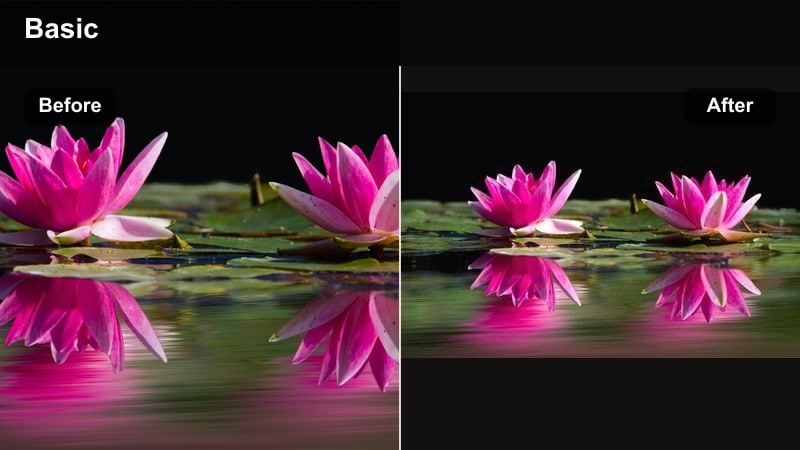
- Effect look: Rich golden highlights, slightly deeper shadows, and a light amber cast that makes streets, alleys, and trails glow.
- Best for: Walking sequences through cities, markets, and old towns during late afternoon or early evening light.
- Editing tip: Boost midtone warmth while keeping whites neutral; use Filmora’s HSL to keep yellows warm but not neon by reducing yellow saturation slightly.
Golden Pathway is ideal when you want everyday streets and markets to feel like cinematic adventures. By deepening shadows and adding amber warmth in Filmora, cobblestones, storefronts, and people in the distance gain a richer, story-driven atmosphere without losing realism.
Apply this filter on tracking shots, gimbal walks, or handheld strolls through alleys and plazas. Keep whites like signs and clothing under control with Filmora HSL so they stay neutral while walls, pavement, and streetlights carry most of the golden color, guiding your viewer down the path.
Sun-Kissed Streets
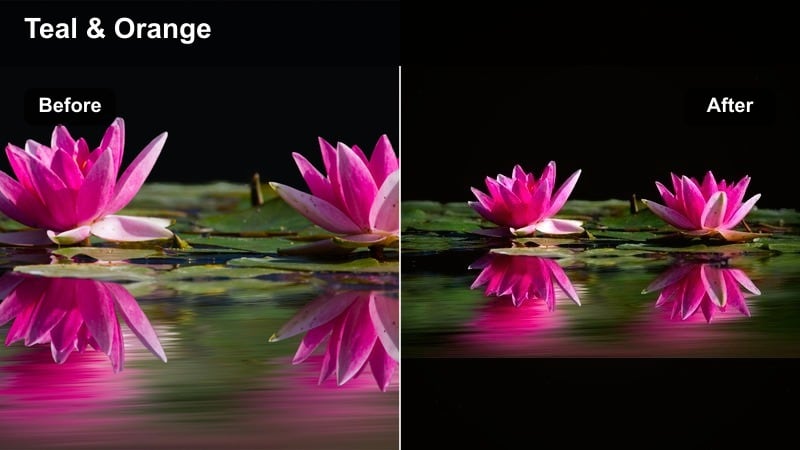
- Effect look: Warm, contrasty streets with punchy highlights, deeper blacks, and a subtle orange-teal balance to keep the sky interesting.
- Best for: Urban travel vlogs, scooters or bike rides, and lifestyle clips shot in backlit city streets and side alleys.
- Editing tip: Raise contrast and clarity slightly, then tame clipped highlights with Filmora’s highlight slider to keep details in clouds and building textures.
Sun-Kissed Streets adds bold, energetic warmth to backlit city scenes where sunlight hits buildings and pavement. In Filmora, the mix of higher contrast, rich blacks, and a light orange-teal harmony helps your streets feel vibrant while skies retain depth and detail.
Use this look for scooter POVs, cycling b-roll, and quick lifestyle cutaways as you move between neighborhoods. Fine-tune the highlight slider and clarity so bright reflections do not blow out, and let the teal shadows in windows and sky contrast against sunlit warm facades for a dynamic urban travel vibe.
Cozy Indoor Warm Vlog Filters
Café Cozy Warmth
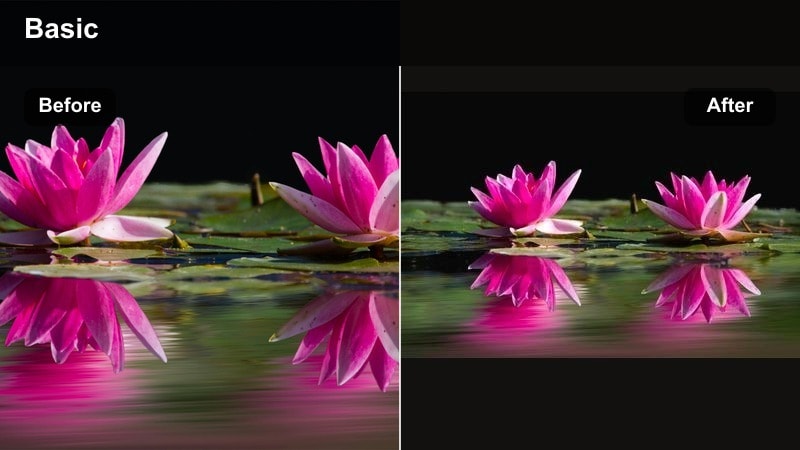
- Effect look: Soft amber and caramel tones with reduced contrast, making lamps, coffee, and wooden textures feel inviting and cinematic.
- Best for: Indoor lifestyle vlogs, work-from-cafe scenes, journaling, reading, or coffee b-roll in travel diaries.
- Editing tip: Lift shadows slightly to reveal detail in darker corners, then add subtle film grain in Filmora for a cozy, analog-inspired finish.
Café Cozy Warmth is designed to make dim coffee shops and indoor nooks feel like scenes from a slow cinema film. In Filmora, reduced contrast and caramel-toned highlights bring attention to steam, mugs, pastries, and wooden tables while keeping the overall mood relaxed.
Apply this filter to laptop shots, notebook close-ups, and window-side conversations to give your vlog a reflective pause between outdoor segments. Add a touch of film grain and slightly lifted shadows so viewers can still see background details without losing that intimate, low-light atmosphere.
Homey Evening Glow
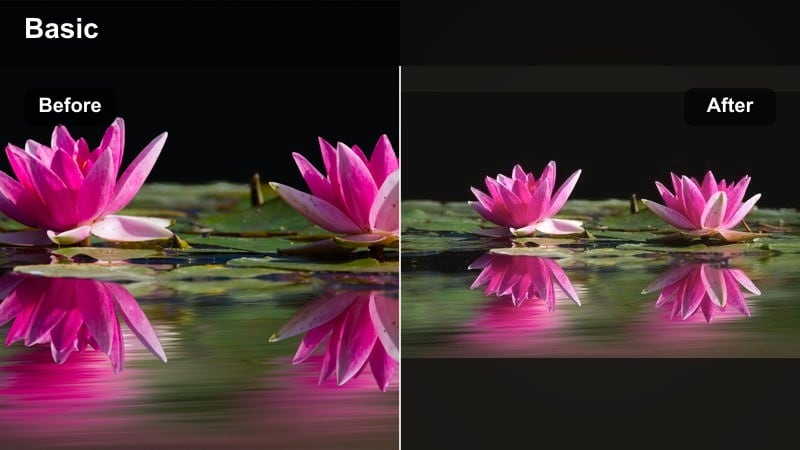
- Effect look: Muted, pastel warmth with gentle contrast and a slight fade in blacks that feels like soft lamplight at home.
- Best for: Night routine vlogs, living room chats, cozy apartment tours, and indoor travel stays like Airbnbs or cabins.
- Editing tip: Lower saturation on yellow channels to avoid neon lamps, then use Filmora’s vignette to keep attention on faces and key objects.
Homey Evening Glow is perfect for slower, talk-to-camera segments when you want the space to feel calm and lived in. By fading blacks and softening contrast in Filmora, the light from lamps and fairy lights feels diffused, creating a relaxing background for your storytelling.
Use this warm filter for evening recaps, routine videos, or room tours, and gently desaturate yellows to prevent cheap-looking light. A subtle vignette will guide the eye toward your face or key decor pieces while the rest of the room stays softly warm and out of focus.
Book Nook Amber
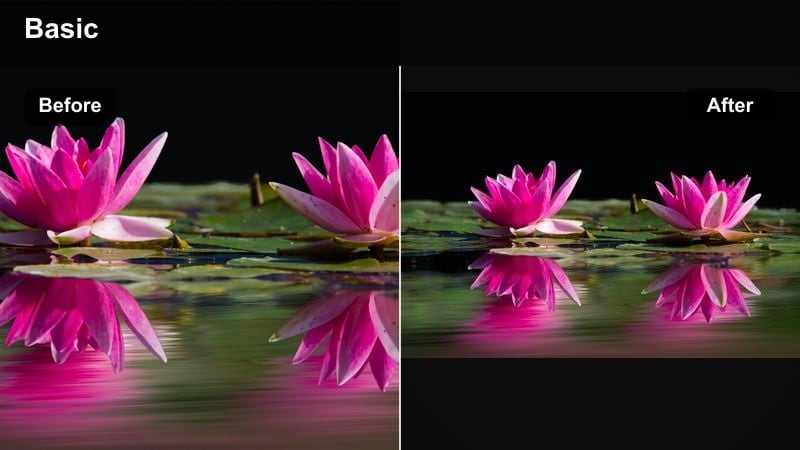
- Effect look: Deep amber tones, warm shadows, and subtle desaturation that make books, textiles, and wood feel rich and tactile.
- Best for: Reading corners, study vlogs, cottage stays, and aesthetic desk setups featuring warm lamps and decor details.
- Editing tip: Reduce overall saturation a bit, then selectively boost orange and brown saturation to highlight books, mugs, and wood textures.
Book Nook Amber is built to highlight cozy details and textures in your indoor setups. In Filmora, its deep amber shadows and slight desaturation make paper, fabric, and wood appear more tactile and cinematic, ideal for aesthetic b-roll between narrative segments.
Apply this look to close-ups of pages turning, pens moving, or hands holding a warm drink. By lowering global saturation and then boosting oranges and browns, you can pull attention to shelves, blankets, and mugs while keeping the rest of the frame calm and visually soothing.
Warm Outdoor Adventure Filters
Desert Trail Warm
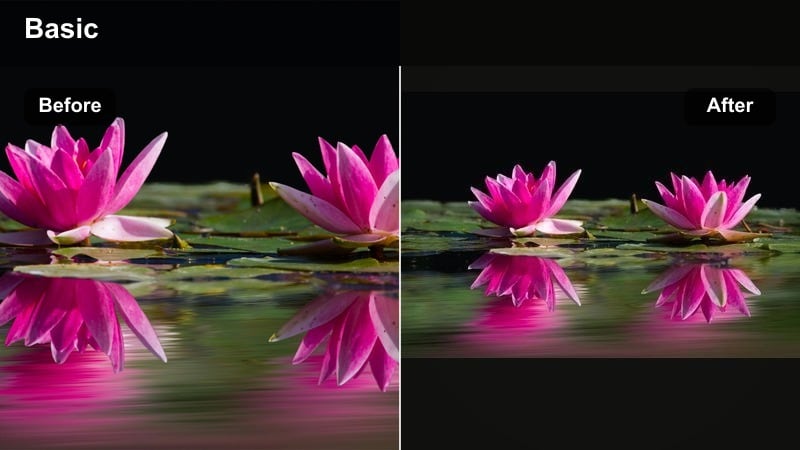
- Effect look: Earthy, golden-brown tones with crisp contrast and slightly warm highlights that emphasize sand, rocks, and dry landscapes.
- Best for: Hiking vlogs, desert travel, canyons, cliffs, and outdoor adventure content with strong sunlight.
- Editing tip: Push warmth toward yellow rather than red to keep skin from looking sunburned, and pull down highlights to preserve sky details.
Desert Trail Warm enhances the rugged beauty of rocky paths, sand dunes, and canyon walls. In Filmora, leaning warmth toward golden yellows instead of reds keeps your footage sun-kissed but avoids the harsh, sunburnt look that can ruin skin tones.
Use this filter on wide hiking shots, drone passes over cliffs, and POV trail clips to make textures pop. Control highlights and use curves to keep skies and clouds intact, letting the earthy browns and golden stones carry most of the warmth in your adventure vlog.
Pine Forest Golden
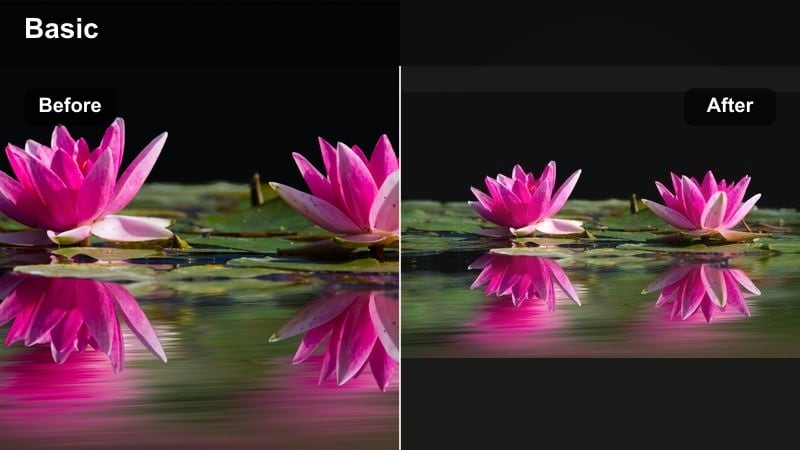
- Effect look: Warm greens and deep golden highlights with a slight matte finish, ideal for forest paths and cabin surroundings.
- Best for: Forest hikes, cabin-in-the-woods vlogs, tent setups, and morning walks through trees and fields.
- Editing tip: Desaturate greens slightly to avoid neon foliage, then warm up midtones so sunlight patches on leaves look soft and golden.
Pine Forest Golden turns flat, cool greens into cinematic woodland scenes with depth and softness. In Filmora, adding a matte finish and warming up midtones lets sun patches on leaves and paths feel like gentle golden-hour light, even when you shot in mid-day.
Apply this filter to walking trails, tent setups, and cabin exteriors. Slightly desaturate and darken greens so they do not appear neon, letting small sun flares and golden highlights draw attention to your subject moving through the forest.
Sunlit Coastline
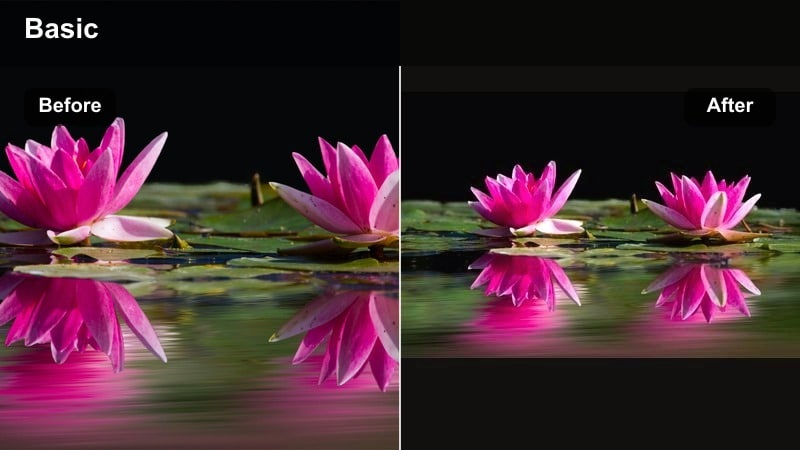
- Effect look: Warm, luminous highlights on skin and rocks with balanced teal-blues in the ocean for a classic travel postcard vibe.
- Best for: Beach vlogs, cliffside views, seaside cafes, and drone shots over water at late afternoon.
- Editing tip: Warm the midtones for skin and rocks, but keep the blue channel slightly cooler so the water pops against the golden surroundings.
Sunlit Coastline balances rich, warm land tones with clean, vibrant ocean blues. In Filmora, this filter gives skin and rocky cliffs a glowing look while carefully preserving teal-blue water so your beach vlogs feel like polished travel postcards.
Use it on cliff overlooks, shoreline walks, and drone sweeps over bays or harbors. Adjust blue and cyan channels to keep the water crisp and slightly cool, then warm midtones to give faces, sand, and stone a cohesive golden glow across your coastal sequences.
Signature Warm Tone Vlog Looks
Travel Diary Warm LUT Look
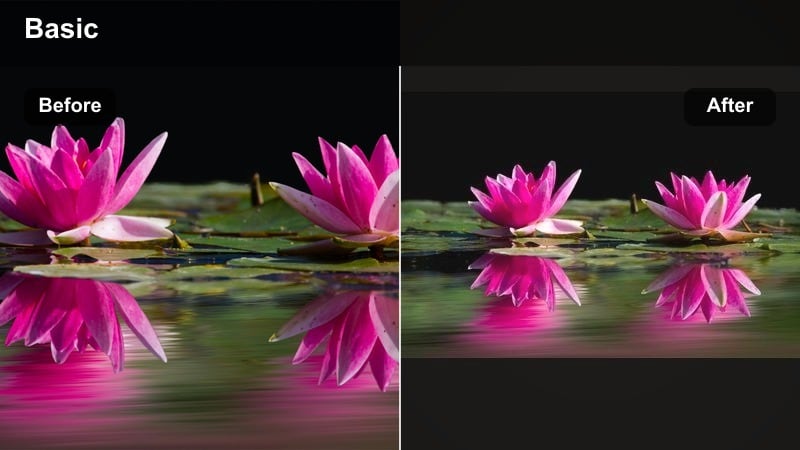
- Effect look: Film-style warmth with gentle contrast, softened highlights, and slightly lifted blacks for a nostalgic diary feel.
- Best for: Ongoing travel vlog series, weekly lifestyle recaps, and story-driven videos where you want a consistent warm identity.
- Editing tip: Apply your cozy LUT video look on an adjustment layer in Filmora, then fine-tune exposure per clip underneath for a unified but controlled result.
The Travel Diary Warm LUT Look gives your channel a film-inspired color signature that viewers can recognize instantly. In Filmora, softened highlights and lifted blacks create gentle contrast that feels nostalgic, perfect for montages and reflective voiceovers.
Apply this LUT-based style on an adjustment layer spanning your entire timeline, then tweak exposure and white balance on individual clips below. This workflow keeps your warmth consistent across destinations while allowing precise correction for shots that are too dark or too bright.
Sun-Kissed Lifestyle
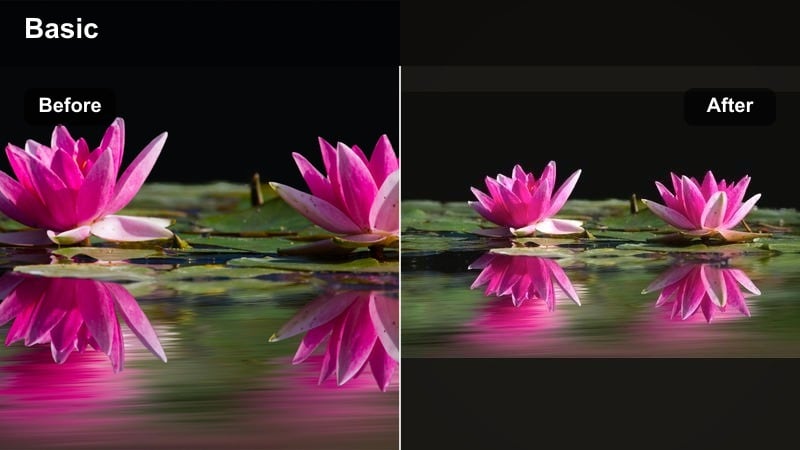
- Effect look: Bright, airy warmth with clean whites, soft pastels, and flattering skin tones that feel modern and minimal.
- Best for: Lifestyle creators filming morning routines, outfit-of-the-day clips, home decor, and soft travel montages.
- Editing tip: Increase exposure slightly, keep blacks clean instead of faded, and use Filmora’s skin tone tools to maintain natural complexions.
Sun-Kissed Lifestyle is ideal for creators who love bright, minimal feeds with gentle warmth instead of heavy grading. In Filmora, cleaner blacks and brighter exposure keep your footage feeling fresh, while soft warm tones and pastels flatter skin and interiors.
Use this filter for morning routines, skincare segments, and OOTD clips near windows or outdoors. Maintain neutral whites by balancing temperature and slightly reducing yellow saturation, then rely on Filmora skin tools to keep faces glowing but true to life.
Cinematic Golden Hour Signature
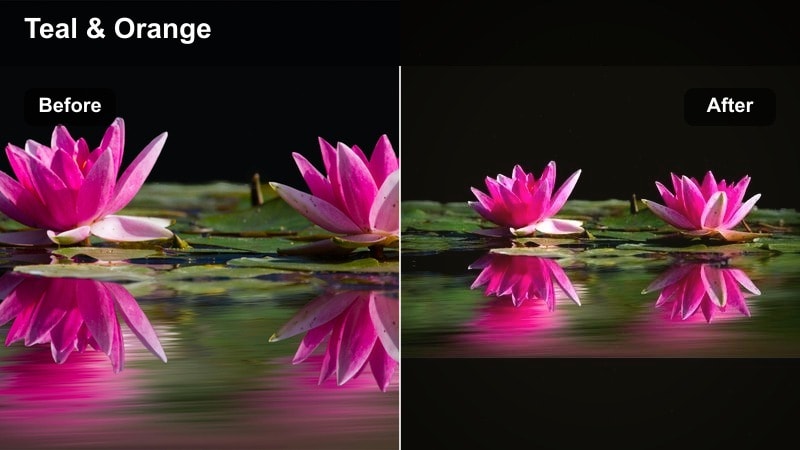
- Effect look: Deep, cinematic golden tones with strong contrast, gentle halation in highlights, and a subtle teal counterbalance in shadows.
- Best for: Hero shots in travel films, emotional storytelling sequences, slow-motion b-roll during sunset, and opening scenes.
- Editing tip: Apply a glow or light leak overlay in Filmora over this warm filter, then lower opacity for a nuanced cinematic flare instead of a heavy effect.
Cinematic Golden Hour Signature is crafted for your most powerful moments: arrivals, goodbyes, and big reveals. In Filmora, the rich golden highlights, controlled halation, and teal-leaning shadows bring a Hollywood-style look that stands out from your everyday grade.
Reserve this filter for intros, outros, and emotional slow-motion clips to keep its impact strong. Layer soft glow or light leaks at low opacity to add depth, and cut between this dramatic color and your regular warm look to emphasize key narrative shifts in your vlog.
Tips for Using Vlog Video Warm Filters in Filmora
- Shoot slightly underexposed during bright golden hour so your warm filters have room to preserve highlight detail in skies and windows.
- Lock white balance in-camera to prevent big color shifts between shots when you apply the same warm vlog video filters in Filmora.
- Create separate warm presets for indoor and outdoor scenes so cafes, hotel rooms, and landscapes all look cohesive but still natural.
- Use HSL controls to keep skin tones clean and flattering while you push stronger warmth into backgrounds, lights, and scenery.
- Save your favorite warm adjustments as a custom preset in Filmora so you can apply your signature look to every new vlog in seconds.
- Preview filters on a mix of close-ups and wide shots to be sure your warm look works consistently across faces, skies, and detailed textures.
Warm vlog video filters are one of the fastest ways to give your travel and lifestyle content a cozy, sun-kissed identity without needing advanced color grading skills. By pairing golden hour styles, indoor cozy looks, and outdoor adventure warmth, you can keep your channel’s aesthetic consistent across destinations and seasons.
Start by picking one or two favorite warm presets in Filmora, fine-tune them for your own skin tone and shooting style, and save them as reusable looks. As you edit more warm travel vlogs and golden hour video edits, your visual style will naturally evolve into a recognizable brand that viewers instantly connect with.
secure downloadNext: Cool Vlog Video Filters for Fresh, Cinematic Travel Looks
