

 100% Security Verified | No Subscription Required | No Malware


 ChatGPT
 Perplexity
 Gemini
 Claude
 Grok
Grok
Vibrant, appetizing color is one of the fastest ways to grab viewers on YouTube food videos, and the right LUT-style filters can instantly turn flat footage into a delicious, scroll-stopping frame.
Below are curated Filmora filter styles inspired by YouTube food video LUTs with a vibrant tone, designed for content creators who want punchy colors, rich contrast, and a consistent, branded look across their cooking, recipe, and food review videos.
In this article
Sunlit Kitchen and Brunch Scenes
Citrus Brunch Pop
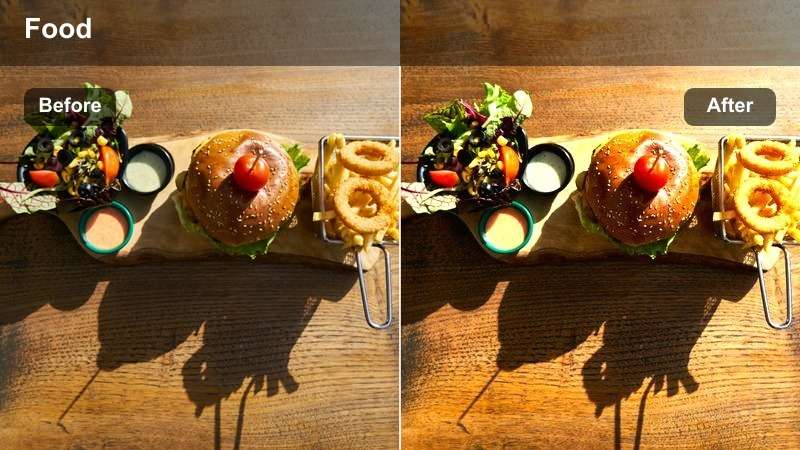
- Effect look: Bright, punchy colors with lifted warmth that makes yellows and oranges glow for sunny breakfast plates.
- Best for: Brunch spreads, smoothie bowls, pancakes, and overhead shots in naturally lit kitchens.
- Editing tip: Pair this filter with slightly reduced highlights and a subtle vignette to keep viewers focused on the center of the plate.
Use Citrus Brunch Pop in Filmora when you want your breakfast and brunch footage to feel sun-drenched and optimistic. The filter pushes warmth into yellows and oranges so eggs, citrus slices, and golden crusts look brighter and more flavorful on YouTube, without needing complicated color grading curves.
After applying the filter, fine-tune exposure and highlights in Filmora to avoid losing detail in whipped cream, yogurt, or shiny plates. Add a slight vignette and a gentle sharpen to your hero shots, then save the combination as a preset so all your brunch videos keep the same bright, on-brand vibe.
Match Vibrant Food Tones with AI-Powered Color Tools
Filmora s AI-driven color tools help you push saturation and contrast in your food videos without destroying natural skin tones or making dishes look artificial. Before locking in a LUT-style look, let AI balance your base colors so hands, countertops, and plates stay realistic while food pops.
Sample a few key frames from your cooking sequence, then adjust hue and luminance for reds, yellows, and greens so sauces, toppings, and fresh produce stay vivid and consistent across every cut in your timeline.
 secure download

Preview Filters in Real Time on Your Food Footage
Instead of guessing how a LUT-style filter will affect your YouTube food video, drag Filmora filters onto a short test clip to see the impact on color, contrast, and texture immediately. This helps you avoid overdoing vibrance or crushing shadows before you commit to a look.
Compare two or three vibrant options side by side in your timeline, then save the winner as a custom preset so future recipes, taste tests, and vlogs keep the same mouthwatering style.
secure download1000+ Video Filters and 3D LUTs
Filmora includes an extensive library of filters and 3D LUTs so you can quickly match popular YouTube food aesthetics, from bright brunch visuals to moody street food and cozy dinners. You can stack filters, adjust intensity, and mix them with your own color tweaks for a unique but repeatable style.
Once you dial in a look that makes your dishes stand out, save it as a custom preset and apply it across entire series or playlists in just a few clicks.
secure downloadFresh Herb Glow
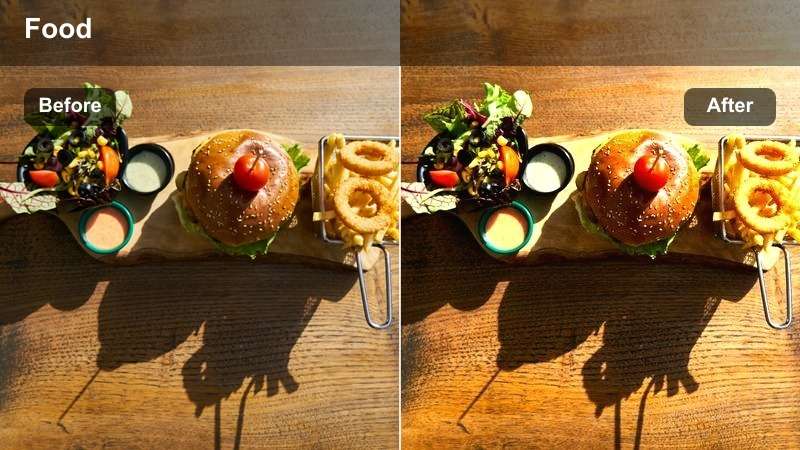
- Effect look: Crisp greens and boosted clarity to make herbs, salads, and toppings look ultra-fresh and crunchy.
- Best for: Salads, grain bowls, garnish shots, and recipe close-ups where fresh herbs are the hero.
- Editing tip: Use a gentle sharpen and micro-contrast after this filter to emphasize texture on leaves, seeds, and toppings without making the image harsh.
Fresh Herb Glow is ideal for any YouTube segment where green ingredients sell the freshness of your dish. In Filmora, this filter boosts the saturation and clarity of greens so basil, cilantro, and lettuce stand out clearly against neutral boards and plates.
Apply it to close-up B-roll of chopping, sprinkling, and plating herbs, then add a small dose of sharpening in the Effects or Color panel. If the overall tone feels too cool, nudge the white balance slider slightly warmer to maintain a tasty, inviting look while keeping your greens crisp.
Golden Morning Table
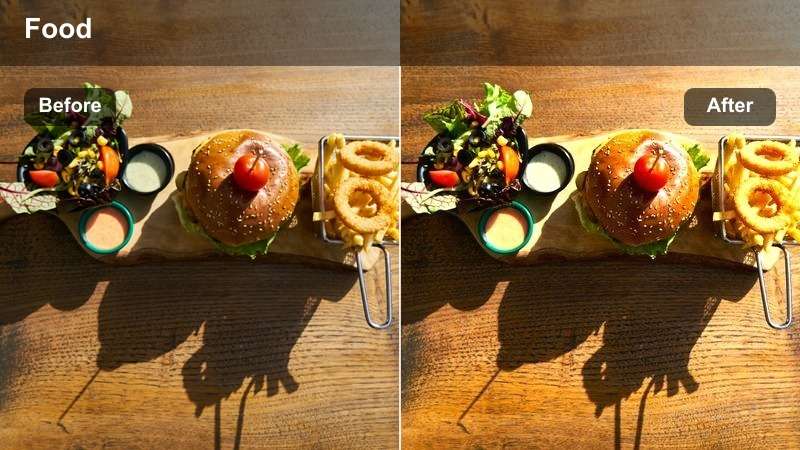
- Effect look: Soft golden highlights and gentle contrast that create a cozy, morning sunlight feel over your food.
- Best for: Coffee shots, pastries, breakfast plates, and slow, lifestyle-style kitchen B-roll.
- Editing tip: Slow your footage slightly and add subtle motion blur transitions to match the relaxed, golden mood of the filter.
Golden Morning Table wraps your breakfast scenes in a soft, nostalgic glow that works beautifully for lifestyle cooking vlogs. In Filmora, use it on wide shots of the kitchen table, steaming coffee, and pastry trays to simulate warm window light even when your lighting setup is simple.
Combine this look with slow push-in movements and gentle cross-dissolve or motion blur transitions so the pacing supports the relaxed tone. Slightly reduce contrast if dark mugs or shadows feel too heavy, and save the final combination as a preset for all your morning routine and brunch storytelling videos.
Bold Street Food and Night Market Shots
Neon Street Bite
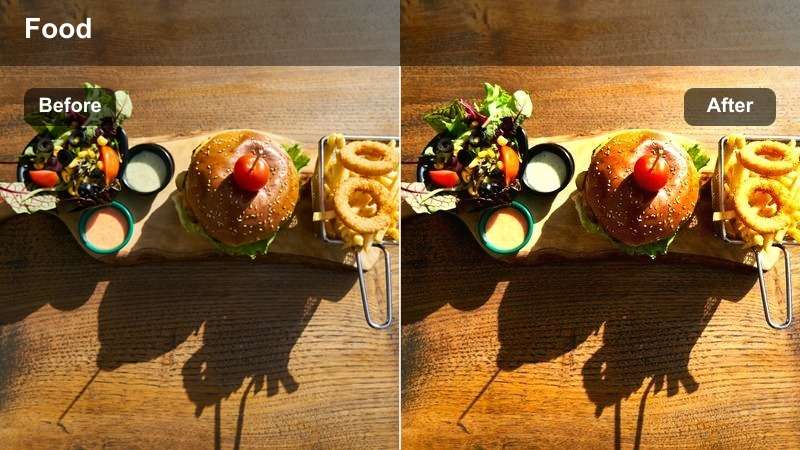
- Effect look: High vibrance with rich reds and deep blacks, adding a neon-inspired punch to busy street food scenes.
- Best for: Night markets, food trucks, sizzling grills, and colorful street snacks under mixed lighting.
- Editing tip: Reduce digital noise after applying this filter, especially in shadows, so bright colors stay clean and cinematic.
Neon Street Bite is built for energetic, after-dark food adventures packed with signage and crowds. In Filmora, the filter deepens blacks and intensifies reds and yellows so glowing signs and sauces stand out dramatically against city nights.
Because low-light clips often carry noise, apply Filmoras denoise tool after grading to keep shadows smooth and professional. Use selective color or HSL controls to protect skin tones from overly red or magenta street lighting, then export a LUT-style preset you can reuse for your entire night market series.
Crispy Grill Heat
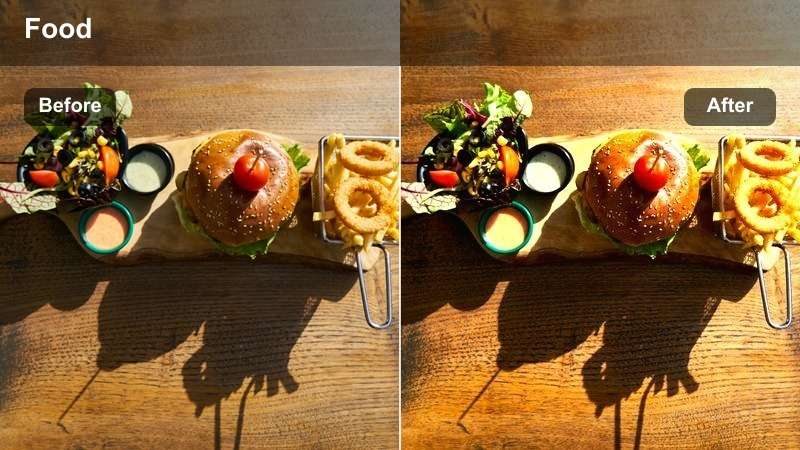
- Effect look: Boosted warmth, high contrast, and enhanced orange tones that highlight char, grill marks, and steam.
- Best for: Grilled meats, skewers, burgers, sizzling pans, and cooking close-ups over open flame.
- Editing tip: Use slow-motion sizzling shots with added sound design to complement the intense, fiery energy of this filter.
Crispy Grill Heat emphasizes orange and brown tones so seared edges, grill marks, and bubbling sauces look bold and dramatic. Apply it in Filmora to close-ups of skewers, burgers, and barbecue to amplify the sense of heat and smokiness on screen.
Pair this filter with slow-motion clips and detailed sound effects of sizzling, tongs, and crackling flames to enhance viewer immersion. If highlights from flames start to clip, reduce exposure slightly before grading and then tweak the highlights slider so you keep detail while still enjoying a fiery, cinematic look.
Market Color Rush
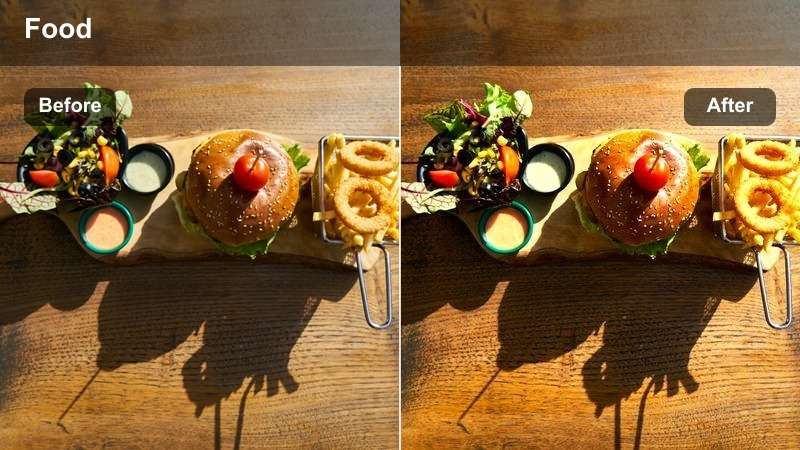
- Effect look: Rich saturation and moderate contrast that emphasize variety and abundance in crowded food displays.
- Best for: Buffets, dessert counters, street food spreads, and overhead shots of multiple dishes.
- Editing tip: Use slower camera moves or top-down shots so the viewer can absorb all the colors without feeling overwhelmed by motion.
Market Color Rush is designed to make spreads of many dishes feel abundant and exciting rather than chaotic. In Filmora, it boosts overall saturation and maintains moderate contrast so every tray, bowl, and garnish remains visible and colorful.
Use it on overhead or wide shots of buffets, tasting platters, and market counters, then stabilize or slow your footage slightly so viewers can explore each dish. Consider adding a light vignette or using depth-of-field shots in between wide angles to guide attention toward your hero items while still celebrating the full spread.
Clean Recipe Tutorials and Overhead How-To Shots
Studio Recipe Clarity
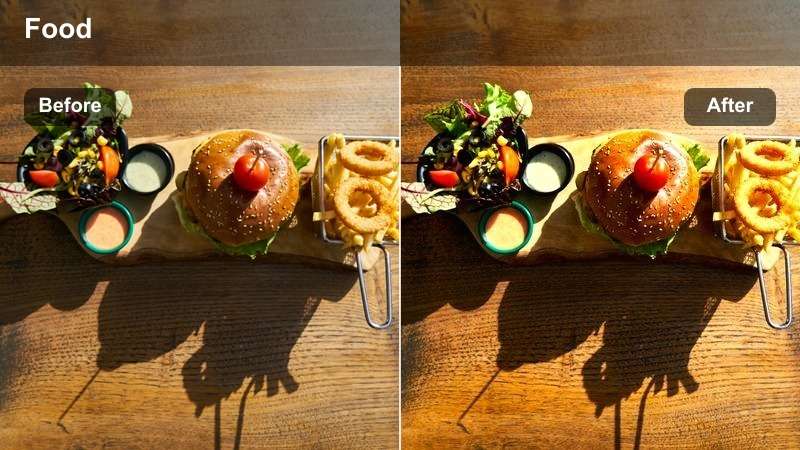
- Effect look: Neutral yet vibrant color with crisp whites and boosted midtones for a polished, studio tutorial feel.
- Best for: Step-by-step recipe videos, ingredient prep, and overhead cutting board shots.
- Editing tip: Use this filter with a clean, minimal background and consistent top light to reduce distractions and focus on the process.
Studio Recipe Clarity keeps your colors true-to-life while giving your tutorials a bright, professional finish. In Filmora, it cleans up whites and boosts midtones so cutting boards, bowls, and tools look tidy, helping the viewer concentrate on each recipe step.
Apply this look to all your top-down prep shots and dialogue-led instructions for a unified series style. Combine it with consistent exposure and a minimal set design, then save the configuration as a preset so every new upload on your channel feels like part of the same polished tutorial brand.
Creamy Dessert Focus
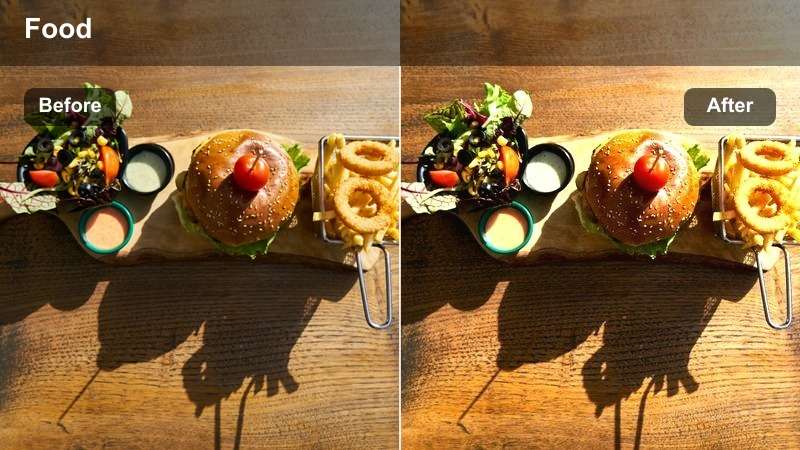
- Effect look: Soft contrast and subtle warmth that emphasize creamy textures and pastel dessert tones without blowing out highlights.
- Best for: Cakes, pastries, ice cream, and slow, close-up dessert assembly shots.
- Editing tip: Use shallow depth of field and slow macro movements, then apply this filter to emphasize smooth, rich textures.
Creamy Dessert Focus is tailored to flatter soft, delicate sweets where texture is everything. In Filmora, it gently lifts warmth and lowers hard contrast so frosting, mousse, whipped cream, and pastel toppings look smooth and indulgent instead of harsh.
Apply it to macro or slow-motion dessert B-roll, then slightly reduce highlights if white icing or plates start to lose detail. Use this filter alongside subtle background music and soft sound effects to create a luxurious mood, and reuse the preset across all your dessert shorts and reels for a cohesive, sweet aesthetic.
Color Block Ingredients
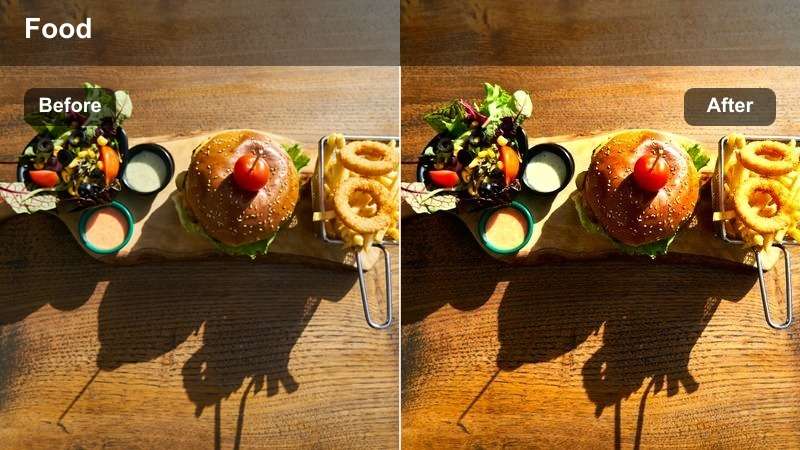
- Effect look: High separation between colors with punchy primaries that make chopped ingredients stand out on the board.
- Best for: Ingredient breakdowns, mise en place shots, and thumbnail frames showing all components of a recipe.
- Editing tip: Frame ingredients in tidy sections and hold the shot longer so viewers can appreciate the distinct colors and shapes.
Color Block Ingredients gives you bold, clearly separated colors that make every component of a recipe instantly readable. In Filmora, this filter enhances primaries so reds, greens, and yellows hold their own even on a busy cutting board.
Use it for overhead shots where you present all ingredients at once, especially for chapter openers and thumbnail grabs. Keep your board organized in neat sections, add simple on-screen text labels, and export still frames directly from Filmora to create clickable thumbnails that match the look of your full video.
Cozy Home Dinners and Table Setting Shots
Family Table Warmth
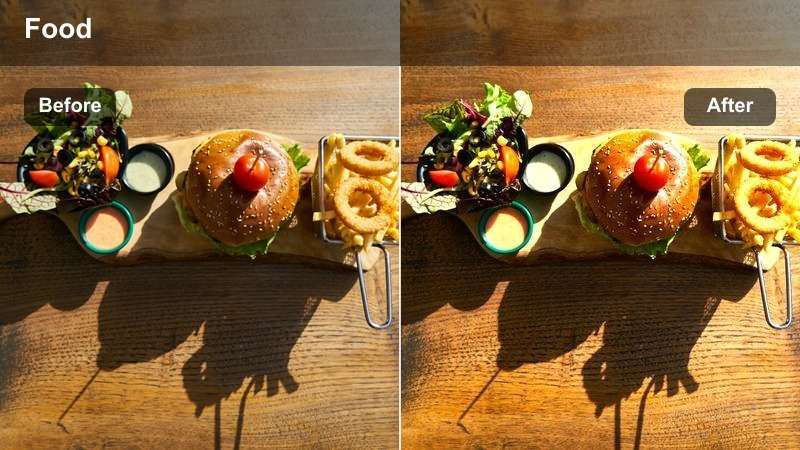
- Effect look: Rich, warm midtones with softened contrast that make shared plates and table spreads feel intimate and welcoming.
- Best for: Family-style dinners, shared platters, and lifestyle food vlogs around the dining table.
- Editing tip: Let shots run a bit longer and keep camera moves subtle to support the relaxed, communal atmosphere of this filter.
Family Table Warmth adds a cozy, lived-in glow to any meal shared between friends or family. In Filmora, it enriches midtones and softens contrast so faces, hands, and dishes all sit together naturally in the same warm environment.
Apply it to wider table shots and mid-close-ups of serving and sharing moments, then use longer cuts and gentle camera motion to emphasize connection. Blend in natural audio of conversation and cutlery to reinforce the homely feeling, and keep this look as a go-to preset for all your family dinner or gathering videos.
Evening Plate Glow
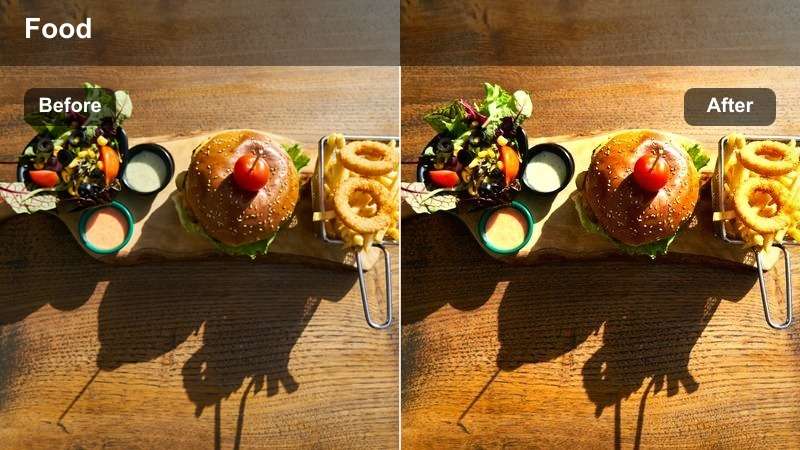
- Effect look: Gentle low-light lift with warm highlights that keep evening or indoor dinners bright without looking flat.
- Best for: Candlelit dinners, moody dining rooms, and low-light home cooking shots.
- Editing tip: Reduce shadow noise with a denoise tool after applying this filter so dim environments still look clean and high-end.
Evening Plate Glow helps you brighten dim dinner shots just enough to stay appetizing while preserving a warm, intimate atmosphere. In Filmora, it lifts shadows slightly and warms highlights so plates and glassware catch the light from lamps or candles without becoming washed out.
Use this filter on close-ups of plated dinners and handheld shots around a dim dining room, then add noise reduction so the boosted shadows do not look grainy. If the scene starts to feel too bright, pull down blacks a touch to bring back mood while keeping your food clearly visible for viewers watching on phones.
Weeknight Quick Serve
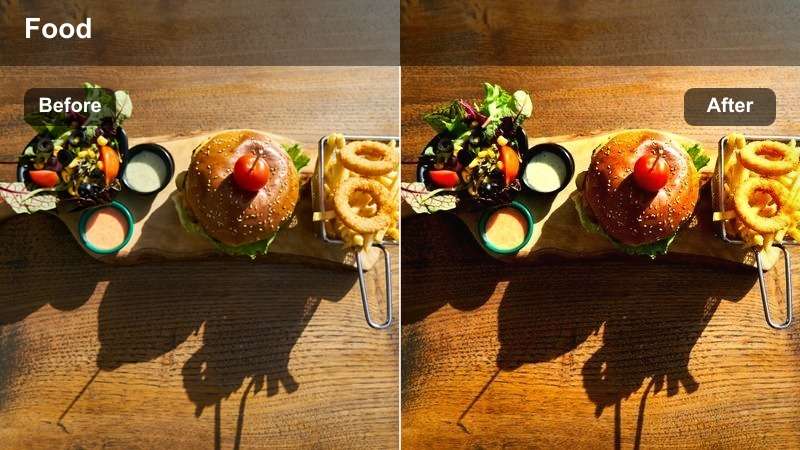
- Effect look: Clean, slightly cool vibrance with moderate contrast for casual, realistic but still appetizing weekday meals.
- Best for: Quick recipe vlogs, budget meals, and realistic home cooking content without heavy styling.
- Editing tip: Keep cuts snappy and text labels short to match the efficient, everyday tone of the filter and content.
Weeknight Quick Serve keeps everyday dinners looking honest and relatable while adding just enough polish for YouTube. In Filmora, this filter adds a touch of cool vibrance and moderate contrast so vegetables, sauces, and proteins look fresh under standard kitchen lighting.
Apply it to quick how-to segments, budget-friendly recipes, and realistic family meals where heavy styling is not the focus. Combine the look with fast-paced edits, simple lower-thirds, and clear step labels so viewers can easily follow along with your practical, weeknight-friendly cooking content.
Tips for Using Youtube Food Video Luts Vibrant Tone Filters in Filmora
- Shoot slightly flatter in-camera and add your vibrant filter in post so you retain more detail in highlights and shadows.
- Use consistent backgrounds and plates so your color grading changes stand out without visual clutter.
- Build a simple three-look system: one filter for bright kitchens, one for street food, and one for cozy dinners to keep your channel cohesive.
- Check your food footage on both mobile and desktop screens to make sure the vibrant tone still looks appetizing everywhere.
- Avoid over-saturating reds and oranges, which can make meats and sauces look unnatural under strong filters.
YouTube food videos live and die by color, and a well-chosen set of vibrant tone filters can transform ordinary recipes into irresistible, bingeable content. Using Filmora, you can quickly test, tweak, and save the looks that make your dishes stand out in crowded feeds.
Save your favorite styles as presets in Filmora so every new upload starts with the same appetizing, on-brand look and you can focus more on storytelling, pacing, and flavor details on screen.
secure download