

 100% Security Verified | No Subscription Required | No Malware


 ChatGPT
 Perplexity
 Gemini
 Claude
 Grok
Grok
Eclipse Navy is a deep, cinematic blue that feels calm, confident, and a little mysterious. It suggests stability and professionalism, but also adds just enough drama to keep the viewer curious. That is why you see this kind of dark navy used in movie posters, streaming platform UIs, and premium brand identities.
For creators, Eclipse Navy is a powerful base color for video intros, channel branding, YouTube thumbnails, title cards, and overlays. Below you will find ready made Eclipse Navy color palettes with HEX codes so you can match your editing, color grading, graphics, and text styles consistently in Filmora and across your entire visual brand.
In this article
Cinematic & Moody Eclipse Navy Color Palettes
Midnight Studio Frame
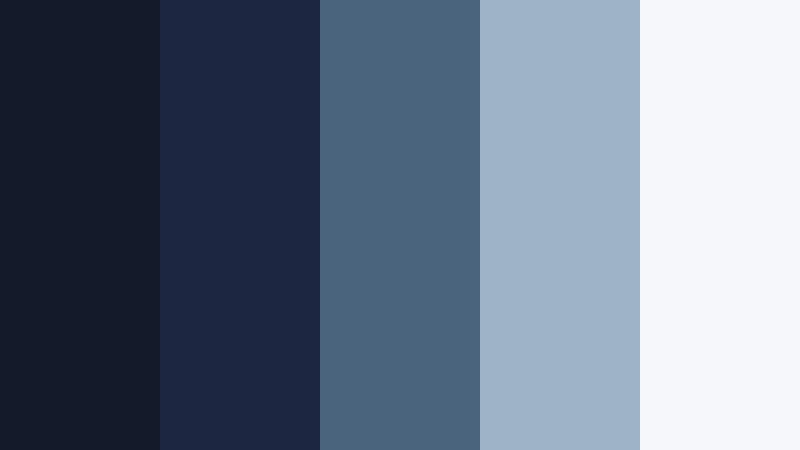
- HEX Codes: #151a2b, #1c2640, #4a647d, #9fb3c8, #f5f7fb
- Mood: Moody, cinematic, and quietly intense.
- Use for: Use for cinematic intros, title cards, and dramatic storytelling edits that need a dark but legible frame.
Midnight Studio Frame moves from inky Eclipse Navy shadows into softer, steely blues and an almost white highlight. It feels like looking at a dimly lit studio set where the details emerge slowly from the dark. The contrast between the deepest navy tones and the pale off white gives you plenty of room for readable text and clean UI elements while keeping the overall look moody.
This palette works particularly well for YouTube intros, suspenseful video essays, and thumbnails that need to feel premium without going pure black. Use the darkest shades as background plates, the mid blues for lower thirds and motion graphics, and the lightest tint for titles, progress bars, and icons. In Filmora, you can build overlays and frames with these HEX codes to keep your entire edit visually cohesive from cold open to end screen.
Pro Tip: Build a Cinematic Eclipse Navy Look in Filmora
To keep your Eclipse Navy visuals consistent, start by setting one of the darkest HEX values as your main background in Filmora title templates and then reuse it across intros, credits, and end cards. Add the mid tone blues to shapes, callouts, and subtle gradients, and reserve the lightest color for titles and key UI elements so they stay readable on mobile screens.
You can also create a custom preset in Filmora for this palette: save your text styles, shadows, and background color as a reusable template. That way every new video, reel, or short opens with the same Midnight Studio Frame identity without having to manually re build colors each time.
AI Color Palette
If you have a reference still or thumbnail mockup using this palette, Filmora's AI Color Palette feature can analyze that image and apply the same tone and contrast across the rest of your footage. This is perfect when you want your A roll, B roll, and screen recordings to share one unified Eclipse Navy mood.
Simply import the reference frame, select it as the source, and let AI Color Palette match your clips. You keep the moody Eclipse Navy depth while balancing skin tones, highlights, and shadows so the whole timeline feels like one continuous cinematic world instead of a collection of mismatched shots.
 secure download

HSL, Color Wheels & Curves
Once your Eclipse Navy base is in place, use Filmora's HSL controls and color wheels to fine tune the blues so they feel exactly as dark, teal, or neutral as you want. You can gently push shadows cooler for a thriller vibe or slightly warmer for a more human, documentary style look. Curves let you lift the midtones while keeping blacks rich, which is perfect when you want moody contrast without crushing detail.
To master this, follow the workflow shown in Filmora's advanced color grading tutorial on using curves and color wheels to shape atmosphere. A few small adjustments can turn a flat navy background into a polished, studio grade Eclipse Navy grade that supports your story instead of distracting from it.
secure download1000+ Video Filters & 3D LUTs
If you want to stylize your Eclipse Navy palette even faster, Filmora's video filters and 3D LUTs make it easy to test different cinematic looks in one click. You can add subtle film grain, push the blues toward teal and orange, or give your footage a glossy commercial finish while still respecting your chosen HEX codes in graphics and titles.
Try pairing a cool, moody LUT with the Midnight Studio Frame colors to create a complete atmosphere: the palette shapes your overlays and text, while the LUT unifies your footage so everything feels like it belongs in the same midnight studio universe.
secure downloadHarbor Storm Sequence

- HEX Codes: #0f1723, #202b3b, #567189, #d0d9e4, #fefefe
- Mood: Stormy, tense, yet polished and professional.
- Use for: Great for tech explainers, crime documentaries, and dramatic travel vlogs that need a brooding, oceanic tone.
Harbor Storm Sequence feels like a storm rolling in over a city harbor: deep navy and slate blue sit under misty gray highlights. It has tension, but the lighter blue grays and clean white keep it professional and easy to read.
Use the darkest tones as background plates and letterbox bars, the mid blue for accent lines and infographics, and the light grays for body text, captions, and UI elements. This palette suits tech thumbnails, urban B roll sequences, drone shots over water, and any series where you want a sharp, investigative feel without going full noir.
Noir Edit Suite

- HEX Codes: #070b12, #151b29, #38435a, #8d9ab2, #f2f4f8
- Mood: Classic noir, mysterious, and ultra cinematic.
- Use for: Perfect for intros, end screens, and channel branding that leans into film noir, mystery, or investigative themes.
Noir Edit Suite leans into inky Eclipse Navy and graphite blues, lifted by muted lavender gray and soft white. It feels like monochrome cinema with a subtle modern twist, ideal when you want to suggest shadows, secrets, and late night editing sessions.
Use the almost black navy as a digital letterbox or background, then introduce the gray blues for lower thirds, timelines, and chapter markers. The pale tones make great highlight colors for names, episode numbers, or subscribe CTAs in your thumbnails and intros. This palette is perfect for crime podcasts on YouTube, dark academia vlogs, and any storytelling series with a mysterious edge.
Deep Current Montage
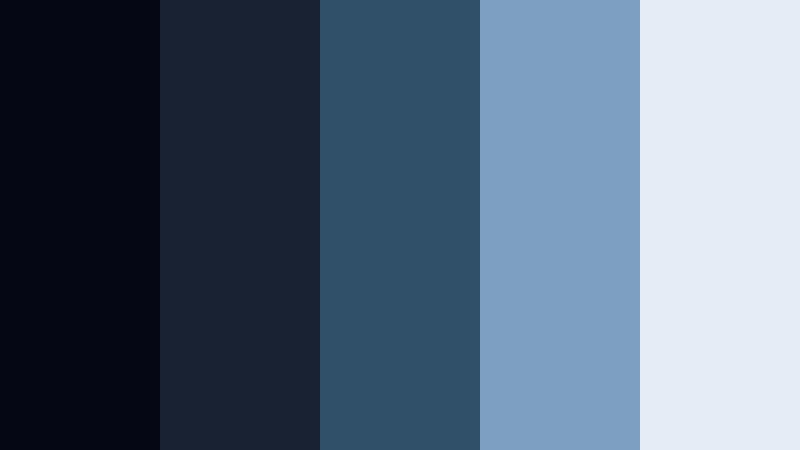
- HEX Codes: #050814, #182233, #30506a, #7da0c0, #e4edf6
- Mood: Immersive, aquatic, and contemplative.
- Use for: Use for underwater footage, travel montages, or reflective documentary moments with a deep sea feeling.
Deep Current Montage moves smoothly from almost black Eclipse Navy into oceanic blues and airy ice tones. It feels like being submerged under water and slowly rising toward the surface light, which makes it ideal for slow, reflective sequences.
Apply the darkest shade to vignettes and transitions, the mid blues to titles and quote cards, and the lightest tint to delicate overlays or timestamps. This palette fits travel vlogs featuring coastlines, scuba or snorkeling footage, as well as meditative B roll or nature documentaries edited in Filmora.
Celestial Frame Lines

- HEX Codes: #090d18, #1b2440, #3f4c7b, #a2b0db, #f8fafc
- Mood: Ethereal, futuristic, and quietly optimistic.
- Use for: Great for sci fi intros, tech branding, and motion graphics with a space inspired aesthetic.
Celestial Frame Lines pairs starry Eclipse Navy with rich indigo and soft periwinkle highlights. It feels weightless and futuristic, like a clean interface floating in space. The bright, airy highlight color keeps everything legible and modern.
Use the darker tones as the main canvas for your frames and HUD elements, mid blues for icons and progress indicators, and the soft lilac white for text and data labels. This palette is ideal for sci fi channel branding, tech product overviews, motion graphics packages, and UI styled overlays in Filmora.
Elegant & Modern Eclipse Navy Color Palettes
Gilded Premiere Night
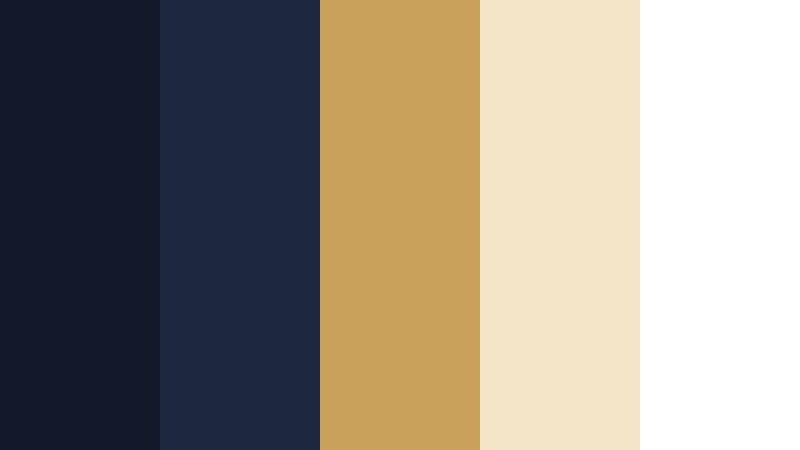
- HEX Codes: #13192b, #1e2740, #c9a15b, #f4e4c8, #ffffff
- Mood: Luxurious, red carpet ready, and glamorous.
- Use for: Use for event promos, luxury brand reels, and thumbnails that need a sleek awards night vibe.
Gilded Premiere Night sets deep Eclipse Navy alongside glowing gold and champagne tones. It instantly suggests spotlights, red carpets, and premium experiences. The metallic gold shade pops dramatically on navy while still feeling tasteful and refined.
Use the dark blues as the stage, then add gold for key titles, logo reveals, and subtle accent lines. The soft champagne and white shades are ideal for smaller text, subtitles, or secondary buttons. This palette is perfect for film festival promos, award show recaps, luxury product reels, and stylish channel banners.
Marble Lobby Titles

- HEX Codes: #111827, #243047, #8f9bb5, #e1e5ec, #fbfbfd
- Mood: Corporate chic, calm, and refined.
- Use for: Perfect for corporate videos, portfolio reels, and modern UI overlays that need a professional polish.
Marble Lobby Titles combines a solid Eclipse Navy base with cool marble grays and soft whites. It feels like a high end lobby or office, clean and quiet but clearly premium. The palette avoids harsh contrasts, keeping everything smooth and easy on the eyes.
Use the navy and deep blue for backgrounds and panels, the neutral grays for data blocks and lower thirds, and the off whites for main copy and headers. This is a go to palette for company profiles, SaaS walkthroughs, PowerPoint to video conversions, and LinkedIn focused content.
Glass Tower Accent

- HEX Codes: #151a2c, #1f3650, #4aa3c7, #b7d6e6, #f4f9fb
- Mood: Modern, airy, and subtly energetic.
- Use for: Ideal for startup pitches, SaaS explainers, and product demos that mix trust with innovation.
Glass Tower Accent anchors Eclipse Navy with bright aqua and pale sky tints. It suggests reflections on glass skyscrapers and clean dashboards. The energetic accent blue keeps the palette from feeling too serious while still looking trustworthy.
Place navy in your hero backgrounds and title cards, use the aqua for buttons, icons, and charts, and let the pale sky tones support body text or slide like panels. This palette is perfect for product tours, app previews, crowdfunding videos, and banner graphics in a modern tech brand style.
Copper Lens Glow
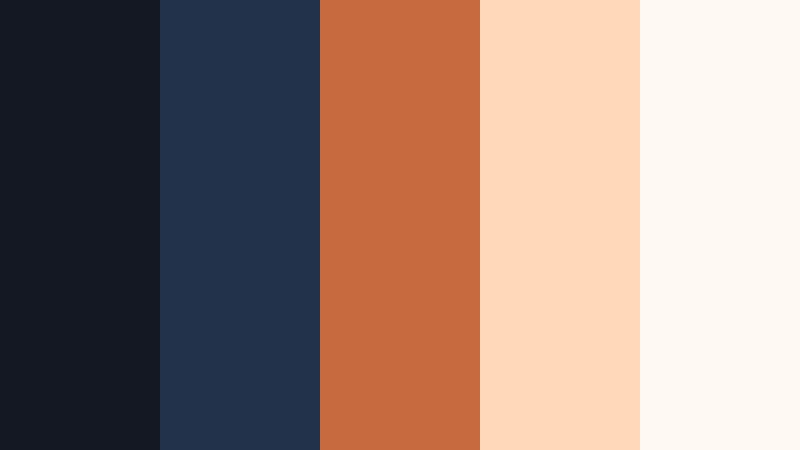
- HEX Codes: #141822, #22324a, #c56b3f, #ffd9b8, #fff9f3
- Mood: Warm, cinematic, and editorial.
- Use for: Use for lifestyle edits, fashion lookbooks, and cinematic b roll with a refined, magazine inspired warmth.
Copper Lens Glow sets deep Eclipse Navy shadows against warm copper and peach lights, like a lens flare cutting across a dark frame. It feels editorial and cinematic, great for story driven lifestyle or fashion content.
Use navy in backgrounds and margins, the copper shade for key titles or graphic shapes, and the peach tones to soften portraits, highlight quotes, or create gradient overlays. This palette shines in lookbooks, beauty tutorials, moody product shots, and Pinterest ready thumbnails.
Silver Screen Minimal
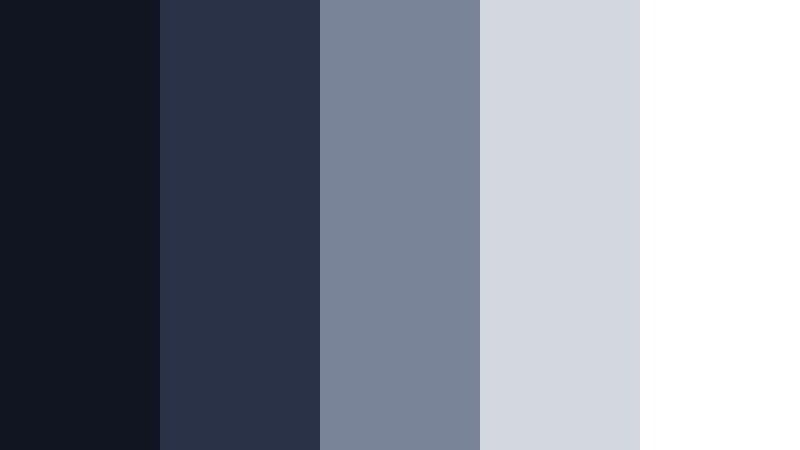
- HEX Codes: #101521, #293246, #7a8498, #d3d7df, #ffffff
- Mood: Minimal, clean, and quietly authoritative.
- Use for: Great for minimalist title cards, logo animations, and channels that favor a calm, editorial aesthetic.
Silver Screen Minimal steps gently from Eclipse Navy into silver gray, then pure white. It is understated and calm, with enough contrast to keep typography razor sharp. Think of a monochrome cinema intro with a modern, digital edge.
Use the two darkest shades for backgrounds and title slates, the mid gray for rules and dividers, and the lighter grays and white for headlines and descriptions. This palette works especially well for educational channels, editing breakdowns, portfolio reels, and minimal logo stings.
Soft & Romantic Eclipse Navy Color Palettes
Twilight Balcony Notes
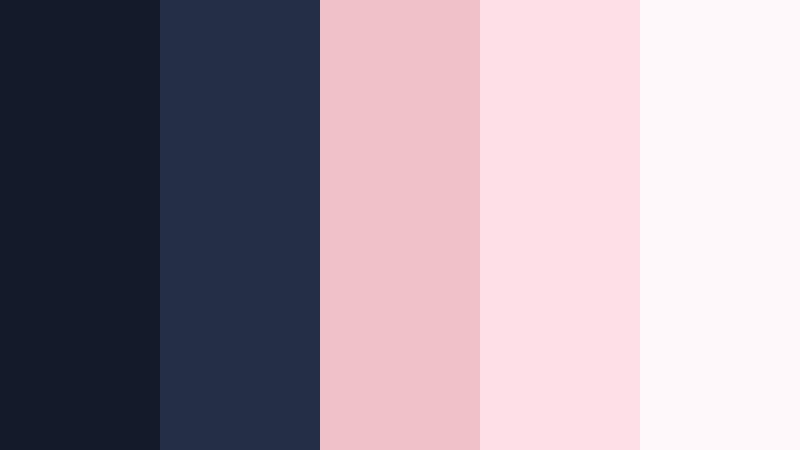
- HEX Codes: #141a2a, #242f46, #f0c1c8, #ffdfe7, #fff8fb
- Mood: Soft, romantic, and nostalgic.
- Use for: Perfect for wedding films, proposal videos, and dreamy vlogs shot during blue hour.
Twilight Balcony Notes blends moody Eclipse Navy with blush pinks and petal whites. It feels like handwritten notes at dusk, gentle and intimate but grounded by deep, confident blues.
Use the navy shades for sky like backgrounds or letterbox bars, and bring in the pinks for names, dates, and subtle flourishes around your titles. The soft off white is ideal for captions and vows on screen. This palette is a natural fit for wedding highlight films, romantic travel vlogs, and sentimental reels edited in Filmora.
Moonlit Harbor Vows
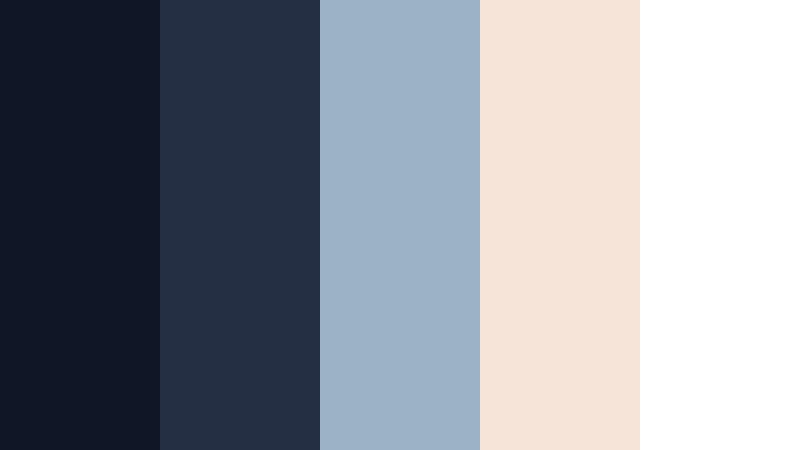
- HEX Codes: #0f1726, #252f44, #9bb3c4, #f6e4d8, #ffffff
- Mood: Tender, coastal, and serene.
- Use for: Use for beach weddings, elopement films, and intimate storytelling with gentle seaside vibes.
Moonlit Harbor Vows pairs Eclipse Navy and slate blue with sandy blush and soft ivory. It feels like a quiet harbor at night, with lanterns and gentle waves. The mix of cool and warm tones keeps the palette balanced and timeless.
Use the deeper blues in backgrounds and transitional cards, the soft blue gray for lower thirds and chapter titles, and the blush tones for delicate accents around names or decorative borders. This palette is ideal for coastal weddings, engagement sessions, and calm lifestyle montages.
Indigo Letterbox Dream
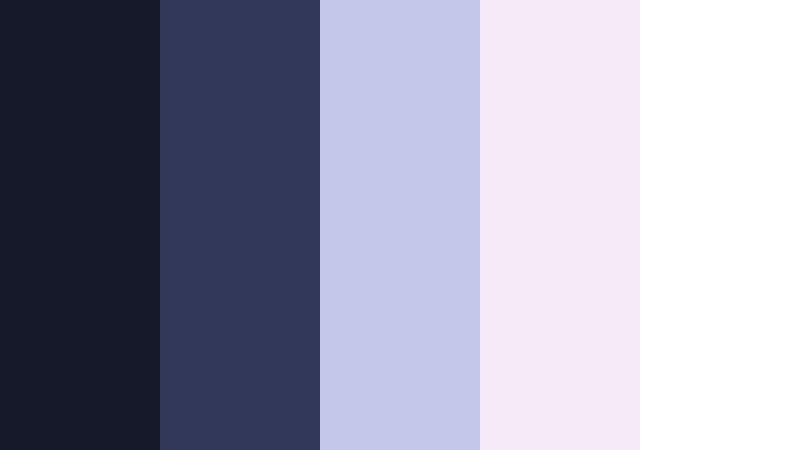
- HEX Codes: #151929, #313859, #c3c7e9, #f4eaf8, #ffffff
- Mood: Dreamy, whimsical, and poetic.
- Use for: Ideal for lyric videos, aesthetic reels, and daydreamy montages with a gentle cinematic letterbox feel.
Indigo Letterbox Dream mixes Eclipse Navy with soft indigo and luminous lavender. It feels like a dreamy film still, slightly hazy and nostalgic, perfect for poetic and musical storytelling.
Use the two darkest hues for frames, letterbox bars, or overlays, then bring the pale lavender tones into titles, handwritten fonts, and lyric highlights. This palette suits lyric videos, soft focus B roll, journaling vlogs, and any content that aims for a gentle, introspective tone.
Blush Cabin Evening
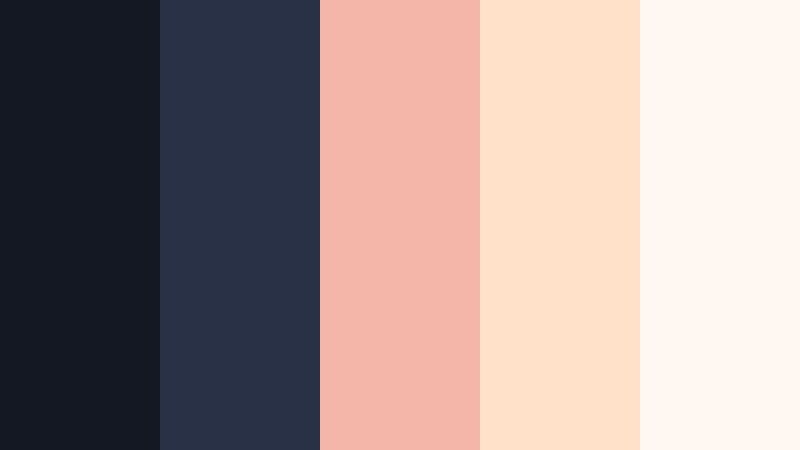
- HEX Codes: #141822, #283146, #f2b7a9, #ffe0c9, #fff7f1
- Mood: Cozy, intimate, and storybook like.
- Use for: Use in cozy cabin vlogs, lifestyle content, and narrative shorts about home, warmth, and relationships.
Blush Cabin Evening brings together deep Eclipse Navy interiors with candlelit blush and apricot tones. It feels warm and homely, like an evening in a wood cabin with soft lamps and blankets.
Use navy as the night outside your windows or as a background layer, with the warm tones lighting up titles, chapter cards, and lower thirds. This palette is perfect for home renovation stories, family vlogs, cozy book content, and any narrative focused on comfort and relationships.
Bold & Vibrant Eclipse Navy Color Palettes
Neon Dock Skyline
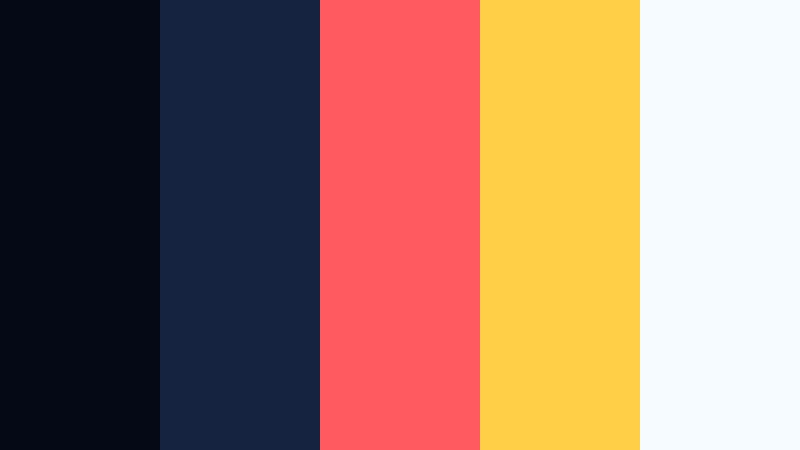
- HEX Codes: #050915, #152341, #ff5a5f, #ffcf48, #f5fbff
- Mood: Energetic, urban, and nightlife inspired.
- Use for: Great for dance edits, city night vlogs, and bold channel art that needs punchy contrast.
Neon Dock Skyline throws vivid coral red and signal yellow against a deep Eclipse Navy backdrop. It looks like neon signage reflected on dark water, instantly energetic and eye catching.
Use the navy shades as your canvas, then light it up with small but intense pops of red and yellow for titles, accent strokes, and animated shapes. The pale blue white tones keep text readable without dulling the vibrancy. This palette suits dance compilations, nightlife vlogs, festival recaps, DJ or gaming branding, and bold thumbnail designs.
Electric Tide Intro
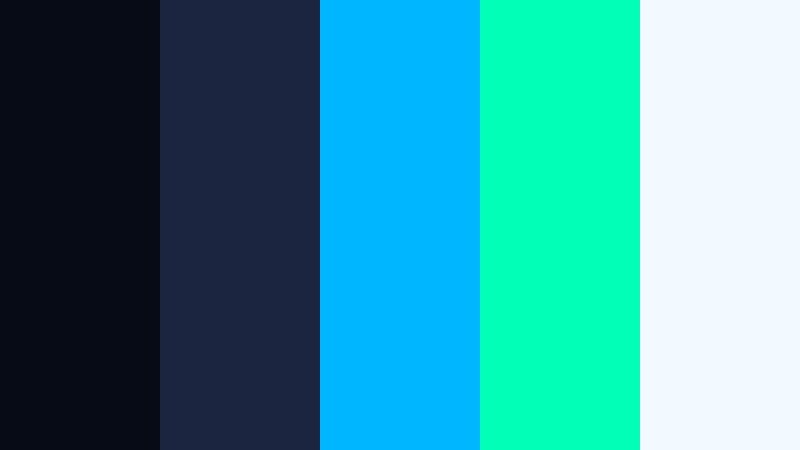
- HEX Codes: #070b16, #1b2540, #00b7ff, #00ffb7, #f2f9ff
- Mood: Futuristic, kinetic, and high energy.
- Use for: Perfect for gaming intros, tech reviews, and glitch transitions that lean into cyber aesthetics.
Electric Tide Intro grounds electric cyan and neon mint in rich Eclipse Navy. It immediately reads as cyber, digital, and fast paced. The bright accents almost glow against the dark blues.
Use the navy base for full screen backgrounds and transitions, then add the neon blues and greens to outlines, glitch elements, and animated typography. The lightest tint works well for body copy or subtle interface text. This palette is made for gaming channels, tech reviews, motion graphics packs, and any intro that needs a high energy, futuristic presence.
Tips for Creating Eclipse Navy Color Palettes
Eclipse Navy works best when you balance its depth with carefully chosen accent and highlight colors. Whether you are designing thumbnails, lower thirds, or full video branding in Filmora, these tips will help you build palettes that stay cinematic, readable, and on brand.
- Pair Eclipse Navy with at least one light neutral (off white, pale gray, or soft blush) to keep text readable on mobile and desktop screens.
- Choose one strong accent color only (gold, coral, aqua, or neon) to avoid visual clutter and give viewers a clear focal point.
- Use the darkest navy shade for backgrounds and frames instead of pure black so your footage feels richer and more cinematic.
- Test your palette on a real thumbnail and a full screen title card in Filmora to check contrast, readability, and overall mood.
- Keep brand consistency by saving color HEX codes in Filmora presets for titles, lower thirds, and graphics across all your videos.
- Match your footage to your palette with gentle color grading, nudging shadows slightly toward navy and keeping skin tones natural.
- For romantic or lifestyle content, soften Eclipse Navy with warm blush or peach; for tech and gaming, pair it with cool aqua or neon tones.
- Always consider accessibility: ensure enough contrast between text and background, especially for subtitles and important CTAs.
Eclipse Navy is one of those rare colors that can shift from serious and corporate to dreamy, romantic, or electric, depending on how you combine it. With the right palette, it becomes a powerful tool for shaping mood, guiding attention, and building a recognizable visual identity across your channel or brand.
Use these ready made Eclipse Navy color palettes as starting points, then tweak the HEX codes, brightness, and saturation in Filmora to match your footage and story. Once you lock in a look you love, save it as a template so every intro, reel, and thumbnail reinforces the same signature style.
The more intentionally you use color, the more your videos will feel cohesive and professional. Experiment with these palettes in Filmora, mix them with your own footage, and turn Eclipse Navy into a core part of your creative style.
secure downloadNext: Deep Onyx Color Palette
