

 100% Security Verified | No Subscription Required | No Malware

These Free Winter Landscape LUTs are built for travel creators and photographers who want crisp, cinematic snow without losing detail or mood in their outdoor videos.
Use these winter video LUTs and snowy landscape filters in Filmora to quickly balance cold tones, keep skin looking natural, and turn your winter travel and snowy landscape footage into clean, share-ready stories.
In this article
Blue Hour Snow Scenes
Arctic Blue Mist
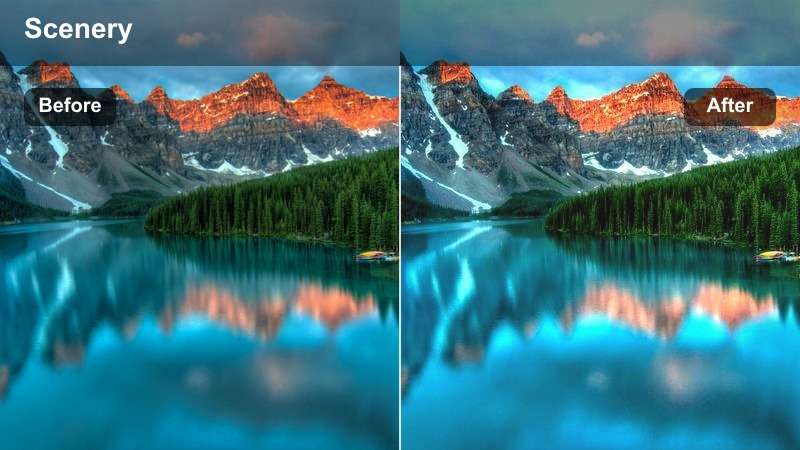
- Effect look: Soft, pale blues with slightly lifted shadows for dreamy blue hour scenes.
- Best for: Snowy forests and frozen lakes shot just before sunrise or right after sunset.
- Editing tip: Lower contrast slightly if your camera already captured deep shadows to avoid crushing detail in pine trees and distant mountains.
Arctic Blue Mist wraps your winter landscapes in a gentle blue veil that enhances the natural magic of blue hour without pushing colors into unnatural territory. In Filmora, this LUT subtly lifts the shadows across snowbanks and tree lines, helping you keep detail in darker areas while preserving the icy mood of early morning or late evening.
Apply Arctic Blue Mist to clips from foggy lakes, quiet tree lines, or still mountain views, then fine-tune midtones with Filmoras color tools so your subject stands out against the cool background. If faces or foreground elements feel too cold, slightly warm the midtones while leaving highlights cool, keeping skin tones believable and the overall scene cinematic.
Match Winter Tones with Filmora's AI Color Tools
Pair these Free Winter Landscape LUTs with Filmoras AI color features to quickly balance exposure, contrast, and temperature in bright or gloomy snowy scenes. Let AI handle tricky lighting first so your base image is clean and neutral before you stylize it.
Once AI correction is applied, add your favorite winter video LUT to lock in a cohesive cold tone palette where snow, sky, and skin tones sit naturally together. This workflow helps prevent color casts and saves time when grading long winter travel projects.
 secure download

See Winter Filters in Action on Real Travel Footage
Test these snowy landscape filters on sample clips like ski runs, frozen lakes, and winter city streets to see how each LUT responds to different lighting conditions. Watching how snow, shadows, and skies shift from before to after grading makes it easier to pick the right look for each scene.
In Filmoras preview window, compare versions side by side and save winning combinations as reusable presets. Over time, you will build a reliable set of winter grades that speed up editing for every new trip.
secure downloadExplore 1000+ Video Filters and 3D LUTs in Filmora
Beyond these Free Winter Landscape LUTs, Filmora includes a large library of filters and 3D LUTs to cover every travel season and style. You can layer gentle color shifts, film-inspired looks, and stylized tints on top of your winter base grade to craft a unique visual identity.
Mix cold tone LUTs with Filmoras built in filters like vignettes, glow, or film grain, then save the combination as a custom preset. This gives you a one click starting point for future edits so your winter videos stay consistent and professional across platforms.
secure downloadPolar Twilight Glow
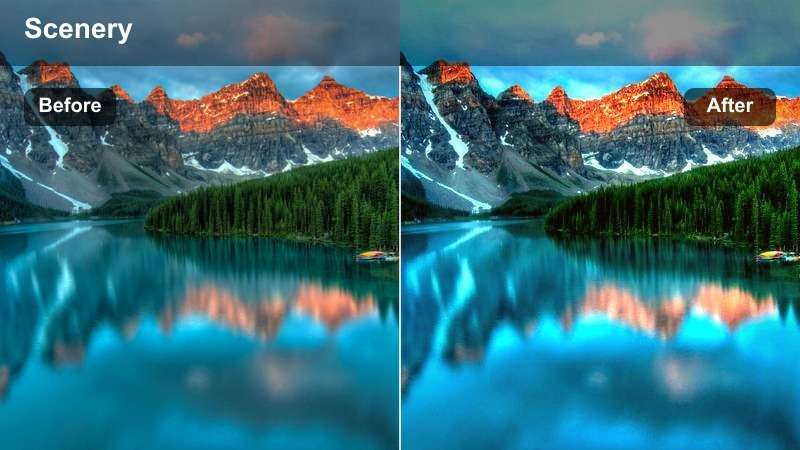
- Effect look: Cool shadows with a subtle lilac tint and gentle lifted blacks for a soft twilight glow.
- Best for: Snowy village streets, cabins, and mountain towns filmed during late dusk.
- Editing tip: Increase saturation slightly on oranges to keep window lights and street lamps warm against the cooler snow.
Polar Twilight Glow adds a soft lilac and blue cast to your scene, perfect for dreamy town and village shots as the sun disappears. The LUT lifts blacks and gently reduces harsh contrast so rooftops, roads, and snowbanks keep detail, even in low light.
In Filmora, apply this LUT to clips of glowing windows, lamp lit streets, and cabin exteriors, then boost orange and yellow saturation to keep practical lights warm and inviting. Adding a touch of local contrast or clarity helps retain texture in buildings and snow while the overall scene stays atmospheric and cinematic.
Glacier Blue Clarity
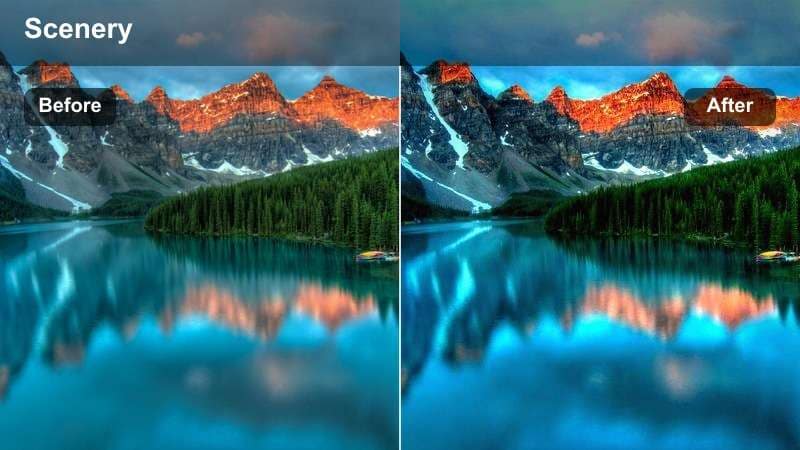
- Effect look: Crisp blue shadows, bright whites, and enhanced edge clarity to define icy textures.
- Best for: Glaciers, icy coastlines, and snow-covered peaks under clear skies.
- Editing tip: Dial back sharpness if you shoot in 4K to avoid harsh grain in the sky and smooth snow areas.
Glacier Blue Clarity emphasizes the structure and texture of ice, giving your glacier and high mountain footage a bold, detailed look. It deepens blue shadows and pushes whites bright while enhancing edge clarity so ridgelines, crevasses, and snow patterns stand out on screen.
Use this LUT in Filmora on well exposed clips from clear days, then slightly reduce global sharpness if you notice noise in skies or flat snow fields. You can also pull highlights down a touch with curves to protect bright glacier faces, keeping the look punchy yet realistic for travel films and documentaries.
Bright Daytime Snow Adventures
Crisp Alpine Day
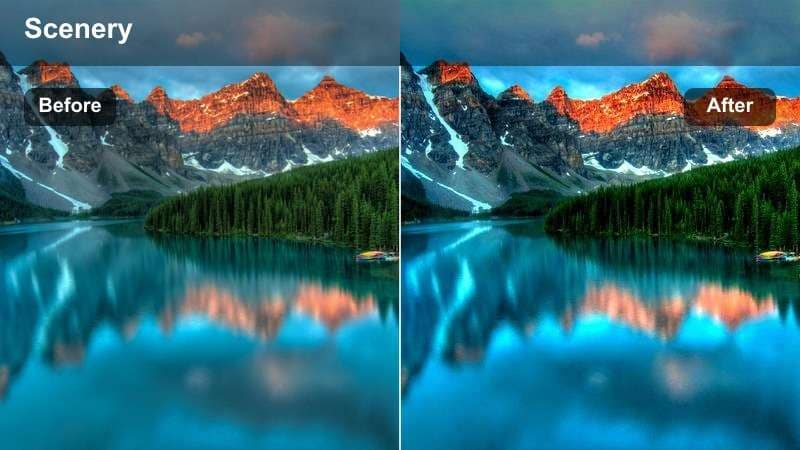
- Effect look: Neutral cool whites, rich blues, and balanced contrast for sunny snow days.
- Best for: Ski runs, snowboarding clips, and bright hiking footage in the mountains.
- Editing tip: Use Filmoras highlight recovery to pull back any blown-out snow before applying this filter for cleaner detail.
Crisp Alpine Day is designed for high energy, sunny slopes where snow and sky can easily blow out. The LUT keeps whites clean and slightly cool while enriching blues, so skies look vivid without overpowering the rest of the frame.
In Filmora, first use highlight recovery or curves to rein in any clipped snow, then apply the LUT for a fresh, balanced base grade. Adjust saturation and contrast subtly to keep helmets, jackets, and gear vibrant while preserving realistic snow texture that holds up on social feeds and larger screens.
Fresh Powder Pop
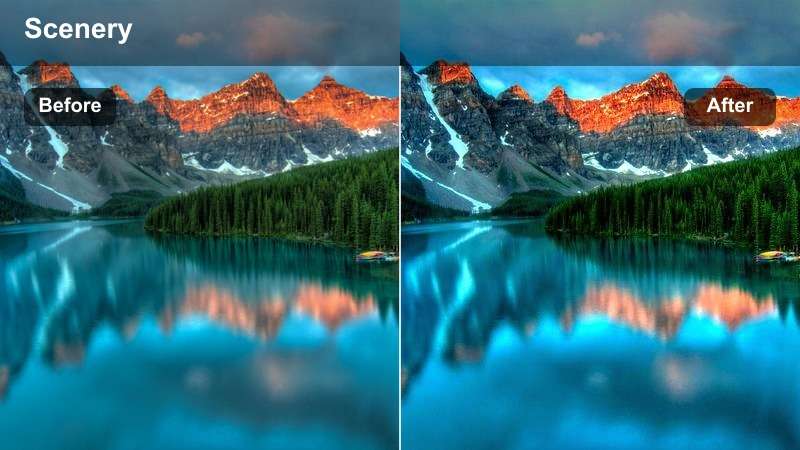
- Effect look: Punchy contrast, bright snow, and boosted primary colors for energetic outdoor clips.
- Best for: Action-filled snowball fights, sledding, and family winter fun videos.
- Editing tip: Trim exposure so faces are not overexposed, then add a light vignette to subtly center attention on your subject.
Fresh Powder Pop brings a lively, social media ready punch to your winter fun footage. It brightens snow, intensifies primary colors, and tightens contrast so movement, expressions, and flying powder feel exciting and bold.
Apply this LUT in Filmora to playful scenes with friends or family, then nudge exposure down if faces look too hot in direct sun. A light vignette and a touch of saturation control on blues help keep attention on people and action instead of letting overly vivid skies or jackets dominate the frame.
High Albedo Guard
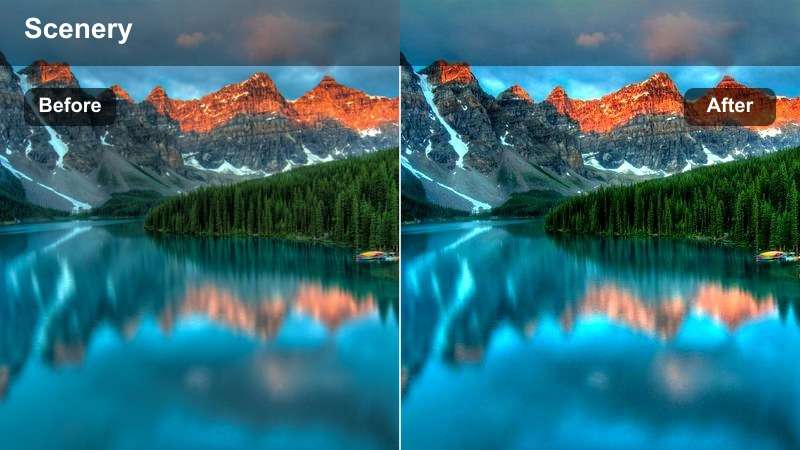
- Effect look: Controlled highlights and gentle contrast to tame over-bright snow and skies.
- Best for: Drone shots and open fields where sunlight reflects strongly off the snow.
- Editing tip: Reduce highlights before applying, then use this filter to restore a natural balance between sky and ground.
High Albedo Guard is built to manage extreme brightness in wide, reflective snow scenes, especially from drones or wide angle lenses. It reins in hot highlights, adds gentle contrast, and evens out luminance between land and sky so details remain visible across the frame.
In Filmora, pull down highlights or add a soft S curve before applying this LUT to protect texture in clouds and open snowfields. After grading, fine tune exposure and white balance so the snow stays realistic while the overall scene feels cinematic and easy on the eyes for longer viewing.
Moody Overcast Winter Days
Nordic Grey Haze
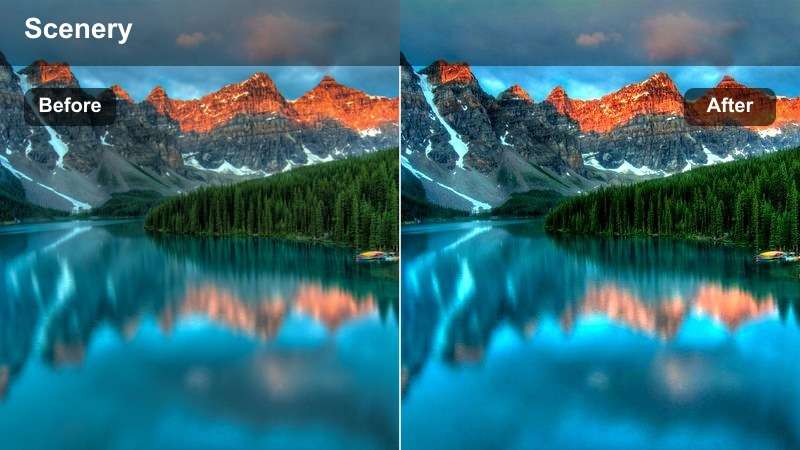
- Effect look: Muted colors, soft contrast, and cool grey highlights for quiet winter moods.
- Best for: Foggy forests, frozen rivers, and overcast countryside walks.
- Editing tip: Lower saturation slightly and add subtle film grain in Filmora to push a calm, documentary feel.
Nordic Grey Haze softens your winter footage into a calm, introspective palette with cool greys and low contrast. It is ideal for quiet walks, minimalistic landscapes, and documentary style b roll where mood matters more than punchy color.
In Filmora, pair this LUT with slightly reduced saturation and a hint of film grain to emphasize stillness and atmosphere. Keep camera moves slow and add stabilization when needed so the subdued grade reads as intentional and cinematic rather than flat or shaky.
Blizzard Cinematic Matte
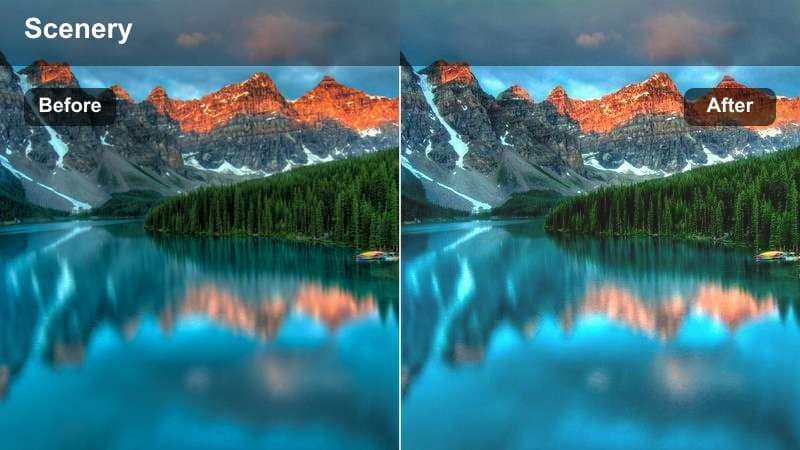
- Effect look: Desaturated tones, lifted blacks, and a soft faded highlight roll-off with a cinematic matte feel.
- Best for: Blizzard walks, snowstorms, and wind-swept ridgelines with low visibility.
- Editing tip: Add a subtle letterbox and reduce midtone contrast slightly to accentuate the cinematic, stormy atmosphere.
Blizzard Cinematic Matte turns chaotic snowstorms into dramatic, filmic sequences with a soft, faded contrast profile. Blacks are lifted, highlights roll off smoothly, and overall saturation drops, which makes blowing snow and low visibility feel more emotional and story driven.
In Filmora, apply this LUT to your most intense weather clips, then add letterbox bars and gentle midtone reduction for a full cinema look. Layer wind, storm ambience, and minimal music underneath to complete the mood and keep viewers immersed in your harsh winter narrative.
Frosted Urban Street
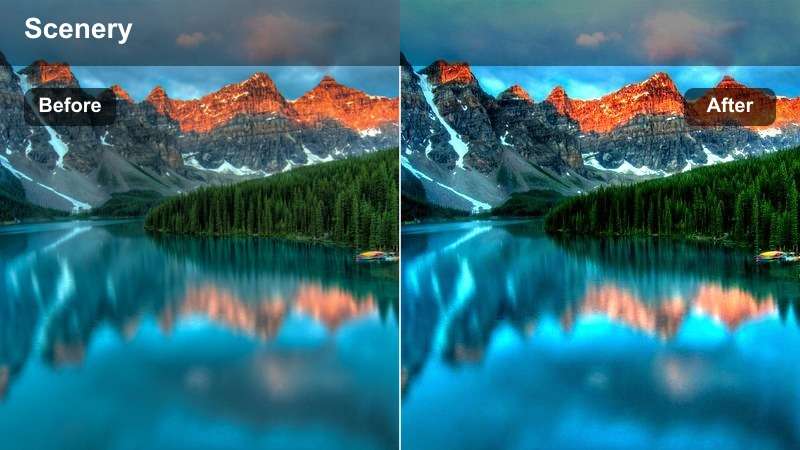
- Effect look: Cool cyan shadows with muted highlights and preserved skin tones for street travel scenes.
- Best for: Snow-dusted city streets, tram stops, and winter markets under flat light.
- Editing tip: Boost luminance in the yellow channel to keep street lights and window reflections visible in grey conditions.
Frosted Urban Street gives your winter city footage a stylish, travel friendly aesthetic with cool cyan shadows and soft highlights. It cools down pavements, buildings, and snow while carefully preserving skin tones so people stay natural against a moody urban backdrop.
Use this LUT in Filmora on clips from markets, sidewalks, or transit stops, then lift yellow and orange luminance so street lights, signs, and windows do not disappear into the grey. A small exposure boost on your main subject using masks can help guide the viewers eye through busy city frames.
Golden Hour Winter Travel Moments
Amber Snow Glow
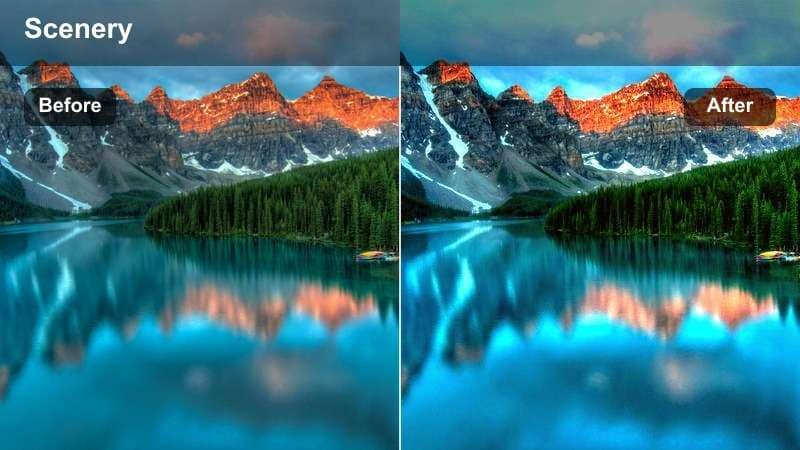
- Effect look: Warm golden highlights with cool shadows for rich, balanced winter sunsets.
- Best for: Sunset hikes, snowy hilltops, and backlit portraits in winter light.
- Editing tip: Reduce warmth slightly in the shadows to avoid muddying blue skies while keeping the sunlit snow warmly tinted.
Amber Snow Glow emphasizes the contrast between warm, low sun and crisp winter shadows, perfect for sunset travel moments. It adds golden warmth to highlights while keeping shadows cool and blue, which makes snow sparkle and skies feel rich and colorful.
In Filmora, apply this LUT to backlit subjects and scenic vistas, then fine tune color temperature in the shadows if skies or shaded snow look too warm. Expose slightly for the sky when shooting, and afterwards lift shadows on your subject so silhouettes retain detail without flattening the glowing sunset.
Sunset Snow Trails
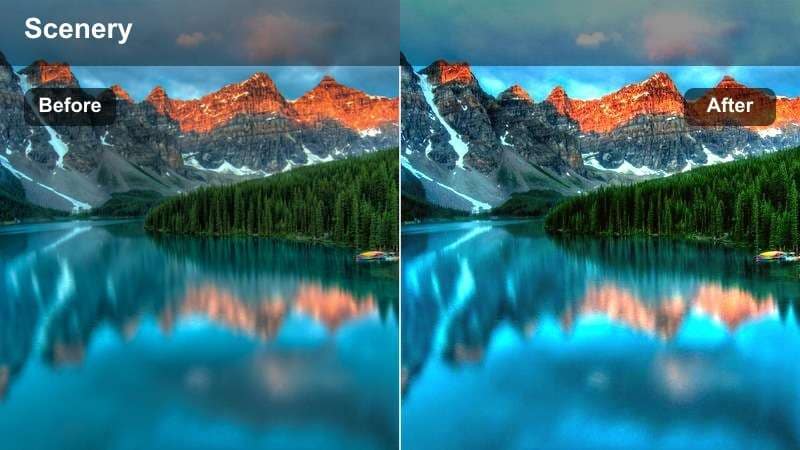
- Effect look: Deepened oranges, gentle magenta in the sky, and crisp snow detail along trails and footprints.
- Best for: Snowy path walks, cross-country ski trails, and scenic closing shots of winter travel vlogs.
- Editing tip: Use Filmoras vignette tool to darken frame corners slightly, pulling focus down the trail into the horizon.
Sunset Snow Trails is tuned for emotional outro shots, highlighting leading lines in the snow that draw the viewer toward a colorful horizon. It enriches oranges and pinks in the sky while preserving detail along trails and footprints, ideal for closing chapters in your winter story.
Apply this LUT in Filmora to wide establishing or final shots, then add a subtle vignette to guide the eye down the path. You can slightly slow down the clip or extend the duration on your timeline, pairing it with softer music to give audiences a moment to absorb the landscape and reflect on the journey.
Campfire Snow Contrast
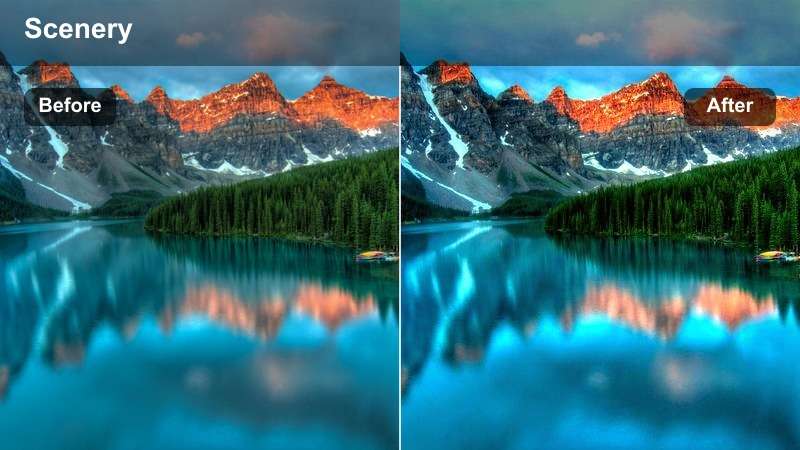
- Effect look: High contrast between warm lights and cold surrounding snow for cozy outdoor scenes.
- Best for: Campfires, cabin exteriors, and evening gatherings in snowy clearings.
- Editing tip: Lower saturation in blues slightly so the fire remains the visual focus against dark snow and trees.
Campfire Snow Contrast heightens the cozy feeling of warm light sources surrounded by deep, cold winter tones. It pushes firelight and cabin windows into rich ambers while darkening and cooling the environment, making gatherings feel intimate against a dramatic backdrop.
In Filmora, use this LUT on night scenes with visible flames, lanterns, or window glow, then pull back blue saturation so the warmth stays center stage. Lower highlights slightly before grading if your flames are clipping, preserving texture in logs and sparks for a more immersive and realistic campfire atmosphere.
Tips for Using Winter Landscape Luts Filters in Filmora
- Shoot slightly underexposed in bright snow so these filters have room to recover highlight detail without clipping.
- Use manual white balance on location to avoid color shifts when you apply cold tone LUTs or snowy landscape filters later.
- Group similar winter shots on your timeline and apply the same filter batch, then fine-tune clip by clip for a consistent travel story.
- Mix one strong look filter with subtle adjustments instead of stacking many heavy effects that can make snow look fake or dirty.
- Export a short test sequence and review it on your phone to ensure your winter grades stay clear and readable on smaller screens.
- Save your favorite LUT and filter combinations as Filmora presets so you can reuse them quickly on new winter projects.
- Use Filmoras scopes and histograms while grading to keep whites just below clipping, especially in drone and ski footage.
- Combine color grading with gentle stabilization and noise reduction to keep winter scenes clean, detailed, and cinematic.
These Free Winter Landscape LUTs and snowy video filters give travel creators and photographers an easy way to turn raw winter footage into clean, cinematic outdoor stories.
Save your favorite looks as presets in Filmora so every new winter travel, snowy landscape, or outdoor video can be edited quickly with a consistent, professional cold tone style.
secure download