

 100% Security Verified | No Subscription Required | No Malware


 ChatGPT
 Perplexity
 Gemini
 Claude
 Grok
Grok
Green Navy Blue sits at the intersection of trust, depth, and nature. The navy tones feel stable and cinematic, while the green and teal notes add freshness, energy, and a modern digital edge. Together they create palettes that work beautifully for cinematic grading, gaming overlays, clean UI, and premium brand identities.
For video creators, this combination is a go to for YouTube thumbnails, title cards, channel branding, intros, and even subtle color grades that keep footage cohesive. Below are 15 ready to use Green Navy Blue color palettes with HEX codes you can apply to your design work and bring into Filmora for consistent, professional looking edits.
In this article
Cinematic Green Navy Blue Color Palettes
Midnight Studio Teal

- HEX Codes: #02111d, #04364a, #0b6e4f, #f4f1de, #c2956b
- Mood: Moody, cinematic, and sophisticated with a subtle vintage edge.
- Use for: Ideal for movie-style intros, dramatic vlog openings, and trailer-style titles.
Midnight Studio Teal feels like a controlled studio night shoot, where shadows are deep and the highlights are warm and intentional. The navy and teal tones carry a strong cinematic identity, while the cream and tan accents give you room for readable text and subtle vintage flair.
Use this palette for opening title cards, end screens, and thumbnail backgrounds when you want a serious, story driven vibe. In Filmora, you can apply these HEX codes to text, shapes, and overlays so your intro, B roll, and social cutdowns all keep the same Green Navy Blue atmosphere.
Pro Tip: Build a Cinematic Green Navy Blue Look in Filmora
To keep a palette like Midnight Studio Teal consistent, start by defining your key colors in Filmora. Apply the darkest navy as your background for titles, use teal for accent lines or motion graphics, and reserve the warm highlight tones for important text or call to action buttons.
Once your colors are set, save them as custom swatches in Filmora so every lower third, subtitle, and thumbnail style frame can reuse the same Green Navy Blue scheme. This gives your channel or brand a recognizable, film like identity across intros, trailers, and regular uploads.
AI Color Palette
If you have a reference still graded with this Midnight Studio Teal palette, you can let Filmora do the heavy lifting. Filmora's AI Color Palette feature analyzes the colors from your reference and applies a matching look to the rest of your clips.
Import your hero shot, set it as the source, and then match other scenes so your Green Navy Blue tones stay unified across indoor and outdoor shots. This is especially useful for trailers, cinematic vlogs, or any project where you need the same teal navy mood from first frame to last.
 secure download

HSL, Color Wheels & Curves
To fine tune a Green Navy Blue grade, use Filmora's HSL and color wheels to target teal, blue, and green channels. You can deepen the navy in the shadows, lift teal in the midtones, and keep skintones natural by adjusting only the relevant hue ranges, following the principles in this color correction guide.
Curves let you add gentle contrast while preserving detail, especially in dark teal areas. Add a soft S curve to increase drama without crushing blacks, and nudge the blue or green curves slightly to push your entire scene toward a cohesive Green Navy Blue mood.
secure download1000+ Video Filters & 3D LUTs
If you want to move fast, start with Filmora's presets and then nudge them toward your chosen Green Navy Blue palette. Filmora’s video filters and 3D LUTs make it easy to add cinematic contrast, teal shadows, or soft haze in just a few clicks.
Apply a teal and orange or cool cinematic LUT, then tweak saturation and color balance until your HEX based design elements match the grade. This way, your overlays, titles, and footage all share the same cohesive Midnight Studio Teal atmosphere.
secure downloadNoir Harbor Titles

- HEX Codes: #010812, #072538, #0f4c5c, #14a098, #f5f3f4
- Mood: Cool, mysterious, and stylish like a late night port city.
- Use for: Perfect for bold title sequences, crime or mystery themed edits, and stylish lower thirds.
Noir Harbor Titles leans into inky blues and teals with a crisp off white to cut through the darkness. It feels like neon reflected off wet streets, ideal for mystery, thriller, or tech noir style content.
Use the lightest color for titles and UI, the darkest navy for backgrounds, and the teal accents to highlight key phrases in thumbnails or end screens. In Filmora, this palette works especially well with glitch transitions and sharp kinetic typography.
Deep Ocean Trailer
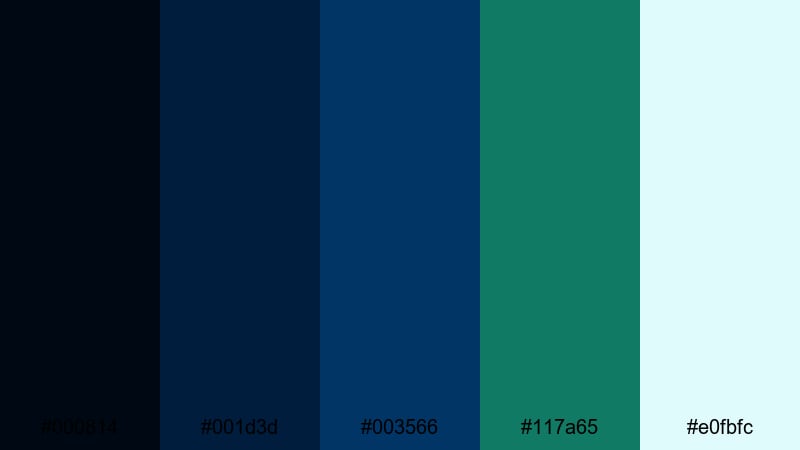
- HEX Codes: #000814, #001d3d, #003566, #117a65, #e0fbfc
- Mood: Epic, adventurous, and immersive like a deep sea journey.
- Use for: Great for cinematic trailers, travel documentaries, and underwater or adventure themed sequences.
Deep Ocean Trailer dives from pitch black navy into rich ocean blue and teal, lifted by a pale, airy highlight. The combination feels expansive and adventurous, making it ideal for story driven trailers and travel intros.
Use the brighter teal and light blue for callouts on maps, lower thirds, and location labels. For YouTube thumbnails, place white or light cyan text over the darkest blues to keep everything readable on both desktop and mobile.
Retro Neon Tide
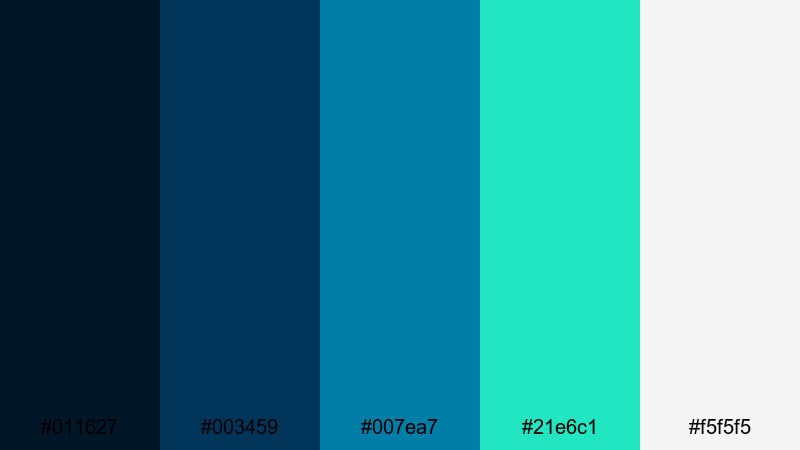
- HEX Codes: #011627, #003459, #007ea7, #21e6c1, #f5f5f5
- Mood: Energetic, retro, and slightly futuristic with neon teal accents.
- Use for: Use in synthwave edits, tech explainers, channel intros, and motion graphics with glowing elements.
Retro Neon Tide combines deep navy bases with bright teal and cyan that feel like glowing LEDs. The palette has a strong synthwave and tech vibe, especially when paired with gradients and soft glows.
Try it for animated logos, HUD style overlays, and fast cut intros. In thumbnails, stack white text on top of the darkest navy and outline important words in the neon teal to grab clicks in a crowded feed.
Soft & Dreamy Green Navy Blue Color Palettes
Foggy Harbor Pastels
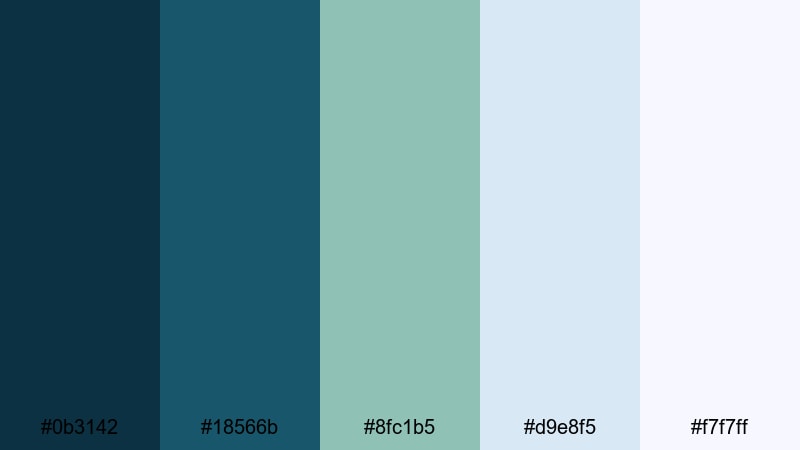
- HEX Codes: #0b3142, #18566b, #8fc1b5, #d9e8f5, #f7f7ff
- Mood: Soft, calm, and airy like a misty morning by the sea.
- Use for: Lovely for calming vlogs, lifestyle content, minimal intros, and pastel overlay graphics.
Foggy Harbor Pastels softens the usual boldness of Green Navy Blue into a gentle, desaturated set of tones. The darker teals anchor your design, while the light blues and whites wash everything in a delicate haze.
This palette fits morning routines, study vlogs, and minimalist tutorial slides. Use the lightest shades for backgrounds and the muted teal for titles and icons to keep everything readable but relaxed.
Seafoam Storytime
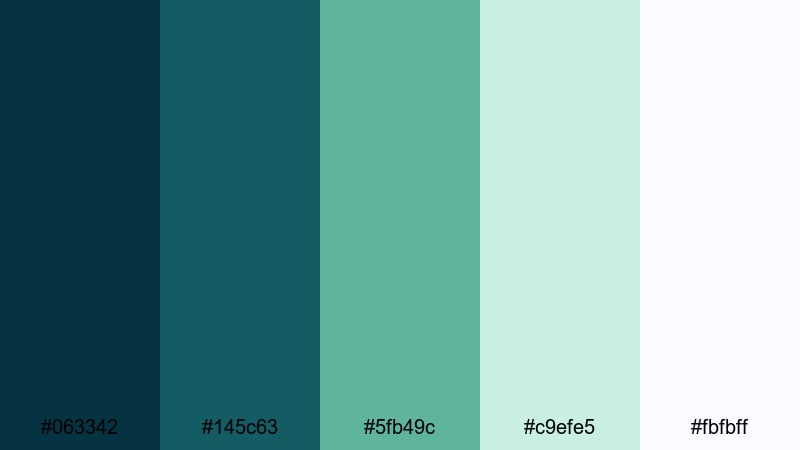
- HEX Codes: #063342, #145c63, #5fb49c, #c9efe5, #fbfbff
- Mood: Comforting, fresh, and storytelling friendly with soft seafoam tones.
- Use for: Best for sit down storytime videos, wellness channels, and cozy podcast visuals.
Seafoam Storytime balances muted navy with friendly seafoam greens and light, breathable backgrounds. It feels welcoming and candid, perfect for hosts speaking directly to the camera.
Use the soft greens for accent shapes behind your webcam frame, and keep lower thirds in the darker teal for contrast. On thumbnails, a pale background with teal borders and seafoam accents keeps the design clean and approachable.
Moonlit Teal Whisper
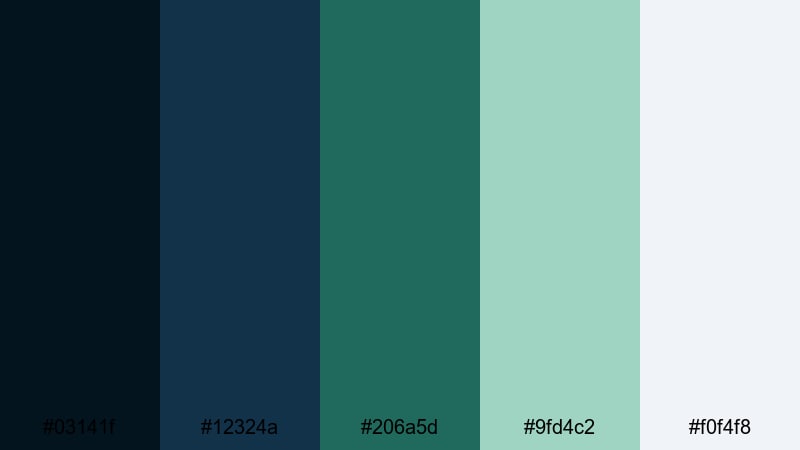
- HEX Codes: #03141f, #12324a, #206a5d, #9fd4c2, #f0f4f8
- Mood: Ethereal, soothing, and slightly romantic like moonlight on water.
- Use for: Great for cinematic vlogs, slow travel edits, wedding reels, and dreamy B-roll overlays.
Moonlit Teal Whisper feels like a calm night by the water, where deep navy shadows gently fade into soft teal reflections. The pale mint and mist tones add a romantic glow without overpowering the image.
Use this palette for wedding highlight reels, emotional travel sequences, or slow, reflective vlogs. In design, the dark navy works for letterbox bars and text, while the lighter tones shine in overlays, gradient washes, and title backdrops.
Gentle Marina Fade

- HEX Codes: #072736, #16475a, #4a7c72, #b7d9cf, #f7fafc
- Mood: Relaxed, coastal, and clean with a gentle gradient feel.
- Use for: Use in minimalist travel vlogs, day in the life edits, and background slides for tutorials.
Gentle Marina Fade layers rich teal navies into soft, seafoam inspired tints, creating a natural gradient across the palette. It captures the calm of a harbor at midday, making your visuals feel fresh but not loud.
In Filmora, this palette works beautifully in gradient backgrounds, chapter cards, and subtle overlay panels behind text. For thumbnails and channel art, fade from the deepest teal at one corner into the lightest tone for an organic, modern look.
Bold & Modern Green Navy Blue Color Palettes
Electric Harbor Gaming

- HEX Codes: #020616, #071931, #004e64, #00a5cf, #f4f4f4
- Mood: High energy, modern, and gamer ready with sharp teal accents.
- Use for: Perfect for gaming overlays, esports branding, tech reviews, and bold intros.
Electric Harbor Gaming uses very dark navy as a base, then slices through it with bright teal and clean white. The contrast feels fast and digital, making gameplay, HUD elements, and key stats stand out.
Build stream overlays with the darkest colors as the frame and the bright teal for borders and button highlights. For thumbnails, place your character or game art on the navy background and outline them with the electric teal to catch attention instantly.
Urban Grid Teal Pop

- HEX Codes: #020817, #102a43, #1b6c7a, #17bebb, #fefefe
- Mood: Edgy, urban, and confident with a crisp teal pop.
- Use for: Great for city vlogs, creator brand packages, tech shorts, and edgy title screens.
Urban Grid Teal Pop blends charcoal navy with a punchy teal accent and bright white. It feels like a nighttime city grid with neon highlights, perfect for fast, confident edits.
Use the white for bold titles, the dark navy for backgrounds, and the teal pop for underlines, icons, and callouts. This palette shines in kinetic text animations, reels, and shorts where you want a sharp, contemporary Green Navy Blue identity.
Streaming Overlay Pulse
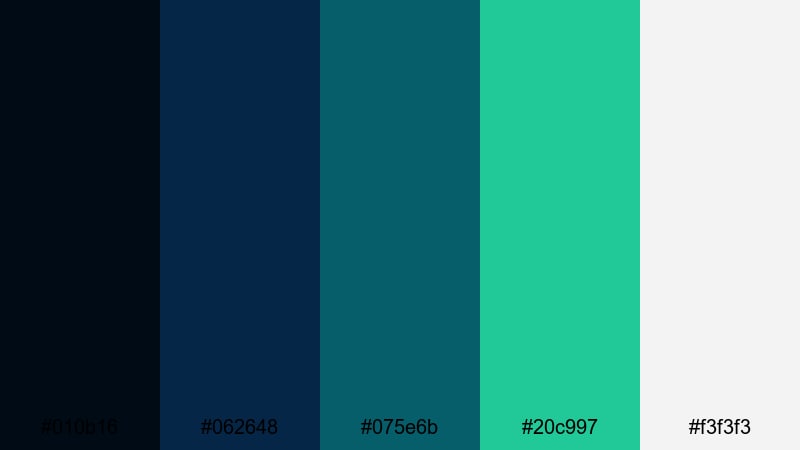
- HEX Codes: #010b16, #062648, #075e6b, #20c997, #f3f3f3
- Mood: Dynamic, digital, and rhythmic like a live stream HUD.
- Use for: Use for Twitch or YouTube overlays, alerts, facecam frames, and animated panels.
Streaming Overlay Pulse focuses on layered blues and teals that feel like a pulsing audio meter or HUD interface. The bright greenish teal accent is ideal for alerts and interactive elements.
Design your offline screens, panels, and facecam frames with deep navy bases and a repeating teal accent line. The light gray supports readable labels and chat prompts without clashing with the rest of your Green Navy Blue scene.
High Contrast Teal Slate
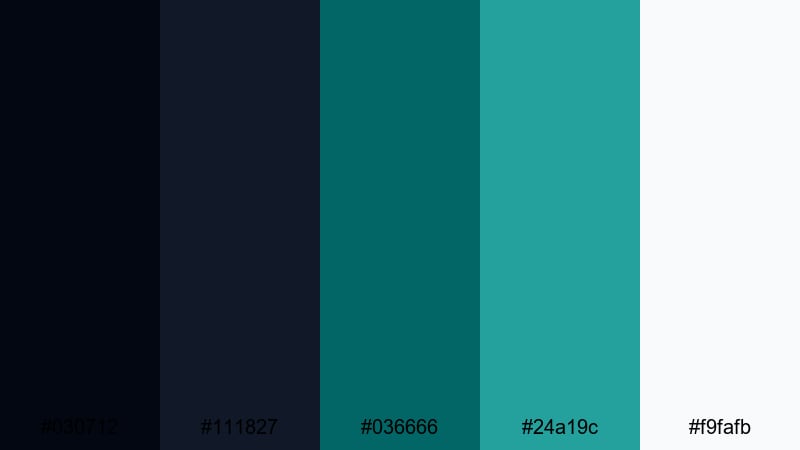
- HEX Codes: #030712, #111827, #036666, #24a19c, #f9fafb
- Mood: Clean, sharp, and professional with strong contrast.
- Use for: Ideal for UI mockups, app promos, productivity content, and modern explainer videos.
High Contrast Teal Slate pairs charcoal navy with precise teal accents and bright, nearly white backgrounds. The result is a sleek, professional palette with excellent readability on screens.
Use it for infographic style scenes, UI breakdowns, and SaaS promos. In Filmora, set the off white as your slide background and alternate between the two darkest shades for headings and body text, using the teals only for key metrics and CTA buttons.
Nature Inspired Green Navy Blue Color Palettes
Evergreen Coastal Cliff
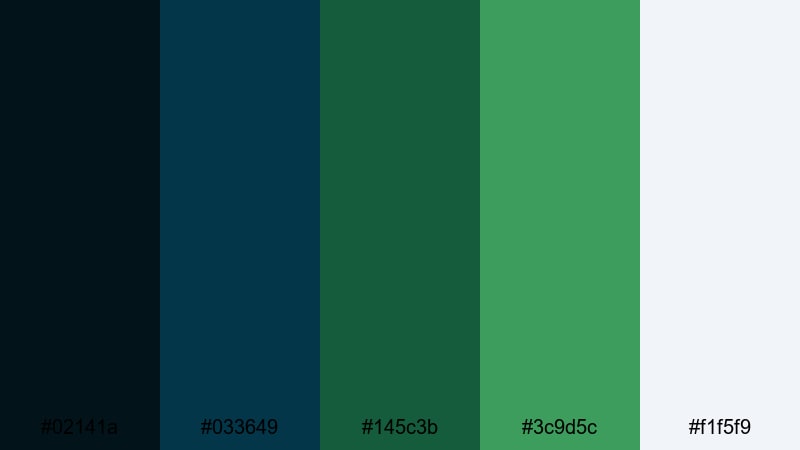
- HEX Codes: #02141a, #033649, #145c3b, #3c9d5c, #f1f5f9
- Mood: Grounded, organic, and refreshing like cliffs above the sea.
- Use for: Great for outdoor vlogs, eco brands, hiking reels, and nature documentary intros.
Evergreen Coastal Cliff fuses deep coastal blues with rich forest greens and a soft, sky like highlight. It feels rugged yet refreshing, ideal for any content that mixes water, rock, and foliage.
Use the darkest tones for title bars and map frames, the mid greens for icons and buttons, and the pale highlight for text and background plates. This palette reinforces eco, travel, and adventure branding without feeling too aggressive or neon.
Rainy Pine Dock
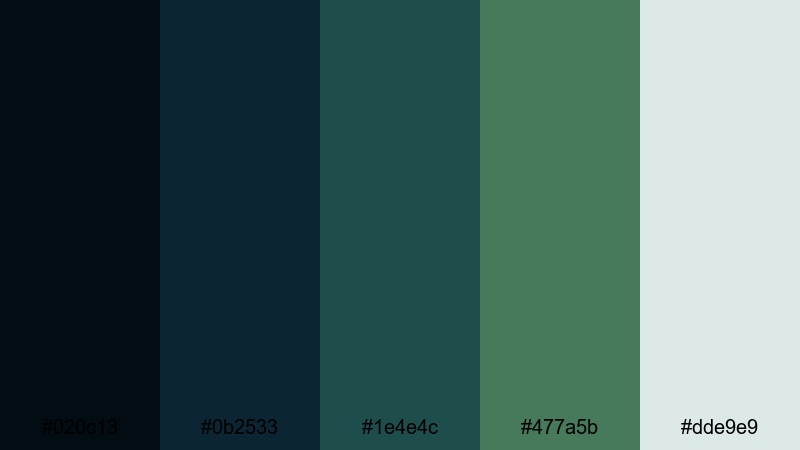
- HEX Codes: #020c13, #0b2533, #1e4e4c, #477a5b, #dde9e9
- Mood: Quiet, reflective, and moody like a rainy day by the lake.
- Use for: Perfect for cinematic b roll, reflective vlogs, acoustic music videos, and moody timelapses.
Rainy Pine Dock layers muted pine greens and steel blues under a veil of soft gray, capturing the feeling of rain on water. It is introspective and calm, making it great for slower storytelling.
Use the lighter gray as a subtle overlay to cool down footage and place song titles or quotes in the darker teal and navy. For thumbnails, combine a desaturated frame grab with this palette's green navy accents to signal a moody, emotional piece.
Aurora Fjord Glow

- HEX Codes: #02091a, #072640, #0b6b6b, #4fd2a7, #e6f7ff
- Mood: Magical, crisp, and expansive like northern lights over deep water.
- Use for: Use for travel reels, drone footage, timelapses, and inspirational brand films.
Aurora Fjord Glow sets deep fjord blues against glowing teal and mint, evoking the shimmer of aurora lights. The palette feels clean and uplifting, perfect for big landscapes and inspirational edits.
Lean on the darkest colors for vignettes and text outlines, and reserve the glowing mint for key words, icons, and transition accents. This Green Navy Blue combination is strong for drone shots, scenic openers, and brand stories about exploration or innovation.
Tips for Creating Green Navy Blue Color Palettes
When you design your own Green Navy Blue combinations for video and graphics, a few practical rules will help you balance mood, contrast, and brand consistency across every scene.
- Pick a dominant shade: decide whether navy or teal is the hero color and keep that consistent across thumbnails, titles, and overlays.
- Control contrast: pair your darkest navy with off white or very light cyan for text to keep everything readable on mobile and small screens.
- Limit accent colors: add only one or two supporting hues (like warm beige or mint) so your Green Navy Blue base stays clear and recognizable.
- Match footage temperature: if your camera footage is very warm, cool it slightly in Filmora so it blends better with teal and navy interface elements.
- Use gradients thoughtfully: blend navy into teal or green along one direction to create modern backgrounds without distracting banding.
- Check grayscale: quickly desaturate a frame or thumbnail mockup to ensure your key elements still have enough luminance contrast.
- Stay on brand: save a small set of HEX codes in Filmora and reuse them across lower thirds, captions, and end screens for a consistent channel identity.
- Adapt for platforms: slightly boost brightness and contrast for social thumbnails while keeping the same core Green Navy Blue palette.
Green Navy Blue palettes can push your visuals toward cinematic, calming, high tech, or nature inspired moods depending on how you combine them. With the 15 HEX based palettes above, you can design intros, overlays, and thumbnail systems that feel intentional and on brand.
Bring these HEX codes into Filmora to color your titles, graphics, and color grades so footage and design work as one. Whether you edit gaming streams, cinematic vlogs, or educational content, a consistent Green Navy Blue palette will make your channel look more professional and memorable.
Experiment with different palettes on sample timelines, save what works as presets, and build your own variations as your style evolves. The more your viewers associate this Green Navy Blue look with your videos, the stronger your visual identity becomes.
secure downloadNext: Pink Green Color Palette
