

 100% Security Verified | No Subscription Required | No Malware


 ChatGPT
 Perplexity
 Gemini
 Claude
 Grok
Grok
Mauve Shadow is a soft, muted purple with a gentle gray undertone, often associated with nostalgia, warmth, and quiet intimacy. It feels romantic without being overly sweet, and cinematic without feeling too dark. In color psychology, this family of mauve tones can suggest trust, emotional depth, and calm reflection, which makes it ideal for creators who want to tell personal stories while still looking polished and modern.
In video editing, branding, YouTube thumbnails, and intro sequences, Mauve Shadow works as a versatile base or accent color. It can frame your subject, soften harsh lighting, and give your channel a signature, recognizable look. Below you will find Mauve Shadow color palettes with HEX codes designed for Filmora users and other creators, so you can match your thumbnails, titles, overlays, and color grading for one cohesive visual style.
In this article
Soft And Romantic Mauve Shadow Color Palettes
Twilight Mauve Whisper
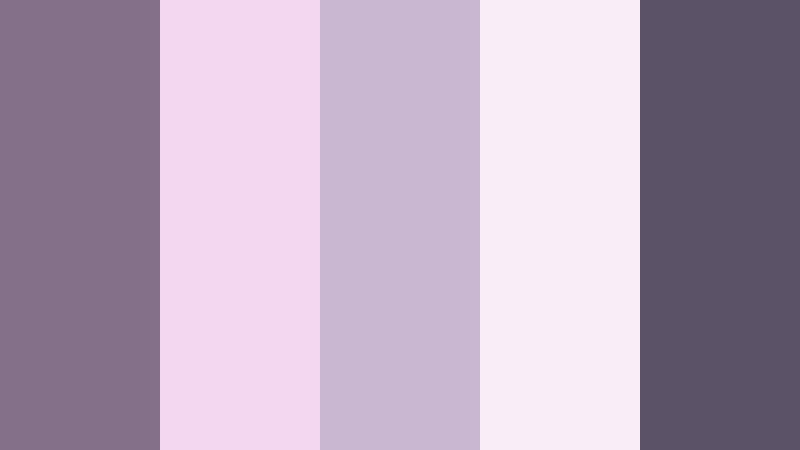
- HEX Codes: #85708a, #f3d7f0, #c9b7d2, #f9edf7, #5b5268
- Mood: Dreamy, tender, and quietly nostalgic.
- Use for: Perfect for romantic wedding highlight videos, soft vlog aesthetics, and dreamy storytelling intros.
Twilight Mauve Whisper feels like the last light of the day settling on a vintage film frame. Soft blush and lilac tints wrap around the core Mauve Shadow tone, giving you a palette that is gentle, hazy, and emotional without turning overly pink.
Use this combination for wedding highlight reels, slow b-roll of couples, or reflective vlog moments. In Filmora, you can echo these HEX codes in your titles, lower thirds, and thumbnail backgrounds so that your intros, end screens, and channel branding all share the same dreamy twilight aesthetic.
Pro Tip: Build a Cinematic Mauve Shadow Look in Filmora
When you work with a delicate palette like Twilight Mauve Whisper, consistency is everything. Start by choosing one or two of the mid-tones, such as #85708a and #c9b7d2, as your main accent colors for titles, callouts, and shapes in Filmora. Keep brighter tints like #f3d7f0 and #f9edf7 for backgrounds, frames, and simple overlays, so your footage remains the focus.
Save these color choices as presets for text styles, elements, and overlays. That way, every intro, b-roll transition card, and social cut-down keeps the same Mauve Shadow atmosphere, whether you are editing a full wedding film or short romantic Reels.
AI Color Palette
If you have a reference image with this Twilight Mauve Whisper look, you can turn it into a full video style with Filmora's AI tools. Filmora's AI Color Palette feature lets you pick a frame or design that uses Mauve Shadow and automatically apply its colors to the rest of your clips.
This is especially helpful for wedding films and cinematic vlogs, where lighting often changes. By using AI Color Palette, you can keep your Mauve Shadow mid-tones and soft highlights consistent from the ceremony through the reception, from your YouTube thumbnail to the final outro screen.
 secure download

HSL, Color Wheels & Curves
To refine your Mauve Shadow look, adjust the purple and magenta ranges in Filmora's HSL panel. Slightly reducing saturation in the shadows while lifting the luminance of mauve mid-tones creates a smoother, filmic result. Use the color wheels to push mid-tones toward Mauve Shadow and highlights toward the lighter HEX tones like #f3d7f0, while keeping shadows anchored with #5b5268 to add depth.
You can also shape contrast with curves, lifting the blacks just a touch to avoid crushed details in romantic scenes. If you want more guidance, look for Filmora tutorials on using HSL and curves for cinematic grading to see how subtle changes lock your Mauve Shadow palette into place.
secure download1000+ Video Filters & 3D LUTs
To move fast while keeping your Mauve Shadow aesthetic, combine these HEX codes with Filmora's preset looks. Filmora's video filters and 3D LUTs make it easy to add a cohesive romantic tone with just a few clicks, then fine-tune details like text color and overlays to match the Twilight Mauve Whisper palette.
Try pairing a soft cinematic LUT with subtle glow or vignette filters. This reinforces the twilight feeling and ties your color palette, lighting, and overall mood together in everything from long-form edits to vertical social clips.
secure downloadDusky Rose Letters
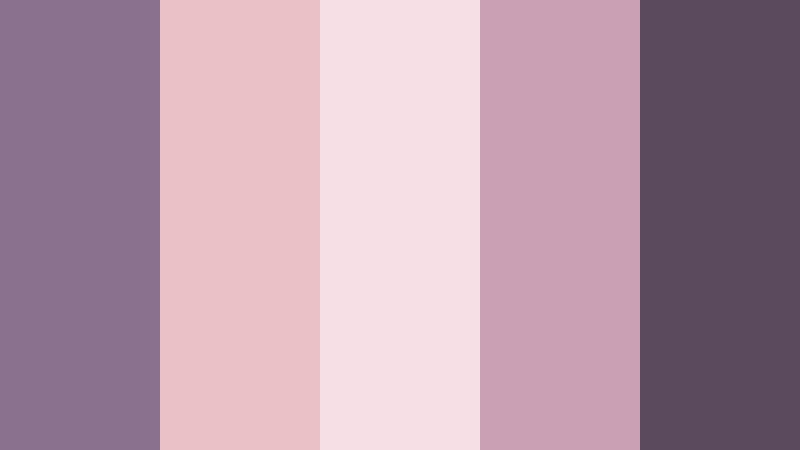
- HEX Codes: #8a718d, #e9c1c7, #f7e0e5, #c9a0b4, #5b495e
- Mood: Sentimental and intimate, like handwritten notes at dusk.
- Use for: Works beautifully for love-story montages, anniversary edits, and cozy lifestyle reels.
Dusky Rose Letters feels like pages of a love letter soaked in evening light. Mauve Shadow merges with dusty rose, blush, and a darker plum to give your frames a warm, sentimental tone that still looks mature and polished.
Use this palette in Filmora for anniversary slideshows, couple Q and A videos, or cozy home vlogs. Set your text and icon accents in #8a718d and #c9a0b4, use #f7e0e5 as a soft backdrop for quotes or lower thirds, and rely on #5b495e for legible, romantic-looking typography in thumbnails and end screens.
Lavender Balcony Glow
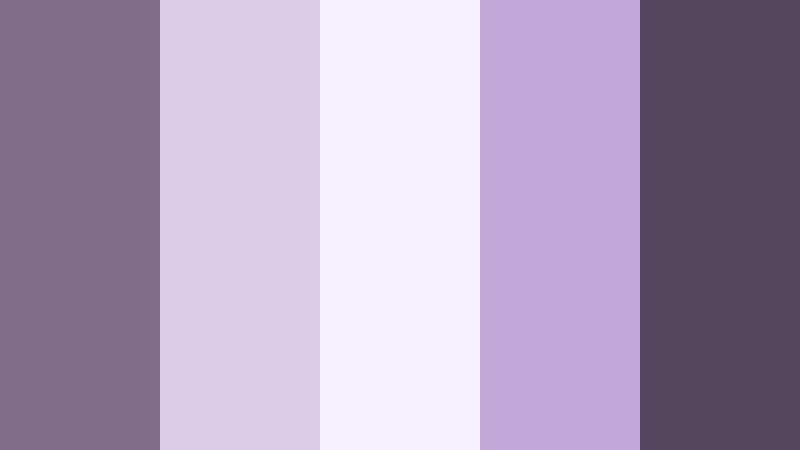
- HEX Codes: #7f6c88, #dbcce9, #f6efff, #c1a7d8, #54475f
- Mood: Romantic, airy, and slightly cinematic.
- Use for: Ideal for balcony scenes, city romance edits, and dreamy travel vlogs at golden hour.
Lavender Balcony Glow mixes Mauve Shadow with light lavender and pale, almost cloud-like whites. The result feels like an evening city view, soft and slightly cinematic, with enough contrast from the deeper #54475f to hold detail in shadows.
For travel vlogs, balcony monologues, or date-night edits, use #f6efff and #dbcce9 as gentle backgrounds behind text and subscribe prompts. Let #7f6c88 and #c1a7d8 drive your titles, icons, and simple shapes in Filmora, and deepen your frames with #54475f in outlines or subtle gradient overlays along the edges of your footage.
Blush Cinema Reverie
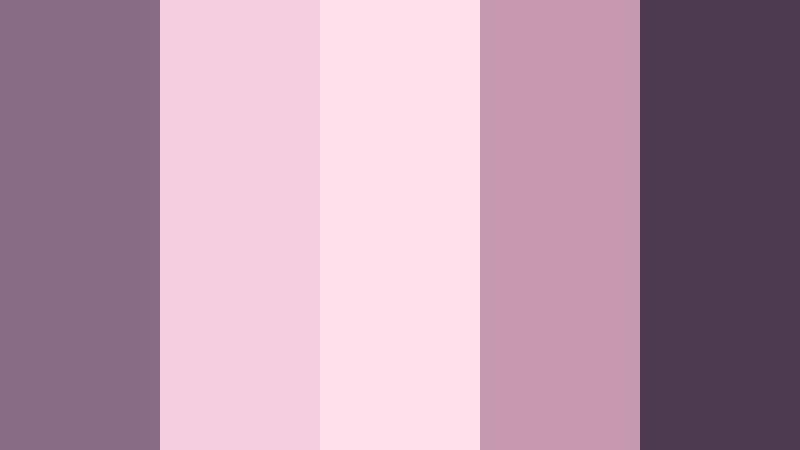
- HEX Codes: #866b84, #f4cedd, #ffdfe9, #c59aae, #4e3b4f
- Mood: Cinematic, tender, and slightly vintage.
- Use for: Use in narrative shorts, lyric videos, and romantic title cards where softness meets drama.
Blush Cinema Reverie wraps Mauve Shadow in creamy blush tones, giving your visuals a romantic, film-like wash. The pastel pinks lighten the mood, while #4e3b4f introduces a darker accent that feels like a vignette straight from analog cinema.
This palette works well for lyric videos, poetic short films, or romantic title cards. Design your Filmora titles with #866b84 or #c59aae, add backgrounds or shapes in #f4cedd and #ffdfe9, and use #4e3b4f for crucial text like video titles on thumbnails so they remain readable even on mobile screens.
Moonlit Mauve Garden
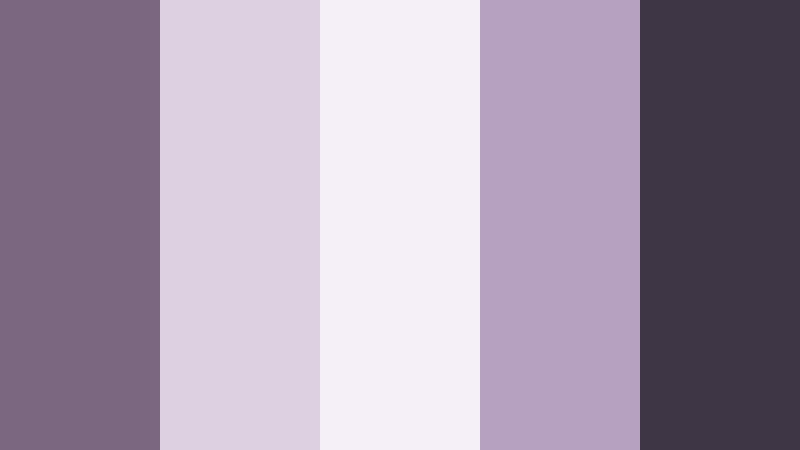
- HEX Codes: #7b677f, #ddd0e0, #f5f0f7, #b7a1c0, #3f3645
- Mood: Calm, magical, and quietly romantic.
- Use for: Perfect for night garden scenes, lyrical poetry reels, and ambient music videos.
Moonlit Mauve Garden balances pale floral tints with deeper, shadowy mauves to recreate the feel of a quiet garden at night. The light grays and gentle violets give your footage a soft glow, while #3f3645 anchors the frame with calm darkness.
Use this palette in night scenes, poetry reels, or ambient music videos where the goal is atmosphere, not intensity. In Filmora, combine titles and simple line elements in #7b677f and #b7a1c0, keep panels and frames in #ddd0e0 and #f5f0f7, and reserve #3f3645 for outlines, progress bars, or key typography that needs extra contrast.
Modern And Minimal Mauve Shadow Color Palettes
Urban Mauve Interface
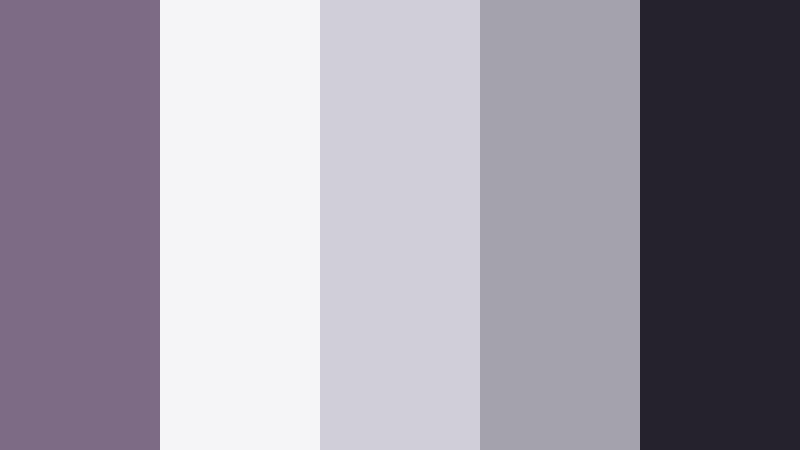
- HEX Codes: #7d6b86, #f5f5f7, #d0ced6, #a3a2ad, #25212d
- Mood: Clean, contemporary, and tech-forward.
- Use for: Great for app promo videos, tech explainers, and minimal UI overlays in tutorials.
Urban Mauve Interface pairs Mauve Shadow with crisp grays and off-whites, creating a minimal, UI-inspired look. It feels modern and slightly soft, avoiding the coldness of pure gray by keeping a mauve undertone in #7d6b86 and #d0ced6.
For app or software videos, use #f5f5f7 as your base panel color, #a3a2ad for fine lines and icons, and #25212d for text that must stay readable on any device. #7d6b86 can serve as a branded accent across call-to-action buttons, progress bars, and thumbnail borders in your Filmora projects.
Studio Loft Mauve
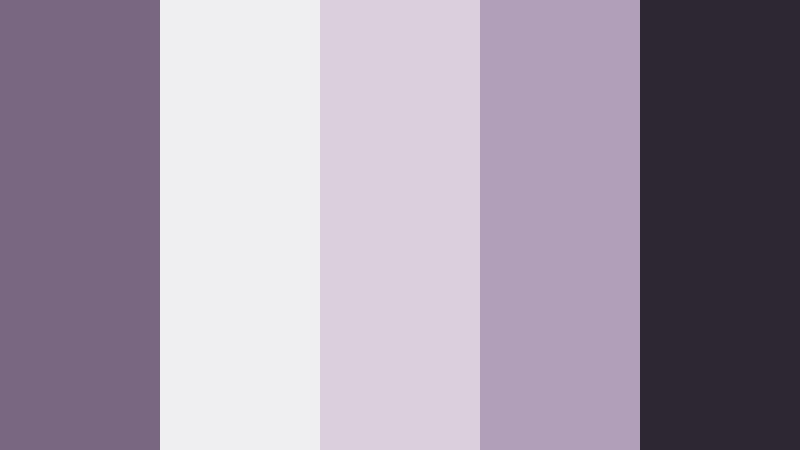
- HEX Codes: #796681, #efeef1, #d9d0dc, #b19fb9, #2d2633
- Mood: Sophisticated, airy, and design-focused.
- Use for: Use for studio tour videos, creative portfolios, and aesthetic workspace edits.
Studio Loft Mauve feels like a bright creative loft with high windows and curated decor. The combination of soft whites, smoky mauves, and a grounded dark accent in #2d2633 makes this ideal for clean, design-driven layouts.
Use #efeef1 and #d9d0dc for backdrop cards behind text, #796681 and #b19fb9 for titles and icons, and #2d2633 for navigation text, channel names, and any detail that must stand out. This palette works especially well for portfolio videos, workspace tours, or productivity content edited in Filmora where you want a refined but approachable brand look.
Mauve Matte Editorial
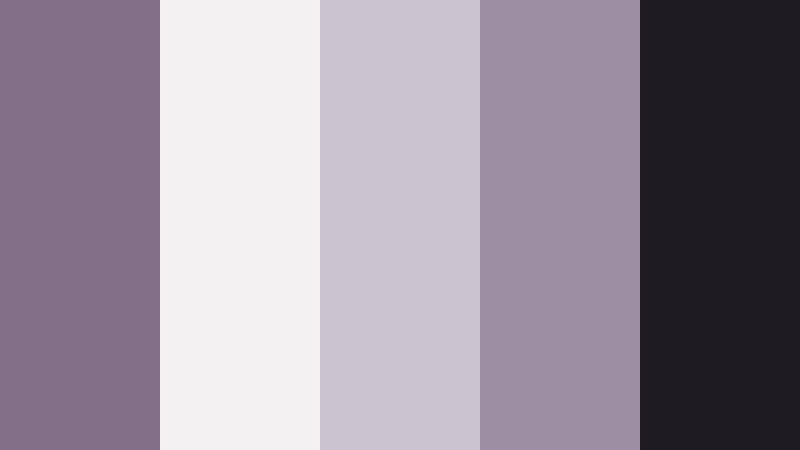
- HEX Codes: #846f88, #f3f1f2, #cbc4cf, #9d8ea3, #1f1b23
- Mood: Understated, chic, and magazine-like.
- Use for: Perfect for fashion lookbooks, product showcases, and minimalist brand intros.
Mauve Matte Editorial is all about quiet luxury. Muted mauves, soft grays, and a deep near-black give your frames the feeling of a magazine spread. The colors are cool and matte, letting your subject and typography become the main stars.
Use #f3f1f2 and #cbc4cf as neutral backgrounds for text blocks and product callouts. Let #846f88 and #9d8ea3 shape your titles, logo marks, and separators. #1f1b23 is perfect for clean, sharp text on thumbnails, especially for fashion and beauty channels using Filmora to create polished lookbooks and campaign teasers.
Soft Hardware Mauve
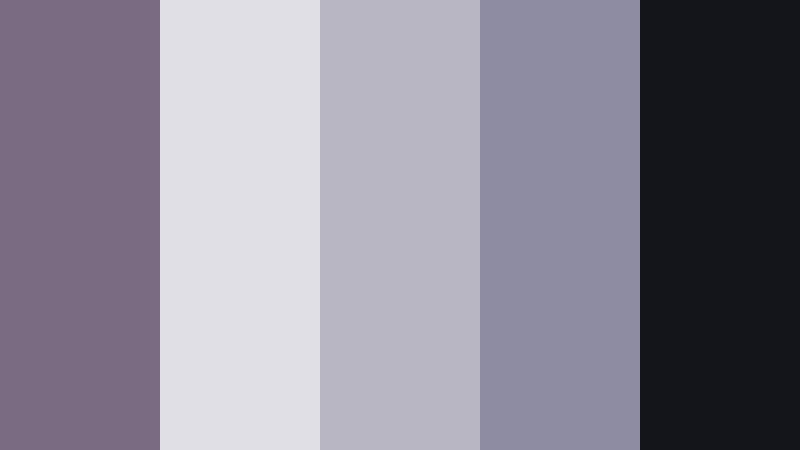
- HEX Codes: #7a6a82, #e0dfe6, #b7b6c2, #8d8da1, #14141b
- Mood: Techy yet gentle, balanced between hardware and softness.
- Use for: Ideal for gadget reviews, motion graphics UI, and subtle glitch-style titles.
Soft Hardware Mauve bridges sleek tech visuals with a softer, more human tone. Cool grays and mauves like #7a6a82 and #8d8da1 evoke device finishes and UI panels, while #14141b gives strong contrast for overlays and code-style text.
Use this palette in Filmora for gadget reviews, explainer videos, and motion graphics UI overlays. Set your interface panels in #e0dfe6 and #b7b6c2, apply #7a6a82 and #8d8da1 to icons and lines, and rely on #14141b for crisp labels, keyboard shortcuts, and title text that must stay sharp even against busy footage.
Clean Desk Mauve Focus
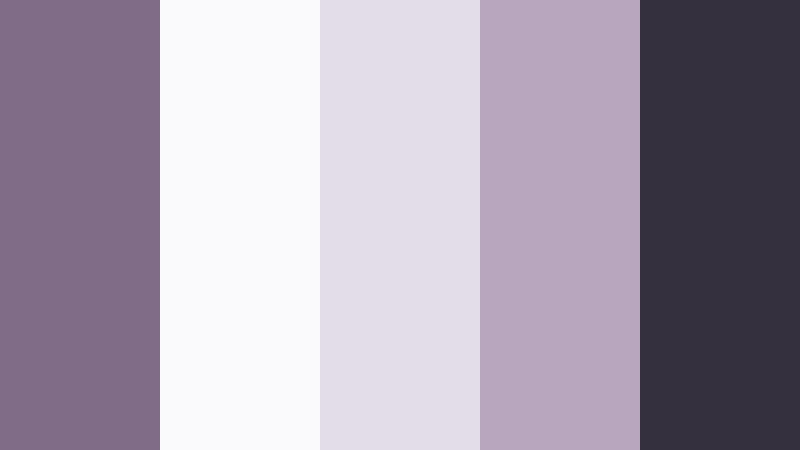
- HEX Codes: #816c87, #faf9fb, #e3dde8, #b8a6bf, #34303d
- Mood: Focused, calm, and productivity-oriented.
- Use for: Great for study-with-me videos, productivity vlogs, and aesthetic workspace shots.
Clean Desk Mauve Focus combines bright whites and soft mauves to create a calm, productive atmosphere. The palette feels like a tidy desktop in morning light, with #34303d adding enough depth for clear text and icons.
For study-with-me or productivity content, use #faf9fb and #e3dde8 for timer cards, chapter titles, or checklist overlays in Filmora. Accent key actions in #816c87 or #b8a6bf, and use #34303d for text so your on-screen notes stay readable throughout long videos and time-lapse sessions.
Cinematic And Moody Mauve Shadow Color Palettes
Noir Mauve Corridor
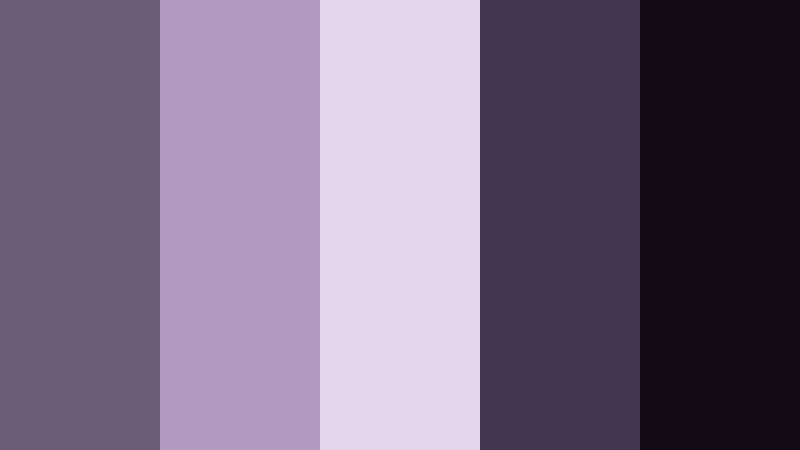
- HEX Codes: #6f5c79, #b39bbd, #e4d5ec, #43364e, #110c16
- Mood: Moody, enigmatic, and cinematic.
- Use for: Perfect for short films, mystery edits, and dramatic intros with heavy shadows.
Noir Mauve Corridor turns Mauve Shadow into a mysterious, corridor-like atmosphere. The darker tones #43364e and #110c16 provide deep shadows, while the lighter violets keep the palette from becoming too heavy.
Use this palette in Filmora for thriller intros, story-driven teasers, or moody channel openers. Let #e4d5ec and #b39bbd highlight key text or symbols against deep backgrounds in #110c16, and add subtle gradients or vignettes using #6f5c79 and #43364e to draw eyes toward the subject.
Rainwashed City Mauve
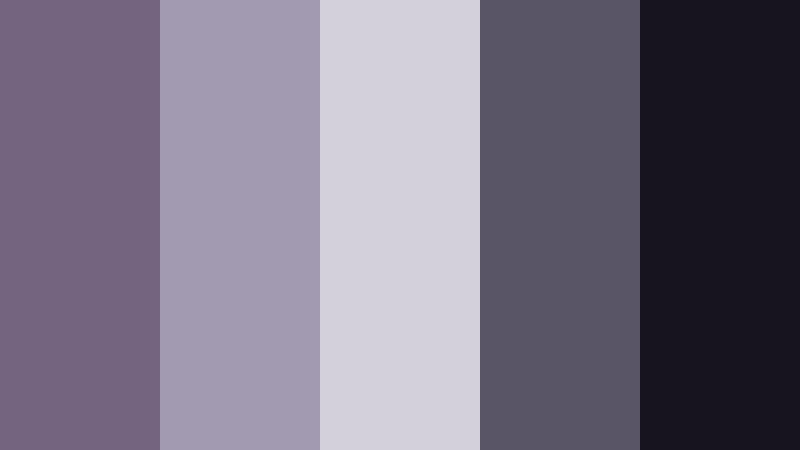
- HEX Codes: #75647f, #a29ab0, #d4d0db, #5a5566, #17141f
- Mood: Reflective, urban, and softly melancholic.
- Use for: Use in rainy day montages, city b-roll, and reflective talking-head scenes.
Rainwashed City Mauve captures the feeling of city lights reflecting on wet pavement. Muted mauves and grays like #75647f and #a29ab0 create a soft urban haze, with #17141f adding the depth of a night sky or dark alley.
Apply this palette to rainy b-roll sequences, journal-style voiceovers, or reflective talking-head videos. In Filmora, use #d4d0db and #a29ab0 for subtle title cards, #5a5566 for separators and icons, and #17141f for backgrounds behind white or light gray text on thumbnails and lower thirds.
Silent Cinema Mauve
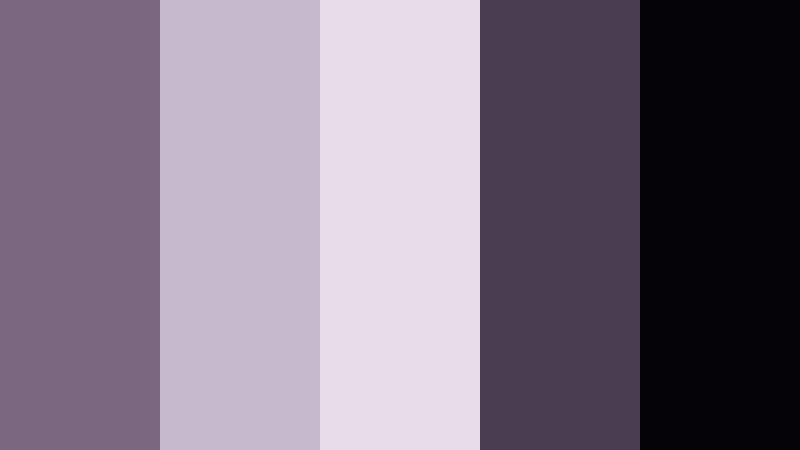
- HEX Codes: #7b677f, #c6b9cd, #e7dde9, #4a3c51, #050308
- Mood: Vintage, poetic, and quietly dramatic.
- Use for: Great for black-and-mauve title cards, retro-inspired edits, and lyric visuals.
Silent Cinema Mauve feels like a silent movie reimagined in color. Faded whites and mauves give your video an aged reel look, while #050308 keeps blacks rich and deep for strong contrast.
Use it for retro lyric videos, poetry content, or title cards that nod to old film. In Filmora, try light backgrounds in #e7dde9 or #c6b9cd, overlay text in #7b677f or white, and apply borders or bars in #4a3c51 and #050308 to frame footage in a classic cinematic style.
Backstage Velvet Mauve
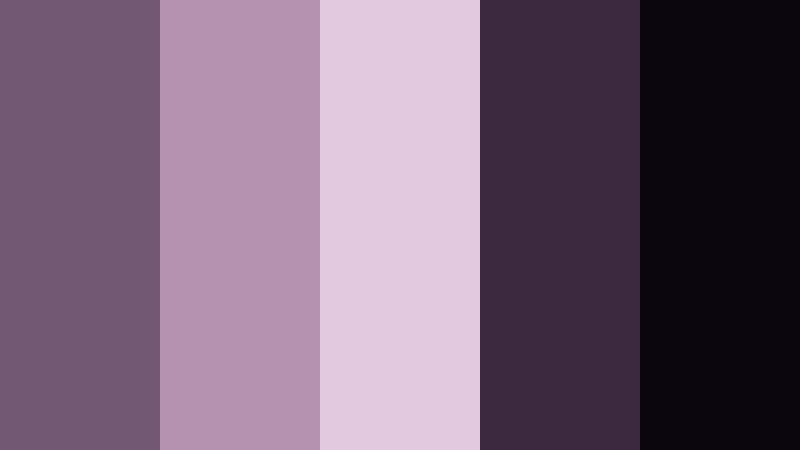
- HEX Codes: #735873, #b592b0, #e2c9df, #3d293f, #0b050d
- Mood: Theatrical, luxe, and slightly mysterious.
- Use for: Use behind-the-scenes concert videos, stage reveals, and performance reels.
Backstage Velvet Mauve blends rich purples and deep shadows to evoke stage curtains, dim dressing rooms, and warm spotlights. The lighter tones #b592b0 and #e2c9df soften the look, while #0b050d and #3d293f introduce dramatic contrast.
Use this palette in Filmora for concert recaps, dance reels, or any performance-based content. Choose #e2c9df as a backdrop for artist names or tour dates, apply #735873 and #b592b0 to accents and shapes, and frame everything with #3d293f or #0b050d to emphasize the theatrical feel.
Playful And Pastel Mauve Shadow Color Palettes
Pastel Cloud Mauve
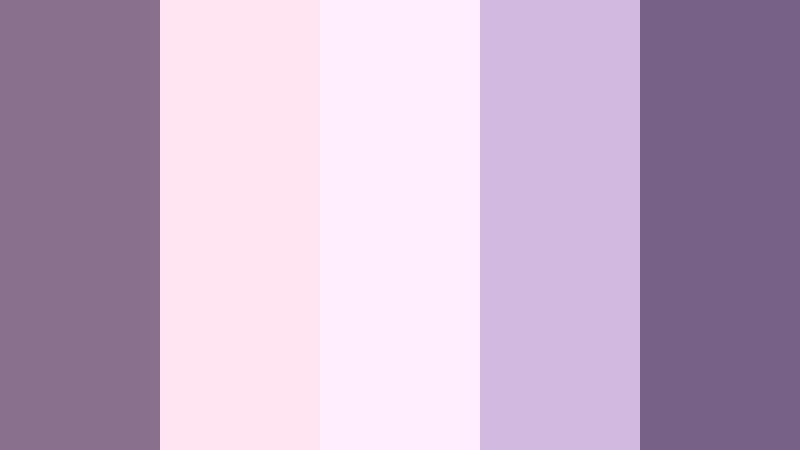
- HEX Codes: #89718e, #ffe4f2, #ffeefc, #d1b9df, #776187
- Mood: Light, whimsical, and softly playful.
- Use for: Ideal for pastel vlog aesthetics, K-pop style edits, and soft gaming channels.
Pastel Cloud Mauve wraps Mauve Shadow in fluffy pastel pinks and violets. The palette feels light and dreamy, almost like candy-colored clouds, but stays grounded by #89718e and #776187.
For K-pop inspired edits, cozy gaming intros, or pastel lifestyle vlogs, use #ffe4f2 and #ffeefc as bright background cards, #d1b9df for soft elements and borders, and #89718e or #776187 for text and icons. This keeps your visuals cute and clickable while staying cohesive across thumbnails, intros, and in-video graphics.
Cotton Candy Mauve Pop
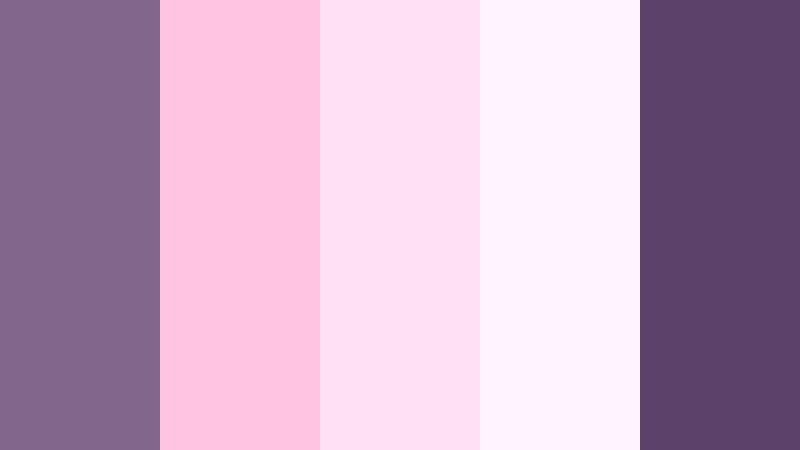
- HEX Codes: #82678a, #ffc5e0, #ffe0f5, #fdf4ff, #5c426b
- Mood: Fun, energetic, and candy-sweet.
- Use for: Perfect for energetic vlogs, unboxing videos, and playful channel branding.
Cotton Candy Mauve Pop is sugary, bright, and designed to stand out in feeds. Mauve Shadow shades #82678a and #5c426b add sophistication, while the candy pinks and soft whites keep everything fun and energetic.
Use this palette for energetic vlogs, unboxings, or playful branding elements in Filmora. Set your main background in #ffe0f5 or #fdf4ff, add bold shapes and stickers in #ffc5e0, and use #82678a or #5c426b for buttons, outlines, and text so that your thumbnails and titles pop without looking harsh.
Tips for Creating Mauve Shadow Color Palettes
Mauve Shadow works beautifully when you balance its softness with the right highlights, neutrals, and dark anchors. These tips will help you build color combinations that look great in Filmora and stay consistent across thumbnails, intros, and full edits.
- Always pair Mauve Shadow with at least one light neutral (off-white, light gray, or pale blush) so text and UI elements have breathable space.
- Use a deep accent color (charcoal, plum, or near-black) from the palette for important text and icons to keep everything readable on small screens.
- Limit your main working colors to 3 or 4 HEX codes: one background, one primary accent, one secondary accent, and one dark for typography.
- Match your footage to the palette by gently shifting mid-tone hues and saturation in Filmora so skin tones stay natural but shadows lean slightly mauve.
- Design your YouTube thumbnails, lower thirds, and end screens with the same HEX codes you use for titles and stickers inside the edit.
- Test light and dark modes: try your Mauve Shadow palette on both bright and dark backgrounds to ensure good contrast and legibility.
- Use gradients sparingly; a soft blend from Mauve Shadow to a lighter tint can add depth behind titles without distracting from your subject.
- Save style presets in Filmora for text, shapes, and overlays using your chosen Mauve Shadow colors so future projects automatically follow the same brand look.
Mauve Shadow color palettes can transform your videos and designs from simple to cinematic, giving your channel or brand a recognizable emotional tone. Whether you choose a soft romantic look, a modern minimal interface, a moody cinematic style, or playful pastels, these HEX combinations help you stay consistent from frame to frame.
Try dropping these palettes straight into Filmora for titles, overlays, and color grading tweaks. Once you dial in a Mauve Shadow style that matches your story, save it as your visual signature for thumbnails, shorts, and long-form edits.
The more consistently you use Mauve Shadow across your intros, b-roll, and social assets, the faster your audience will start to recognize your content at a glance. Experiment, refine, and let these palettes guide your next aesthetic upgrade in Filmora.
secure download