

 100% Security Verified | No Subscription Required | No Malware


 ChatGPT
 Perplexity
 Gemini
 Claude
 Grok
Grok
Sapphire is one of those blues that instantly feels cinematic: deep, confident, and slightly mysterious. It suggests trust, clarity, and focus, which is why it works so well for tech channels, productivity content, and polished brand intros. On screen, sapphire tones can make skin tones pop, push backgrounds into a rich twilight mood, or give your titles a cool professional edge in thumbnails and lower thirds.
This guide collects 15 ready-to-use sapphire color palettes with HEX codes so you can build cohesive visuals across thumbnails, intros, vlogs, and branding. Whether you grade your footage directly in Filmora or design assets in other tools first, these palettes give you a solid starting point for sapphire themed videos and graphics.
In this article
Cinematic Sapphire Color Palettes
Midnight Studio Sapphire
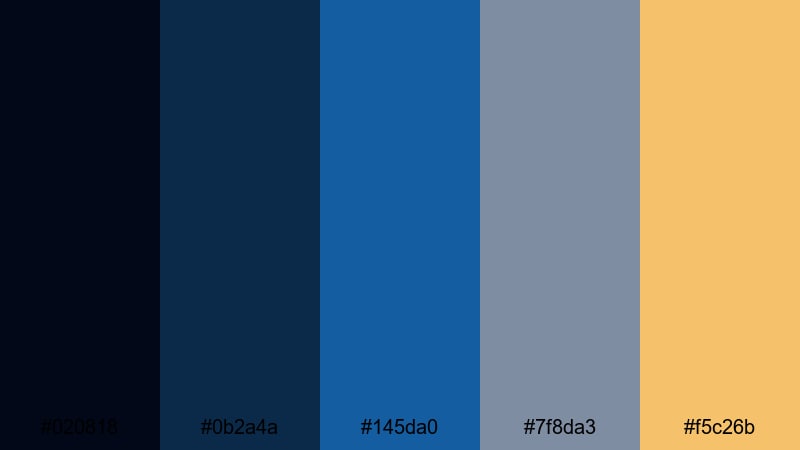
- HEX Codes: #020818, #0b2a4a, #145da0, #7f8da3, #f5c26b
- Mood: Moody, cinematic, and polished with a subtle luxury accent.
- Use for: Use for dramatic film trailers, dark tech intros, and stylish review videos.
This palette layers inky navy with rich sapphire and soft slate gray, then lifts everything with a warm gold accent. It feels like a studio set lit for a high-end product reveal or a thriller style opening, giving your footage a moody but premium finish.
Use the deeper blues for backgrounds, overlays, or title bars, and let the gold highlight key elements like Subscribe buttons, product callouts, or logo marks. It works especially well for YouTube thumbnails, cinematic B-roll sequences, and intro animations where you want drama without losing readability.
Pro Tip: Build a Cinematic Sapphire Look in Filmora
To keep a Midnight Studio Sapphire look consistent, design a simple color system inside Filmora. Use the darkest navy for background shapes and adjustment layers, the mid sapphire for titles and lower thirds, and the gold for animated accents or call-to-action text. This way, even quick shorts, B-roll cutdowns, and Instagram edits feel like part of the same visual universe.
Save your favorite title presets, color-corrected adjustment layers, and overlays using these HEX values once, then reuse them across every episode or series. Your channel will gain a recognizable sapphire identity without having to rebuild the grade from scratch each time.
AI Color Palette
If you have a still frame or color card that perfectly matches this sapphire mood, you can apply it to an entire video in a couple of clicks. Filmora's AI Color Palette feature analyzes a reference image and transfers its color style to your clips while keeping skin tones looking natural.
Drop a graded shot, brand visual, or thumbnail mockup onto the AI Color Palette panel, then let Filmora match other clips to that look. This is ideal when you want your trailers, talking head shots, cutaways, and end screens to share the same Midnight Studio Sapphire atmosphere.
 secure download

HSL, Color Wheels & Curves
Once you have a base sapphire look, you can refine it using Filmora's color correction tools. Use HSL to deepen blues without oversaturating skin, then nudge the midtone color wheels toward teal or royal blue for a more dramatic studio contrast.
Curves are perfect for adding cinematic depth to this palette: lift shadows slightly so navy tones stay visible, then add a gentle S-curve to boost contrast. This preserves detail in dark backgrounds while keeping gold accents bright and eye-catching on titles and icons.
secure download1000+ Video Filters & 3D LUTs
If you want instant sapphire stylization, Filmora's video filters and 3D LUTs make it easy to push your palette toward teal-and-orange, cool noir, or glossy commercial looks. Stack a subtle cinematic LUT on top of your color-corrected clips and fine-tune opacity until it matches the Midnight Studio Sapphire mood.
You can also save your own LUT inspired by this palette and reuse it on trailers, product reviews, and social teasers. This keeps your channel visuals consistent, even when you mix different cameras or shoot on different days.
secure downloadNeon Harbor Nights
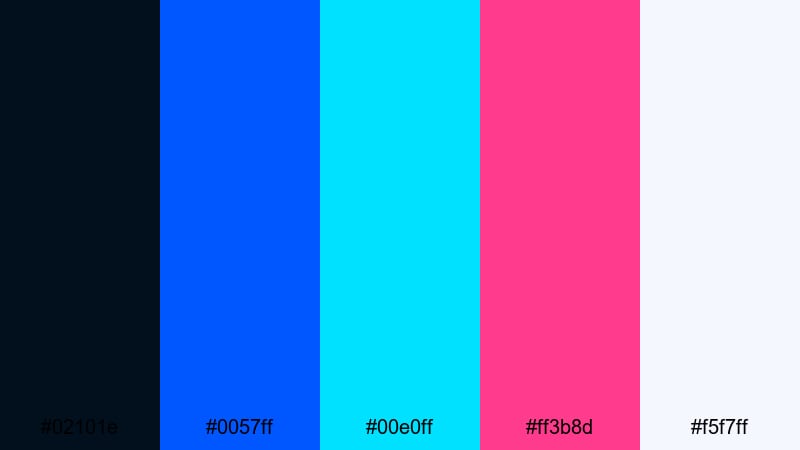
- HEX Codes: #02101e, #0057ff, #00e0ff, #ff3b8d, #f5f7ff
- Mood: Electric, nightlife inspired, and energetic.
- Use for: Use for city vlog openings, music videos, and dynamic event highlight reels.
Neon Harbor Nights mixes a deep harbor blue base with punchy sapphire, cyan, and neon magenta, grounded by a clean off white. It feels like neon signs reflecting on water, perfect for content that lives after dark.
Use the darkest blue as your background layer, then let the cyan and magenta drive text, motion graphics, and animated borders. This palette is ideal for YouTube thumbnails, DJ set covers, and kinetic transitions in concert or nightlife edits.
Ocean Depths Narrative
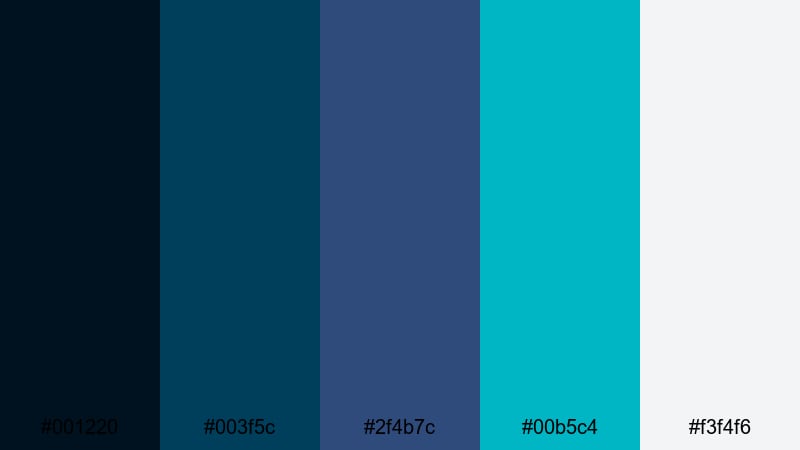
- HEX Codes: #001220, #003f5c, #2f4b7c, #00b5c4, #f3f4f6
- Mood: Thoughtful, immersive, and documentary ready.
- Use for: Use for travel documentaries, underwater footage, and reflective storytelling videos.
Ocean Depths Narrative moves from almost-black ocean blue through muted sapphire into bright aqua, ending with a soft neutral highlight. It feels calm and immersive, like slowly surfacing from deep water into daylight.
Use the darker tones for lower thirds and intro cards to keep attention on your footage, while the brighter aqua and off white highlight location labels, subtitles, and charts. This palette suits travel films, slow cinematic B-roll, and reflective talking head pieces where you want a quiet, documentary mood.
Sapphire Noir Thriller

- HEX Codes: #030712, #111827, #1e3a8a, #2563eb, #9ca3af
- Mood: Dark, tense, and sophisticated with a modern edge.
- Use for: Use for suspense trailers, tech explainers, and cyber security themed content.
Sapphire Noir Thriller combines near-black shadows with vivid sapphire blues and cool gray accents, giving a sleek, high-contrast look. It feels like a modern crime thriller opening or cyber security dashboard brought to life.
Use the darkest tones for background plates, then let the brighter blues outline data, keywords, and UI elements in your overlays. The gray tones keep body text and captions readable in thumbnails, explainers, and screen-record tutorials with a tense but polished mood.
Soft & Dreamy Sapphire Color Palettes
Cloudlit Sapphire Skies

- HEX Codes: #e5f2ff, #bdd7ff, #6ea8ff, #2f5faf, #1b3462
- Mood: Airy, hopeful, and softly cinematic.
- Use for: Use for lifestyle vlogs, travel montages, and inspirational reels.
Cloudlit Sapphire Skies floats from pale sky blue into mid sapphire and finishes with deeper indigo notes. It feels like golden hour clouds tinted blue rather than orange, giving your footage a hopeful but cool atmosphere.
Use the lighter tones for backgrounds, story slides, and text blocks, and reserve the deeper sapphire for buttons, logos, and call-to-action frames. This palette fits motivational reels, aesthetic day-in-the-life vlogs, and clean, optimistic channel branding.
Pastel Lagoon Whisper

- HEX Codes: #f6fbff, #d7f2ff, #9dd6ff, #64a5d8, #405b8f
- Mood: Gentle, relaxing, and beachy.
- Use for: Use for wellness content, morning routines, and calm travel vlogs.
Pastel Lagoon Whisper builds a soft gradient from near white to gentle lagoon blue and muted sapphire. It feels airy and spa-like, perfect for content that emphasizes calm, clarity, and slow living.
Use the palest tones for clean backgrounds in thumbnails and info cards, and let the deeper blues accent key phrases, step numbers, or chapter markers. This palette pairs beautifully with minimal typography and soft light, making your wellness vlogs and routine videos look soothing and intentional.
Morning Frost Sapphire

- HEX Codes: #f5f7fb, #dde4f5, #a8b9e6, #5e7ec8, #1f3f82
- Mood: Clean, focused, and slightly nostalgic.
- Use for: Use for study with me videos, productivity content, and soft tech explainers.
Morning Frost Sapphire blends frosty whites with powdery sapphire blues, giving a tidy, focused look with a hint of nostalgia. It is cool without feeling harsh, which keeps text and UI elements clear on screen.
Apply the lightest shades to backgrounds and whiteboards, while the richer blues anchor timers, progress bars, and to-do lists in your overlays. This palette is ideal for Notion-style productivity videos, calm study vlogs, and gentle tech tutorials where clarity matters.
Serene Coastal Haze
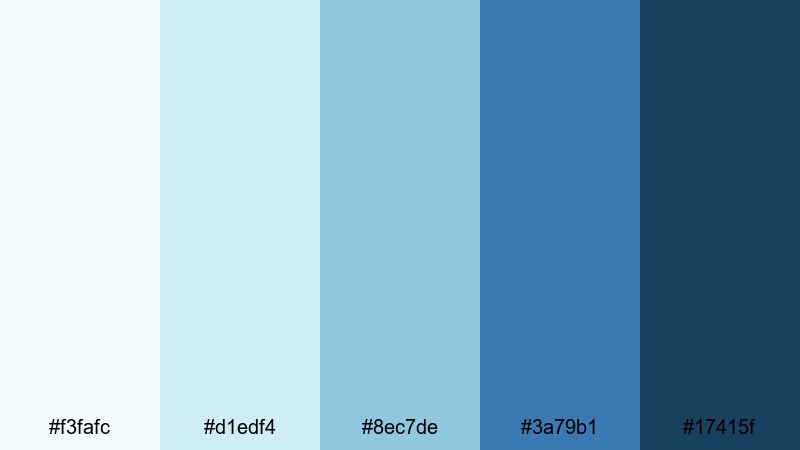
- HEX Codes: #f3fafc, #d1edf4, #8ec7de, #3a79b1, #17415f
- Mood: Coastal, relaxed, and quietly cinematic.
- Use for: Use for beach vlogs, drone footage, and slow travel storytelling.
Serene Coastal Haze shifts from misty seafoam into mid ocean blue and grounded sapphire. It feels like a hazy morning at the beach, giving coastal footage a relaxed and cinematic cast.
Use the lighter blues for full-screen titles, quote cards, or intermission slides, then rely on the deeper tones for subtle gradients behind logos and navigation bars. This palette works well for drone shots, slow pans, and scenic travel B-roll where you want a consistent seaside vibe across all your visuals.
Bold & Electric Sapphire Color Palettes
Digital Wave Sapphire
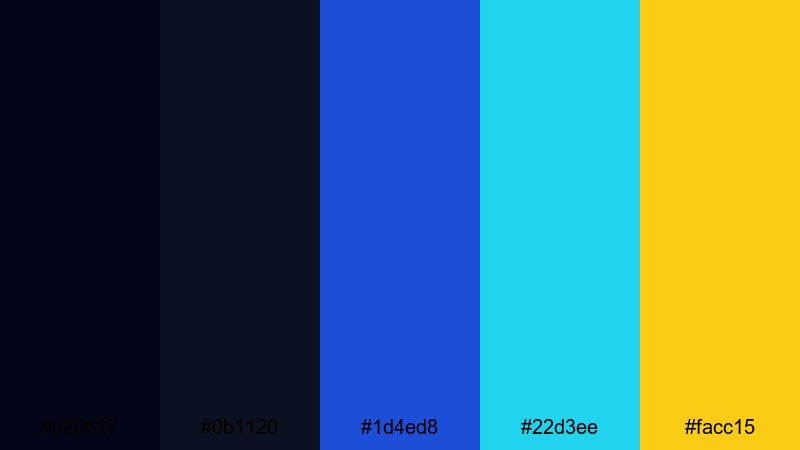
- HEX Codes: #020617, #0b1120, #1d4ed8, #22d3ee, #facc15
- Mood: High tech, energetic, and futuristic.
- Use for: Use for app promos, motion graphics intros, and gaming highlights.
Digital Wave Sapphire combines ultra dark digital blues with bright sapphire, neon cyan, and an electric yellow highlight. It feels like a tech keynote or e-sports event, full of energy and motion.
Use the dark tones as your base layer for screens and overlays, with sapphire and cyan driving lines, HUD elements, and animated shapes. The yellow is perfect for subscribe buttons, key stats, and thumbnail text that needs to stand out in crowded feeds.
Cyber Skyline Pulse
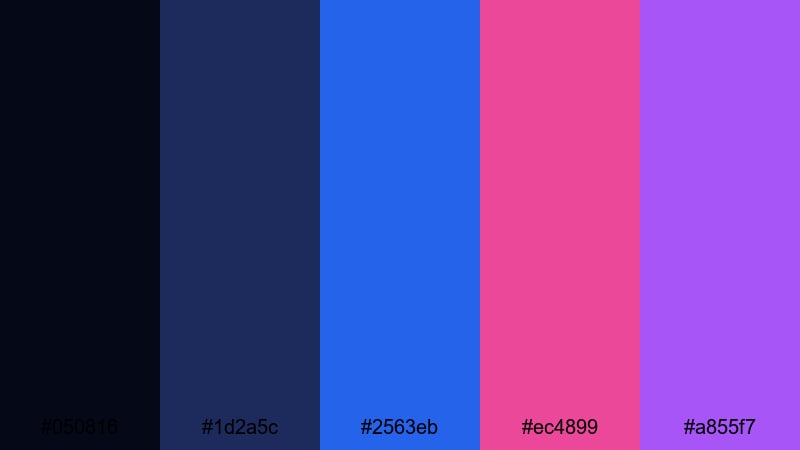
- HEX Codes: #050816, #1d2a5c, #2563eb, #ec4899, #a855f7
- Mood: Urban, neon, and cyberpunk inspired.
- Use for: Use for city night timelapses, synthwave edits, and music visualizers.
Cyber Skyline Pulse pairs dark urban blues with vivid sapphire, neon pink, and violet. It feels like a cyberpunk skyline, glowing with futuristic billboards and synthwave light.
Use the deep navy as a stage for your titles and waveform visualizers, then pulse pink and violet on beats, transitions, and accent lines. This palette is great for music channels, speed-ramp city vlogs, and retro-futuristic edits.
Sport Energy Sapphire

- HEX Codes: #04101f, #0f4cb3, #1d9bf0, #22c55e, #f97316
- Mood: Athletic, fast paced, and motivating.
- Use for: Use for sports montages, fitness promos, and energetic challenge videos.
Sport Energy Sapphire combines strong blues with vivid green and orange accents, delivering a fast, competitive feel. It looks like a modern sports broadcast or fitness app interface.
Let the sapphire tones handle backgrounds and typography, while green and orange highlight reps, goals, and on-screen timers. This palette works brilliantly in shorts, workout overlays, and thumbnail designs where movement and intensity are the main message.
Streamer Neon Splash
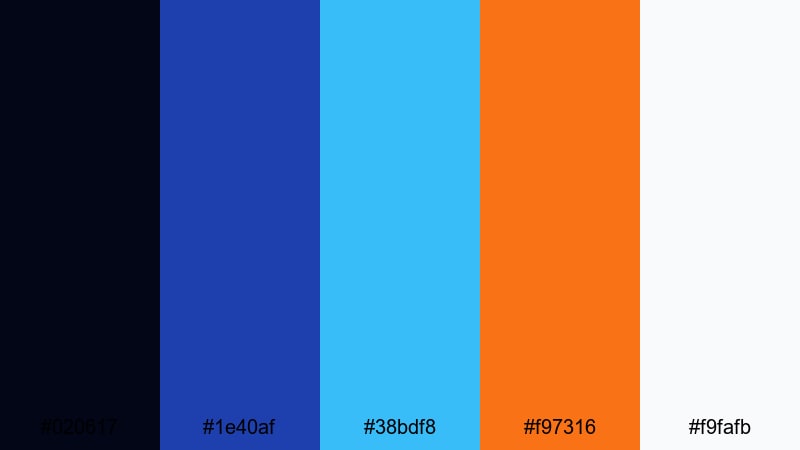
- HEX Codes: #020617, #1e40af, #38bdf8, #f97316, #f9fafb
- Mood: Playful, modern, and creator focused.
- Use for: Use for streaming overlays, channel branding, and animated alerts.
Streamer Neon Splash starts with a dark base, adds solid sapphire and bright cyan, then finishes with punchy orange and clean near-white. It feels designed for creators who want overlays that pop on any platform.
Use sapphire and cyan for frames, webcam borders, and info panels, while orange draws attention to alerts, donations, and subscribe prompts. The near-white keeps text readable on panels and thumbnails, even at small sizes.
Minimal & Elegant Sapphire Color Palettes
Sapphire Glass UI

- HEX Codes: #050b16, #0f172a, #1e40af, #38bdf8, #e5e7eb
- Mood: Sleek, minimal, and product ready.
- Use for: Use for SaaS promos, UI mockups, and modern app walkthrough videos.
Sapphire Glass UI layers dark navy backgrounds with glassy sapphire and cyan, softened by a light neutral gray. It feels like a modern dashboard or app interface demo, clean and product focused.
Use the navy tones as your canvas for screen recordings, with sapphire and cyan outlining buttons, cursors, and key flows in motion graphics. The neutral gray works well for body text and annotations in explainers, landing page previews, and product intro sequences.
Corporate Dawn Sapphire

- HEX Codes: #f3f4f6, #d1d5db, #4b6cb7, #1f3c88, #111827
- Mood: Professional, trustworthy, and balanced.
- Use for: Use for business explainers, pitch videos, and LinkedIn focused content.
Corporate Dawn Sapphire mixes soft grays with calm mid-tone blues and a deep anchoring navy. It feels stable and trustworthy, which is perfect for corporate storytelling, investor content, and B2B explainers.
Use the lighter neutrals for slide-style backgrounds and chart areas, while the sapphire tones highlight key numbers, pull quotes, and logo reveals. This palette keeps your visuals serious and clean without looking dull in thumbnails or video overlays.
Luxury Sapphire Accent
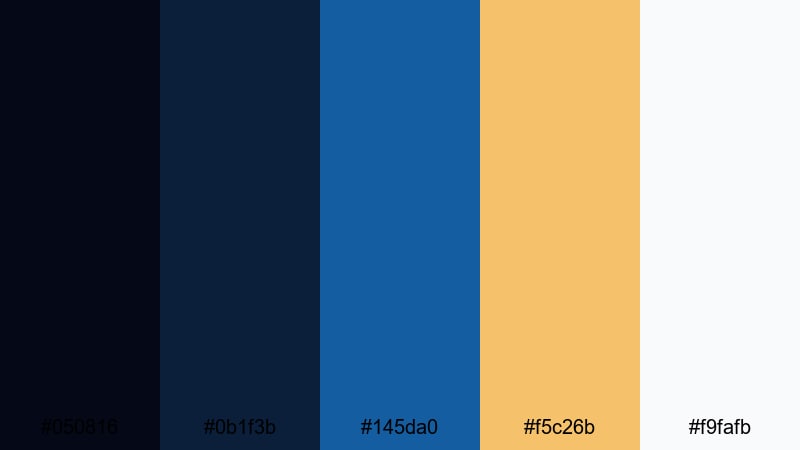
- HEX Codes: #050816, #0b1f3b, #145da0, #f5c26b, #f9fafb
- Mood: Premium, refined, and quietly dramatic.
- Use for: Use for luxury product ads, jewelry showcases, and high end brand intros.
Luxury Sapphire Accent pairs deep navy and sapphire with warm gold and crisp white. It feels expensive and controlled, like a luxury watch commercial or high-end fashion lookbook.
Let the dark blues act as a stage for product close-ups, while gold draws attention to logos, price tags, and short taglines. The white keeps everything clean in end cards, catalog style layouts, and minimalist thumbnails that still read as premium at a glance.
Tips for Creating Sapphire Color Palettes
When building your own sapphire color palette for video and design, focus on balance: sapphire should carry the mood, while supporting colors handle contrast, readability, and brand personality.
- Pair sapphire with one warm accent (gold, orange, or coral) to guide the eye to CTAs, logos, and important text in thumbnails and end screens.
- Use lighter tints of sapphire and blue-gray for backgrounds so white or dark text stays readable on mobile screens.
- Limit strong accent colors to one or two per palette to avoid visual noise, especially in busy gaming or sports edits.
- Match your sapphire levels to your footage: push saturation for stylized vlogs and gaming, or keep it muted for documentaries and corporate videos.
- Test your palette on both light and dark scenes; adjust brightness or add a neutral shade if overlays become hard to read.
- Keep branding consistent by reusing the same HEX codes for titles, lower thirds, and social banners across all platforms.
- Create a simple hierarchy: darkest colors for backgrounds, mid-tone sapphire for main text and UI, brightest accent for buttons and key icons.
- Export a reference frame from Filmora and use it to check your colors across other tools so your thumbnails, channel art, and videos share the same sapphire tone.
Sapphire based palettes are powerful tools for shaping mood, from calm coastal vlogs to intense cyberpunk edits. With a few carefully chosen HEX codes, you can make your channel feel cohesive and instantly recognizable, no matter what niche you create for.
Use these 15 palettes as starting points: test them on your intros, titles, B-roll, and end screens inside Filmora, then tweak saturation and contrast until they match your personal style. Saving your favorite looks as presets will help you build a strong visual identity over time.
Whether you prefer soft pastels or electric neon blues, Filmora gives you the color tools, AI features, and filters you need to turn a simple sapphire hue into a full cinematic look across every video.
secure download