

 100% Security Verified | No Subscription Required | No Malware


 ChatGPT
 Perplexity
 Gemini
 Claude
 Grok
Grok
Space-inspired color palettes tap into feelings of mystery, scale, and cinematic drama. Deep blues, ink blacks, and starlit highlights instantly suggest galaxies, nebulae, and futuristic tech, which is why they work so well for trailers, vlogs, and channel branding that needs a bold, immersive mood. Used correctly, Space tones can make your thumbnails and title cards feel like frames from a sci fi blockbuster.
This guide collects 15 carefully curated Space color palettes with HEX codes, designed for creators and Filmora users who want consistent cosmic visuals across intros, lower thirds, overlays, and YouTube thumbnails. You can copy these codes directly into your design tools or use them as references when grading footage in Filmora.
In this article
Cinematic Deep Space Color Palettes
Event Horizon Drama

- HEX Codes: #02030a, #071325, #283956, #8aa4ff, #f4f7ff
- Mood: tense, cinematic, and immersive like a big-budget space thriller
- Use for: Use for dramatic intros, sci fi trailers, and cinematic title cards where you want maximum depth and contrast.
Event Horizon Drama is all about inky blues and near-black shadows, with delicate cool highlights on top. The palette mimics the look of a starship disappearing into a black hole, while the lighter blue and off-white tones serve as subtle glows for text, UI elements, or lens flares.
In practice, this palette is perfect for dramatic cold opens, cinematic YouTube intros, and hero thumbnails that need a strong focal point against a deep void. Use the dark tones as your background, then reserve #8aa4ff and #f4f7ff for titles, call-to-action buttons, and key highlights in your branding so everything reads clearly even on mobile screens.
Pro Tip: Build a Cinematic Space Look in Filmora
To keep this dramatic Space palette consistent in Filmora, start by designing your darkest background layers using footage or gradients close to #02030a and #071325. Then add titles, HUD overlays, and lower thirds using the cooler mid-blue #283956 and highlight blue #8aa4ff so your visuals echo the same energy from intro to end screen.
Create a reusable style by saving title presets and color settings that match this palette. That way, every edit you make, from shorts to long-form essays, shares the same Event Horizon Drama identity without you needing to rebuild the look from scratch each time.
AI Color Palette
You can turn Event Horizon Drama into a full project-wide grade using Filmora's AI tools. Grab a reference frame or a simple color card built from these HEX codes, then let Filmora's AI Color Palette feature analyze it and apply the same mood to the rest of your clips.
This is especially useful if you mix different cameras or stock footage. AI Color Palette helps even out the blues and shadows so your intro, B-roll, and outro all feel like they belong to the same cinematic universe.
 secure download

HSL, Color Wheels & Curves
Once you match the overall look, refine the Space tones with HSL, color wheels, and curves inside Filmora. Gently desaturate any stray warm colors so the blues dominate, then deepen your shadows with the curves tool to push them closer to #02030a without crushing detail.
You can also use the midtone color wheel to nudge skin tones slightly warmer while keeping the environment cold and cosmic, as shown in Filmora's color correction tutorial in Filmora. This keeps your subject natural while the rest of the frame feels like a deep-space backdrop.
secure download1000+ Video Filters & 3D LUTs
If you want to stylize Event Horizon Drama even faster, combine it with Filmora's built-in looks. Filmora’s video filters and 3D LUTs make it easy to push your blues toward a grittier sci fi look, a glossy blockbuster grade, or a desaturated thriller style while still keeping the same Space color story.
Apply a LUT for overall mood, then tweak the key colors from this palette so your branding assets, overlays, and thumbnails stay consistent. You can save these as custom presets and reuse them across episodes and seasons.
secure downloadStarlit Void Contrast
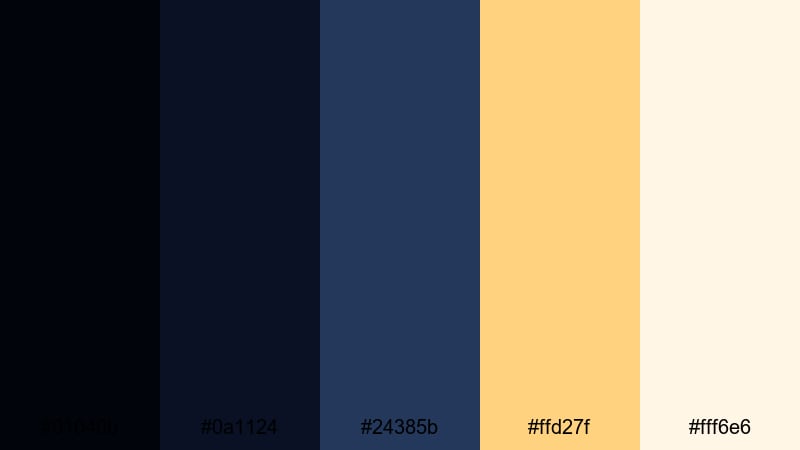
- HEX Codes: #01040b, #0a1124, #24385b, #ffd27f, #fff6e6
- Mood: mysterious yet hopeful with warm starlight cutting through darkness
- Use for: Use for YouTube thumbnails and end screens where you need a dark base with bright focal points for text and icons.
Starlit Void Contrast balances rich navy shadows with soft, warm star tones. The deep blues (#01040b, #0a1124, #24385b) provide a moody base, while #ffd27f and #fff6e6 act like distant suns that naturally pull the eye.
Use the dark colors for backgrounds and frames, then drop your key title words, subscribe buttons, or arrows in the warm yellows. It is especially effective for thumbnails and end screens where you want strong contrast and clear readability without losing that cosmic night-sky feeling.
Midnight Orbit Focus

- HEX Codes: #020614, #08162b, #224461, #4fd0ff, #e9fbff
- Mood: focused and techy, like sleek control panels glowing in the dark
- Use for: Perfect for tech reviews, science explainers, and motion graphics overlays with data or HUD elements.
Midnight Orbit Focus feels like you are staring at a futuristic control panel in a dim starship bridge. The deep navy tones form a calm backdrop, while the cyan accents (#4fd0ff, #e9fbff) create crisp, readable UI elements.
This palette works well for on-screen graphics, data overlays, and tech review lower thirds that need a modern, high-tech Space vibe. Use the brighter cyans for lines, icons, and important numbers, and keep backgrounds anchored in the darker hex values to maintain clarity.
Galactic Noir Frame
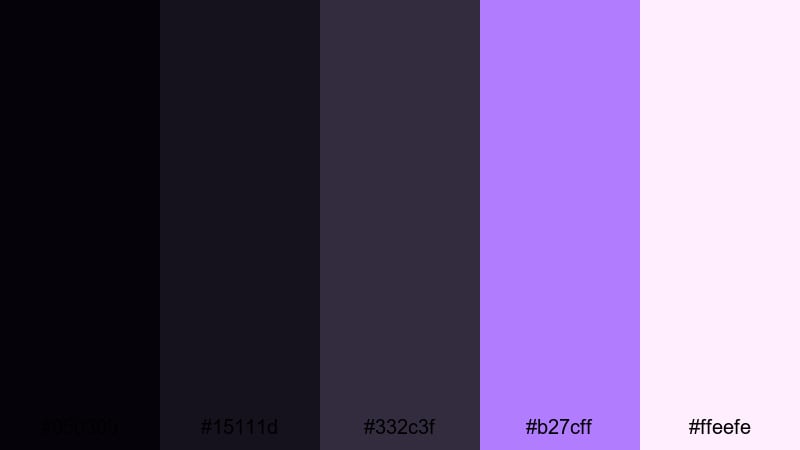
- HEX Codes: #050309, #15111d, #332c3f, #b27cff, #ffeefe
- Mood: moody and stylish with a noir-inspired space vibe
- Use for: Use for stylish intros, character reveals, and commentary channels that want a dark but trendy look.
Galactic Noir Frame mixes plum shadows with violet and pastel highlights to create a chic, noir-inspired outer space look. The darker tones frame faces and subjects beautifully, while #b27cff and #ffeefe add subtle neon pops.
Choose this palette if your commentary channel or cinematic vlog leans toward stylish, character-driven storytelling. Use the purples for accent borders, name tags, and transition overlays so everything feels part of the same moody galaxy.
Cosmic Spotlight Fade
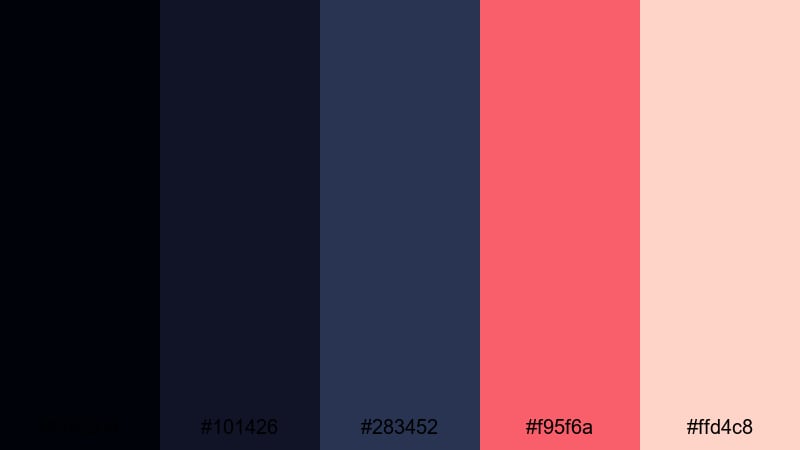
- HEX Codes: #00020a, #101426, #283452, #f95f6a, #ffd4c8
- Mood: dramatic and emotional with a cinematic spotlight feel
- Use for: Ideal for storytelling vlogs, music videos, and emotional montage sequences that fade into space.
Cosmic Spotlight Fade pairs cool midnight blues with a bold coral spotlight accent. The dark tones act like a stage, and #f95f6a becomes the emotional highlight that draws attention to faces, key text, or a central object.
It is a strong choice for storytelling vlogs, music videos, and emotional montage sequences where you want a sense of intimacy against a vast, dark backdrop. Use the coral and soft peach #ffd4c8 for lyrics, quotes, or chapter titles so they feel like they are glowing out of the void.
Nebula Glow Space Color Palettes
Aurora Nebula Dream

- HEX Codes: #050813, #151b3b, #5a4ff2, #ff7ad9, #ffe9ff
- Mood: dreamy, ethereal, and imaginative like drifting through a colorful nebula
- Use for: Use for fantasy intros, channel branding, and overlays where you want a magical cosmic glow.
Aurora Nebula Dream blends deep blues with electric indigo and soft magenta to create a glowing, aurora-like effect. The contrast between #5a4ff2 and #ff7ad9 feels magical and imaginative without becoming too harsh.
Use it in fantasy intros, music visualizers, or channel branding where you want a sense of wonder. The lighter #ffe9ff is great for soft text, icons, and UI elements that should feel dreamy but remain readable on dark backgrounds.
Ion Trail Spectrum
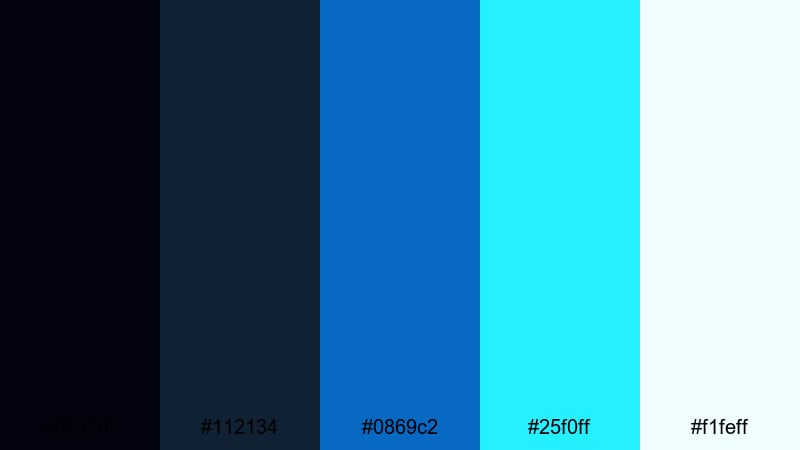
- HEX Codes: #02030f, #112134, #0869c2, #25f0ff, #f1feff
- Mood: energetic and futuristic with a high-tech sci fi charge
- Use for: Great for gaming intros, tech product promos, and kinetic typography with fast cuts and motion.
Ion Trail Spectrum is built for speed and energy. Dark blue bases sit behind neon cyan accents (#0869c2, #25f0ff), creating the illusion of glowing ion trails from fast-moving spacecraft or digital particles.
Apply this palette to gaming intros, quick-cut tech promos, or kinetic typography where motion is key. Use the brightest cyan for streaks, outlines, and key words in your titles so they slice cleanly across the darker backdrop.
Stellar Dust Bloom

- HEX Codes: #040612, #221933, #6f3bbd, #ff9b73, #ffe7d9
- Mood: romantic and cinematic with soft glowing dust clouds
- Use for: Use for wedding highlight reels, lyric videos, and soft cinematic b-roll with a cosmic twist.
Stellar Dust Bloom combines violet shadows with warm peach highlights to mimic starlight scattering through cosmic dust. The result is a soft, romantic atmosphere that still feels grounded in Space imagery.
It works beautifully for wedding highlight films, lyric videos, or dreamy B-roll sequences. Use the violets as your background haze and add peach highlights to text, light leaks, and subtle flares to keep the mood intimate and cinematic.
Radiant Quasar Burst
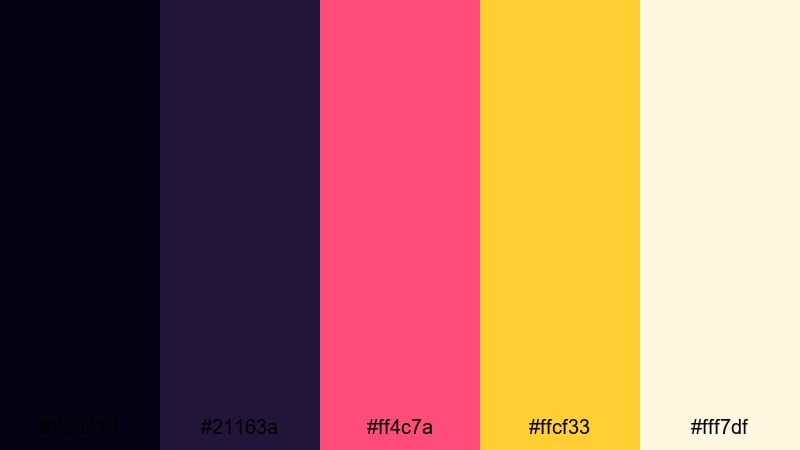
- HEX Codes: #050313, #21163a, #ff4c7a, #ffcf33, #fff7df
- Mood: explosive, bold, and attention-grabbing like a cosmic event
- Use for: Best for promo graphics, call-to-action frames, and click-worthy thumbnails that must pop in feeds.
Radiant Quasar Burst is your go-to for maximum impact. A dark violet base gives depth, while hot pink (#ff4c7a) and solar yellow (#ffcf33) explode off the screen like a quasar flare.
Use this palette for promo slides, discount banners, or thumbnails that must stand out among crowded feeds. Keep backgrounds in the darker tones and reserve the warm brights for key words like Sale, New Video, or Subscribe so they instantly grab attention.
Magnetic Starfield Hues

- HEX Codes: #01030c, #121e2c, #284f6d, #7ce8b6, #f5fff8
- Mood: calm and optimistic like a quiet starfield with soft cosmic greens
- Use for: Ideal for educational content, science channels, and brand idents that should feel smart but approachable.
Magnetic Starfield Hues brings together deep night blues and soft teal-greens, creating a calm, intelligent atmosphere. The mint highlight #7ce8b6 and soft white #f5fff8 feel clean and optimistic against the darker base colors.
This palette is ideal for science explainers, educational channels, or tech brands that want a friendly but futuristic tone. Use the greens for icons, diagrams, and chapter markers, and keep your backgrounds dark blue for a subtle starfield feel.
Minimal Modern Space Color Palettes
Void And Chrome

- HEX Codes: #02030a, #171b24, #3a4658, #9ba5b7, #f5f7fb
- Mood: sleek, minimal, and professional with a subtle sci fi edge
- Use for: Use for UI overlays, product reviews, and clean brand packages that need a modern space undertone.
Void And Chrome leans into graphite shadows and cool metal grays that recall spacecraft hulls and futuristic interfaces. It feels premium, understated, and highly professional.
Use this palette for product review layouts, user interface mockups, or minimalist title cards. The lighter tones (#9ba5b7, #f5f7fb) are perfect for legible text and icons, while the darker grays help frame your subject without distracting from it.
Silent Orbit Neutrals
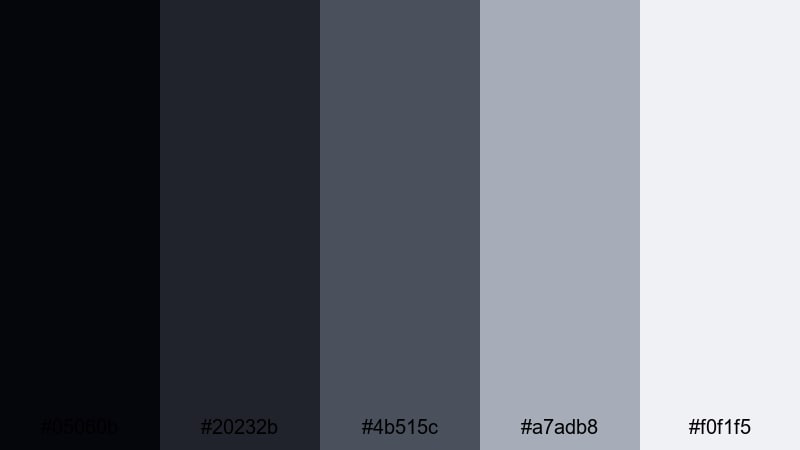
- HEX Codes: #05060b, #20232b, #4b515c, #a7adb8, #f0f1f5
- Mood: quiet, restrained, and balanced with subtle orbital mood
- Use for: Perfect for talking head videos, documentaries, and tutorials where content clarity matters more than loud color.
Silent Orbit Neutrals is a calm, low-contrast palette built around charcoals and muted steels. It adds a faint Space atmosphere without overpowering your subject or message.
This palette suits talking head videos, documentary explainers, or tutorial content where you want the visuals to support, not compete with, the narration. Use the darker tones for backdrops and the lighter grays for simple titles and clean lower thirds.
Lunar Interface Clean
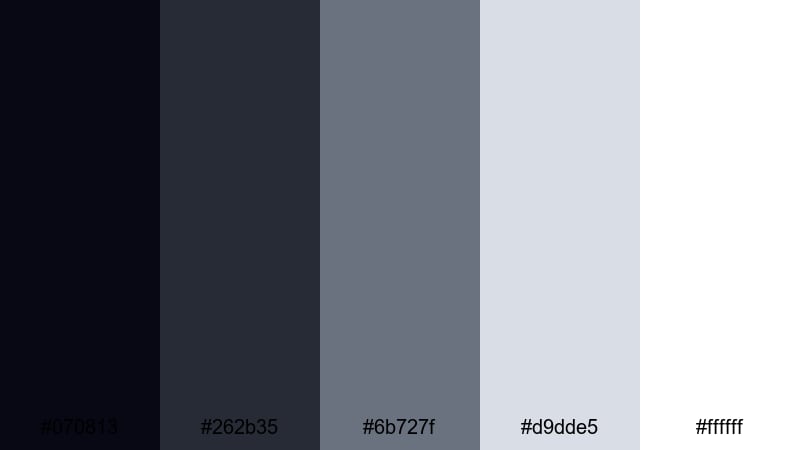
- HEX Codes: #070813, #262b35, #6b727f, #d9dde5, #ffffff
- Mood: clean and slightly futuristic like a moon base interface
- Use for: Great for app demos, UI mockups, and minimalist infographics set against subtle space-flavored backgrounds.
Lunar Interface Clean contrasts deep navy bases with crisp whites and cool mid-grays, evoking a bright moon base control room. It feels clear, easy to read, and just futuristic enough.
It is a strong choice for app demos, dashboard walkthroughs, and minimalist infographics. Keep text and main icons in white or #d9dde5, use the mid-grays for lines and boxes, and reserve the darkest tones for subtle Space-inspired backgrounds.
Retro Sci Fi Space Color Palettes
Retro Galaxy Arcade
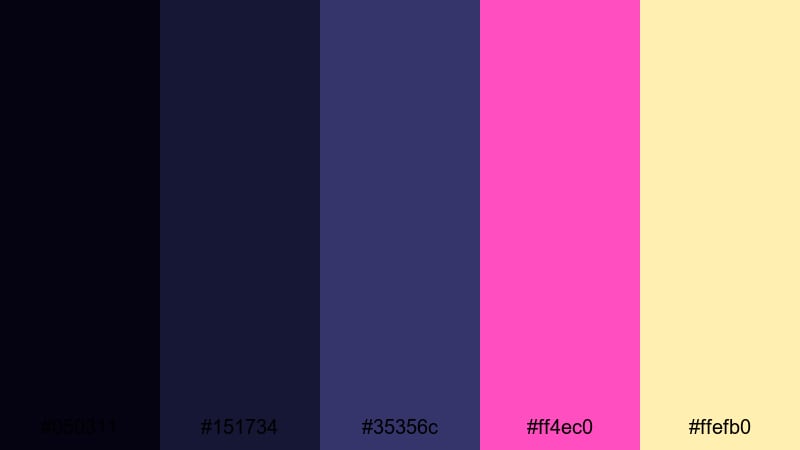
- HEX Codes: #050311, #151734, #35356c, #ff4ec0, #ffefb0
- Mood: playful, nostalgic, and neon-soaked like an 80s space arcade
- Use for: Use for gaming channels, synthwave edits, and retro-inspired motion graphics with bold titles and grids.
Retro Galaxy Arcade dives into classic 80s sci fi with indigo and violet bases plus neon pink and pale yellow highlights. It instantly suggests synthwave music, vector grids, and retro arcade cabinets.
Use the darker purples for backgrounds and throw your boldest titles and shapes in #ff4ec0 and #ffefb0. This palette is perfect for retro gaming intros, nostalgia edits, or any motion graphics that reference vintage space aesthetics.
Vintage Cosmos Title
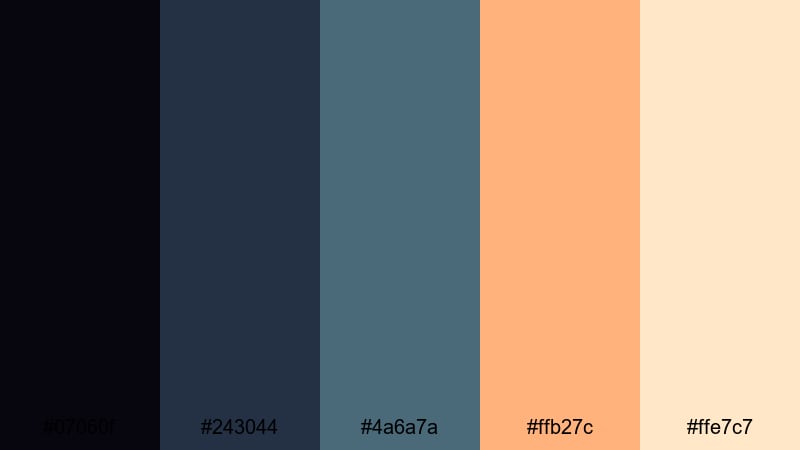
- HEX Codes: #07060f, #243044, #4a6a7a, #ffb27c, #ffe7c7
- Mood: warm and nostalgic like vintage sci fi book covers
- Use for: Ideal for title cards, chapter screens, and podcast visuals that nod to classic space stories.
Vintage Cosmos Title mixes dusty blues with warm orange creams, echoing the look of aged sci fi book covers and posters. The combination feels nostalgic, cozy, and slightly grainy in a good way.
Use it for title cards, chapter markers, and podcast visuals that reference classic space adventures. Keep the blues as your main backdrop and let #ffb27c and #ffe7c7 carry your text, borders, and illustrative details for a timeless cosmic feel.
Tips for Creating Space Color Palettes
When you build your own Space color palette for video and design, you are balancing depth, contrast, and emotional tone. Here are practical ways to combine Space shades with accents so your content stays cinematic and readable.
- Start with a dark base: choose one or two deep blues or near-blacks as your primary background colors to create instant cosmic depth.
- Add 1 to 2 accent colors only: pick a bright star tone (gold, cyan, magenta) for titles and buttons so your design stays focused and uncluttered.
- Protect text readability: test your titles at mobile size; if white or light text on dark Space backgrounds looks fuzzy, increase contrast or add a subtle drop shadow.
- Use gradients for nebula vibes: blend two complementary Space colors (for example, indigo into magenta) to create smooth, glowing backgrounds for intros and end screens.
- Match footage with grading: in Filmora, nudge shadows into blue and cool your midtones slightly so live-action clips sit naturally inside your chosen palette.
- Keep branding consistent: reuse the same HEX codes for your logo lockup, lower thirds, and thumbnail frames so viewers recognize your channel at a glance.
- Reserve warm tones for emphasis: in cold Space palettes, a small amount of warm coral or gold immediately highlights CTAs, key stats, or sponsor mentions.
- Test in different lighting: preview your palettes on both bright and dim screens to ensure details in dark areas are not lost and accents do not look oversaturated.
Space color palettes are powerful tools for shaping mood, storytelling, and brand identity. From deep, noir-inspired blues to neon nebula bursts, the right combination can turn simple footage into something that feels cinematic and otherworldly.
Experiment with these 15 palettes as starting points, then fine-tune them inside Filmora to match your footage and style. Once you lock in a look you love, save it as a repeatable workflow so every intro, thumbnail, and short keeps the same cosmic signature.
Whether you are editing sci fi trailers, tech explainers, or dreamy vlogs, consistent Space color grading will help your channel stand out and feel instantly recognizable.
secure downloadNext: Blue Cream Color Palette
